Unreal Engine 5 Blueprint Functions represent a cornerstone of modern game development, offering developers a powerful visual scripting paradigm to construct complex, reusable, and maintainable game logic. This fundamental concept, central to efficient programming, allows for the encapsulation of specific functionalities into self-contained blocks of code, significantly streamlining the development process within Epic Games’ flagship engine. This approach is not merely a convenience; it is a strategic imperative for scalable and collaborative game development, enabling creators to build intricate systems with greater clarity and efficiency.
In the dynamic and ever-evolving landscape of game development, the ability to manage increasing complexity while maintaining agility is paramount. Unreal Engine’s Blueprint system, a visual scripting language, addresses this challenge by providing an intuitive interface for designing game mechanics without extensive reliance on traditional C++ coding. Within this robust system, functions stand out as a key organizational tool. They are discrete units of logic that can be defined once and invoked multiple times across various parts of a Blueprint actor, ensuring consistency, reducing redundancy, and simplifying debugging efforts. For example, instead of repeatedly scripting the same damage calculation logic across numerous character interactions, developers can create a single CalculateDamage function. This function can then be called wherever damage needs to be applied, and any future adjustments to the damage formula only require modifying this single, centralized function.
The Evolution of Visual Scripting and Modularity in Game Development
The journey of game development has seen a continuous push towards tools that enhance productivity and accessibility across diverse skill sets. Historically, game logic was predominantly crafted using text-based programming languages like C++. While offering immense power and control, this approach often presented steep learning curves and intricate debugging processes, particularly for designers, artists, or animators without extensive coding backgrounds. The advent of visual scripting languages marked a significant turning point, democratizing game development and broadening the pool of creators capable of contributing to complex interactive experiences.
Unreal Engine’s Blueprints, first introduced prominently with Unreal Engine 4, pioneered this shift by translating complex programming concepts into an intuitive, node-based graphical interface. This innovation allowed for rapid prototyping and iterative design, effectively bridging the gap between highly technical programmers and creatively focused designers. The core philosophy behind visual scripting, and particularly Blueprints, is modularity – the principle of breaking down complex systems into smaller, manageable, and interchangeable components. Functions are the direct embodiment of this principle within Blueprints. They represent the ability to abstract away complexity, treating a sequence of operations as a single, callable entity. This design choice has been widely lauded across the industry for its substantial contribution to accelerating development cycles and vastly improving project maintainability over the long term.
Unreal Engine 5 and the Blueprint Paradigm: A New Era of Creation
With the release of Unreal Engine 5, Epic Games has continued to push the boundaries of real-time graphics and interactive experiences, introducing groundbreaking technologies such as Nanite virtualized geometry, Lumen global illumination, and Niagara VFX systems. To fully leverage these advancements, robust and efficient underlying logic is indispensable. Blueprints, and by extension Blueprint Functions, are integral to constructing the behavioral logic for characters, items, and environmental interactions that bring these visually stunning worlds to life.
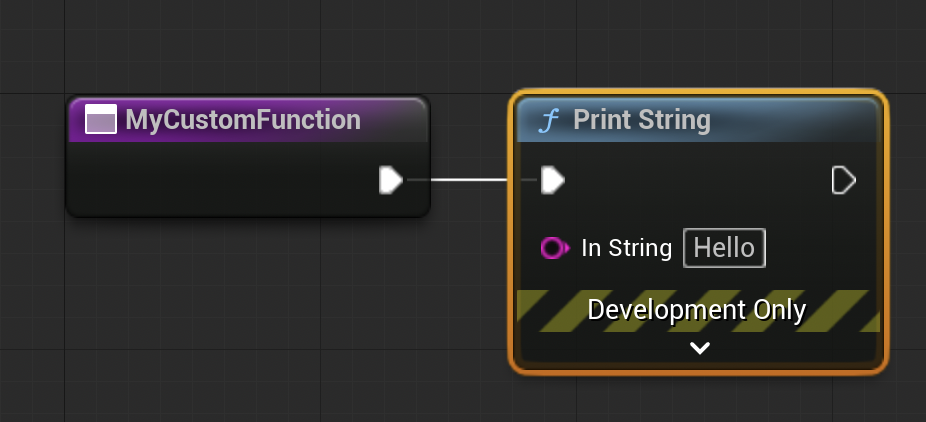
At its heart, a function in programming is a subroutine designed to perform a specific task. In Blueprints, this translates to a self-contained graph of interconnected nodes designed to execute a defined sequence of operations. These functions are highly versatile, capable of accepting various inputs (parameters) and producing specific outputs (return values). Crucially, a Blueprint Function is typically scoped to a specific Blueprint actor, meaning it resides within and operates on the data pertinent to that particular actor. This encapsulation ensures that logic remains organized and directly relevant, preventing unintended side effects or conflicts across different game elements. The emphasis on functions reflects a broader industry trend towards component-based architectures, where systems are built from interoperable, self-contained units.
Crafting Robust Game Logic: The Practical Application of Blueprint Functions
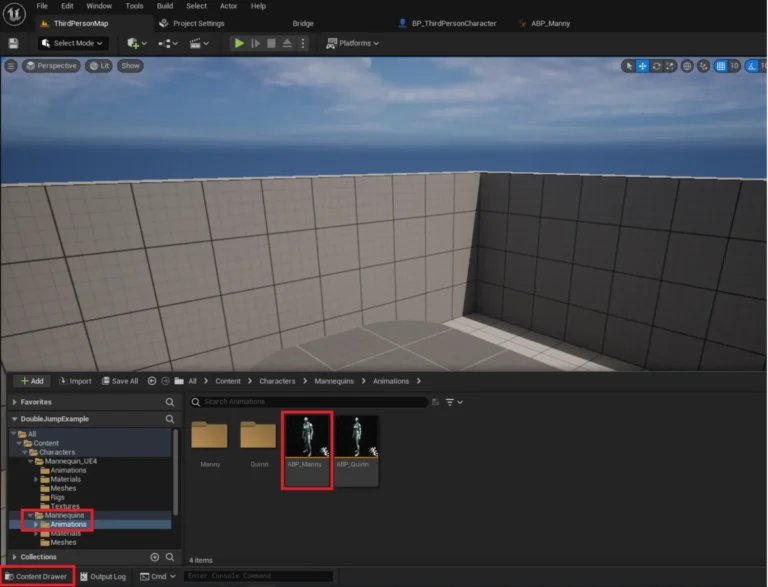
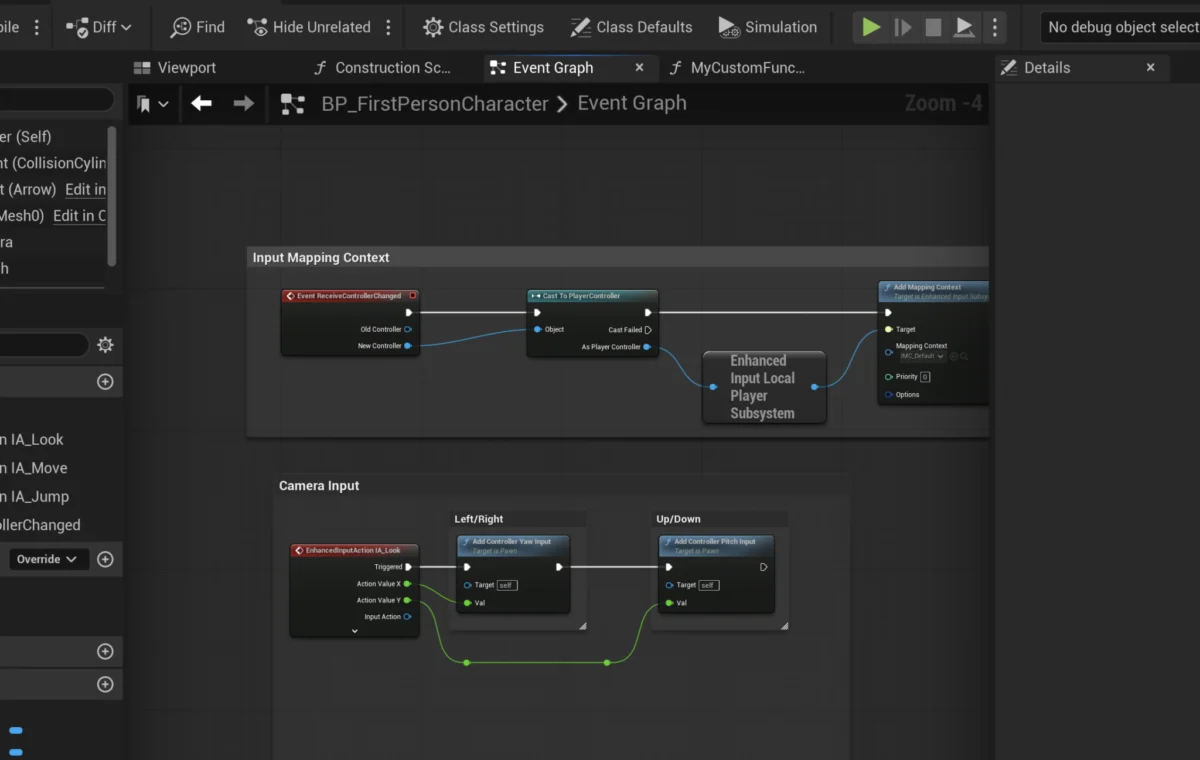
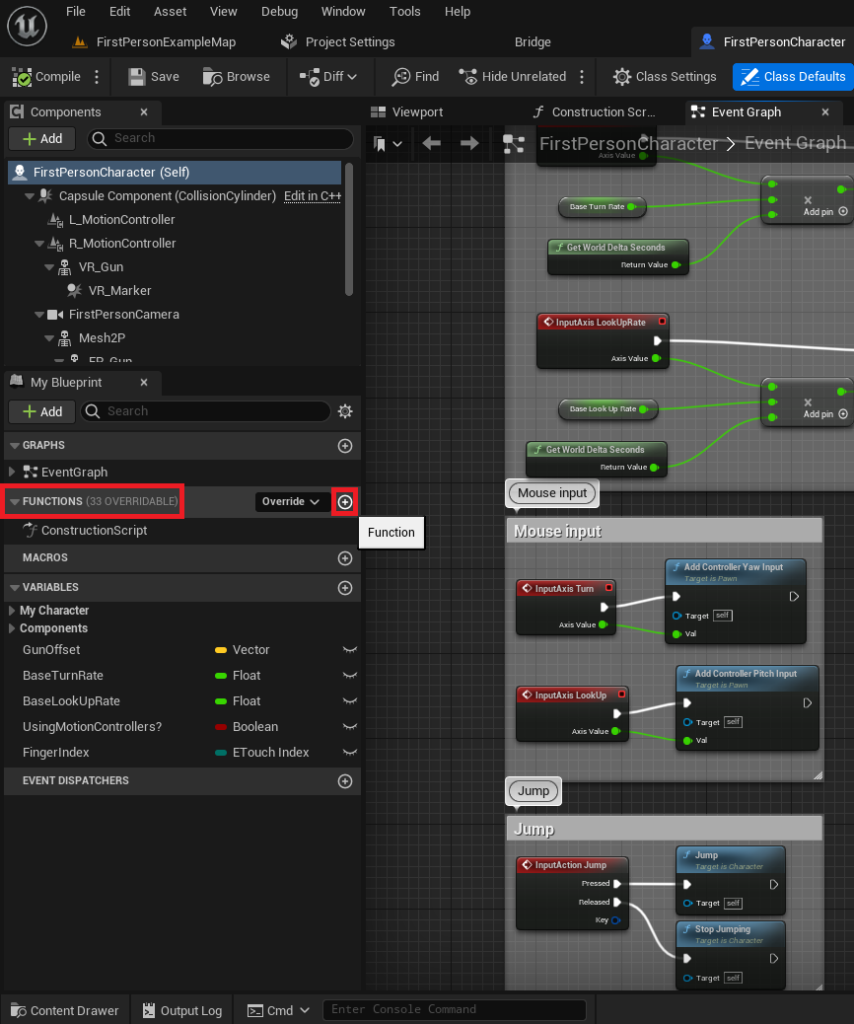
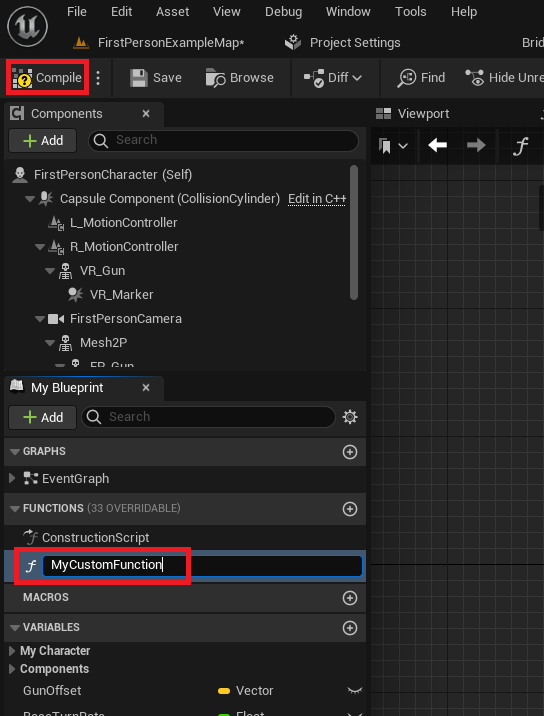
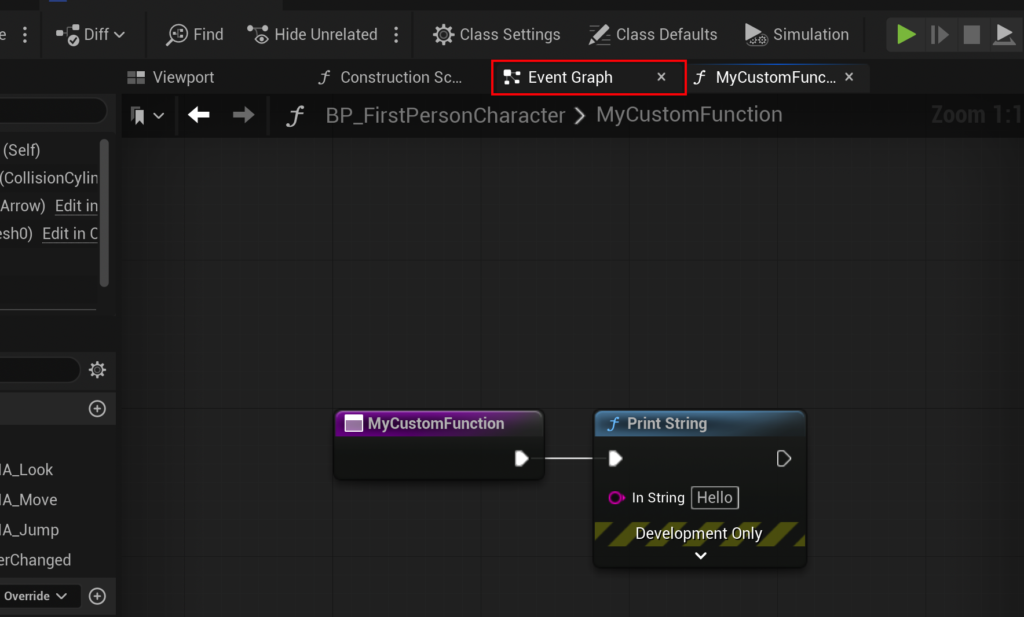
The process of creating a Blueprint Function is designed to be intuitive, yet its implications for project organization are profound. The initial step involves opening the desired Blueprint actor, such as the FirstPersonCharacter Blueprint often found in a standard Unreal Engine template. Within the Blueprint editor, developers will find a dedicated "Functions" panel, which serves as the central repository for all functions associated with that specific actor. A new function is initiated by a simple click on an ‘add’ button, prompting the developer to assign it a clear and descriptive name. This naming convention is not merely stylistic; it is a critical professional practice for maintaining project clarity, especially in collaborative environments or large-scale productions where potentially hundreds of functions might coexist. Once named and compiled, the function becomes an active component, ready for the integration of intricate logic.
Structuring for Clarity: Naming Conventions and Organization
The importance of well-structured and clearly named functions cannot be overstated. In projects involving multiple developers or extending over a long development cycle, ambiguous function names can lead to confusion, errors, and significant time wastage. Adhering to consistent naming conventions (e.g., CalculateDamage, ApplyBuff, PlayerJump, ToggleVisibility) significantly enhances readability and maintainability. Such practices act as a form of self-documenting code, allowing any developer to quickly understand a function’s purpose without needing to delve into its internal logic. This adherence to best practices is a hallmark of professional software development and directly contributes to a healthier, more manageable, and ultimately more successful codebase.
Input and Output Parameters: The Pillars of Flexibility
The true power and versatility of Blueprint Functions lie in their ability to handle dynamic data through the use of input and output parameters. These parameters allow functions to operate on varying data without needing to be rewritten or duplicated for each specific scenario. For instance, the CalculateDamage function mentioned earlier would take a Damage value as an input. This design allows the function to be called with different damage values—e.g., 20 damage from a pistol, 50 damage from a rifle, or 10 damage from a melee attack—all while utilizing the same core calculation logic.
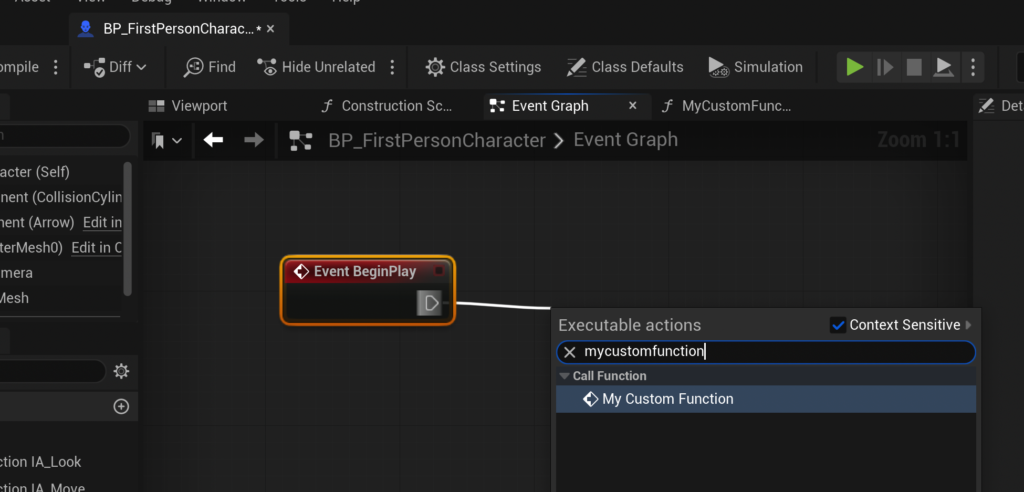
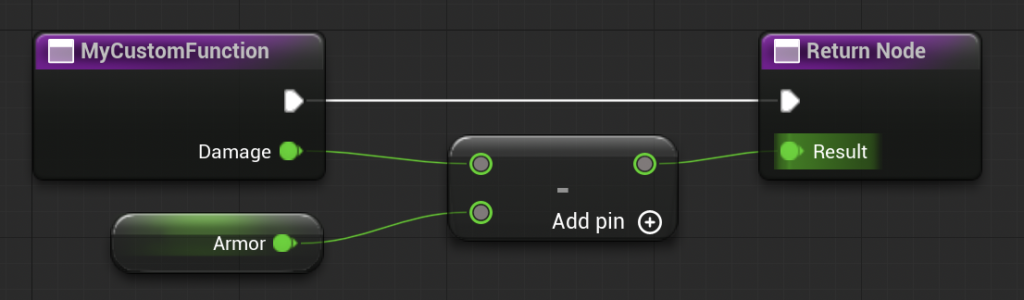
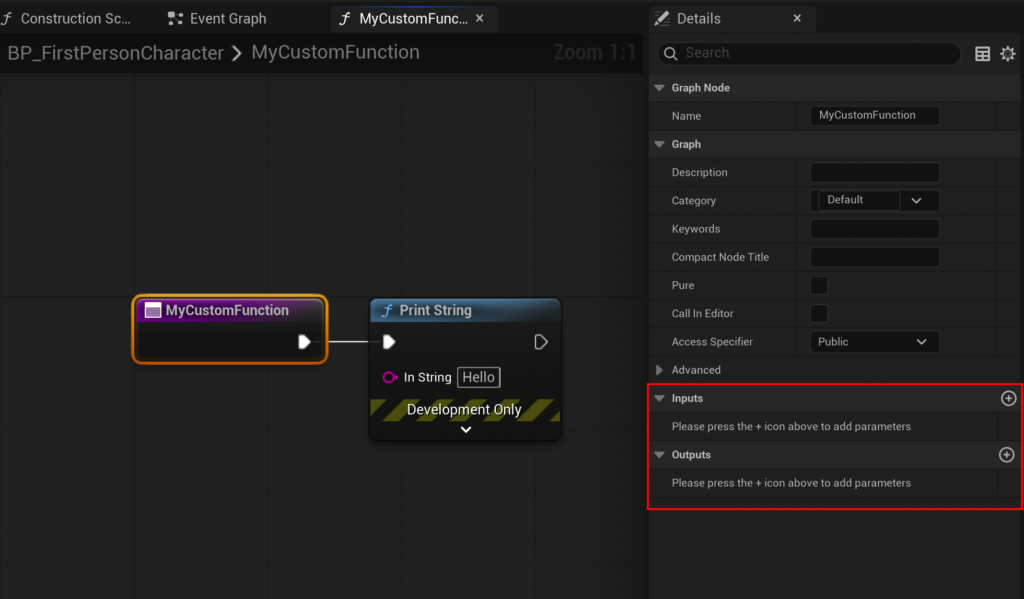
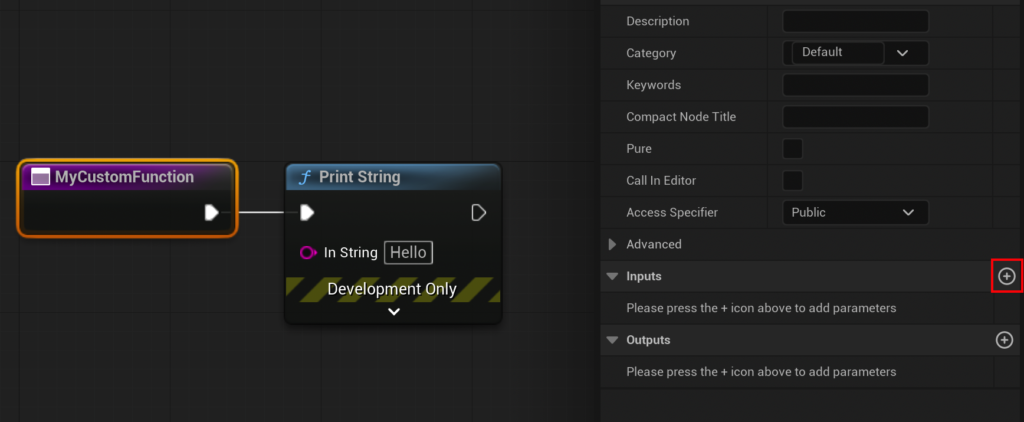
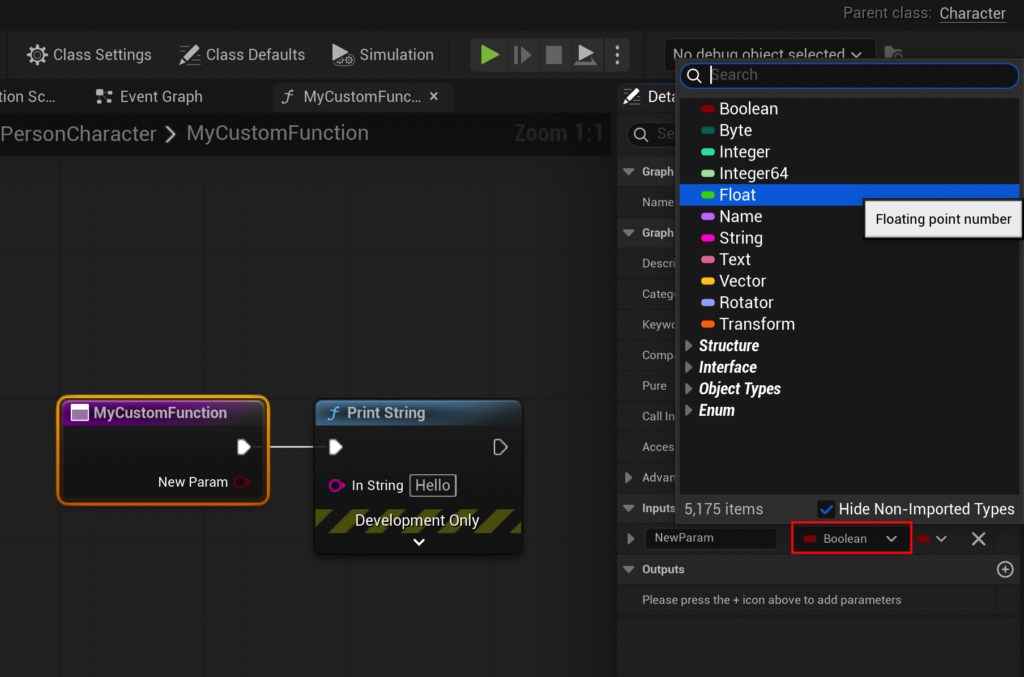
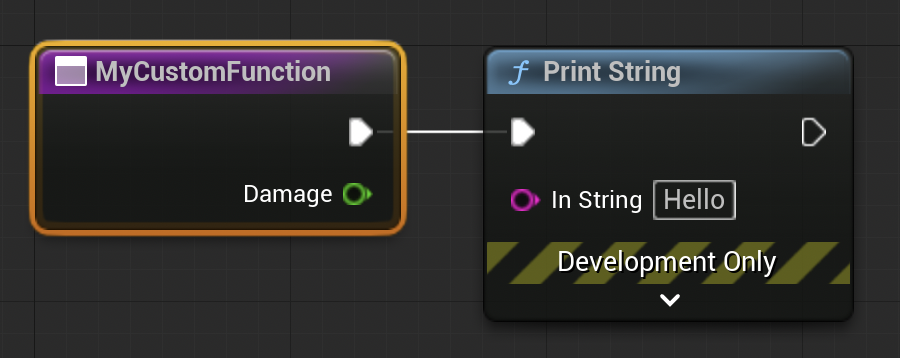
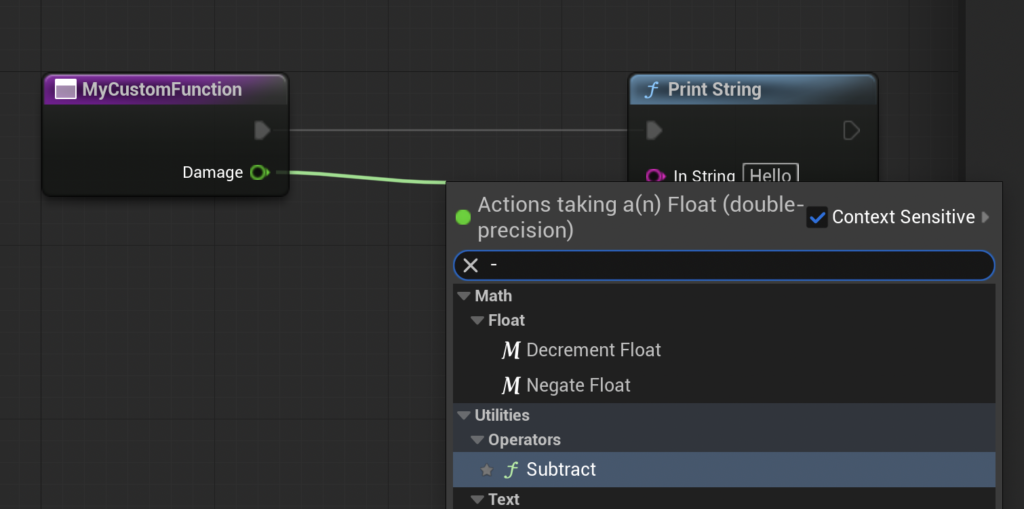
The process of adding parameters involves selecting the function’s entry node within its graph and utilizing the "Details" panel to define new inputs or outputs. Developers specify the variable type (e.g., Float for numerical values, Boolean for true/false states, String for text, various object references) and assign a meaningful name. For the CalculateDamage function, an input parameter named Damage of type Float would be created. Internally, the function can then perform operations, such as subtracting an Armor value (which could be a variable defined within the Blueprint or even another input parameter) from the incoming Damage input. The result of this calculation, representing the final damage dealt after armor mitigation, can then be returned as an output parameter, perhaps named Result, also of type Float. This design allows the calling graph to receive and subsequently utilize the processed value, making the function a powerful and adaptable data transformer.
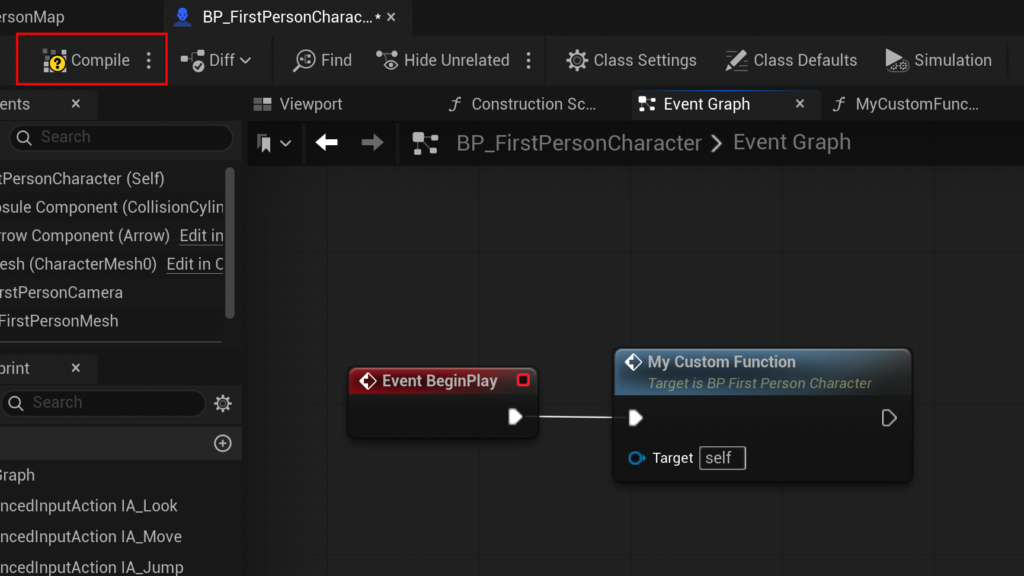
Execution Flow: Understanding Exec Pins and Sequential Logic
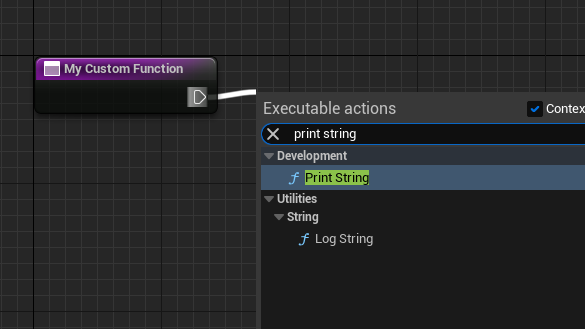
The flow of operations within a Blueprint Function is meticulously dictated by "exec pins," which are represented by white triangular connections on the nodes. These pins determine the precise sequential order in which nodes are executed. When a function is "called" or "run," the execution begins from its entry node’s exec pin and flows methodically through connected nodes. For example, after subtracting Armor from Damage, the execution pin would connect to a "Print String" node for debugging purposes, and then to a "Return Node," which signals the function’s completion and outputs its calculated Result.
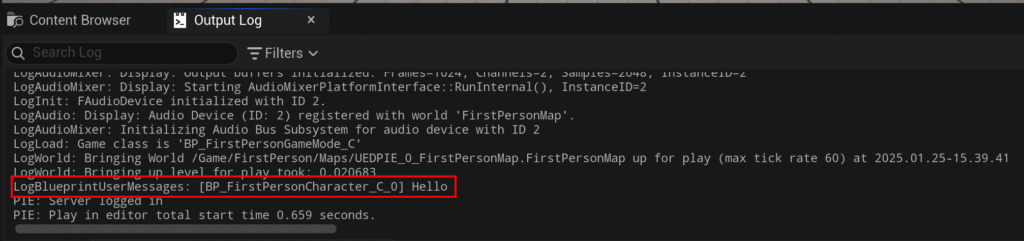
This strictly sequential execution is critical for ensuring deterministic behavior. Unlike some other Blueprint constructs, functions are inherently designed to run from start to finish without interruption. This characteristic underpins their reliability and predictability, making them ideally suited for core gameplay calculations, data manipulation, and immediate state changes that must execute synchronously within a single frame.
Impact on Development Cycles and Productivity: A Data-Driven Analysis
The widespread adoption of Blueprint Functions within the Unreal Engine ecosystem serves as compelling evidence of their profound utility. Industry surveys and developer testimonials frequently highlight the importance of visual scripting in significantly accelerating game development timelines. By providing a clear, visual representation of logic, Blueprint Functions drastically reduce the cognitive load often associated with understanding and modifying complex code, particularly for individuals less fluent in traditional programming languages. This leads to several tangible and measurable benefits across various stages of development:
- Faster Prototyping and Iteration: Developers can rapidly build and test new features, adjusting parameters and logic on the fly without the lengthy compile times that are a common bottleneck in traditional C++ workflows. This agility fosters a more experimental and iterative development process, leading to more refined gameplay.
- Reduced Redundancy and Error Rates: Encapsulating logic into reusable functions means that any necessary changes or updates only need to be implemented in one place. This significantly lowers the probability of introducing bugs due to inconsistent code, forgotten updates, or discrepancies across multiple instances of similar logic, thereby enhancing overall code quality.
- Enhanced Collaboration: Teams can operate more efficiently and collaboratively. For instance, a C++ programmer might develop and expose complex core functionalities to Blueprints, while designers and artists can then integrate and utilize these functionalities through the intuitive visual Blueprint interface. Within Blueprints themselves, functions establish clear boundaries and responsibilities, allowing different team members to develop distinct features in parallel without extensive interference or requiring a deep understanding of unrelated systems.
- Improved Debugging and Troubleshooting: The visual nature of Blueprints, coupled with the inherent modularity offered by functions, makes debugging considerably more intuitive. Developers can visually trace execution paths, inspect values at each node, and pinpoint issues with greater ease and speed, leading to faster resolution of problems.
Epic Games has consistently emphasized the role of Blueprints in empowering developers of all skill levels, fostering a more inclusive and efficient development environment. Industry analysts often cite tools like Blueprints as critical enablers for agile game development, allowing studios to accelerate their production pipelines significantly and achieve higher quality outcomes with optimized resource allocation. This strategic emphasis has been instrumental in the engine’s success across various scales of development, from indie projects to AAA blockbusters.

Key Distinctions: Functions vs. Events in Unreal Engine Blueprints
While the terms "functions" and "events" are often used interchangeably in general programming parlance, they have distinct and crucial roles within Unreal Engine Blueprints. Understanding these differences is fundamental for effective and efficient Blueprint design.
- Functions: As previously detailed, Blueprint Functions are synchronous, deterministic units of logic. They execute immediately when called, process their inputs, and return their outputs before the calling graph proceeds. A critical characteristic is their inability to incorporate "Delay" nodes or other asynchronous operations. This limitation ensures that a function’s execution path is always predictable and completes within a single frame, making them ideal for calculations, data manipulation, and immediate state changes that do not rely on temporal progression.
- Events: Events, such as
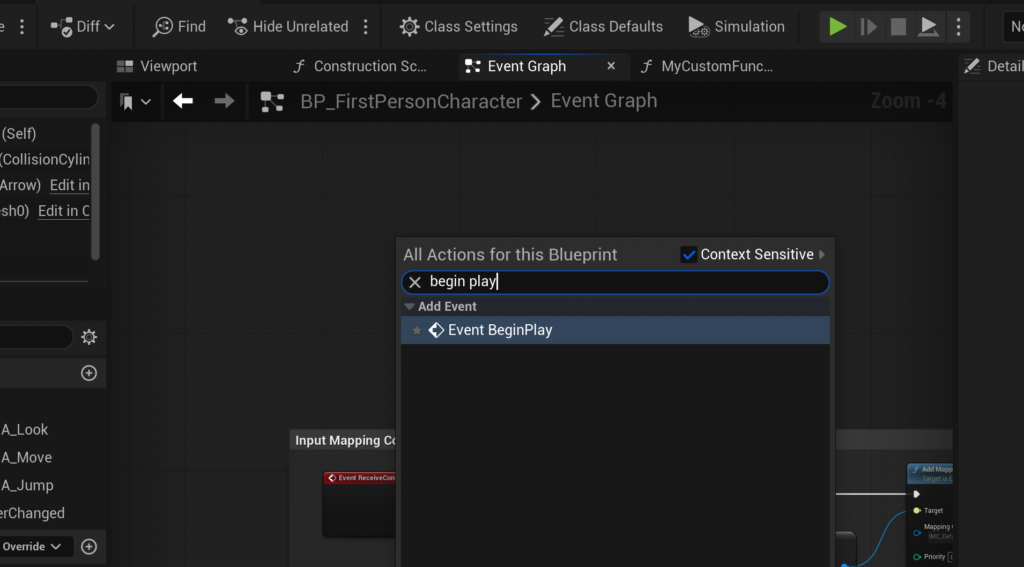
Event Begin Play(which triggers when an actor enters the game world) orEvent Tick(which triggers every frame), are asynchronous triggers that respond to specific occurrences in the game world or over time. Unlike functions, events do not typically return values directly, though they can set variables or trigger other functions or events. Events can incorporate asynchronous nodes likeDelay, allowing for time-based actions, sequences that span multiple frames, or interactions that require waiting for external conditions. They are typically used to initiate chains of logic in response to game state changes, user input, or timed sequences.
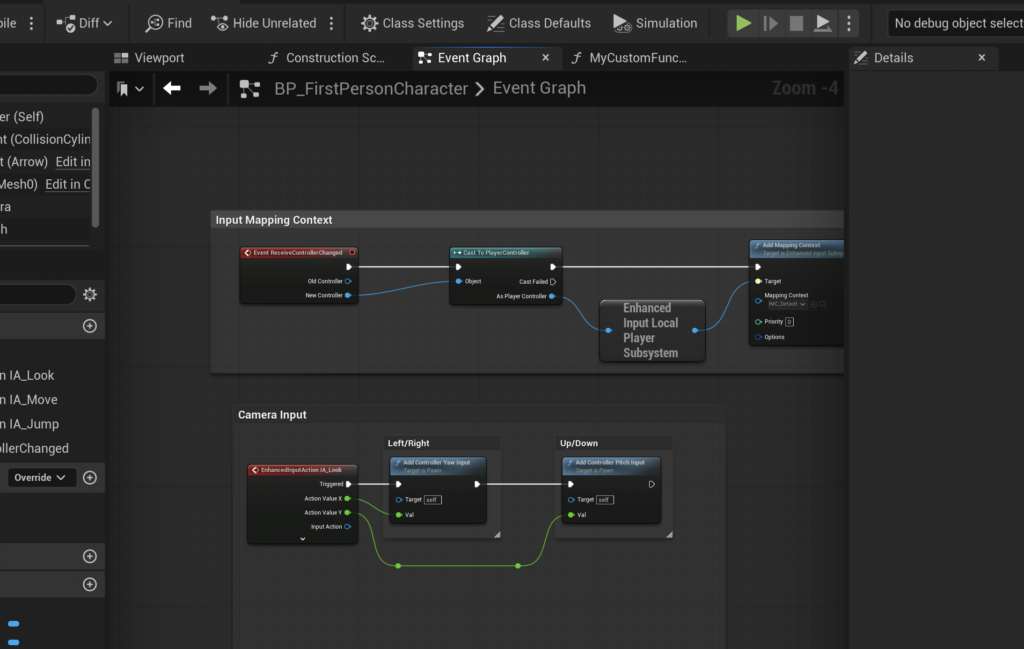
The pattern of connecting a custom function to an Event Begin Play or Event Tick is common and illustrative. An event serves as the initial trigger, which then "calls" (or runs) a function to perform a specific, encapsulated task. This clear separation of concerns—events for triggering and initiating, functions for synchronous processing and calculation—is a fundamental principle for creating clean, efficient, and well-organized Blueprints that are both performant and maintainable.
Broader Implications: Scalability, Collaboration, and the Future of Game Development
The strong emphasis on Blueprint Functions in Unreal Engine 5 underscores a broader industry trend towards scalable and collaborative development practices. As games become increasingly ambitious, featuring expansive open worlds, complex AI, sophisticated gameplay systems, and dynamic multiplayer interactions, the need for modular design grows exponentially. Functions provide the architectural backbone for managing this inherent complexity:
- Scalability: By meticulously breaking down a game’s logic into smaller, testable, and reusable functions, developers can construct incredibly complex systems from simpler, manageable parts. This modularity allows projects to scale effectively, accommodating new features, content expansions, and systemic changes without collapsing under their own structural weight.
- Collaboration: In a team development environment, functions act as well-defined interfaces. One developer can create a robust function, and another can confidently use it without needing to understand every node within it, only its defined inputs and outputs. This fosters parallel development, reduces interdependencies, and significantly accelerates overall project timelines by allowing multiple contributors to work on distinct features simultaneously.
- Maintainability: Long-term project health and longevity are intrinsically linked to maintainable code. Functions, with their clear responsibilities and isolated logic, are inherently easier to debug, update, and refactor. This extends the effective lifespan of a game’s codebase and substantially reduces the cost and effort associated with post-launch support, bug fixing, and future content expansions.
Looking ahead, as game engines continue to evolve and integrate advanced artificial intelligence, procedural generation, cloud-based services, and virtual/augmented reality functionalities, the importance of robust, modular scripting will only intensify. Blueprint Functions, with their powerful blend of capability and accessibility, are poised to remain a vital tool in the developer’s arsenal. They empower creators to bring increasingly sophisticated and immersive interactive experiences to life within the cutting-edge Unreal Engine ecosystem, solidifying their role not just as a feature, but as a fundamental paradigm shaping the future of interactive entertainment development.
Conclusion
The exploration of Unreal Engine 5 Blueprint Functions reveals them to be an indispensable tool for any aspiring or experienced game developer. These self-contained units of logic provide an unparalleled ability to organize, reuse, and manage complex game mechanics, transforming daunting development challenges into manageable and iterative tasks. From simple utilities like printing debugging strings to sophisticated systems like calculating damage with various modifiers, functions offer the flexibility of input and output parameters, ensuring adaptability across diverse gameplay scenarios. By embracing Blueprint Functions, developers can significantly enhance the clarity, efficiency, and scalability of their projects, laying a robust foundation for creating captivating and high-quality interactive experiences in the dynamic and demanding world of Unreal Engine 5. They are a testament to the power of structured, visual programming in democratizing and advancing game creation.
About the Author