The ability to save and load game progress is not merely a feature but a foundational pillar of modern interactive entertainment, profoundly shaping player experience and developer workflow. In an era where game worlds are increasingly vast and complex, the seamless persistence of player data is paramount, and Epic Games’ Unreal Engine 5 (UE5) addresses this critical need with its sophisticated, built-in SaveGame system. This robust framework empowers developers to easily manage the state of their game, from player positions and inventory to complex world states, ensuring that players can resume their adventures exactly where they left off.

The Evolution of Game State Persistence: A Historical Context
The concept of saving game progress has evolved dramatically since the early days of video gaming. Primitive systems often relied on simple high-score tables, passcodes, or laborious level-specific restarts. The advent of battery-backed cartridges in the 1980s marked a significant leap, allowing for direct saving of game states, albeit with limited capacity. The 1990s introduced external memory cards for consoles, offering players more control over their save data. PC gaming, meanwhile, leveraged file systems, enabling more extensive and flexible saving mechanisms.
As games grew in complexity and scope, the demand for more robust and developer-friendly saving solutions intensified. Modern titles, particularly open-world games and RPGs, generate immense amounts of player-specific data that must be reliably stored and retrieved. Cloud saving, introduced by platforms like Xbox Live, PlayStation Network, and Steam, further revolutionized data persistence, allowing players to access their saves across multiple devices and mitigating local storage failures. Unreal Engine, a pioneer in game development tools, has consistently adapted to these evolving requirements, providing increasingly integrated and powerful solutions for data management, culminating in the refined SaveGame system found in UE5.
Unreal Engine 5’s SaveGame System: A Technical Overview
At its core, Unreal Engine 5’s SaveGame system simplifies the intricate process of data serialization and deserialization—the conversion of game objects into a format that can be stored (saved) and then reconstructed back into game objects (loaded). This system is designed to be highly accessible, particularly through its Blueprint visual scripting interface, making it available to a wide spectrum of developers regardless of their C++ proficiency.
The central component of this system is the SaveGame Blueprint class. This specialized class acts as a container for all the data a developer wishes to persist. Instead of manually writing data to files or managing complex serialization logic, developers simply add variables to their custom SaveGame Blueprint. The engine then handles the underlying mechanics of writing these variables to a file on the user’s machine and reading them back when needed. This abstraction significantly reduces development time and minimizes the potential for errors.
Data saved via the SaveGame class is typically stored in user-specific application data directories to ensure proper permissions and organization:
- Windows:
Local Appdatafolder (e.g.,C:Users[Username]AppDataLocal[GameName]SavedSaveGames) - MacOS:
Library/Application Support(e.g.,~/Library/Application Support/[GameName]/Saved/SaveGames) - Linux:
/home/username/.local/share(e.g.,~/.local/share/[GameName]/Saved/SaveGames)
These standard locations ensure that save files are kept separate from game installation files and are accessible to the user while adhering to operating system conventions. Crucially, the system supports saving almost every common variable type, from basic integers and booleans to more complex structures like vectors, transforms, and even arrays of custom data, offering immense flexibility for developers.
Constructing the Foundation: The Custom Save Class
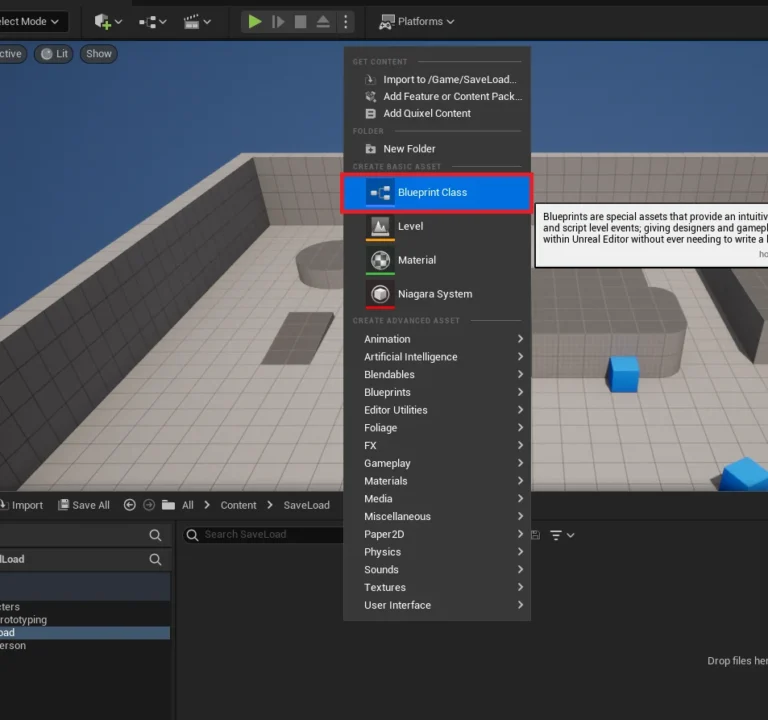
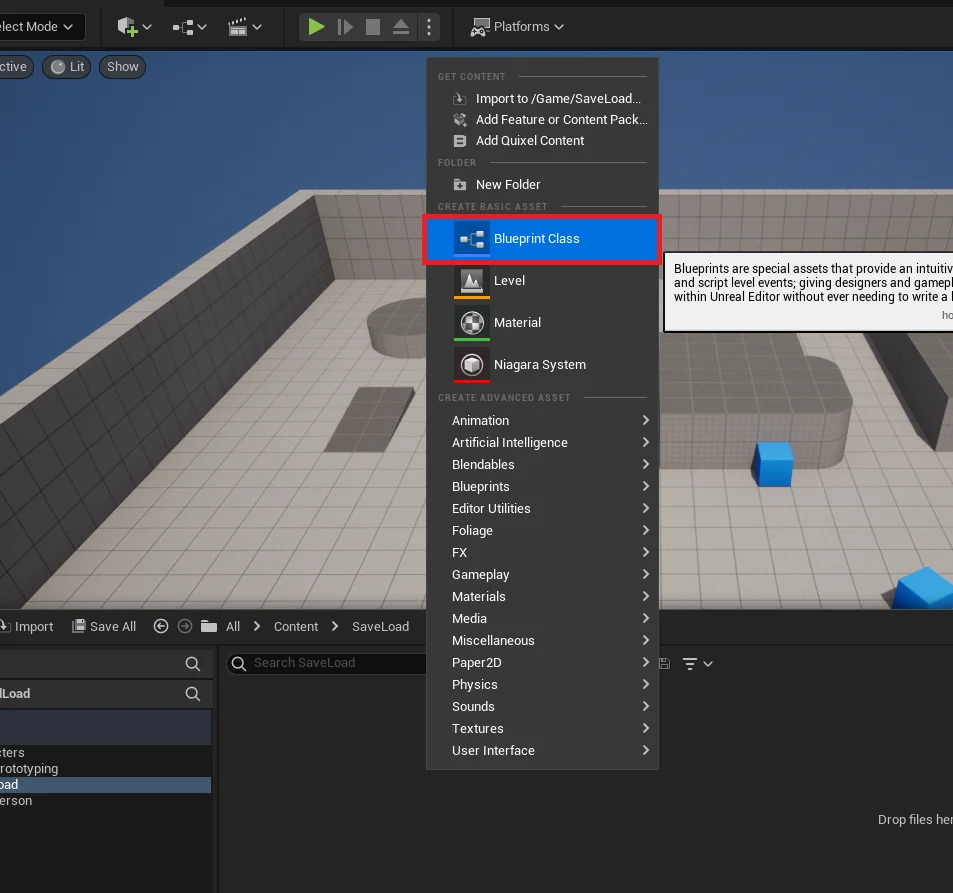
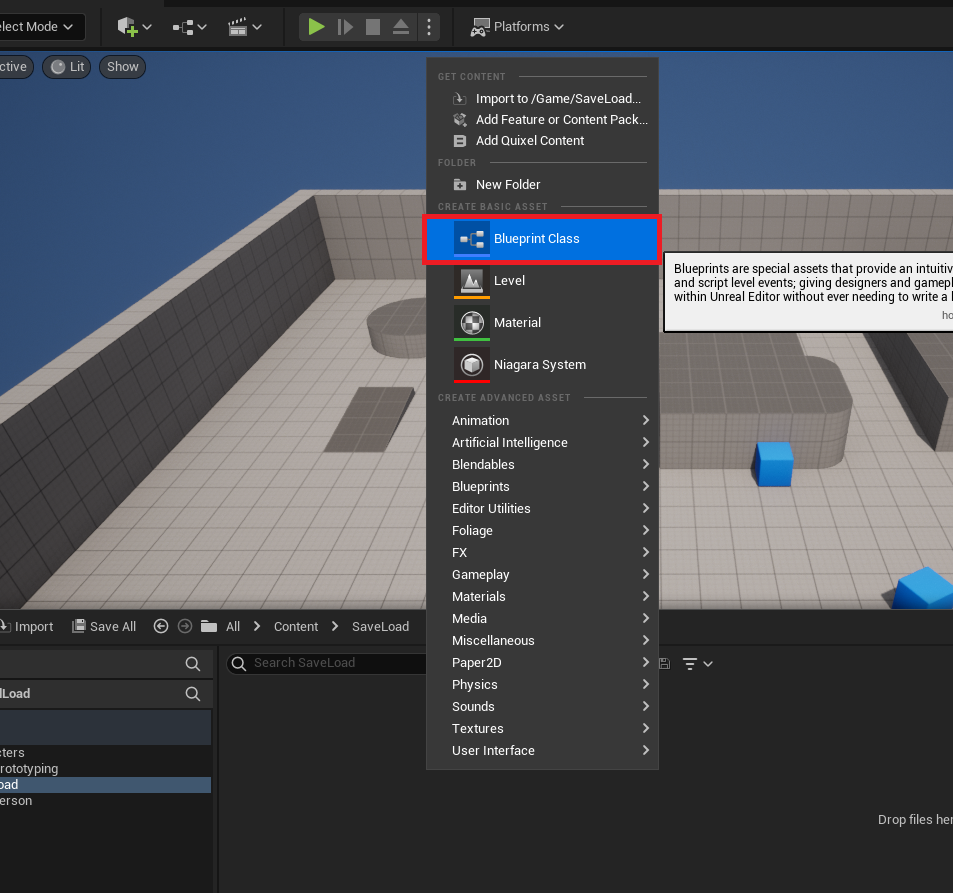
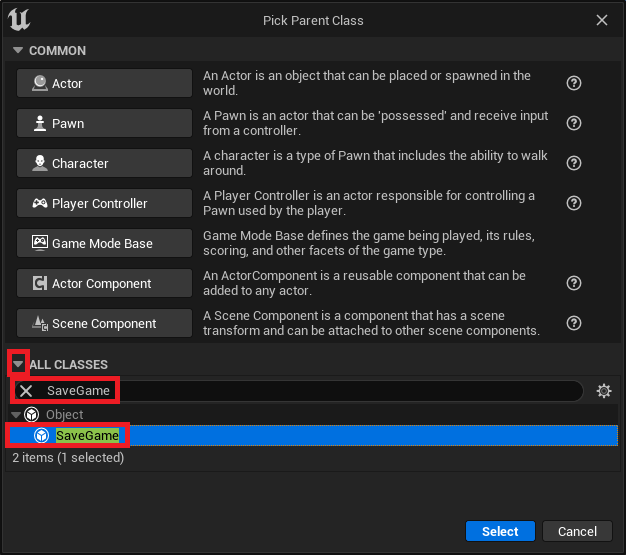
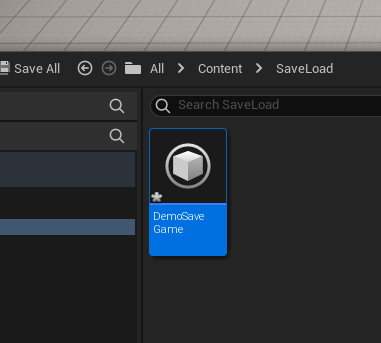
The journey to implementing persistent data begins with the creation of a custom SaveGame Blueprint class. This process is straightforward, initiated from the Content Browser within the Unreal Editor. Developers select the SaveGame class as the parent for their new Blueprint, giving it a descriptive name such as DemoSaveGame or PlayerSaveData.

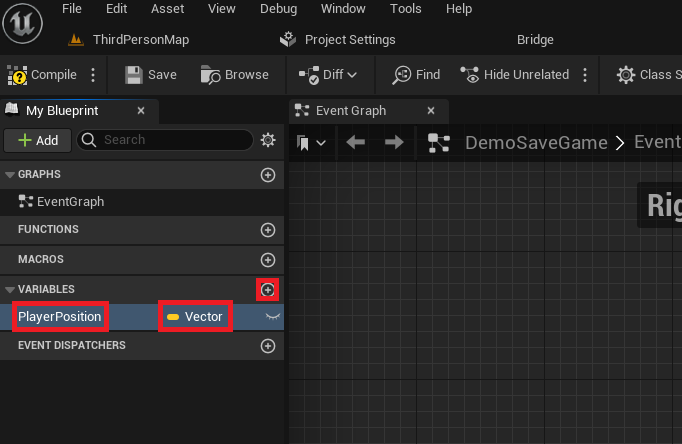
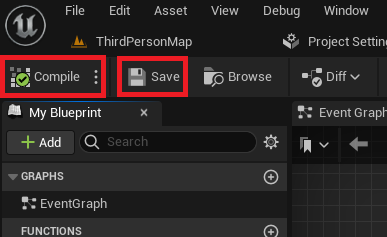
Once created, this custom SaveGame Blueprint becomes the central repository for all data intended for persistence. For instance, to save a player’s position, a Vector variable named PlayerPosition would be added to this class. This variable will hold the X, Y, and Z coordinates of the player in the game world. The beauty of this approach lies in its scalability: as the game evolves, additional variables—such as current health, inventory items, quest progress, or unlocked abilities—can be seamlessly added to this single SaveGame class, providing a unified structure for all persistent data. After defining variables, compiling and saving the Blueprint ensures that these changes are integrated into the project.

Orchestrating Persistence: The Game Instance as the Central Hub
While the SaveGame class defines what data is saved, the Game Instance is the ideal component to manage how and when this data is saved and loaded. The Game Instance is a unique Unreal Engine object that persists throughout the entire lifetime of a game session, even across different levels or maps. This makes it an invaluable centralized location for managing global game states and, critically, the save/load functionality.
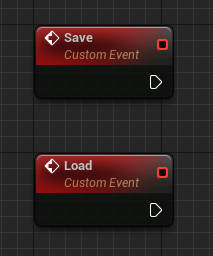
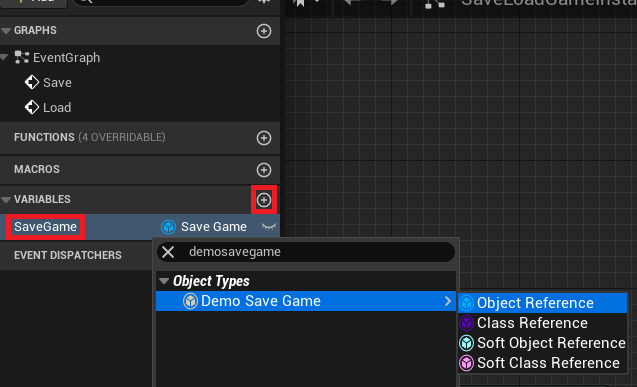
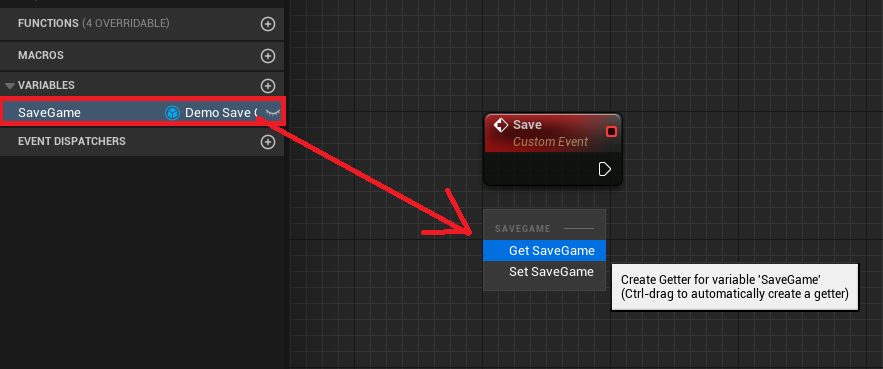
To establish this control, two custom events, typically named Save and Load, are created within the custom Game Instance Blueprint. Furthermore, a variable of the custom SaveGame class type (e.g., DemoSaveGame object reference) is added to the Game Instance. This variable acts as a dynamic link to the current save data, allowing the Game Instance to interact directly with the persistent information.
Loading Game State: Retrieving Player Progress
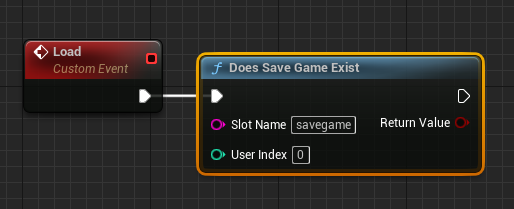
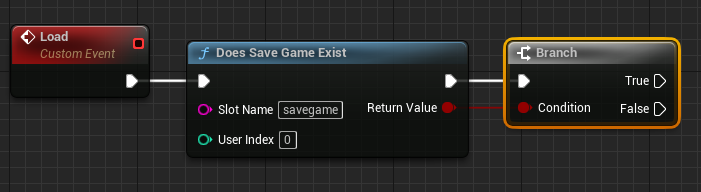
The loading process is a carefully orchestrated sequence designed to gracefully handle both existing save files and scenarios where no save data is present. Upon the invocation of the Load event, the first crucial step is to determine if a save file already exists for a specified "slot name" using the Does Save Game Exist node. The slot name serves as a unique identifier for a particular save file, allowing for multiple save slots or profiles within a single game.
A conditional Branch node then dictates the flow:
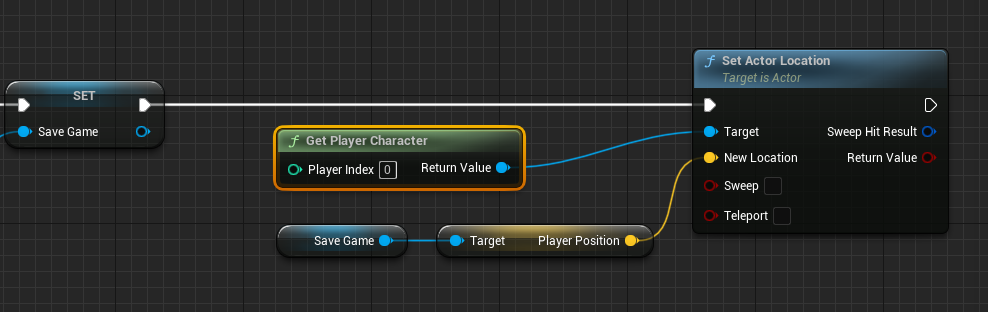
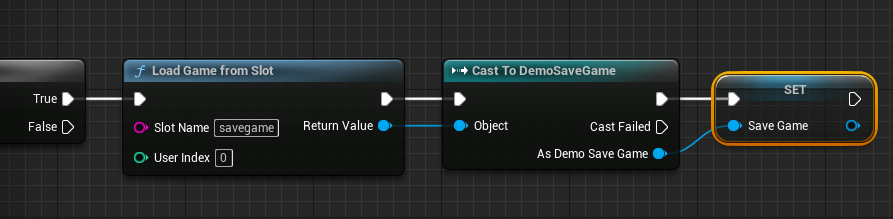
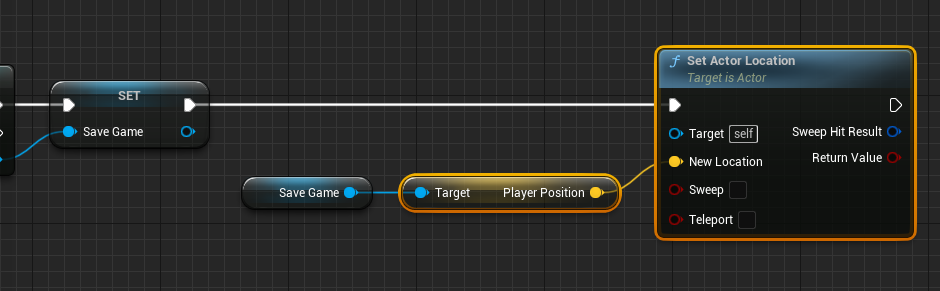
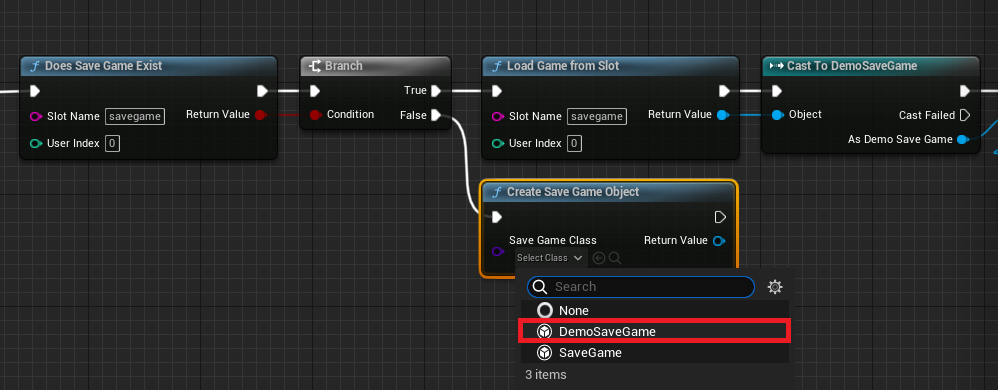
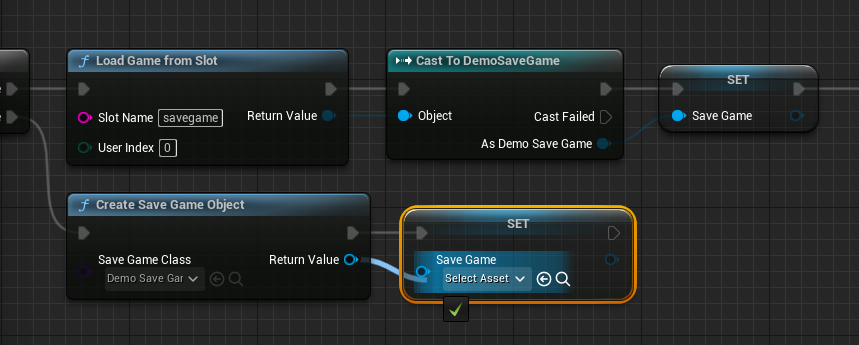
- If a save file exists (True): The
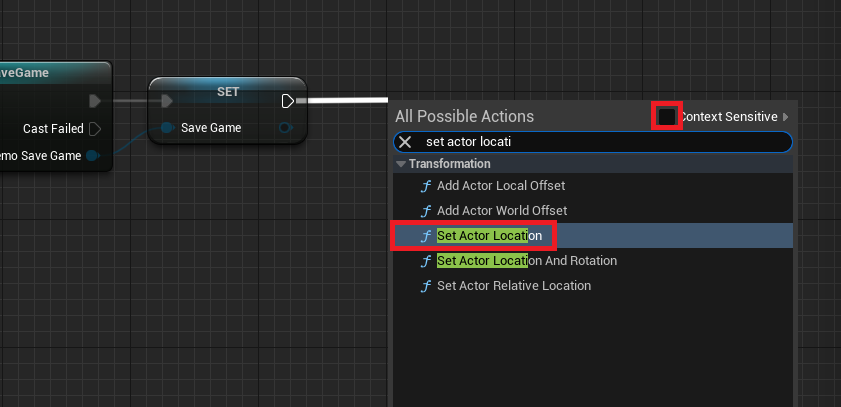
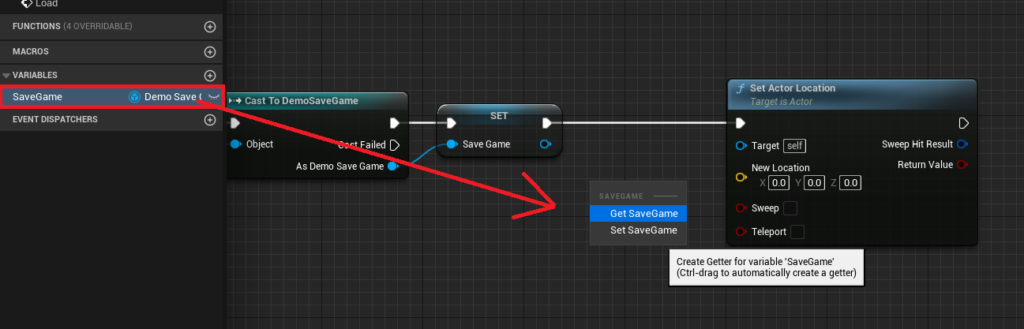
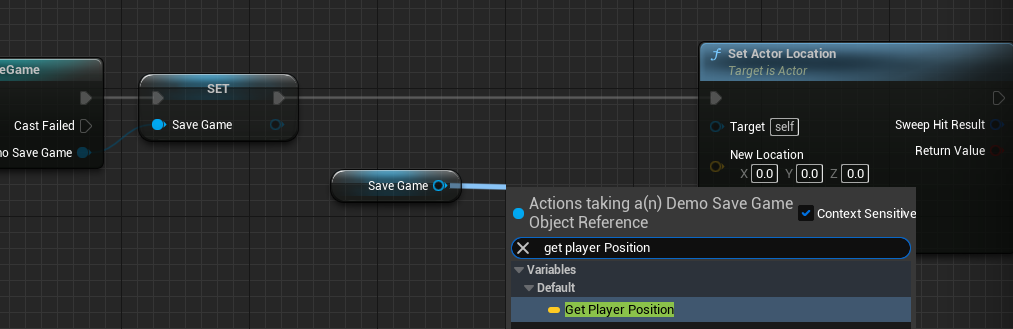
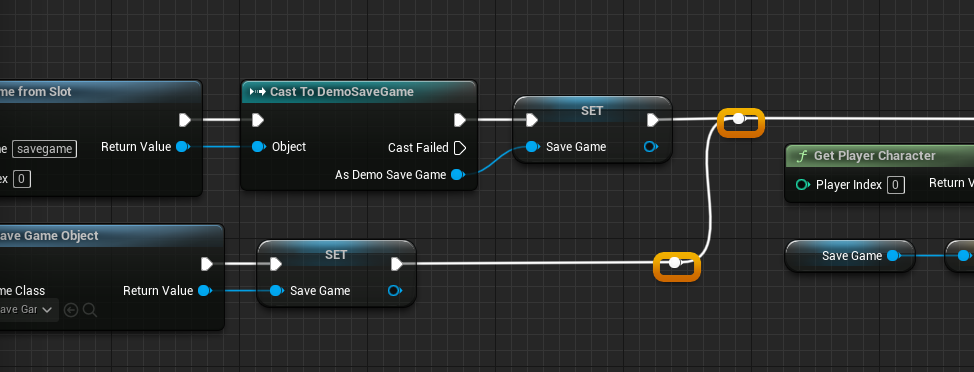
Load Game From Slotnode is executed, retrieving the data from the specified slot. The returnedSaveGameobject is then "cast" to the customSaveGameBlueprint class (e.g.,Cast To DemoSaveGame). This casting is essential for accessing the specific variables defined within the custom class, such asPlayerPosition. The retrievedSaveGameobject is then stored in theGame Instance‘sSaveGamevariable for easy access throughout the game. Finally, the player’s character is relocated to the savedPlayerPositionusing theSet Actor Locationnode, effectively teleporting the player back to their last known location. This process involves getting a reference to thePlayer Characterand supplying the loadedPlayerPositionas the new location. - If no save file exists (False): A new
SaveGameobject is created using theCreate Save Game Objectnode, instantiating the customSaveGameBlueprint class. This newly created, emptySaveGameobject is then assigned to theGame Instance‘sSaveGamevariable. This ensures that even on a fresh game start, a validSaveGameobject exists, ready to accumulate data and be saved later. The execution flow then typically proceeds to initialize default game states or directly to the saving logic if an initial save is desired. This robust branching logic prevents crashes and ensures a smooth experience for both new and returning players.
Saving Game State: Preserving Player Endeavors
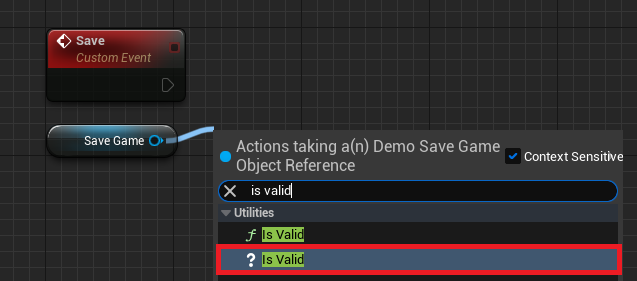
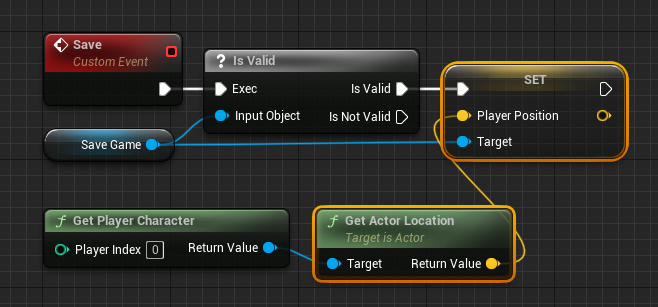
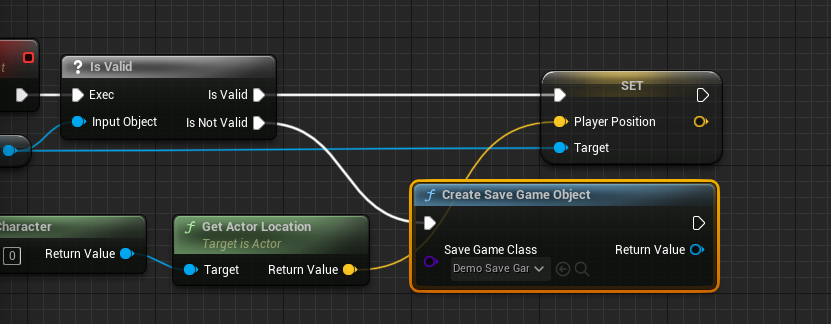
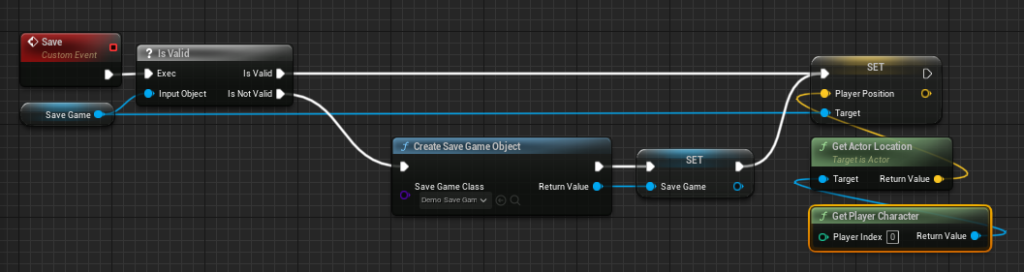
The saving process mirrors the loading logic in its careful validation and execution. When the Save event is triggered, the system first retrieves the SaveGame object reference stored in the Game Instance. An Is Valid node checks if this reference points to an actual, existing SaveGame object. This is a critical defensive programming step, preventing attempts to save data to a non-existent or invalid object.
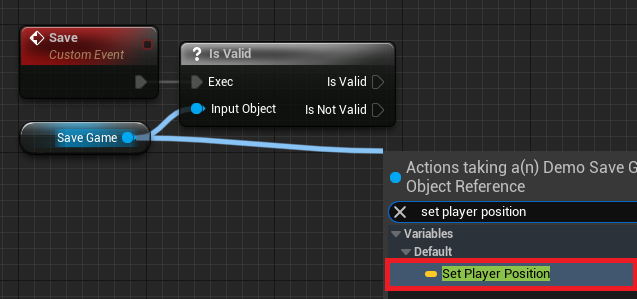
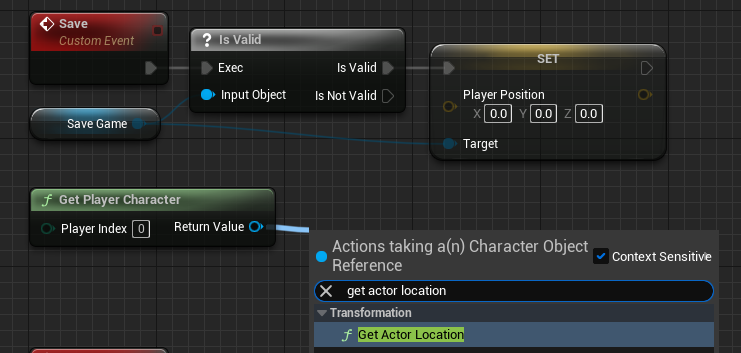
- If the
SaveGameobject is valid (Is Valid): The system proceeds to capture the current state of relevant game elements. For thePlayerPositionexample, the currentActor Locationof thePlayer Characteris retrieved usingGet Player CharacterandGet Actor Locationnodes. This vector value is then assigned to thePlayerPositionvariable within theSaveGameobject using aSet Player Positionnode. This updates the in-memorySaveGameobject with the player’s latest location. - If the
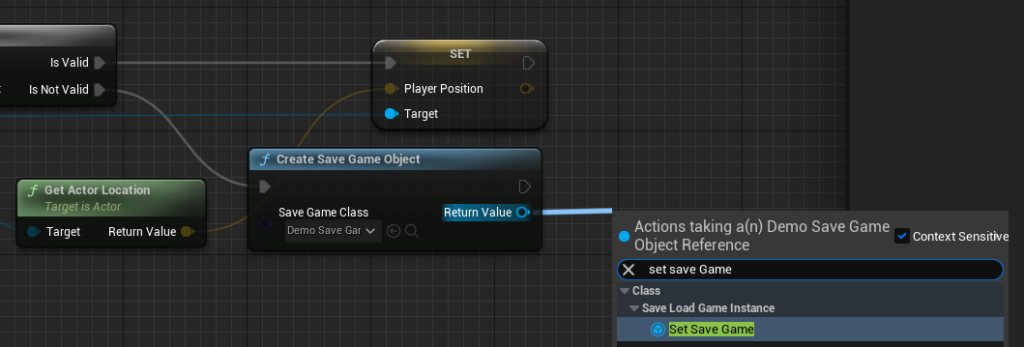
SaveGameobject is not valid (Is Not Valid): This scenario typically occurs if a game is started without an existing save file and a save operation is attempted before any explicit loading or initial save object creation. In this case, a newSaveGameobject is instantiated usingCreate Save Game Object, assigned to theGame Instance‘sSaveGamevariable, and then the process of capturing the player’s current position proceeds as described above.
The final and most critical step in the saving process is to commit the updated SaveGame object to disk. Developers have a choice between two primary nodes: Save Game to Slot and Async Save Game to Slot.
Save Game to Slot(Synchronous): This node saves the data immediately. It’s suitable for smaller amounts of data where the brief pause in game execution is negligible.Async Save Game to Slot(Asynchronous): This node performs the save operation in the background, preventing hitches or freezes in gameplay, which is crucial for games saving large datasets. For titles with extensive worlds, complex inventories, or numerous persistent elements, asynchronous saving is highly recommended to maintain a fluid player experience.
Both nodes require the same "slot name" used during loading to ensure data consistency. This final action writes the serialized data to the specified file location, securing the player’s progress.
Triggering Functionality: Player Interaction and Game Flow
With the save and load logic implemented within the Game Instance, the final piece of the puzzle is to expose this functionality to the player. This is typically achieved through player input events within the Player Character Blueprint. For demonstration purposes, developers might bind specific keyboard keys—such as ‘1’ for saving and ‘2’ for loading.
When a key is pressed, the Player Character Blueprint first obtains a reference to the Game Instance and then "casts" it to the custom Game Instance class. This allows the Player Character to call the custom Save or Load events defined within the Game Instance. For instance, pressing ‘1’ would trigger the Save event, capturing the player’s current location and writing it to the save file. Pressing ‘2’ would trigger the Load event, retrieving the saved location and relocating the player.
This communication pattern highlights the modularity and hierarchical structure of Unreal Engine. The Player Character focuses on player-specific actions and inputs, while the Game Instance handles the overarching, global logic for data persistence, ensuring a clean separation of concerns and maintainable code.
Broader Implications and Industry Outlook
Unreal Engine 5’s SaveGame system represents a significant boon for game developers, streamlining a fundamental aspect of game creation. By providing a robust, built-in solution that is accessible via Blueprints, Epic Games empowers a wider range of creators to build complex and persistent game worlds without needing deep expertise in file I/O or data serialization. This contributes to greater developer efficiency, allowing teams to focus more on innovative gameplay and less on boilerplate systems.
The cross-platform nature of Unreal Engine means that a SaveGame implementation developed on one platform will generally function seamlessly on Windows, MacOS, and Linux, simplifying multi-platform deployment. Furthermore, the inherent design of the system lays the groundwork for more advanced features, such as cloud saves integration (which often requires platform-specific APIs but leverages the underlying SaveGame data structure), or even dynamic, real-time persistence in online multiplayer environments.
As games continue to push boundaries in scale and interactivity, the importance of reliable data persistence will only grow. Epic Games, through continuous refinement of tools like the SaveGame system, reaffirms its commitment to providing a comprehensive and powerful ecosystem that enables developers to craft immersive, uninterrupted player journeys. The SaveGame system in Unreal Engine 5 is not just a technical utility; it is a critical enabler of the rich, enduring experiences that define modern gaming.
About the Author