Unreal Engine 5 (UE5) Data Tables represent a cornerstone feature for modern game development, offering a structured and efficient method for managing vast quantities of in-game information. This utility allows developers and designers to establish and access predefined lists of data, significantly streamlining the creation and iteration processes for complex game systems. The core principle behind a Data Table involves selecting a specific Unreal Engine Struct as its foundation, which dictates the type and arrangement of data that each row in the table will contain. This design choice ensures type safety and consistency across all entries, preventing common data-related errors and enhancing project stability.
Understanding the Role of Data Tables in Game Development
At its essence, a Data Table in Unreal Engine 5 is a robust tool designed to define, store, and retrieve structured data based on a unique key. This data is encapsulated within a project asset, making it readily accessible and modifiable from any part of the codebase, whether through C++ or Blueprint visual scripting. A critical advantage is the persistence of this data within the editor environment, enabling developers to populate and refine game data during development and seamlessly utilize it at runtime. This capability is particularly invaluable for elements like item statistics, enemy attributes, quest parameters, or environmental variables, where extensive data sets require organized management and rapid iteration. The simplicity and minimal overhead involved in creating and implementing Data Tables underscore their utility, positioning them as an indispensable asset for any UE5 project.
Historically, game development often grappled with cumbersome data management practices. Early titles frequently embedded game data directly into code, leading to monolithic structures that were difficult to modify, debug, or scale. As games grew in complexity and team sizes expanded, developers sought more flexible solutions, transitioning to external configuration files (e.g., XML, JSON) or custom database integrations. While these methods offered some separation of data from logic, they often introduced overheads related to parsing, validation, and integration with the game engine’s native systems. Unreal Engine’s Data Tables emerged as a powerful, engine-native solution to these challenges, providing a highly optimized and developer-friendly approach to data-driven design. This paradigm shift enables a more modular, scalable, and collaborative development workflow, aligning with the demands of contemporary game production cycles.
Architectural Foundation: Enums and Structs
The effective utilization of Data Tables in Unreal Engine 5 is predicated on a foundational understanding and proper construction of two key Blueprint elements: Enumerations (Enums) and Structures (Structs). These components act as the schema for the data, ensuring consistency and type integrity.
Creating an Enumeration (Enum) for Data Standardization
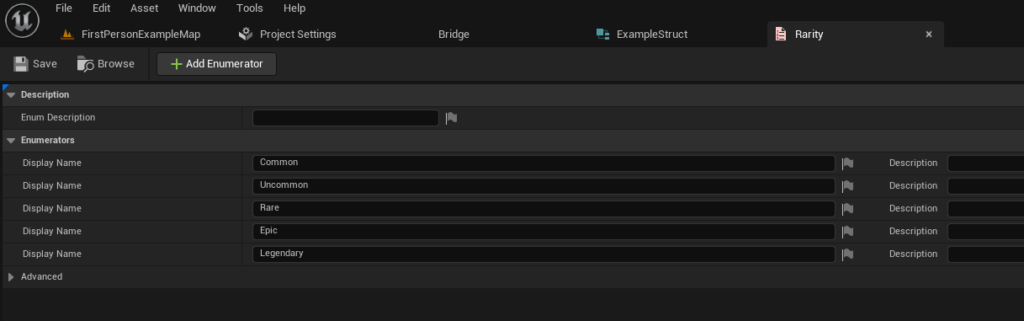
Before defining the overarching structure for a Data Table, it is often beneficial to establish Enumerations. Enums provide a predefined list of named integral constants, serving as a type-safe way to represent a fixed set of discrete values. For instance, in an RPG context, an item’s quality can be definitively categorized using an Enum, such as EItemRarity. This approach eliminates ambiguity, prevents typographical errors that might arise from using raw strings, and enhances code readability.
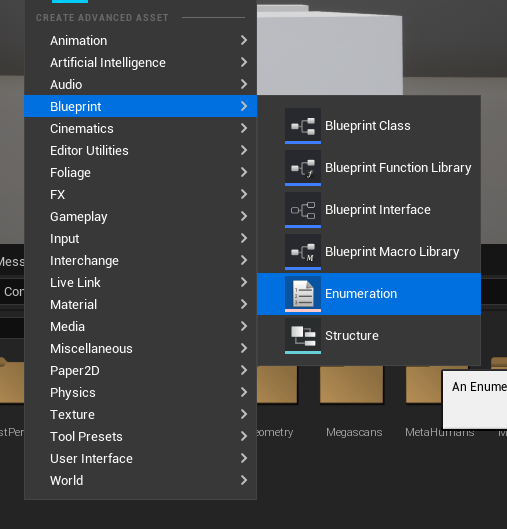
To create an Enum, developers navigate to the Content Browser, right-click, and select Blueprints -> Enumeration. After naming the Enum (e.g., EItemRarity), values representing different tiers of quality (e.g., Common, Uncommon, Rare, Epic, Legendary) are added. Each value is assigned an internal integer, but is referenced by its descriptive name, making data entry and retrieval intuitive. This standardization is crucial for maintaining data integrity across a large project, especially when multiple designers and programmers are contributing.
Defining the Data Schema with a Structure (Struct)
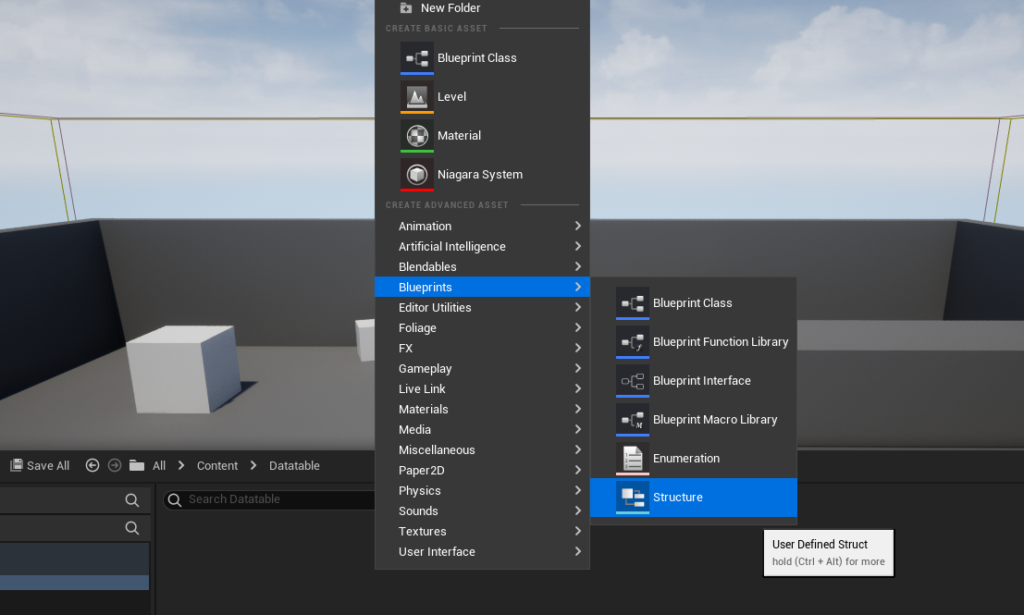
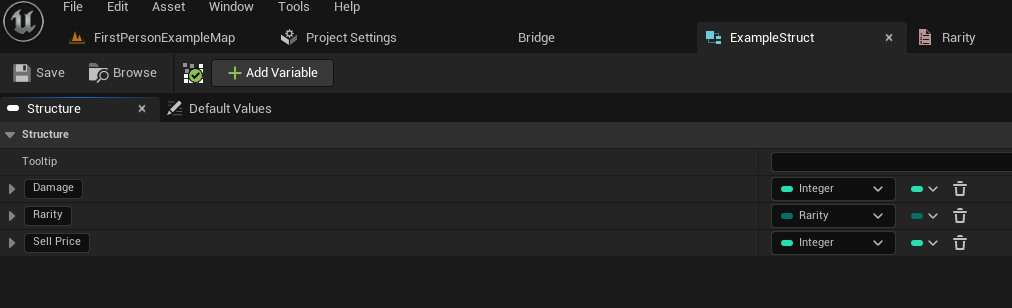
Following the creation of necessary Enums, the next critical step is to define a Structure (Struct). A Struct in Unreal Engine is a custom data type that groups together variables of different types under a single name. It acts as the blueprint for each row in a Data Table, dictating what pieces of information each entry will hold. For an item, this might include attributes such as Damage (float), Rarity (using the EItemRarity Enum), and SellPrice (integer).
To create a Struct, developers right-click in the Content Browser and select Blueprints -> Structure. Once named (e.g., FExampleItemData), variables corresponding to the desired data points are added. Each variable is assigned a specific data type, including custom Enums. For instance, adding a variable named ItemDamage of type Float, ItemRarity of type EItemRarity, and ItemSellPrice of type Integer establishes a comprehensive template for item data. This structured approach ensures that every item entry in the Data Table adheres to the same set of properties, facilitating predictable data access and manipulation. The reusability of structs is a significant advantage, as a single struct definition can underpin multiple Data Tables, promoting a consistent data architecture across a project.
Constructing and Populating the Data Table
With the foundational Enum and Struct in place, the process of creating the Data Table itself becomes straightforward. This asset serves as the central repository for the structured data defined by the chosen Struct.
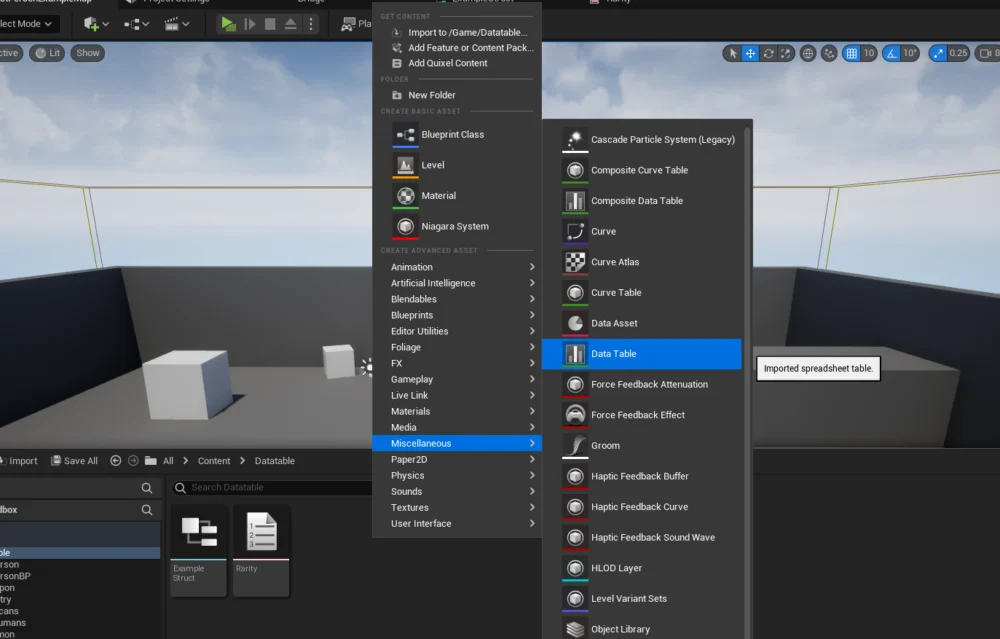
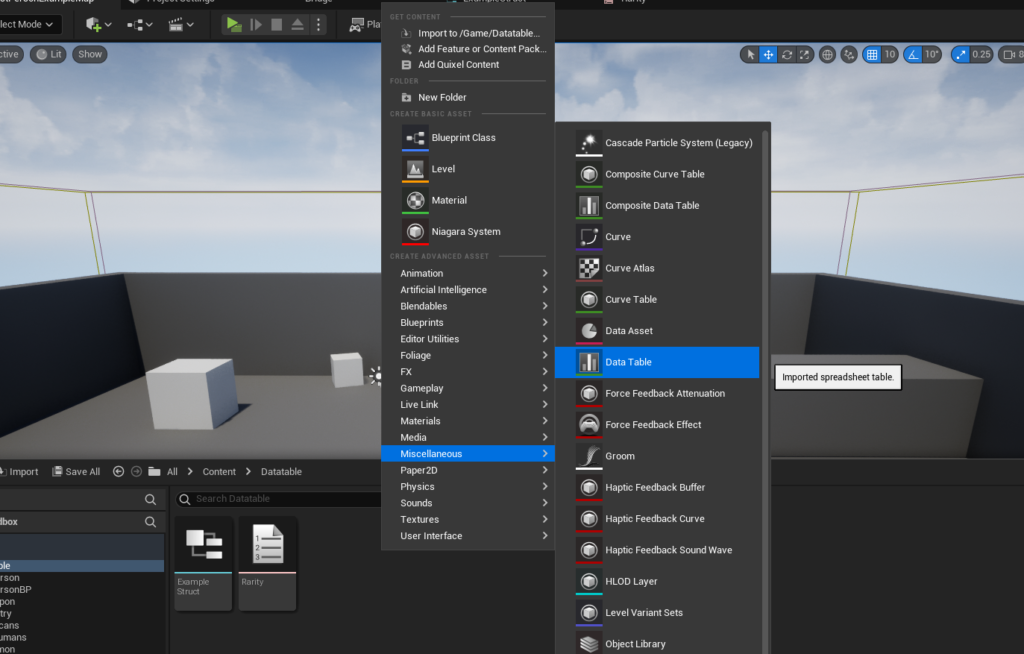
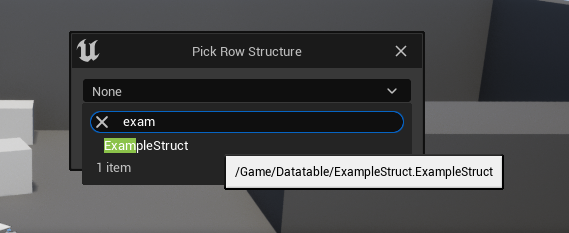
To create a Data Table, developers right-click within the Content Browser, navigate to Miscellaneous, and select Data Table. Upon selection, a crucial prompt appears, requiring the developer to choose the Row Structure. This is where the previously created Struct (e.g., FExampleItemData) is linked, establishing the schema for all subsequent data entries. This selection is immutable after creation, underscoring the importance of careful planning for the Struct’s definition.
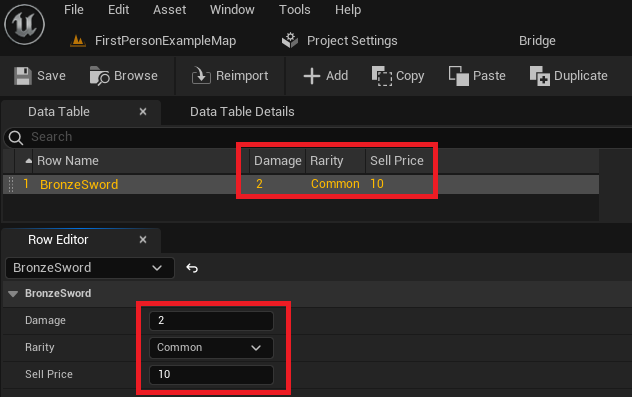
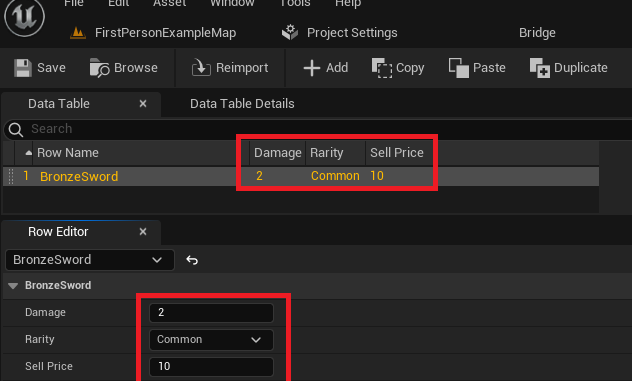
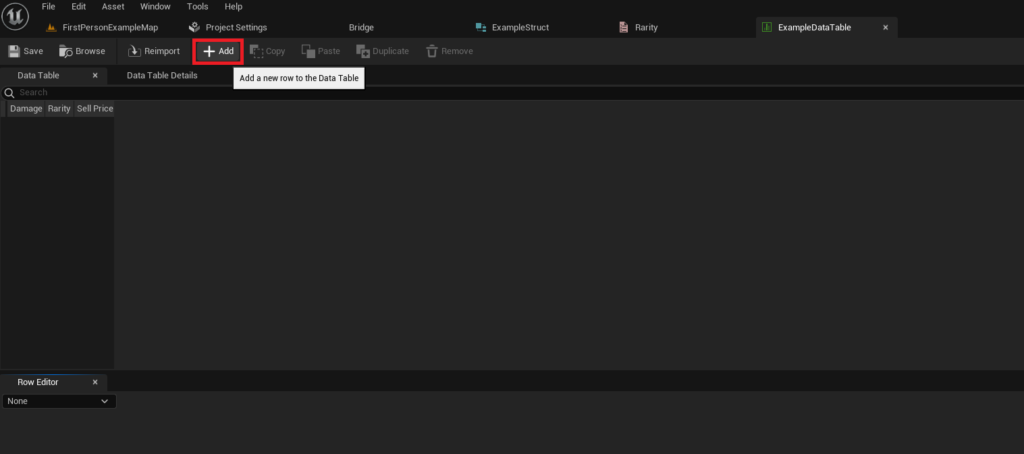
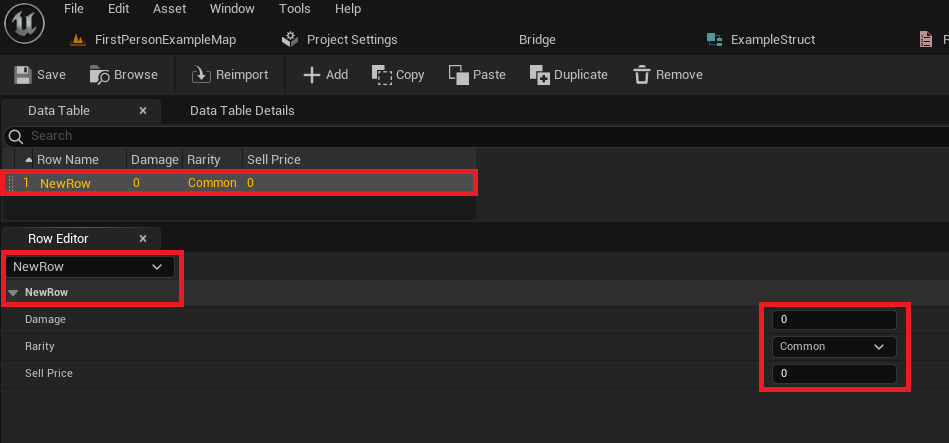
Once the Data Table asset is created and opened, it presents an interface similar to a spreadsheet. The initial view typically shows an empty table. To populate it, the "Add" button is used to introduce new rows. Each new row automatically inherits the default values defined in the associated Struct. The "Row Editor" panel, usually located below the main table view, provides a detailed interface for modifying the values of the currently selected row.
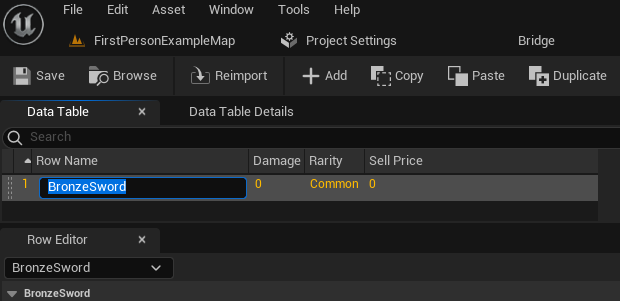
A critical aspect of Data Table management is the Row Name. Each row requires a unique identifier, acting as a key for data retrieval. Developers can modify the default "NewRow" name to something descriptive and unique, such as "BronzeSword," "IronShield," or "HealthPotion." These names are vital for accessing specific data entries programmatically. The flexibility to change values directly in the Row Editor and observe instant updates in the main table facilitates rapid prototyping and balancing of game elements. It is imperative for developers to regularly save the Data Table asset to prevent loss of work, particularly when dealing with extensive data sets.
For projects with large volumes of data, Unreal Engine also supports importing data into Data Tables from external files, typically CSV (Comma Separated Values) or JSON (JavaScript Object Notation) formats. This feature is invaluable for bulk data entry, integrating data from external tools (e.g., spreadsheets used by game designers), or migrating data between projects. Conversely, data can also be exported, providing flexibility for external analysis or version control. This import/export capability significantly enhances the scalability and collaborative aspects of Data Table usage.
Accessing and Utilizing Data Tables Programmatically
The utility of Data Tables extends far beyond mere storage; their power lies in the ease with which their data can be accessed and manipulated within game logic, primarily through Blueprints or C++.
Retrieving Specific Data Rows
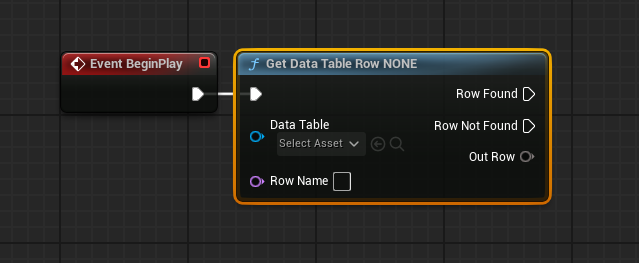
The primary method for accessing individual data entries is via the Get Data Table Row node in Blueprints. This node requires two key inputs: a reference to the Data Table asset itself and the Row Name (the unique identifier) of the desired entry. The node provides two execution pins: Row Found and Row Not Found. This explicit error handling is crucial for robust game logic, allowing developers to gracefully manage scenarios where a requested row might not exist.
Upon successful retrieval, the Out Row pin outputs a copy of the Struct data corresponding to the specified row. To make the individual variables within this Struct accessible, the Out Row pin can be right-clicked, and Split Struct Pin selected. This action expands the Struct into its constituent variables (e.g., Damage, Rarity, Sell Price), which can then be used directly in subsequent Blueprint nodes. An additional convenience feature is that if the Row Name input pin is not connected to another node, it transforms into a dropdown menu, allowing developers to select from all available row names within the referenced Data Table, minimizing potential typos during development.
Iterating Through Data Table Rows
Beyond retrieving individual entries, there are many scenarios where developers need to process all or multiple rows within a Data Table. For instance, populating a store inventory, calculating aggregate statistics, or applying global effects might require iterating through every item. This is achieved efficiently using a combination of the Get Data Table Row Names node and a For Each Loop.
The Get Data Table Row Names node takes a Data Table asset reference and outputs an array of Name values, each corresponding to a Row Name within the table. This array can then be fed into a For Each Loop node. The For Each Loop executes its Loop Body pin once for each element in the input array, providing the current Array Element (which is a Row Name) and an Array Index.
Within the Loop Body, the Array Element (the current Row Name) is connected to the Row Name input of a Get Data Table Row node. This setup allows the loop to sequentially retrieve the full Struct data for each row in the Data Table. The Out Row data, once split, can then be processed according to the specific game logic required for each iterated item. This pattern is incredibly powerful for dynamically generating content, evaluating game states, or performing bulk operations on game data.
Broader Impact and Strategic Implications
The strategic implementation of Data Tables in Unreal Engine 5 extends far beyond simple data storage, profoundly influencing project scalability, team collaboration, and the overall efficiency of game development.
Enhancing Collaboration and Iterative Design: Data Tables foster a highly collaborative environment. Game designers, level designers, and content creators can directly populate and adjust game data (e.g., weapon stats, enemy health, quest rewards) within the Unreal Editor without requiring direct programmer intervention or C++ recompilations. This decoupling of data from logic empowers non-technical team members to iterate rapidly on game balance and content, significantly shortening development cycles and enabling a more agile design process. Programmers, in turn, can focus on developing robust systems and logic, knowing that the underlying data can be managed by other disciplines.
Scalability for Complex Projects: As games grow in scope and ambition, the sheer volume of data can become overwhelming. Data Tables provide a structured, performant, and maintainable solution for managing thousands of items, hundreds of enemies, or complex quest lines. Their asset-based nature allows for easy version control integration and reduces the memory footprint compared to individual Blueprint assets for every single data instance. This scalability is particularly critical for live-service games, where new content and balance adjustments are frequent.
Single Source of Truth: By consolidating related data into a single Data Table asset, developers establish a "single source of truth." This minimizes inconsistencies and errors that often arise when data is scattered across multiple locations (e.g., hardcoded values, disparate Blueprint variables, external text files). Any changes to the Data Table immediately propagate throughout the game systems that reference it, ensuring uniformity and predictability.
Performance Optimization: While seemingly simple, Data Tables are optimized for performance. When an Unreal Engine project is packaged, Data Table assets are compiled into a highly efficient binary format. This allows for extremely fast lookup times at runtime, crucial for games that frequently access large datasets (e.g., querying item properties every time an inventory is opened or an enemy spawns). This efficiency often surpasses the performance of parsing custom external files during gameplay.
Facilitating Localization and Moddability: Data Tables can be instrumental in managing localization data, allowing text strings for various languages to be stored and retrieved based on a key. This simplifies the process of making games accessible to a global audience. Furthermore, for games that aim to be moddable, well-structured Data Tables can be exposed to mod creators, enabling them to easily create new content or modify existing game parameters without delving into complex code, fostering vibrant community engagement.
Conclusion
Unreal Engine 5 Data Tables are a cornerstone of efficient and scalable game development. By providing a structured, accessible, and collaborative method for managing game data, they empower development teams to build more complex, balanced, and maintainable titles. From the initial definition of data schema through Enums and Structs, to the intuitive population of data within the editor, and finally to the robust programmatic access via Blueprints, Data Tables streamline critical workflows. Their inherent benefits in terms of type safety, performance, collaborative potential, and support for iterative design cycles make them an indispensable tool for any Unreal Engine 5 project aiming for professional quality and long-term sustainability. Mastering Data Tables is not merely a technical skill but a strategic advantage in the dynamic landscape of modern game production.
About the Author