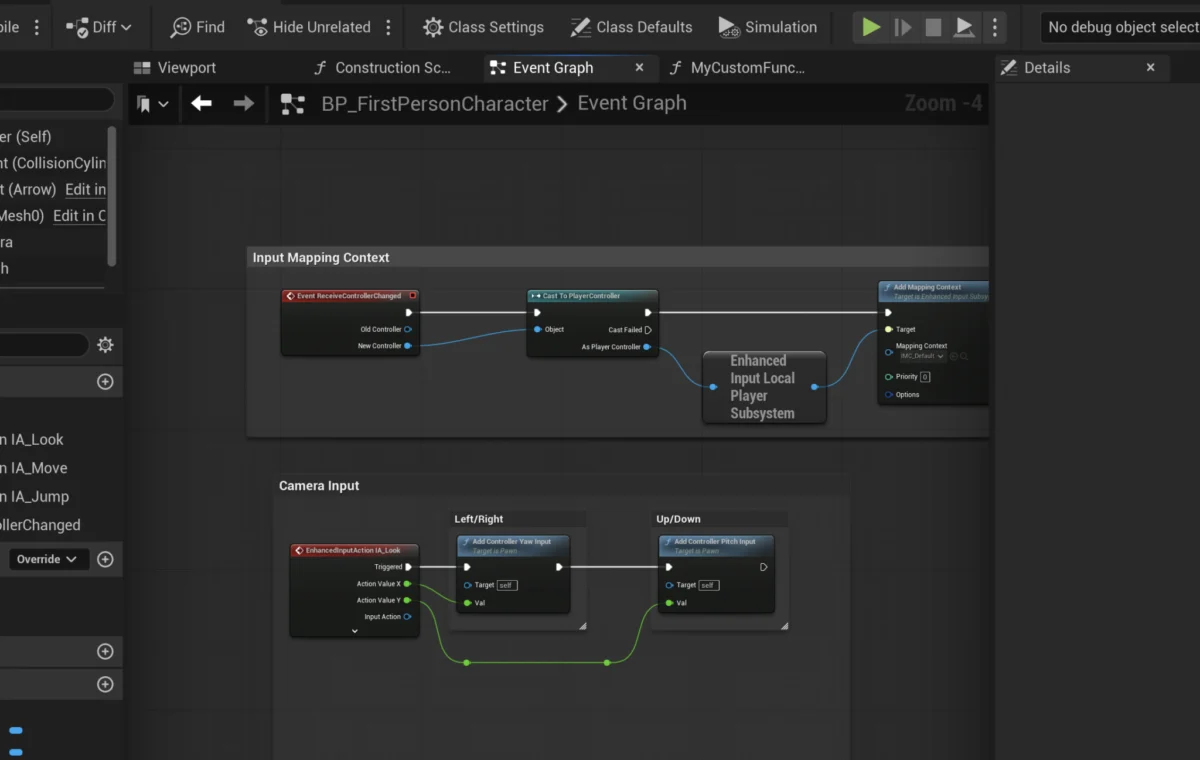
The adoption of robust, modular programming paradigms is a cornerstone of efficient game development, a principle powerfully embodied by Blueprint Functions within Unreal Engine 5. These self-contained blocks of visual scripting logic serve as indispensable tools for developers aiming to streamline workflows, enhance code reusability, and manage project complexity. From simplifying intricate gameplay mechanics to establishing scalable core systems, Blueprint Functions are instrumental in building sophisticated interactive experiences, offering a powerful abstraction layer over raw code.
The Foundational Role of Functions in Programming and Game Development
At its core, programming thrives on the concept of functions – discrete units of code designed to perform specific tasks. This fundamental principle extends seamlessly into visual scripting environments, with Unreal Engine 5’s Blueprint system providing a highly accessible and powerful implementation. Blueprint Functions encapsulate logic, making it callable from various points within an actor’s blueprint, thereby preventing redundant node networks and centralizing critical operations. The ability to define input and output parameters further enhances their utility, allowing developers to pass data into a function for processing and receive results, much like traditional code-based functions.
Consider the common scenario of damage calculation in a game. Without functions, a developer might find themselves recreating the same logic—subtracting armor from incoming damage, applying resistances, or factoring in critical hits—across numerous blueprints for different characters, weapons, or environmental hazards. This repetitive approach inevitably leads to increased development time, a higher likelihood of errors, and significant maintenance overhead. By contrast, encapsulating this logic within a single CalculateDamage Blueprint Function allows it to be invoked wherever needed. Any future adjustments or balance changes to the damage formula then require only a single modification within the function itself, propagating the update across the entire project instantly. This illustrative example underscores the profound impact functions have on project scalability and maintainability, drastically reducing technical debt and fostering a more agile development environment.
The Evolution of Visual Scripting in Unreal Engine
The journey towards the sophisticated Blueprint system in Unreal Engine 5 is rooted in a continuous effort by Epic Games to democratize game development. Earlier iterations of Unreal Engine, such as UE3, featured a visual scripting tool called Kismet. While revolutionary for its time, Kismet was primarily event-driven and lacked the comprehensive, object-oriented capabilities that would later define Blueprint. The introduction of Blueprint with Unreal Engine 4 marked a significant paradigm shift, offering a fully-fledged visual scripting language that mirrored many aspects of C++ programming, including variables, classes, interfaces, and crucially, functions. This evolution has empowered a broader range of developers, including technical artists and designers, to implement complex gameplay systems without requiring extensive C++ knowledge, fostering closer collaboration between diverse team members.
Unreal Engine 5 has further refined Blueprint, optimizing its performance and integrating it more deeply with the engine’s advanced features, such as Lumen and Nanite. The emphasis remains on providing tools that promote efficiency and clarity, making Blueprint Functions an increasingly vital component in managing the visual complexity of next-generation game logic. The engine’s commitment to visual scripting reflects a broader industry trend towards accessible development tools that can accelerate prototyping and iteration cycles, critical factors in today’s fast-paced game development landscape.
Core Principles of Blueprint Functions: Encapsulation and Data Flow
A Blueprint Function is fundamentally a self-contained unit of logic. This means all the nodes and operations within a function are isolated from the main Event Graph until the function is explicitly "called" or "run." This encapsulation is key to managing complexity. Rather than having a sprawling network of nodes in the Event Graph that performs a specific calculation, that logic can be neatly tucked away inside a function, represented by a single, clean node when called.
The power of functions is significantly amplified by their ability to handle data through input and output parameters.
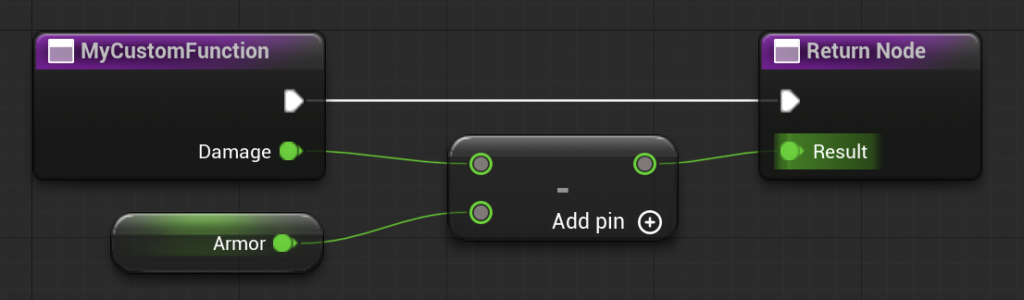
- Input Parameters: These allow data to be fed into the function when it is called. For instance, in our
CalculateDamageexample,Damagewould be an input parameter, specifying the base amount of damage to be processed. - Output Parameters: These enable the function to return computed values back to the calling graph. The
Resultof the damage calculation, representing the final damage after modifications, would be an output parameter.
This data flow mechanism ensures that functions are highly flexible and adaptable. They are not hard-coded to specific values but can dynamically process different inputs each time they are called, yielding varied results as required by the gameplay context. It is important to note a critical distinction between Blueprint Functions and Blueprint Events: Functions execute synchronously and cannot contain certain asynchronous nodes, such as Delay nodes. If a piece of logic requires a time-based delay or other asynchronous operations, a Custom Event is typically the more appropriate choice, highlighting the specialized roles each component plays within the Blueprint ecosystem.
Implementing Blueprint Functions: A Step-by-Step Overview
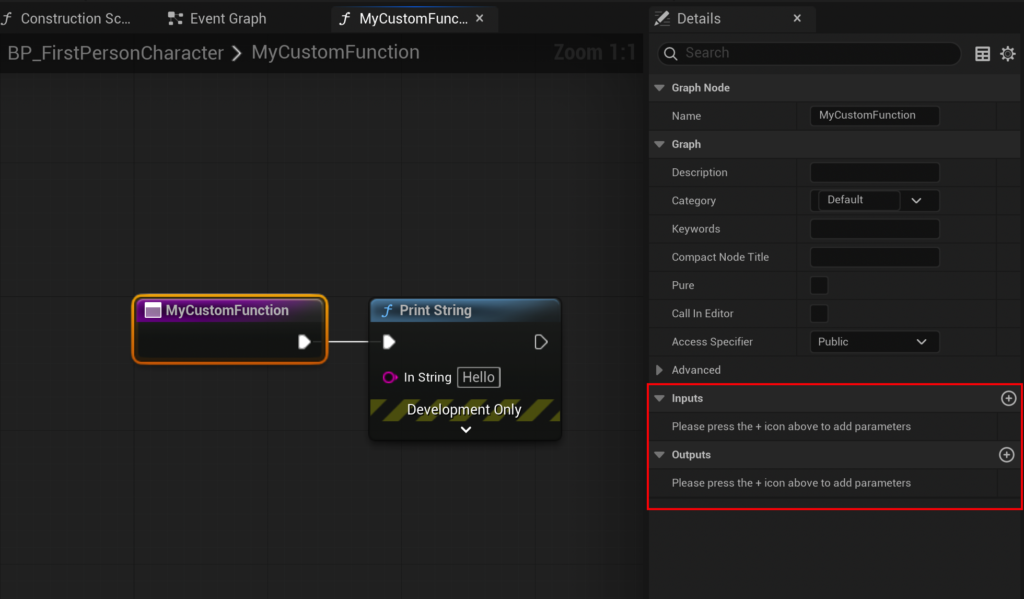
Creating a Blueprint Function in Unreal Engine 5 is an intuitive process designed for clarity and efficiency. The process typically begins within a specific Blueprint Actor, such as the FirstPersonCharacter blueprint found in the First Person Shooter template.
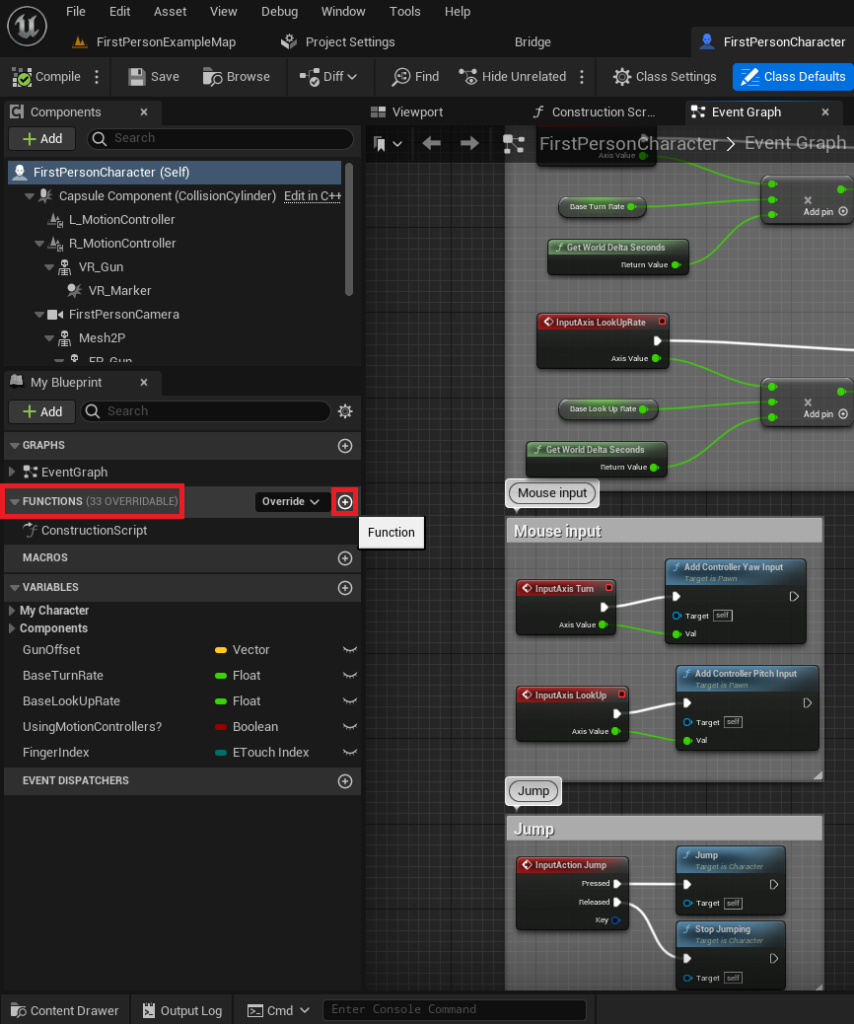
- Accessing the Functions Panel: Within the Blueprint Editor, developers locate the "Functions" section in the My Blueprint panel (usually on the left side). This panel serves as the central repository for all functions pertinent to that specific blueprint.
- Initiating Function Creation: A new function is instantiated by clicking the ‘+’ icon adjacent to the "Functions" dropdown. This action creates a new, empty function graph, ready for logic definition.
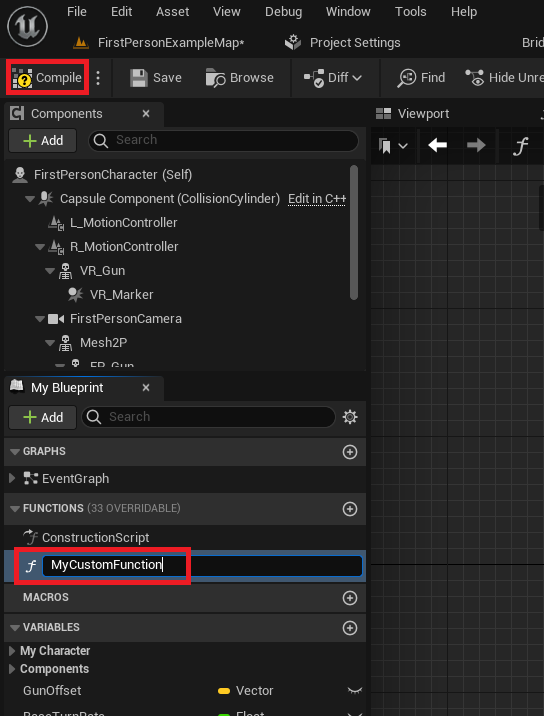
- Naming Conventions: Adhering to clear and descriptive naming conventions is paramount for project maintainability, especially in larger development teams. A function named
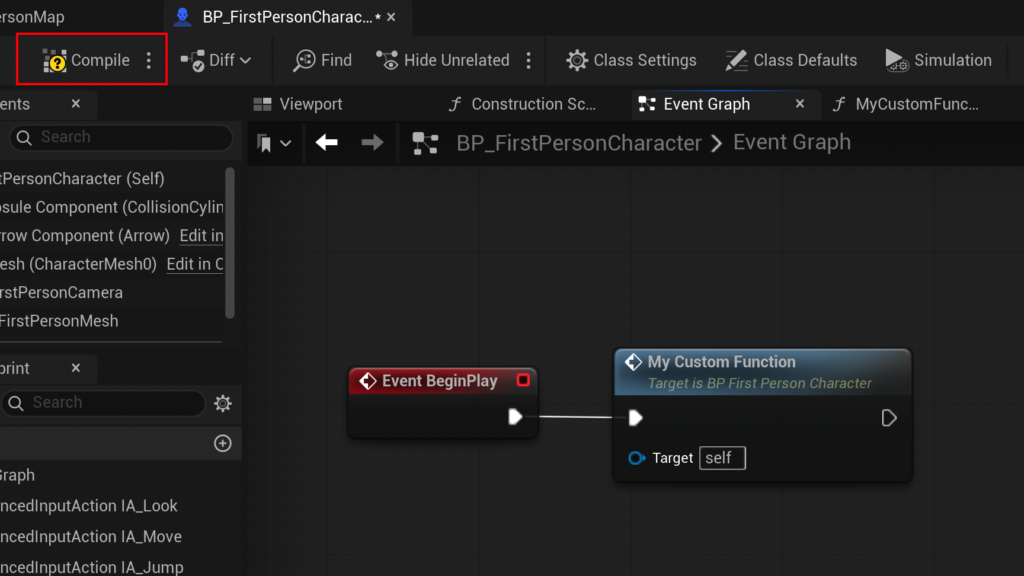
MyCustomFunctionis acceptable for initial learning, but in a production environment, a name likeApplyDamageReductionorGetPlayerHealthwould be far more informative, contributing to a clean and understandable project structure. - Compilation: After naming and before the function can be utilized, it must be compiled. The "Compile" button in the Blueprint Editor transforms the visual nodes into executable code, integrating the function into the blueprint’s overall logic. This compilation step ensures that the engine can correctly interpret and execute the defined functionality.
Building Basic Functionality: The "Print String" Demonstration

To illustrate basic functionality, a simple Print String function serves as an excellent starting point.
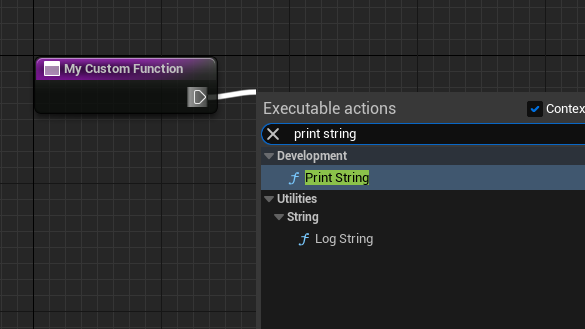
- Connecting Nodes: Within the newly created function graph, an "exec pin" (a white triangle) on the function’s entry node is dragged out. Releasing the mouse button in the empty graph space brings up a context menu.
- Adding the
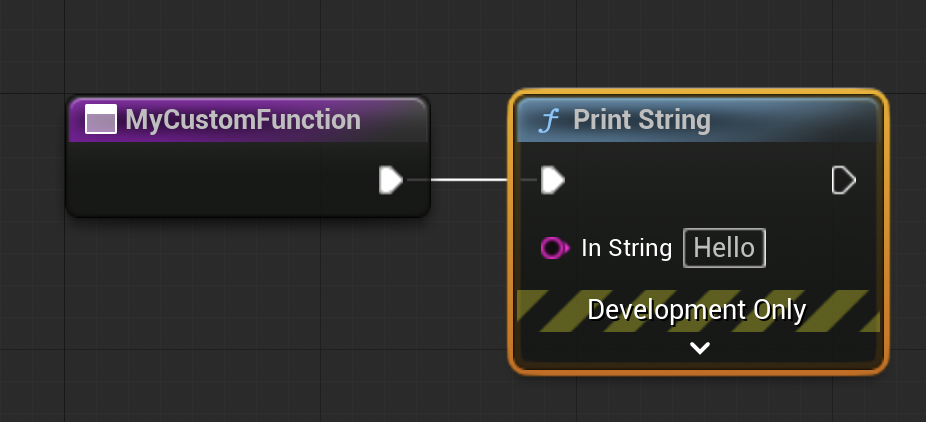
Print StringNode: Searching for and selecting "Print String" from this menu automatically connects it to the function’s execution flow. This node, a fundamental debugging tool, outputs text to the Unreal Engine’s Output Log and, optionally, to the screen. - Defining Output: The
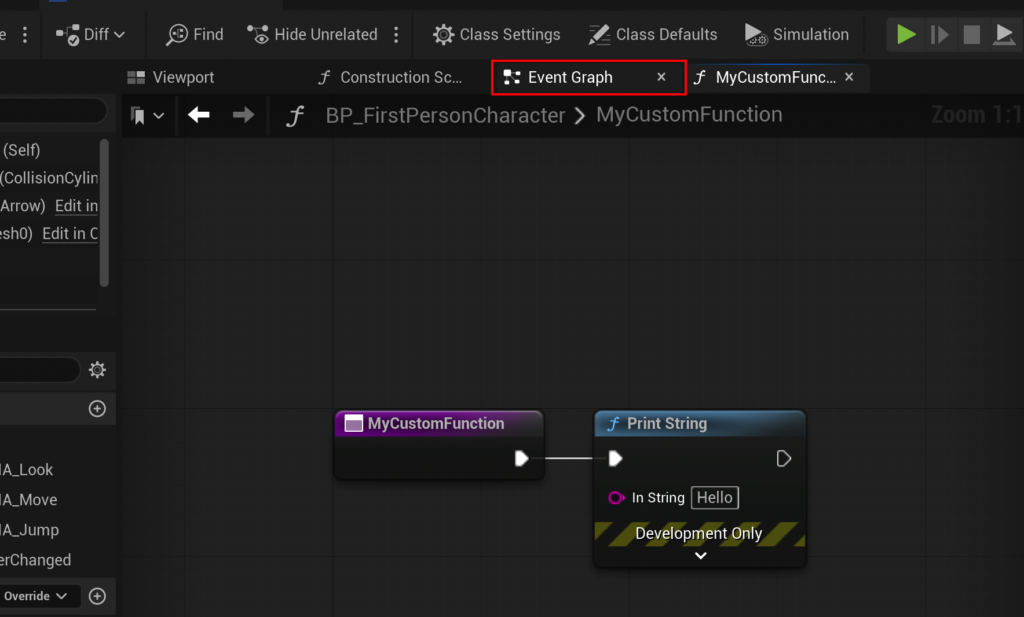
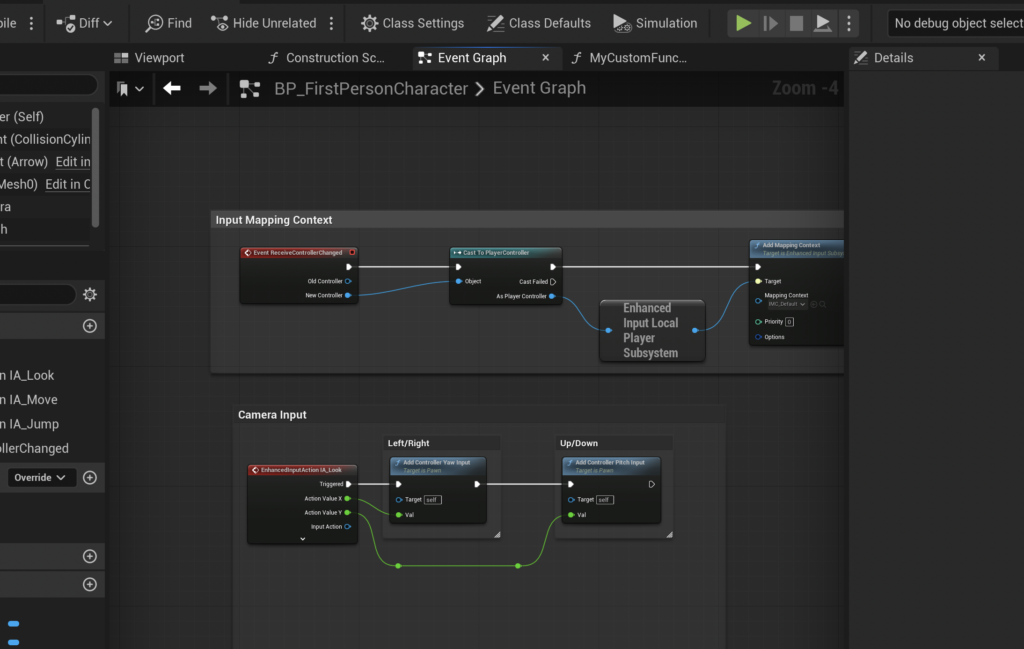
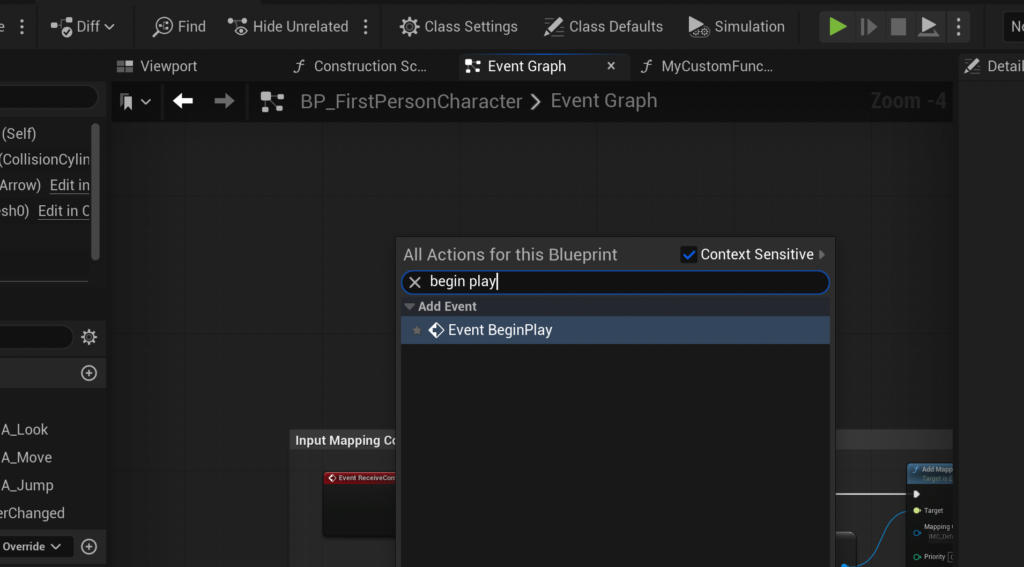
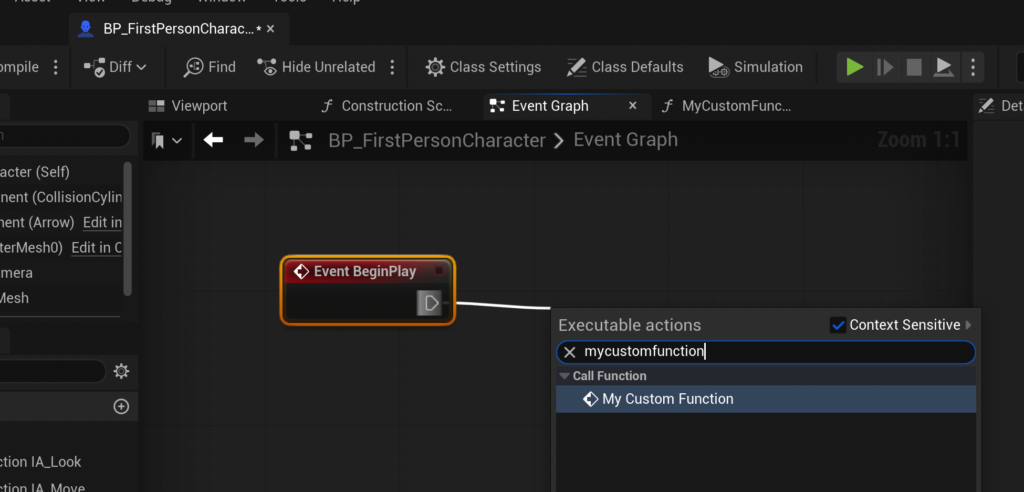
Print Stringnode can be configured to display any desired text, such as "Hello." When this function is called, it will execute thePrint Stringnode sequentially. - Calling the Function from an Event: To observe the function in action, it must be called from an Event Graph. A common practice is to trigger it on
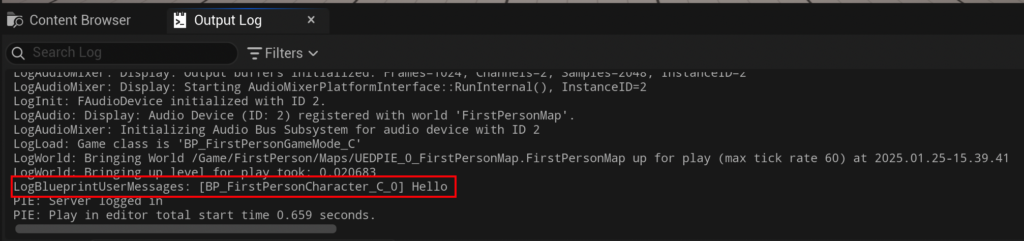
Event Begin Play, an event that fires when the actor is spawned into the game world. By dragging an exec pin from theEvent Begin Playnode and searching for the newly created function (e.g.,MyCustomFunction), a callable node for the function is placed and connected. - Testing: Compiling and saving the blueprint, then launching the game, will demonstrate the function’s execution as "Hello" appears in the Output Log. This simple example reinforces the concept of a function as a reusable piece of logic that can be activated by an event. The terms "call," "called," and "calling" are synonymous with running a function, establishing a consistent vocabulary within the development community.
Advanced Functionality: The CalculateDamage Function with Inputs and Outputs
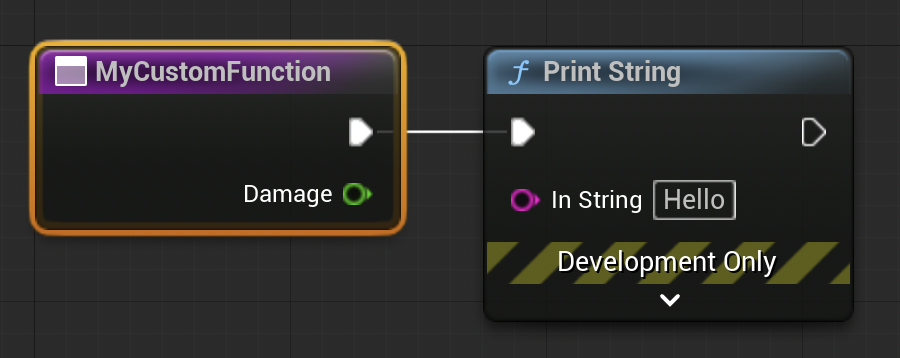
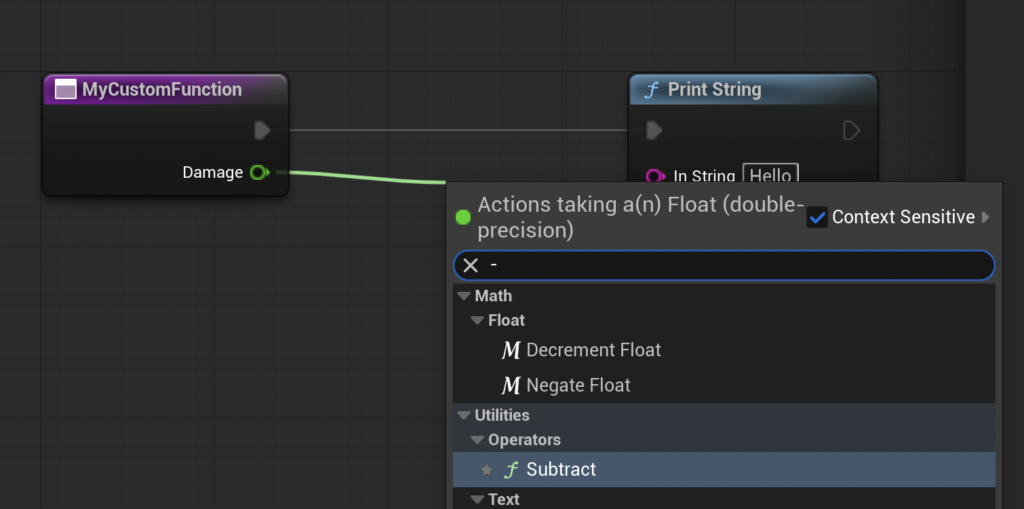
Expanding beyond basic printing, Blueprint Functions truly shine when handling complex logic involving data manipulation. The CalculateDamage example, a cornerstone of many game systems, demonstrates the utility of input and output parameters.
-
Setting Up Input Parameters:
- Navigate back to the function graph and select the main function node (e.g.,
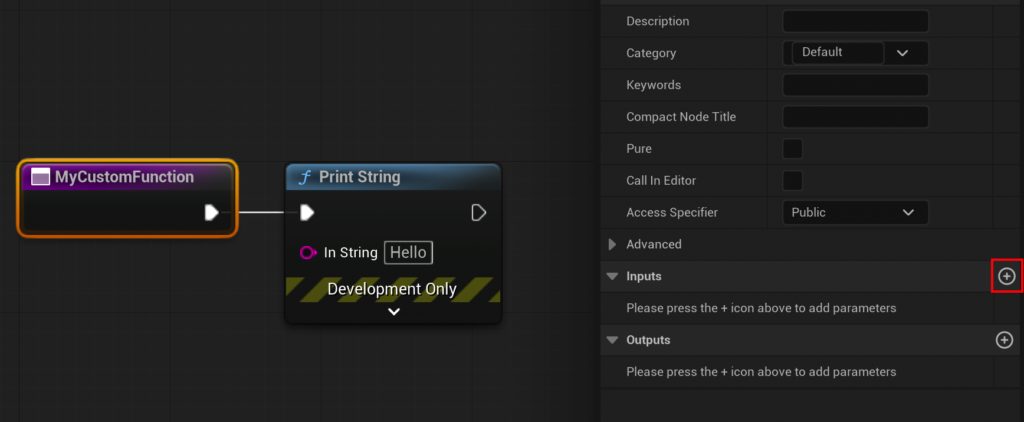
MyCustomFunction). - In the Details panel on the right, locate the "Inputs" section.
- Click the ‘+’ button to add a new input parameter.
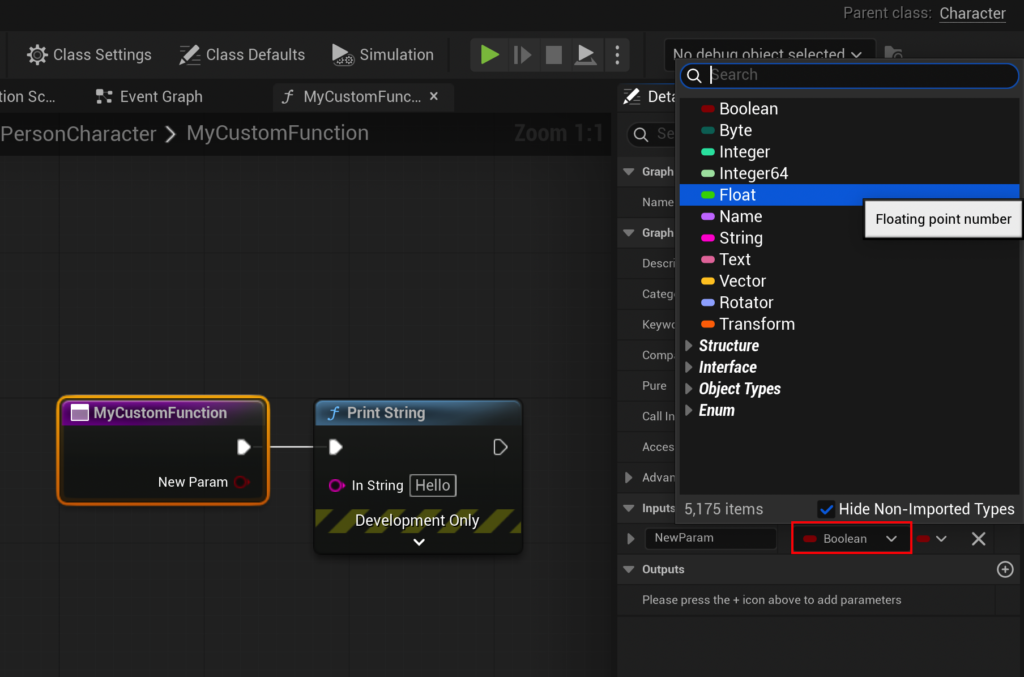
- Rename the parameter to
Damageand change its type fromBooleantoFloat, signifying it will accept a numerical value. ThisDamageinput will be the raw damage value passed into the function.
- Navigate back to the function graph and select the main function node (e.g.,
-
Implementing Logic with Internal Variables:
- Drag the green
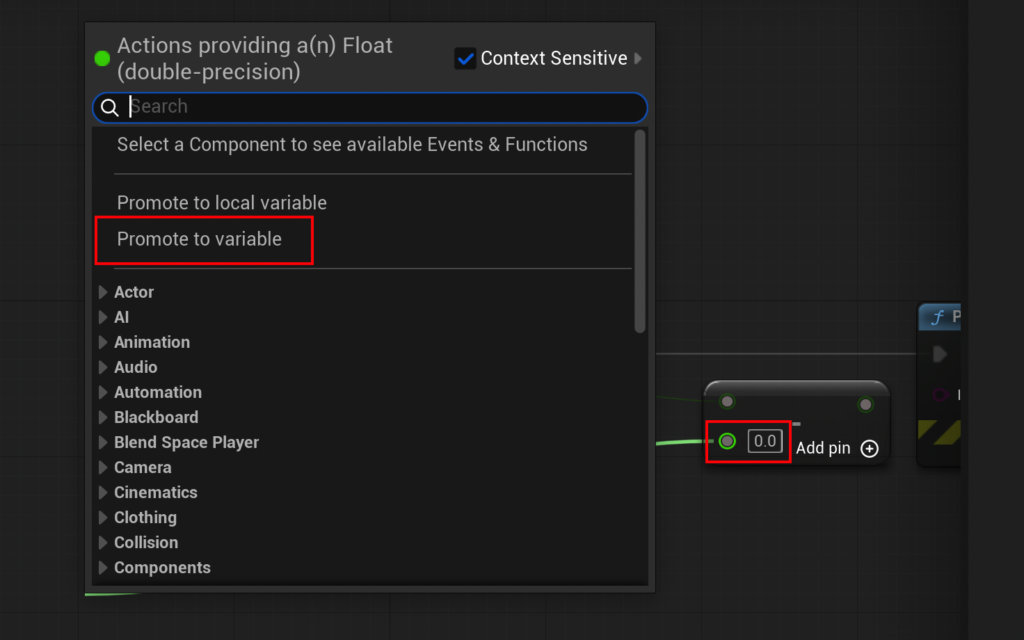
Damagepin from the function entry node into the graph and release. Search for the "Float – Float" (subtract) node to perform a subtraction operation. - From the bottom input pin of the subtract node, drag out and select "Promote to Variable." This action creates a new variable directly within the function graph, allowing local storage and manipulation of values.
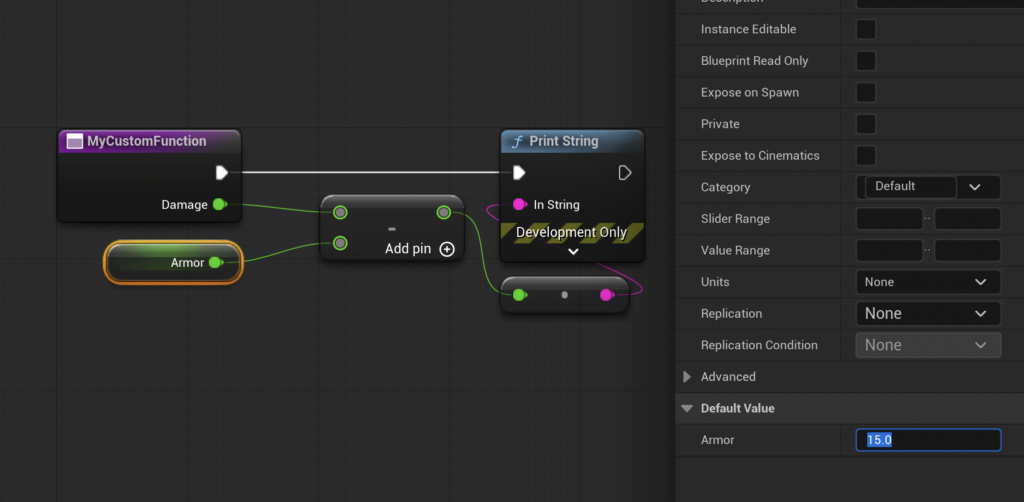
- Name this new variable
Armorand ensure its type isFloat. In the Details panel for theArmorvariable, set its default value (e.g.,15.0). ThisArmorvariable represents the character’s damage absorption. - Connect the
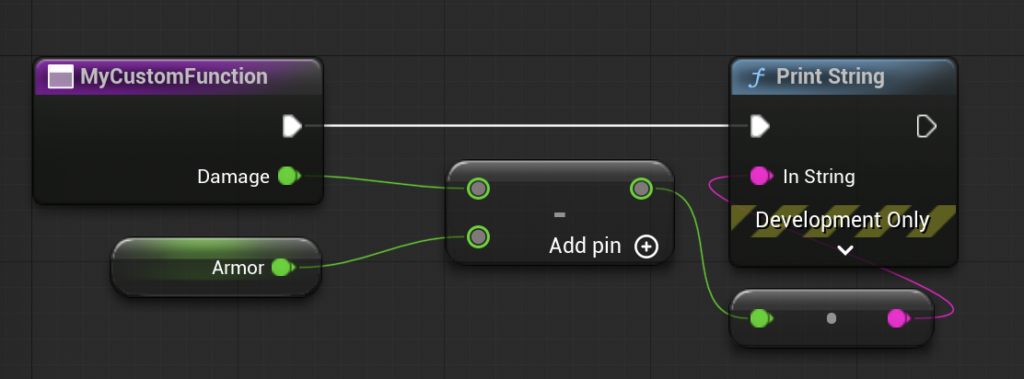
Damageinput to the top pin of the subtract node, and theArmorvariable to the bottom pin. The subtract node will now computeDamage - Armor.
- Drag the green
-
Defining Output Parameters (Returning Values):
- With the function node still selected in the graph, locate the "Outputs" section in the Details panel.
- Click the ‘+’ button to add a new output parameter.
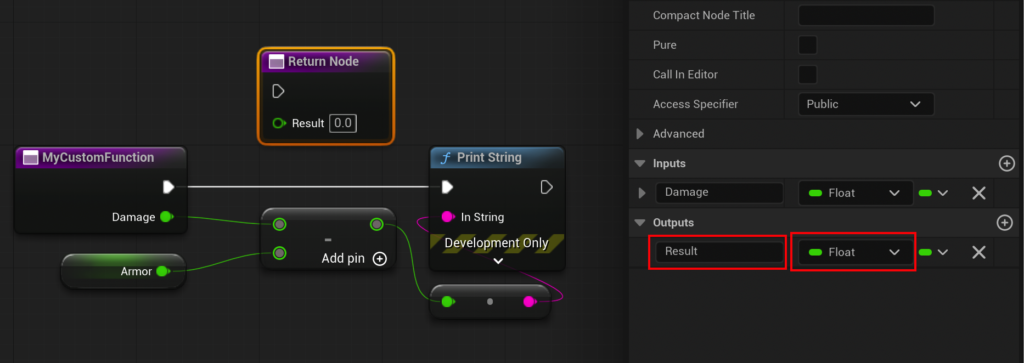
- Rename this parameter to
Resultand set its type toFloat. - Upon creation, Unreal Engine automatically generates a "Return Node" in the function graph. This node serves as the exit point for the function, where output values are specified.
- Connect the output of the subtract node to the
Resultpin of the Return Node. - The previous
Print Stringnode within the function should be deleted, as the function’s purpose is now to calculate and return a value, not to directly print it.
-
Testing the
CalculateDamageFunction: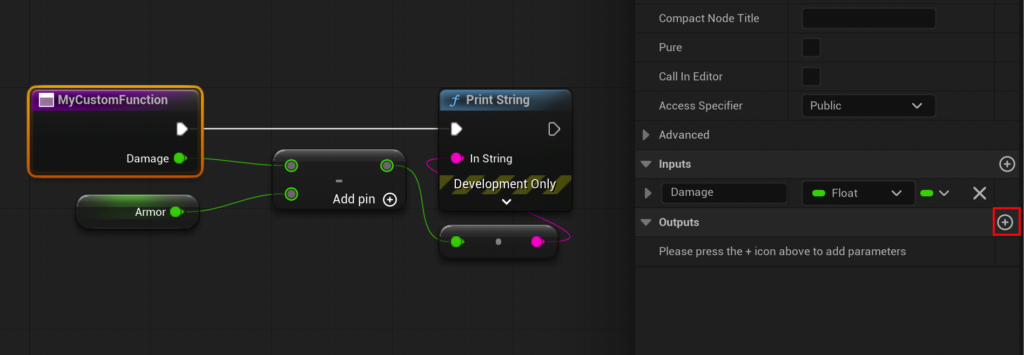
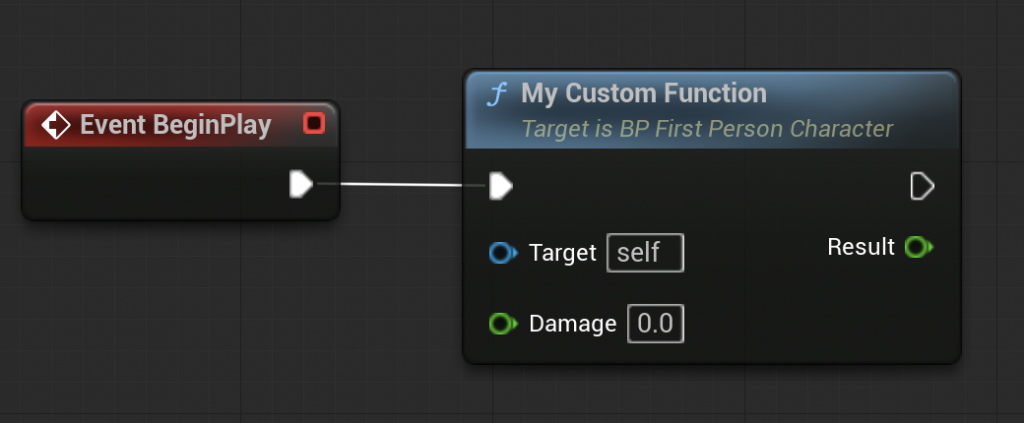
- Return to the Event Graph. The
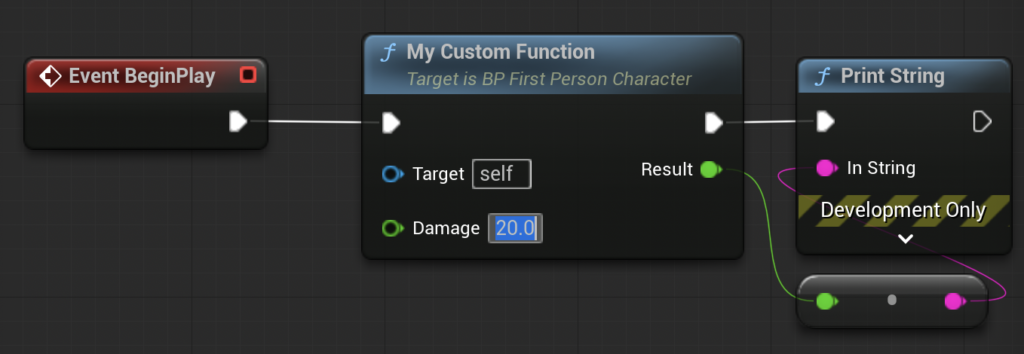
MyCustomFunctionnode now displays theDamageinput pin and theResultoutput pin. - Set a test value for the
Damageinput, for example,20.0. - To verify the output, drag from the
Resultoutput pin and connect it to a newPrint Stringnode. - Compile and save the blueprint.
- When the game is run, the function
MyCustomFunction(acting asCalculateDamage) will be called with an input of20.0. Inside the function,15.0(theArmorvalue) will be subtracted from20.0, yielding5.0. This5.0will then be returned as theResultand subsequently printed to the Output Log by thePrint Stringnode in the Event Graph. This demonstration clearly illustrates the complete lifecycle of data through a function: input, processing, and output.
- Return to the Event Graph. The
Strategic Implications for Modern Game Development

The strategic adoption of Blueprint Functions carries significant implications for game development studios of all sizes:
- Enhanced Team Collaboration: By modularizing logic into functions, different developers can work on separate, self-contained components without constantly interfering with each other’s work on the main Event Graph. This promotes parallel development and reduces merge conflicts.
- Scalability and Project Longevity: As games grow in scope and complexity, the ability to organize logic into reusable functions becomes paramount. It prevents the Event Graph from becoming an unmanageable "spaghetti" of nodes, making the project easier to scale, maintain, and expand over its lifecycle.
- Reduced Technical Debt: Consolidating logic in functions minimizes redundant code, which in turn reduces the potential for bugs and the effort required for debugging and refactoring. Changes made to a function are instantly reflected across all instances where it’s called, significantly cutting down maintenance time.
- Improved Readability and Onboarding: Well-named functions act as documentation, clearly communicating their purpose. This makes it easier for new team members to understand existing systems and contribute effectively, shortening the onboarding process.
- Empowering Designers: Functions provide a layer of abstraction that allows game designers to implement complex gameplay rules and interactions without needing to understand the underlying technical implementation details. They can simply call a function and provide inputs, focusing on creative iteration rather than intricate node wiring.
Epic Games’ continued investment in the Blueprint system, including its function capabilities, aligns with their broader vision of making high-fidelity game development more accessible and efficient for a global community of creators. The robustness of Blueprint Functions allows for an iterative development process, where complex systems can be designed, implemented, and refined with remarkable agility.
Conclusion
Blueprint Functions in Unreal Engine 5 represent a fundamental programming concept vital for modern game development. They empower developers to create highly organized, reusable, and maintainable visual scripts, transforming what could be chaotic node networks into structured, efficient systems. By mastering the creation and utilization of input and output parameters, encapsulating logic, and understanding the distinction between functions and events, developers gain a potent toolset for building ambitious and robust interactive experiences. Whether constructing intricate gameplay mechanics, optimizing performance, or fostering seamless team collaboration, Blueprint Functions are an indispensable asset in the Unreal Engine ecosystem, forming the backbone of clean, scalable, and manageable projects. Their ongoing evolution ensures that Unreal Engine remains at the forefront of accessible yet powerful game development.
About the Author