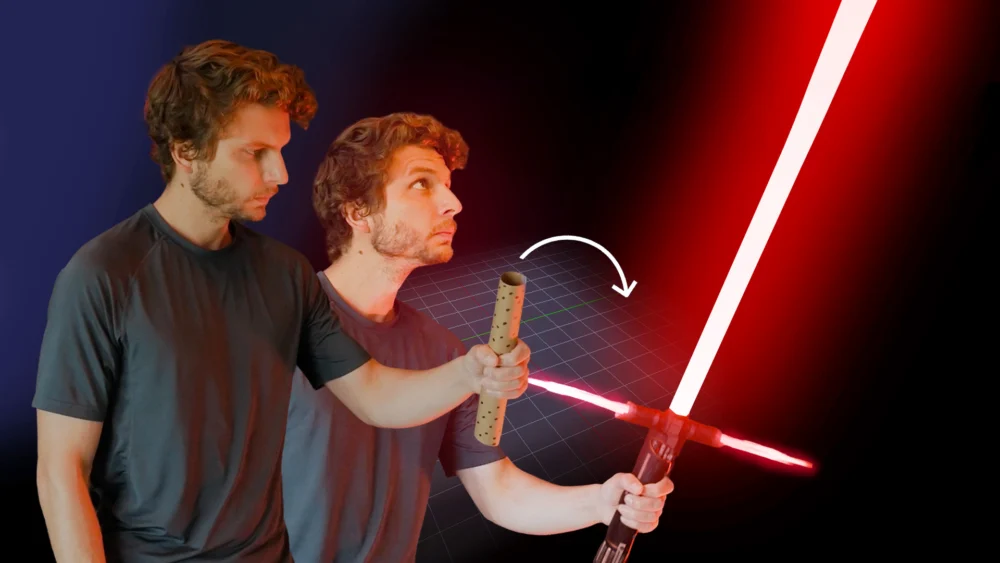
A new instructional video released by BlenderNation, spearheaded by long-time Blender educator Kenan Proffitt, offers a streamlined approach to mastering object tracking within the popular open-source 3D creation suite. The tutorial, presented in a concise eight-minute format, aims to demystify a crucial aspect of visual effects (VFX) production, enabling users to seamlessly integrate 3D elements into live-action footage. This development arrives at a time when the demand for sophisticated VFX capabilities in independent filmmaking and professional projects continues to escalate, making accessible and efficient training resources increasingly vital.
The Evolution of Object Tracking in Blender
Object tracking, also known as motion tracking or camera tracking, is a fundamental technique in VFX that allows animators and visual effects artists to match the movement of a virtual camera in a 3D environment to the movement of a real-world camera captured in footage. This process is essential for creating believable integrations of computer-generated imagery (CGI) into live-action scenes. For instance, adding a CGI dragon flying through a cityscape requires precise tracking of the camera’s movement in the original footage so the dragon appears to inhabit the same space and perspective.
Blender, since its inception, has continuously evolved its capabilities in this area. Early versions offered basic tracking tools, but over the years, significant advancements have been made, particularly with the introduction of powerful algorithms and a more intuitive user interface. The Grease Pencil object tracker, a key component for this tutorial, has been refined to offer greater accuracy and speed. Proffitt’s video leverages these recent improvements, aiming to make the process accessible even to those with limited prior experience in motion tracking.
Proffitt’s Approach: Efficiency and Clarity
Kenan Proffitt, an experienced VFX artist with over 15 years of dedicated work in Blender and a decade of experience producing educational content for YouTube, emphasizes a "step-by-step walkthrough" in his latest tutorial. This pedagogical approach is designed to break down a potentially complex process into manageable stages. The objective is to equip viewers with the knowledge to track their video footage directly within Blender and subsequently composite 3D assets back into the original shot, effectively bringing digital elements into the real world.
The video’s short duration, approximately eight minutes, suggests a focus on core principles and efficient workflows. This brevity is a strategic choice in today’s content-saturated digital landscape, where users often seek quick, impactful learning experiences. Proffitt’s extensive background in the film industry, where Blender is a regular fixture in his workflow, lends significant credibility to his instruction. His personal journey, which includes carving out a niche on YouTube for Blender VFX exploration, highlights his commitment to community-driven learning and knowledge sharing. This ethos is reflected in his desire to empower others to leverage Blender for their creative endeavors.
Technical Underpinnings of Blender’s Tracking System
Blender’s object tracking capabilities are built upon a sophisticated system that analyzes video frames to identify and follow specific points or patterns. The process typically involves several key steps:
- Scene Setup: Importing the video footage into Blender and preparing it for tracking.
- Pattern Identification: Selecting distinct features within the video that are unlikely to be obscured or to change appearance significantly. These are often high-contrast areas.
- Tracking: The software then follows these identified features across subsequent frames, calculating their movement and the camera’s perspective shift.
- Solving: Once enough tracking data is gathered, Blender calculates the camera’s motion and the 3D scene’s position, orientation, and scale. This is often referred to as "solving the camera motion."
- Compositing: Finally, 3D objects or effects are rendered and composited into the tracked footage, ensuring they align perfectly with the real-world camera movement.
The efficiency and accuracy of this process depend on several factors, including the quality of the original footage, the distinctiveness of the tracked points, and the sophistication of the tracking algorithms employed by the software. Proffitt’s tutorial likely guides users through optimizing these elements for the best results.
Data and Trends in VFX and 3D Integration
The demand for motion tracking and seamless 3D integration is a significant driver in the digital content creation industry. According to recent market research reports, the global visual effects market is projected to grow substantially in the coming years. For instance, reports from Mordor Intelligence indicate that the VFX market, valued at approximately USD 20 billion in 2023, is expected to reach over USD 35 billion by 2029, exhibiting a compound annual growth rate (CAGR) of around 9%. This growth is fueled by the booming film and television industry, the increasing adoption of CGI in advertising, and the rise of immersive media like virtual and augmented reality.
Blender’s role in this expanding market is noteworthy. As a free and open-source software, it democratizes access to professional-grade VFX tools, enabling independent filmmakers, small studios, and individual artists to compete with larger production houses. The continuous development and improvement of Blender’s features, including its tracking and compositing tools, directly contribute to its growing popularity and adoption in professional pipelines. The accessibility of such powerful tools is a key factor in the increasing volume and quality of VFX content being produced globally.
Implications for Creators and the Industry
Proffitt’s tutorial signifies a broader trend: the continuous effort to make advanced creative technologies more accessible. By distilling a complex workflow into an eight-minute video, Proffitt and BlenderNation are lowering the barrier to entry for aspiring VFX artists. This democratization of tools and knowledge has several implications:
- Increased Content Creation: More individuals and smaller teams will be equipped to produce higher-quality visual effects, potentially leading to a surge in independent film and animation projects.
- Skill Development: Accessible tutorials like this foster a more skilled global talent pool, benefiting the entire VFX industry. Artists can quickly acquire essential skills without significant financial investment in proprietary software or lengthy training programs.
- Innovation: As more creators experiment with these tools, novel approaches to visual storytelling and effects integration are likely to emerge.
- Cost-Effectiveness: For many projects, particularly those with limited budgets, employing Blender for tracking and integration can offer a significant cost-saving alternative to expensive commercial software.
The release of this tutorial can be seen as a strategic move to empower the Blender community, enabling them to tackle more ambitious projects that require sophisticated camera and object tracking. It aligns with the broader mission of open-source software to foster innovation and widespread adoption through collaboration and accessible resources.
A Timeline of Blender’s Tracking Advancements (Illustrative)
While Proffitt’s tutorial focuses on current capabilities, understanding the historical progression of Blender’s tracking tools provides context:
- Early Versions (Pre-2010): Basic motion tracking tools were available but often cumbersome and less accurate.
- Significant Overhauls (Mid-2010s): The Blender development community introduced substantial improvements to the tracking algorithms, enhancing stability and performance.
- Grease Pencil Integration and UI Refinements (Late 2010s – Present): The integration with Grease Pencil and a continuous refinement of the user interface have made the tracking workflow more intuitive and powerful. The introduction of features like planar tracking and improved solving options have further enhanced its capabilities.
- Ongoing Development: Blender’s development is community-driven, meaning features are constantly being added, refined, and optimized based on user feedback and technological advancements. Proffitt’s tutorial likely showcases some of the most recent and effective implementations.
The consistent evolution of Blender’s tracking system underscores its commitment to remaining a competitive and relevant tool in the demanding field of visual effects.
The "Why Now?" for Object Tracking Tutorials
The timing of this tutorial is particularly relevant given the current production landscape. The increasing use of virtual production techniques, where real-time rendering and compositing are paramount, relies heavily on accurate motion tracking. Furthermore, the proliferation of high-resolution cameras and complex visual environments in filmmaking necessitates robust tracking solutions. By offering a fast-track to mastering object tracking, Proffitt is addressing a direct need within the creative community. His decade-long presence on YouTube, building a community around sharing Blender knowledge, positions him as a trusted source for such instructional content. The emphasis on practical application – integrating 3D assets back into shots – directly translates to tangible skills for users looking to enhance their VFX capabilities.
In conclusion, Kenan Proffitt’s "Learn Blender Object Tracking Fast!" video represents more than just another tutorial. It is a testament to the ongoing democratization of advanced creative technologies and a valuable resource for a growing community of artists and filmmakers seeking to elevate their visual effects work. By providing a clear, concise, and practical guide, Proffitt empowers users to harness the full potential of Blender’s sophisticated object tracking capabilities, contributing to the vibrant and ever-expanding world of digital content creation.
About the Author