
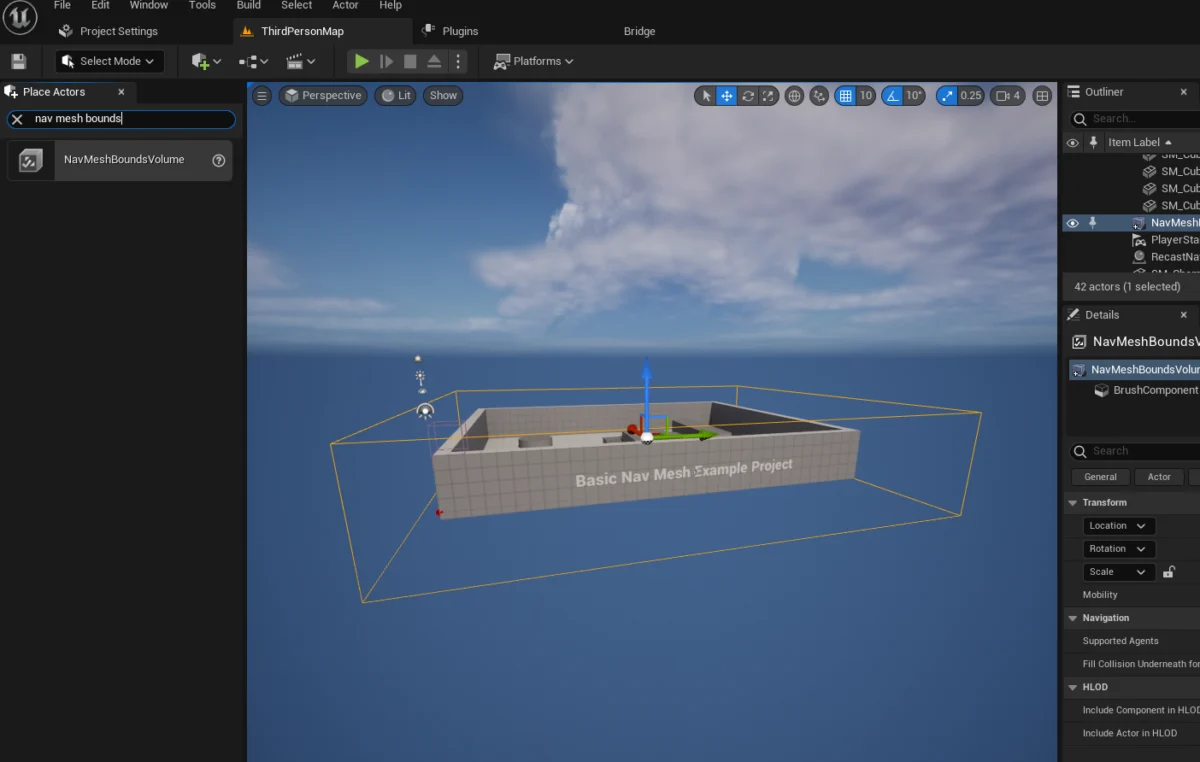
The landscape of modern video games is increasingly defined by the sophistication of its artificial intelligence (AI), with AI-controlled characters serving as crucial elements for enhancing atmospheric immersion, providing dynamic gameplay challenges, and populating expansive digital worlds. Unreal Engine 5 (UE5), Epic Games’ flagship development platform, continues to streamline the often-complex process of integrating intelligent behaviors, offering robust tools that empower developers to implement foundational AI navigation with remarkable efficiency. A recent guide details the straightforward yet critical steps required to generate navigable meshes and configure basic AI character movement within the engine, highlighting both the ease of setup and potential pitfalls if foundational elements are overlooked.
The core of enabling AI-controlled characters to traverse a virtual environment lies in the creation of a Navigation Mesh, or NavMesh. This specialized mesh acts as a data layer that defines the walkable surfaces and obstacles within a game level, allowing AI agents to calculate optimal paths without colliding with environmental geometry. In Unreal Engine 5, this process is initiated by introducing a NavMeshBoundsVolume actor into the scene. This volume, once scaled and positioned appropriately, dynamically generates the NavMesh, which is then utilized by AI systems for pathfinding. The accessibility of this feature marks a significant advancement, democratizing sophisticated AI implementation for developers of all experience levels.
Establishing the Navigable Landscape: The NavMeshBoundsVolume
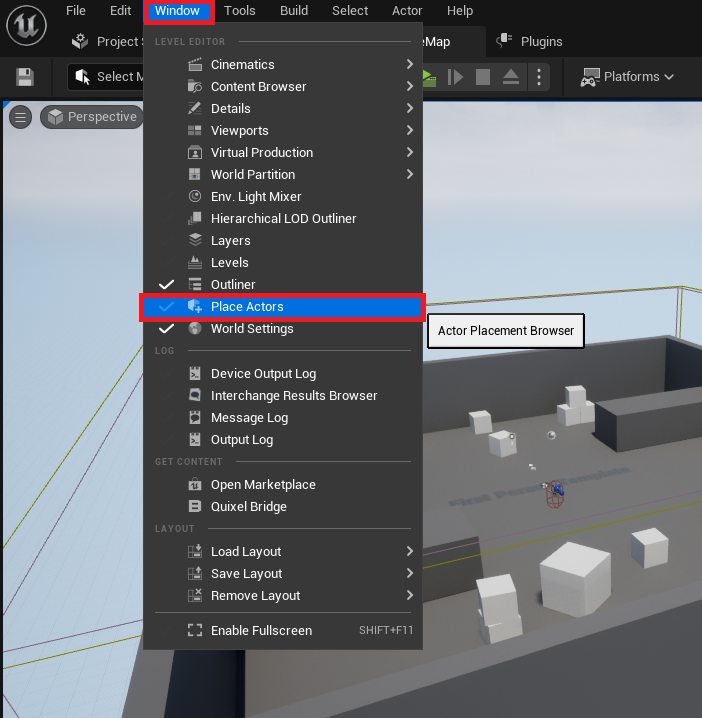
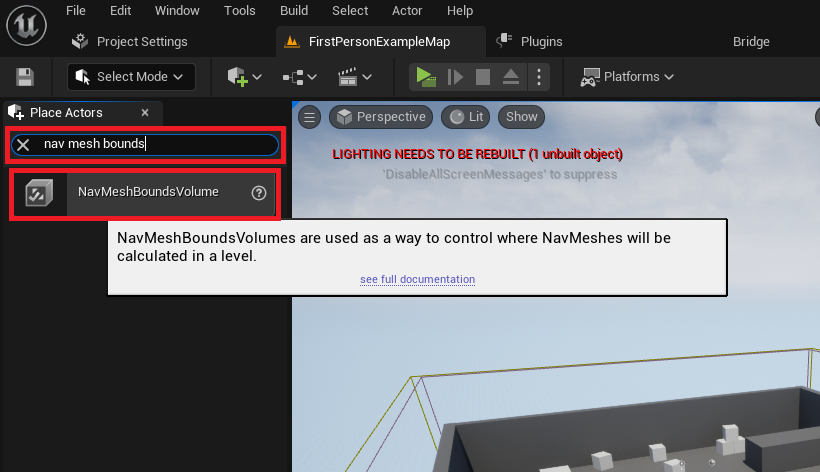
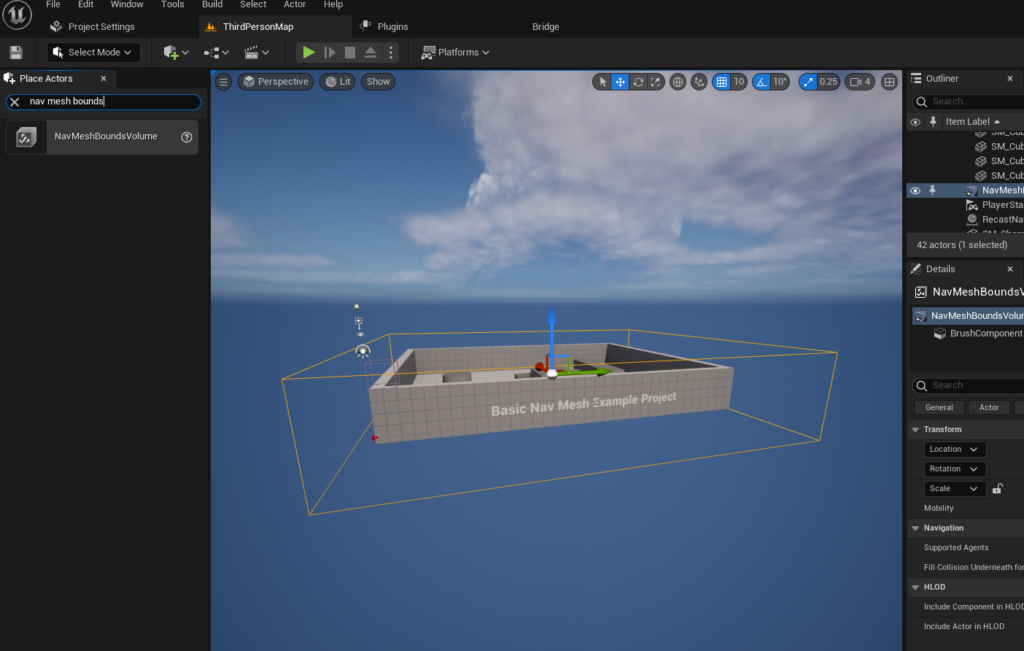
The initial step in crafting an intelligent environment within Unreal Engine 5 involves a simple yet pivotal action: accessing the ‘Place Actors’ window. This central hub, typically found under the ‘Window’ menu, serves as the primary interface for spawning fundamental objects and volumes directly into the active level. Among the diverse categories presented, the ‘Volumes’ section houses the indispensable NavMeshBoundsVolume. Dragging and dropping this actor into the scene immediately lays the groundwork for AI pathfinding.
Once placed, the NavMeshBoundsVolume requires careful manipulation to encompass the entirety of the area where AI agents are expected to navigate. This involves scaling and positioning the volume to precisely fit the desired navigable space, whether it’s a small room, an expansive outdoor environment, or intricate multi-layered architecture. Developers must consider the scope of their AI’s potential movement, as the size and complexity of the NavMesh directly impact generation time and runtime performance. While smaller, static NavMeshes generate rapidly, larger or dynamically changing environments may necessitate advanced techniques such as dynamic NavMesh generation, a feature that allows the navigation data to update in real-time as the environment changes, crucial for games with destructible environments or procedurally generated levels. The importance of accurately sizing this volume cannot be overstated, as any area outside its bounds will be considered non-navigable by AI characters, potentially leading to unresponsive or stuck agents.

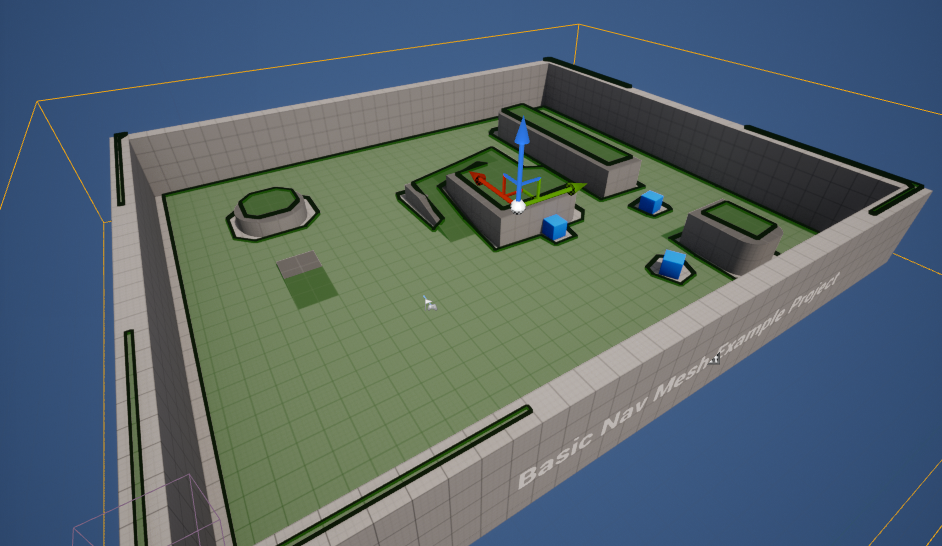
To ensure the NavMesh is correctly configured and covers all intended walkable areas, Unreal Engine 5 provides a powerful visualization tool. By simply pressing the ‘P’ key on the keyboard, developers can toggle a debug view that renders the generated NavMesh directly within the editor. This visual overlay typically appears as a green mesh covering all navigable surfaces, offering immediate feedback on the volume’s placement and scale. Areas that appear dark or are not covered by the green mesh indicate non-navigable zones, allowing developers to quickly identify and rectify any discrepancies in their NavMeshBoundsVolume setup. This iterative process of adjustment and visualization is fundamental to creating reliable AI navigation.
Bringing Characters to Life: Blueprinting Basic AI Movement
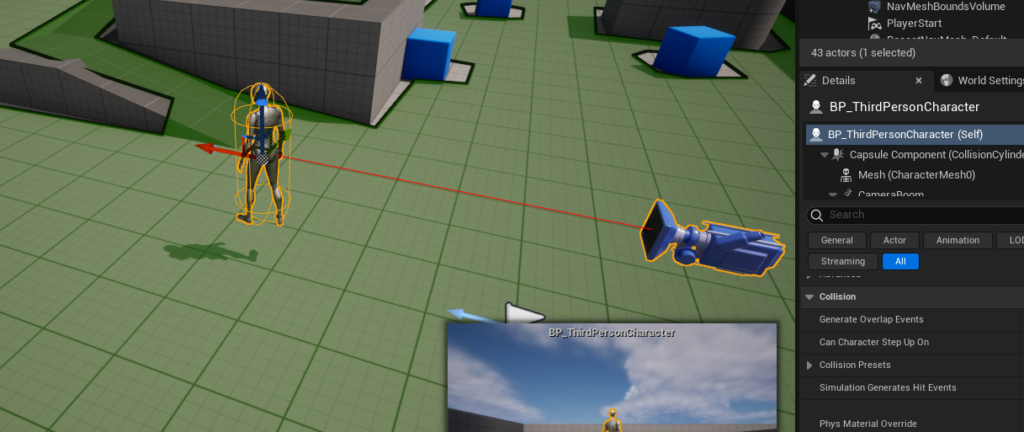
With the navigable environment established, the next phase involves integrating AI logic directly into character blueprints. For demonstrative purposes, Unreal Engine 5’s Third Person Template provides an excellent starting point, offering a pre-rigged and animated character that can be readily adapted for AI control. This template character, typically located within the "Third Person / Blueprints" folder in the Content Drawer, can be dragged directly into the level, marking its presence in the game world.
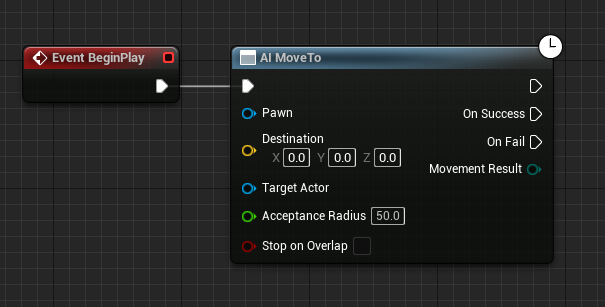
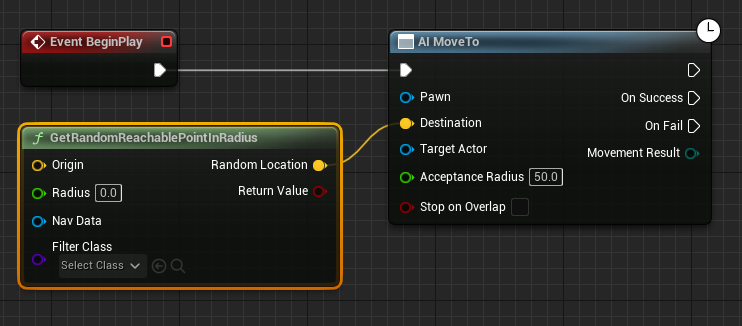
The true magic of AI navigation unfolds within the character’s Blueprint editor, Unreal Engine’s visual scripting system. Here, a series of interconnected nodes define the character’s autonomous behavior. The process begins with the Event BeginPlay node, which triggers the AI logic as soon as the game starts or the character is spawned into the level. Connected to this event is the pivotal AI MoveTo node. This node is the workhorse of AI pathfinding, instructing the AI pawn to move towards a specified destination. Its effectiveness relies heavily on a properly configured NavMesh, as it queries the navigation system to find a valid path to the target.
To endow the AI character with a sense of emergent, exploratory movement, the GetRandomReachablePointInRadius node is introduced. This node intelligently queries the NavMesh to find a random, valid destination point within a specified radius from an origin. Connecting the output (yellow vector pin) of this node to the Destination pin of the AI MoveTo node directs the character towards these randomly selected locations. To define the center of this random movement, a Get Actor Location node is employed, providing the AI character’s current position as the Origin for the random point calculation. This ensures that the AI’s roaming is localized around its current area, preventing it from straying too far from its intended zone. The Radius parameter, a green numerical pin, dictates the maximum distance the AI will consider for its random destinations. A value like 2000 (Unreal Units) allows for a considerable roaming area, giving the impression of purposeful, yet unscripted, movement.
Crucially, the AI MoveTo node requires a reference to the AI pawn itself to execute its movement. This is achieved by creating a Reference to Self node and connecting it to the blue Pawn pin of the AI MoveTo node. This establishes the direct link, telling the AI MoveTo node which specific character it needs to control.
Finally, to ensure continuous autonomous movement, a looping mechanism is implemented. After the AI MoveTo node successfully reaches its destination, indicated by the On Success execution pin, a Delay node is introduced. This node pauses the execution for a specified duration, simulating a brief moment of "thought" or a pause in patrol. Once the delay concludes, the execution flow loops back to the AI MoveTo node, prompting the AI to find a new random destination and repeat the process. This simple yet effective loop creates an endlessly roaming AI character, demonstrating fundamental autonomous behavior within the game environment. Upon clicking ‘Play’ in the editor, the configured character will immediately begin navigating the level, using the generated NavMesh to intelligently pathfind towards various random locations within its designated radius.
The Evolution of Game AI: From Scripts to Sophisticated Systems
The ease with which basic AI navigation can be set up in Unreal Engine 5 is a testament to decades of advancements in game AI development. Early video game AI was often characterized by simple, hard-coded scripts or finite state machines, where characters followed predetermined paths or reacted in predictable ways to player input. Over time, as computational power increased and development tools matured, more sophisticated techniques emerged. Pathfinding algorithms like A* search became standard, allowing AI agents to navigate complex environments efficiently.
Unreal Engine, from its early iterations, has been at the forefront of providing robust AI frameworks. Unreal Engine 3 introduced powerful AI systems like Behavior Trees, which offer a more flexible and modular way to design complex AI behaviors than traditional finite state machines. Unreal Engine 4 further refined these tools, integrating them seamlessly with its Blueprint visual scripting system and C++ backend, making AI development more accessible to a broader range of developers. Unreal Engine 5 builds upon this legacy, refining the user experience and optimizing performance, especially with features like its World Partition system and Nanite virtualized geometry, which allow for incredibly vast and detailed open worlds that AI characters can seamlessly navigate.
Industry experts widely acknowledge that the quality of AI significantly impacts player immersion and satisfaction. Poor AI can break a player’s sense of realism, while well-crafted AI can create memorable gameplay moments, whether through challenging enemies, believable NPCs, or dynamic companions. Epic Games, through its continuous investment in tools like the NavMesh system and the AI MoveTo node, demonstrates a clear commitment to empowering developers to create these compelling AI experiences. Statements from Epic Games often emphasize their goal of democratizing game development, and the intuitive AI tools within UE5 are a prime example of this philosophy in action, reducing the barrier to entry for complex features.
Empowering Developers: Accessibility and Efficiency in Unreal Engine 5
The implications of such accessible AI tools extend far beyond simple character movement. By streamlining the foundational aspects of AI navigation, Unreal Engine 5 allows developers to allocate more resources and creative energy towards developing more complex and nuanced AI behaviors. Instead of wrestling with low-level pathfinding implementations, developers can focus on crafting intricate behavior trees, designing compelling decision-making processes, or integrating machine learning models for truly adaptive AI.
This efficiency is particularly beneficial for indie studios and smaller development teams who may not have the extensive resources to build proprietary AI systems from scratch. UE5 provides a robust and production-ready framework, enabling these teams to compete with larger studios in terms of AI quality and sophistication. Furthermore, the visual nature of Blueprint scripting makes AI logic transparent and easy to debug, reducing development cycles and improving collaboration among team members. The ability to quickly iterate on AI behaviors and visualize NavMesh generation in real-time is a significant advantage in modern game development.
Beyond basic roaming, the NavMeshBoundsVolume and AI MoveTo nodes form the bedrock upon which more advanced AI functionalities are built. These include patrol routes, enemy pursuit behaviors, objective-based navigation, crowd simulation, and even complex strategic AI for RTS games. The system’s flexibility allows for custom navigation filters, enabling different types of AI agents (e.g., ground units, flying units, swimming units) to navigate specific areas or utilize distinct pathfinding rules.
Beyond Basic Movement: Future Horizons for AI in Gaming
While the guide focuses on basic random movement, the underlying principles and tools in Unreal Engine 5 lay the groundwork for a vast spectrum of AI possibilities. Developers can expand upon this basic setup by integrating AI Controllers, Behavior Trees, and Environment Query Systems (EQS) to create truly intelligent and reactive characters. AI Controllers act as the "brains" of the AI pawn, managing its behaviors, while Behavior Trees provide a hierarchical, state-based system for decision-making. EQS allows AI to query its environment for relevant data, such as cover points, enemy positions, or usable objects, further enhancing its decision-making capabilities.
The ongoing evolution of AI in gaming points towards even more sophisticated systems, including those leveraging machine learning for adaptive behaviors that learn from player interactions, or procedural AI that generates behaviors on the fly. Unreal Engine 5 is designed with future-proofing in mind, providing hooks and integration points for these advanced techniques. The foundational knowledge of NavMesh and basic AI movement remains critical, serving as the immutable starting point for any intelligent agent within a UE5 project.
In conclusion, Unreal Engine 5 offers a powerful, accessible, and efficient toolkit for implementing AI navigation. The straightforward process of setting up a NavMeshBoundsVolume and configuring basic character movement via Blueprints empowers developers to create dynamic and immersive game worlds populated by intelligent entities. This accessibility not only streamlines development but also elevates the potential for rich, engaging gameplay experiences, cementing Unreal Engine 5’s position as a leading platform for crafting the next generation of interactive entertainment. The continuous refinement of these AI features by Epic Games underscores their commitment to pushing the boundaries of what is achievable in game development, making sophisticated AI more attainable for creators worldwide.
About the Author








