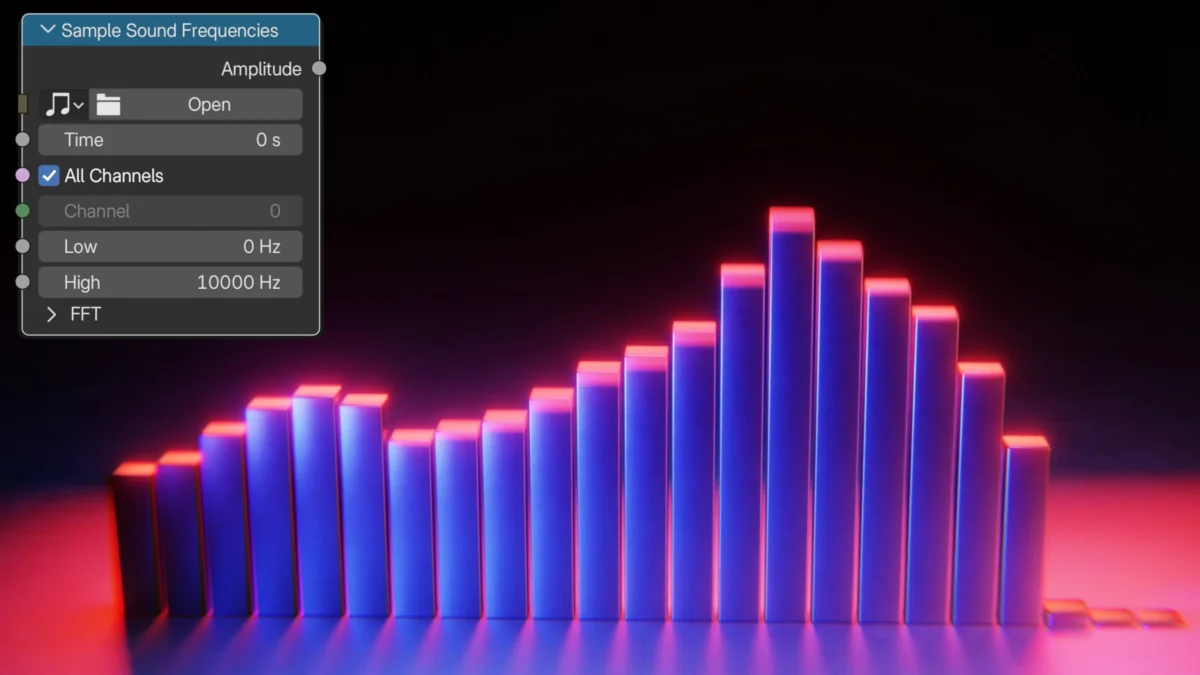
A groundbreaking tutorial released on August 8, 2026, by renowned 3D artist and YouTuber Ryan King Art, showcases the creation of a dynamic audio visualizer within Blender 5.2, leveraging the powerful new "Sample Sound Frequencies" node. This tutorial, available on the popular Blender news platform Blendernation.com, marks a significant advancement in procedural content generation for 3D artists and musicians seeking to synchronize visual elements with audio. The release highlights the ever-evolving capabilities of Blender’s Geometry Nodes system, now enabling real-time audio responsiveness in complex 3D scenes.
The Power of Geometry Nodes: A New Era for Procedural Art
Geometry Nodes, introduced in Blender 3.0, has fundamentally transformed how artists can create and manipulate 3D geometry. It allows for the creation of complex, procedural assets and effects without the need for traditional modeling or manual animation techniques. Artists can define a set of rules and parameters, and Blender’s node-based system generates the geometry accordingly. This approach offers unparalleled flexibility, allowing for intricate designs that can be easily modified and iterated upon. The addition of nodes that interact with external data, such as audio, represents a significant leap forward, bridging the gap between visual art and auditory experiences.
The "Sample Sound Frequencies" node, a key component in Ryan King Art’s tutorial, is a testament to Blender’s commitment to expanding the possibilities within this powerful system. This node, likely integrated into the Blender 5.2 development cycle, allows for the direct analysis of audio waveforms. By sampling specific frequency bands or overall amplitude, the node can output data that can then be used to drive various aspects of the generated geometry. This could include scaling, displacement, rotation, color, or any other property that can be influenced by numerical input within Geometry Nodes. The implications for real-time interactive installations, music videos, and immersive experiences are substantial.
Ryan King Art’s Contribution to the Blender Community
Ryan King Art, known for his extensive library of Blender tutorials on his YouTube channel (YouTube.com/RyanKingArt), has consistently provided valuable resources for the 3D art community. His expertise in procedural generation and his ability to break down complex topics into accessible lessons have made him a respected figure. This latest tutorial is no exception, offering a clear, step-by-step guide to harnessing the new audio visualization capabilities. The tutorial, embedded within the Blendernation article, provides a visual demonstration of the process, allowing viewers to follow along with ease.
The release of this tutorial on August 8, 2026, places it squarely within the context of ongoing advancements in Blender’s development. Blender 5.2, the version referenced, would have been a recent or upcoming release at the time of publication, indicating that the tutorial is leveraging cutting-edge features. This timely release ensures that Blender users are among the first to explore and utilize these new functionalities, fostering innovation and creative application within the community.
Technical Breakdown of the Audio Visualizer
While the full technical intricacies are detailed within the tutorial itself, the core concept involves using audio data to influence geometric parameters. The "Sample Sound Frequencies" node likely takes an audio file as input, or perhaps a live audio stream, and breaks it down into quantifiable data points. These data points, representing different aspects of the sound (e.g., bass frequencies, treble, overall volume), are then connected to attributes within the Geometry Nodes setup.
For instance, the tutorial might demonstrate how to:
- Scale Objects: The amplitude of specific frequency bands could be mapped to the scale of individual elements within the visualizer. Louder bass frequencies might cause larger geometric shapes to pulsate, while higher frequencies could control the size of smaller, more intricate details.
- Displace Surfaces: The audio data could drive a displacement modifier or a procedural noise texture within Geometry Nodes, causing surfaces to deform and ripple in sync with the music.
- Animate Motion: Rotational or translational data could be derived from the audio, creating dynamic movement patterns that respond to the rhythm and intensity of the soundtrack.
- Control Color and Material Properties: The frequency data could also be used to modulate color values, emission strength, or other material attributes, adding another layer of visual responsiveness.
The "new sample sound frequencies node" suggests a dedicated node designed for this purpose, likely offering intuitive controls for selecting frequency ranges, smoothing the data, and mapping it to desired outputs. This would represent a significant improvement over previous methods that might have relied on more complex workarounds or external scripting.

Supporting Data and Context
The development of real-time audio visualization tools has a rich history, dating back to early computer graphics and the advent of music synthesizers. Early visualizers, often found in media players, primarily used spectral analysis to represent sound visually. These were typically 2D representations like bar graphs or oscillating waveforms. The integration of such capabilities into sophisticated 3D modeling and animation software like Blender opens up entirely new avenues for artistic expression.
Blender’s Geometry Nodes have seen rapid development since their initial introduction. Key milestones include:
- Blender 3.0 (December 2021): Introduction of the Geometry Nodes system, providing a powerful procedural workflow.
- Blender 3.3 LTS (June 2022): Significant improvements to node usability and performance.
- Blender 3.5 (March 2023): Further enhancements to attribute management and node stability.
- Blender 4.0 (December 2023): Major overhaul of the node system, introducing new nodes and a more streamlined interface.
- Blender 5.0+ (Anticipated/Recent): Continued evolution with the likely inclusion of advanced data integration nodes, such as the "Sample Sound Frequencies" node.
The availability of audio input and analysis within Geometry Nodes is a natural progression, aligning with the software’s commitment to providing artists with comprehensive creative tools. The timing of this tutorial, coinciding with the likely release or development of Blender 5.2, suggests that the Blender Foundation and its development community are actively pushing the boundaries of what is possible in real-time procedural content creation.
Potential Implications and Applications
The ability to create sophisticated audio-reactive visuals directly within Blender has far-reaching implications:
- Music Videos and Live Performances: Artists can now generate complex, dynamic 3D environments that react in real-time to their music, enhancing live shows and creating captivating music videos.
- Interactive Installations: Museums, galleries, and event spaces can utilize this technology to create immersive installations that respond to ambient sound or user-generated audio.
- Game Development: Game designers can integrate real-time audio visualization into game environments, creating dynamic visual feedback for in-game music or sound effects.
- Architectural Visualization: Architects and designers could use this to create dynamic presentations of their projects, where lighting and environmental elements respond to soundscapes.
- Educational Tools: The tutorial itself serves as an educational tool, teaching advanced concepts in procedural generation and real-time data integration.
The fact that this is achieved through Geometry Nodes means that the generated visuals are not limited to simple animations. They can be infinitely complex, procedural geometries that can be rendered in high fidelity, offering a level of artistic control previously unattainable without extensive custom coding or specialized software.
Community Reactions and Future Developments
While direct "reactions" from specific parties are not detailed in the provided content, the release of such a tutorial on a platform like Blendernation, coupled with the endorsement of a known artist like Ryan King Art, typically elicits positive responses from the Blender community. Users often express excitement about new features and eagerly share their own creations based on these tutorials.
Discussions within Blender forums and social media channels are likely to focus on:
- The ease of use of the new "Sample Sound Frequencies" node.
- Creative applications and unique visual styles achieved with the node.
- Potential improvements or additional features for future versions.
- Comparisons with similar functionalities in other 3D software.
The continued development of Blender’s Geometry Nodes, with an increasing focus on external data integration, suggests a future where the lines between digital art, music, and interactive experiences become increasingly blurred. The "Sample Sound Frequencies" node is a significant step in this direction, empowering artists with powerful new tools to bring their sonic visions to life in the 3D realm. Ryan King Art’s tutorial serves as an essential guide for anyone looking to explore this exciting new frontier. The tutorial’s existence and its focus on a specific, powerful node within a recent Blender version point to a robust development ecosystem and a community eager to push the boundaries of procedural 3D art.
About the Author