The independent game development platform itch.io has unveiled a significant enhancement to its desktop application, integrating the powerful "butler" command-line utility with a user-friendly graphical interface (GUI). This strategic update is poised to democratize access to efficient build management for a broader spectrum of developers, enabling them to upload and manage game builds directly within the itch.io app without requiring any command-line proficiency. The update, accessible via version 26.12.0 and later of the itch.io app, represents a pivotal step in streamlining the content delivery pipeline, benefiting both creators and their player communities.
Background: The Evolution of Developer Tools on Itch.io
Itch.io has long distinguished itself as a vibrant ecosystem for independent game developers, offering unparalleled flexibility in terms of pricing, distribution, and community engagement. Central to its technical infrastructure for efficient content delivery has been "butler," a proprietary command-line interface (CLI) tool. Introduced several years ago, butler was engineered to address a critical challenge in game distribution: the cumbersome and bandwidth-intensive process of updating game builds.
Traditional methods often involve developers uploading entire new versions of their games every time a patch or update is released. For players, this translates to downloading the full game file again, even if only minor changes have occurred. Butler revolutionized this by implementing a delta-patching system. When a developer uses butler, the tool intelligently compares the new build with the previously uploaded version for a specific channel (e.g., windows-beta, linux-arm64). It then only uploads the differences, or "patches," rather than the complete build. This process drastically reduces upload times for developers and, more importantly, download sizes for players, conserving bandwidth and accelerating the update experience on both ends.
However, the efficacy of butler was, until now, largely confined to developers comfortable with command-line environments. While many experienced programmers and technical artists readily adopted the CLI, a significant portion of the indie game development community, particularly those from artistic backgrounds or emerging developers, found the terminal-based workflow intimidating or inaccessible. This created a disparity, where a powerful, efficiency-boosting tool was not uniformly available to all creators on the platform. The recent integration of butler into the itch.io app’s GUI directly addresses this long-standing usability gap.
Unveiling the New Upload Section: A Gateway to Efficiency
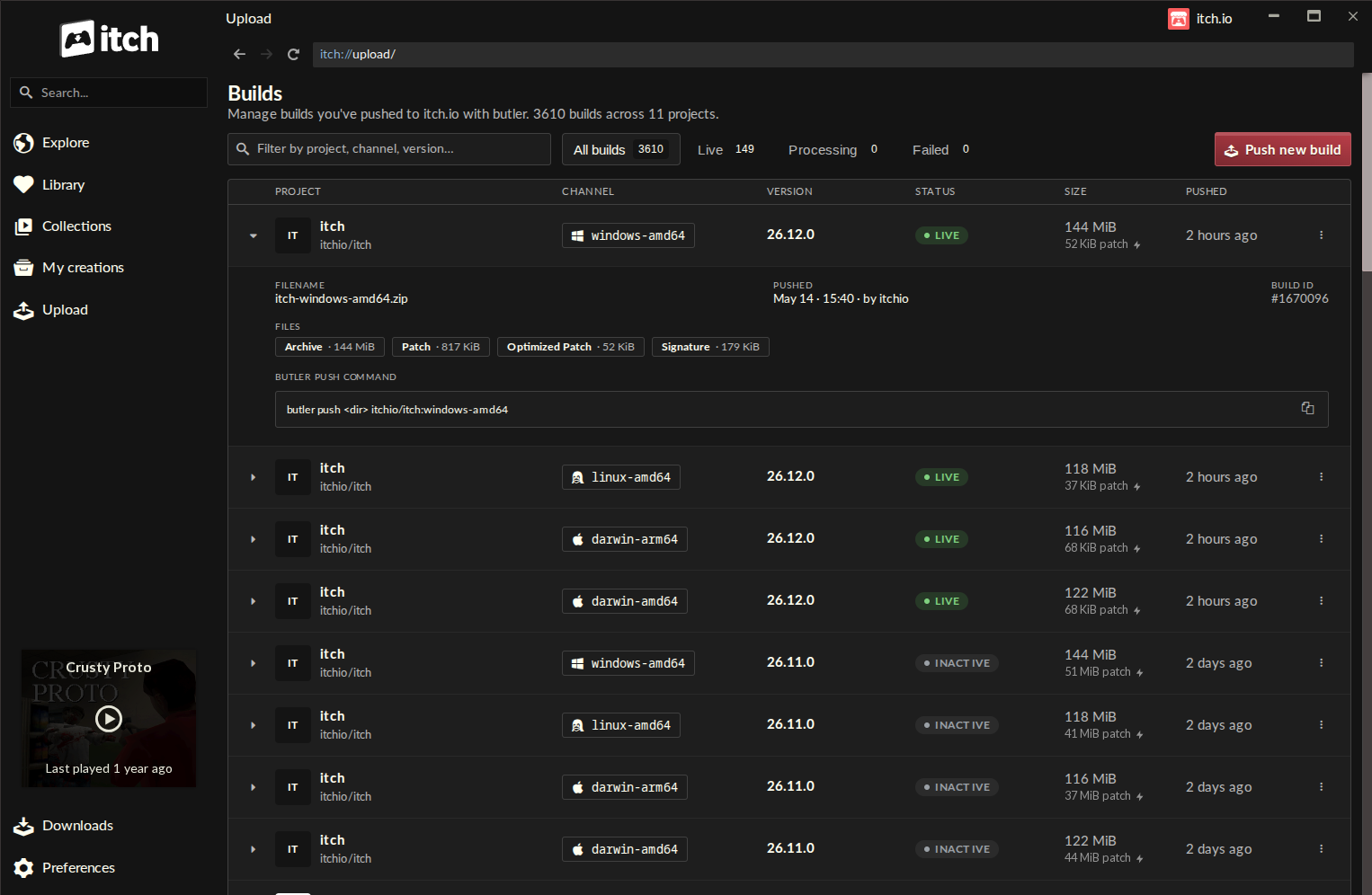
The core of this transformative update is the introduction of a dedicated "Upload" section within the itch.io desktop application’s sidebar. Clicking this new entry transports developers to the "Builds" page, a centralized dashboard designed to provide a comprehensive overview of all builds associated with projects editable by the logged-in account.
The "Builds" page is meticulously structured to offer immediate clarity and control. Each row on this screen presents vital information about a specific build, including:
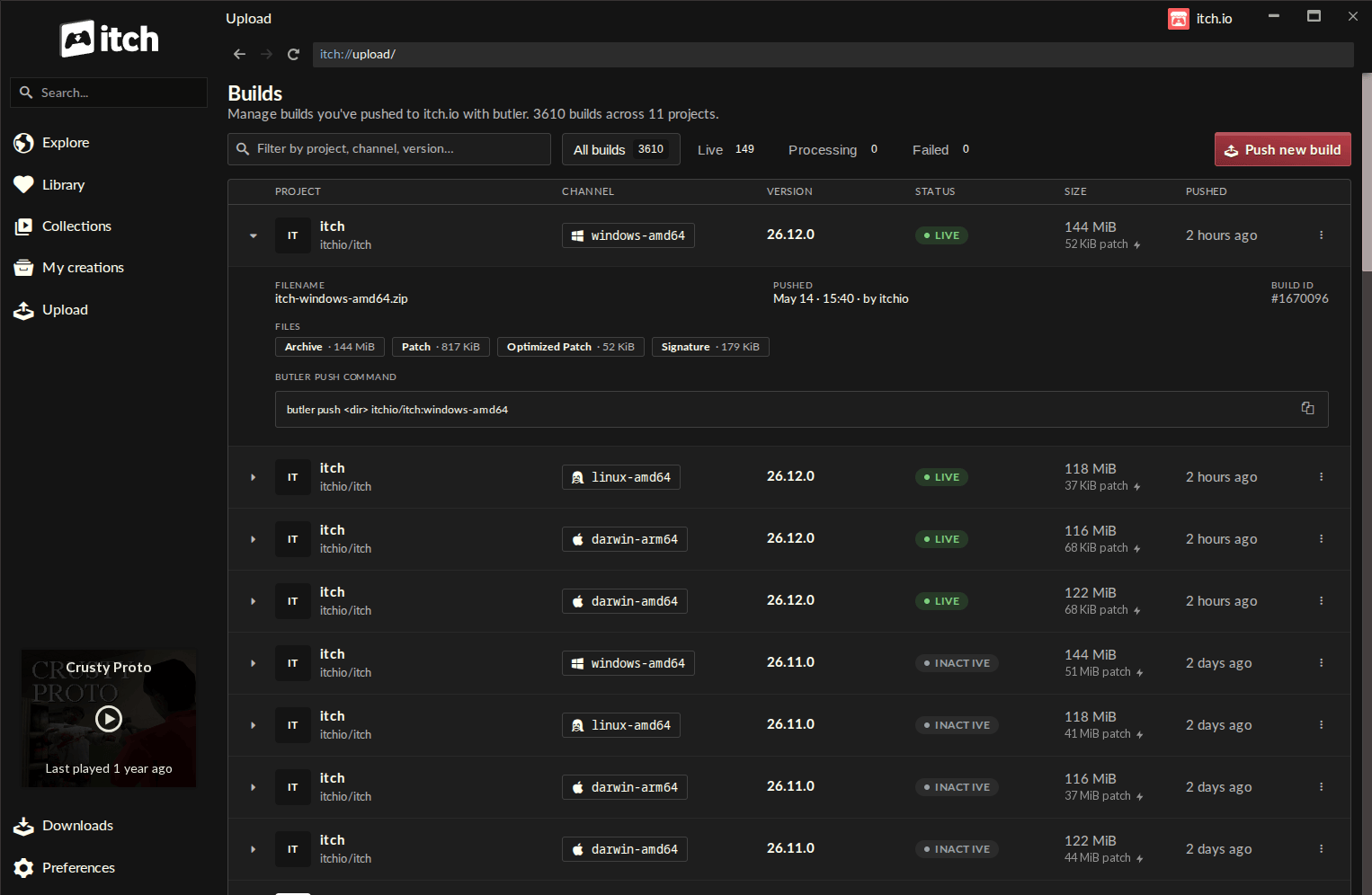
- Project Name: Clearly identifying the game or software title.
- Channel: The designated distribution channel (e.g.,
stable,development,public-test). - Version: The specific version identifier for the build, allowing for precise tracking.
- Status: Indicating whether the build is active, processing, or has encountered issues.
- File Size: The total size of the build, offering a quick reference.
- Push Date: The timestamp of the last successful upload, providing a chronological record.
This consolidated view empowers developers to monitor their project’s distribution status at a glance, facilitating better version control and release management without ever needing to navigate away from the app.
The Streamlined Build Pushing Workflow
The centerpiece of the new GUI integration is the "Push new build" button, which activates an intuitive dialog guiding developers through the upload process. The workflow is designed for simplicity and error prevention:
- Project Selection: Developers first select the specific project to which the build pertains from a dropdown list of their editable titles.
- Channel Management: A critical aspect of butler’s power lies in its channel system. The GUI allows developers to either choose an existing channel or create a new one by simply typing a desired name (e.g.,
windows-x64-release,mac-arm-test). This flexibility is crucial for managing different platform builds, experimental versions, or public betas. - Optional Versioning: While butler can automatically manage versions, the GUI provides an option to explicitly set a version string. This allows for clear, human-readable version numbers that align with a developer’s internal versioning schema.
- File Selection: The interface supports a straightforward drag-and-drop mechanism for selecting the build files. Developers can either drop an entire folder containing their game’s executable and assets or a compressed
.zipfile. A "recent folders" list further enhances convenience, allowing quick access to previously used build directories.
Pre-Upload Verification: Enhancing Developer Confidence
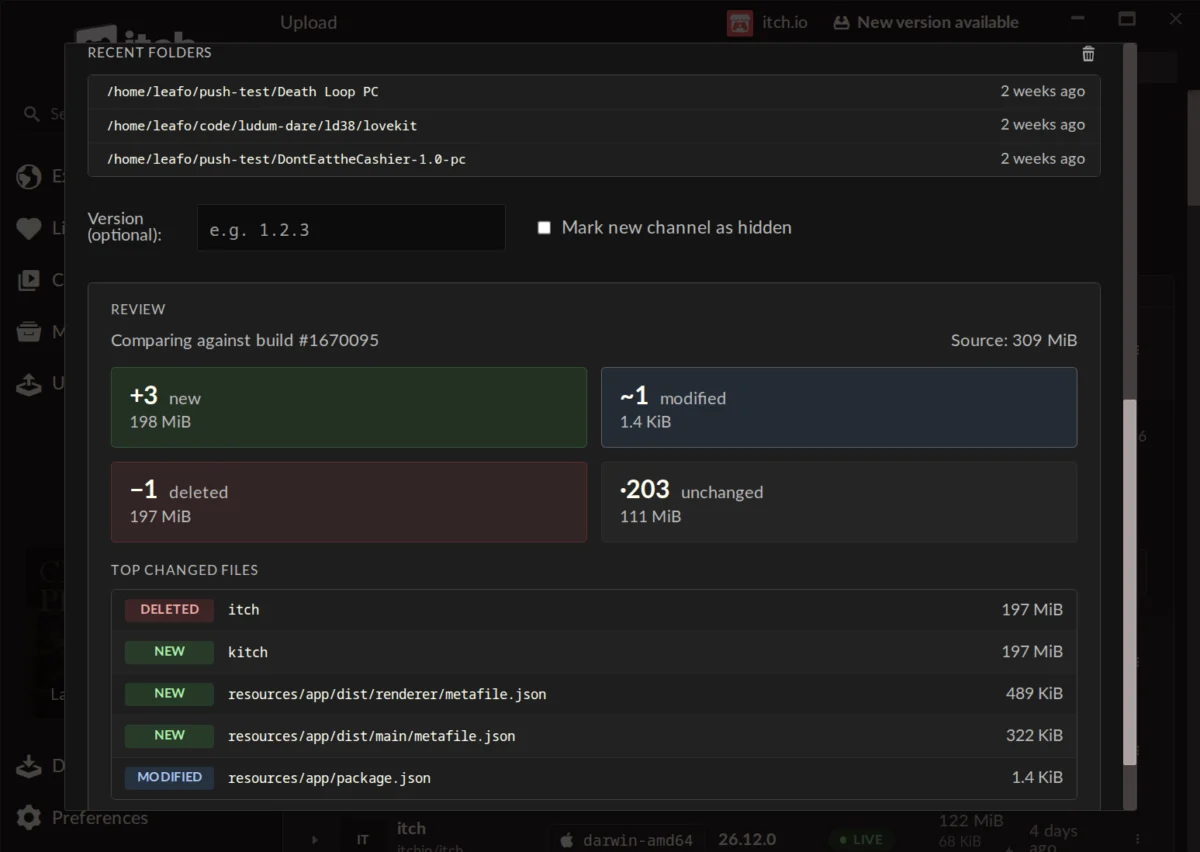
A standout feature of the new push dialog is its pre-upload preview functionality. Before initiating the actual upload, developers can generate a detailed summary of the proposed changes. This preview displays:
- The number of new files being added.
- The number of modified files.
- The number of files slated for deletion.
- The number of unchanged files.
- The cumulative size for each of these categories.
- A list of the largest changed files.
This robust verification step is invaluable for preventing accidental uploads of incorrect builds or incomplete updates. By visualizing the scope of changes, developers can confirm that only the intended modifications are being pushed, significantly reducing the risk of errors and subsequent hotfixes. This level of transparency was previously only achievable through careful manual inspection or advanced CLI commands, making it a significant quality-of-life improvement.
Technical Advantages and User Experience
The integration of butler within the itch.io app brings a host of technical and experiential advantages. Foremost among these is the inherent efficiency of patch-based updates. For a typical game that undergoes frequent updates, the difference in download size can be dramatic. A minor bug fix or content addition might reduce a player’s download from several gigabytes to mere megabytes. This translates to:
- Reduced Bandwidth Costs: For developers, who often bear the cost of hosting, and for itch.io, efficient patching optimizes server resources.
- Faster Update Times for Players: Players spend less time waiting for downloads, leading to higher engagement and satisfaction. Anecdotal evidence from various platforms suggests that smaller update sizes directly correlate with higher update adoption rates.
- Improved User Retention: A seamless update experience contributes to a more positive overall impression of the game and the platform, fostering player loyalty.
Furthermore, the version of butler embedded within the app is automatically kept up-to-date by itch.io. This eliminates the need for developers to manually manage butler installations or worry about compatibility issues, ensuring they always leverage the latest optimizations and features. The app also intelligently uses the credentials of the logged-in itch.io account, simplifying authentication and offering seamless support for managing builds across multiple developer profiles, a common scenario for teams or individual creators with diverse projects.
Once a patch is uploaded, itch.io’s robust backend infrastructure takes over, re-compressing and further optimizing the patch files. This server-side processing ensures that the delivered patches are as small and efficient as possible, maximizing the benefits of the delta-patching system.
Developer Reception and Broader Implications
Initial reactions from the developer community have been overwhelmingly positive, as evidenced by comments following the announcement. Developers have lauded the update for making the previously "complicated and fiddly" butler workflow "so easy and organized." Many expressed excitement about the newfound accessibility, stating that it makes the itch.io app "a lot more useful" and could prompt them to migrate more of their software or games to the platform. The self-enforcing nature of the compare step has been particularly praised for preventing errors, even for developers new to the app’s build management features.
This strategic move by itch.io carries significant implications for the independent game development landscape:
- Democratization of Advanced Tools: By abstracting the complexities of command-line tools behind an intuitive GUI, itch.io is effectively lowering the barrier to entry for efficient build management. This empowers a wider array of creators, including those without extensive technical backgrounds, to leverage professional-grade distribution techniques.
- Enhanced Platform Competitiveness: In a crowded digital distribution market, offering superior developer tools and a streamlined workflow can be a crucial differentiator. This update positions itch.io as a leader in developer-centric features, potentially attracting more creators seeking an accessible yet powerful platform.
- Improved Player Ecosystem: Ultimately, easier and more efficient updates for developers translate directly into a better experience for players. Faster downloads, less storage consumption, and a smoother patching process contribute to a more enjoyable and less frustrating gaming experience, which can boost player engagement and retention across the platform.
- Future Development Potential: While the current implementation does not support converting existing, non-butler uploaded games to the new system due to metadata requirements, the positive reception suggests this could be a highly desired feature for future iterations. Itch.io’s continued investment in its core tools indicates a commitment to evolving with developer needs.
Getting the Update and Looking Ahead
For existing users of the itch.io app, the update process is seamless: the application automatically updates itself in the background. Developers can also manually check for updates from the Preferences screen if they wish to expedite the process. New users can download the itch.io app directly from the itch.io website. To access the new "Upload" tab and its integrated butler functionality, users will need to ensure their app version is at least 26.12.0.
This integration marks a significant milestone in itch.io’s ongoing commitment to empowering independent creators. By making a powerful, efficiency-driven tool like butler accessible to all, itch.io not only simplifies the development pipeline but also reinforces its position as a forward-thinking platform dedicated to fostering a thriving and accessible ecosystem for indie games and software. The expectation is that this enhancement will lead to even more frequent and smoother updates for the vast library of titles hosted on the platform, benefiting developers and players alike.
About the Author