
The integration of sophisticated Artificial Intelligence (AI) into video games has become a cornerstone of modern interactive entertainment, enriching game worlds, providing dynamic challenges, and enhancing overall player immersion. Unreal Engine 5, Epic Games’ flagship development platform, empowers developers to implement these complex systems with remarkable accessibility, particularly concerning character navigation. A foundational element of this capability is the Navigation Mesh (NavMesh) system, a robust framework that dictates where AI-controlled entities can move within a digital environment. This report details the fundamental process of establishing a NavMesh and configuring basic AI character movement within Unreal Engine 5, highlighting its technical aspects, practical implications, and broader significance in the contemporary game development landscape.

The core principle behind AI character movement in 3D environments relies on a navigable surface that AI agents can traverse. Unlike player-controlled characters that react directly to input, AI characters require a pre-computed or dynamically generated understanding of their surroundings. This is precisely what the NavMesh provides: a detailed, traversable surface that algorithms can use to plot paths, avoid obstacles, and reach designated objectives. Without a properly configured NavMesh, AI characters would either remain static, collide uncontrollably with environmental geometry, or attempt to move through solid objects, breaking immersion and gameplay mechanics. The ease of setting up this crucial component in Unreal Engine 5 underscores Epic Games’ commitment to providing powerful yet user-friendly tools for developers of all scales.
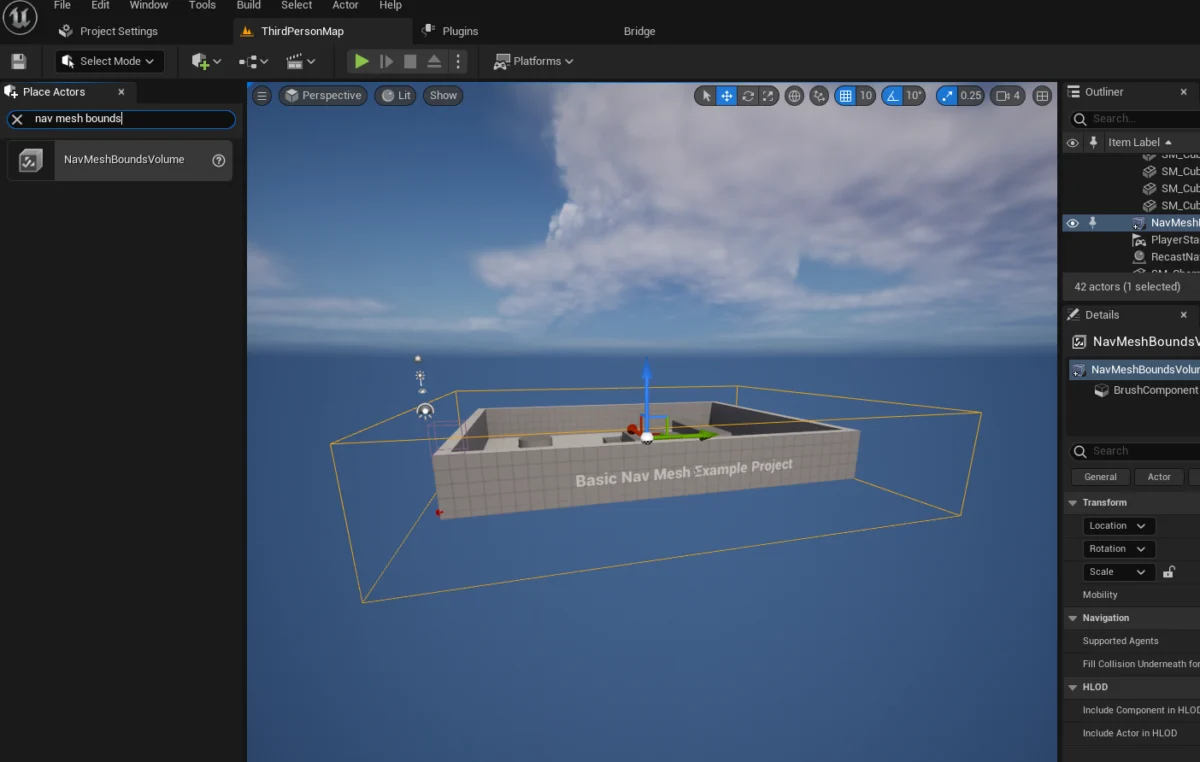
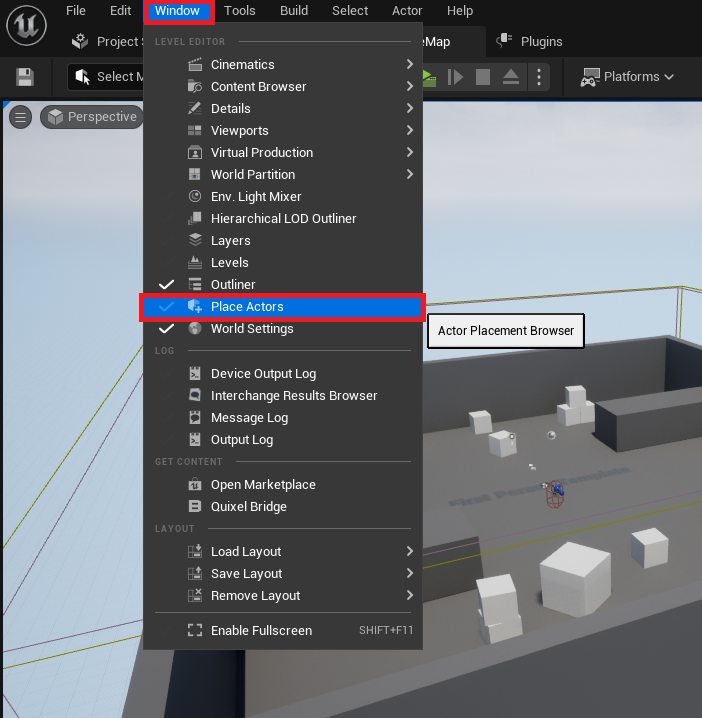
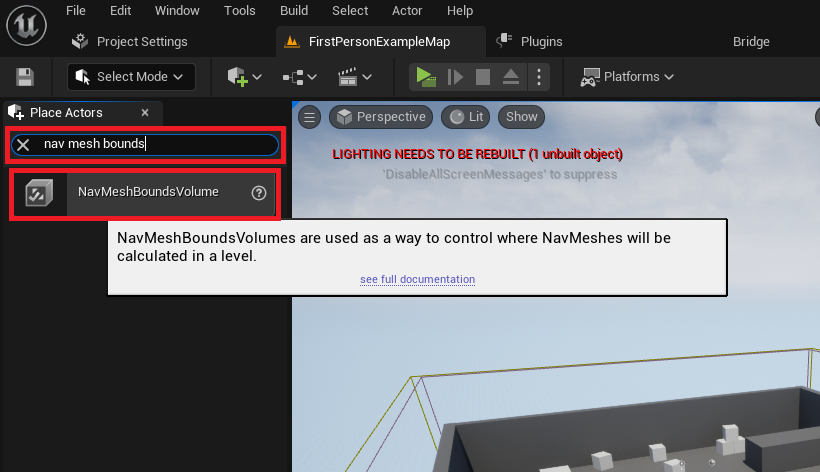
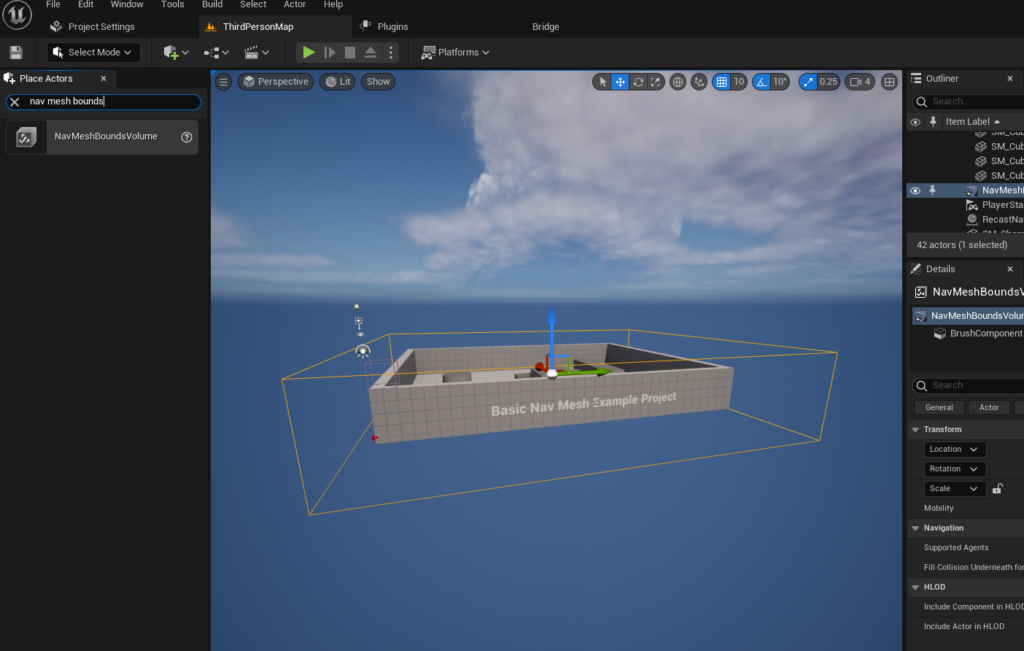
The initial step in establishing this navigational backbone involves accessing the "Place Actors" window within the Unreal Engine 5 editor. This window, a central hub for populating game levels, is typically found under the "Window" menu. Its function is to allow developers to introduce a wide array of basic objects, volumes, and other interactive elements into their scenes. From this panel, the "NavMeshBoundsVolume" actor is selected and added to the level. This specific volume serves as the conceptual boundary for the NavMesh generation process. Once placed, it defines the three-dimensional space within which the engine will compute the navigable surface. This approach provides developers with granular control over the areas where AI is expected to operate, preventing unnecessary computation in non-playable or inaccessible zones.
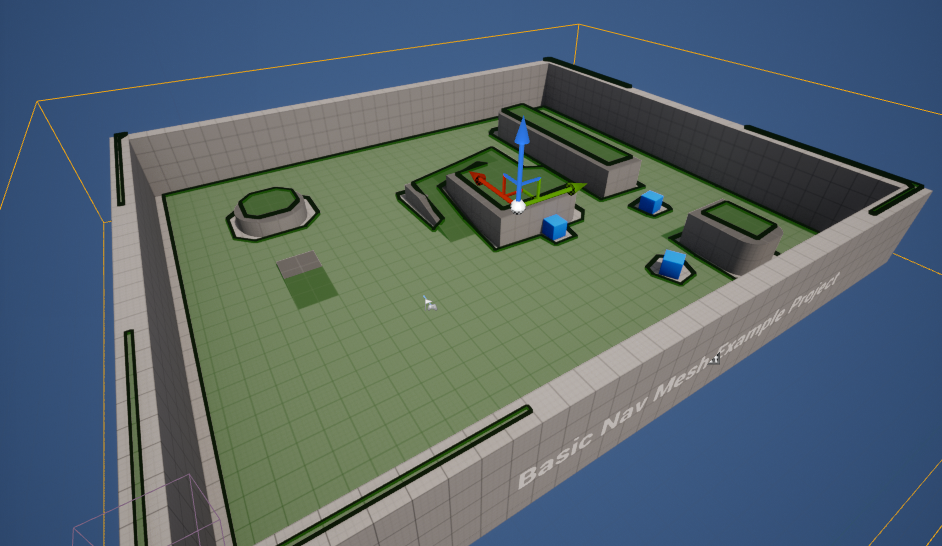
Following its placement, the NavMeshBoundsVolume must be precisely scaled and positioned to encompass the desired navigable areas of the level. This adjustment is critical, as the generated NavMesh will strictly adhere to the volume’s dimensions. Developers can resize and move this volume using standard Unreal Engine transformation tools, ensuring it wraps around all pertinent geometry—floors, ramps, platforms, and other surfaces—that AI characters are intended to walk or run upon. The flexibility in scaling allows for environments ranging from small, confined rooms to sprawling open-world landscapes. However, it is noteworthy that larger NavMeshes, while offering expansive AI freedom, inherently demand more computational resources and time for generation. For dynamic environments or very large worlds, Unreal Engine offers advanced solutions such as dynamic NavMesh generation, which can adapt to real-time changes in the environment, minimizing performance overhead and enhancing responsiveness. This adaptability is a key factor in developing games with destructible environments or procedurally generated content, where static NavMeshes would quickly become obsolete.
To visually confirm the successful generation and accuracy of the NavMesh, Unreal Engine 5 provides a convenient debug visualization. By pressing the "P" key on the keyboard, developers can toggle a display that renders the generated NavMesh as a series of connected polygons, typically highlighted in green. This visual feedback is invaluable for identifying areas where the NavMesh might be incomplete, incorrectly generated, or failing to cover desired pathways. Gaps, unexpected obstacles, or areas marked as non-navigable (often indicated by a lack of green overlay) can be quickly pinpointed and addressed, ensuring that AI characters will not encounter unforeseen pathfinding issues during gameplay. This immediate visual confirmation streamlines the debugging process, allowing developers to iterate quickly on their level design and AI implementation.
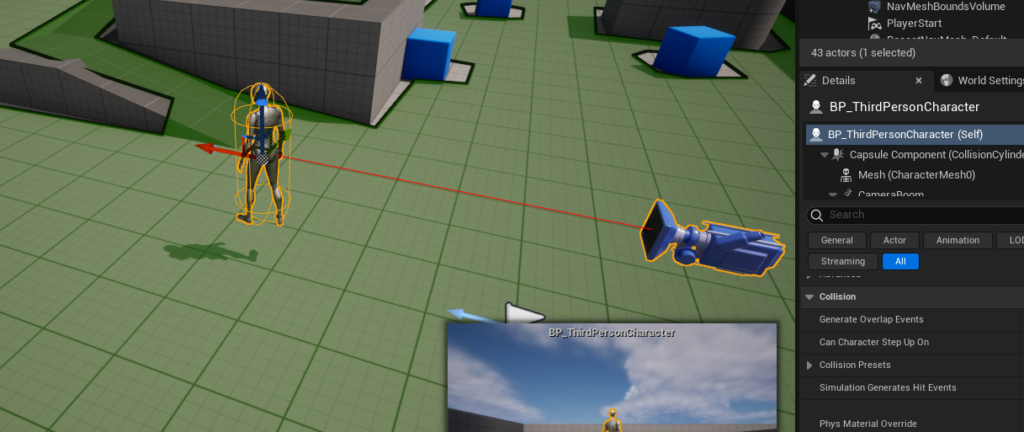
Once the navigational mesh is established, the focus shifts to the AI character itself. For demonstration purposes, this guide leverages the third-person template provided by Unreal Engine 5, which includes a pre-animated character blueprint. This allows developers to immediately test AI navigation with a visually responsive entity. The character blueprint, typically located within the "Third Person / Blueprints" folder in the Content Drawer, is dragged directly into the level, instantiating an AI-ready character.
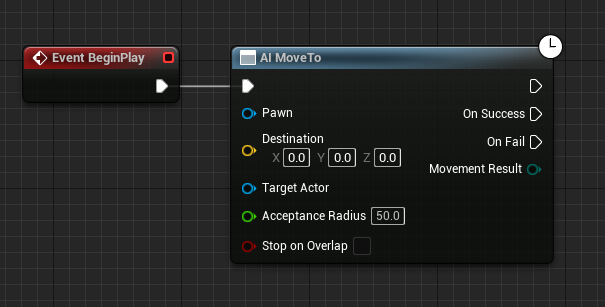
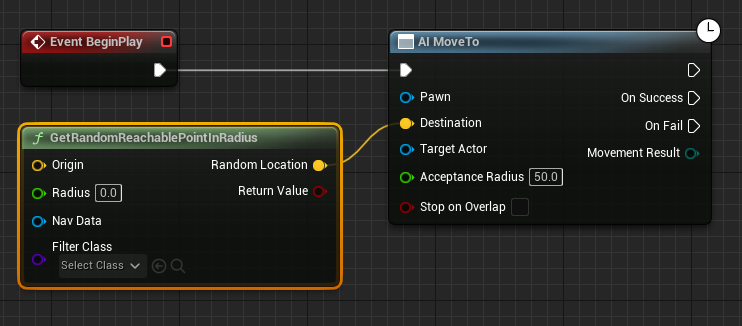
The programming logic for the AI character’s movement is then configured within its Blueprint editor. Blueprints, Unreal Engine’s visual scripting system, enable developers to create complex gameplay mechanics without writing a single line of code. The process begins with the "Begin Play" event, a standard trigger that fires when the game starts or when the actor is spawned into the world. Connected to this event is the "AI MoveTo" node, a fundamental AI action in Unreal Engine. This node instructs an AI Pawn (the character) to move towards a specified destination.
To provide a dynamic and exploratory behavior, the "AI MoveTo" node is supplied with a target destination generated by the "GetRandomReachablePointInRadius" node. This node intelligently queries the NavMesh to find a random, valid, and accessible point within a specified radius from an origin point. The output, a yellow vector pin representing the destination coordinates, feeds directly into the "Destination" pin of the "AI MoveTo" node. This ensures that the AI character always attempts to move to a location that is physically traversable according to the generated NavMesh.
The origin for this random movement calculation is provided by the "Get Actor Location" node, which retrieves the current world coordinates of the AI character itself. Connecting this to the "Origin" yellow vector pin of "GetRandomReachablePointInRadius" means the AI will always seek a new random destination within a sphere centered around its current position. A crucial parameter for this node is the "Radius" value, which defines the extent of the search area. In the provided example, a radius of "2000" units is used, allowing the AI character to roam within a significant area around its starting or current location. This parameter offers developers fine-tuned control over the AI’s wanderlust, from confined patrols to expansive explorations.
To ensure the "AI MoveTo" node knows which character to control, a "Reference to Self" node is connected to its "Pawn" input pin. This node simply refers to the Blueprint instance currently being edited, explicitly telling the "AI MoveTo" node that this character is the one that needs to move. This self-referential connection is a common pattern in Blueprint scripting, ensuring actions are applied to the correct actor.
Finally, to create continuous, autonomous movement, a "Delay" node is introduced. This node is connected to the "On Success" output pin of the "AI MoveTo" node. The "On Success" pin executes when the AI character successfully reaches its target destination. After a specified delay (e.g., a few seconds, allowing the character to briefly pause at its destination), the "Delay" node loops back, triggering another "AI MoveTo" command. This creates an infinite loop of random movement: the AI moves to a random point, waits, then moves to another random point, ensuring continuous navigation within the defined NavMesh boundaries.
This systematic approach, from defining the navigable space with a NavMeshBoundsVolume to scripting the AI’s movement logic with Blueprints, exemplifies Unreal Engine 5’s streamlined workflow for AI implementation. Developers can click "Play" in the editor, and the character will immediately begin moving towards random locations, demonstrating the successful integration of the NavMesh and AI behavior.
The evolution of AI navigation tools within game engines, and specifically Unreal Engine, mirrors the broader trajectory of game development itself. Early game AI often relied on simple waypoint systems or limited A* pathfinding algorithms that required significant manual setup and were prone to errors in complex environments. With the advent of more powerful hardware and sophisticated engine technologies, the industry shifted towards more automated and robust solutions. Epic Games has consistently pushed these boundaries, with NavMesh technology being a staple since earlier iterations of Unreal Engine. Unreal Engine 5 refines this, offering enhanced performance and integration with other advanced features, such as Lumen for global illumination and Nanite for virtualized geometry, allowing for unprecedented environmental detail without compromising AI pathfinding efficiency.
The implication of such accessible AI tools is profound. For independent developers and smaller studios, robust, built-in AI navigation means they can create more believable and dynamic game worlds without needing dedicated AI programmers or extensive custom coding. This democratizes advanced game development, allowing creative visions to be realized with fewer technical hurdles. For larger AAA studios, it accelerates prototyping, reduces development cycles, and frees up specialized talent to focus on more complex behavioral AI, such as enemy tactics, companion intelligence, or emergent gameplay systems. The ability to quickly iterate on AI movement is a significant factor in delivering polished and engaging player experiences.
Moreover, the increasing sophistication of NavMesh and AI pathfinding systems points towards future trends in game development. We can anticipate even more dynamic NavMeshes that react instantly to environmental destruction or player-driven alterations, creating truly adaptive gameplay scenarios. Integration with machine learning algorithms could lead to AI characters that learn optimal paths over time, adapt to player strategies, or even exhibit unique, emergent behaviors that enhance replayability. The foundation laid by current NavMesh systems in Unreal Engine 5 is a critical enabler for these forthcoming innovations, promising even richer and more intelligent virtual worlds.
In conclusion, setting up NavMesh and basic AI character navigation in Unreal Engine 5 is a testament to the engine’s powerful yet accessible design philosophy. By providing intuitive tools like the NavMeshBoundsVolume and a comprehensive visual scripting system through Blueprints, Epic Games empowers developers to infuse their games with intelligent, autonomously moving characters. This not only enhances the atmosphere and gameplay but also significantly impacts development efficiency across the industry. As game worlds grow in complexity and player expectations for immersion rise, the foundational role of well-implemented AI navigation, as facilitated by Unreal Engine 5, remains an indispensable component of modern interactive entertainment.
About the Author








