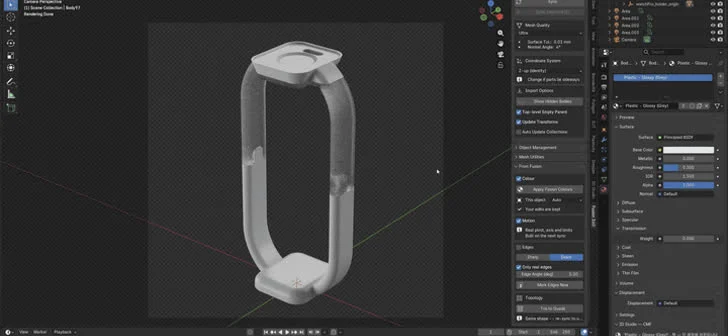
A groundbreaking free add-on pair has been released, promising to revolutionize the workflow for designers and 3D artists who utilize both Autodesk Fusion 360 and Blender. Developed by Jimin Kim, this innovative solution automates the often tedious process of transferring 3D models from Fusion 360, a popular CAD software, into Blender, a leading open-source 3D creation suite, while preserving crucial scene elements. The add-on facilitates a one-click synchronization, ensuring that materials, modifiers, and light links remain intact across multiple revisions, a significant leap forward from the traditional manual re-creation of these elements with each design iteration.
The Problem: A Friction Point in the 3D Design Pipeline
For professionals working across different software environments, the seamless transition of data is paramount. Many designers and engineers rely on Fusion 360 for its robust parametric modeling capabilities, enabling precise and iterative design of mechanical parts, assemblies, and even consumer products. Once a design is finalized or reaches a particular stage, it is often exported for rendering, visualization, or animation in applications like Blender. However, this export process has historically been a significant bottleneck.
The typical workflow involved exporting models from Fusion 360 in common interchange formats such as STEP or OBJ. Upon importing these files into Blender, users were faced with a series of manual tasks. Each material had to be painstakingly reassigned, textures re-linked, and shader nodes rebuilt from scratch. Furthermore, crucial modeling details, such as sharp edges that define the form of a model, had to be manually marked within Blender, often requiring the rebuilding of modifier stacks to achieve the desired visual fidelity. This repetitive and time-consuming process was not only a drain on productivity but also a source of potential errors and inconsistencies. The frustration of having to repeat these steps every time a minor dimension was tweaked in Fusion 360 became a widely acknowledged, albeit often unspoken, challenge in the community.
The Solution: A Direct, Intelligent Link
Jimin Kim’s newly released add-on pair directly addresses this workflow friction by establishing a direct, real-time connection between Fusion 360 and Blender. The system comprises two complementary add-ons: one that operates within Fusion 360 and another that resides within Blender. These two components communicate locally via a WebSocket connection, meaning the transfer of data occurs directly between the two applications on the user’s own computer, ensuring data privacy and security.
The core functionality is elegantly simple: a single "Sync" button press. When activated, the geometry of the model in Blender is updated in place to reflect any changes made in Fusion 360. Crucially, this synchronization process is designed to be non-destructive to the user’s work in Blender. Existing materials, modifiers, light links, and even manually marked sharp edges are preserved, allowing artists to continue refining their renders without the need for extensive re-work. This preserves the creative investment made in the Blender scene, making the iterative design process significantly more fluid and efficient.
What It Does Not Do: A Deliberate Design Choice
It is important to note that the add-on’s current functionality is deliberately focused on geometry transfer and scene element preservation. It does not import Fusion 360’s "Appearance" settings, which primarily govern basic colors and material properties within the CAD environment. Kim explains this as a conscious design decision, emphasizing that the tool is intended to move geometric data only. The visual appearance of the model is intended to be a creative output from Blender itself, built and refined within the 3D creation suite. This separation of concerns ensures that the Blender scene remains under the full artistic control of the user, rather than being dictated by the imported appearance settings, which might not translate optimally into Blender’s rendering pipeline.
Technical Specifications and Accessibility
The add-on pair is offered as free and open-source software, distributed under the GPL-3.0-or-later license. This licensing ensures that the tool is accessible to all users and encourages community contributions for further development and improvement. To utilize this new workflow, users will require both Autodesk Fusion 360 and Blender version 4.2 or later. Both applications must be running simultaneously on the same computer to establish the necessary local WebSocket connection. This requirement ensures a direct and robust communication channel, minimizing latency and potential points of failure.
Background Context: The Evolving Landscape of 3D Design
The development of such tools reflects a broader trend in the 3D design industry: the increasing demand for integrated and efficient workflows. As the lines between engineering, product design, and digital art continue to blur, professionals are seeking solutions that bridge the gaps between specialized software. CAD software like Fusion 360 is indispensable for product development due to its precision and parametric capabilities. Simultaneously, rendering and animation software like Blender has become a powerful and accessible tool for creating photorealistic visualizations, marketing materials, and even animated product showcases.

Historically, the workflow between these domains has been characterized by manual data conversion and re-setup, a process that has been a constant source of frustration for many. The proliferation of plugins and add-ons aimed at streamlining these transitions is a testament to the industry’s need for such bridges. While numerous solutions exist for transferring models between various 3D applications, the specific combination of Fusion 360 and Blender, coupled with the preservation of scene elements like modifiers and light links, represents a significant advancement for users operating within this particular ecosystem.
The release of this add-on can be seen as a response to user-driven demand. Online forums and communities dedicated to both Fusion 360 and Blender are replete with discussions and feature requests related to improving the inter-application workflow. Jimin Kim’s initiative to develop and release this solution as a free, open-source tool is likely to be met with significant enthusiasm from a user base that has long sought a more seamless integration.
Chronology of Development and Release
While specific dates for the development stages are not publicly detailed in the initial announcement, the release of this add-on pair signifies a culmination of efforts to address a persistent workflow challenge. The process would likely have involved:
- Problem Identification: Recognizing the inefficiencies and frustrations associated with the manual export/import and re-setup process between Fusion 360 and Blender.
- Conceptualization: Designing the architecture for a two-part add-on system communicating via a local WebSocket.
- Development of Fusion 360 Add-on: Creating the component that interfaces with Fusion 360 to export and manage geometry updates.
- Development of Blender Add-on: Building the counterpart within Blender to receive updates, apply them in place, and preserve existing scene data.
- Testing and Refinement: Rigorous testing to ensure stability, compatibility, and effective preservation of materials, modifiers, and other scene elements. This phase would have involved iterative improvements based on feedback and bug reports.
- Licensing and Distribution: Finalizing the open-source licensing (GPL-3.0-or-later) and making the add-on pair available to the public.
The announcement itself marks the official public release, making the tool accessible to designers and artists worldwide. The requirement for Blender 4.2+ suggests that the add-on is built to leverage newer functionalities or APIs within Blender, indicating a forward-looking approach to its development.
Potential Reactions and Community Impact
The announcement of this free, open-source add-on is expected to generate a positive and enthusiastic response within the 3D design and rendering communities.
- Individual Designers and Small Studios: For freelancers and small teams who rely on both Fusion 360 for product design and Blender for visualization, this add-on represents a significant time-saving and productivity enhancement. The ability to iterate rapidly without the tedious re-work associated with material assignment and scene setup will directly impact project timelines and profitability.
- Educational Institutions: Schools and universities that teach product design and 3D visualization often use both Fusion 360 and Blender. This add-on can streamline curriculum delivery and provide students with a more efficient and integrated learning experience.
- Open-Source Community: As an open-source project, it invites contributions from other developers. This could lead to further enhancements, such as support for additional Fusion 360 features or integrations with other software, further solidifying its value.
While official statements from major software vendors like Autodesk or the Blender Foundation are unlikely for a community-developed add-on, the impact on user workflows will be significant. Developers of paid plugins or services in similar niches may also take note, as this free solution sets a new benchmark for workflow integration between these two popular applications.
Broader Implications and Future Possibilities
The success and adoption of this Fusion 360 to Blender add-on could have several broader implications for the 3D design and visualization industry:
- Increased Adoption of Blender for Product Visualization: By simplifying the import process, this add-on may encourage more engineers and product designers to adopt Blender for their rendering and visualization needs, potentially reducing reliance on more expensive, proprietary rendering solutions.
- Democratization of Advanced Workflows: The free and open-source nature of the add-on makes advanced workflow integration accessible to a wider range of users, regardless of their budget. This can level the playing field for smaller businesses and individual creators.
- Catalyst for Further Integration: The success of this project could inspire similar efforts to bridge other software gaps, fostering a more interconnected ecosystem of 3D creation tools. Future iterations might explore importing more sophisticated material properties, handling assembly structures more effectively, or even synchronizing animation data.
- Emphasis on Workflow Automation: This development underscores the growing importance of workflow automation in creative and technical fields. As software becomes more specialized, the ability to seamlessly connect these tools becomes a critical factor in productivity and innovation.
In conclusion, Jimin Kim’s free add-on pair for Fusion 360 and Blender represents a significant advancement in the 3D design workflow. By eliminating the need for repetitive manual re-creation of scene elements, it empowers designers and artists to focus on their creative process, accelerating iteration cycles and enhancing overall productivity. The open-source nature of the solution further amplifies its impact, fostering collaboration and making powerful workflow integration accessible to a broad spectrum of users. This development is a compelling example of how community-driven innovation can address critical pain points and shape the future of digital content creation.
About the Author