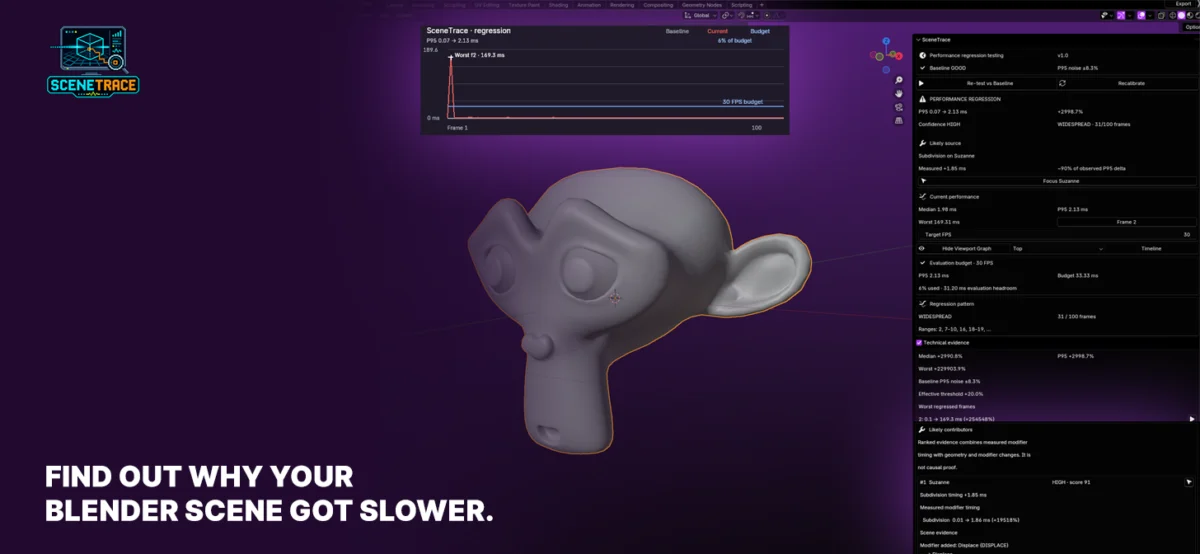
A significant advancement in optimizing digital content creation workflows has emerged with the release of SceneTrace, a free and open-source Blender extension designed to meticulously track and diagnose performance degradation within complex 3D scenes. Developed by Dustin Hanke, SceneTrace addresses a common and often frustrating challenge faced by 3D artists, technical directors, and animation studios: the gradual slowdown of Blender projects over time, without a clear understanding of the root cause. The tool empowers users to pinpoint specific changes that impact render times, moving beyond guesswork to data-driven analysis.
The core functionality of SceneTrace revolves around establishing a calibrated performance baseline for a Blender scene. This baseline acts as a reference point, allowing artists to re-test the scene at a later stage and compare current performance metrics against this established standard. The extension then intelligently highlights any performance regressions – instances where the scene has become slower – providing concrete data that directly correlates with specific scene modifications. This capability is particularly valuable as projects evolve, with elements like intricate geometry, complex modifiers, demanding materials, or the organizational structure of collections often contributing to performance bottlenecks.
The Silent Erosion of Performance: A Persistent Challenge in 3D Production
The digital art and animation industry relies heavily on sophisticated software like Blender, a powerful and versatile open-source 3D creation suite. While Blender’s capabilities are vast, enabling artists to realize incredibly detailed and realistic visions, its performance can be a delicate balance. As scenes grow in complexity, incorporating more polygons, higher-resolution textures, advanced shading networks, and numerous animated elements, the computational demands on a system increase exponentially.
Historically, diagnosing performance issues in large 3D scenes has been a labor-intensive and often subjective process. Artists might notice a scene taking longer to load, interact with, or render, but identifying the exact culprit can be akin to finding a needle in a haystack. Was it the addition of a new high-polygon model? The application of a particularly resource-intensive procedural material? The nesting of multiple complex modifier stacks? Or perhaps an inefficient scene organization that leads to excessive data processing? Without a systematic way to measure and compare changes, artists often resort to trial-and-error, disabling elements one by one until performance improves, a process that can be time-consuming and prone to error.
This challenge is not unique to Blender; similar performance tracking and diagnostic tools are sought after in other professional 3D software packages. However, the open-source nature of Blender often fosters a community-driven approach to problem-solving, leading to innovative solutions like SceneTrace that can be freely adopted and integrated by a wide range of users.
SceneTrace: Features and Functionality
SceneTrace distinguishes itself with a robust set of features designed to provide comprehensive performance insights. At its heart, the extension offers:
- Performance Baseline Creation: Users can initiate a performance test that establishes a baseline metric for their current scene. This test captures various performance indicators, providing a snapshot of how the scene behaves under normal conditions at that specific point in time.
- Automated Regression Testing: Subsequent tests can be run against this established baseline. SceneTrace then performs a detailed comparison, identifying and quantifying any performance degradation.
- Detailed Reporting: The extension generates reports that clearly indicate which aspects of the scene are contributing to the slowdown. This can include detailed breakdowns of geometry processing, modifier evaluation times, material complexity impact, and collection overhead.
- Visualizations: While not explicitly detailed in the initial announcement, it is common for such tools to offer visual representations of performance data, making it easier for users to grasp complex metrics. This could involve graphs, charts, or even heatmaps within the Blender viewport.
- Command-Line Interface (CLI): A significant aspect of SceneTrace’s utility lies in its command-line interface, powered by a Rust-based core. This allows for the automation of performance checks outside of the interactive Blender environment.
The Power of Automation and CI Integration
The inclusion of a command-line interface is a game-changer for production pipelines, particularly for technical artists, pipeline developers, and larger teams. This feature enables SceneTrace to be seamlessly integrated into Continuous Integration (CI) workflows. CI is a software development practice where developers frequently merge their code changes into a central repository, after which automated builds and tests are run.
By incorporating SceneTrace into a CI pipeline, studios can proactively catch performance regressions before they become significant issues. For instance, every time a significant change is committed to a project file, an automated script could trigger SceneTrace to run a performance test. If the test reveals a notable slowdown compared to the established baseline, the CI system can flag the change, preventing it from being merged or alerting the responsible artist. This proactive approach shifts performance management from a reactive troubleshooting exercise to a preventative measure, saving considerable time and resources in the long run.
This automation is crucial for maintaining project stability and predictability, especially in long-term projects or those involving multiple artists collaborating on the same scene. It ensures that the scene remains performant throughout its development lifecycle, contributing to smoother animation playback, faster iterative feedback loops, and ultimately, more efficient render times.
Technical Underpinnings: Blender Extension and Rust Core
SceneTrace’s architecture reflects a modern approach to software development, combining a user-friendly interface within Blender with a robust and efficient backend. The Blender extension provides the interactive experience, allowing artists to easily initiate tests, view results, and understand performance bottlenecks directly within their familiar 3D environment.
The heavy lifting of data analysis and command-line operations is handled by a Rust-based core. Rust is a systems programming language known for its performance, memory safety, and concurrency. Its use here suggests that SceneTrace is built for speed and efficiency, ensuring that performance tests are executed quickly and reliably. This choice of technology also contributes to the CLI’s ability to handle complex scene data processing without significant overhead.
The project is explicitly designed for Blender versions 4.2 and newer, indicating that it leverages recent advancements and APIs within the Blender ecosystem. Its free and open-source licensing model further democratizes access to this powerful tool, making it available to individual artists, educational institutions, and studios of all sizes.
Implications for the 3D Industry and Future Development
The release of SceneTrace has several significant implications for the broader 3D production landscape:
- Democratization of Performance Optimization: By providing a free and accessible tool, SceneTrace empowers a wider range of users to tackle performance issues, leveling the playing field for smaller studios and independent artists who may not have dedicated pipeline technical directors.
- Shift Towards Proactive Performance Management: The emphasis on establishing baselines and automating checks encourages a cultural shift towards proactive performance management rather than reactive troubleshooting. This can lead to more predictable and efficient production pipelines.
- Enhanced Collaboration: In team environments, SceneTrace can serve as an objective measure of performance impact, facilitating clearer communication about how individual contributions affect the overall scene health.
- Foundation for Further Development: As an open-source project, SceneTrace has the potential to evolve with community contributions. Future iterations could include more advanced diagnostic features, enhanced visualization options, or integrations with other project management and asset tracking tools.
While the initial announcement focuses on render time degradation, the principles behind SceneTrace could potentially be extended to track other performance metrics, such as viewport interaction speed, simulation times, or even memory usage, further enhancing its utility.
Conclusion: A Vital Tool for Modern 3D Workflows
SceneTrace emerges as a timely and invaluable tool for anyone working with Blender on complex 3D projects. By addressing the persistent challenge of performance degradation with a data-driven and automated approach, it promises to save artists countless hours of frustrating guesswork. The extension’s dual nature – offering an intuitive interface for individual users and a powerful CLI for pipeline integration – ensures its applicability across a broad spectrum of professional workflows. As the demand for increasingly detailed and visually complex 3D content continues to grow, tools like SceneTrace will become indispensable for maintaining efficient, stable, and productive creative environments. The open-source nature of the project further solidifies its potential impact, fostering a collaborative ecosystem where performance optimization is a shared and attainable goal.
About the Author