The ongoing quest for realistic and compelling 3D renders within the Blender ecosystem has taken a significant leap forward with the release of "Light It Up" version 3. This comprehensive add-on, designed to address the common pitfall of overly uniform and flat lighting, promises to empower both novice and experienced 3D artists with an array of powerful tools and an intuitive workflow. Unlike many existing solutions, Light It Up v3 meticulously constructs actual lighting rigs using native Blender lights, ensuring seamless integration and compatibility across various render farms without requiring additional software installations.
A Paradigm Shift in Lighting Workflow
At its core, Light It Up v3 tackles the fundamental challenge of achieving dynamic and visually engaging lighting. Renderers often struggle with scenes that appear flat due to an even distribution of light, lacking the depth and dimension that characterize real-world illumination. This latest iteration of the add-on introduces a sophisticated, one-click solution that not only rectifies this issue but also provides granular control over the generated lighting setups. The result is a significant reduction in the time and effort required to achieve professional-grade lighting, freeing up artists to focus on other critical aspects of their creative process.
The add-on boasts an impressive library of 37 studio and portrait presets. This extensive collection covers a wide spectrum of lighting scenarios, including the six foundational portrait lighting patterns: Rembrandt, split, loop, butterfly, short, and broad. Beyond portraiture, users will find meticulously crafted setups for product photography, packshots, and cinematic looks. Each of these presets is not merely a collection of shader nodes or baked information. Instead, Light It Up v3 constructs a tangible lighting rig composed of native Blender lights, neatly organized within their own collections. This approach is crucial for interoperability, as it ensures that scenes lit with this add-on can be rendered on any farm without the need for the add-on itself to be installed on the rendering nodes. This significantly streamlines collaborative projects and large-scale rendering operations.

Intelligent Lighting Replication and Analysis
One of the standout features of Light It Up v3 is its ability to match lighting in reference images. Artists can now simply import a film still or a photograph into the add-on’s interface. The software then intelligently analyzes the reference image, dissecting key lighting parameters such as directional intensity, contrast ratio, color temperature, and the softness or hardness of the light. Based on this analysis, it constructs a starting lighting rig that closely approximates the reference.
This feature is particularly revolutionary for artists aiming to replicate specific moods or styles. The add-on can read a lit subject against a background – be it a portrait, a product shot, or a character render – and provide a textual breakdown of its analysis. For instance, it might report "key from the left above, 4.3:1 contrast, 3100K, hard." This precise feedback empowers artists to understand the underlying lighting principles and provides a clear starting point for adjustments. Crucially, it allows artists to critically evaluate the analysis and make informed decisions, rather than relying on guesswork or trial-and-error. This analytical capability bridges the gap between observational learning and practical application, accelerating the learning curve for lighting techniques.
Unlocking Existing HDRI Libraries
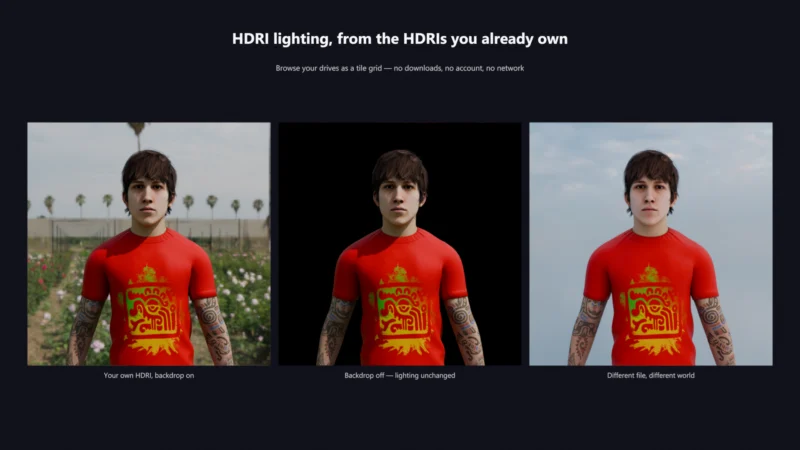
Light It Up v3 also introduces a novel approach to High Dynamic Range Image (HDRI) utilization. Unlike many other HDRI tools in Blender that primarily function as downloaders for online collections, this add-on focuses on browsing the HDRIs users already own. It intelligently scans local drives, identifying and displaying existing HDRI files as a thumbnail grid. This means artists can easily access and utilize the vast libraries of HDRIs they have purchased, downloaded in the past, or received from clients, all without the need for an internet connection or an account with an external service. This localized approach enhances privacy, speeds up access, and maximizes the utility of an artist’s existing assets. The absence of network dependency also makes it a robust tool for environments with unreliable internet access.

Masterful Control and Predictable Results
The control mechanisms within Light It Up v3 are designed for precision and predictability. Parameters such as intensity, color temperature, key-to-fill ratio, and light orbit are not arbitrary sliders. Instead, they are absolute controls that recompute from the preset’s original authoring. This means that adjusting a parameter, such as increasing intensity to 3.0 and then returning it to 1.0, will bring the scene back to its exact starting point. This level of predictability is crucial for maintaining creative consistency and avoiding the subtle drift that can occur with less precise control systems. Artists can experiment with confidence, knowing that their adjustments are precise and reversible.
A Comprehensive Suite of Advanced Features
Beyond these core functionalities, Light It Up v3 integrates a wealth of additional features designed to enhance the 3D lighting workflow:
- Volumetric Atmosphere Presets: Twenty presets are included to add depth and realism through atmospheric effects, enhancing the mood and believability of scenes.
- Animated Lighting Effects: Thirteen presets offer dynamic lighting animations, adding movement and life to renders, suitable for motion graphics or animated sequences.
- Light Groups and AOV Export: The add-on facilitates the creation of light groups, streamlining the process of rendering individual lighting passes. This includes one-click export for Arbitrary Output Variables (AOVs), a critical feature for compositing workflows.
- Lighting Snapshots: The ability to save and switch between different lighting configurations allows for rapid iteration and comparison of various lighting scenarios within a single scene.
- Rig-Level Light Linking: This feature provides fine-grained control over which objects are affected by specific lights within the generated rig, enabling complex lighting scenarios and creative effects.
- Batch Apply Functionality: Artists can apply lighting setups across multiple objects simultaneously, significantly accelerating workflow for scene population and consistency.
- User-Defined Preset Management: Users can save their own custom lighting setups. Importantly, these user presets are stored outside the add-on’s installation folder, ensuring they are not lost or overwritten during add-on updates.
The add-on is fully compatible with both Cycles and EEVEE, Blender’s powerful rendering engines, and has been rigorously tested on recent stable versions of Blender, including LTS releases (4.2, 4.5) and the latest versions (5.1, 5.2).

Seamless Upgrade Path for Existing Users
For users who already own "Light It Up Pro v2," the transition to version 3 is designed to be exceptionally smooth. Version 3 installs under a new module name, allowing it to coexist alongside older versions rather than replacing them. Upon its first launch, the add-on automatically detects the presence of a previous version and offers a convenient one-click process to migrate settings and preferences, ensuring a hassle-free upgrade experience.
Implications for the 3D Industry
The release of Light It Up v3 signals a maturing of specialized tools within the Blender ecosystem. By democratizing access to advanced lighting techniques and streamlining complex workflows, this add-on has the potential to significantly impact the quality and efficiency of 3D content creation across various industries, including film, animation, game development, and architectural visualization.
The emphasis on native Blender assets and interoperability also addresses a persistent challenge in collaborative 3D environments, where reliance on proprietary add-ons can create bottlenecks. The ability to render scenes on any farm without add-on dependencies is a substantial benefit for studios and freelancers alike. Furthermore, the intelligent analysis of reference images suggests a future where AI and procedural generation play an even more integral role in assisting artists with technical tasks, allowing them to focus on artistic intent.

The comprehensive feature set, coupled with its intuitive design, positions Light It Up v3 not just as a lighting tool, but as a fundamental enhancement to the Blender creative pipeline, empowering artists to achieve professional results with greater ease and efficiency than ever before. The ongoing development and rigorous testing across multiple Blender versions underscore a commitment to providing a stable and reliable solution for the demanding needs of modern 3D production.
About the Author