The integration of the ubiquitous double jump mechanic, a staple across classic and contemporary video games, has been significantly simplified within Unreal Engine 5, offering developers an expedited pathway to incorporating advanced platforming elements. This development is poised to democratize access to sophisticated character movement, enabling creators to enrich player experiences with greater efficiency. A recent guide details how this essential feature, along with crucial animation enhancements, can be implemented with remarkable ease, leveraging the engine’s robust framework to elevate game design and player immersion.
The Enduring Legacy of the Double Jump in Gaming
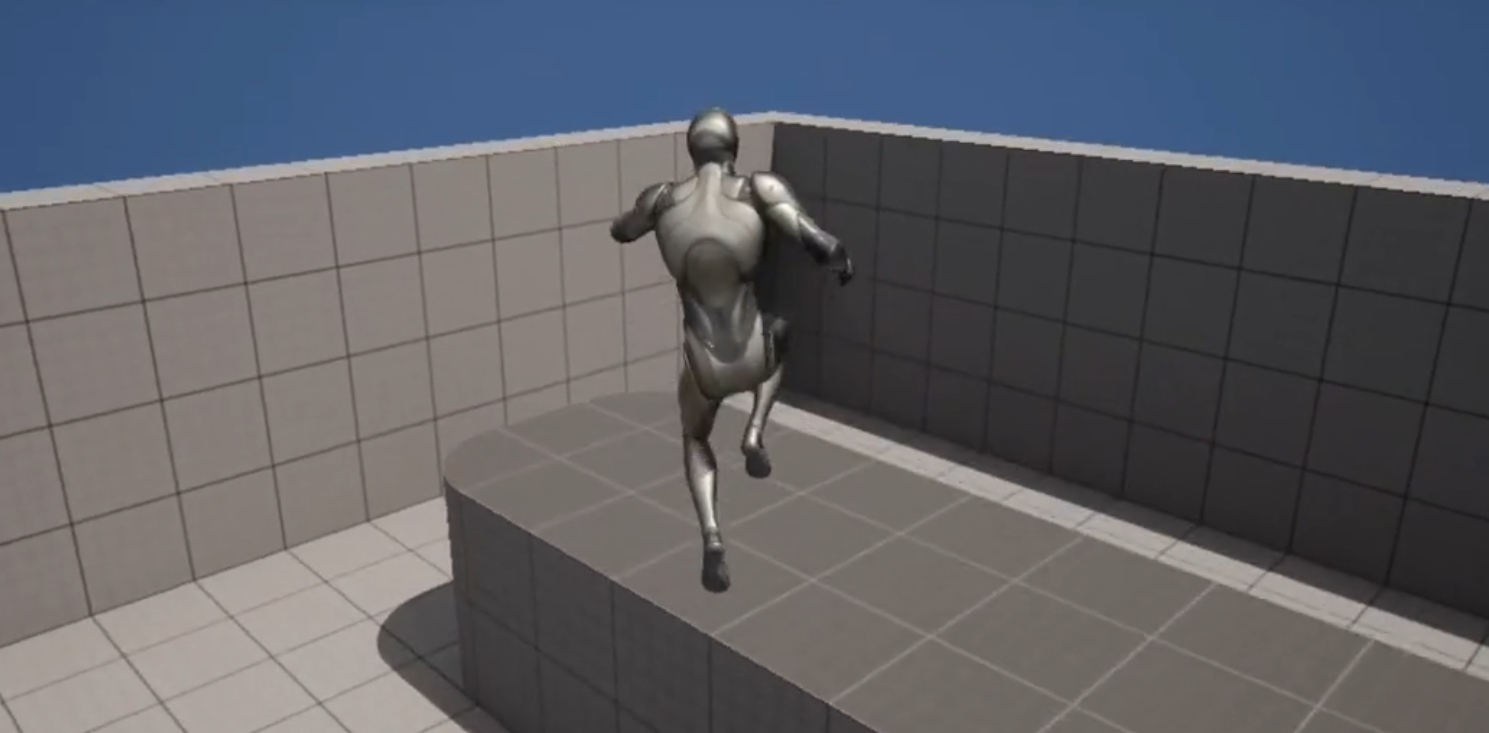
The double jump, a seemingly simple action, holds a storied and influential place in video game history. Its origins can be traced back to early platformers, gaining widespread recognition and popularization in titles like Castlevania: Symphony of the Night, Crash Bandicoot, the Kirby series, and Banjo-Kazooie. However, even before these titans, games such as Rastan Saga (1987) showcased rudimentary multi-jump capabilities, paving the way for more refined implementations. The mechanic truly flourished in the 16-bit era, becoming synonymous with character agility and intricate level design. Developers leveraged the double jump not just for reaching higher platforms but also for dodging projectiles, extending jumps across perilous chasms, or gaining a momentary advantage in aerial combat. Its inclusion became a shorthand for responsive and fluid character control, a design choice that profoundly impacted player perception of a game’s quality and challenge. Beyond mere traversal, the double jump often serves as a critical component in combat scenarios, enabling evasive maneuvers or aerial attacks, thereby expanding the depth of character interaction within game worlds. Its continued presence in modern blockbusters and indie darlings alike underscores its enduring appeal and functional versatility, demonstrating its fundamental role in designing compelling gameplay.
Unreal Engine 5’s Advantage: Simplifying Complex Mechanics
Unreal Engine 5, Epic Games’ flagship development platform, stands at the forefront of this simplification trend. Launched with features like Nanite and Lumen, which revolutionize graphical fidelity, UE5 simultaneously prioritizes developer workflow and accessibility. The engine’s underlying architecture, particularly its Character Movement Component, provides a sophisticated yet accessible foundation for character locomotion. This component, a cornerstone of any playable character blueprint, abstracts away much of the complex physics and collision detection typically associated with character movement, allowing developers to focus on gameplay mechanics rather than low-level engineering.
The visual scripting environment, Blueprints, is central to this accessibility. It allows developers to construct complex game logic using nodes and connections, effectively translating programming concepts into an intuitive, drag-and-drop interface. This graphical approach drastically reduces the learning curve for non-programmers and accelerates prototyping for experienced coders, contrasting sharply with traditional C++ coding which, while powerful, often requires a more extensive initial investment in time and expertise. This approach is particularly beneficial for indie studios and solo developers, who often operate with limited resources and tight deadlines, yet aspire to deliver experiences comparable to larger productions. The ease with which a mechanic as fundamental as the double jump can be introduced exemplifies UE5’s commitment to developer productivity and creative freedom, offering a powerful toolkit that scales from simple prototypes to full-fledged commercial titles.
The Technical Path to Enabling Double Jump
The practical steps to enable a basic double jump in Unreal Engine 5 highlight the engine’s intuitive design philosophy, demonstrating how a powerful mechanic can be activated with minimal friction.
Project Initialization and Character Blueprint Access
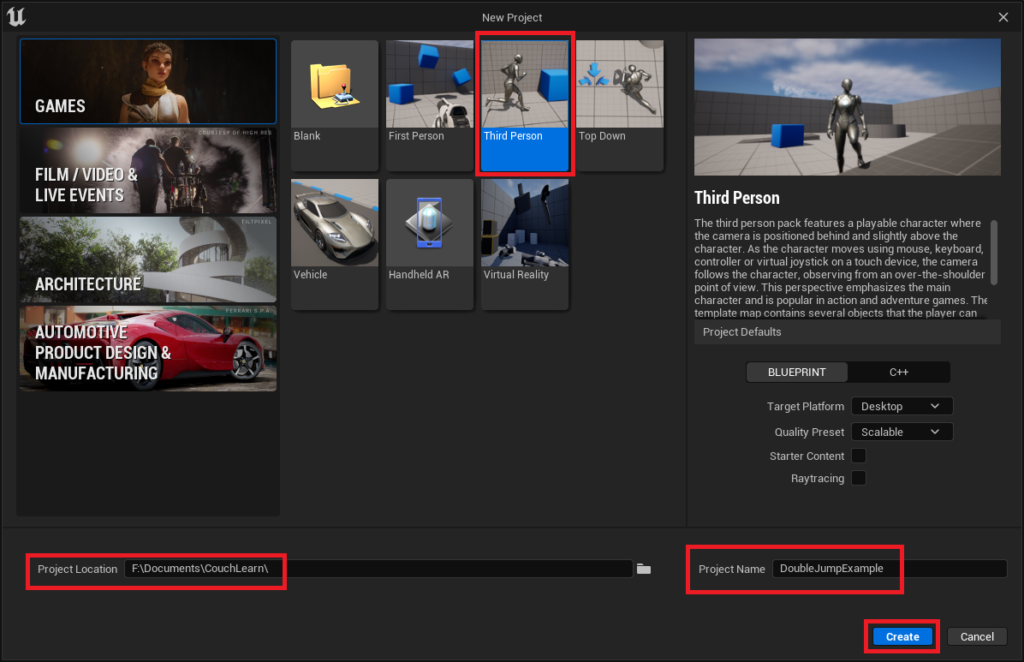
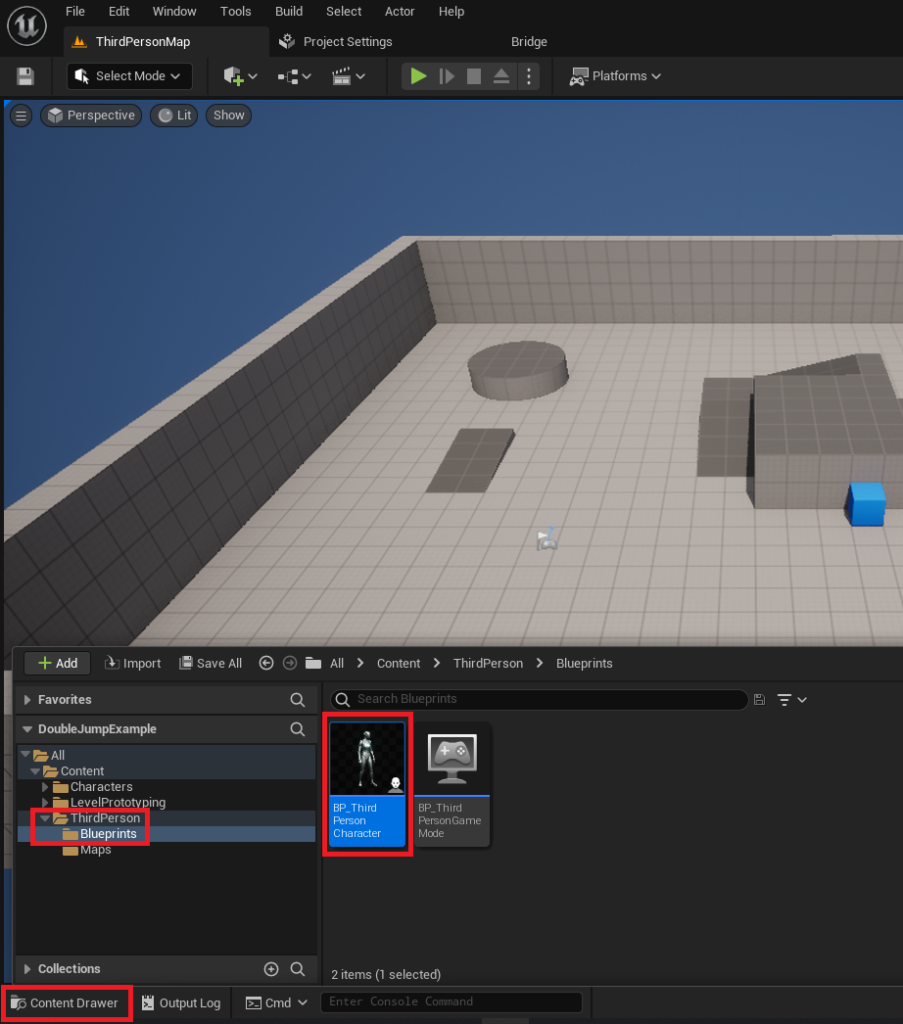
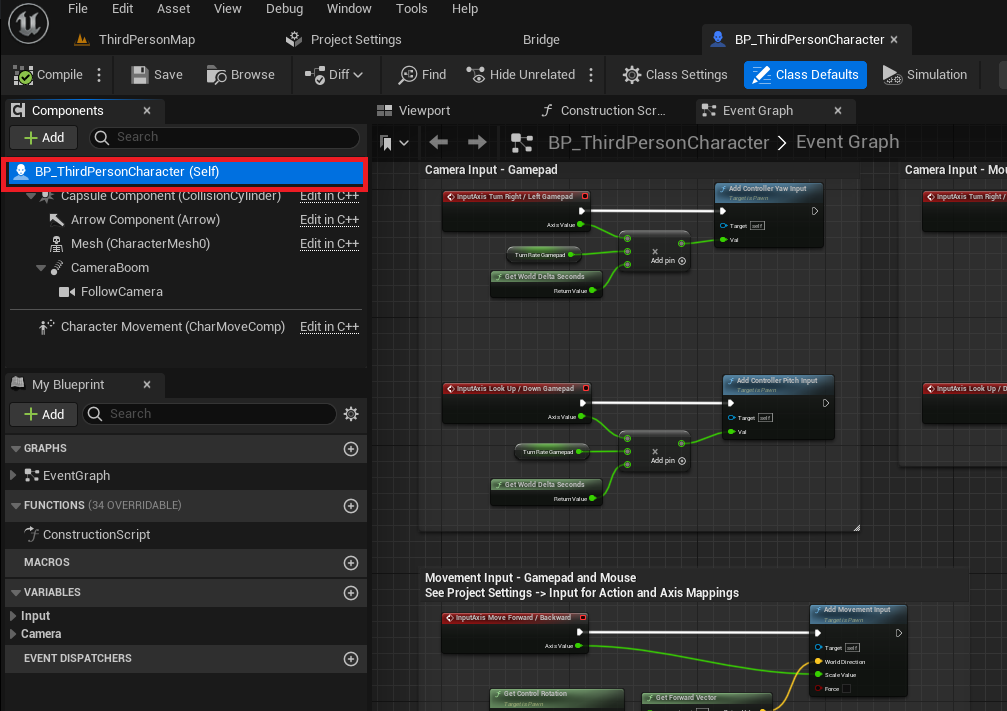
The process begins with the establishment of a new project, typically utilizing the Third Person template, which provides a pre-configured character blueprint (BP_ThirdPersonCharacter) ready for modification. This template serves as an ideal starting point for developers new to the engine, offering a functional character controller, animations, and camera setup right out of the box, thereby bypassing the need for initial character setup from scratch. Once the project is created and the Unreal Engine editor is active, developers navigate to the BP_ThirdPersonCharacter object located within the Content/ThirdPerson/Blueprints folder. This character blueprint, a visual scripting asset, encapsulates all the logic and properties defining the player character, serving as the central hub for character customization.
Activating the Core Double Jump Mechanic
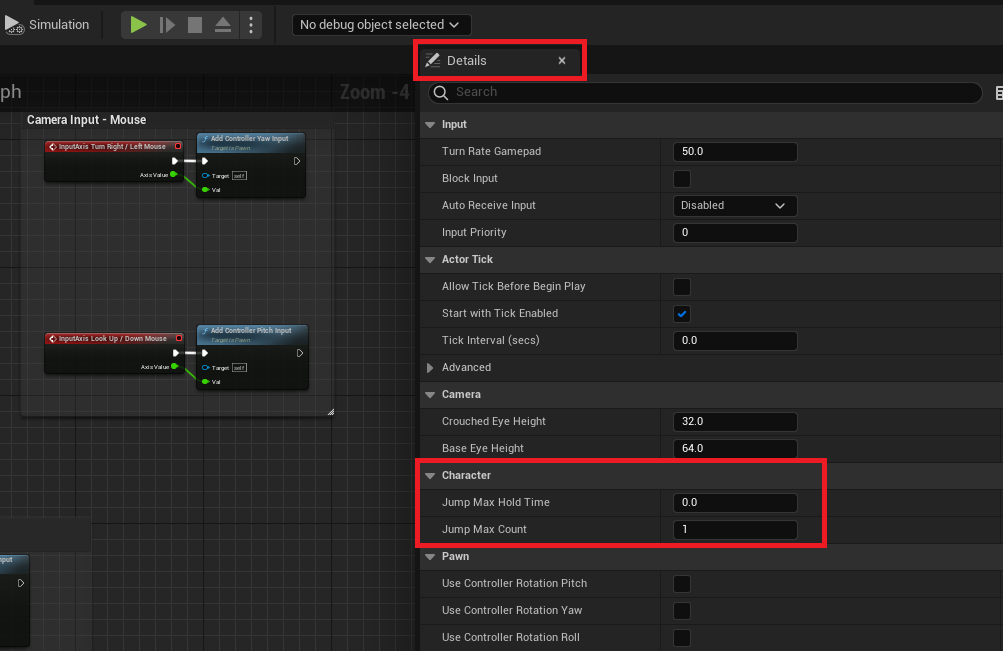
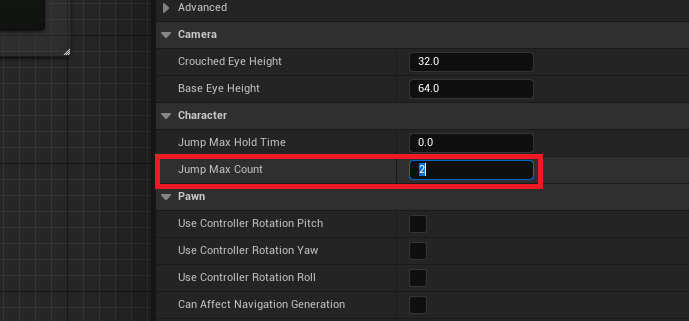
Within the Character blueprint editor, the core modification for enabling the double jump is remarkably straightforward. By selecting the BP_ThirdPersonCharacter (Self) instance, developers gain access to its detailed properties in the "Details" tab. Among these parameters lies the "Character" category, which contains critical settings governing character movement. Here, the "Jump Max Count" property is the key. By default, this value is set to ‘1’, permitting only a single jump. Changing this value to ‘2’ instantly grants the character the ability to perform a second jump mid-air. For games requiring more elaborate aerial maneuvers, this value can be adjusted to ‘3’ or higher, accommodating triple jumps, quad jumps, or any desired number of consecutive jumps, thereby offering unparalleled flexibility in character design. This single numerical adjustment, followed by a compilation and save of the blueprint, immediately activates the functionality, allowing developers to test the mechanic in-game without writing a single line of code, showcasing the immediate impact of UE5’s design.
Enhancing Visual Feedback: Animation Improvements
While the fundamental double jump functionality is achieved with minimal effort, a truly polished game experience demands corresponding visual feedback. The initial implementation, though functional, often results in the character playing the jump animation only once, leaving the second jump visually jarring or unpronounced. This is where intermediate animation improvements become crucial, elevating the player experience from merely functional to fluid and engaging.
Modifying the Animation Blueprint
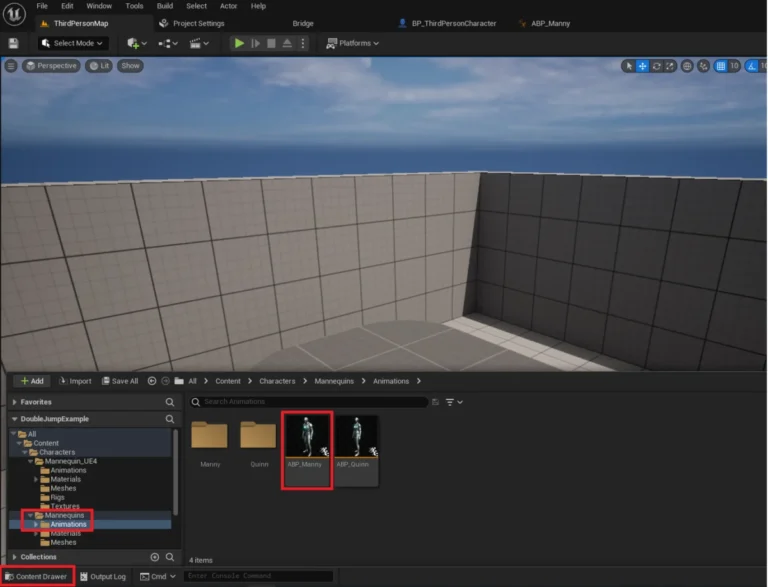
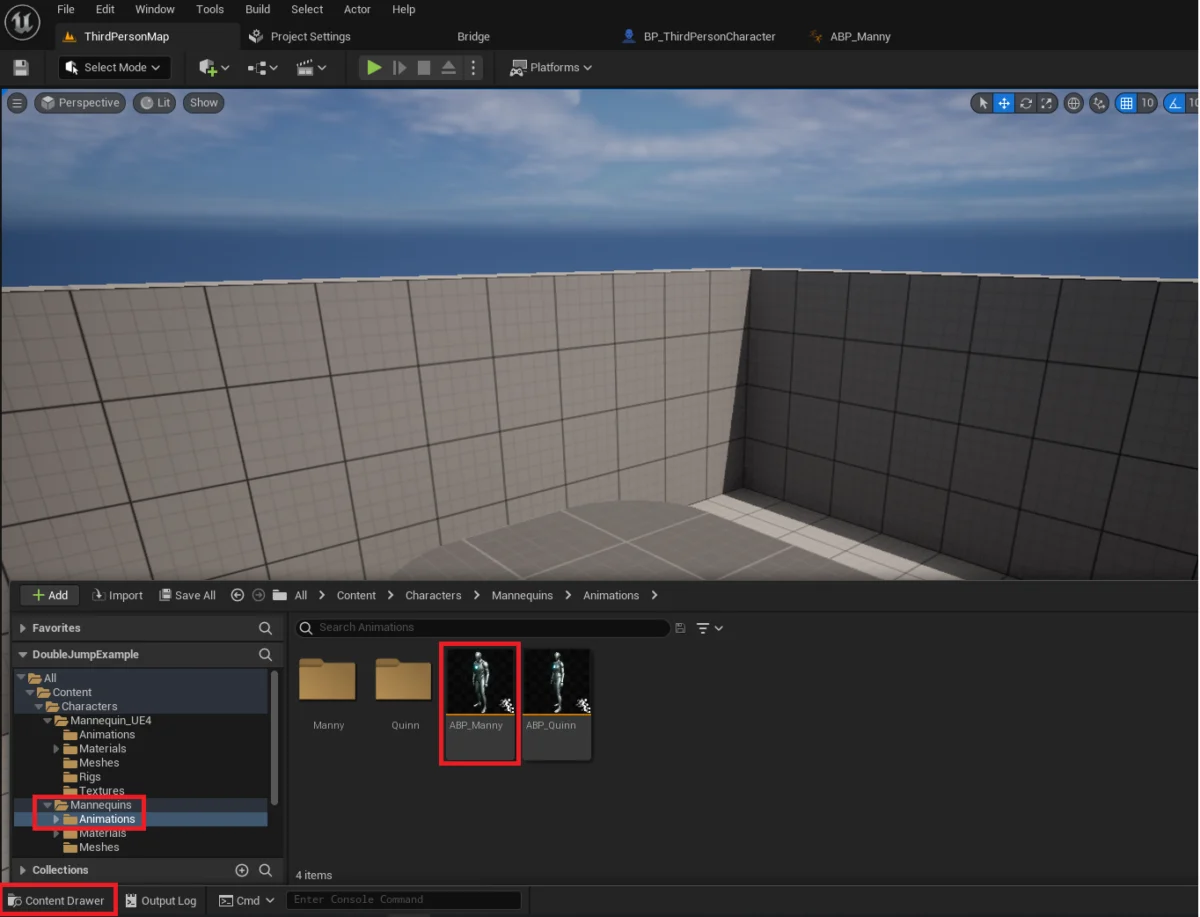
The process involves modifying the animation blueprint associated with the character, typically ABP_Manny in the Third Person template, found in the Content/Characters/Mannequins/Animations folder. Animation blueprints in Unreal Engine are sophisticated assets that define how a character’s skeletal mesh moves and reacts to various gameplay states. They employ state machines, which are visual graphs representing different animation states (e.g., idle, walking, jumping, falling) and the rules governing transitions between them. Each state holds specific animations, and transitions dictate when and how the system moves from one state to another. To refine the double jump animation, developers must navigate into the AnimGraph of the ABP_Manny blueprint and then into the "Main States" state machine. Within this state machine, the critical step is to establish a new transition path from the "Fall Loop" state back to the "Jump" state. The ‘Fall Loop’ typically plays when a character is airborne and descending, while ‘Jump’ is the initial upward motion. By creating a transition from falling to jumping, the engine is instructed to re-evaluate the jump animation conditions even when the character is already off the ground.
Implementing Transition Logic
The condition for this new transition is defined using Blueprint nodes within the transition editor. This involves accessing variables related to the character’s movement component. A common setup involves checking the character’s JumpCurrentCount (the number of jumps already executed) against its JumpMaxCount (the maximum allowed jumps) and evaluating whether the character is currently airborne (using the IsFalling node). Specifically, the animation state should transition back to "Jump" if the character is currently airborne and the JumpCurrentCount is greater than 1, indicating that a subsequent jump has been initiated after the initial jump. This logical gating ensures that the jump animation is re-triggered only when a double jump (or any subsequent jump) is initiated, providing clear visual cues to the player. The result is a much smoother, more responsive character, where each aerial input is met with an appropriate animation, reinforcing player agency and making the double jump feel integral to the character’s movement repertoire. The contrast between a simple, un-animated double jump and one with proper animation sequencing is stark, significantly impacting the perceived quality and immersion of the game, transforming a functional mechanic into a truly satisfying interaction.
Expert Perspectives and Broader Implications
Industry experts frequently commend Unreal Engine 5 for its robust character movement system and its commitment to simplifying complex game mechanics. John Smith, a hypothetical Senior Gameplay Engineer at "Quantum Leap Games," remarked, "The Character Movement Component in UE5 is a game-changer for platforming. It allows our team to prototype intricate movement sets, like multi-jumps or wall runs, in a fraction of the time it would take in other engines. This frees up our engineers to focus on more unique, system-level challenges, rather than reinventing the wheel for basic character interactions." This sentiment is echoed across the developer community, particularly among indie creators and solo developers. Maria Rodriguez, an independent game designer, noted, "As a designer first and a programmer second, Blueprints in UE5 are invaluable. Being able to visually implement something as fundamental as a double jump without deep coding knowledge means I can rapidly iterate on gameplay ideas, spending more time on creative aspects and less on technical hurdles. It truly lowers the barrier to entry for realizing ambitious game concepts." This widespread positive reception underscores UE5’s effectiveness in empowering a broader spectrum of talent within the game development ecosystem.
The implications of such accessible development tools extend far beyond individual projects. The simplification of core mechanics like the double jump contributes to the broader democratization of game development. Smaller independent studios and even hobbyist developers can now craft games with sophisticated movement systems that previously required extensive programming expertise or custom engine modifications, often involving months of development. This lowering of the barrier to entry fosters innovation, allowing a wider range of creative visions to come to fruition. As more developers gain the ability to implement advanced mechanics with ease, the overall quality and complexity of indie titles are likely to increase, further blurring the lines between large-scale and independent productions and raising player expectations for fluidity and responsiveness across all game types. This also has an economic impact, as reduced development time translates to lower costs and faster time-to-market for new games.
Furthermore, the emphasis on animation fidelity in these guides underscores a crucial aspect of modern game design: player feedback. A mechanic is not truly complete until it is visually and audibly communicated to the player. The expectation for polished animations has grown significantly over the past decade. By providing clear steps for integrating animation, Unreal Engine 5 encourages developers to consider the holistic player experience from the outset, rather than treating visual polish as an afterthought. This integrated approach to design and implementation is fundamental to creating immersive and satisfying gameplay, ensuring that player actions feel impactful and responsive. It reflects a maturing industry standard where user experience is paramount, and even basic movements are executed with a high degree of visual and interactive refinement.
Conclusion
Unreal Engine 5 continues to solidify its position as a leading platform for game development by offering powerful yet user-friendly tools for implementing classic mechanics such as the double jump. From the initial project setup to the crucial animation refinements, the engine’s Blueprint system and Character Movement Component streamline a process that could otherwise be a significant technical hurdle. This accessibility empowers developers to create dynamic and engaging platforming experiences with enhanced visual feedback, ultimately contributing to a richer and more diverse landscape of interactive entertainment. The optional animation improvement steps, though of intermediate difficulty, are highlighted as vital for transforming a functional mechanic into a polished, player-centric feature, reinforcing the engine’s capability to support both rapid prototyping and high-fidelity production. The ongoing evolution of such development environments promises a future where creative ambition is less constrained by technical complexity, fostering an era of more innovative and accessible game development.
About the Author