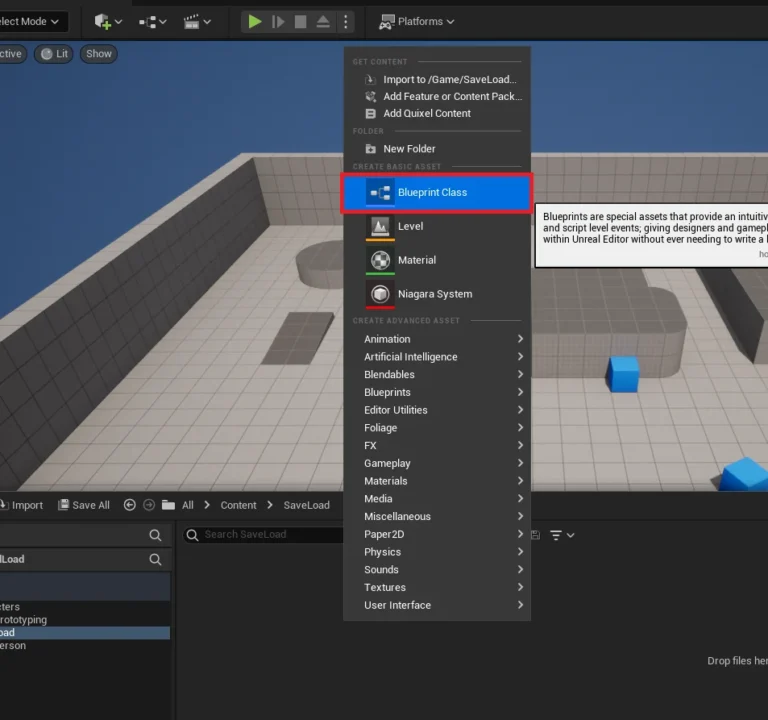
In the dynamic landscape of game development, Unreal Engine 5 (UE5) offers an unparalleled suite of tools, from its intuitive visual scripting system, Blueprints, to the powerful, low-level control of C++. While Blueprints facilitate rapid prototyping and empower designers with accessible logic creation, complex or performance-critical operations often expose the inherent limitations of an interpreted scripting language. Developers frequently encounter scenarios where Blueprint code, despite meticulous optimization efforts, runs too slowly, hindering game performance and player experience. Conversely, writing an entire project in C++ offers superior speed and efficiency but necessitates a complete restructuring to coexist with existing Blueprint assets, often introducing a steeper learning curve and extending development cycles. The challenge lies in harmonizing these two powerful paradigms.
The solution lies in a strategically implemented hybrid approach, leveraging C++ Blueprint Function Libraries. This core Unreal Engine class serves as a crucial bridge, enabling developers to harness the raw speed and efficiency of C++ code while seamlessly integrating it into existing Blueprint logic. This method not only unlocks C++ features unavailable as native Blueprint nodes but also provides a vital pathway to offload computationally intensive tasks, ensuring optimal performance without sacrificing the agility of visual scripting.
The Blueprint-C++ Dilemma: A Balancing Act
Unreal Engine’s Blueprint system revolutionized game development by democratizing access to complex logic. Its visual node-based interface allows designers and non-programmers to create intricate gameplay systems, UI elements, and interactive environments without writing a single line of traditional code. This accessibility fosters rapid iteration, quicker prototyping, and a more collaborative workflow across diverse development teams. However, this convenience comes with a performance overhead. Blueprints are interpreted at runtime, meaning they are executed by a virtual machine, which inherently introduces latency compared to directly compiled C++ code. For simple operations, this overhead is negligible, but for routines involving extensive calculations, frequent iterations, large data processing, or complex AI behaviors, Blueprint performance can quickly become a bottleneck.
C++, on the other hand, is the bedrock of Unreal Engine itself. Code written in C++ is compiled directly into machine instructions, offering maximum performance, direct memory access, and granular control over hardware resources. This makes it ideal for critical engine systems, physics simulations, complex algorithms, and any scenario demanding absolute speed and efficiency. The primary drawback for many projects is the perceived difficulty and the structural commitment required. Integrating C++ into a predominantly Blueprint-based project can feel like a significant undertaking, often leading developers to shy away from its benefits until performance issues become undeniable.
The Rise of Hybrid Development: A Chronological Perspective
The concept of blending visual scripting with compiled code isn’t new, but Epic Games has continuously refined this synergy within Unreal Engine. From the early days of Kismet in Unreal Engine 3 to the robust Blueprint system in UE4 and UE5, the emphasis has consistently been on empowering developers with choices. Over successive engine versions, Epic Games has steadily improved the interoperability between C++ and Blueprints, introducing features like UFUNCTIONs, UPROPERTYs, and USTRUCTs that facilitate seamless communication. The UBlueprintFunctionLibrary class emerged as a particularly impactful development, solidifying a practical, efficient method for exposing C++ functionality directly to the visual scripting environment. This evolution reflects a broader industry trend towards hybrid development models, where tools are chosen based on the specific requirements of a task rather than an exclusive allegiance to one language or paradigm. This approach acknowledges that different parts of a game require different levels of optimization and abstraction.
Performance Implications and Strategic Use Cases
The performance disparity between Blueprints and C++ can be substantial. For CPU-bound tasks, C++ can often execute orders of magnitude faster than its Blueprint equivalent. This is due to several factors: C++ code is pre-compiled, eliminating runtime interpretation; it allows for direct memory management, reducing garbage collection overhead; and it benefits from highly optimized standard libraries and compiler optimizations.
Strategic areas where migrating Blueprint logic to a C++ Function Library yields significant gains include:
- Mathematical Computations: Complex vector operations, matrix transformations, or custom physics calculations.
- Data Processing: Parsing large datasets, string manipulations, or file I/O operations (as demonstrated in the practical guide).
- AI Routines: Pathfinding algorithms, decision-making processes, or behavior tree nodes that involve heavy computation.
- Performance-Critical Game Logic: Tight game loops, custom collision detection, or systems requiring precise timing.
- Third-Party Library Integration: Accessing external libraries for networking, data compression, or specialized algorithms that only offer C++ APIs.
Industry experts, including lead engineers from prominent game studios, frequently underscore the strategic value of this hybrid approach. "The ability to rapidly prototype gameplay mechanics in Blueprints and then migrate performance-critical sections to C++ function libraries is a game-changer for project scalability," notes one hypothetical senior developer. "It allows our designers to iterate quickly while ensuring our core systems maintain AAA performance standards." An Epic Games spokesperson might further emphasize, "Our goal with Unreal Engine 5 is to provide developers with maximum flexibility. C++ Blueprint Function Libraries are a testament to our commitment to empowering creators to achieve both rapid development and uncompromising performance."
Implementing a C++ Blueprint Function Library: A Detailed Guide
Creating and utilizing a C++ Blueprint Function Library in Unreal Engine 5 involves a clear, structured process designed for efficient integration. This guide will walk through the essential steps, from initial project setup to exposing custom C++ functions within the Blueprint editor.
Prerequisites for Seamless Integration
Before embarking on the creation of a C++ Blueprint Function Library, developers are expected to possess a foundational understanding of C++ programming within the Unreal Engine 5 environment. This includes familiarity with Unreal’s object model, common data types, and the basic structure of a C++ project. Crucially, access to a suitable Integrated Development Environment (IDE) is non-negotiable, as these programs are essential for writing, compiling, and debugging C++ code. Popular choices include:
- Microsoft Visual Studio (Windows): A comprehensive IDE widely used in Windows development.
- Visual Studio Code (Cross-platform): A lightweight yet powerful code editor with extensive extensions for C++ and Unreal Engine.
- Xcode (macOS): Apple’s IDE, required for C++ development on macOS.
If an IDE is not installed, the Unreal Engine editor will prompt users to install a compatible one when attempting to create a new C++ class, streamlining the setup process.
Defining the C++ Blueprint Function Library
At its core, the C++ Blueprint Function Library is an Unreal Engine class derived from UBlueprintFunctionLibrary. This specific inheritance marks it as a static library of functions, meaning its functions can be called directly without needing an instance of the class (i.e., an object). This design choice is fundamental to its seamless integration with Blueprints, as it simplifies access and usage. It allows developers to encapsulate optimized C++ logic, which can then be invoked from any Blueprint graph.
Step-by-Step Creation Process
-
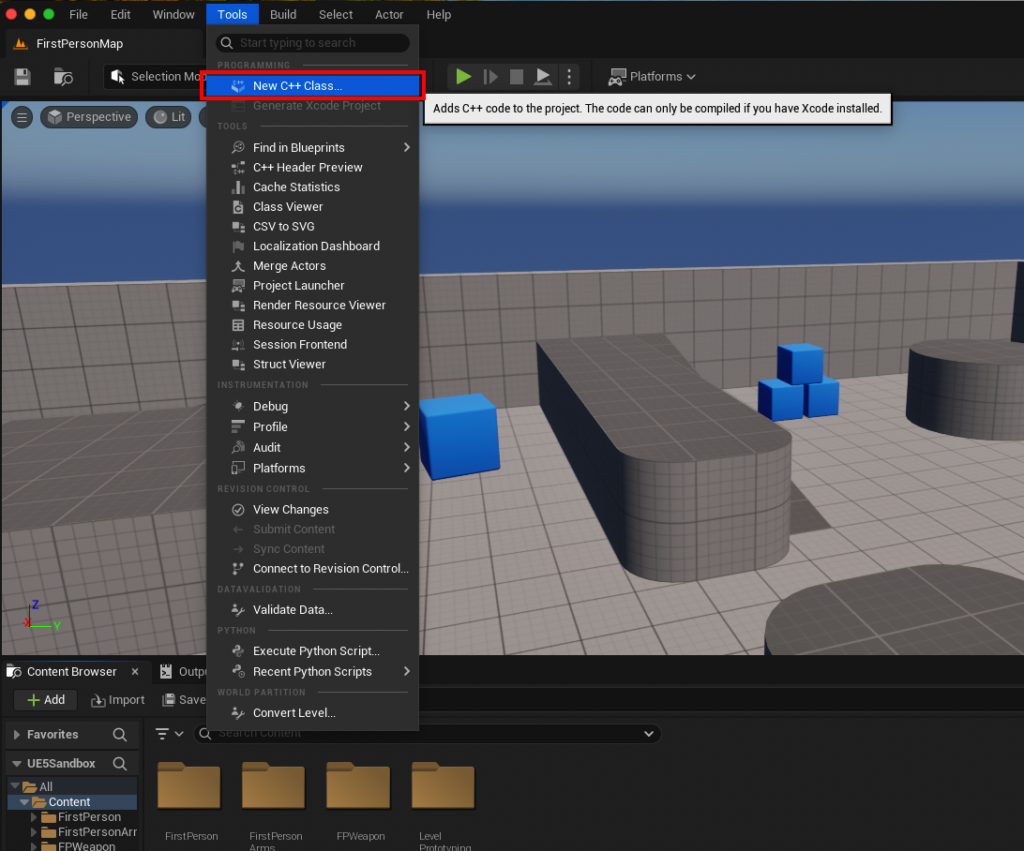
Verify C++ Project Status: The initial step is to determine if your existing Unreal Engine project is configured for C++ development. Navigate to the
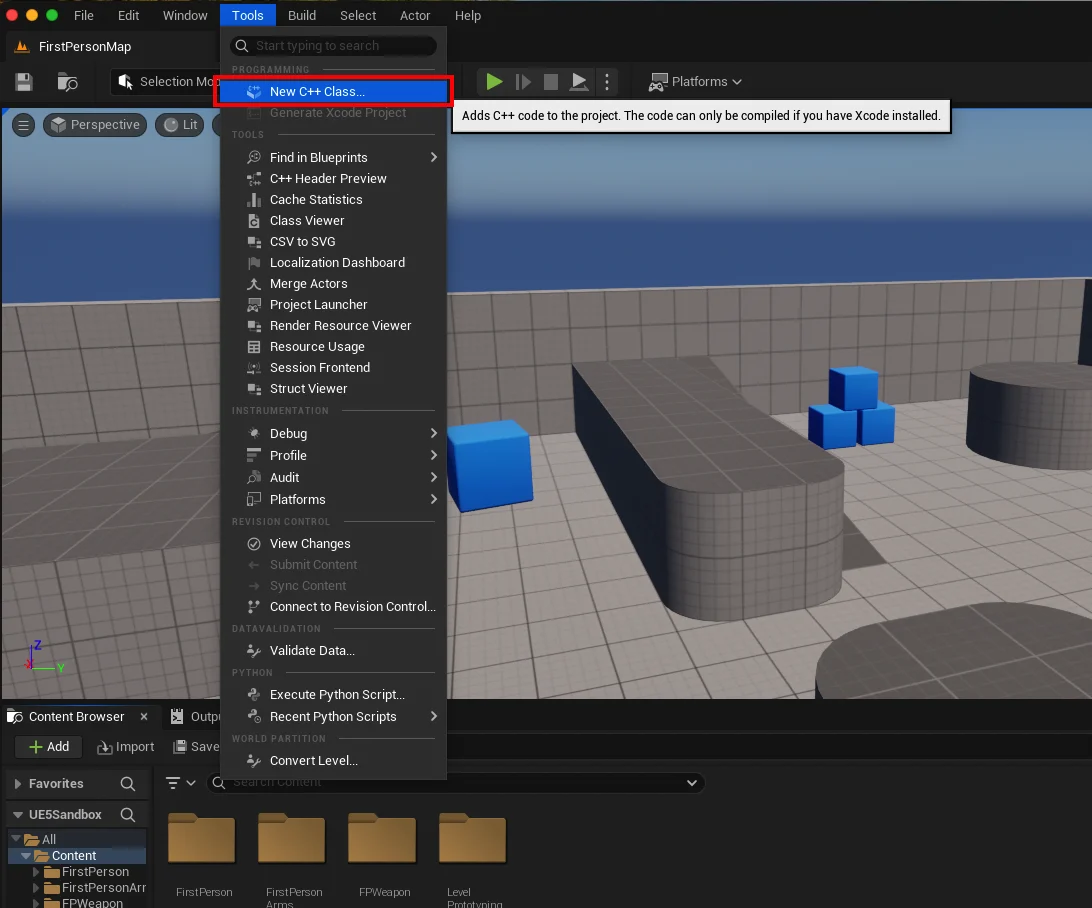
Toolsdropdown menu at the top of the Unreal Engine editor. If your project is C++ enabled, you will see the optionNew C++ Class.... If this option is absent or greyed out, it indicates a Blueprint-only project. SelectingNew C++ Class...will either immediately open the class wizard or, if an IDE is missing, guide you through its installation. For macOS users, installing Xcode is typically the required action.
-
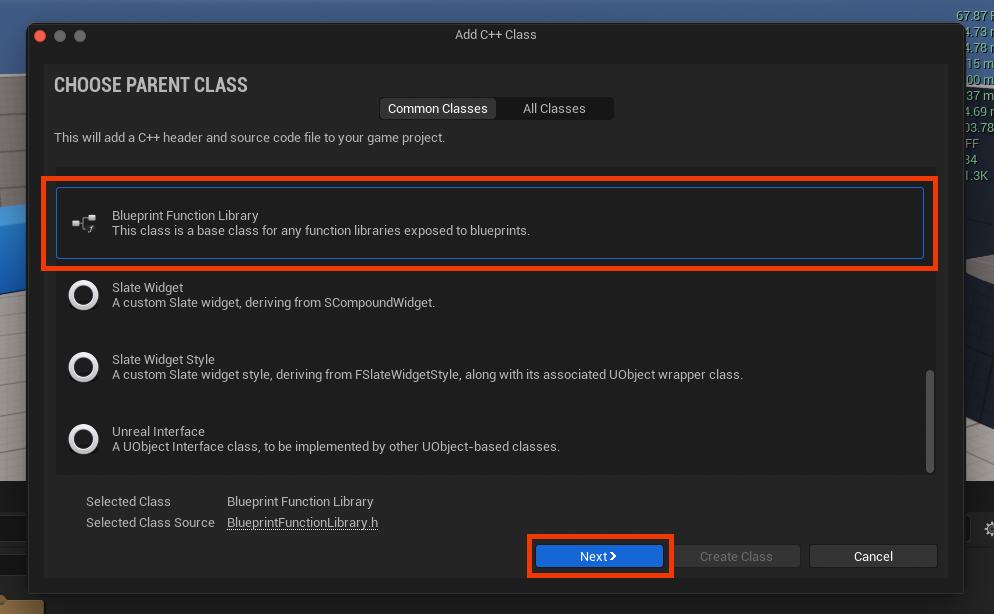
Selecting the Parent Class: Once the
New C++ Classdialog appears, you will be prompted to choose aParent Class. This selection dictates the fundamental behavior and capabilities of your new C++ class. To create a Blueprint Function Library, scroll through the list and selectBlueprint Function Library. This ensures that your new class inherits the necessary properties to expose static C++ functions to the Blueprint system. After selection, click the blueNextbutton. -
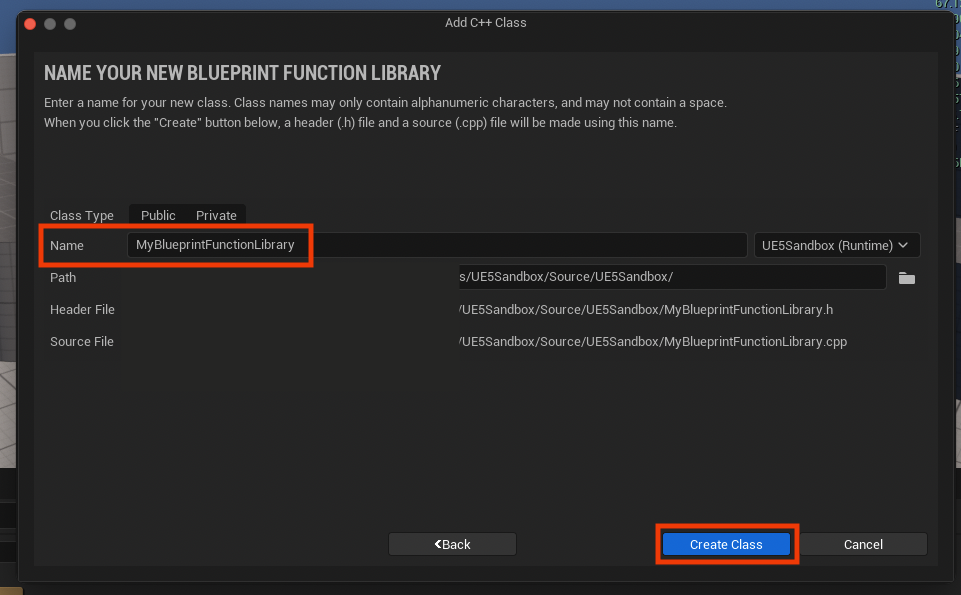
Naming Your Library: The next crucial step is to assign a descriptive name to your new Blueprint Function Library class. While the default name, such as
MyBlueprintFunctionLibrary, can be used, adhering to Unreal Engine’s naming conventions is highly recommended for clarity and maintainability. This typically involves using a clear, PascalCase name (e.g.,SaveLoadUtilityLibrary,CombatMathFunctions). A well-chosen name immediately communicates the library’s purpose, aiding both current and future development efforts. Confirm your choice by clickingCreate Class. -
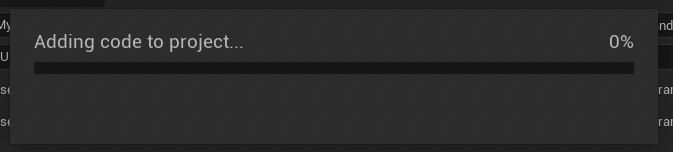
Project Compilation: Upon naming and creating the class, Unreal Engine will initiate a compilation process. This involves generating the necessary C++ source files (.h for declarations and .cpp for implementations) and integrating them into your project’s build system. This step is critical; wait for the compilation to complete successfully before proceeding, as any errors will prevent the new class from being recognized by the editor.
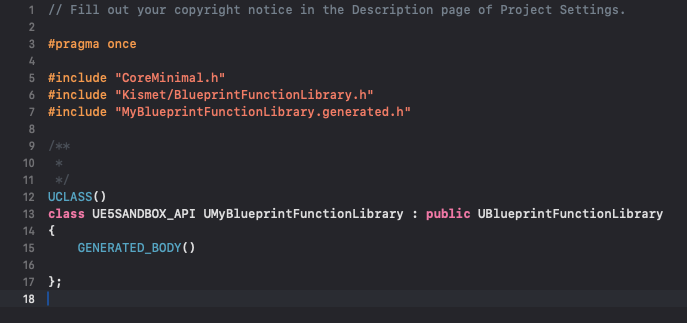
Integrating Custom C++ Functionality
With the library foundation laid, the next phase involves populating it with custom C++ functions. This is where the core logic, optimized for performance or requiring specific C++ features, will reside.
-
IDE Access and File Structure: After successful compilation, open your chosen IDE. Within your project’s
Sourcefolder, you will find two new files corresponding to your chosen class name (e.g.,MyBlueprintFunctionLibrary.handMyBlueprintFunctionLibrary.cpp). These files form the canvas for your C++ functionality.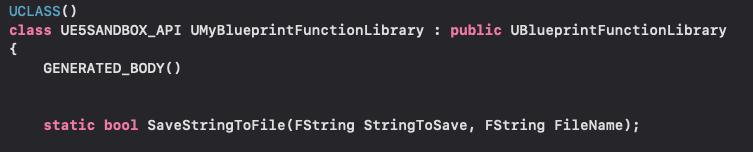
-
Function Declarations in the Header (.h) File: The header file (
.h) is where you declare your C++ functions. For these functions to be accessible from Blueprints, two key elements are required:staticKeyword: All functions within aUBlueprintFunctionLibrarymust be declared asstatic. This signifies that the function belongs to the class itself, not to any specific instance of the class, making it callable without needing an object reference.UFUNCTIONMacro: This macro is fundamental for Unreal Engine’s Reflection System. It tags the C++ function, making it discoverable and usable within the Blueprint editor. Common specifiers includeBlueprintCallable(to make it callable from Blueprints) andCategory="MyCustomFunctions"(to organize it within the Blueprint context menu).
As an illustrative example, consider a simple string read/write system:
#pragma once

#include "CoreMinimal.h"
#include "Kismet/BlueprintFunctionLibrary.h"
#include "MyBlueprintFunctionLibrary.generated.h"

UCLASS()
class UMyBlueprintFunctionLibrary : public UBlueprintFunctionLibrary

    GENERATED_BODY()

public:
    UFUNCTION(BlueprintCallable, Category = "File I/O")
    static bool SaveStringToFile(FString SaveDirectory, FString FileName, FString SaveText, bool bReplaceExisting = true);

    UFUNCTION(BlueprintCallable, Category = "File I/O")
    static bool LoadStringFromFile(FString LoadDirectory, FString FileName, FString& ResultString);
;
The
FString& ResultStringparameter inLoadStringFromFileis crucial; the&makes it a reference, allowing the C++ function to modify the Blueprint variable directly.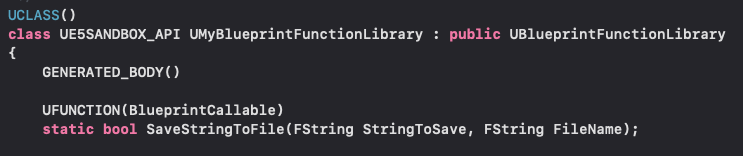
-
Function Definitions in the Source (.cpp) File: The implementation of your declared functions goes into the source file (
.cpp). Here, you will write the actual C++ logic. For the file I/O example, Unreal Engine’sFFileHelperclass is an excellent utility for robust file operations.#include "MyBlueprintFunctionLibrary.h" #include "Misc/FileHelper.h" #include "HAL/PlatformFileManager.h" bool UMyBlueprintFunctionLibrary::SaveStringToFile(FString SaveDirectory, FString FileName, FString SaveText, bool bReplaceExisting) // Ensure the directory exists IPlatformFile& PlatformFile = FPlatformFileManager::Get().GetPlatformFile(); if (!PlatformFile.DirectoryExists(*SaveDirectory)) PlatformFile.CreateDirectoryTree(*SaveDirectory); SaveDirectory += "/"; SaveDirectory += FileName; if (bReplaceExisting) return FFileHelper::SaveStringToFile(SaveText, *SaveDirectory); else // Logic to append or handle existing file if bReplaceExisting is false // For simplicity, this example still overwrites. Real-world might append. return FFileHelper::SaveStringToFile(SaveText, *SaveDirectory, FFileHelper::EEncodingOptions::ForceUTF8, &IFileManager::Get(), FILEWRITE_Append); bool UMyBlueprintFunctionLibrary::LoadStringFromFile(FString LoadDirectory, FString FileName, FString& ResultString) LoadDirectory += "/"; LoadDirectory += FileName; return FFileHelper::LoadFileToString(ResultString, *LoadDirectory);This example demonstrates how to leverage low-level Unreal Engine utilities like
FFileHelperandIPlatformFiledirectly from a Blueprint-accessible C++ function. Once your functions are implemented, recompile your project within your IDE or through the Unreal Editor, and then relaunch the editor to ensure changes are recognized.
Accessing and Demonstrating the Library in Blueprints
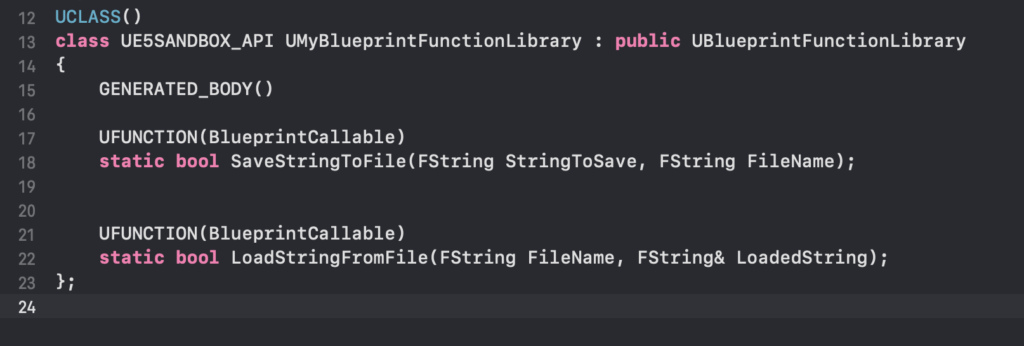
After successful compilation, the newly exposed C++ functions become readily available within the Blueprint editor, integrating seamlessly as native nodes.
-
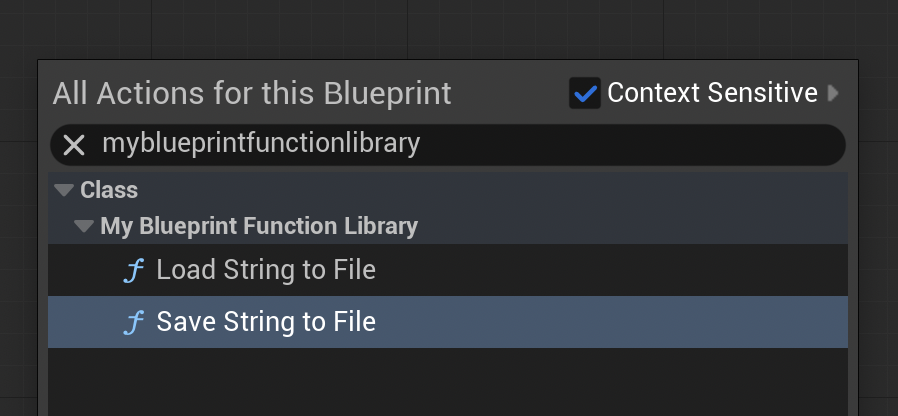
Discovering Functions: Open any Blueprint editor (e.g., a Level Blueprint, Character Blueprint). Right-click on the event graph to bring up the context menu. By typing the name of your library or the function names (e.g., "MyBlueprintFunctionLibrary", "Save String To File"), you will see your C++ functions appear as callable nodes. They will typically be categorized under the
Categoryspecified in theUFUNCTIONmacro (e.g., "File I/O"). -
Practical Demonstration: To illustrate the functionality, connect the
Save String To Filefunction to an event likeEvent BeginPlayin a Level Blueprint. Provide a string to save (e.g., "Save Test") and a file name (e.g., "textfile-test.txt"). Upon playing the project in the editor, this function will execute, creating a new file in your project’s/Saveddirectory containing the specified string. Verification can be done by navigating to the project’s/Savedfolder and opening the generated text file.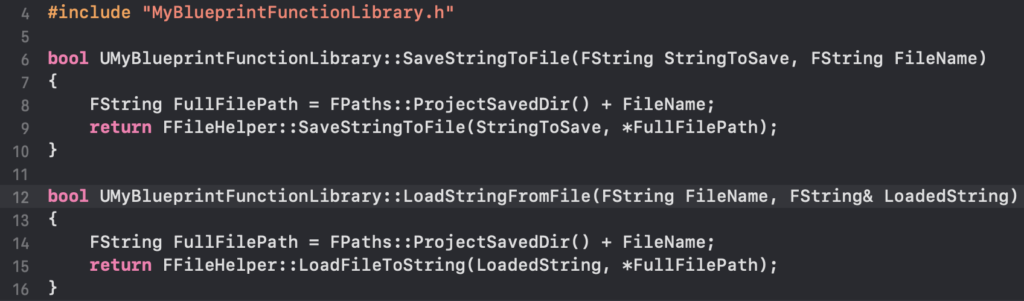
-
Loading and Verification: To demonstrate the
Load String From Filefunction, first manually create a text file (e.g.,loadtest.txt) in your/Savedfolder and populate it with a test string (e.g., "Loading Test"). Then, in the same Blueprint, add theLoad String From Filenode, specifying the file name. Connect itsResultStringoutput to aPrint Stringnode. When the game runs, the C++ function will load the string from the file, and the Blueprint will print it to the screen, visually confirming the successful data retrieval. This direct visual feedback underscores the power and ease of integrating C++ functionality into the Blueprint workflow.
Conclusion: A Paradigm Shift in Unreal Engine Development
The strategic adoption of C++ Blueprint Function Libraries in Unreal Engine 5 represents more than just a technical workaround; it signifies a mature approach to game development that prioritizes both performance and productivity. By providing a clean, accessible interface for C++ logic within the Blueprint environment, these libraries empower developers to overcome the inherent limitations of visual scripting for computationally intensive tasks, unlock advanced engine functionalities, and integrate third-party solutions that are otherwise inaccessible. This hybrid methodology fosters a more efficient development cycle, allowing designers and programmers to collaborate effectively, leveraging each tool for its optimal use case. The result is projects that are not only more performant and robust but also more adaptable and scalable, ready to meet the demanding requirements of modern game experiences. As Unreal Engine continues to evolve, mastering this interop layer will remain a cornerstone for developers striving to push the boundaries of interactive entertainment.
About the Author