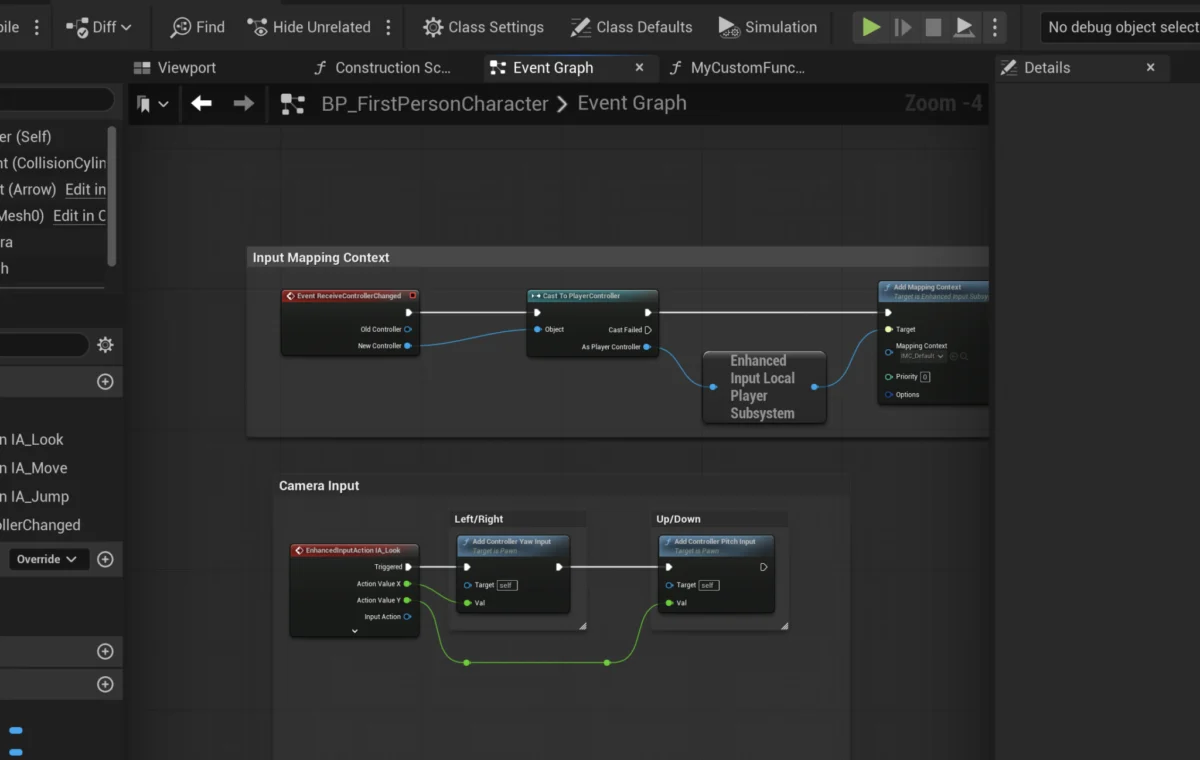
The concept of functions, fundamental to all programming paradigms, has found a powerful visual representation within Unreal Engine 5’s Blueprint system, acting as self-contained units of executable logic. These integral components are revolutionizing how developers, from seasoned programmers to burgeoning designers, approach game creation, offering unparalleled efficiency, modularity, and scalability in complex interactive projects. This guide delves into the essential nature of Blueprint Functions, their practical implementation, and their significant impact on modern game development workflows.
The Foundation of Logic: Understanding Functions in Programming
At its core, a function in programming is a named section of a program that performs a specific task. It encapsulates a sequence of operations, making that logic reusable across different parts of a codebase without requiring it to be rewritten each time. This principle of "Don’t Repeat Yourself" (DRY) is a cornerstone of efficient software engineering, promoting cleaner code, easier debugging, and more maintainable projects. Functions often accept "input parameters" to customize their behavior and can produce "output values" as their result. This abstraction allows developers to focus on higher-level problem-solving, treating complex operations as single, manageable blocks.
Unreal Engine 5’s Blueprint visual scripting system translates this fundamental programming concept into an intuitive node-based interface. Blueprint Functions are visual graphs of nodes that contain specific logic, much like their text-based counterparts. They are designed to be self-contained and can be executed, or "called," from various points within a Blueprint actor. This visual approach significantly lowers the barrier to entry for game development, empowering individuals and teams with diverse skill sets to contribute to complex projects without needing to write traditional C++ code.
A Brief History of Visual Scripting and Unreal Engine’s Blueprints
The journey of visual scripting in game development is marked by a continuous effort to make complex systems more accessible and manageable. Early iterations often involved proprietary tools or limited scripting languages. Epic Games, a pioneer in game engine technology, recognized the potential of visual scripting early on. The precursor to Blueprints, known as Kismet, was introduced in Unreal Engine 3 (released 2006). Kismet allowed designers to script simple gameplay mechanics and events through a node-based interface, a significant step towards democratizing development.
However, Kismet had limitations, primarily in its scope and reusability. It was often tightly coupled to specific levels or sequences, making it challenging to reuse logic across different parts of a game or to build truly modular systems. Recognizing these shortcomings, Epic Games embarked on a significant overhaul, culminating in the introduction of Blueprints with Unreal Engine 4 (first previewed in 2012, released 2014). Blueprints were designed from the ground up to be a full-featured visual scripting language, capable of almost everything C++ could do within the engine, but with a visual interface. This included robust support for functions, variables, events, and even object-oriented programming concepts.
With the advent of Unreal Engine 5 (released in early access 2021, full release 2022), Blueprints have continued to evolve, integrating seamlessly with new features like Lumen, Nanite, and MetaSounds. The underlying philosophy remains the same: to provide powerful, accessible tools that enhance developer productivity and enable rapid prototyping and iteration. Blueprint Functions, in particular, have become a cornerstone of this ecosystem, allowing developers to create intricate game mechanics while maintaining a clean, organized, and performant project structure. The emphasis on reusability and clear execution flow is a direct response to the increasing complexity of modern game development, where projects can involve hundreds or thousands of unique behaviors and interactions.
Implementing Blueprint Functions: A Practical Overview
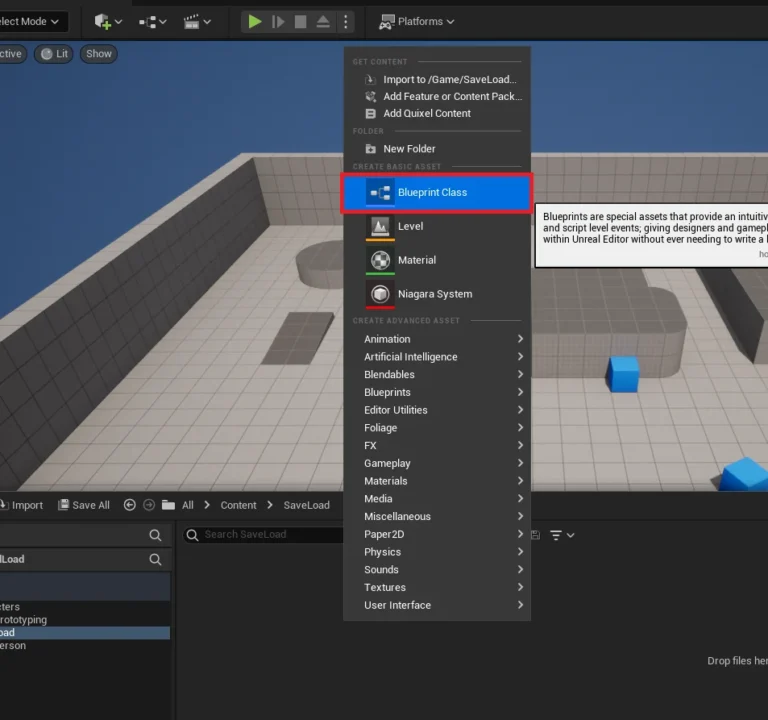
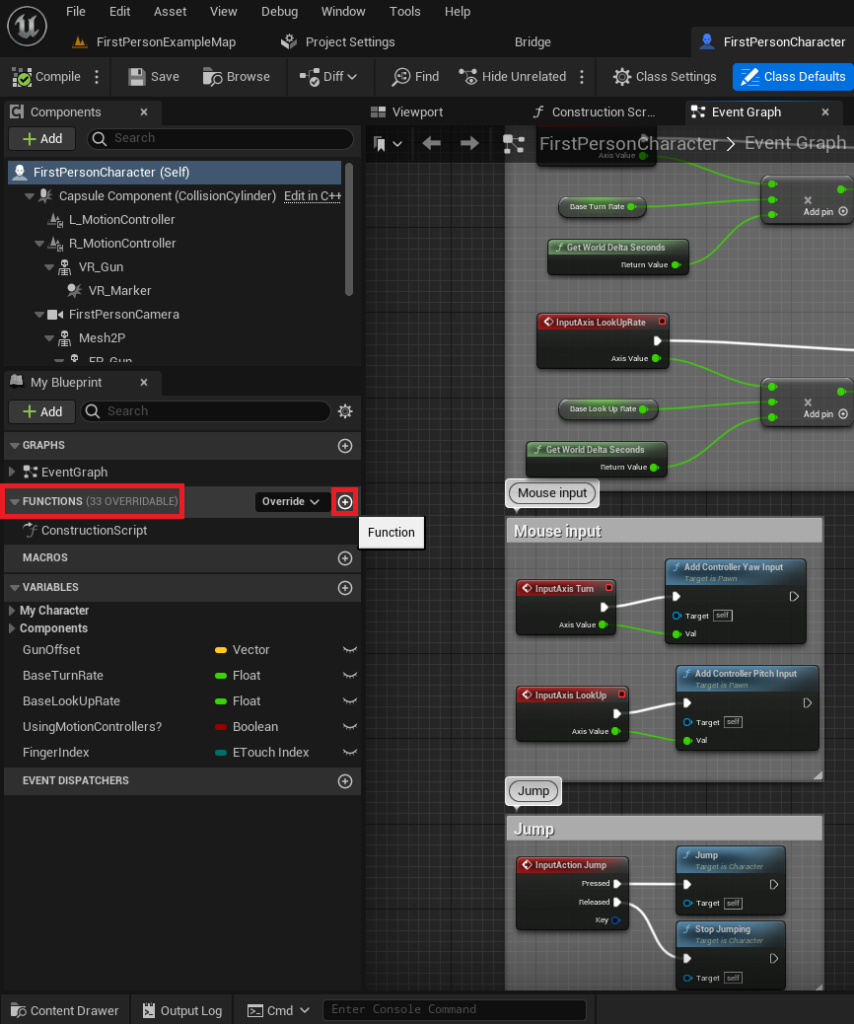
The process of creating and utilizing Blueprint Functions in Unreal Engine 5 is designed to be intuitive, even for those new to visual scripting. Developers typically begin by opening the Blueprint Actor where the new function is intended to reside. For instance, in a First-Person Shooter template, this might be the FirstPersonCharacter Blueprint, which controls the player’s actions and interactions.
Creation Process
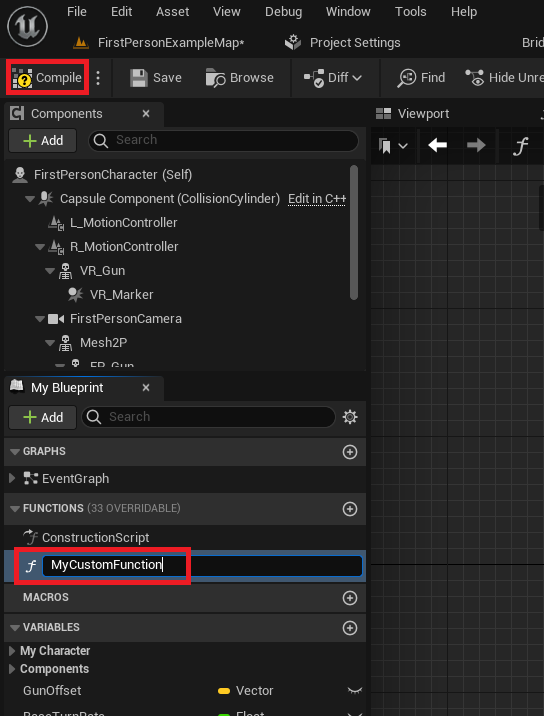
Within the Blueprint editor, a dedicated "Functions" section on the left-hand side serves as the repository for all functions specific to that Blueprint. To initiate the creation of a new function, developers click a designated plus symbol, which instantly generates a new function entry. A crucial step that follows is assigning a clear and descriptive name to the function. Adhering to consistent naming conventions is paramount for project organization, especially in larger development efforts involving multiple team members. Vague or confusing names can significantly impede readability and maintenance, leading to increased development time and potential errors. After naming, compiling the Blueprint integrates the new function, making it ready for logic implementation.
Basic Functionality: The "Print String" Example
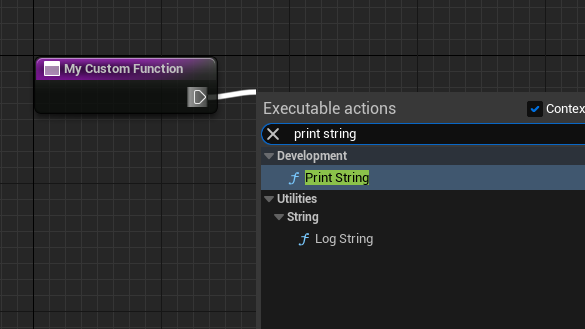
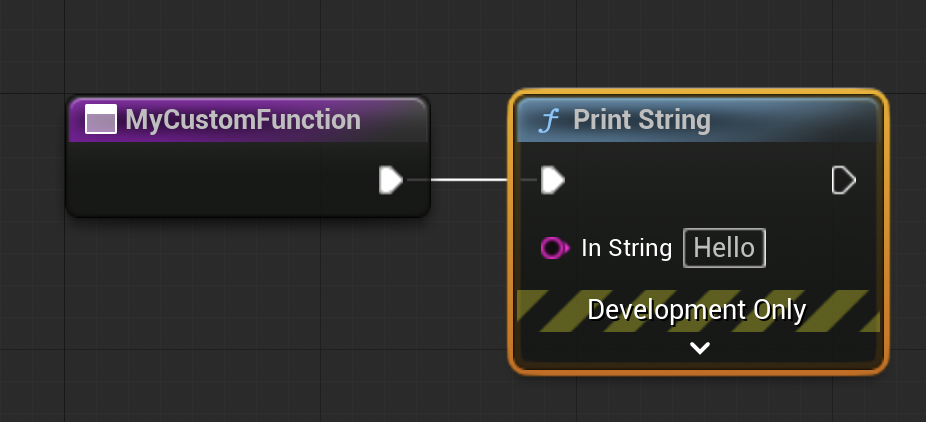
To illustrate basic functionality, a common introductory exercise involves creating a function that simply prints a string of text to the screen or output log. This demonstrates the execution flow within a function. Once the function is created, developers navigate to its dedicated graph. Here, they can drag an "exec pin" (a white triangle typically found on the function’s entry node) and release it into the graph background. This action brings up a contextual menu, allowing them to search for and select the desired node, such as "Print String." The "Print String" node is automatically connected to the function’s execution flow, ensuring that when the function is called, the specified text will be outputted. This simple example highlights the sequential nature of Blueprint execution and the immediate feedback provided by the editor. The terms "call," "called," or "calling" a function are interchangeable with "running" a function, signifying its execution.
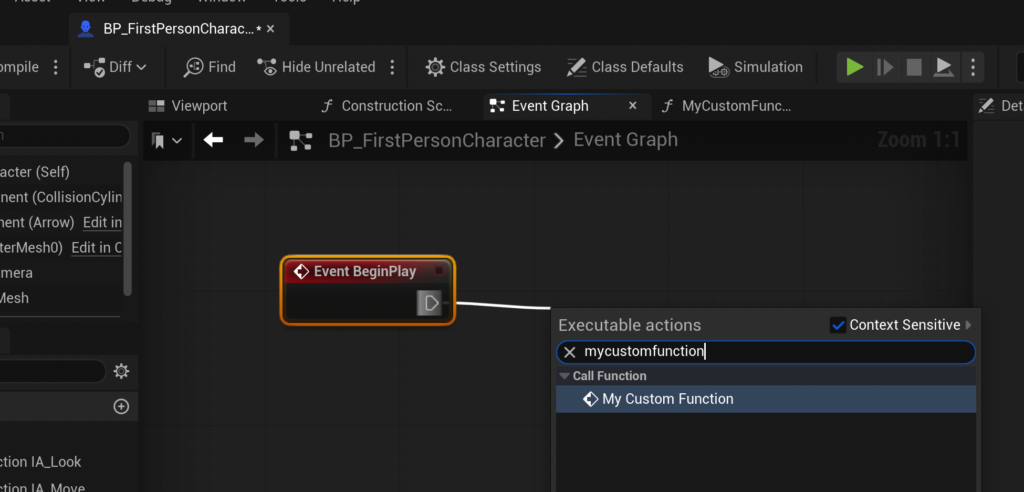
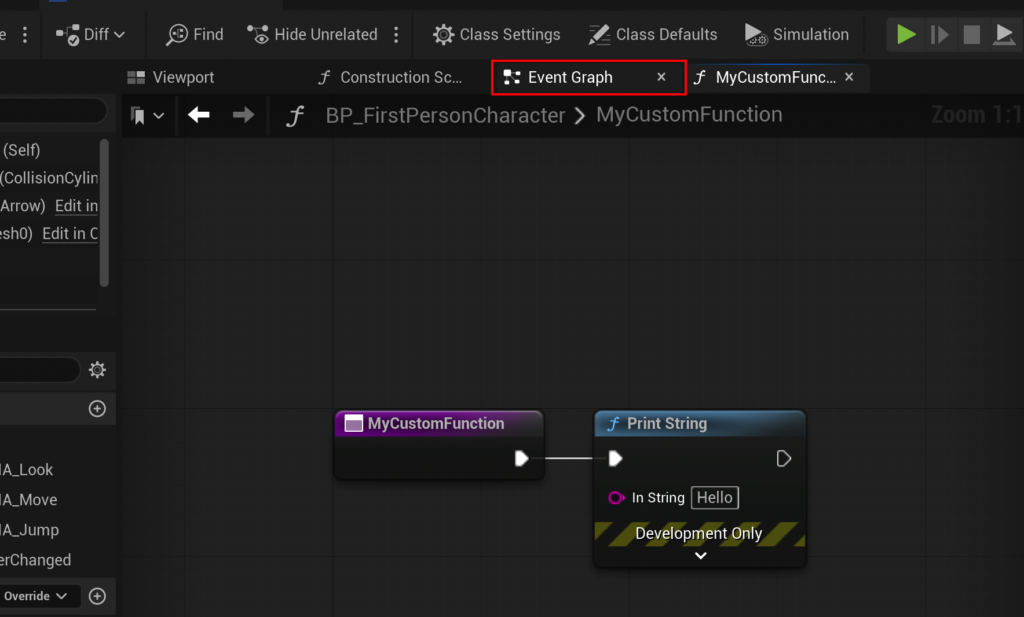
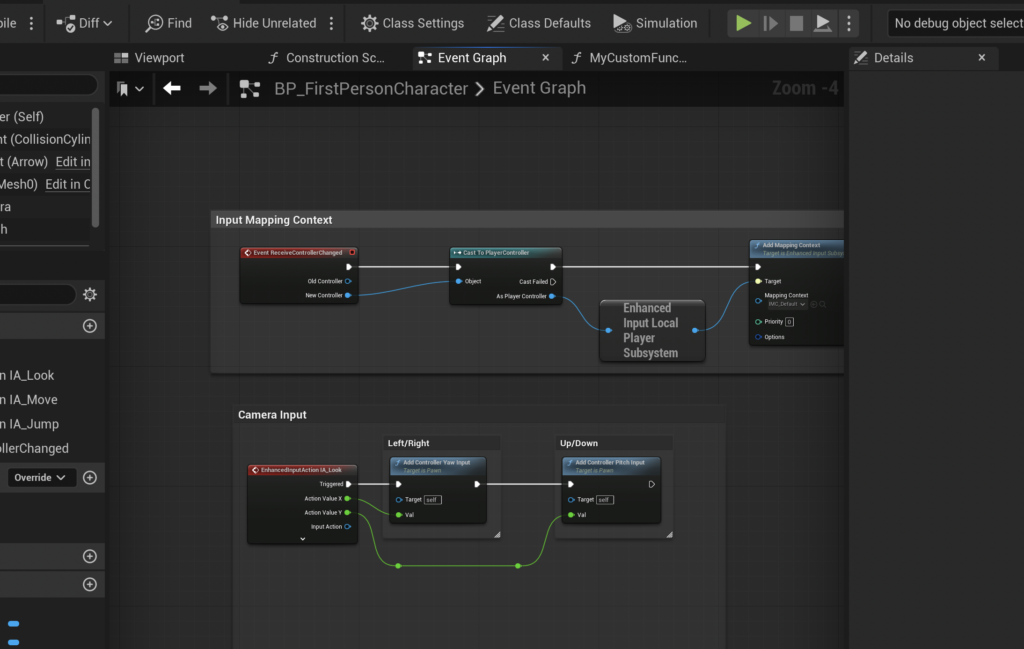
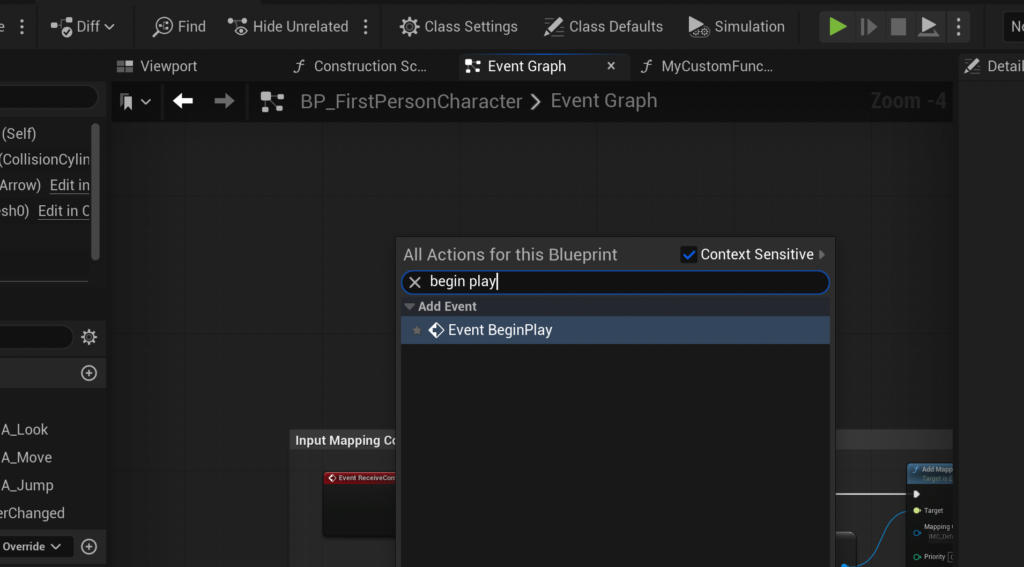
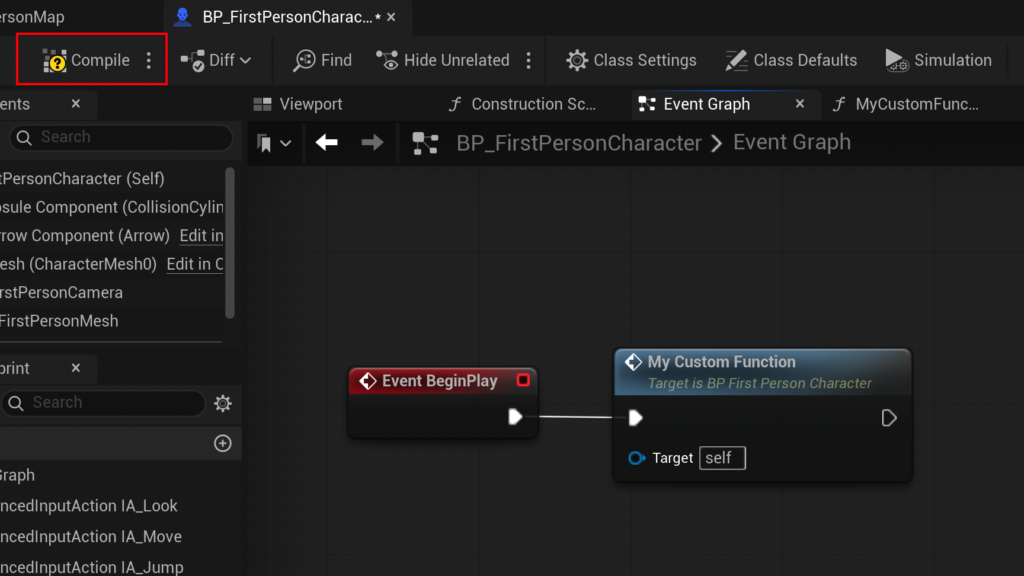
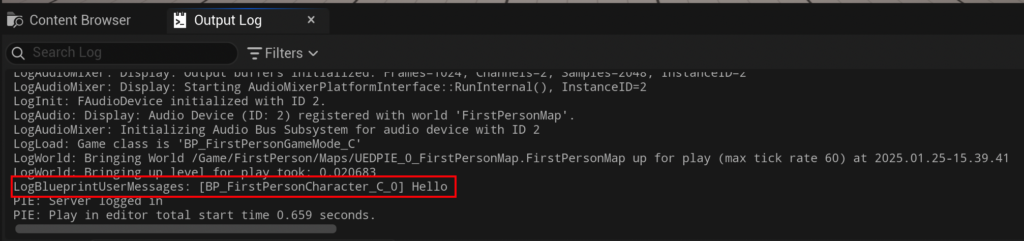
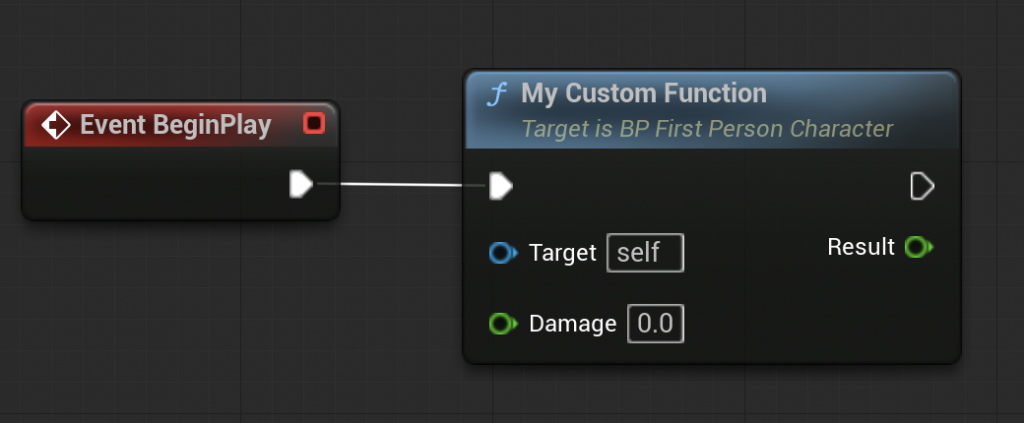
To observe this function in action, it must be "called" from another part of the Blueprint, typically an event graph. A common practice for testing is to link it to the "Event Begin Play." This event is automatically triggered when the actor (e.g., the FirstPersonCharacter) is spawned into the game world at the start of gameplay. By navigating back to the main Event Graph, right-clicking in an empty space to summon the contextual menu, and searching for "Event Begin Play," developers can create this event node. Then, dragging from its exec pin and searching for the newly created custom function (e.g., "MyCustomFunction"), they can establish a connection. After compiling and saving the Blueprint, launching the game will execute the Event Begin Play, which in turn calls the custom function, resulting in the "hello" message appearing in the output log.
Advanced Logic: Input, Output, and the "CalculateDamage" Scenario
While a simple print function is useful for demonstrating the mechanics, the true power of Blueprint Functions lies in their ability to process data through input and output parameters. This enables the creation of highly reusable and dynamic logic, such as a CalculateDamage function.
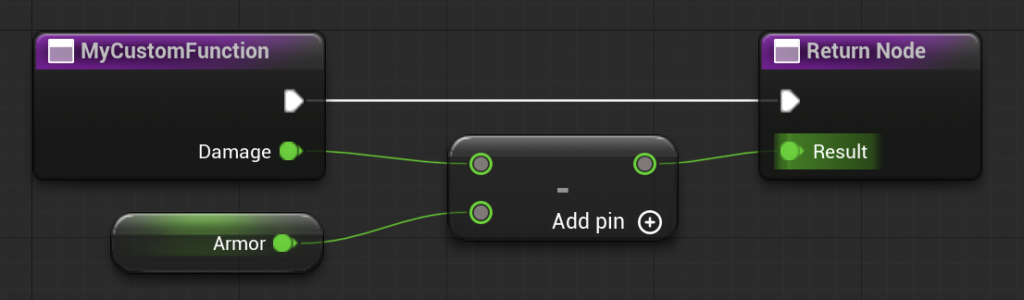
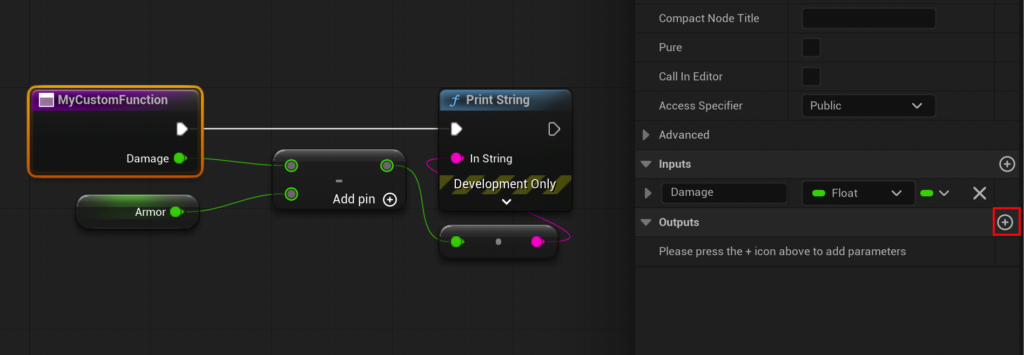
For a CalculateDamage function, the goal is to take an initial damage value, factor in a character’s armor, and then return the final damage dealt. This requires the function to accept an input and provide an output. By selecting the function’s entry node within its graph, developers can access the "Details" panel, which contains sections for "Inputs" and "Outputs."
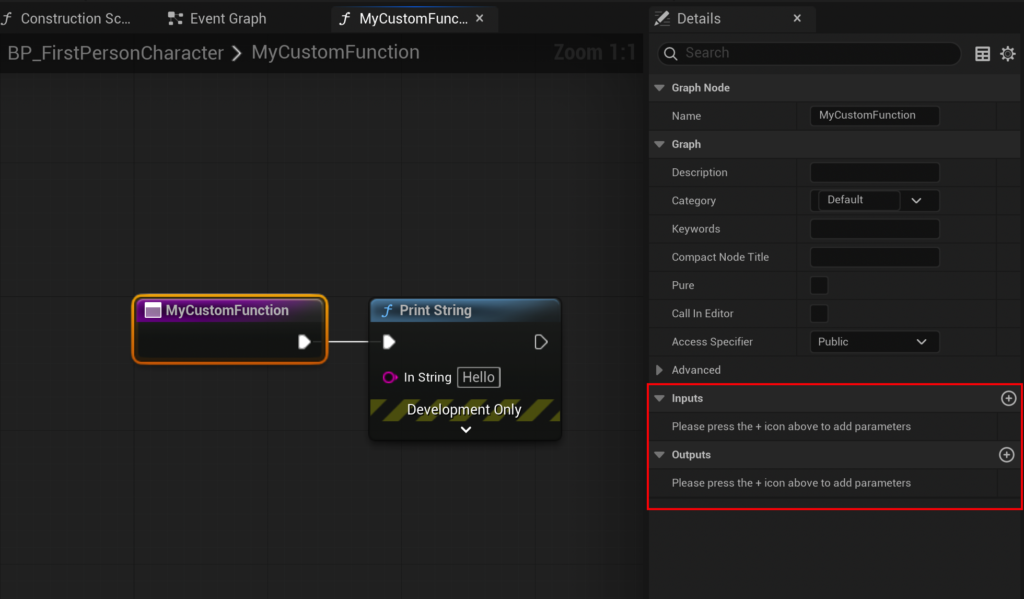
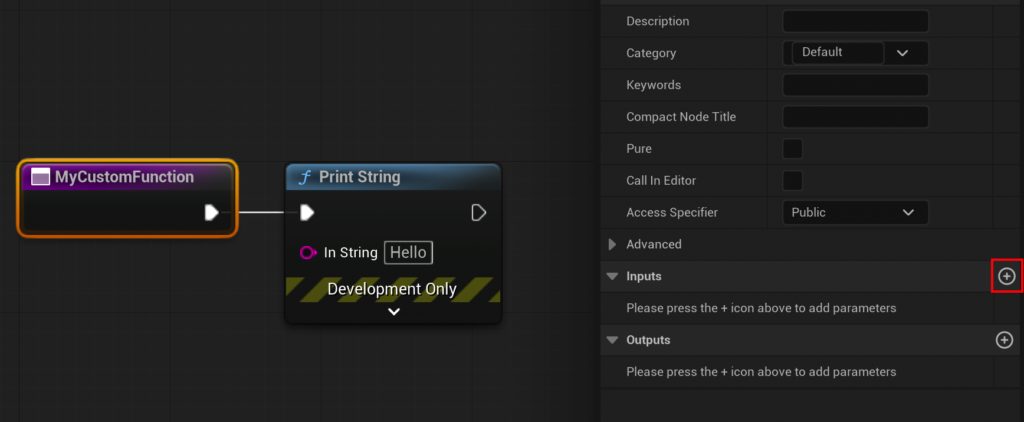
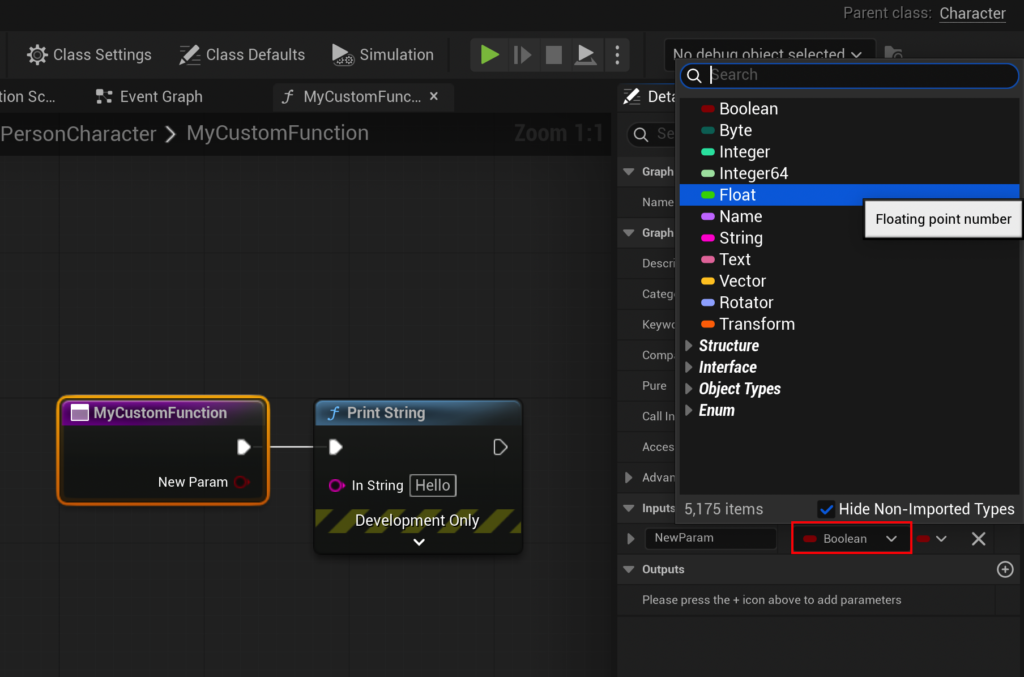
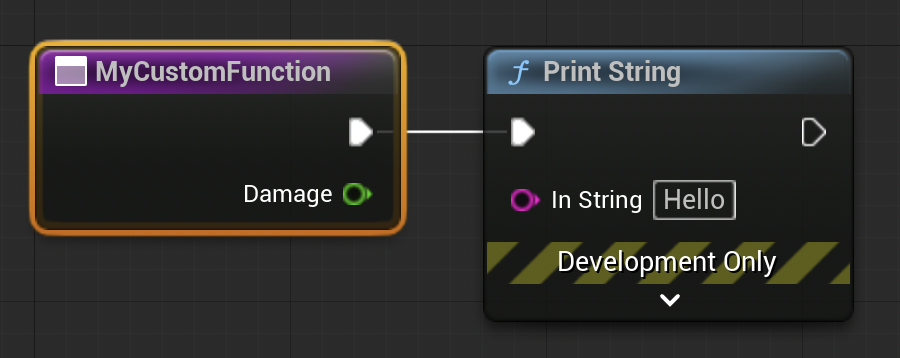
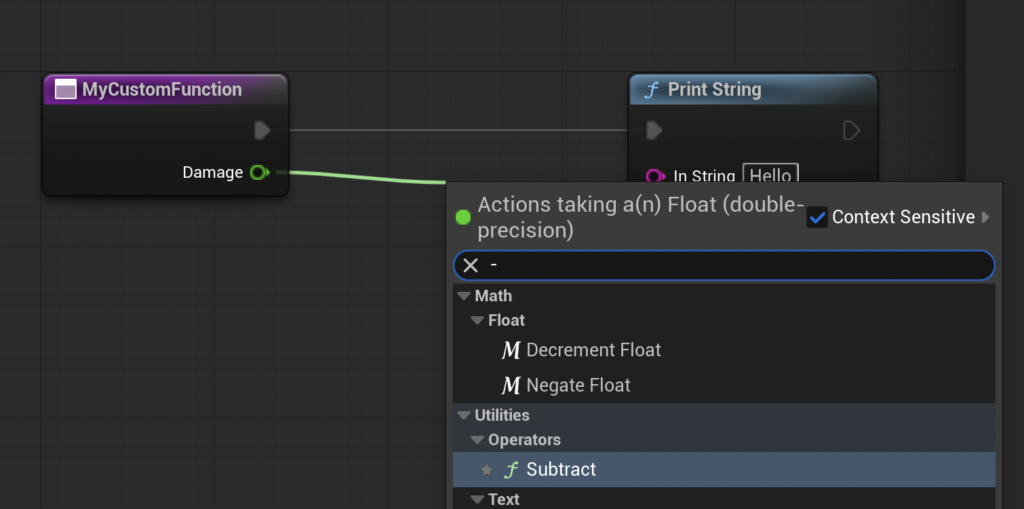
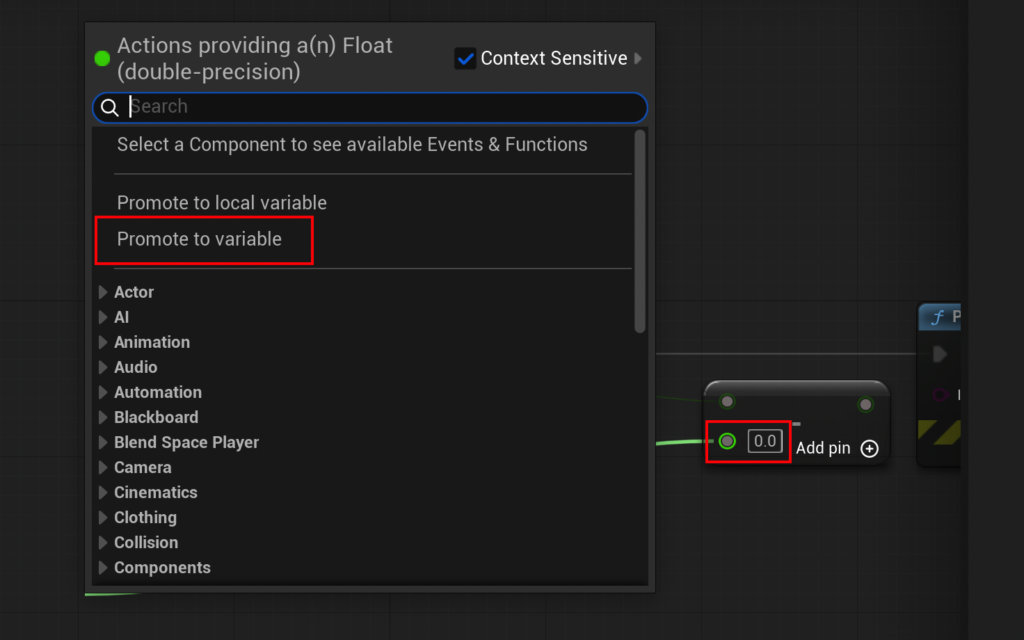
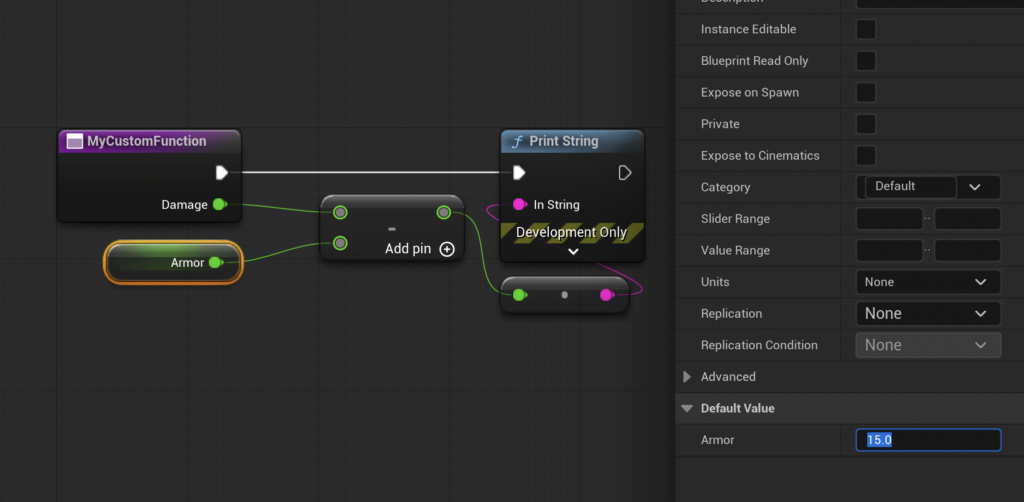
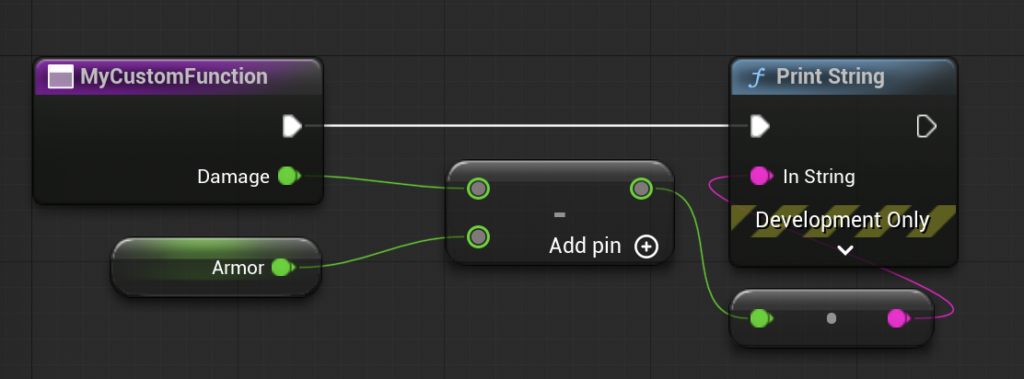
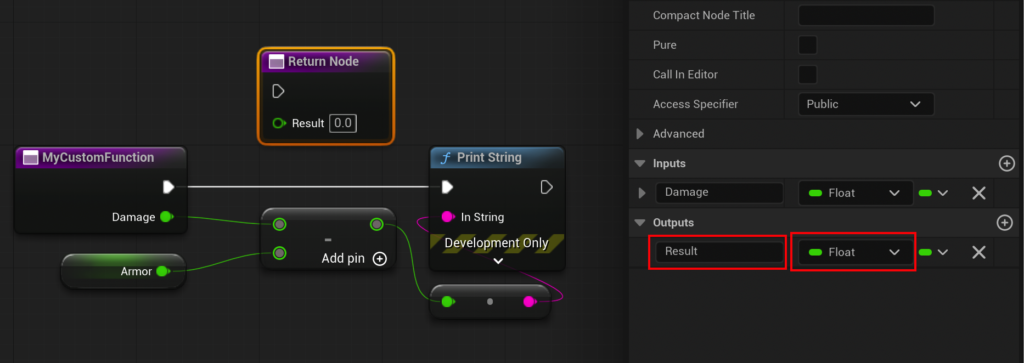
To add an input, a new parameter is created (e.g., "Damage"). The type of this parameter is then set (e.g., "Float" for numerical values), allowing the function to receive a specific damage number. To incorporate an "Armor" value, a new local variable (a variable only accessible within that function) can be created and assigned a default value (e.g., 15.0). The core logic then involves a subtraction node, where the "Damage" input is connected to the first operand and the "Armor" variable to the second.
Crucially, for the function to be useful, it must "return" the calculated value. Similar to adding an input, an "Output" parameter (e.g., "Result," also a "Float") is added in the Details panel. Unreal Engine automatically generates a "Return Node" in the function graph when an output is created. The result of the subtraction node is then connected to the "Result" pin of the Return Node. This action effectively sends the calculated final damage value out of the function, making it available to the calling graph.

A vital distinction to note is the difference between Blueprint Functions and Events. While both are used to encapsulate logic, Functions are synchronous, execute immediately, and can return values. They also have limitations, notably the inability to contain asynchronous nodes such as "Delay" nodes, which pause execution for a set duration. For logic requiring such delays or other asynchronous operations, "Custom Events" are the appropriate choice. This design ensures that functions remain deterministic and predictable, crucial for performance and reliability in complex game systems.
Once the CalculateDamage function is complete with its input and output, the original "Print String" node can be removed from within the function, as its role is now to calculate and return a value, not to display it directly. Back in the Event Graph, when the CalculateDamage function is called, it will now appear as a node with both a "Damage" input pin and a "Result" output pin. Developers can then provide an initial damage value (e.g., 20.0) to the input pin and connect the "Result" output pin to a "Print String" node to display the final calculated damage (20 – 15 = 5) in the output log, confirming the function’s successful operation.
The Impact on Development Workflows
The widespread adoption and continuous refinement of Blueprint Functions have had a profound impact on game development workflows, influencing everything from individual productivity to large-scale project management.
Enhanced Productivity and Iteration
Blueprint Functions significantly accelerate the development cycle. By creating reusable blocks of logic, developers eliminate the need to repeatedly write or visually construct the same sequences of nodes. This not only saves time but also reduces the likelihood of introducing errors that can arise from duplicate code. Rapid prototyping becomes more feasible, allowing designers and programmers to quickly test new ideas and iterate on gameplay mechanics without extensive coding overhead.
Improved Code Organization and Readability
One of the most immediate benefits of Blueprint Functions is the dramatic improvement in code organization. Instead of sprawling, unmanageable graphs of nodes in an Event Graph, complex logic can be compartmentalized into smaller, named functions. This makes Blueprints much easier to read, understand, and navigate. A clear, well-structured Blueprint with appropriately named functions acts as self-documenting code, which is invaluable for long-term project health and for onboarding new team members.
Facilitating Collaboration
In multi-developer environments, modularity is key to effective collaboration. Blueprint Functions enable different team members to work on distinct pieces of logic concurrently without stepping on each other’s toes. A programmer might create a core damage calculation function, while a designer can then integrate that function into various weapon Blueprints or enemy AI behaviors, knowing that the underlying logic is robust and consistent. This division of labor streamlines development and reduces merge conflicts, which are common headaches in large software projects.
Reducing Technical Debt
Technical debt, the implied cost of additional rework caused by choosing an easy but limited solution now instead of using a better approach that would take longer, is a persistent challenge in software development. Blueprint Functions help mitigate technical debt by encouraging best practices like reusability and abstraction from the outset. When a piece of logic needs updating, it can be modified in one central function, and those changes automatically propagate to all instances where the function is called. This prevents the need to track down and update multiple copies of the same logic, saving significant time and resources in the long run.
Accessibility for Diverse Teams
Perhaps one of the most transformative impacts of Blueprint Functions is their role in democratizing game development. By providing a visual, intuitive interface for complex programming concepts, Blueprints empower individuals who may not have traditional programming backgrounds—such as artists, level designers, and narrative designers—to directly contribute to interactive systems. This fosters a more interdisciplinary development environment, where creative visions can be translated into gameplay more directly and efficiently, breaking down traditional silos between departments.

Real-World Application and Industry Perspective
Leading game studios worldwide leverage Unreal Engine’s Blueprint system, and by extension, Blueprint Functions, to build some of the most visually stunning and mechanically rich games on the market. From large-scale open-world titles to intricate indie experiences, the ability to rapidly prototype, iterate, and maintain complex game logic through visual scripting is invaluable. Studios often develop extensive libraries of custom Blueprint Functions that serve as core building blocks for their specific game mechanics, ensuring consistency and efficiency across their projects.
Epic Games, as the creator of Unreal Engine, continuously emphasizes the importance of Blueprints and functions in their development philosophy. Their ongoing investment in Blueprint features, performance optimizations, and integration with new engine capabilities underscores their commitment to providing accessible yet powerful tools. While C++ remains the backbone for performance-critical systems and engine-level modifications, Blueprints, particularly functions, are the preferred choice for implementing most gameplay logic, UI interactions, and event handling due to their speed of development and ease of maintenance. The ecosystem has matured to a point where a significant portion of a game can be developed entirely within Blueprints, with C++ used primarily for foundational elements or extreme performance bottlenecks.
Conclusion
Blueprint Functions in Unreal Engine 5 are far more than just a convenient feature; they represent a fundamental pillar of modern game development. By embodying the core programming principle of modularity and reusability within an accessible visual scripting environment, they empower developers to construct complex interactive experiences with unprecedented efficiency and clarity. From simplifying debugging and improving team collaboration to accelerating iteration cycles and reducing technical debt, the benefits are extensive and far-reaching. As Unreal Engine continues to evolve, Blueprint Functions will undoubtedly remain a critical tool, enabling creators across the globe to bring their most ambitious visions to life and shaping the future of interactive entertainment.
About the Author