The itch.io desktop application has undergone a significant transformation this month with the release of two major updates, v26.15.0 and v26.17.0, followed swiftly by a critical hotfix, v26.18.0, to address a macOS-specific crashing issue. These updates collectively introduce a suite of highly anticipated features designed to profoundly improve user experience, particularly concerning the management of extensive game libraries acquired through the platform’s renowned game bundles, alongside advanced customization options for launching games and broader compatibility for downloads. The changes reflect a direct response to persistent community feedback and requests meticulously tracked via the platform’s public issues tracker, underscoring itch.io’s commitment to its user base and independent developer community.
Background: itch.io’s Unique Ecosystem and the Challenge of Scale
itch.io has long distinguished itself in the digital game distribution landscape as a vibrant marketplace primarily focused on independent games, experimental projects, and creative freedom for developers. Unlike more centralized platforms, itch.io offers unparalleled flexibility in how creators present, price, and distribute their work, often facilitating direct relationships between developers and players. A cornerstone of its community engagement and philanthropic efforts has been the hosting of massive game bundles, often in support of charitable causes. These bundles, characterized by their immense scale and incredible value, have become iconic events within the indie gaming world.
Two prime examples illustrate this phenomenon: the "Bundle for Racial Justice and Equality" and the "Bundle for Ukraine." The former, launched in 2020, amassed an astonishing 1,741 items and was purchased over 800,000 times, raising significant funds for racial justice organizations. The latter, the "Bundle for Ukraine," launched in 2022, featured nearly 1,000 items and garnered over 400,000 buyers, with proceeds directed to humanitarian aid in Ukraine. While these bundles represented monumental successes in terms of fundraising and community solidarity, they also presented unique technical and user experience challenges for the itch.io platform and its dedicated desktop application.
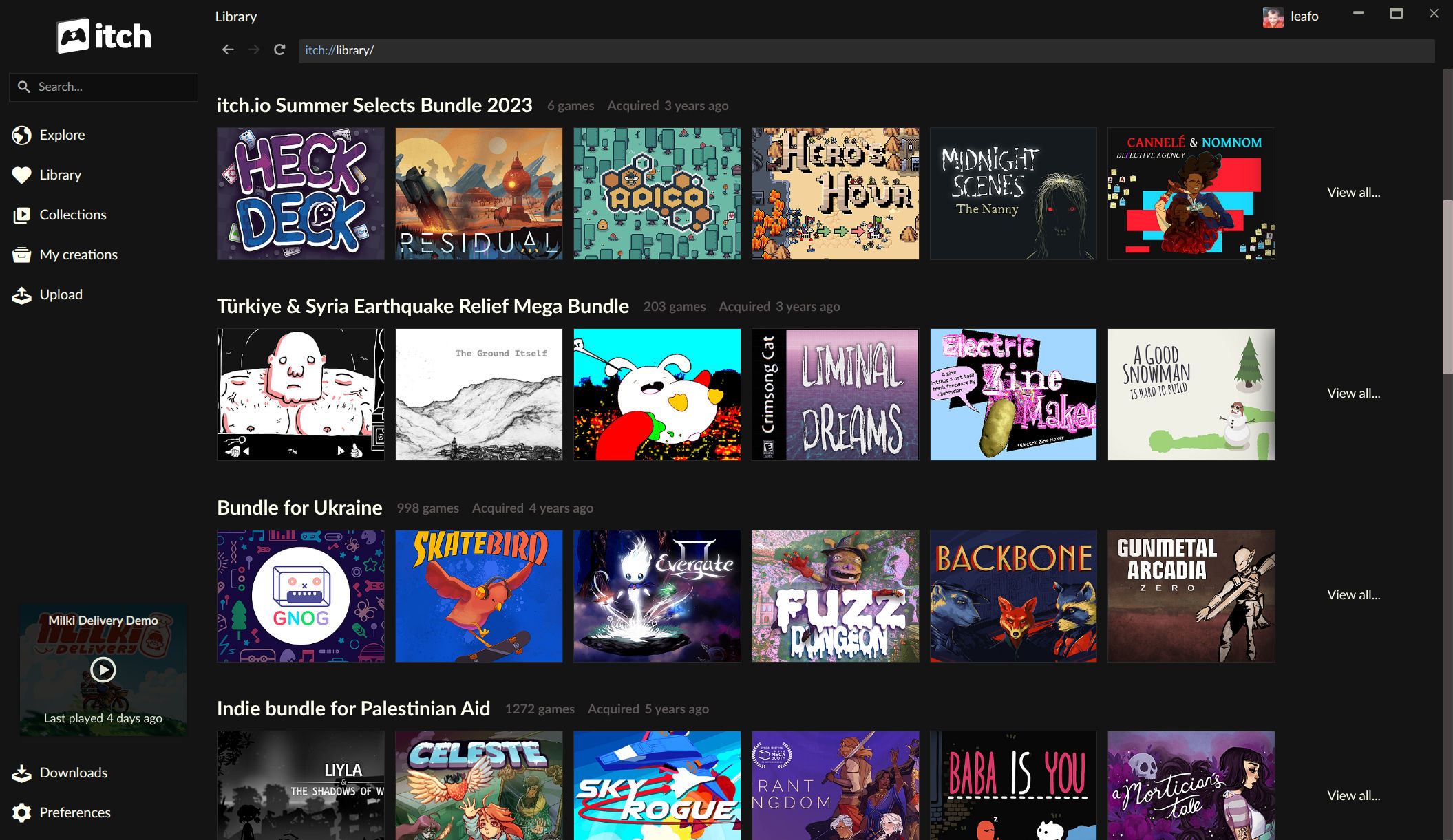
Prior to these recent updates, the itch.io app struggled to adequately handle the sheer volume of games contained within such colossal bundles. The underlying ownership model for these bundles was designed to prevent an exponential explosion of database entries—generating an individual download key for every item for every buyer would have resulted in billions of database rows for the Racial Justice bundle alone. Instead, a single record covered the entire bundle, with individual game download keys only generated upon specific claiming via the website. This efficient backend solution, however, meant that games from these bundles would not automatically appear in a user’s app library until each title was individually claimed on the itch.io website, a cumbersome and time-consuming process for users who had purchased hundreds or even thousands of games. This limitation often left vast swathes of purchased content undiscovered or inaccessible within the app, detracting from the overall utility and enjoyment of these valuable acquisitions.
Chronology of Enhancements and the Hotfix Response
The development timeline saw the rollout of itch.io app versions v26.15.0 and v26.17.0 over the course of the current month, bringing the bulk of the new features online. However, the release was not without its immediate challenges. Following the deployment of these updates, a critical issue emerged where some macOS users experienced persistent application crashes, rendering the app unusable. In a testament to their agile development and user-focused approach, the itch.io team swiftly identified the problem and released a hotfix, v26.18.0. This rapid response aimed to stabilize the application for affected macOS users, with the team recommending a reinstallation from the official setup program for those caught in a crash loop, ensuring minimal disruption to their user base. This prompt action highlights the iterative nature of software development and the importance of responsive support in maintaining user trust and satisfaction.
Revolutionizing Bundle Management within the App
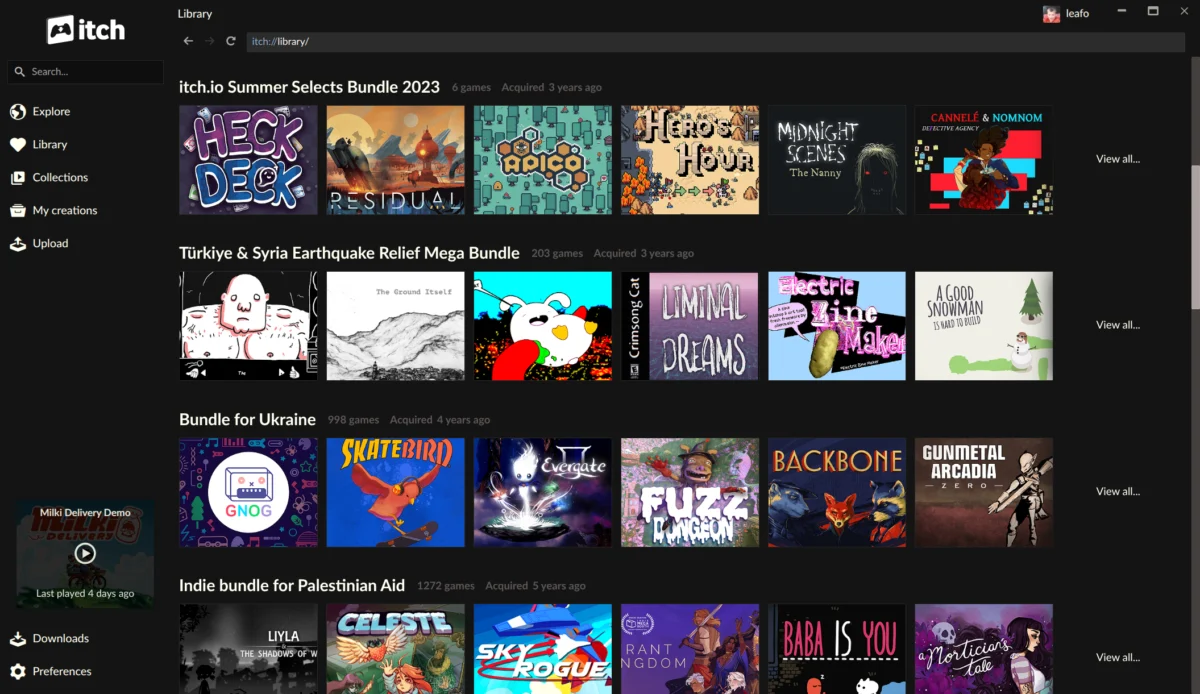
The most impactful change introduced by these updates is the complete overhaul of how game bundles are integrated into the itch.io app library. Previously, the app lacked a native "concept" of large bundle ownership, leading to the aforementioned discoverability issues. Now, bundles a user owns appear directly in their library, each featuring its own dedicated page. These bundle pages are not merely static lists; they are dynamic, interactive interfaces allowing users to:
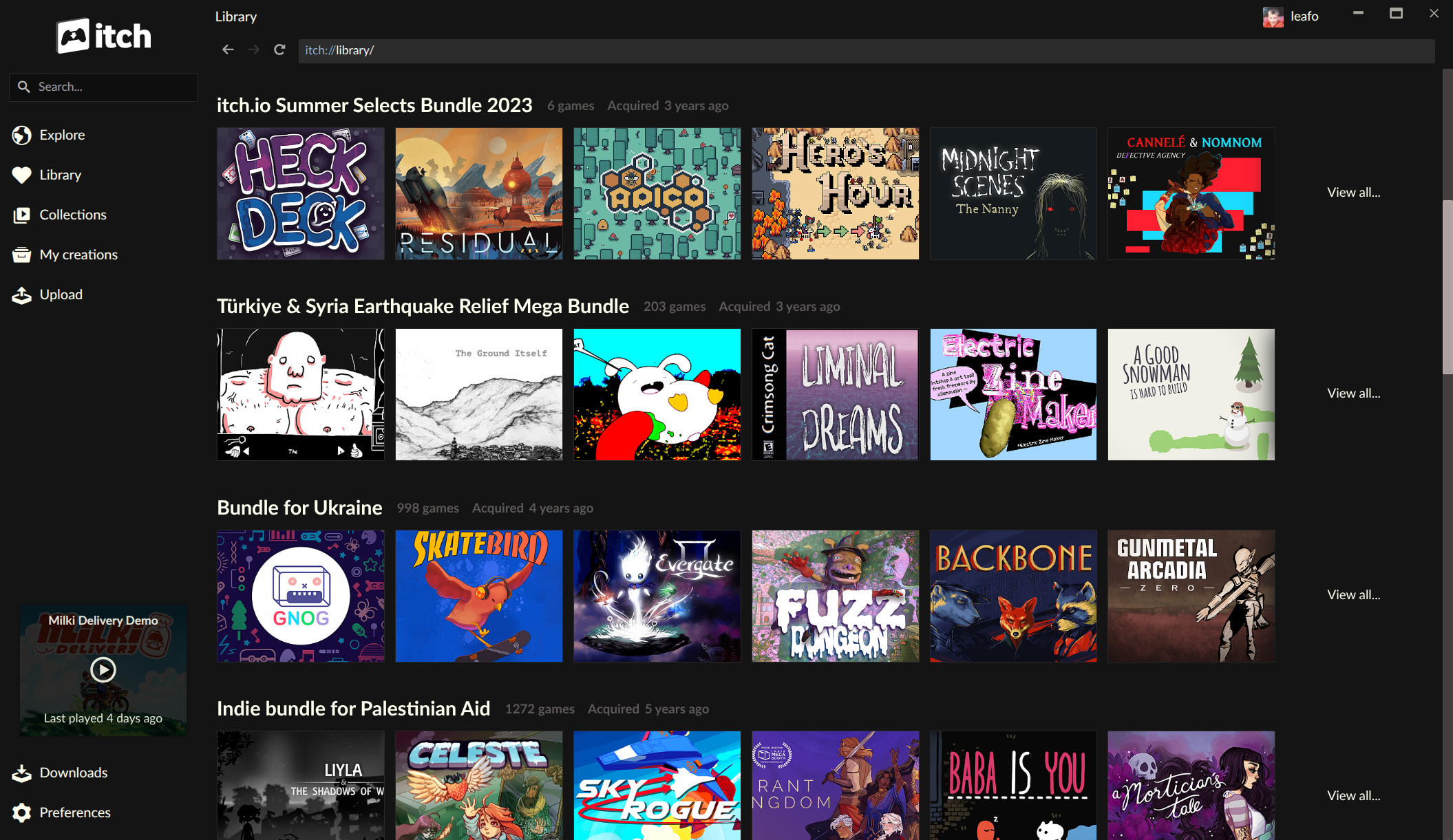
- Browse and Discover: View every game included within a bundle without leaving the app.
- Sophisticated Filtering: Sort the displayed games, search by title, and apply filters based on platform compatibility (e.g., Windows, macOS, Linux), classification (e.g., action, RPG, visual novel), and installation status.
- Direct Installation: Install games directly from the bundle page, eliminating the need to navigate to the website to claim individual keys.
This robust bundle support fundamentally transforms the user experience for individuals who have invested in itch.io’s charitable bundles. What was once a daunting task of managing potentially thousands of games across web and app interfaces has been streamlined into an intuitive, in-app process. Users who purchased the "Bundle for Racial Justice and Equality" or the "Bundle for Ukraine," previously facing the prospect of manually claiming hundreds of games, can now seamlessly explore and install their entire collection. This improvement is not merely a convenience; it actively encourages engagement with the vast and diverse content within these bundles, potentially increasing play rates for independent developers whose games were previously obscured by the logistical challenges of discovery. Furthermore, this development aligns with recent efforts to enhance the developer side, with itch.io having recently revamped its bundle hosting tools, creating a more cohesive and powerful bundle ecosystem for both creators and consumers.
Enhanced Per-Game Launch Settings and Argument Customization
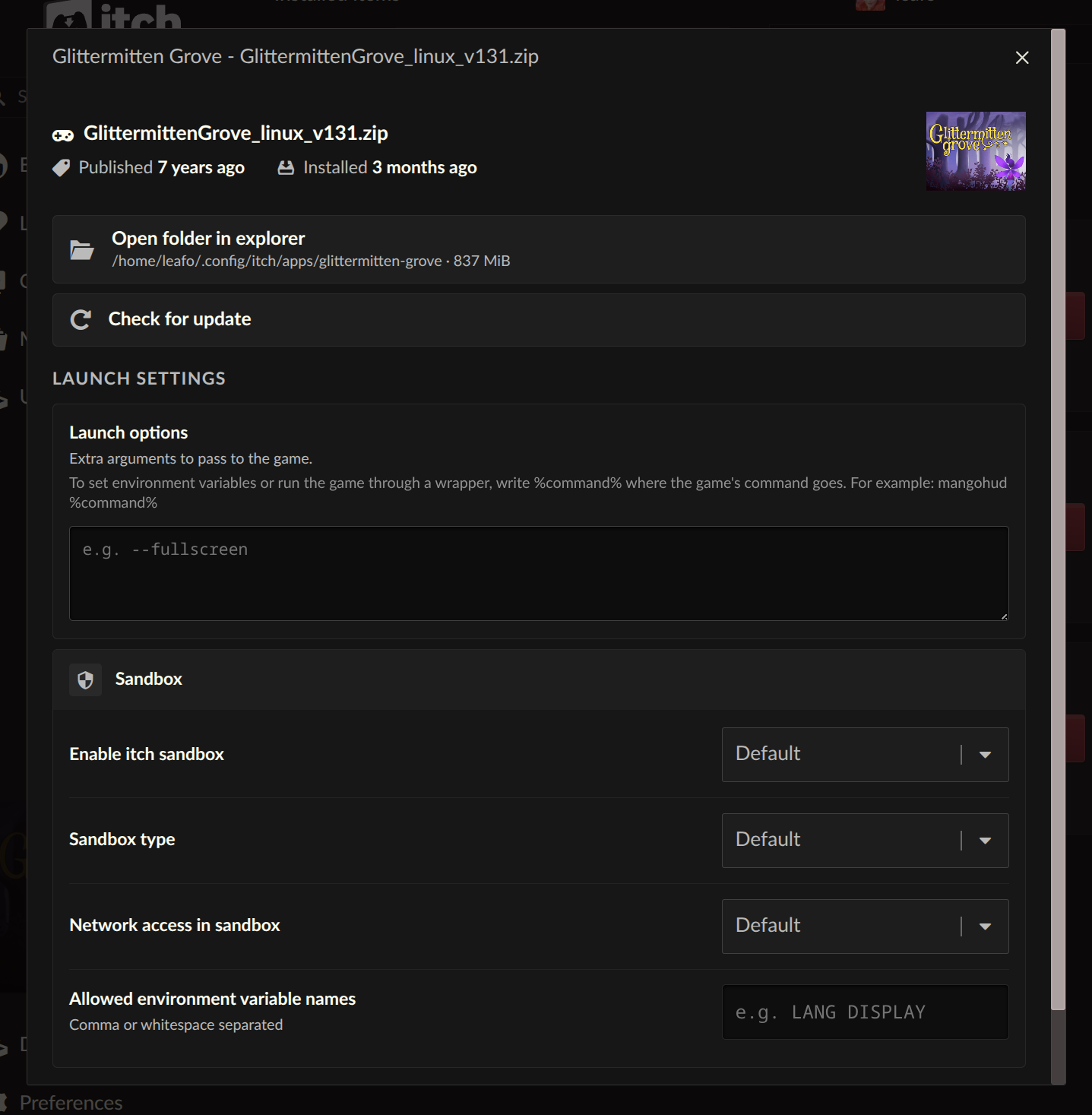
Another significant addition for power users and developers alike is the introduction of per-game "Launch settings," accessible from each installed game’s manage dialog. This feature provides an unprecedented level of control over how individual games are executed, moving beyond basic launch parameters to encompass advanced system configurations. Users can now configure:
- Sandbox Restrictions: Control the level of isolation for a game process, potentially enhancing security or preventing unintended system interactions.
- Network Access: Manage whether a game is permitted to access network resources, useful for privacy concerns or for testing offline functionalities.
- Environment Variables: Define custom environment variables on a per-game basis, which can be crucial for specific game configurations, compatibility layers, or debugging purposes.
A particularly anticipated feature within this section is the new "Command pattern" option for launch arguments. This addresses a long-standing request from the community, especially from users leveraging compatibility layers like Wine or Proton on Linux and macOS. Instead of simply passing arguments directly to the game executable, users can now specify a "%command%" pattern, allowing them to wrap the game launch within another command. For instance, a user on Linux could configure a Windows game to launch using wine %command% or proton run %command%, enabling seamless execution through a compatibility layer without manual command-line interventions. Similarly, developers could integrate debugging tools, performance profilers, or custom scripts into the launch sequence using this flexible pattern. This granular control empowers users to optimize their gaming experience, troubleshoot issues, and extend the playability of titles across a wider range of hardware and operating systems.
Unlocking Cross-Platform Play: Installing Untagged Downloads
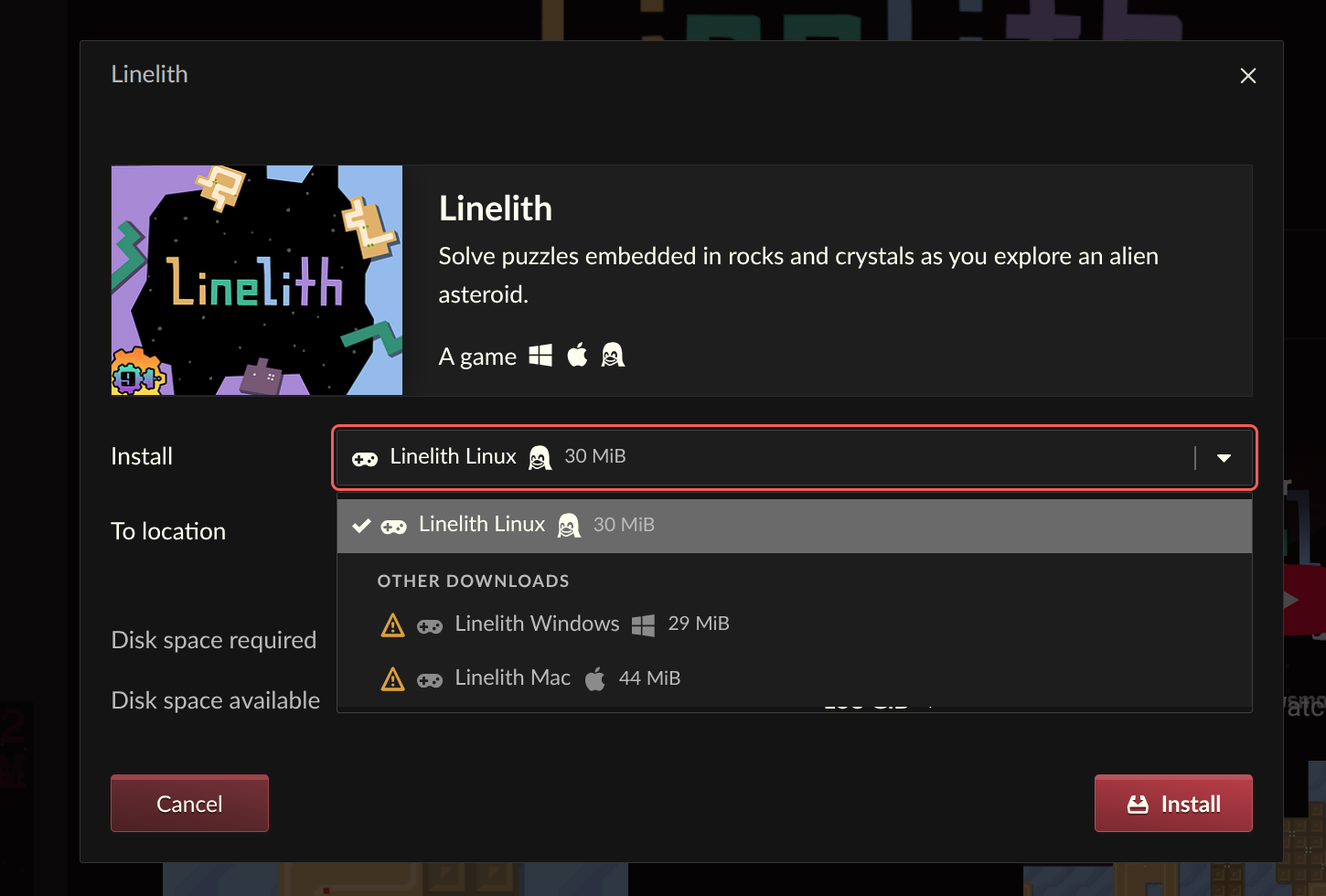
The itch.io platform is renowned for its diverse game offerings, often including builds for multiple operating systems. However, a previous limitation within the app prevented users from easily accessing game downloads not explicitly tagged for their current platform. This meant that a Linux user, for example, couldn’t directly download a Windows-only build even if they intended to run it through a compatibility layer like Wine or Proton.
The latest updates resolve this by allowing users to "reveal and install" downloads that are not tagged for their current operating system. This capability significantly broadens the functional library for many users. A gamer on macOS can now readily grab a Windows build to run via a virtual machine or compatibility tool, or a Linux user can access an untagged Windows version with the full intention of utilizing Proton. This change is a boon for cross-platform enthusiasts and those who maintain versatile gaming setups, fostering a more inclusive and flexible approach to game acquisition and play within the app. It acknowledges the evolving landscape of PC gaming, where compatibility layers are increasingly powerful and common, and ensures the itch.io app facilitates rather than hinders such practices.
A Refined Sidebar Search Experience
The user interface also received a notable improvement with the replacement of the old sidebar search functionality. The previous iteration, which relied on the itch.io API’s autocomplete feature, often presented search results in a confusing order, making it difficult for users to effectively locate specific games or discover new content. The design intent of the new sidebar search is to streamline the user’s interaction with their owned library.
The revamped search now primarily focuses on quickly finding items a user already possesses, prioritizing accuracy and relevance within their personal collection. For broader discovery and exploration of the entire itch.io catalog, the system now intelligently directs users to the more comprehensive search experience available on the itch.io website. This strategic separation of search functionalities aims to improve the overall usability of the app: quick access to owned games for playing, and a dedicated web interface for exploring the vast and ever-growing world of indie titles. This dual approach optimizes the user’s workflow, ensuring that the app remains a focused tool for managing and launching games while the website serves as the primary portal for discovery and community interaction.
Broader Implications and Future Outlook
These comprehensive updates to the itch.io app signify a maturation of the platform’s desktop client, addressing critical user pain points and enhancing its overall utility. By prioritizing community feedback, as evidenced by the consistent engagement with their issues tracker, itch.io reinforces its reputation as a developer-friendly and user-centric platform. The improvements to bundle management alone are a game-changer for hundreds of thousands of users who previously found their vast collections unwieldy, potentially leading to increased engagement with the indie titles within these bundles. The advanced launch settings cater to a more technical audience, providing powerful tools for customization and compatibility, while the ability to install untagged downloads fosters a more open and flexible cross-platform gaming environment.
From a strategic perspective, these enhancements strengthen itch.io’s competitive standing in a crowded digital distribution market. By offering a robust and highly customizable desktop experience, itch.io solidifies its appeal to both casual players and dedicated indie game enthusiasts. The continued investment in the app demonstrates a long-term commitment to providing a seamless and feature-rich experience, promising a more integrated and enjoyable journey for users navigating the unique and diverse world of independent games. As the platform continues to grow and evolve, these foundational improvements lay the groundwork for future innovations and reinforce itch.io’s pivotal role in supporting and showcasing the independent game development community.
Users can obtain the latest version of the itch.io app from https://itch.io/app. Existing installations are designed to auto-update. For detailed technical information regarding the changes, the full changelogs for v26.15.0 and v26.17.0 are publicly available on GitHub. The swift deployment of the v26.18.0 hotfix also reflects the team’s ongoing commitment to stability and user satisfaction, promising a more robust and reliable experience for all users.
About the Author