Unreal Engine 5 (UE5) stands as a formidable platform in the realm of interactive content creation, empowering developers across diverse sectors from AAA gaming to architectural visualization and cinematic production. Its robust feature set and unparalleled visual fidelity are continually expanded and refined, yet certain advanced functionalities remain intrinsically tied to C++ programming. To bridge this gap and democratize access to these powerful capabilities for developers primarily utilizing Blueprints, Epic Games has cultivated a vibrant ecosystem of plugins. These extensions, often developed by the community, integrate seamlessly into the engine, offering new Blueprint nodes, specialized tools, and performance optimizations. This article delves into the critical role of plugins within the UE5 development workflow, outlining the two primary methods for their installation – via the official Unreal Marketplace and through advanced manual procedures – and examining their broader implications for the global developer community.
The Evolution of Extensibility in Game Development
The concept of modularity and extensibility has been a cornerstone of advanced software development for decades, finding particular resonance within the rapidly evolving landscape of game engines. Early game engines were often monolithic, requiring extensive C++ knowledge to modify or extend. However, with the advent of more sophisticated tools and the growth of the indie development scene, there emerged a clear demand for more accessible methods of customization. Epic Games, with its Unreal Engine, has been at the forefront of this evolution. The introduction of Blueprints, Unreal Engine’s visual scripting system, revolutionized game development by allowing designers and artists to create complex gameplay mechanics without writing a single line of code. This dramatically lowered the barrier to entry, fostering an explosion of creativity.
Despite the power of Blueprints, the underlying engine remains a C++ powerhouse. Features that require deep system integration, highly optimized computations, or direct hardware access often necessitate C++ implementation. Plugins serve as a vital conduit, encapsulating these C++ functionalities and exposing them as user-friendly nodes within the Blueprint visual scripting environment, or as new tools and modules within the editor itself. This symbiotic relationship ensures that developers can leverage the performance and depth of C++ while maintaining the rapid iteration and accessibility afforded by Blueprints. The global Unreal Engine community, estimated to be in the millions, has responded enthusiastically, contributing thousands of plugins that address a myriad of development challenges, from networking protocols to complex procedural generation systems.
Unreal Marketplace Plugins: A Streamlined Integration
For many developers, the Unreal Marketplace serves as the primary and most secure conduit for acquiring new engine functionalities. This curated digital storefront, managed directly by Epic Games, offers a vast repository of assets, including code plugins, that undergo a review process to ensure quality and compatibility. The process for integrating these marketplace assets into an Unreal Engine project is designed for efficiency and ease of use.
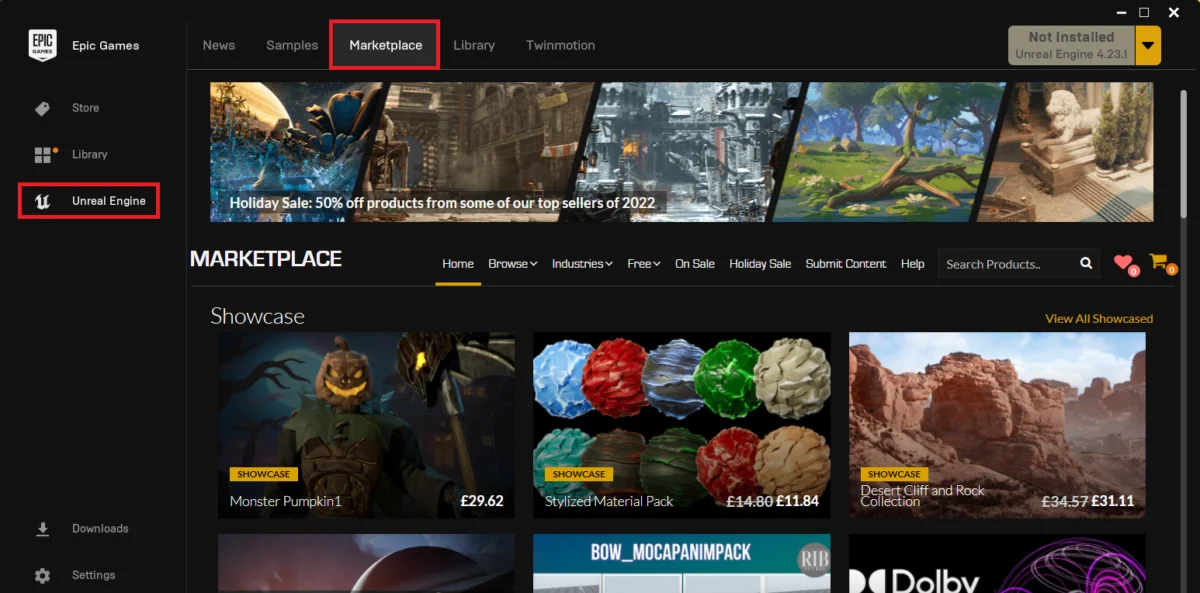
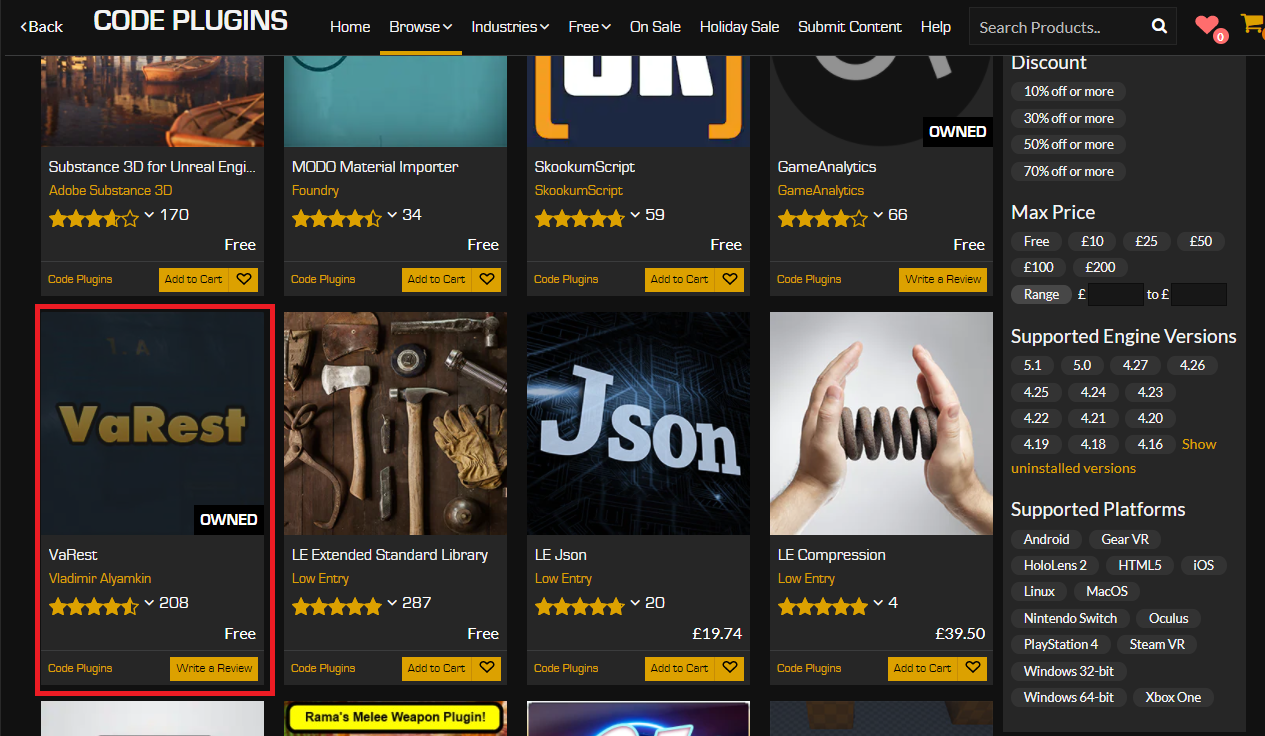
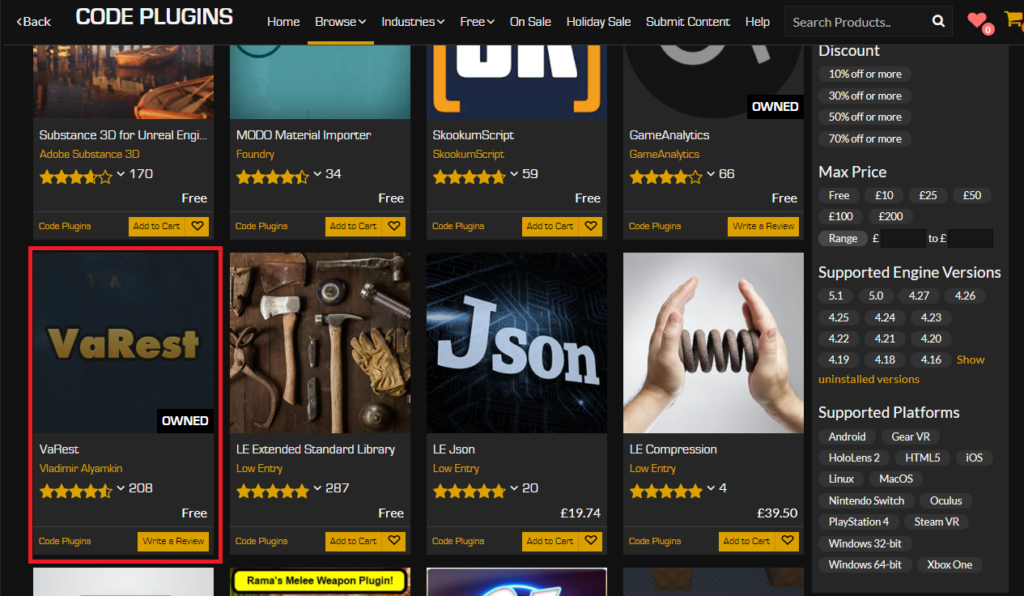
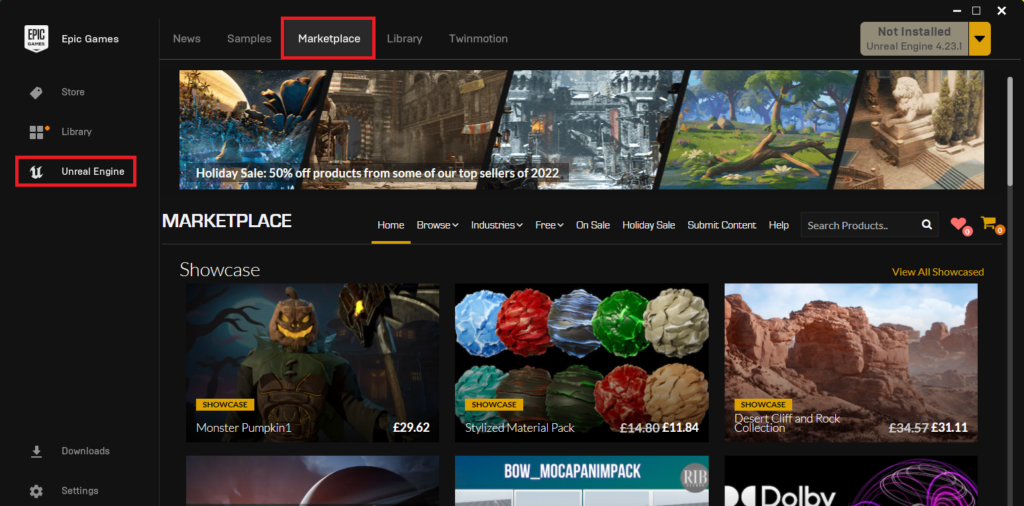
The journey begins within the Epic Games Launcher, the central hub for all Epic-related software and services. Upon launching the application, users navigate to the "Unreal Marketplace" section. This expansive digital catalog features a diverse range of content, categorized for easy discovery. To locate code-based extensions, developers specifically select the "Code Plugins" option within the "Browse" tab. This filters the marketplace to display only those assets that introduce new engine functionalities or extend existing ones, rather than purely visual or content-based assets.
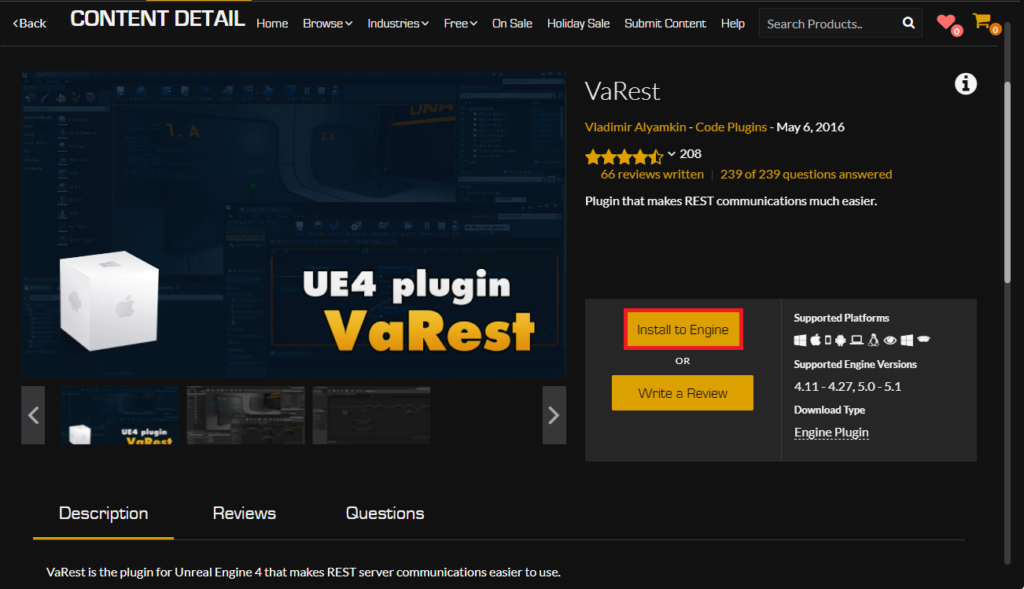
Once a desired plugin is identified, such as the widely used VaRest network plugin for handling RESTful API requests, the acquisition process is straightforward. For paid plugins, users proceed with a standard e-commerce transaction, adding the item to their cart and completing the purchase. Notably, even free plugins, which constitute a significant portion of the marketplace offerings and are crucial for community growth, follow a similar "purchase" workflow, though no monetary charge is incurred. This system allows Epic Games to track ownership, manage licensing, and facilitate updates for all acquired plugins, ensuring a consistent user experience.
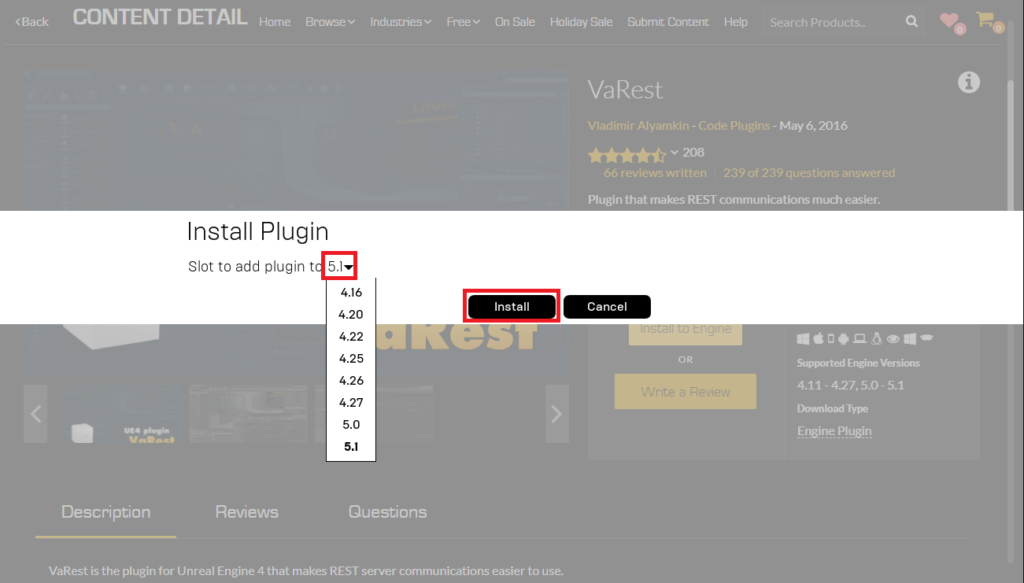
Following acquisition, the critical step of installation commences. Unlike content assets that can be added directly to a project, code plugins are typically installed to the Unreal Engine itself. This ensures that the plugin’s compiled binaries and source code are available across any project utilizing that specific engine version. Users click the "Install to Engine" button, then presented with a choice of installed Unreal Engine versions. It is paramount for developers to select the correct engine version that aligns with their project’s requirements, as compatibility issues can arise if a plugin compiled for one version is attempted with another. Epic Games’ robust versioning system usually flags potential incompatibilities, but developer vigilance remains key.
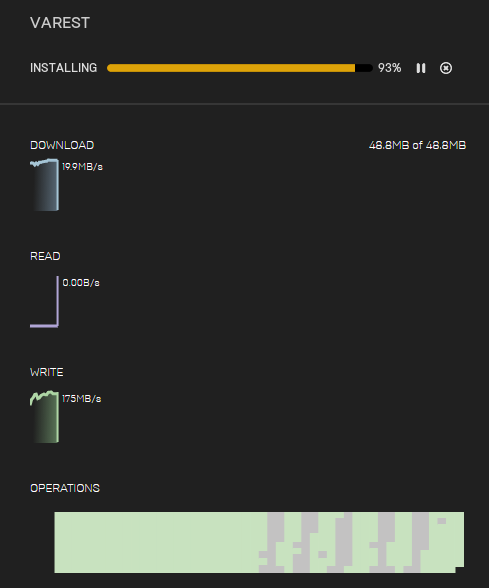
The installation progress is transparently displayed within the "Downloads" tab of the Epic Games Launcher. Depending on the size of the plugin and internet speed, this process can take several minutes. Upon successful download and installation, the plugin’s files are integrated into the chosen Unreal Engine installation directory, ready for activation within individual projects.
Activating Marketplace Plugins Within Projects

The installation of a plugin to the engine does not automatically activate it within every Unreal Engine project. This deliberate design choice is a performance optimization, preventing projects from building unnecessary code and inflating their executable sizes, especially when only a subset of installed plugins is required. Therefore, a final activation step is essential for each project where the plugin is to be utilized.
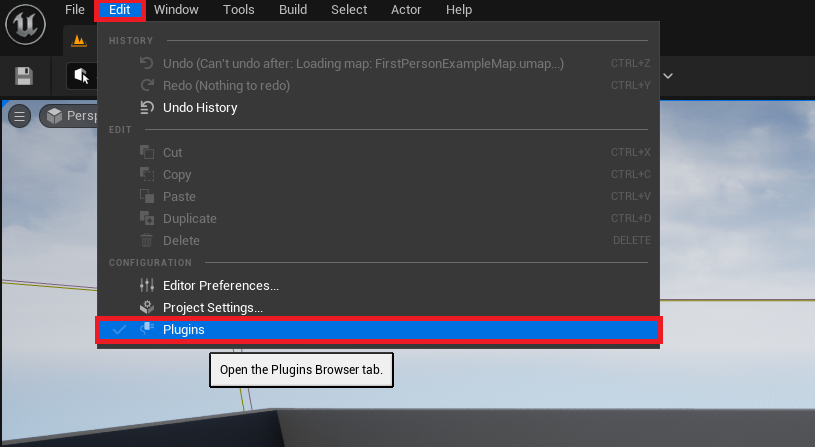
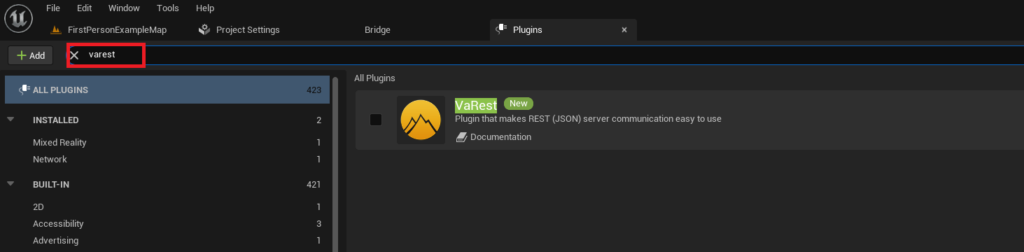
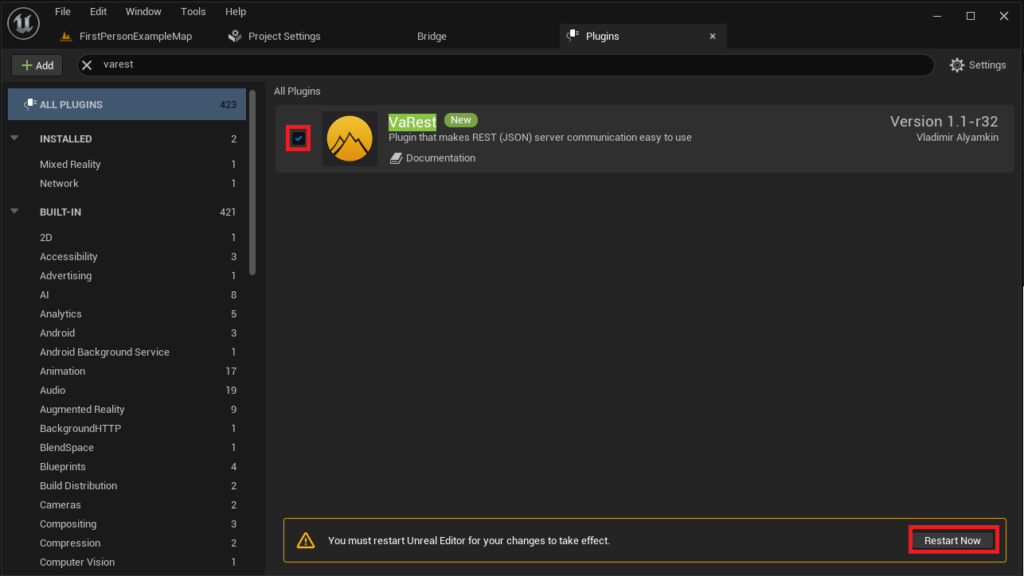
Within the Unreal Editor, developers access the plugin management interface by navigating to "Edit" in the top menu bar, and then selecting "Plugins." This action opens the "Plugins" tab, a comprehensive dashboard listing all installed plugins, both official and third-party. To efficiently locate the newly installed plugin, developers can utilize the search bar, typing in the plugin’s name (e.g., "VaRest").
Once identified, the plugin will appear in the search results. A checkbox adjacent to the plugin’s name controls its active status within the current project. Checking this box enables the plugin. Crucially, the Unreal Editor will then prompt a restart. This restart is not merely a convenience; it is a necessary step that allows the engine to recompile and load the plugin’s modules, integrate its new Blueprint nodes, and make its C++ functionalities available to the project. Upon the editor’s relaunch, the newly enabled plugin is fully operational, empowering developers to leverage its extended capabilities in their C++ code and Blueprint scripts.
Manually Installed Plugins: Advanced Integration and Cautionary Measures
While the Unreal Marketplace provides a convenient and relatively secure method for plugin acquisition, there are scenarios where developers may opt for manual installation. This advanced procedure is typically employed for community-driven projects not yet listed on the Marketplace, custom internal tools, or specific beta versions of plugins that require direct file manipulation. However, this method carries inherent risks that necessitate careful consideration and adherence to best practices.
Security Disclaimer and Best Practices: It is paramount to issue a stringent disclaimer regarding the manual installation of third-party code. Unlike Marketplace plugins, which undergo a vetting process, manually downloaded plugins may originate from unverified sources. The internet, while a vast resource for collaboration, also harbors malicious software. Downloading and executing untrusted code can expose development environments to significant security vulnerabilities, including malware, viruses, and data corruption. Furthermore, poorly written or incompatible plugins can introduce instability, crashes, or unexpected behavior into an Unreal Engine project, potentially leading to lost work and extensive debugging efforts.
Therefore, developers are strongly advised to exercise extreme caution:
- Source Verification: Only download Unreal Engine plugins from highly trusted sources. This typically includes official developer forums (e.g., Unreal Engine Forums), reputable GitHub repositories with active communities and clear licensing, or direct communication channels with established developers.
- Compatibility Check: Always verify that the plugin is explicitly stated to be compatible with the exact version of Unreal Engine 5 currently installed. Version mismatches are a common cause of compilation errors and runtime crashes.
- Backup Strategy: Before installing any manual plugin, especially in a production environment, ensure a comprehensive backup of the project is created. This mitigates potential data loss should the plugin cause irreparable damage.
- Community Vetting: Look for plugins that have been widely used and positively reviewed by the community, indicating a degree of reliability and safety.
Installation Procedure for Manual Plugins: The manual installation process involves directly manipulating the project’s file structure.
- Locate or Create the "Plugins" Folder: The first step requires navigating to the root directory of the Unreal Engine project. Within this directory, developers must ensure the presence of a folder named "Plugins." If this folder does not exist, it must be manually created. This "Plugins" folder serves as the designated location for all project-specific, manually installed plugins.
- Copy the Plugin Files: The entire root folder of the downloaded plugin (e.g., "VictoryPlugin" from a community source like Rama’s Victory BP plugin) must then be copied directly into the project’s "Plugins" folder. This ensures that all necessary plugin files—including source code, compiled binaries, and any associated content—are correctly placed within the project’s hierarchy, making them discoverable by the Unreal Editor.
- Verify Folder Structure: Developers should briefly inspect the copied plugin folder to ensure it contains the expected files and subdirectories, typically including "Source," "Binaries," and a
.uplugindescriptor file, which informs the engine about the plugin’s structure and properties.
Enabling Manually Installed Plugins: The final step for manually installed plugins mirrors the activation process for Marketplace assets.
- Access Plugin Manager: Open the Unreal Editor for the project. Navigate to "Edit" > "Plugins" to open the Plugins tab.
- Locate and Enable: Utilize the search bar within the Plugins tab to find the newly copied plugin by its name. Once located, check the corresponding box to enable it for the project.
- Restart Editor: As with Marketplace plugins, the editor will prompt a restart. This is essential for the engine to properly load the manually integrated plugin, compile its modules, and expose its functionalities to the project’s C++ and Blueprint environments. Upon restart, the plugin should be fully functional.
Impact and Implications for the Unreal Engine Ecosystem
The robust plugin ecosystem is not merely a convenience; it is a fundamental pillar supporting the dynamism and widespread adoption of Unreal Engine 5. Its implications span several critical areas:
-
Developer Empowerment and Accessibility: Plugins significantly lower the barrier to entry for developers, particularly those less proficient in C++. By packaging complex C++ functionalities into accessible Blueprint nodes, plugins democratize advanced features, allowing a broader spectrum of creators to leverage the full potential of UE5. This fosters a more inclusive development environment, encouraging innovation from diverse backgrounds.
-
Accelerated Development Cycles: For both individual developers and large studios, plugins represent a massive saving in development time and resources. Instead of reinventing common functionalities or writing bespoke C++ code for every niche requirement, developers can readily integrate pre-built, tested solutions. This allows teams to focus their efforts on unique game mechanics and artistic vision, rather than foundational engineering tasks. Data from the Unreal Marketplace indicates that thousands of hours are collectively saved by developers utilizing these ready-made solutions.
-
Innovation and Specialization: The plugin ecosystem fosters a highly specialized and innovative environment. Developers with expertise in specific domains (e.g., advanced AI pathfinding, complex networking architectures, custom UI frameworks, real-time VFX) can create and share tools that elevate the entire community. This leads to a richer feature set for Unreal Engine users, allowing projects to push boundaries in various technical and creative aspects.
-
Community Contribution and Collaboration: The vast majority of plugins, especially those freely available or open-source, are products of the global developer community. This collaborative spirit is a testament to the strength of the Unreal Engine ecosystem. Forums, GitHub repositories, and online communities thrive on the exchange of knowledge and tools, with plugins often being a direct result of collective problem-solving and shared passion. This peer-to-peer support system is invaluable for both novice and seasoned developers.
-
Marketplace Economy and Professionalization: The Unreal Marketplace itself has cultivated a robust micro-economy. It provides a platform for talented developers to monetize their creations, offering high-quality, professionally supported plugins. This incentivizes the creation of robust, well-documented, and regularly updated tools, raising the overall standard of available extensions. For many independent developers, selling plugins on the Marketplace has become a viable business model, further enriching the ecosystem.
-
Future Outlook and Adaptability: As Unreal Engine 5 continues to evolve and integrate new technologies—such as MetaHumans, Lumen, Nanite, and advanced cloud streaming—plugins will remain crucial for extending these core features or creating specialized tools that leverage them. The modular nature of plugins ensures that the engine can adapt quickly to emerging trends and developer needs without requiring fundamental changes to its core architecture. This adaptability guarantees UE5’s longevity and relevance in a rapidly changing technological landscape.
Conclusion
Plugins are an indispensable component of the Unreal Engine 5 development paradigm, offering a vital bridge between the engine’s powerful C++ foundation and the accessible world of Blueprints. Whether acquired through the streamlined Unreal Marketplace or integrated via careful manual installation, these extensions significantly enhance developer capabilities, accelerate project timelines, and foster a dynamic environment of innovation and collaboration. While the ease of Marketplace integration provides a secure and efficient pathway, the manual method, though requiring heightened caution regarding source verification, offers unparalleled flexibility for specialized needs. Ultimately, the thriving plugin ecosystem underscores Unreal Engine 5’s commitment to empowering its global community, ensuring that creators have access to the tools necessary to bring their most ambitious visions to life.
About the Author