The realm of 3D art and design is constantly seeking innovative workflows that enhance efficiency and creative freedom. Within the powerful open-source 3D creation suite, Blender, a recent development has captured the attention of artists and developers alike: the integration and application of the Menu Switch node. This node, championed by Blender community member Kenan Proffitt, offers a groundbreaking method for managing and dynamically altering multiple shader configurations within a single material, eliminating the need to reassign entire material slots. This advancement promises to streamline complex texturing workflows and unlock new possibilities for interactive and adaptable 3D assets.
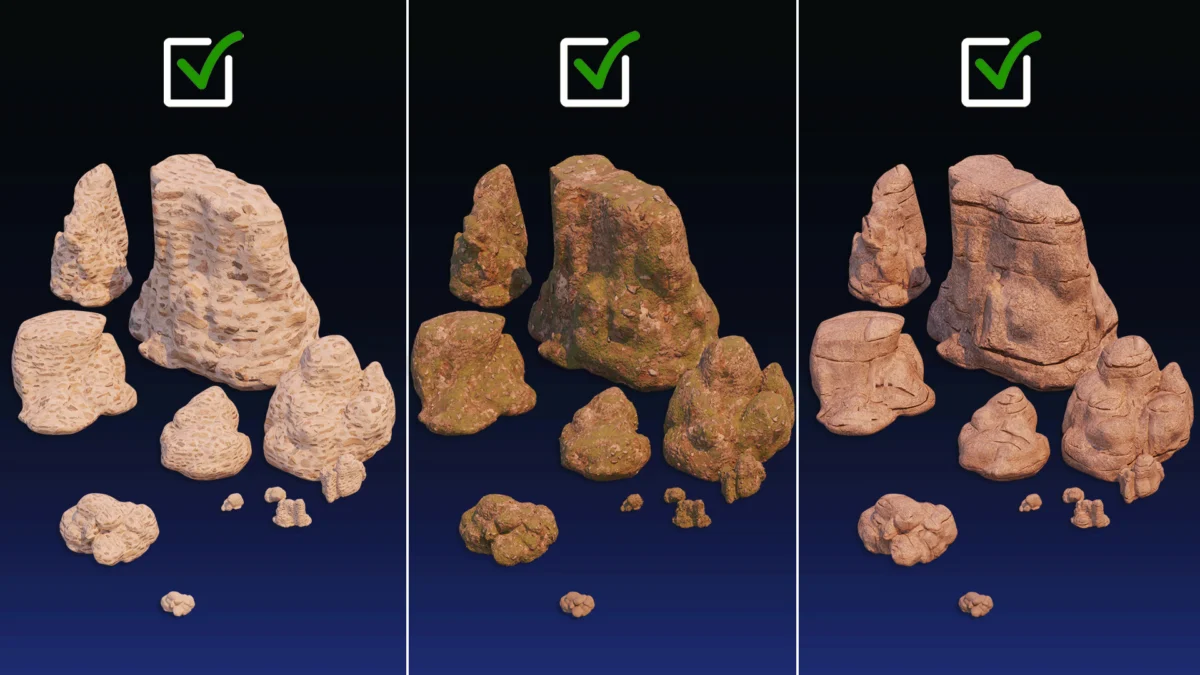
The core functionality of the Menu Switch node lies in its ability to act as a central hub for various shader node groups. Instead of creating separate materials, each with a distinct shader setup, artists can now consolidate these variations into a single material. The Menu Switch node then provides an intuitive interface, accessible directly within Blender’s Material Properties panel, to select and activate one of these pre-defined shader configurations. This capability is particularly transformative for projects requiring a high degree of material variation without the associated overhead of managing numerous individual materials.
Genesis of the Menu Switch Node and its Community Impact
While the exact origins of the Menu Switch node within Blender’s development pipeline are not explicitly detailed in the initial announcement, its emergence highlights the project’s commitment to community-driven innovation. Blender’s open-source nature fosters an environment where users can not only utilize the software but also contribute to its evolution. Kenan Proffitt’s tutorial, shared through platforms like BlenderNation, serves as a testament to this collaborative spirit. By demystifying the node’s functionality and showcasing its practical applications, Proffitt has empowered a wider audience of Blender users to adopt this advanced technique.
The timing of this revelation is also noteworthy. As 3D asset creation continues to proliferate across industries such as gaming, film, virtual reality, and product visualization, the demand for efficient and flexible material handling has never been greater. Developers and artists are constantly searching for ways to reduce polygon counts, optimize texture memory, and create assets that can adapt to various scenarios or user interactions. The Menu Switch node directly addresses these needs, offering a solution that is both technically sound and artistically liberating.
Technical Implementation and Workflow Advantages
At its heart, the Menu Switch node functions as a conditional logic gate for shader networks. Users can define distinct shader groups, each representing a specific visual appearance – for example, different types of wood grain, various metal finishes, or distinct stages of wear and tear on an object. These shader groups are then plugged into the corresponding inputs of the Menu Switch node. The node itself possesses a selection mechanism, typically an integer input or a dropdown menu, which dictates which of the connected shader groups is actively routed to the material’s output.
This architectural shift offers several key advantages:
- Material Consolidation: Instead of managing dozens of materials for a single object with slight variations, artists can manage a single material with multiple shader options. This drastically simplifies scene organization and reduces the potential for errors.
- Performance Optimization: By loading only one material, even with multiple shader options available, the rendering engine can operate more efficiently. This is particularly crucial in real-time applications like game development and VR, where frame rates are paramount.
- Dynamic Control: The ability to switch shaders directly within the Material Properties panel means that artists can iterate on designs and test different looks rapidly without needing to delve deep into complex node setups or re-apply materials. This speeds up the creative process significantly.
- Asset Reusability: Assets created with this technique become more versatile. A single character model, for instance, could have its armor material dynamically switch between pristine, battle-worn, or even elemental variations, all within the same asset.
Expanding the Horizon: Potential Applications and Use Cases
The implications of the Menu Switch node extend far beyond simple material variations. Its dynamic nature opens doors to a multitude of advanced applications:
- Interactive Environments: In game development, this node could be used to create objects that change their appearance based on player actions, environmental conditions, or in-game events. Imagine a potion that glows differently when active, or a plant that cycles through its growth stages.
- Procedural Texturing Evolution: While Blender already boasts robust procedural texturing capabilities, the Menu Switch node can add another layer of control. Artists could switch between different procedural noise patterns, color ramps, or texture combinations to achieve a wider range of outcomes from a single procedural setup.
- Architectural Visualization: For architects and designers, this node allows for quick presentation of design options. A single building model could showcase various facade materials, window styles, or roof finishes without the need to create and render entirely separate scenes.
- Character Customization: In character creation pipelines, this node could facilitate the selection of different clothing textures, skin tones, or even facial features, all within a unified material system.
- Animation and VFX: For visual effects artists, the node could be used to control the evolution of materials over time, creating dynamic effects like melting, burning, or transforming objects.
Community Reactions and Future Development
The introduction of Kenan Proffitt’s tutorial has been met with considerable enthusiasm within the Blender community. Online forums and social media platforms are abuzz with discussions, sharing of experiments, and requests for further exploration of the node’s capabilities. Users are actively sharing their own implementations and creative uses, further solidifying the node’s value.
While Proffitt’s work provides a clear demonstration, the potential for further integration and refinement by the Blender development team is significant. Future iterations could see enhanced user interfaces for managing the switch options, improved performance optimizations for extremely complex shader networks, or even the development of add-ons that build upon this core functionality. The collaborative nature of Blender development suggests that this node could become an even more powerful tool as the community continues to explore and contribute to its ecosystem.
Broader Impact on the 3D Industry
The widespread adoption of techniques like the Menu Switch node signifies a maturing of the 3D art and design landscape. As software becomes more powerful and accessible, the emphasis shifts towards intelligent workflows that maximize efficiency and creative output. This trend is not unique to Blender; similar advancements are being seen across other 3D software packages and game engines, all striving to empower creators with more sophisticated tools.
For independent artists and small studios, such innovations are particularly impactful. They democratize access to advanced techniques that were once the domain of large, well-funded production houses. A single artist can now achieve a level of material complexity and dynamic control that was previously unimaginable without a dedicated team and extensive resources.
Conclusion: A Step Forward in Material Design
The Menu Switch node represents a significant, albeit potentially niche, advancement within Blender’s already extensive feature set. Its ability to simplify material management, enhance performance, and unlock new avenues for dynamic control makes it an invaluable tool for a wide range of 3D artists. Kenan Proffitt’s initiative in sharing this technique underscores the vibrant and collaborative spirit of the Blender community, a spirit that continuously drives innovation and pushes the boundaries of what is possible in the world of 3D creation. As artists continue to explore and implement this node, we can expect to see a new wave of visually rich, dynamically adaptable, and efficiently produced 3D assets across all industries.
About the Author