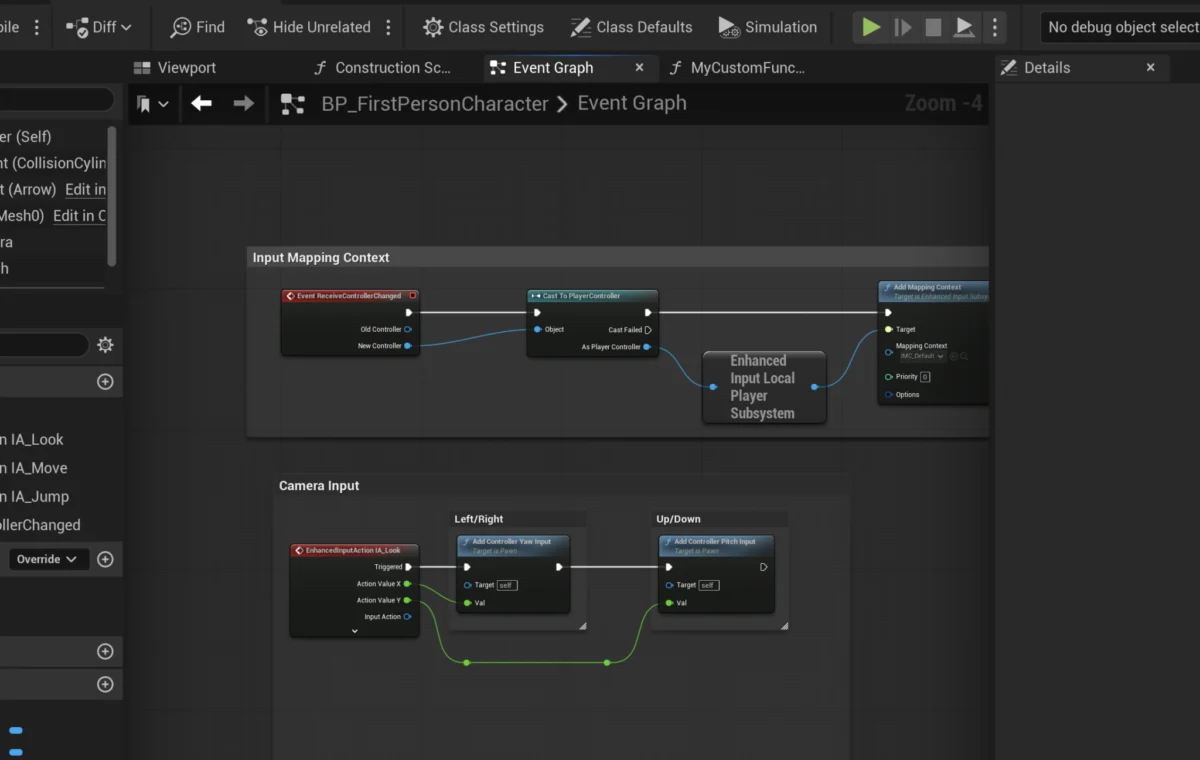
The realm of game development, particularly within powerful engines like Unreal Engine 5 (UE5), increasingly relies on efficient and organized coding practices. A cornerstone of this methodology is the concept of functions, self-contained blocks of code designed for reusability and modularity. In UE5’s visual scripting environment, Blueprints, these functions provide developers with a robust toolset to compartmentalize logic, streamline workflows, and maintain complex projects with greater ease. This guide delves into the fundamental principles and practical application of Blueprint Functions, illustrating their critical role in modern game creation.
The Foundational Role of Functions in Programming and Game Development
At its core, a function in programming is a named sequence of instructions that performs a specific task. By encapsulating logic within functions, developers can execute the same code multiple times from different parts of a program without duplication, a principle known as "Don’t Repeat Yourself" (DRY). This not only reduces the overall lines of code but also significantly simplifies debugging and updates. Should a change be required in a particular piece of logic, it only needs to be modified in one function, rather than across numerous scattered instances. Industry data suggests that modular codebases can reduce debugging time by up to 30% and improve development efficiency by over 20% in large-scale projects, according to various software engineering surveys.
In the context of game development, where projects often involve intricate systems and vast amounts of interconnected logic, functions are indispensable. They enable the creation of reusable gameplay mechanics, AI behaviors, UI interactions, and more, fostering a more organized and scalable development environment. For instance, a complex damage calculation system in a role-playing game could be abstracted into a single function, allowing various combat scenarios to call upon it while ensuring consistent behavior and ease of modification. Major studios like Epic Games themselves, along with others developing AAA titles such as Fortnite and Gears of War, extensively utilize such modular programming paradigms to manage the immense complexity of their projects.
Unreal Engine 5 Blueprints: Visualizing Code with Functions
Unreal Engine has long been at the forefront of democratizing game development through its visual scripting system. Dating back to Kismet in Unreal Engine 3, this philosophy evolved into the comprehensive Blueprint system in Unreal Engine 4, which has been further refined and enhanced in Unreal Engine 5. Blueprints offer a node-based interface that allows designers and programmers alike to build game logic without writing traditional text-based code, providing a powerful alternative for rapid prototyping and iteration. Epic Games has consistently championed Blueprints as a core feature, citing their ability to empower non-programmers and accelerate the creative process.
Blueprint Functions are the visual scripting equivalent of their text-based counterparts. They represent self-contained graphs of nodes that can be executed from various points within a Blueprint Actor. This capability is particularly vital for separating distinct pieces of logic within the often-expansive Blueprint Editor, preventing spaghetti code and promoting clarity. The ability to define input and output parameters further enhances their flexibility, allowing data to flow into and out of these encapsulated logic blocks, much like arguments and return values in conventional programming.
Consider a scenario where a game requires different types of projectiles to inflict damage. Instead of duplicating the damage calculation logic for each projectile Blueprint, a single CalculateDamage Blueprint Function can be created. This function would accept parameters such as the base damage value and potentially the type of damage, then process it against the target’s defenses, returning the final damage dealt. Any future adjustments to the damage formula would only necessitate a change within this single function, instantly propagating across all instances where it is called. This approach exemplifies the efficiency and maintainability that Blueprint Functions bring to large-scale projects, significantly reducing the potential for errors and accelerating development cycles.
Chronology of Implementation: Creating and Integrating a Blueprint Function
The process of implementing Blueprint Functions in Unreal Engine 5 is straightforward, designed to be intuitive for developers, whether they are new to the engine or seasoned professionals. The journey typically begins within a specific Blueprint Actor, such as the FirstPersonCharacter Blueprint found in Epic Games’ First Person Shooter template, which serves as an excellent starting point for practical demonstrations of character-centric logic.
Step 1: Function Creation and Naming Conventions
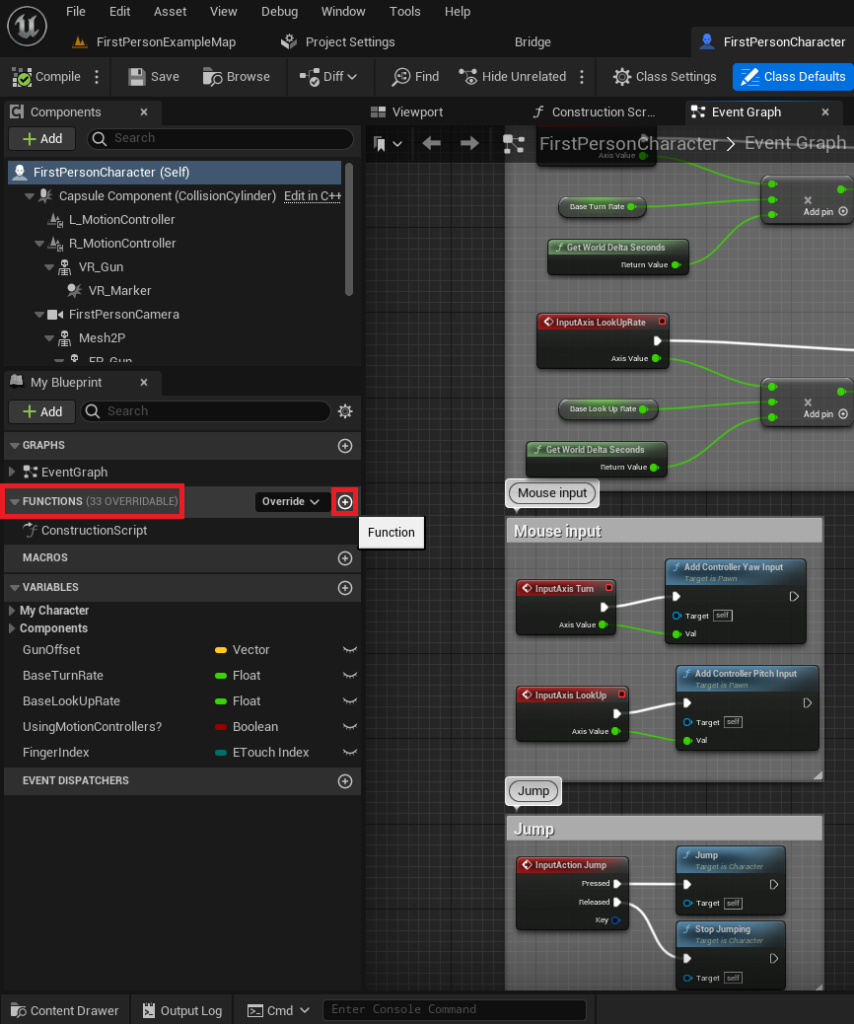
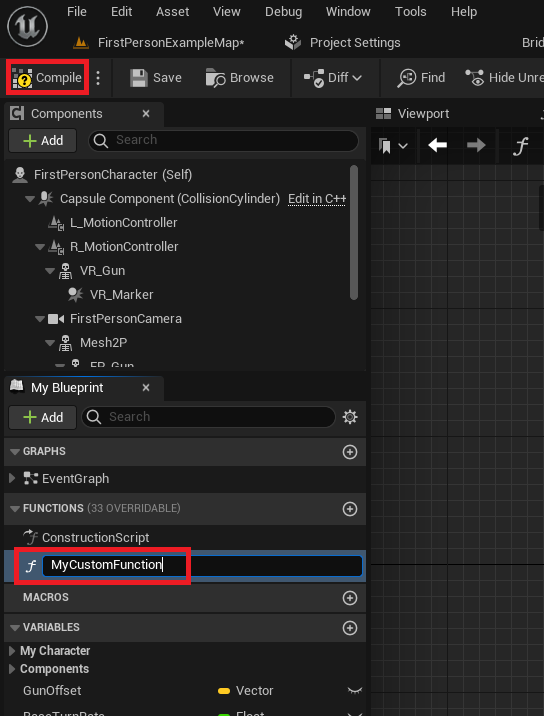
Within the Blueprint Editor, the ‘Functions’ section in the ‘My Blueprint’ panel on the left-hand side serves as the central repository for all functions belonging to that specific Blueprint Actor. To initiate the creation of a new function, developers simply click the designated ‘+’ symbol. This action introduces a new, unnamed function into the Blueprint. Upon creation, assigning a clear, descriptive name is paramount. Adhering to consistent naming conventions (e.g., PascalCase for function names like CalculateDamage or PrintDebugMessage) is a best practice that significantly contributes to project readability and team collaboration, especially in larger development teams where multiple individuals contribute to the same codebase. Once named and compiled, the function is integrated into the Blueprint’s structure, ready for logic definition.
Step 2: Defining Core Functionality
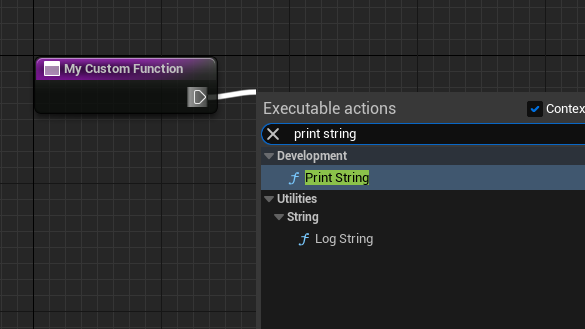
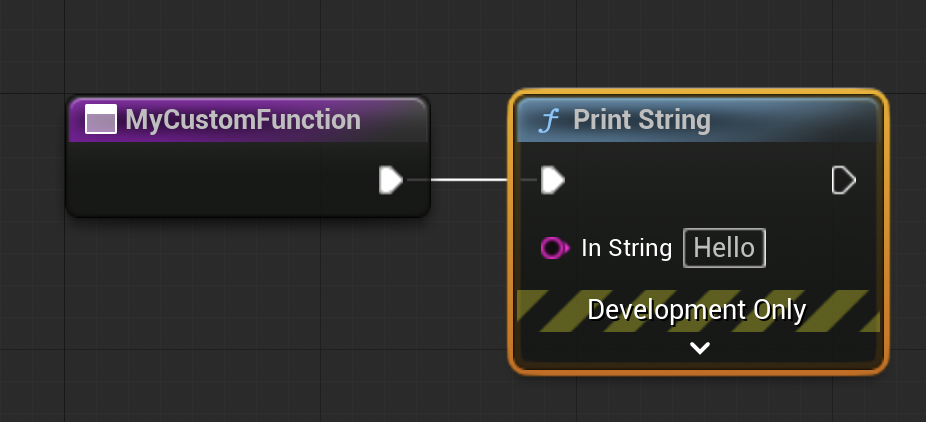
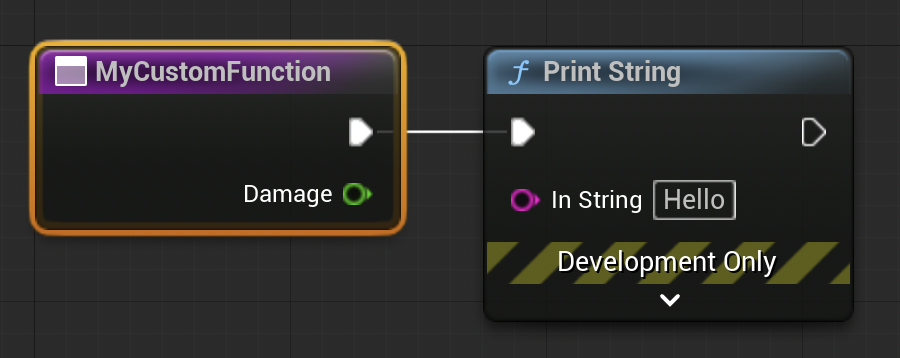
Initially, a newly created function is an empty canvas, devoid of any operational logic. The subsequent step involves populating it with the desired behavior using Unreal Engine’s node-based system. For a foundational understanding, a simple ‘Print String’ node can be added. This is achieved by dragging an execution pin (the white sideways triangle) from the function’s entry node onto the grid, which then prompts a context-sensitive menu populated with available Blueprint nodes. Selecting ‘Print String’ from this menu creates the node, automatically connecting it to the function’s execution flow. This establishes a sequential execution path, where the ‘Print String’ node will run immediately after the function is called. This basic example effectively illustrates how discrete actions are integrated into a function’s logic graph, laying the groundwork for more complex operations.
Step 3: Integrating Functions into the Event Graph
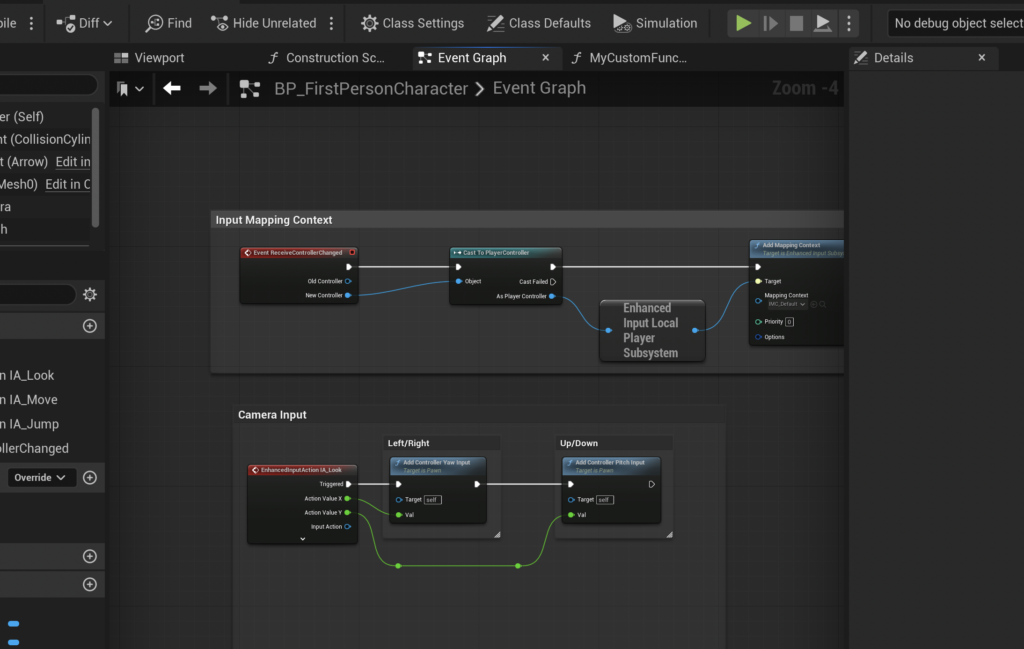
Once a function is defined, it must be ‘called’ or ‘run’ from somewhere within the Blueprint’s execution flow to become active. The primary location for orchestrating high-level game logic and responding to game events is the Event Graph. Events, distinct from functions, are triggers that respond to specific occurrences within the game (e.g., ‘Event Begin Play’ when an actor spawns, or ‘Event Tick’ for per-frame updates). Unlike functions, events cannot directly return values and can execute certain asynchronous nodes (like ‘Delay’ nodes) that are prohibited within standard functions due to their synchronous nature.
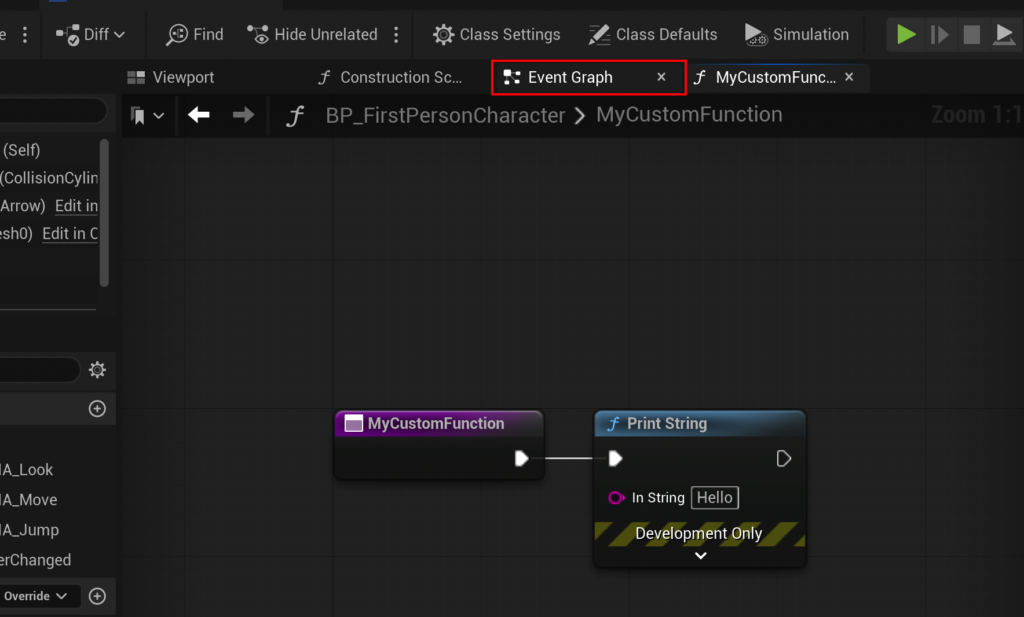
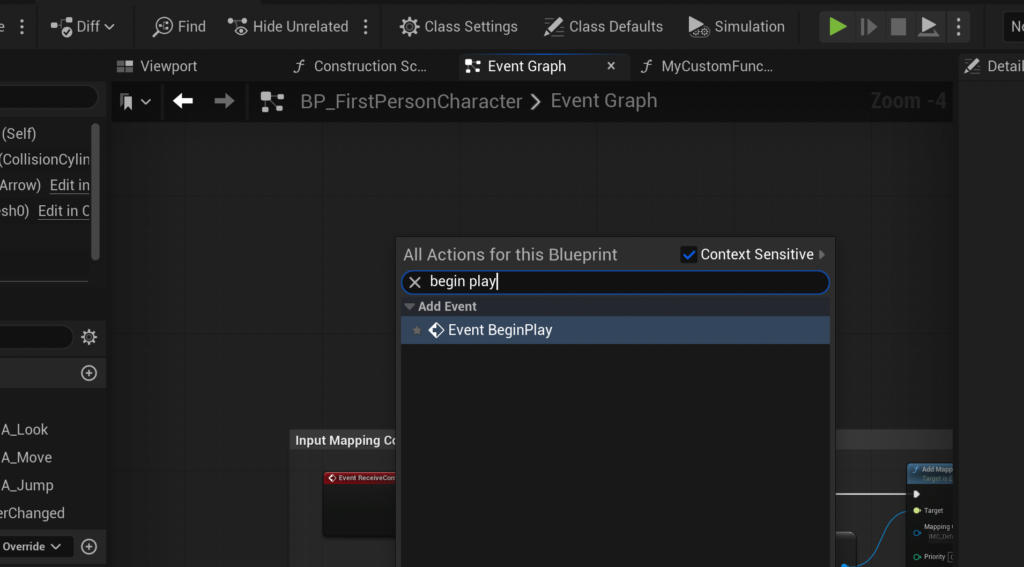
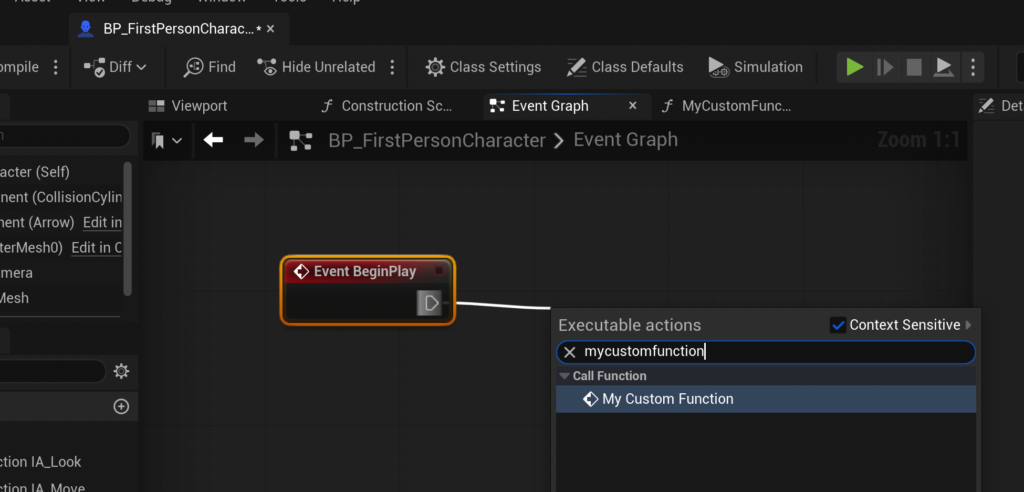
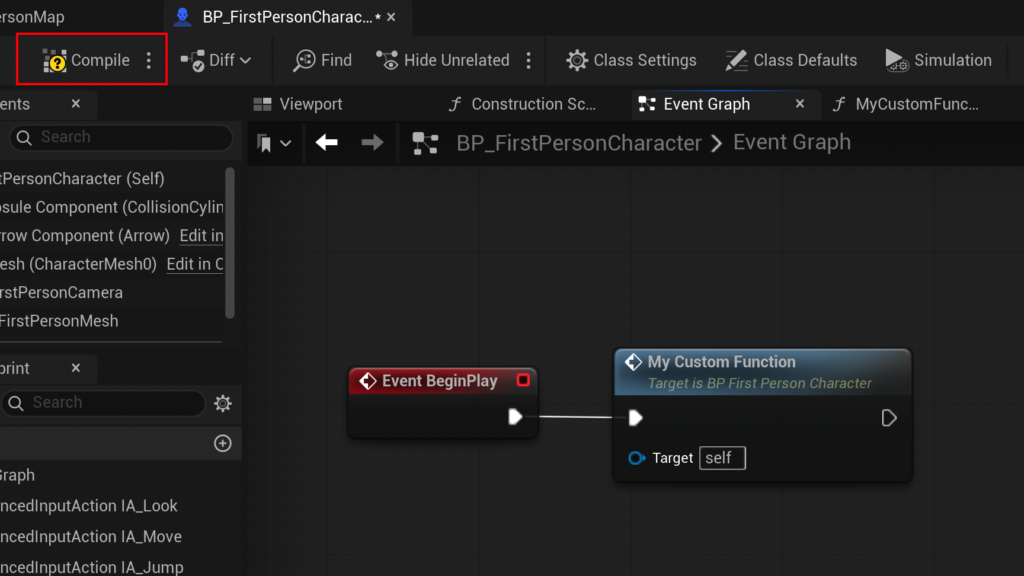
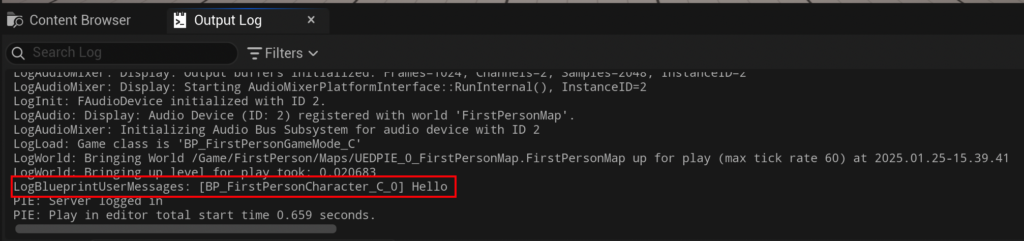
To test a newly created function, it is typically connected to an ‘Event Begin Play’ node. This event ensures that the function executes as soon as the associated actor enters the game world, providing an immediate feedback loop for testing. The process involves navigating back to the Event Graph, right-clicking in an empty space to summon the context menu, searching for ‘Event Begin Play’, and creating it. Subsequently, the custom function (e.g., MyCustomFunction) is dragged from the ‘Functions’ panel into the Event Graph and connected to the ‘Event Begin Play’ execution pin. Compiling and saving the Blueprint finalizes these connections, allowing the function’s logic to execute when the game begins. For the simple ‘Print String’ example, this would result in "hello" appearing in the output log upon game startup, confirming the function’s successful invocation and integration.
Advanced Functionality: Input, Output, and Practical Application
Beyond basic execution, Blueprint Functions truly shine through their ability to handle input and output parameters. This enables them to perform calculations or manipulate data dynamically based on external values and then return a result, making them incredibly versatile and essential for sophisticated game mechanics.
Step 4: Implementing Input Parameters for Dynamic Data
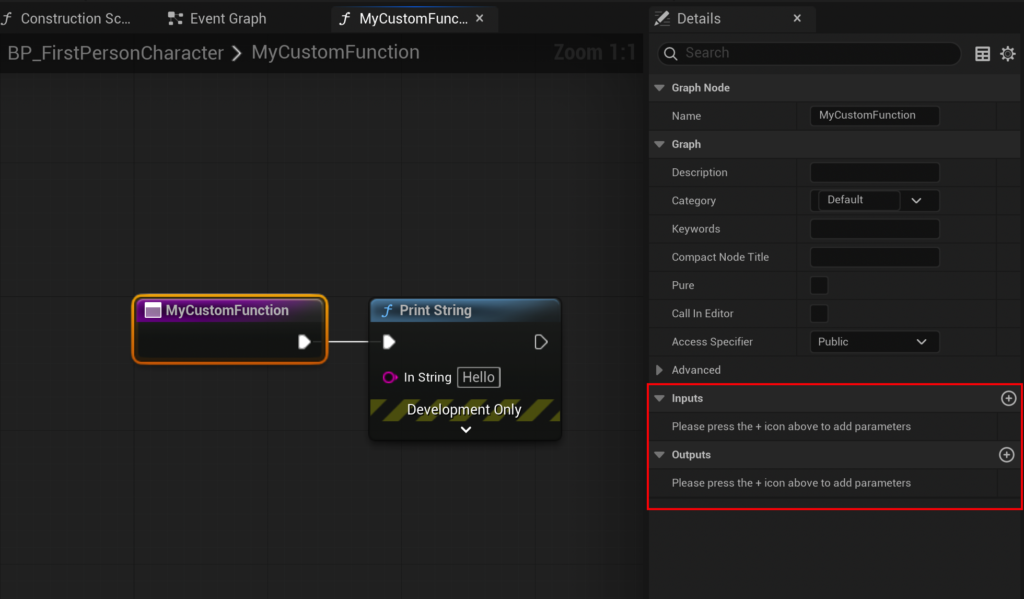
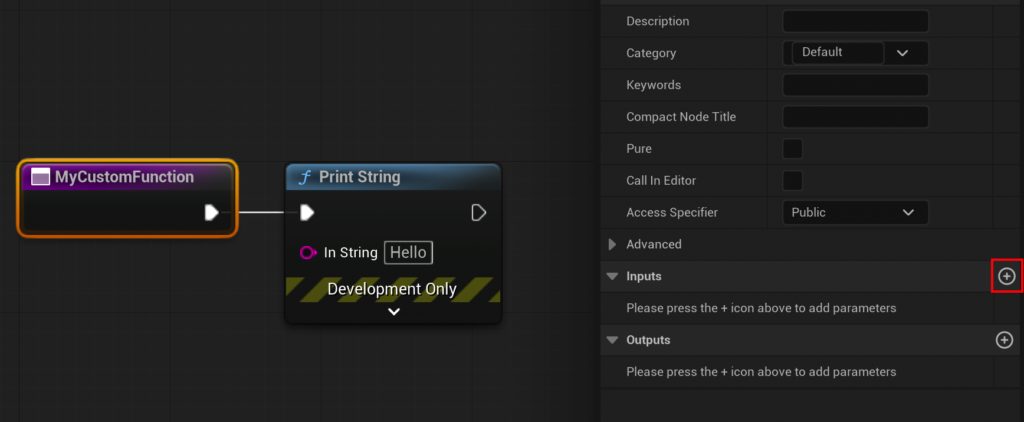
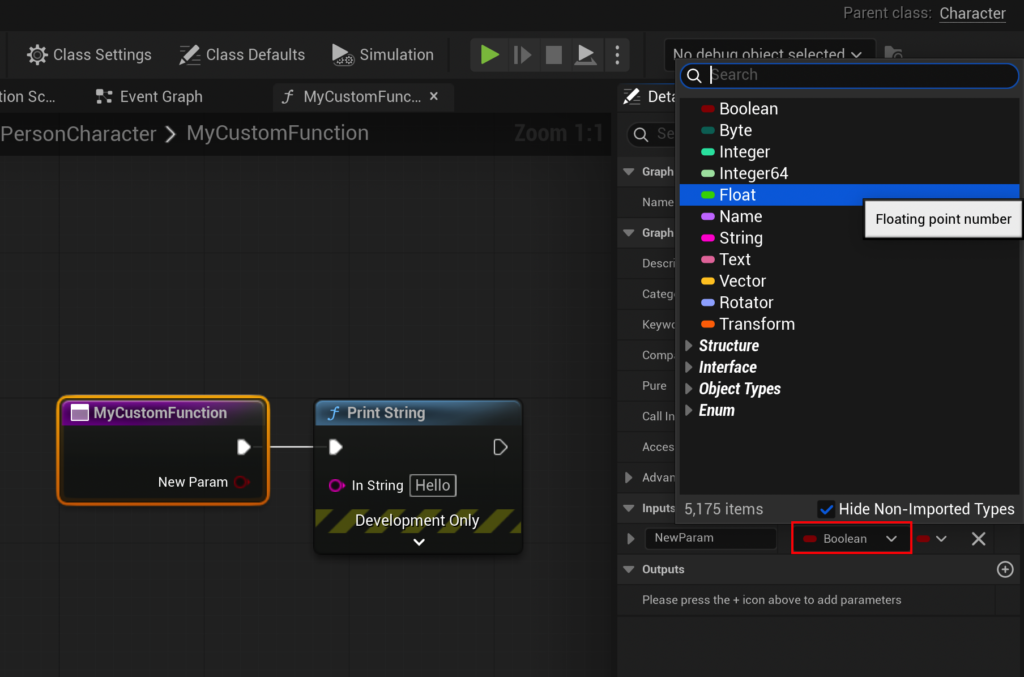
To create a more practical function, such as the CalculateDamage example, input parameters are essential for feeding dynamic data into the function’s logic. By selecting the function’s entry node within its graph, the ‘Details’ panel on the right-hand side of the editor reveals dedicated ‘Input’ and ‘Output’ sections. Adding a new input parameter involves clicking the ‘+’ button in the ‘Input’ section. For a damage calculation, a ‘Float’ type parameter, typically named ‘Damage’, would be created to represent the incoming damage value. This ‘Damage’ pin then appears on the function’s entry node, allowing external data to be fed into the function when it is called from the Event Graph or another function.
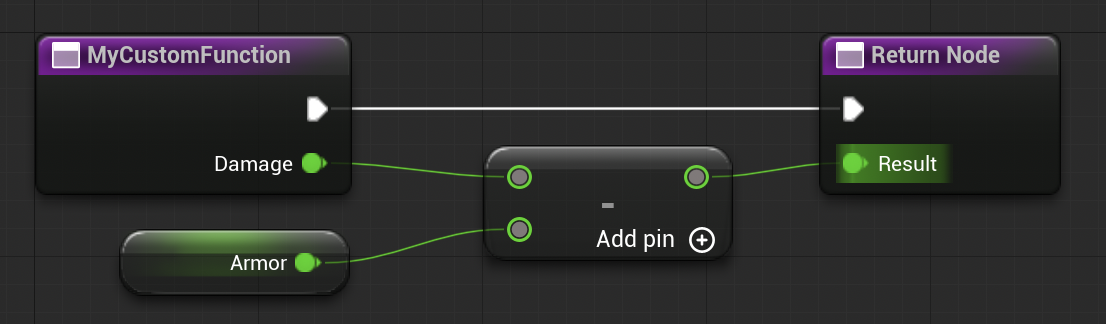
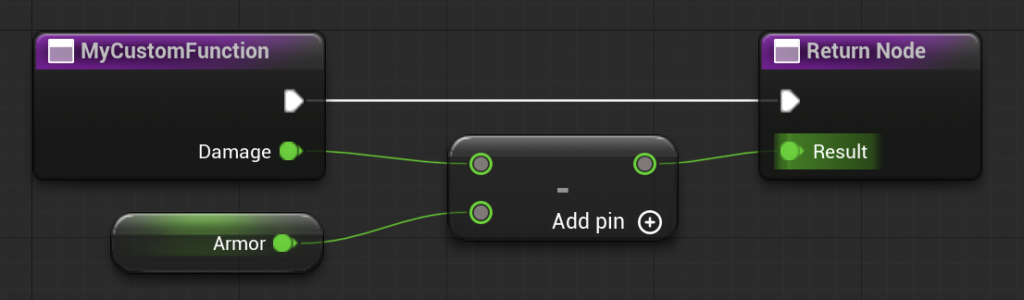
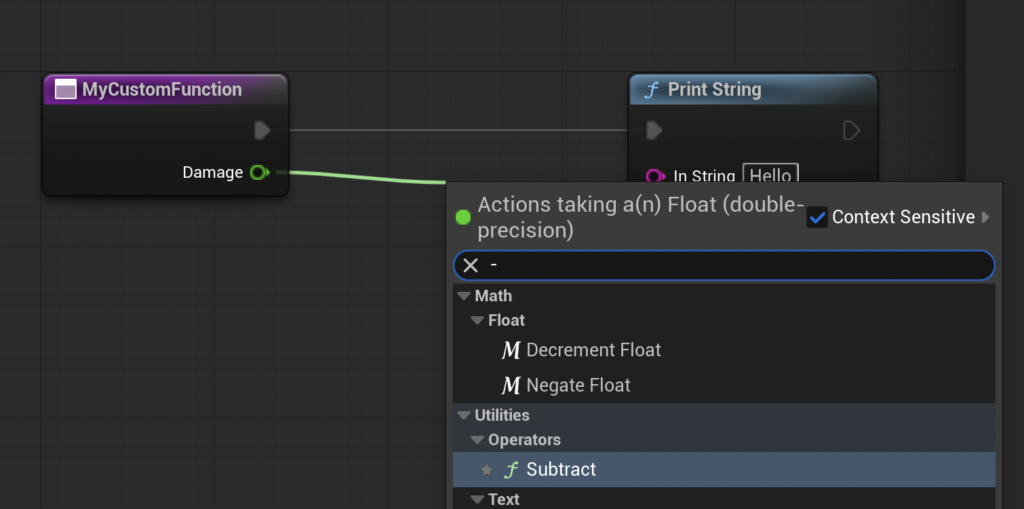
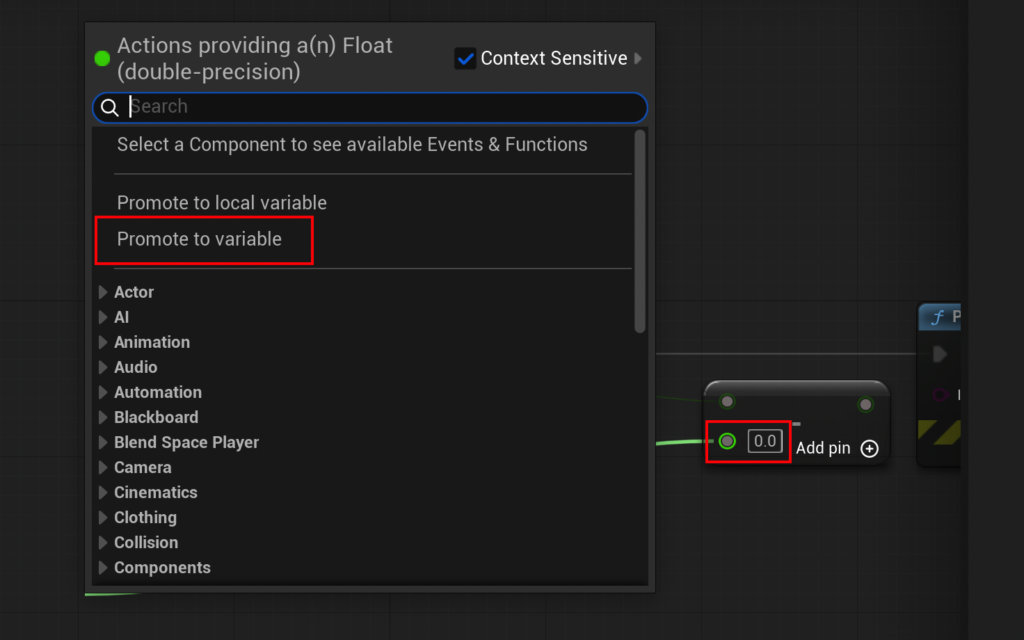
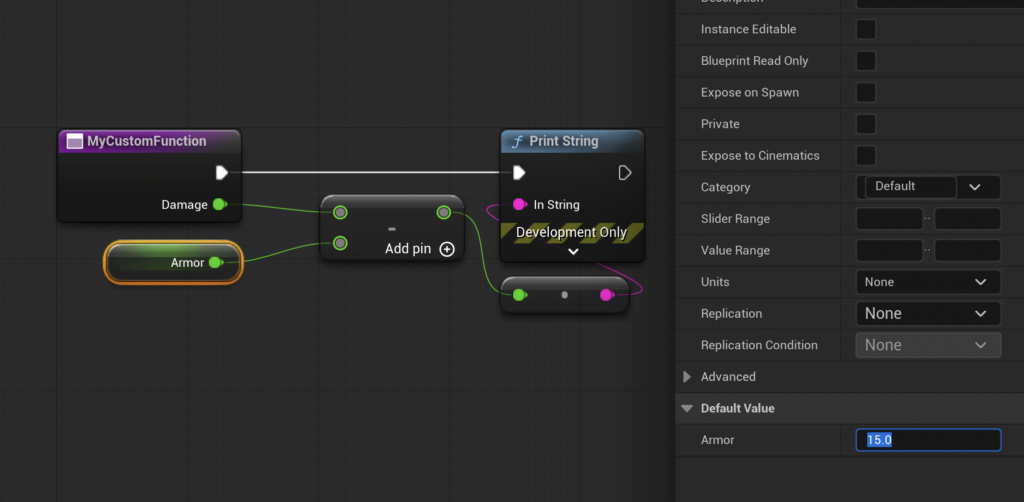
The logic within the CalculateDamage function would then utilize this ‘Damage’ input. For instance, a ‘Subtract’ node (Float – Float) could be introduced, connecting the ‘Damage’ input to its top pin. To simulate armor, a new ‘Float’ variable named ‘Armor’ could be created and connected to the bottom pin of the ‘Subtract’ node. This ‘Armor’ variable, set to a default value (e.g., 15.0), would represent the character’s damage reduction. The resulting graph would visually represent the calculation: Damage - Armor, establishing a clear, readable flow for the damage mitigation process.
Step 5: Returning Values for External Use
A function’s utility is significantly amplified when it can return processed values to the calling logic. This is achieved through output parameters. Similar to inputs, output parameters are added via the ‘Output’ section in the ‘Details’ panel of the function’s entry node. A ‘Float’ type output parameter, often named ‘Result’, is created for the CalculateDamage function to convey the final damage value.
Crucially, the creation of an output parameter automatically generates a ‘Return Node’ within the function’s graph. This node acts as the explicit exit point for the function’s calculated values. The output of the ‘Subtract’ node (the calculated damage after armor reduction) is then connected to the ‘Result’ pin of this ‘Return Node’. This completes the CalculateDamage function: it takes raw damage, subtracts armor, and then outputs the final, mitigated damage.
Back in the Event Graph, when the CalculateDamage function is called, it will now present an input pin for ‘Damage’ and an output pin for ‘Result’. A developer can then set an initial ‘Damage’ value (e.g., 20.0) and connect the ‘Result’ output to a ‘Print String’ node to observe the outcome. With 20 damage and 15 armor, the output log would display ‘5’, clearly demonstrating the function’s successful calculation and return of the processed value. This ability to pass data in and out makes functions powerful tools for creating modular and interconnected game systems.
Industry Impact and Developer Perspectives
The widespread adoption of Blueprint Functions, and visual scripting in general, in Unreal Engine has profound implications for the game development industry. Epic Games, in its developer conferences and documentation, consistently highlights the benefits of Blueprints for streamlining production pipelines and fostering innovation.
Enhancing Team Collaboration and Project Scalability

One of the most significant advantages is the enhancement of team collaboration. By encapsulating logic in functions, different developers can work on separate parts of a system without interfering with each other’s code. A lead programmer might define the CalculateDamage function in C++ or a master Blueprint, while level designers or gameplay programmers can then simply call that function from their own Blueprints without needing to understand its intricate internal workings. This modularity reduces merge conflicts, improves code review processes, and ensures consistency across a project. For large-scale titles, where hundreds of developers might be contributing, such organizational tools are critical for managing complexity and ensuring timely delivery. Industry reports often cite improved team efficiency by up to 25% when modular programming principles are rigorously applied.
The Role of Blueprints in Rapid Prototyping and Iteration
Blueprint Functions also play a pivotal role in rapid prototyping. Game designers can quickly block out and test new mechanics using visual scripting, iterating on ideas much faster than if they had to wait for C++ programmers to implement every change. This speed allows for more experimentation and refinement in the early stages of development, leading to more innovative and polished gameplay experiences. The ability to modify function parameters on the fly without recompiling large codebases further accelerates this iterative process, cutting down iteration times from hours to minutes for certain tasks.
Democratizing Game Development
Epic Games’ continued investment in Blueprints underscores a broader commitment to democratizing game development. By providing a powerful yet accessible visual scripting environment, Unreal Engine lowers the barrier to entry for aspiring developers, hobbyists, and non-programmers. This expanded talent pool contributes to a more diverse range of games and creative expressions, fostering a vibrant ecosystem. Educational institutions increasingly incorporate visual scripting into their game development curricula, preparing students for industry roles where proficiency in tools like Blueprints is highly valued. Statements from Epic Games often emphasize Blueprints as a bridge between technical and creative roles, allowing artists and designers to directly implement their visions.
Challenges and Considerations
While Blueprint Functions offer numerous benefits, it’s important to acknowledge certain limitations and best practices. A notable restriction, as previously mentioned, is the inability to directly incorporate ‘Delay’ nodes within a Blueprint Function. For logic that requires time-based pauses or asynchronous operations, developers are directed to utilize ‘Custom Events’ in conjunction with ‘Sequence’ or ‘Delay’ nodes within the Event Graph. This distinction highlights the specific design intent behind functions (synchronous, deterministic operations) versus events (reactive, potentially asynchronous triggers).
Furthermore, while Blueprints are highly optimized, extremely performance-critical calculations or very complex algorithmic logic might still be better suited for implementation in C++. This is due to the inherent overhead of visual scripting interpreters compared to compiled native code. Developers often adopt a hybrid approach, using C++ for core engine features and performance-sensitive systems, and Blueprints for higher-level gameplay logic, UI, and rapid iteration. This synergistic relationship leverages the strengths of both environments, resulting in robust and efficient games that meet both performance and production demands. The decision to use C++ or Blueprints often depends on factors like performance requirements, team composition, and the specific nature of the logic being implemented.
Conclusion
Blueprint Functions stand as a cornerstone of efficient and scalable game development within Unreal Engine 5. They embody the principle of modularity, empowering developers to create reusable, self-contained pieces of logic that significantly enhance project organization, reduce development time, and simplify maintenance. From defining basic actions like printing debug messages to implementing complex gameplay systems such as damage calculation with intricate input and output parameters, functions are an indispensable tool. Their ability to encapsulate logic and manage data flow is crucial for maintaining clarity and efficiency in projects of all scales.
As the game industry continues to evolve towards larger, more intricate virtual worlds, mastering Blueprint Functions will remain a fundamental skill, enabling developers to build their dream games with greater efficiency, collaboration, and creative freedom. Their continuous refinement within UE5 ensures that they will remain a vital component for both aspiring creators and seasoned professionals navigating the complexities of modern game production, driving innovation and accessibility across the development landscape.
About the Author