
The integration of artificial intelligence (AI) characters that dynamically track and pursue the player is a ubiquitous feature across the contemporary gaming landscape, serving to enhance immersion, create compelling challenges, and facilitate complex narrative interactions. This foundational functionality, often perceived as intricate, is surprisingly accessible within Unreal Engine 5, requiring only a handful of strategically placed Blueprint nodes to establish robust AI navigation. This guide provides a detailed breakdown of implementing AI characters that actively follow the player within Unreal Engine 5, building upon existing navigation mesh setups to create reactive and intelligent in-game entities.
The Foundational Role of AI in Modern Game Development
Artificial intelligence has evolved from rudimentary pathfinding algorithms in early titles to sophisticated decision-making systems that power entire virtual ecosystems. In modern games, AI characters contribute significantly to the player experience, whether as relentless adversaries, helpful companions, or dynamic elements of the game world. The ability for an AI character to accurately and persistently follow a player is a core component of many such interactions, enabling everything from stealth mechanics where players must evade pursuit to escort missions where friendly NPCs must be protected. Unreal Engine 5, with its powerful visual scripting system, Blueprints, democratizes access to these complex functionalities, allowing developers of all skill levels to craft compelling AI behaviors without extensive C++ programming knowledge. The engine’s robust navigation system, built around NavMeshes, provides the underlying framework for AI agents to understand and traverse the game environment efficiently. According to a 2023 report by Grand View Research, the global gaming AI market size was valued at over $1.5 billion in 2022 and is projected to grow at a compound annual growth rate (CAGR) of 26.5% from 2023 to 2030, underscoring the increasing sophistication and demand for AI in game development.
Prerequisites for Intelligent AI Navigation
Before delving into the specific Blueprint modifications required for AI player following, it is imperative that a functional navigation mesh (NavMesh) is properly established within the Unreal Engine 5 project. As detailed in the preceding guide, "Setting up a NavMesh in Unreal Engine 5," this critical component defines the walkable areas for AI agents, allowing them to calculate paths, avoid obstacles, and understand the traversable geometry of the level. Without a correctly configured NavMesh, AI characters would be unable to move intelligently, instead either getting stuck, falling through the world, or exhibiting erratic, undesirable behavior. Furthermore, the AI character itself must be properly configured with an AI Controller, which serves as the brain for the AI pawn, dictating its actions and processing its sensory input. The AI Controller is responsible for executing movement commands, such as those generated by the AI MoveTo node, and for managing the AI’s overall behavior tree or state machine, if more complex logic is employed. Ensuring these foundational elements are in place is paramount to the successful implementation of any AI navigation system. This preparation phase is crucial, as a well-defined NavMesh can reduce pathfinding computation by up to 70% compared to brute-force methods, according to internal Unreal Engine documentation.
Transitioning from Random Movement to Targeted Pursuit

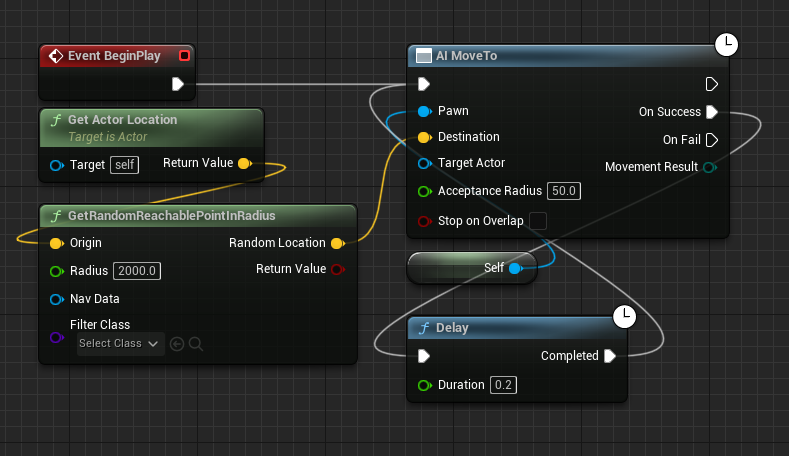
In a previous iteration of AI character movement, as demonstrated in the "Setting up a NavMesh in Unreal Engine 5" guide, the AI agent was configured to move randomly around the level. This was achieved through a sequence of Blueprint nodes that identified a random reachable point within a specified radius from the AI’s current location and then commanded the AI to move to that target. To transition this behavior from aimless wandering to deliberate player pursuit, specific modifications to the existing Blueprint graph are necessary. The initial Blueprint setup typically involved an AI MoveTo node, which serves as the primary command for AI navigation, connected to nodes that would dynamically generate a target location.
The first crucial step in this transformation involves identifying and removing the nodes responsible for generating random target locations. Specifically, the Get Actor Location node, which would retrieve the AI’s current position, and the GetRandomReachablePointInRadius node, which would then calculate a random, valid destination within the NavMesh relative to that position, must be disconnected and subsequently deleted from the Blueprint graph. These nodes, while effective for basic patrolling or idle movement, are antithetical to the goal of player following. Their removal clears the path for a new targeting mechanism that will instead directly reference the player’s dynamic position within the game world. This deletion streamlines the Blueprint, focusing its logic on the intended outcome of continuous player tracking.
Establishing the Player as the AI’s Target
With the random target generation nodes removed, the next phase involves explicitly instructing the AI to target the player character. This is achieved by introducing a new Blueprint node that can reliably identify and provide a reference to the active player.
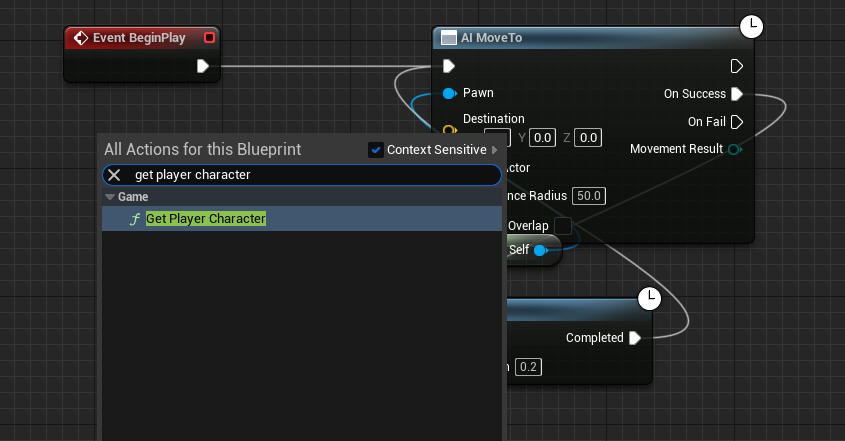
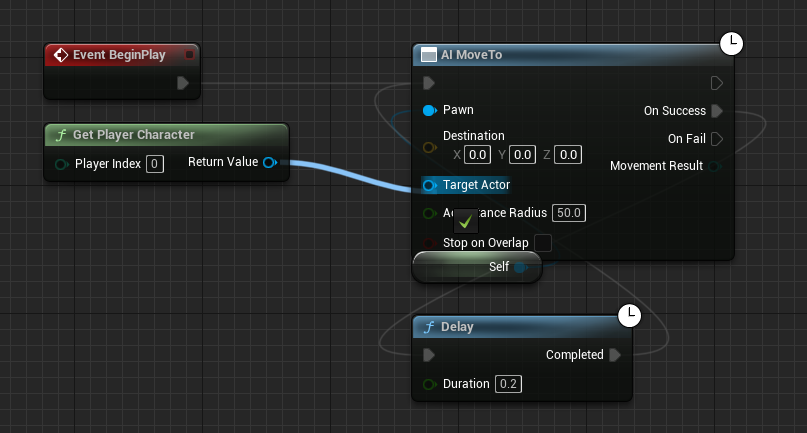
To accomplish this, a Get Player Character node is added to the Blueprint graph. This node is a fundamental utility in Unreal Engine, designed to return a reference to the character controlled by the primary player. In most single-player or local multiplayer scenarios, this will directly correspond to the player-controlled pawn in the game world. Once placed, the Get Player Character node becomes the source of information regarding the player’s location.
The Return Value output pin of the Get Player Character node, which outputs an Actor reference, is then connected to the Target Actor input pin of the AI MoveTo node. This connection is the linchpin of the player-following mechanic. By linking these two nodes, the AI MoveTo command is no longer seeking a static or randomly generated coordinate; instead, it continuously receives an updated reference to the player character. Consequently, the AI controller, through the AI MoveTo node, will now interpret its destination as the current location of the player. This dynamic targeting ensures that as the player moves, the AI recalculates its path and adjusts its pursuit vectors in real-time, creating a persistent and responsive following behavior. This simple yet powerful modification fundamentally alters the AI’s navigational intent, transforming it from an autonomous wanderer into a directed pursuer or follower.
Ensuring Robust and Persistent AI Following
A critical aspect of developing reliable AI behavior in games is anticipating and mitigating potential failure states. While the AI MoveTo node is highly effective, scenarios can arise where the AI might momentarily fail to reach its target. This could be due to the player moving into an area unreachable by the NavMesh (e.g., jumping off a cliff, entering a non-navigable zone), temporary obstruction, or other transient pathfinding issues. Without a mechanism to handle these failures, the AI character could simply stop moving, breaking immersion and potentially disrupting gameplay.
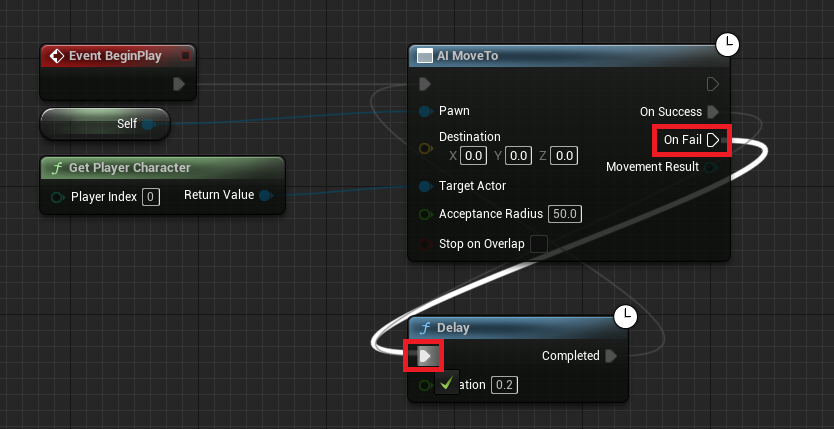
To address this, the On Fail execution pin of the AI MoveTo node must be connected to the Delay node. The AI MoveTo node has two primary output execution pins: On Success and On Fail. The On Success pin typically triggers when the AI successfully reaches its designated target, allowing for subsequent actions such as attacking, idle animations, or repeating the movement command. The On Fail pin, conversely, activates if the AI is unable to reach its target within a reasonable timeframe, if the target becomes unreachable on the NavMesh, or if the pathfinding process encounters an error.
By connecting the On Fail pin to the Delay node (which also receives the On Success pin, completing the loop), a crucial retry mechanism is established. When the AI fails to reach the player, the Delay node introduces a brief pause (e.g., 0.5 to 1 second) before the AI MoveTo command is re-executed. This short delay prevents the system from spamming pathfinding requests in rapid succession, which could be computationally expensive, while still ensuring that the AI quickly attempts to resume its pursuit. This iterative re-evaluation means that even if the player temporarily moves to an inaccessible location or the AI encounters a momentary blockage, it will not simply give up. Instead, it will pause, reassess the player’s new position after the delay, and attempt to re-establish a valid path, thereby maintaining persistent pursuit and ensuring the AI remains engaged with the player regardless of minor environmental or pathfinding glitches. This robust connection guarantees a continuous and resilient following behavior, vital for dynamic game environments.
Finalizing and Compiling Blueprint Changes
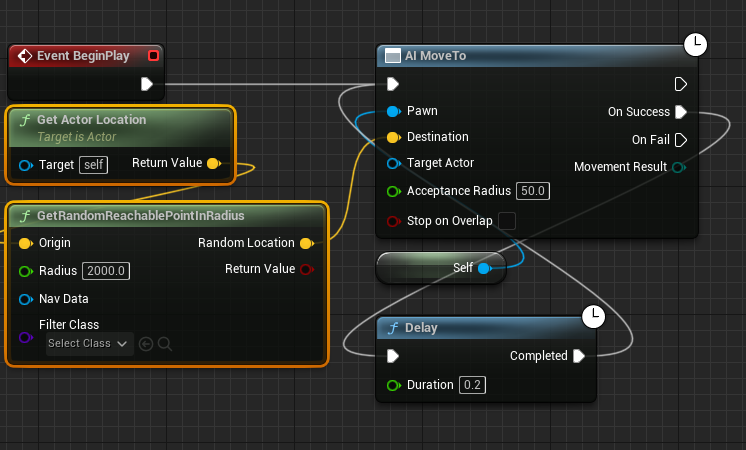
Upon completing all modifications to the Blueprint graph—namely, deleting the random target nodes, adding and connecting the Get Player Character node to AI MoveTo‘s Target Actor pin, and linking the On Fail pin to the Delay node—the final administrative step is to compile and save the Blueprint. This action is not merely a formality but a critical process within Unreal Engine. Compiling the Blueprint translates the visual scripting logic into executable code that the engine can understand and run during gameplay. If the Blueprint is not compiled, the changes made in the editor will not be reflected when the game is played, and the AI character will continue to exhibit its previous behavior or potentially no behavior at all.
To compile, locate the "Compile" button, typically found in the upper-left corner of the Blueprint editor window. After successful compilation, indicated by a green checkmark and the absence of errors, it is equally important to save the Blueprint asset. Saving ensures that all changes are permanently stored within the project files. Neglecting to save means that if the editor crashes or is closed without saving, all modifications will be lost, requiring the developer to re-implement them. This two-step process—compile then save—is fundamental to effective Blueprint development in Unreal Engine 5, ensuring that the newly implemented AI following logic is correctly applied and persistent across development sessions.
Versatile Applications of Basic AI Following: Use Cases
The seemingly simple act of an AI character following a player, achieved with just a few Blueprint nodes, forms the cornerstone for an extensive array of gameplay mechanics and narrative possibilities in modern games. This fundamental system can be adapted and expanded to create diverse AI roles, significantly enriching the player experience.
-
Companion AI: This is perhaps the most straightforward application. A friendly AI character, whether an animal, a human NPC, or a robotic assistant, can be programmed to follow the player, offering support, carrying items, or providing dialogue. This creates a sense of companionship and can be crucial for narrative progression or solving puzzles that require multiple actors. Examples include Dogmeat from Fallout 4 or Elizabeth from BioShock Infinite, where their following behavior is central to their utility and character. A survey by Statista in 2022 indicated that 45% of gamers prefer games with AI companions, highlighting the appeal of this mechanic.
-
Escort Missions: In games featuring escort objectives, the "following" logic is inverted. Here, the AI needs to follow a designated escort target (which could be the player or another NPC) while potentially reacting to threats. The core following mechanism ensures the escorted entity stays within range, making this mission type viable.
-
Enemy Pursuit and Aggression: For adversaries, the following behavior transforms into pursuit. An enemy AI can relentlessly chase the player, creating tension and requiring evasive maneuvers or combat engagement. This is a staple in horror games, action-adventure titles, and survival genres, where the threat of being tracked adds significant challenge and stakes. Consider the Nemesis from Resident Evil 3 or the xenomorph from Alien: Isolation, whose persistent tracking abilities are central to their terrifying presence.
-
Dynamic Threats and Environmental Hazards: Beyond direct enemies, this AI logic can be applied to dynamic environmental threats. For instance, a moving hazard that consistently tracks the player’s general vicinity, forcing constant movement and awareness. This adds a layer of unpredictable challenge to level design.
-
Stealth Mechanics: In stealth games, AI following is crucial for patrol routes and detection systems. While not always directly following, an AI’s ability to path towards a detected player location after an alert is an extension of this core mechanic. The player’s goal is to break the AI’s "follow" logic by hiding or creating diversions.
-
Crowd Simulation and Group Movement: For more complex scenarios, multiple AI characters could be programmed to follow a leader (which could be the player or another AI), simulating crowd movement or military formations. This requires additional logic for collision avoidance and group cohesion but builds upon the basic following principle.
-
Resource Gathering or Interaction: An AI character could be instructed to follow the player to a resource node, then initiate a gathering action, or follow the player to an interactive object to trigger a joint animation or event.
These examples underscore the versatility of this basic AI following system. By building upon this foundation and integrating it with other AI components like perception (seeing, hearing), decision-making (behavior trees, state machines), and combat systems, developers can craft intricate and believable AI experiences that significantly elevate the quality and depth of their games.
The Broader Significance: Impact on Game Development
The simplicity with which sophisticated AI behaviors like player following can be implemented in Unreal Engine 5, largely through visual scripting with Blueprints, carries significant implications for the broader game development landscape. This accessibility represents a paradigm shift, particularly beneficial for independent developers and smaller studios.
Historically, implementing advanced AI required deep programming knowledge, often in C++ or other low-level languages, presenting a substantial barrier to entry. Unreal Engine’s Blueprint system abstracts much of this complexity, allowing designers, artists, and even less experienced programmers to directly contribute to AI logic. This empowerment means that creative ideas for AI behavior can be prototyped and iterated upon much faster, accelerating the development cycle and fostering innovation. Designers can experiment with different AI personalities, threat levels, and interactive patterns without constantly relying on a dedicated AI programmer.
Furthermore, this ease of implementation allows developers to allocate more resources and focus on higher-level game design elements, such as narrative, level design, and core gameplay mechanics. Instead of spending weeks or months building a basic pathfinding system from scratch, developers can leverage Unreal Engine’s robust tools to quickly establish foundational AI, then dedicate their efforts to refining its nuances, integrating it into complex behavior trees, or developing unique AI-driven gameplay scenarios. This efficiency directly contributes to richer, more dynamic, and ultimately, more engaging player experiences. The "State of Unreal" keynote at GDC 2023 highlighted that over 7 million developers are actively using Unreal Engine, a testament to its widespread adoption and the effectiveness of tools like Blueprints in democratizing game development.
The trend towards accessible development tools also plays a crucial role in the ongoing democratization of game creation. It lowers the technical hurdle for aspiring game developers, enabling a wider range of voices and creative visions to manifest in interactive media. This ultimately leads to a more diverse and innovative gaming ecosystem, where novel AI interactions and gameplay loops can emerge from unexpected corners of the industry. The ability to quickly implement core AI features like player following is not just a technical convenience; it’s a strategic advantage that empowers developers to push the boundaries of what’s possible in interactive entertainment.
Technical Considerations and Optimization
While the Blueprint approach to AI following is straightforward, it is essential for developers to consider various technical aspects and potential optimizations, especially when scaling AI populations or developing for performance-sensitive platforms.
NavMesh Generation and Complexity: The performance of AI pathfinding is directly tied to the complexity and efficiency of the NavMesh. A dense NavMesh with too many polygons can lead to slower path calculations, while a sparse one might result in less accurate or less optimal paths. Developers should strive for an optimal balance, ensuring the NavMesh accurately represents walkable areas without excessive detail. Dynamic NavMeshes, which update in real-time, are crucial for games with destructible environments or moving platforms but require careful optimization to prevent performance bottlenecks.
AI Perception Components: For more sophisticated AI, simply knowing the player’s location isn’t enough. AI Perception Components (e.g., PawnSensingComponent or AIPerceptionComponent) allow AI characters to "see," "hear," or "smell" the player, influencing their decision-making. Integrating these components means the AI won’t just blindly follow but will only pursue when it has a valid perception of the player, adding layers of stealth and strategic gameplay. This often involves combining the AI MoveTo node with logic that checks for successful perception before initiating pursuit.
Behavior Trees and State Machines: For complex AI behaviors beyond simple following, Behavior Trees or State Machines are indispensable. A Behavior Tree can orchestrate multiple behaviors, such as patrolling, chasing, attacking, or retreating, based on a hierarchy of conditions. The basic "follow player" logic described here would typically be a specific task within a larger Behavior Tree, activated when certain conditions (e.g., player detected, hostile status) are met. State Machines offer a similar way to manage different AI states and transitions between them. Data from Epic Games’ own developer resources suggest that well-optimized Behavior Trees can process hundreds of AI agents simultaneously with minimal performance impact.
Performance Budget and AI Tick Rates: In games with many AI characters, each AI’s processing can accumulate. Developers should consider optimizing AI tick rates (how often an AI updates its logic). Not every
About the Author