In the dynamic world of game development, achieving optimal performance and bespoke functionality often requires a sophisticated approach that marries rapid prototyping with raw computing power. For developers working with Unreal Engine 5, a critical solution to this challenge lies in the strategic implementation of C++ Blueprint Function Libraries, enabling the seamless integration of high-performance C++ code directly into visual scripting workflows. This method addresses the inherent limitations of purely visual scripting, allowing projects to scale efficiently and access advanced engine features or external libraries that are otherwise unavailable through standard Blueprint nodes.
The evolution of game development tools has seen a significant shift towards accessibility and speed, with visual scripting languages like Unreal Engine’s Blueprints becoming indispensable for many development teams. Blueprints offer an intuitive, node-based interface that empowers designers, artists, and even non-programmers to create complex game logic, interactive systems, and entire gameplay mechanics without writing a single line of traditional code. This paradigm fosters rapid iteration, reduces development cycles, and facilitates cross-disciplinary collaboration, making it a cornerstone of modern game production.
However, as projects grow in complexity and scope, the limitations of visual scripting can become apparent. Performance bottlenecks often emerge in computationally intensive sections of code, such as intricate AI algorithms, complex physics simulations, large-scale data processing, or heavy loop operations. While Blueprints are highly optimized, they operate at a higher abstraction layer than compiled C++, leading to execution overhead in scenarios demanding absolute peak efficiency. Furthermore, direct access to certain low-level engine functionalities, platform-specific APIs, or external third-party libraries is frequently restricted within the Blueprint environment, necessitating a more robust programming solution.
Recognizing this dual need for both rapid development and uncompromising performance, Epic Games designed Unreal Engine with a robust interoperability layer between Blueprints and C++. The C++ Blueprint Function Library stands as a prime example of this philosophy, offering a dedicated class within the engine’s framework specifically designed to encapsulate C++ logic and expose it cleanly to the Blueprint system. This mechanism allows developers to identify performance-critical sections of their Blueprint code or features requiring C++’s direct control, rewrite them in C++, and then integrate these optimized functions back into their visual scripts, thereby gaining the best of both worlds: the speed and power of C++ combined with the flexibility and ease of use of Blueprints.
The process of establishing and utilizing a C++ Blueprint Function Library follows a structured, chronological path, beginning with foundational project setup and culminating in the deployment of high-performance functions within the Blueprint editor. Developers embarking on this journey must first ensure their Unreal Engine 5 project is configured for C++ development, a prerequisite that typically involves having a suitable Integrated Development Environment (IDE) such as Microsoft Visual Studio on Windows, Xcode on macOS, or JetBrains Rider across platforms. These IDEs are essential for compiling and managing C++ code, and the Unreal Engine editor will prompt users to install one if none is detected, streamlining the initial setup.
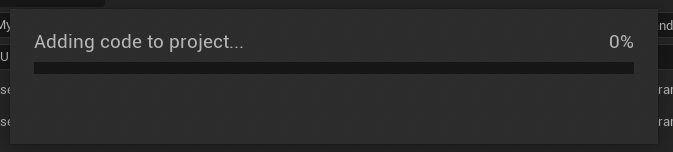
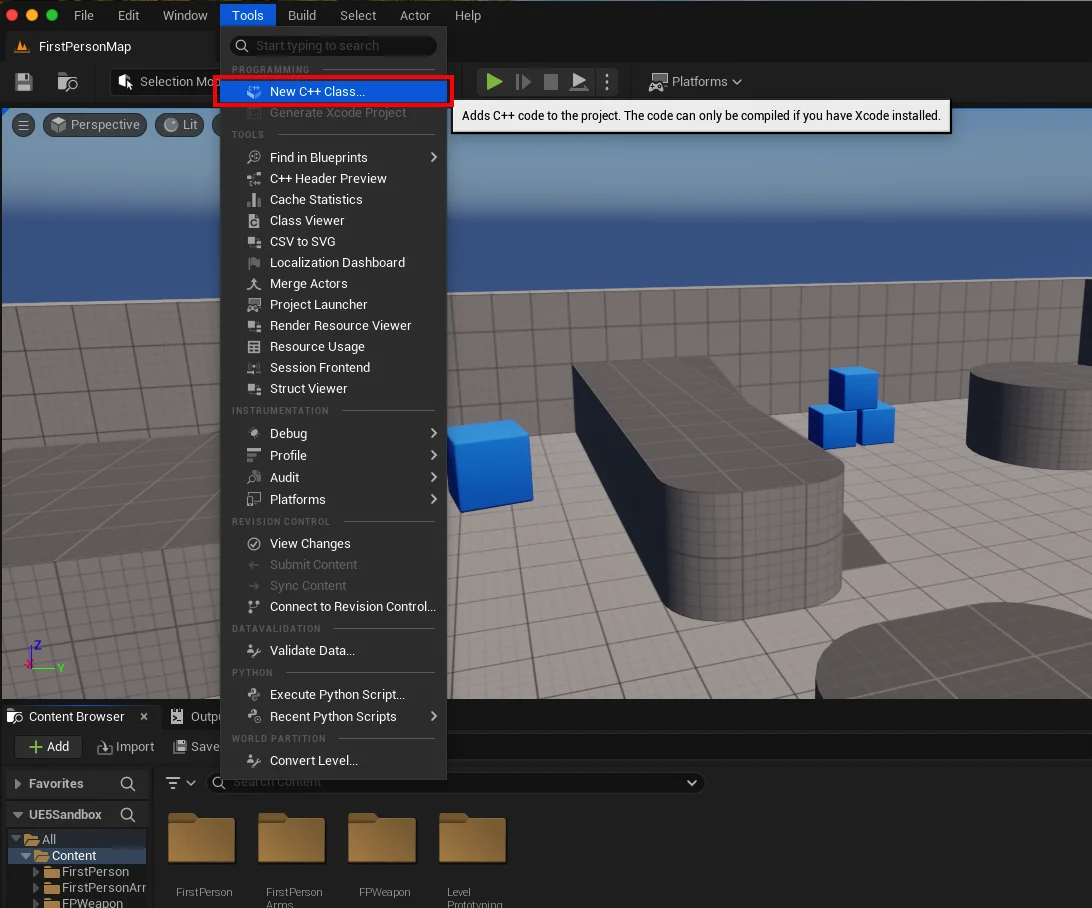
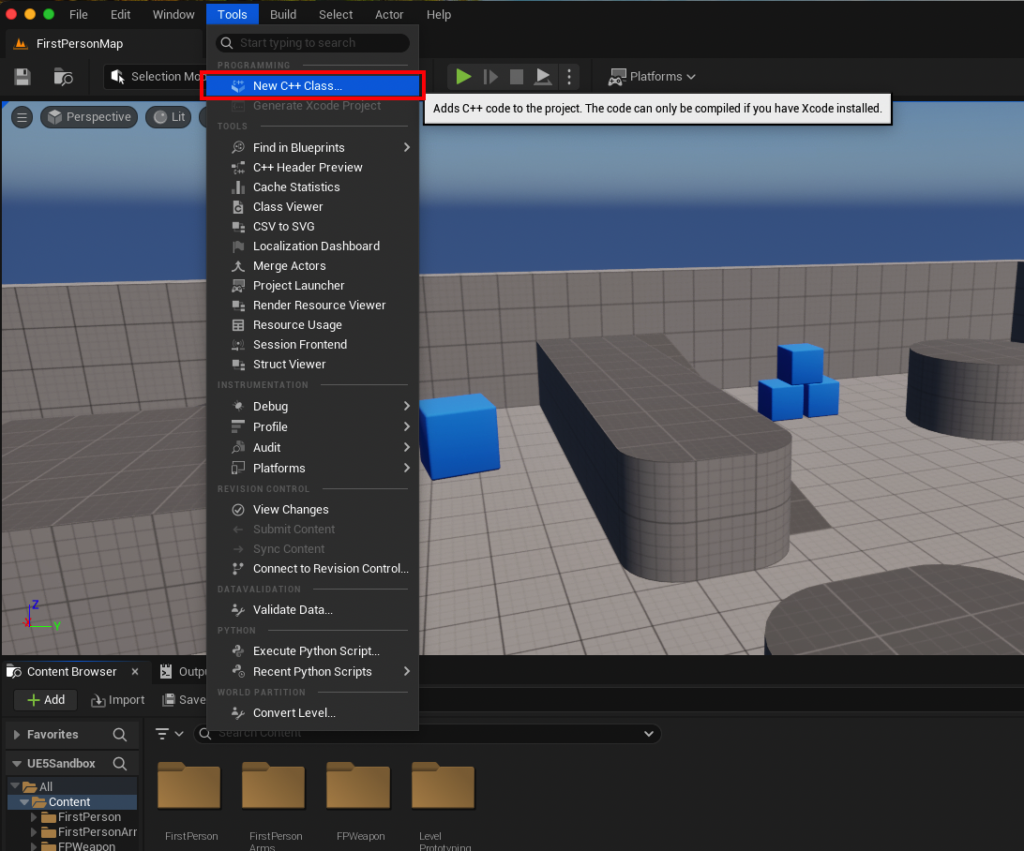
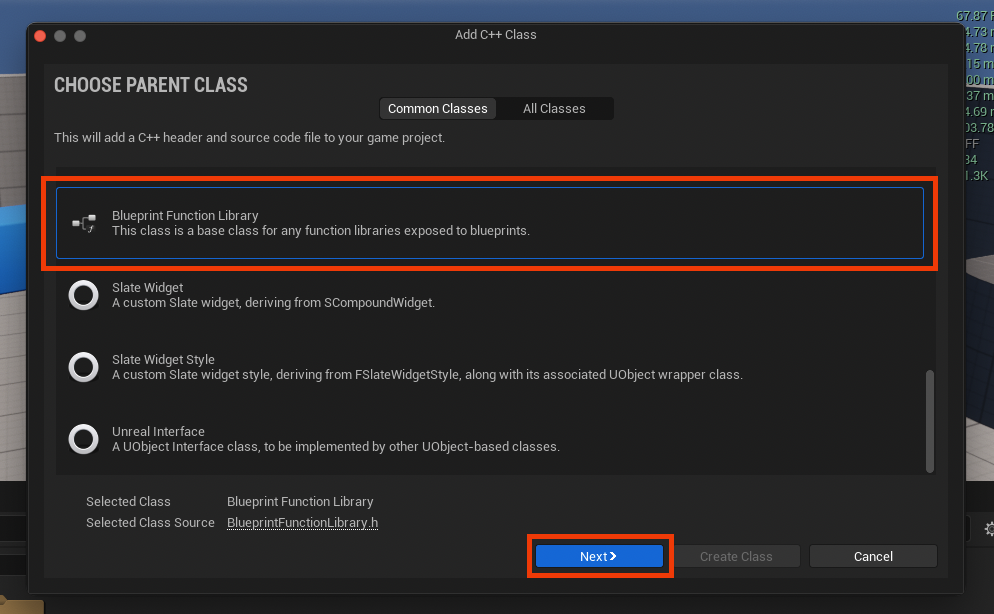
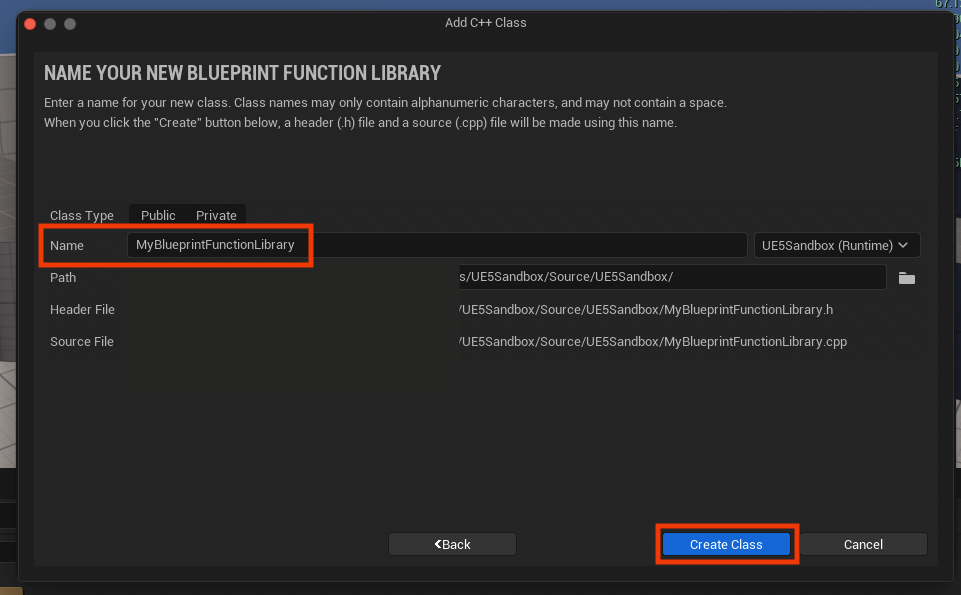
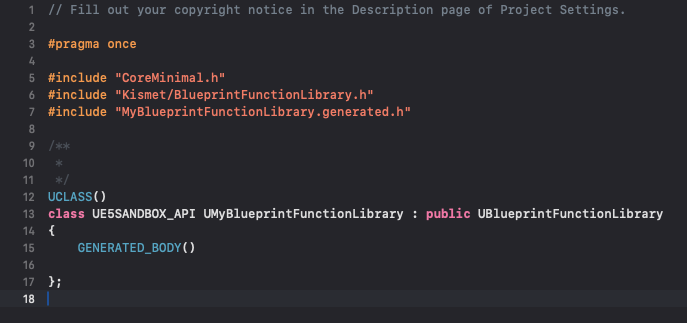
Once the environment is prepared, the creation of a C++ Blueprint Function Library class is initiated directly within the Unreal Engine editor. This involves navigating to the "Tools" dropdown menu and selecting "New C++ Class." The engine then presents a dialog box prompting the selection of a "Parent Class." For a Blueprint Function Library, developers scroll through the available options and choose "Blueprint Function Library," a specific Unreal Engine class (UBlueprintFunctionLibrary) designed for static utility functions accessible from anywhere. Upon selection, developers are prompted to name their new class, adhering to Unreal Engine’s naming conventions, which typically involve a clear, descriptive name using PascalCase (e.g., MyUtilityFunctionLibrary). This step generates the necessary C++ header (.h) and source (.cpp) files within the project’s source directory.

Following the creation of the class, the developer transitions to their chosen IDE to define the desired C++ functions. A crucial aspect of making these functions accessible to Blueprints without requiring an object instance is the static keyword. Declaring a function as static ensures it can be called directly on the class itself, much like a utility function, rather than needing a specific object of that class to be spawned in the world. This is fundamental for Blueprint Function Libraries, as they primarily serve as repositories for global utility functions.
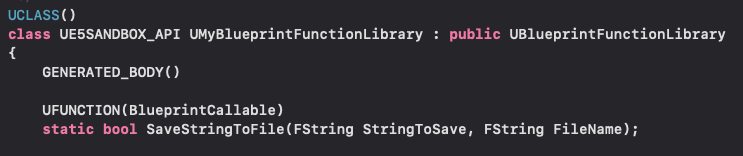
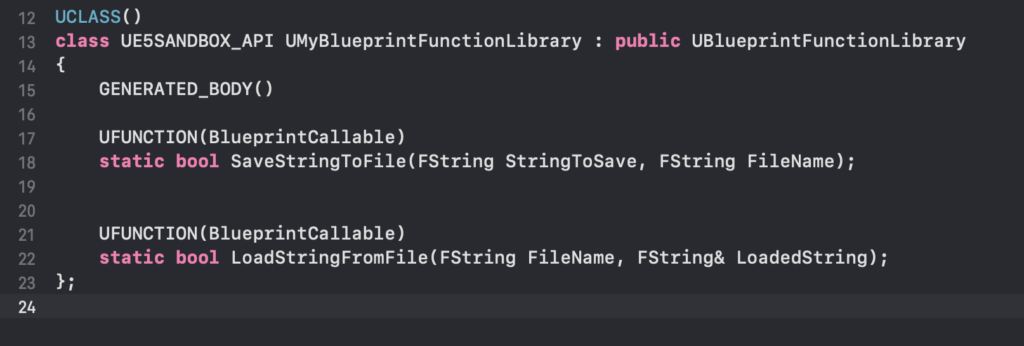
To ensure these static C++ functions are visible and callable from within the Blueprint editor, they must be adorned with the UFUNCTION macro. This macro acts as a bridge, instructing the Unreal Engine’s reflection system to expose the C++ function to the Blueprint environment. Developers can further customize the exposure using specifiers within the UFUNCTION macro, such as BlueprintCallable (to make it callable from Blueprints), Category (to organize it within the Blueprint editor’s context menu), and DisplayName (to provide a user-friendly name). For instance, a function designed to save a string to a file might be declared with UFUNCTION(BlueprintCallable, Category = "File I/O") in its header file.
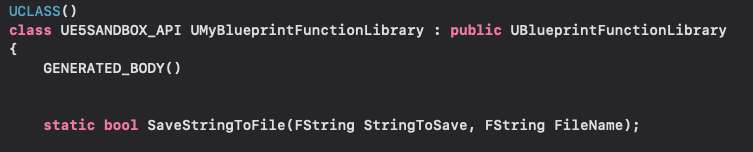
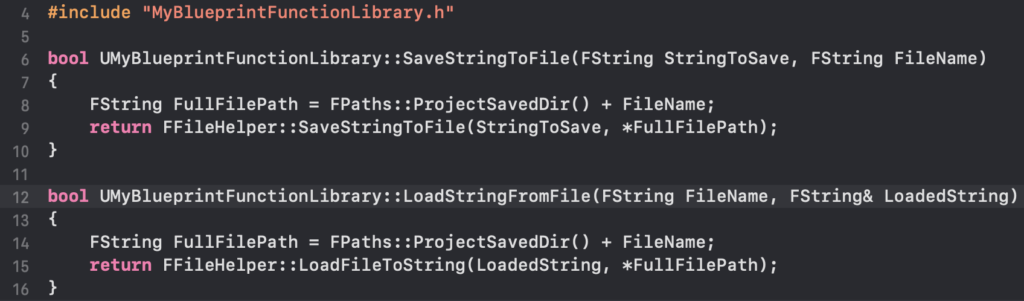
As a practical illustration, consider the implementation of a basic string read and write system. Within the C++ header file, declarations for functions like SaveStringToFile and LoadStringFromFile would be added, both marked as static and using the UFUNCTION macro. The SaveStringToFile function might take a string and a file path as input and return a boolean indicating success or failure. Conversely, LoadStringFromFile would take a file path and output the string content, also returning a boolean for success. The actual logic for these functions, such as utilizing Unreal Engine’s FFileHelper class for file system interactions, would then be implemented in the corresponding .cpp source file. This encapsulation of file I/O operations within a C++ Blueprint Function Library demonstrates how complex, potentially performance-sensitive tasks can be abstracted and made readily available to Blueprint users.
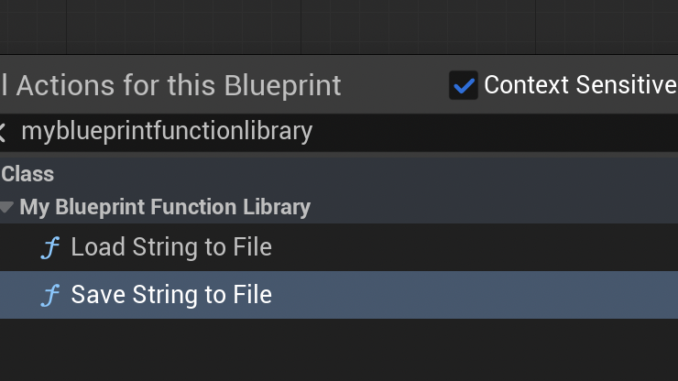
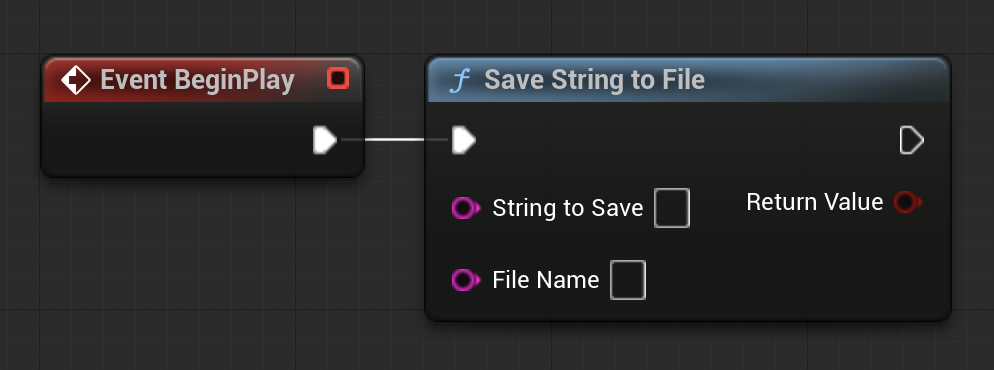
Once the C++ code for these functions is written, the project must be recompiled. This compilation process translates the human-readable C++ code into machine-executable instructions, integrating the new functionality into the Unreal Engine build. Upon successful compilation and reloading the Unreal Editor, the newly defined C++ functions become instantly accessible. Within any Blueprint editor, developers can right-click and search for the names of their C++ Blueprint Function Library functions (e.g., "Save String to File" or "Load String from File"). The system will display these functions as standard Blueprint nodes, complete with their defined input and output pins, appearing indistinguishable from native Blueprint nodes.
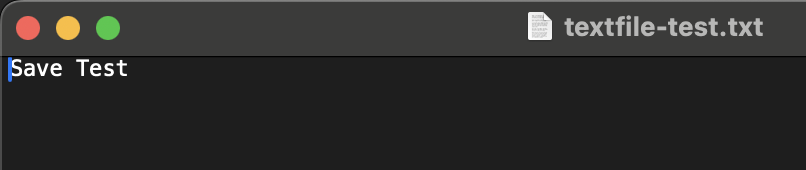
A concrete demonstration of this system’s efficacy highlights its immediate benefits. In a typical scenario, a developer might open a Level Blueprint and, on a "BeginPlay" event, connect the "Save String to File" C++ Blueprint Library function. By providing a string like "Save Test" and a file name such as "testfile-data.txt," and then running the project, the function executes, creating a new text file within the project’s /Saved folder containing the specified string. This verifies the C++ function’s ability to interact with the file system and perform its task efficiently.
Similarly, to test the loading functionality, a pre-existing file (e.g., "loadtest.txt") containing a string like "Loading Test" could be placed in the /Saved folder. The "Load String from File" C++ Blueprint Function Library function would then be integrated into the Level Blueprint, connected to a "Print String" node. Upon playing the project, the C++ function reads the content of "loadtest.txt," converts it into an Unreal Engine string, and passes it to the "Print String" node, which then displays "Loading Test" on the screen. This sequence unequivocally demonstrates the full, bidirectional functionality and seamless integration of C++ code into the Blueprint visual scripting environment.
The implications of mastering C++ Blueprint Function Libraries extend far beyond simple file I/O. For game development teams, this hybrid approach offers several significant advantages. It facilitates crucial performance optimization, allowing core game mechanics, intensive calculations, or frequently executed code paths to leverage C++’s speed, thereby improving overall framerates and responsiveness. It also enables feature expansion, granting access to advanced engine systems, operating system-level calls, or external SDKs that may not have direct Blueprint equivalents. Moreover, this method promotes superior code maintainability and modularity, as complex or performance-critical logic can be centralized in well-structured C++ classes, reducing Blueprint graph clutter and enhancing reusability across different parts of a project.
From a workflow perspective, C++ Blueprint Function Libraries foster better collaboration between programmers and designers. Programmers can develop robust, optimized C++ tools and expose them as user-friendly Blueprint nodes, empowering designers to build sophisticated gameplay without delving into complex C++ syntax. This separation of concerns allows each discipline to work within its preferred environment while contributing to a unified, high-performance product. For larger, more ambitious projects, this scalability is invaluable, enabling teams to manage increasing complexity and ensure the engine’s capabilities are fully exploited.

In conclusion, C++ Blueprint Function Libraries represent a cornerstone of modern, high-performance game development within Unreal Engine 5. They provide a vital bridge between the accessibility and rapid iteration of visual scripting and the power and efficiency of compiled C++. By strategically offloading performance-intensive tasks and extending core engine functionality through these libraries, developers can overcome the inherent limitations of purely visual scripting, unlock hidden capabilities within the engine, and significantly enhance the robustness, scalability, and performance of their projects. As the demand for increasingly complex and immersive gaming experiences grows, the proficiency in leveraging these hybrid development techniques will remain a critical skill for professional Unreal Engine developers.
About the Author