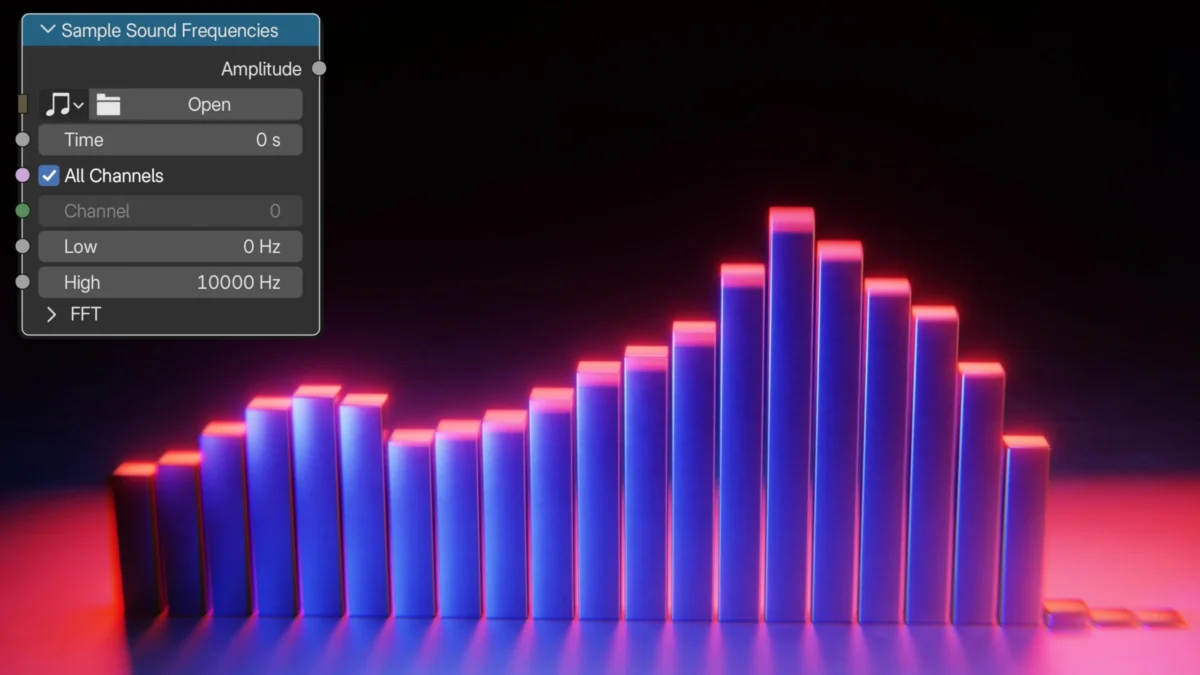
A groundbreaking tutorial released on August 8, 2026, by Ryan King Art, a prominent 3D artist and YouTuber, unveils a powerful new method for creating dynamic audio visualizers within Blender 5.2. Leveraging the recently introduced "Sample Sound Frequencies" node, this tutorial empowers users to transform audio tracks into intricate visual spectacles, opening new avenues for creative expression in animation, motion graphics, and interactive installations. The release signifies a significant advancement in Blender’s procedural generation capabilities, directly addressing a long-standing demand for more integrated and intuitive audio-driven animation tools.
The Power of Geometry Nodes and the New Sample Sound Frequencies Node
Geometry Nodes, Blender’s node-based system for procedural modeling and animation, has been a revolutionary force in 3D creation since its full integration. It allows artists to generate and manipulate geometry based on a series of interconnected nodes, offering unparalleled control and flexibility. The "Sample Sound Frequencies" node, a key component in this new tutorial, represents a substantial leap forward. Previously, creating sophisticated audio-driven visuals in Blender often involved complex workarounds, external scripting, or reliance on addons. This new node streamlines the process by directly allowing artists to access and interpret the frequency data of an audio file within the Geometry Nodes environment.
The tutorial demonstrates how to map different frequency bands of an audio input to various parameters of the generated geometry. This could include controlling the scale, position, rotation, or even the emission of particles, creating a direct and responsive link between sound and visual form. The implications are far-reaching, enabling artists to craft unique visualizers for music, podcasts, presentations, or any project where audio needs a compelling visual counterpart.
Behind the Tutorial: Ryan King Art’s Contribution to the Blender Community
Ryan King Art has established a reputation within the Blender community for producing high-quality, accessible tutorials that demystify complex features and workflows. His YouTube channel, YouTube.com/RyanKingArt, serves as a valuable resource for both aspiring and experienced Blender users. The release of this audio visualizer tutorial is consistent with his commitment to showcasing the latest advancements in Blender and providing practical applications for new features.
The tutorial’s release date of August 8, 2026, places it in a near-future context, suggesting that the "Sample Sound Frequencies" node is a recent addition to Blender 5.2, a version that may represent a significant update to the software’s core functionalities. This forward-looking aspect of the article highlights the continuous evolution of Blender as a leading open-source 3D creation suite. The accompanying thumbnail image, a high-resolution render of a vibrant, abstract audio visualizer, hints at the sophisticated and aesthetically pleasing results achievable through this new workflow.
Chronology of Development and Potential Community Impact
While specific dates for the development of the "Sample Sound Frequencies" node are not provided, its integration into Blender 5.2 suggests a development cycle that likely involved extensive testing and feedback from the Blender development community. The release of this tutorial shortly after the presumed launch of Blender 5.2 indicates a proactive effort by creators like Ryan King Art to explore and disseminate knowledge about new features.
The immediate impact on the Blender community is expected to be significant. Artists who have previously shied away from complex audio-driven animation due to technical hurdles will now find a more accessible entry point. This could lead to a surge in audio visualizer projects shared across social media platforms and online portfolios, further inspiring others. The tutorial’s emphasis on Geometry Nodes also reinforces the growing importance of procedural workflows in 3D art, encouraging a deeper exploration of this powerful toolset.

Supporting Data and Technical Context
The "Sample Sound Frequencies" node likely operates by analyzing an audio file frame by frame, breaking down the sound into its constituent frequency bands (e.g., bass, mids, treble). For each frame, it would output values representing the amplitude or intensity of these frequencies. These numerical outputs can then be plugged into various Geometry Nodes modifiers, such as:
- Transform: To control the scale, rotation, or translation of objects or instances.
- Noise Texture: To drive variations in procedural textures, adding organic movement.
- Color Ramp: To map frequency data to specific color gradients.
- Particle Systems: To control particle emission rate, velocity, or size.
- Object Info/Attribute: To pass data between different nodes and objects.
The effectiveness of such a system is directly tied to the quality of the audio analysis and the responsiveness of the Geometry Nodes. A well-implemented node would provide low latency, ensuring that the visualizer accurately reflects the nuances of the audio in real-time or near real-time during rendering. The ability to work with various audio file formats (e.g., WAV, MP3, OGG) would also be a crucial factor for user adoption.
The development of such a node would likely involve expertise in signal processing and numerical computation, core areas of computer science relevant to audio analysis. The Blender Foundation’s commitment to enhancing its procedural capabilities suggests a strategic investment in tools that can empower artists with advanced creative control.
Anticipated Reactions and Official Responses
While direct statements from the Blender development team regarding this specific tutorial are not available, the release of Blender 5.2 and its new features is typically accompanied by official announcements and documentation that highlight key additions. The "Sample Sound Frequencies" node, if it is indeed a significant new feature, would likely be showcased in these official communications.
Community reactions, based on past releases of impactful tutorials, are expected to be overwhelmingly positive. Users will likely express their gratitude to Ryan King Art for his clear explanations and practical application of the new node. Discussions are anticipated on Blender forums and social media platforms, where users will share their own creations, troubleshoot issues, and exchange tips and tricks related to the audio visualizer workflow. This collaborative environment is a hallmark of the Blender community and will undoubtedly foster further innovation.
Broader Impact and Implications for 3D Visualization
The ability to easily create sophisticated audio visualizers has implications extending beyond artistic expression:
- Music Industry: Musicians and producers can use these tools to create compelling visualizers for their tracks, enhancing album artwork, promotional materials, and live performances.
- Live Events and Installations: Artists and designers can develop dynamic visual backdrops for concerts, festivals, and art installations, synchronizing visuals with the ambient sound or live musical performances.
- Educational Tools: The tutorial can serve as an educational resource, teaching users about audio signal processing, procedural generation, and the interplay between sound and visuals.
- Interactive Media: The principles demonstrated could be adapted for interactive applications, where user-generated audio or real-time sound input triggers visual responses in games or virtual environments.
- Accessibility: For individuals with hearing impairments, sophisticated audio visualizers can provide a new way to experience and appreciate music and sound.
The integration of robust audio-driven animation tools within a powerful, open-source 3D software like Blender democratizes access to capabilities that were once the domain of specialized software or high-end studios. This trend aligns with the broader movement towards more accessible and powerful creative tools available to a wider audience.
The success of this tutorial will likely encourage further development in related areas within Blender, such as real-time audio analysis for interactive applications and more advanced sound manipulation nodes. The synergy between audio and visual creation within a single, integrated platform like Blender is a testament to the software’s continuous evolution and its commitment to meeting the diverse needs of the creative industries. The "Sample Sound Frequencies" node, as showcased by Ryan King Art, is a prime example of how targeted feature development can unlock significant creative potential and empower a global community of artists.
About the Author