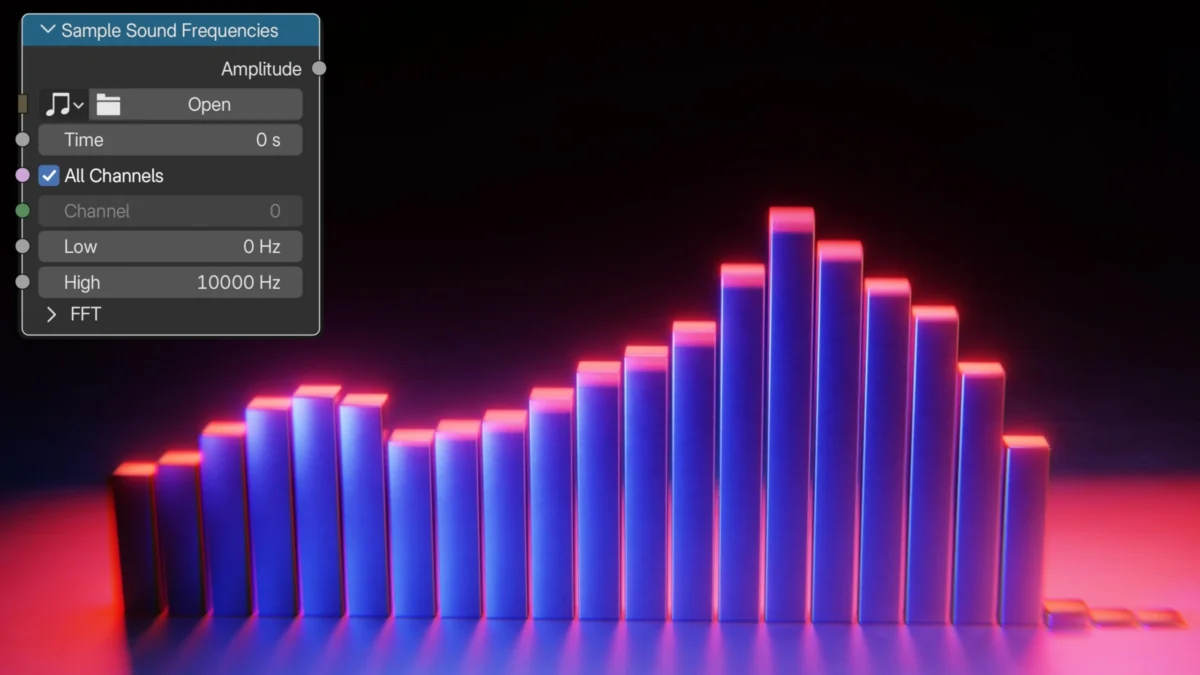
Blender, the open-source 3D creation suite, has once again pushed the boundaries of its capabilities with the introduction of advanced features in version 5.2, notably the powerful new "Sample Sound Frequencies" node within its Geometry Nodes system. This groundbreaking addition empowers users to create dynamic and responsive audio visualizers directly within the 3D environment, a feat previously requiring more complex workflows or external tools. Ryan King Art, a prominent 3D artist and YouTuber known for his insightful Blender tutorials, has released a comprehensive video guide demonstrating how to leverage this new node to craft an intricate audio visualizer. The tutorial, published on August 8, 2026, offers a detailed walkthrough, providing users with the knowledge to transform audio data into compelling visual art.
The Dawn of Interactive Audio Visualization in Blender
The release of Blender 5.2 marks a significant milestone for generative art and real-time visualization within the 3D ecosystem. The "Sample Sound Frequencies" node is the lynchpin of this new functionality. It allows artists to directly import and analyze audio files, breaking down the sound into its constituent frequencies. These frequency data points can then be mapped to various geometric properties, such as vertex displacement, scale, rotation, or even the emission of particles. This direct integration within Geometry Nodes eliminates the need for scripting or complex workarounds, making advanced audio-driven animation accessible to a wider range of Blender users, from hobbyists to seasoned professionals.
Ryan King Art’s tutorial serves as a timely and practical introduction to this powerful new tool. His channel, YouTube.com/RyanKingArt, has become a go-to resource for Blender enthusiasts seeking clear, step-by-step guidance on complex topics. The video, titled "Create an Audio Visualizer with Geometry Nodes in Blender 5.2," meticulously details the process, from setting up the initial geometry to fine-tuning the node network for desired visual outcomes. The tutorial showcases how to connect the audio analysis to the manipulation of geometric primitives, illustrating the creation of pulsating, morphing, and evolving shapes that react in real-time to the nuances of the imported audio.
Technical Underpinnings and Creative Possibilities
The "Sample Sound Frequencies" node operates by analyzing an audio file frame by frame, or at specified intervals, and extracting amplitude data across a range of predefined frequency bands. This data is then outputted in a format that Geometry Nodes can readily interpret. For instance, a low-frequency bassline might influence the overall scale of an object, while a sharp snare drum hit could trigger rapid bursts of displacement or particle emission. The versatility of Geometry Nodes means these outputs can be applied to virtually any aspect of a mesh.
This development has far-reaching implications for various creative fields:

- Music Production and Live Performance: Musicians and DJs can now create custom, in-sync visualizers for their tracks, enhancing live performances and music videos with a unique, generative aesthetic.
- Art Installations: Interactive art installations can be developed, where sound sources trigger dynamic visual responses in real-time, creating immersive and engaging experiences.
- Game Development: Game designers can integrate audio-reactive elements into their game environments, making the world feel more alive and responsive to in-game sounds or player actions.
- Motion Graphics and Animation: Animators can create sophisticated audio-driven motion graphics for explainer videos, title sequences, or abstract visual pieces.
The tutorial by Ryan King Art highlights several key techniques:
- Frequency Band Mapping: Demonstrating how to assign specific frequency ranges (e.g., bass, mids, treble) to different visual parameters.
- Amplitude Scaling: Utilizing the amplitude of each frequency band to control the intensity of visual effects, such as the height of bars in a spectrum analyzer or the intensity of light emission.
- Node Network Optimization: Providing insights into building efficient and modular Geometry Nodes setups that can be easily adapted and expanded.
- Material Integration: Showing how to link the audio-driven geometry to materials, allowing for dynamic color changes, texture distortions, or emissive properties that respond to the sound.
The Evolution of Blender’s Procedural Capabilities
Blender’s commitment to procedural generation through Geometry Nodes has been a driving force behind its increasing adoption in professional pipelines. The introduction of nodes that interact with external data sources like audio signifies a strategic expansion of its capabilities. Prior to Blender 5.2, achieving similar results would often involve complex Python scripting, external audio analysis tools to bake data into attributes, or reliance on addons. The integrated "Sample Sound Frequencies" node streamlines this process, making it more intuitive and efficient.
The timeline leading up to this feature’s integration can be traced back to the ongoing development of Geometry Nodes, which began its public development in Blender 2.92 and has seen iterative improvements with each subsequent release. The Blender Foundation’s roadmap has consistently emphasized enhancing procedural workflows, and the inclusion of audio analysis is a direct response to user demand for more dynamic and data-driven creative tools. The development team likely engaged in extensive testing and refinement to ensure the node’s performance and stability, especially considering the real-time processing demands of audio analysis.
Impact and Future Implications
The implications of this new node extend beyond mere visual aesthetics. It democratizes a powerful form of creative expression, allowing individuals without extensive programming backgrounds to explore generative art driven by sound. This could lead to an explosion of new artistic styles and applications that leverage audio-visual synchronization in innovative ways.
For Blender as a platform, this feature solidifies its position as a comprehensive creative suite capable of handling complex, data-driven projects. It enhances its appeal to professionals in fields that require dynamic visualization, such as broadcast design, architectural rendering with real-time feedback, and interactive media development.
The tutorial by Ryan King Art is more than just a demonstration; it’s an invitation to explore the vast creative potential that Blender 5.2 now offers. As users experiment with the "Sample Sound Frequencies" node, it is anticipated that a new wave of visually stunning and technically sophisticated audio visualizers will emerge from the Blender community. This development underscores Blender’s continuous evolution as a leading tool for digital artists and innovators worldwide. The ease with which complex audio-reactive animations can now be created suggests that visualizers will become an increasingly integrated part of digital content creation, from independent films to large-scale interactive installations. The accessibility provided by such tutorials ensures that this technology is not confined to a select few but is available for exploration by a global community of creators.
About the Author