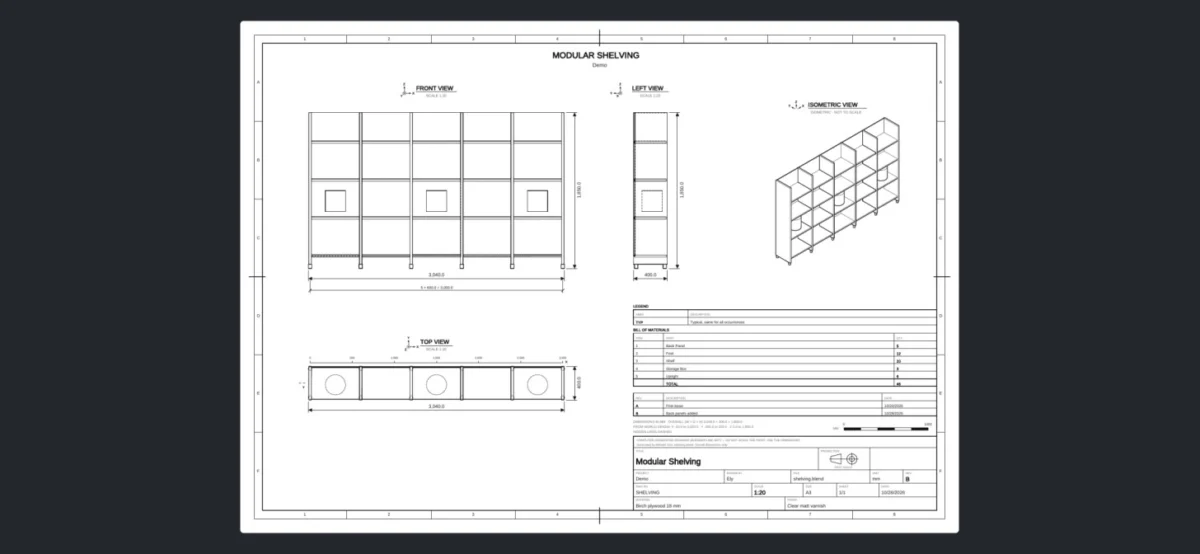
The landscape of 3D design and technical documentation has been significantly reshaped with the recent release of Ichno, a groundbreaking new add-on for the popular open-source 3D creation suite, Blender. Developed by Ely and now available for free on the official Blender Extensions platform, Ichno promises to streamline the process of generating professional technical drawings directly from a Blender scene, requiring only a single click. This innovative tool addresses a long-standing need for 3D artists and designers who require precise, printable plans for their creations, bridging the gap between intricate 3D modeling and practical manufacturing or assembly documentation.
Bridging the Gap: From 3D Models to Technical Blueprints
For many designers and makers who utilize Blender for their creative workflows, the process of translating a detailed 3D model into a set of clear, dimensioned technical drawings has historically been a laborious and time-consuming endeavor. Traditionally, this involved exporting models to specialized CAD (Computer-Aided Design) software, painstakingly setting up views, adding dimensions, and creating title blocks, or employing complex workarounds within Blender itself. Ichno directly tackles this inefficiency by automating the generation of orthographic and isometric views, complete with essential annotations, directly from the user’s existing Blender scene.
The add-on’s core functionality lies in its ability to produce a comprehensive technical drawing package. This includes not only the primary visual representations of the model but also crucial dimensional information. Users can opt for overall dimensions, which provide the total extent of the object, or chain dimensions, which define a series of interconnected measurements, offering a detailed breakdown of the design’s proportions.
Beyond the visual and dimensional aspects, Ichno incorporates essential elements of professional technical documentation. A fully customizable title block is generated, allowing users to integrate their company logo, revision history, and custom fields, ensuring that each drawing adheres to industry standards and branding requirements. Furthermore, a bill of materials (BOM) can be automatically generated, listing all components or parts within the scene, which is invaluable for assembly, procurement, and project management.
Enhanced Export Capabilities and User-Centric Design
The output formats supported by Ichno are designed for maximum utility and compatibility. Drawings can be exported as multi-page vector PDF files, a universally accepted format for professional documents that preserves scalability and print quality. Additionally, SVG (Scalable Vector Graphics) export is available, offering further flexibility for web integration or editing in vector graphics software.
Ichno’s design prioritizes user control and workflow efficiency. Users have the flexibility to split their drawings into multiple sheets, with an option to dedicate one sheet per collection within the Blender scene. This feature is particularly beneficial for complex projects with numerous distinct components or assemblies, allowing for a more organized and digestible presentation of technical information.
Projection methods are also configurable, supporting both first-angle and third-angle projection, which are standard conventions in technical drawing that dictate the placement of views relative to each other. This ensures that designers can produce drawings that comply with the specific standards of their target industries or regions. Furthermore, Ichno accommodates both metric and imperial units, catering to a global user base and diverse project requirements.
A particularly ingenious aspect of Ichno’s design is its non-destructive workflow. The add-on operates by launching a second, background instance of Blender. This background instance works on a copy of the user’s scene, ensuring that the original modeling environment remains untouched throughout the drawing generation process. This prevents any accidental modifications to the primary 3D model, offering peace of mind and safeguarding the integrity of the user’s work.
Target Audience and Practical Applications
Ichno is strategically developed with specific user groups in mind. Furniture and interior designers, who frequently require detailed plans for custom fabrication or client presentations, will find this add-on immensely useful. Woodworkers and craftspeople who rely on precise measurements for cutting and assembly will benefit from the accurate dimensioning capabilities. Product designers, from consumer goods to industrial machinery, can leverage Ichno to quickly produce documentation for manufacturing and prototyping. Moreover, makers involved in 3D printing will appreciate the ability to generate detailed build instructions and plans for their printed creations.
The implications of such a tool are far-reaching. By significantly reducing the time and effort required for technical drawing generation, Ichno empowers designers to focus more on the creative aspects of their work and less on the administrative burden of documentation. This can lead to faster design iterations, quicker prototyping cycles, and a more efficient overall product development process. For small businesses and independent makers, this translates into increased productivity and potentially lower overhead costs associated with specialized software or outsourcing documentation.
The Evolution of Blender as a Professional Tool
The development and release of add-ons like Ichno underscore Blender’s continuous evolution from a purely artistic tool to a robust and comprehensive solution for professional workflows across various industries. While Blender has long been recognized for its powerful modeling, animation, and rendering capabilities, its expansion into more technical domains, such as engineering and manufacturing, has been accelerated by the vibrant community and the availability of specialized extensions.
The open-source nature of Blender fosters an environment where developers can identify specific needs within the user base and create solutions that benefit the entire community. Ichno’s availability as a free add-on exemplifies this collaborative spirit, making advanced technical documentation capabilities accessible to a wide range of users, regardless of their budget.
Future Prospects and Community Impact
While specific details regarding the development timeline or future updates of Ichno have not been extensively detailed, the immediate impact of its release is undeniable. The add-on has already generated significant interest within the Blender community, with discussions focusing on its potential to integrate with other design and manufacturing pipelines.
It is plausible that future iterations of Ichno could include even more advanced features, such as integration with CAM (Computer-Aided Manufacturing) software, automated generation of exploded views for assembly instructions, or enhanced customization options for title blocks and BOMs. The success of Ichno also highlights the growing demand for tools that bridge the gap between 3D modeling and real-world applications, a trend that is likely to continue shaping the development of Blender and its ecosystem.
The ability to generate high-quality, professional technical drawings directly from a 3D model in a single click represents a significant leap forward for designers and makers using Blender. Ichno not only saves time and effort but also democratizes access to essential documentation tools, empowering a broader range of individuals and businesses to bring their 3D creations to life in tangible, functional forms. This development marks a pivotal moment in Blender’s journey toward becoming an indispensable tool for a diverse array of professional disciplines.
About the Author