
The ability for artificial intelligence (AI) characters or enemies to dynamically chase or follow a player is a ubiquitous and often expected feature in modern video games, contributing significantly to immersion, challenge, and narrative progression. While seemingly complex, integrating this functionality within Unreal Engine 5 (UE5) is remarkably streamlined, achievable with a minimal configuration of Blueprint visual scripting nodes. This guide delves into the technical specifics of empowering AI characters to track players within UE5 environments, highlighting the efficiency and power of its integrated development tools.
The evolution of artificial intelligence in video games has seen a dramatic shift from rudimentary, pre-scripted movements to highly dynamic and responsive behaviors. Early game AI often relied on simple state machines or fixed patrol paths, leading to predictable and sometimes immersion-breaking interactions. As hardware capabilities advanced and game design became more sophisticated, the demand for more believable and challenging AI grew. Modern game engines like Unreal Engine have played a pivotal role in democratizing access to advanced AI development, offering powerful visual scripting tools that abstract away much of the underlying complexity. This approach allows developers, regardless of their proficiency in traditional coding languages like C++, to construct intricate AI behaviors with relative ease. The foundational element for any AI character requiring movement within a game world is a robust navigation system, typically facilitated by a NavMesh.
The Crucial Role of Navigation Meshes
Before any AI character can intelligently navigate an environment, a comprehensive understanding of the playable space is paramount. This is where the Navigation Mesh, or NavMesh, becomes indispensable. Introduced formally in the preceding guide, "Setting up a NavMesh in Unreal Engine 5," a NavMesh essentially defines the walkable areas within a game level. It is an abstract 2D representation of the 3D environment, allowing AI pathfinding algorithms to efficiently calculate routes, avoid obstacles, and understand traversable terrain. Without a properly configured NavMesh, AI characters would lack the spatial awareness necessary to move logically, leading to erratic behavior, getting stuck, or failing to reach their intended destinations. The NavMesh acts as the AI’s "map," providing the essential data for pathfinding queries, a critical component for any form of AI movement, including player following.
Transitioning from Patrol to Pursuit: Blueprint Refinements
The core of implementing AI player-following in Unreal Engine 5 lies in modifying existing movement logic to target the player character’s dynamic location. Building upon a previously established AI movement system, which might have directed AI characters to random points or along predefined patrols, the transition to player pursuit involves a precise adjustment of Blueprint nodes.
Initially, an AI character might be configured to move autonomously around the level using nodes such as Get Actor Location (to determine the AI’s current position) and GetRandomReachablePointInRadius (to find a new, random destination within a specified range). This setup is ideal for creating ambient AI or patrol patterns. However, for a pursuit mechanic, the AI’s target must shift from a random point to the player’s real-time position.
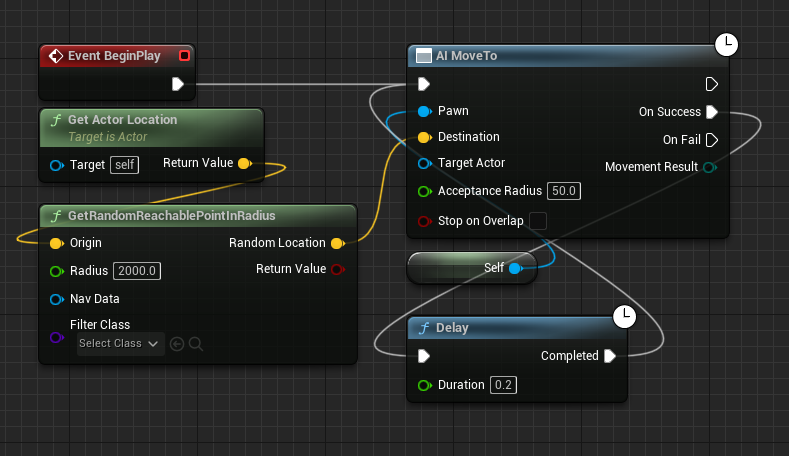
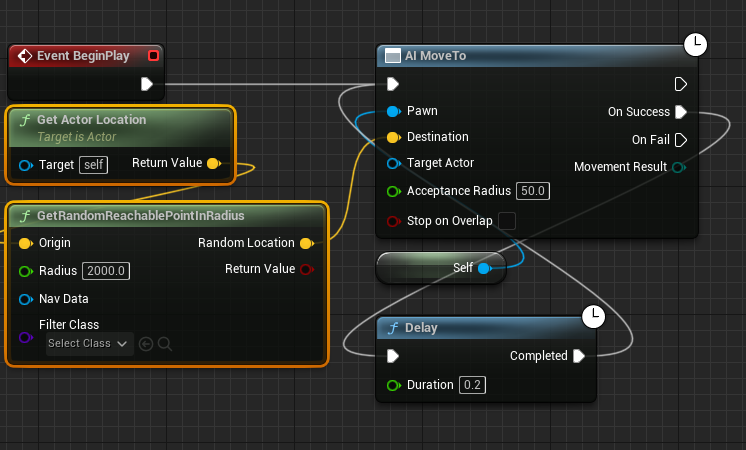
The first step in this modification involves removing the Get Actor Location and GetRandomReachablePointInRadius nodes from the existing Blueprint graph. These nodes, while effective for randomized movement, are no longer relevant when the AI’s objective is to track a specific, moving target. Their removal clears the path for directing the AI’s movement logic towards the player. This deletion simplifies the graph, ensuring that the AI’s movement instructions are singularly focused on the new objective.
Identifying the Target: The Get Player Character Node
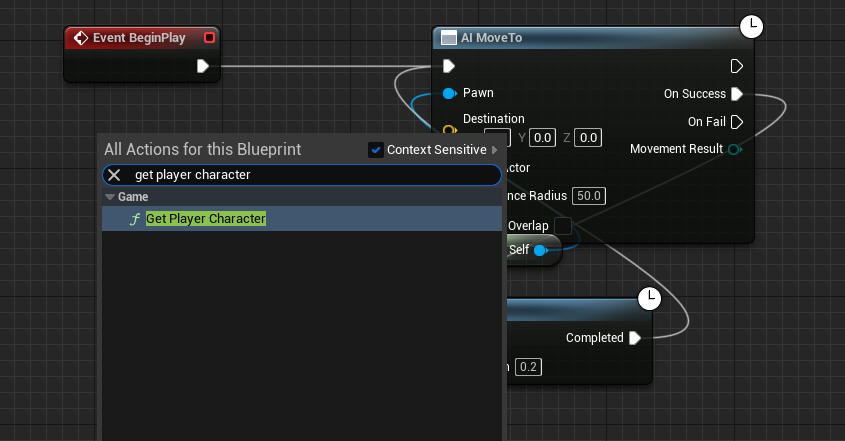
With the previous random movement logic disengaged, the next critical step is to accurately identify and acquire a reference to the player character within the game world. This is achieved by introducing the Get Player Character node into the Blueprint graph. This node is a fundamental utility in Unreal Engine, designed to return a reference to the active player character’s Pawn or Character class. Its simplicity belies its power, as it provides the essential link to the AI’s new target.
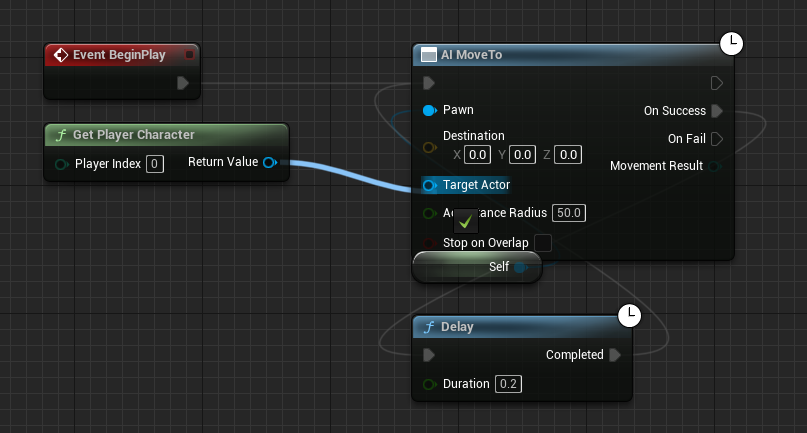
Once the Get Player Character node is added, its blue Return Value pin, which outputs a reference to the player character, must be connected to the blue Target Actor pin on the AI MoveTo node. The AI MoveTo node is a high-level Blueprint function specifically designed for AI navigation, encapsulating complex pathfinding and movement logic. By linking the Get Player Character‘s output to the AI MoveTo‘s Target Actor input, the system is explicitly instructed to use the player’s current location as the AI’s destination. This connection forms the very essence of the AI following mechanic, dynamically updating the AI’s target as the player moves throughout the level. The AI MoveTo node then leverages the underlying NavMesh to calculate an optimal path to the player, taking into account obstacles and traversable areas.
Ensuring Robustness: Handling Movement Failures
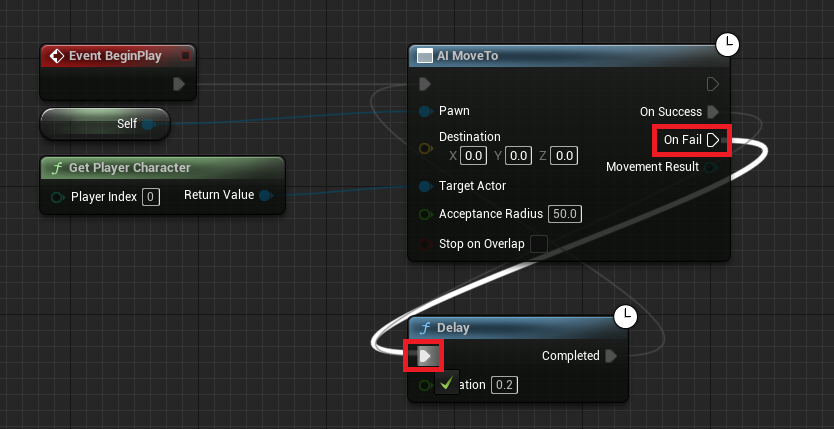
Game environments are dynamic, and AI movement is not always guaranteed to succeed on the first attempt. Players might move into areas temporarily unreachable, or unforeseen navigation mesh issues could arise. To ensure that the AI character maintains its pursuit relentlessly and without interruption, it is crucial to implement a robust error-handling mechanism. The AI MoveTo node includes an On Fail execution pin, which triggers if the AI is unable to complete its movement task for any reason (e.g., no valid path to the target, target becoming unreachable).
To create a persistent following behavior, the On Fail pin of the AI MoveTo node should be connected back to a Delay node, which subsequently loops back to re-execute the AI MoveTo command. This creates a self-correcting loop: if the AI fails to reach the player, it waits for a brief delay (e.g., 0.5 to 1 second) before attempting the movement again. This retry mechanism is vital for maintaining continuous pursuit, preventing the AI from simply stopping if a temporary obstacle or unreachable area is encountered. It also optimizes performance by preventing the AI from constantly attempting to pathfind to an impossible location, thereby reducing CPU overhead. The Delay node provides a small buffer, allowing the game state to potentially resolve temporary issues or for the player to move to a reachable position, ensuring the AI remains responsive and persistent in its objective.
Finally, after all Blueprint modifications are complete, it is imperative to Compile and Save the Blueprint editor. This action applies all the changes made to the logic, ensuring that the new AI following behavior is correctly integrated and will execute as intended when the game is played in the editor or packaged for deployment. Failure to compile and save would mean the changes exist only within the editor session and would not be reflected in gameplay.
Diverse Applications and Strategic Implications
The seemingly simple act of an AI character following a player, achieved with just a few Blueprint nodes, forms the foundational layer for a vast array of sophisticated AI behaviors in modern games. Its implications extend far beyond basic enemy pursuit, touching upon critical aspects of gameplay, narrative, and player experience.
-
Antagonistic AI: The most direct application is for enemies. This basic system can be enhanced to create relentless pursuers in horror games, strategic flanking enemies in shooters, or even boss characters with complex chase phases. By adjusting parameters such as movement speed, acceptance radius (how close the AI gets to the player), and adding line-of-sight checks, developers can craft diverse enemy archetypes. For instance, a stealth game might feature AI that follows sound cues, while a survival game might have enemies that track player scent trails, all building upon this core following mechanic.
-
Companion AI: On the opposite end of the spectrum, this system is fundamental for player companions. Whether it’s an NPC providing combat support, a pet following its owner, or a quest-giver guiding the player through a level, the ability to follow is crucial. Developers can further refine companion AI by adding behaviors like maintaining a certain distance, automatically engaging nearby enemies, or interacting with environmental elements, all while adhering to the primary directive of following the player. This enriches narrative depth and fosters a sense of camaraderie or utility with in-game characters.
-
Escort Missions and Dynamic Events: The mechanic is central to escort missions, where an NPC must be safely guided to a destination. The AI, instead of pursuing the player, might be configured to follow a designated escort target, which could itself be the player character or another NPC. Similarly, dynamic world events, such as wildlife migrating or drones tracking specific points of interest, can leverage this following logic to create believable and interactive environments.
-
Environmental AI: Beyond characters, the principle can be applied to non-character entities. For instance, a camera drone could be programmed to follow the player, recording their actions for a cinematic sequence, or a mobile resource node might drift towards the player, providing a dynamic gathering experience.
-
Puzzle and Interaction Design: In certain puzzle scenarios, an AI might need to follow the player to activate a pressure plate, open a door, or trigger a sequence of events. This transforms the following mechanic from a simple movement script into a key element of gameplay interaction and puzzle solving.
The versatility of this system lies in its scalability. While the initial setup provides basic following, it serves as a robust base for integrating more advanced AI components. Developers can layer on complex perception systems (sight, hearing, smell), behavior trees (to manage decision-making logic), state machines (to define different behavioral states like patrol, chase, attack), and even machine learning algorithms for adaptive behaviors. This modularity allows for the creation of incredibly sophisticated AI that can respond intelligently and dynamically to player actions and environmental changes, significantly enhancing the player experience. Effective AI contributes directly to game immersion, challenge, and replayability, making games feel alive and reactive.
Industry Perspectives and Future Directions
Unreal Engine’s commitment to providing accessible and powerful development tools, epitomized by its Blueprint visual scripting system, has been widely lauded across the game development industry. Game developers, from independent studios to AAA powerhouses, consistently praise UE5 for accelerating the creation of complex gameplay systems, including advanced AI behaviors. Epic Games’ philosophy of democratizing game development is evident in how core functionalities, once requiring deep C++ expertise, are now manageable through intuitive visual interfaces. This approach not only speeds up prototyping and iteration cycles but also lowers the barrier to entry for aspiring game creators. Industry experts frequently highlight that accessible AI development is crucial for fostering innovation within the gaming sector, enabling developers to focus on creative gameplay instead of getting bogged down in intricate coding.
Looking ahead, the landscape of game AI is continuously evolving. While foundational mechanics like player following remain essential building blocks, the integration of machine learning and advanced data analysis is paving the way for AI that learns from player behavior, adapts dynamically, and generates emergent gameplay experiences. Technologies such as reinforcement learning could enable AI characters to develop unique strategies for pursuit, evasion, or collaboration, creating an unparalleled level of unpredictability and challenge. However, regardless of how advanced game AI becomes, the fundamental principles of navigation, target acquisition, and robust error handling, as demonstrated by the simple Blueprint nodes for player following, will always form the bedrock upon which these future innovations are built.
In conclusion, implementing dynamic AI following mechanics in Unreal Engine 5 is a testament to the engine’s powerful and user-friendly development environment. With just a few strategic modifications to Blueprint nodes, developers can transform static AI into responsive, player-tracking entities. This foundational capability is not merely a technical trick but a cornerstone for building diverse and engaging gameplay experiences, from creating compelling antagonists and supportive companions to designing interactive environmental elements and intricate puzzles. By mastering these core principles, game developers are empowered to unlock the full potential of AI within their projects, pushing the boundaries of interactive entertainment and delivering truly immersive virtual worlds.
About the Author