The independent game development platform itch.io has unveiled a significant enhancement to its desktop application, introducing a user-friendly Graphical User Interface (GUI) for its powerful build upload tool, Butler. This update marks a pivotal moment for developers on the platform, democratizing access to Butler’s advanced patching capabilities, which were previously exclusive to command-line users. As of the latest version of the itch.io app, developers can now find a dedicated "Upload" section, providing an intuitive workflow for pushing game builds without the need to interact with a terminal, thereby streamlining the development and release process for a broader audience.
A New Era for Developer Workflow on Itch.io
Itch.io has long distinguished itself as a vibrant ecosystem for independent creators, prioritizing developer control and accessibility. Central to its technical infrastructure for efficient content delivery has been Butler, a robust command-line interface (CLI) tool. Butler’s core innovation lies in its delta-patching technology, which intelligently identifies and uploads only the changes between successive builds of a project. This mechanism drastically reduces upload times for developers and download sizes for players, conserving bandwidth and accelerating the update cycle. However, its command-line nature presented a barrier for developers less comfortable with terminal environments, limiting its adoption despite its clear advantages. The recent integration of Butler into the itch.io app’s GUI directly addresses this challenge, extending these benefits to all creators.
The Genesis of Butler and Its Evolution
Butler was initially conceived to solve a critical problem inherent in game distribution: the inefficiency of re-uploading entire game packages for minor updates. When a developer pushes a new version of their game, often only a small percentage of files have actually changed. Traditional file uploads, common on many platforms, require the entire package to be re-downloaded by users. Recognizing this inefficiency, itch.io developed Butler as an elegant solution. Launched several years ago, Butler allowed developers to specify a folder or a .zip file, which it would then analyze and push to a designated "channel" on their project (e.g., windows-beta, linux-arm64, macos-preview).
The tool’s unique patching algorithm ensures that after the initial full upload, subsequent pushes only transfer the delta – the bytes that have actually changed. This innovative approach has profound implications: for developers, it translates to significantly faster upload times, particularly for projects with frequent updates. For players using the itch.io app, it means downloading small patches rather than entire game files, resulting in quicker updates and a smoother gaming experience. Furthermore, itch.io’s servers perform background re-compression and optimization on these patches, ensuring they are as small and efficient as possible for end-users. Until this recent update, however, harnessing these powerful capabilities necessitated familiarity with command-line operations, a skill set not universally shared among the diverse community of indie developers.
A Chronology of Enhanced Developer Support
The journey towards this GUI integration has been a deliberate evolution of itch.io’s commitment to its developer community. While Butler’s CLI version has been a staple for power users for years, feedback from the community consistently highlighted the desire for a more accessible interface. This desire underscored a broader platform strategy to lower technical barriers and foster greater inclusivity in game development. The development team at itch.io likely undertook significant internal work to encapsulate the complex logic of Butler within a user-friendly graphical wrapper, ensuring seamless functionality and robust performance. This culminated in the release of itch.io app version v26.12.0 (and subsequent iterations), which officially introduced the integrated "Upload" tab and the associated "Builds" page. This rollout represents a maturation of itch.io’s developer tooling, moving from powerful-but-specialized utilities to integrated, intuitive features designed for a wider audience.
Navigating the New Upload Experience: Features and Functionality
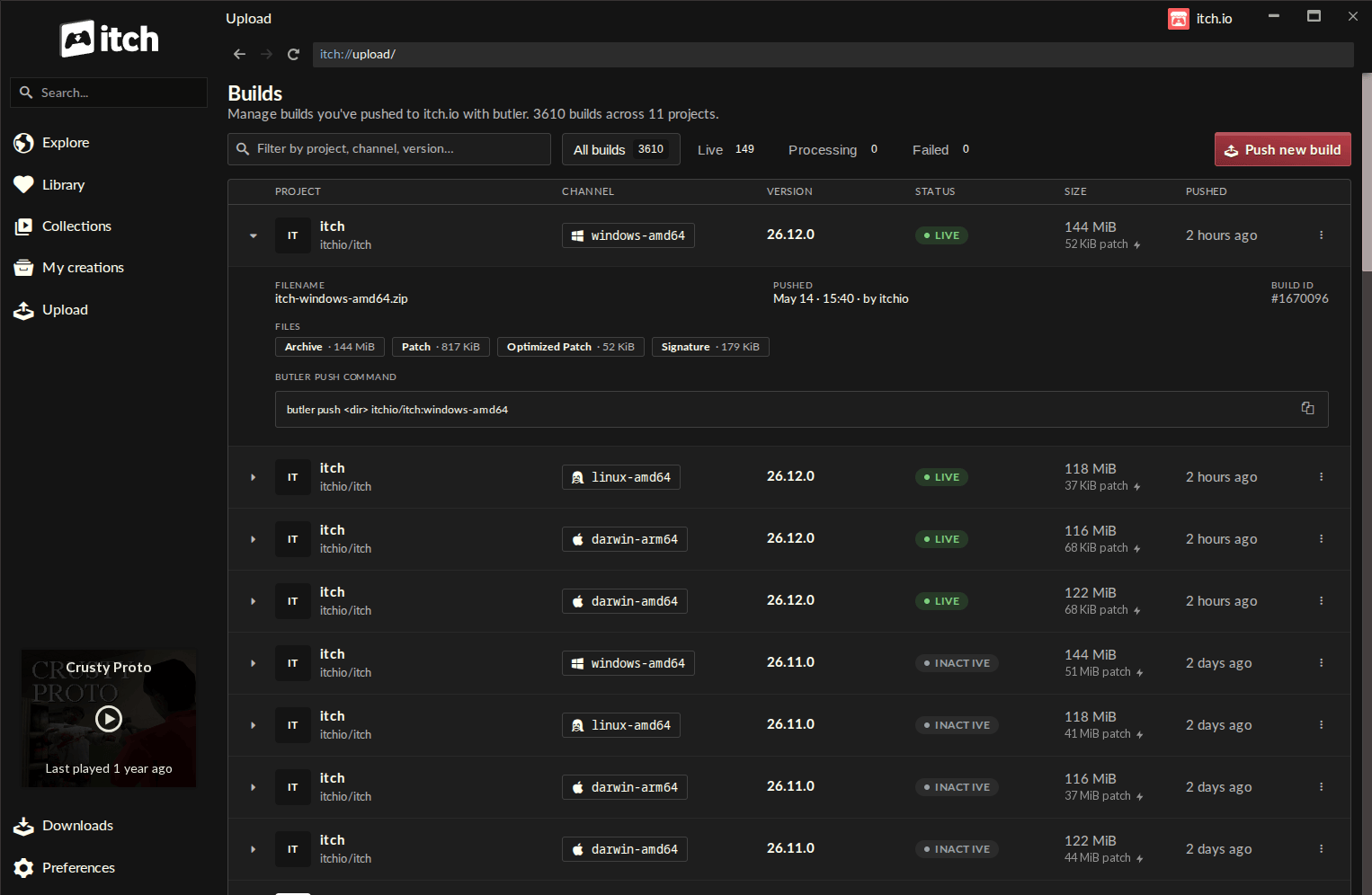
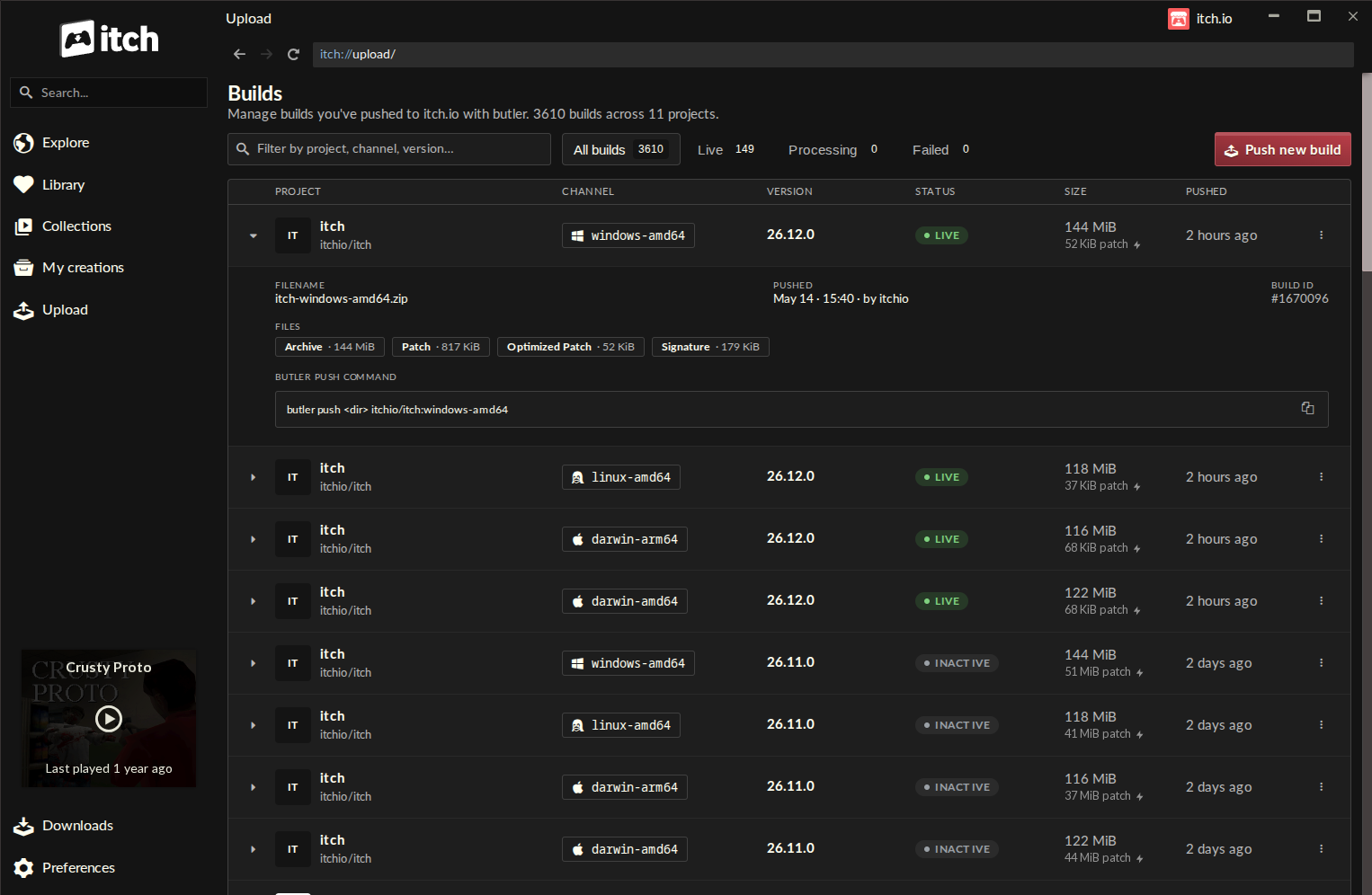
The newly implemented "Upload" section within the itch.io app is designed for maximum clarity and efficiency. Upon accessing this new entry in the sidebar, developers are presented with the "Builds" page, a comprehensive overview of their project’s distribution history.
The Builds Page: A Centralized Hub
The "Builds" page acts as a centralized dashboard, listing every build associated with any project the logged-in account has editing privileges for. Each entry provides critical information at a glance:
- Project: The name of the game or software title.
- Channel: The specific distribution channel (e.g.,
windows-stable,mac-alpha). - Version: The version number of the uploaded build (if specified).
- Status: The current state of the build (e.g., processing, active).
- File Size: The size of the full build, providing context for the patches.
- Pushed On: The timestamp of when the build was uploaded.
This detailed overview empowers developers to monitor their releases, track updates, and quickly identify the status of their various project iterations. The clarity offered by this page is a significant step forward in build management for itch.io creators.
The Push Dialog: Intuitive Build Deployment
The core of the new GUI experience lies within the "Push new build" dialog, accessible from the "Builds" screen. This dialog guides developers through the entire upload process with straightforward options:
- Project Selection: Developers first select the specific project they wish to update from a dropdown list of their editable titles.
- Channel Management: They can then choose an existing channel or easily type a new name to create a new one on the fly. This flexibility is crucial for managing different versions (e.g., public release, internal testing, platform-specific builds).
- Optional Versioning: An optional field allows developers to specify a version number for the build, crucial for clear communication with players and internal tracking.
- File Input: The process culminates in a simple drag-and-drop interface for the game’s build folder or a
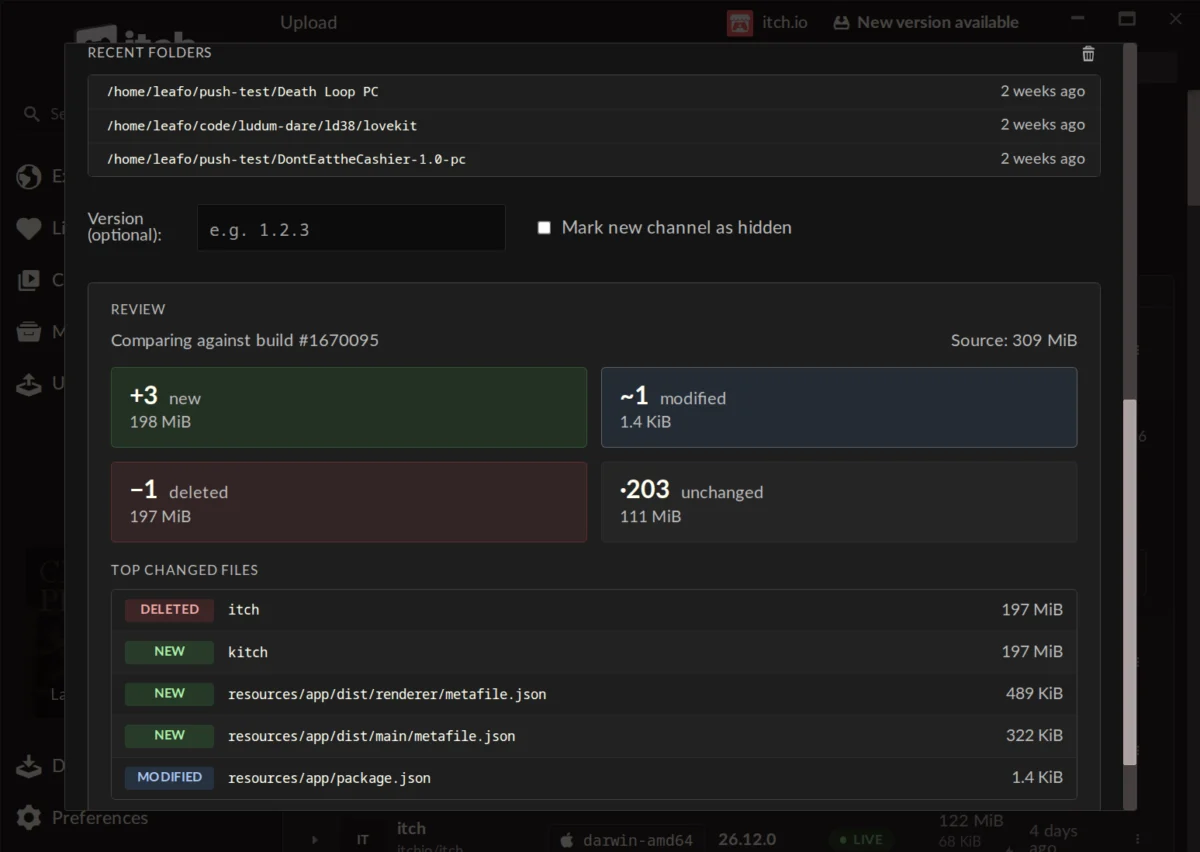
.ziparchive. The app also intelligently maintains a "recent folders" list, enabling quick access to frequently used build directories.
Pre-Upload Preview: Enhancing Confidence and Preventing Errors
One of the most valuable additions is the pre-upload preview feature. Before committing to an upload, developers can generate a detailed report showing precisely what changes Butler has detected since the last build on that channel. This preview breaks down the modifications into:
- New files: Files added since the last build.
- Modified files: Files whose content has changed.
- Deleted files: Files removed from the build.
- Unchanged files: Files that remain identical.
Crucially, it also provides the size for each group and a list of the largest changed files. This level of transparency is invaluable for developers, allowing them to:
- Spot mistakes: Quickly identify if unintended files are included or excluded.
- Understand patch sizes: Anticipate the download size for players.
- Verify changes: Confirm that the correct modifications are being pushed.
This proactive feedback mechanism significantly reduces the risk of deploying erroneous builds, saving time and potential user frustration.
Seamless Integration and Account Management
The Butler instance embedded within the itch.io app benefits from automatic updates, eliminating the need for developers to manually manage or update the CLI tool. This ensures that developers are always utilizing the most current and optimized version of Butler. Furthermore, the in-app Butler leverages the credentials of the currently logged-in itch.io account. This is particularly advantageous for developers managing multiple projects or profiles, as the itch.io app supports quick switching between accounts, simplifying the management of various development endeavors without complex authentication steps.
The Technical Advantage: Butler’s Core Mechanics
At the heart of Butler’s efficiency is its advanced delta-patching algorithm. Unlike traditional file hosting, where every update requires a full re-upload and re-download of the entire game package, Butler operates on a differential basis.
- Initial Push: The very first time a developer uses Butler to push a build to a new channel, the entire contents of the specified folder or
.zipfile are uploaded to itch.io’s servers. This establishes the baseline for that channel. - Subsequent Pushes: For every upload thereafter, Butler meticulously compares the new build against the previous version already hosted on the server for that specific channel. It then calculates the exact "delta" – the precise byte-level differences between the two versions. Only these differences, packaged as a compact patch, are transmitted to the server.
- Server-Side Optimization: Once the patch is received, itch.io’s backend infrastructure takes over, re-compressing and optimizing the patch further. This ensures that the smallest possible data package is prepared for distribution to players.
The benefits of this approach are substantial for all stakeholders. Developers experience drastically reduced upload times, especially for large projects with frequent minor updates. Instead of waiting hours for a multi-gigabyte upload to complete, they might only upload a few megabytes. For players using the itch.io app, this translates directly into faster update downloads. A game update that might be 5GB on another platform could be a mere 50MB patch via Butler, saving significant bandwidth and time. This efficiency fosters a more responsive development cycle and a more satisfying user experience, making games feel more current and accessible.
Community Reception and Broader Implications
Early reactions from the developer community have been overwhelmingly positive, reflecting the long-standing demand for such a feature. Comments from users like "Honestly? This is a lot faster than manually updating the webpage. Great job, itch." and "This is a very cool change, makes the app a lot more useful. Might move my software here. Thanks Itch team!!" underscore the immediate impact of the GUI. Developers who previously found the command-line interface "complicated and fiddly" now praise the "self-enforcing nature of the Compare step," noting that they "almost literally can’t mess it up." This feedback highlights how the GUI lowers the barrier to entry, allowing more developers to leverage Butler’s powerful capabilities without needing specialized technical expertise.
The integration also prompts questions regarding existing projects. A user query about converting games not originally uploaded with Butler to the new system received an official response from itch.io developer leafo, stating that it’s "not possible right now, as a butler push needs additional metadata alongside the file that’s computed when you’re uploading." While acknowledging it could be a future addition, this clarifies current limitations. This transparency is crucial for managing developer expectations.
Beyond the immediate workflow improvements, the Butler GUI integration carries broader implications for the itch.io platform and the indie game ecosystem.
- Democratization of Development: By making advanced tools accessible to a wider array of creators, itch.io reinforces its commitment to democratizing game development. Developers with less technical proficiency in command-line operations can now participate more effectively in continuous integration and rapid iteration workflows. This could encourage more frequent updates and experimental releases, enriching the content available on the platform.
- Enhanced Platform Competitiveness: In a crowded digital storefront landscape, offering robust, user-friendly developer tools is a significant differentiator. This update positions itch.io more strongly against larger platforms by providing a streamlined, efficient, and modern approach to content delivery that benefits both creators and consumers.
- Improved User Experience: Ultimately, faster, more reliable updates lead to a better experience for players. Reduced download times and smaller patch sizes mean players are more likely to keep their games updated, leading to higher engagement and satisfaction with the games purchased or downloaded from itch.io. This positive feedback loop can attract more players to the platform, further benefiting developers.
- Foundation for Future Innovations: This successful integration of a complex CLI tool into a GUI sets a precedent for future enhancements. It demonstrates itch.io’s capacity to evolve its platform by abstracting technical complexities into intuitive interfaces, potentially paving the way for further developer tool integrations or new features that build upon this foundation.
Accessing the Update
For existing users of the itch.io desktop app, the update process is seamless. The application is designed to update itself automatically in the background. Users eager to access the new features immediately can manually check for updates via the Preferences screen if auto-update has not yet pulled the latest version. New users to the platform can easily download the itch.io app from the official website. To fully utilize the new "Upload" tab, users must ensure they are running at least version v26.12.0 of the app. For developers interested in the full capabilities of Butler, including advanced command-line options not yet exposed in the GUI, comprehensive documentation remains available on the itch.io website.
This significant update reinforces itch.io’s dedication to empowering independent developers. By bridging the gap between powerful backend tools and user-friendly interfaces, the platform continues to foster an environment where creators can focus more on crafting compelling experiences and less on the technical complexities of distribution. The integration of Butler’s GUI is not just a new feature; it is an evolution of the development workflow on itch.io, promising greater efficiency, accessibility, and a more vibrant ecosystem for indie games.
About the Author