The independent game distribution platform itch.io has unveiled a significant enhancement to its desktop application, integrating its powerful Butler command-line interface (CLI) with a user-friendly graphical user interface (GUI). This strategic upgrade, rolled out in the latest version of the itch.io app, empowers developers to manage and upload game builds directly from within the application, eliminating the need for terminal commands and dramatically lowering the barrier to entry for efficient content delivery. The new "Upload" section within the app represents a pivotal step towards democratizing access to itch.io’s advanced build management capabilities, previously accessible primarily to those comfortable with command-line operations.
Background: The Evolution of Developer Tools on itch.io
Itch.io emerged in 2013 as a digital storefront and community for independent video games, carved out a unique niche by offering unparalleled flexibility, developer-centric policies, and a highly customizable platform. Unlike more traditional digital marketplaces, itch.io has always prioritized empowering creators, allowing them to set their own prices, design their game pages, and retain a larger share of revenue. This philosophy extended to its technical infrastructure, which sought to provide robust tools for game and software developers, ranging from solo hobbyists to small studios.
One of the cornerstones of itch.io’s developer toolkit has been Butler, its bespoke command-line interface. Introduced several years ago, Butler revolutionized how developers uploaded and updated their projects on the platform. Before Butler, developers typically uploaded full game archives (e.g., ZIP files) for every update. This method, while straightforward, became inefficient as games grew in size and updates became more frequent. Players would have to redownload the entire game, consuming significant bandwidth and time, and leading to potential frustration.
Butler was designed to solve this problem by introducing a sophisticated delta patching system. Instead of uploading entire builds, Butler intelligently compares a new build against the previous version uploaded to a specific channel. It then calculates and uploads only the differences – the new, modified, or deleted files – creating a compact "patch." This patch is then applied by the itch.io app on the user’s end, efficiently updating the game without requiring a full re-download. This system not only saved developers upload bandwidth and time but also provided a superior experience for players, who could update their games much faster and with less data consumption. For instance, a game update that might involve only a few changed textures or code files could reduce a multi-gigabyte download to a mere few megabytes.
Despite its technical brilliance and efficiency, Butler’s command-line nature presented a hurdle for a segment of the developer community. While seasoned programmers and those accustomed to development workflows often found the CLI powerful and intuitive, many indie developers, especially those from non-technical backgrounds or newcomers to game creation, found the terminal-based interface daunting. The need to remember commands, manage file paths, and interpret console output could be a source of friction, potentially deterring some from leveraging Butler’s full benefits. This growing recognition of a usability gap laid the groundwork for the eventual integration of Butler into the itch.io desktop application.
A Chronology of Integration: From CLI to GUI
The journey towards a GUI for Butler has been a gradual evolution, reflecting itch.io’s continuous commitment to refining its developer ecosystem:
- Early 2010s: Itch.io’s inception, focusing on providing an open and flexible platform for game distribution. Initial upload methods were file-based.
- Mid-2010s: Introduction of Butler as a standalone command-line tool. This marked a significant leap in build management, offering advanced patching capabilities and channel-based deployment (e.g.,
windows-beta,linux-arm64,macos-preview). It quickly became an indispensable tool for many developers seeking efficient updates. - Late 2010s – Early 2020s: Growing community feedback highlighted the desire for a more accessible interface for Butler. While its power was appreciated, the CLI posed a learning curve for some. Discussions within developer forums and community channels frequently surfaced the idea of a GUI wrapper.
- Development Phase: Itch.io’s internal development teams began working on integrating Butler’s core functionalities into the desktop application. This involved designing an intuitive user interface that could expose Butler’s features without overwhelming users, ensuring seamless operation across different operating systems supported by the itch.io app.
- Recent Release (v26.12.0 and later): The official rollout of the integrated Butler GUI within the itch.io desktop app, making its advanced features available to a broader audience of developers. This release marks the culmination of efforts to bridge the gap between powerful back-end tools and user-friendly front-end experiences.
This chronological progression underscores itch.io’s responsiveness to its community’s needs, adapting its platform to be more inclusive while maintaining its technical edge.
Deep Dive into the New GUI Functionality
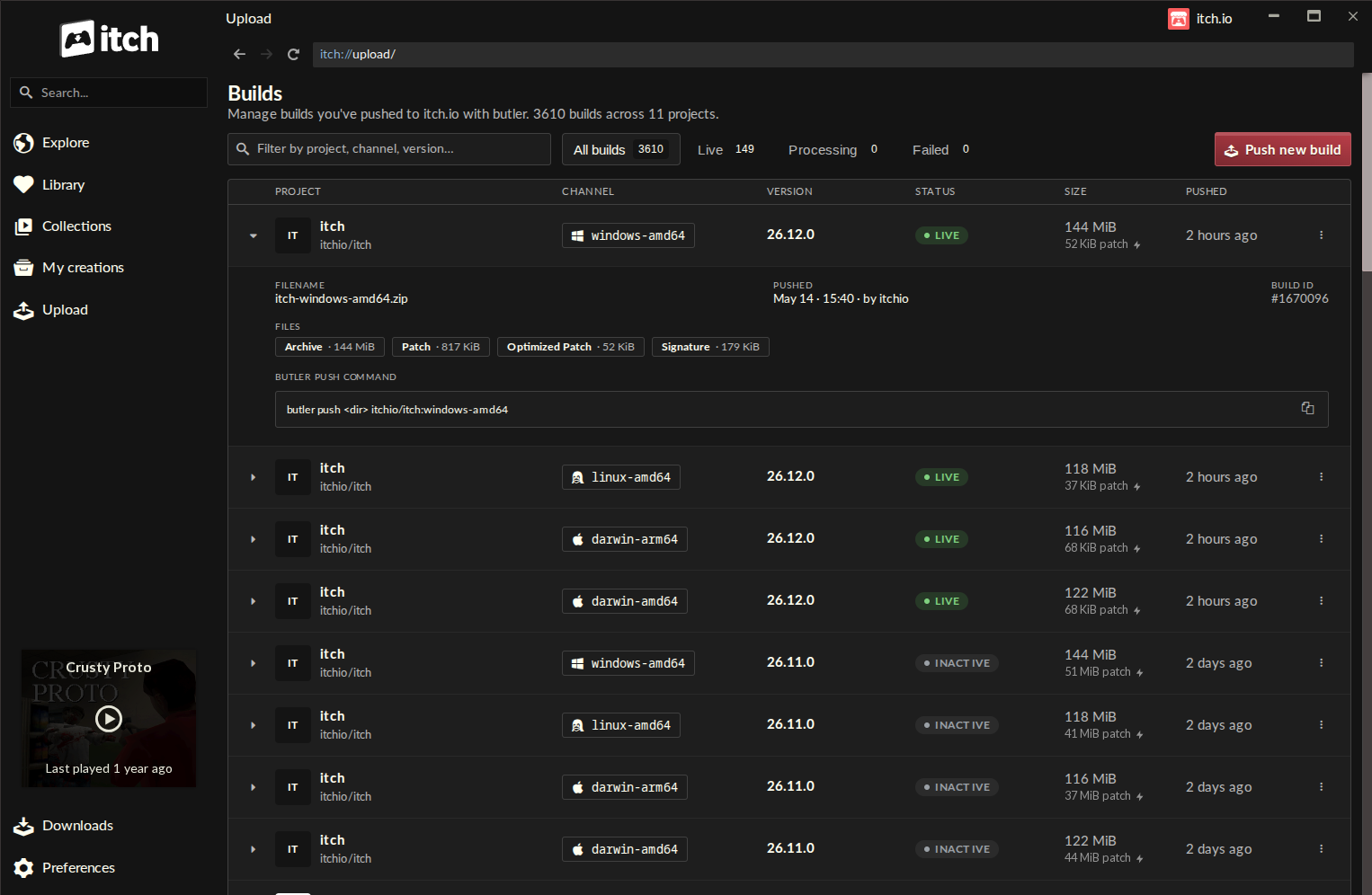
The newly implemented "Upload" section within the itch.io app is designed for clarity and efficiency, making the process of pushing builds intuitive even for first-time users.
The Builds Page: A Centralized Hub
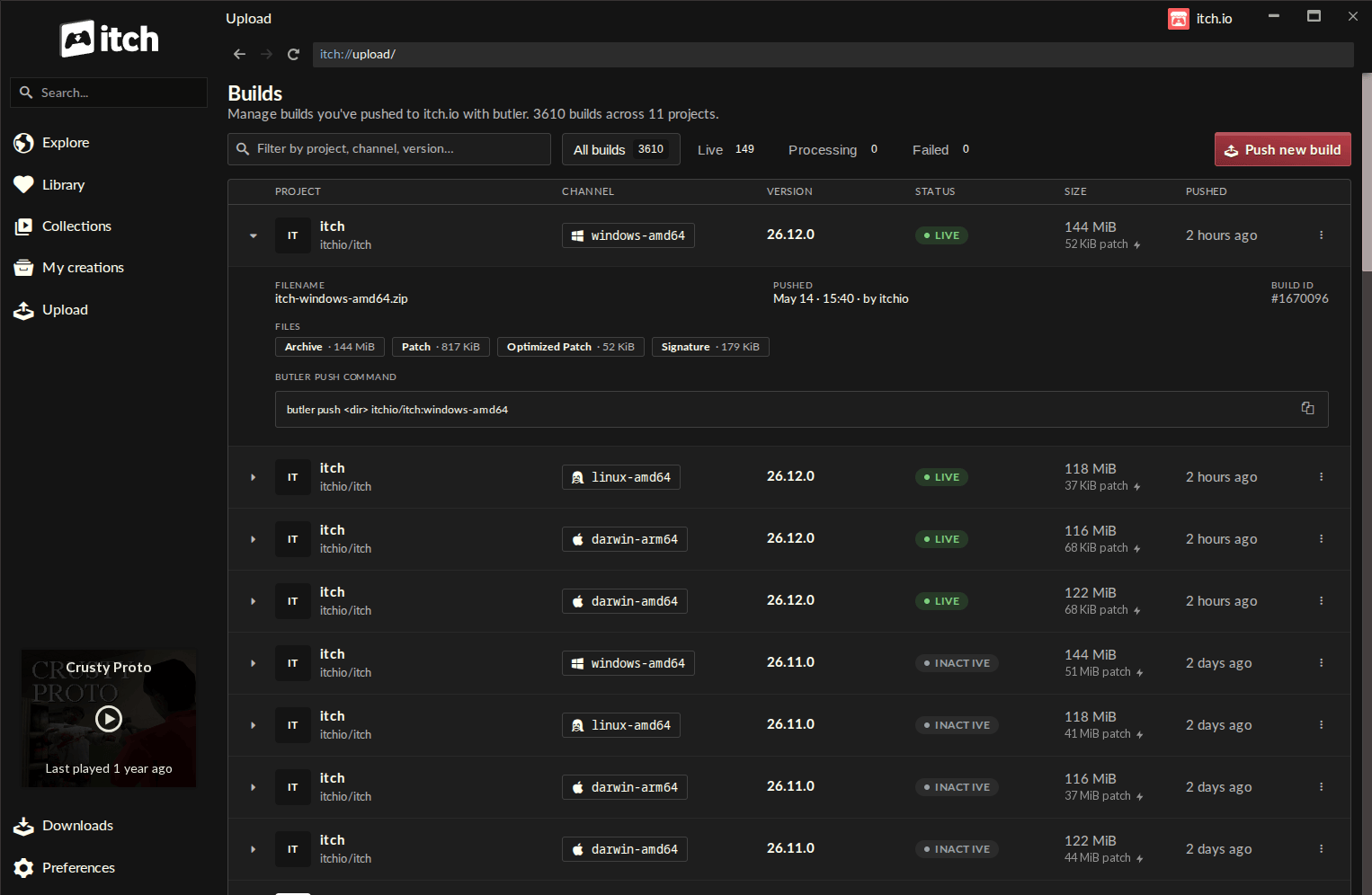
Upon navigating to the new "Upload" entry in the sidebar, developers are greeted by the "Builds" page. This screen serves as a comprehensive dashboard, listing every build associated with any project the logged-in account has editing permissions for. Each entry in the list provides crucial information at a glance:
- Project Name: Clearly identifies the game or software title.
- Channel: Specifies the distribution channel (e.g., "stable," "beta," "experimental," or platform-specific channels like "windows-x64," "android"). This allows developers to manage different versions for different audiences or operating systems.
- Version: Displays the build’s version number, aiding in tracking iteration and release history.
- Status: Indicates the current state of the build (e.g., "live," "processing," "failed"), providing real-time feedback on upload success.
- File Size: Shows the total size of the build, useful for monitoring and optimization.
- Push Timestamp: Records when the build was last pushed, offering a clear chronology of updates.
This centralized view is particularly valuable for developers managing multiple projects or complex release schedules, allowing for easy oversight and management without needing to navigate individual project pages or parse command-line logs.
Pushing a New Build: A Streamlined Workflow
The core of the new GUI experience lies in the "Push new build" dialog, accessed via a prominent button on the Builds screen. This dialog guides developers through the upload process with a series of straightforward steps:
- Project Selection: A dropdown menu allows developers to select the specific project they wish to update, ensuring the build is associated with the correct title.
- Channel Management: Developers can choose an existing channel or create a new one by simply typing a name. This flexibility supports various release strategies, from public stable releases to private alpha tests.
- Optional Versioning: A field is provided to set a version number for the build. While optional, consistent versioning is a best practice for project management and player communication.
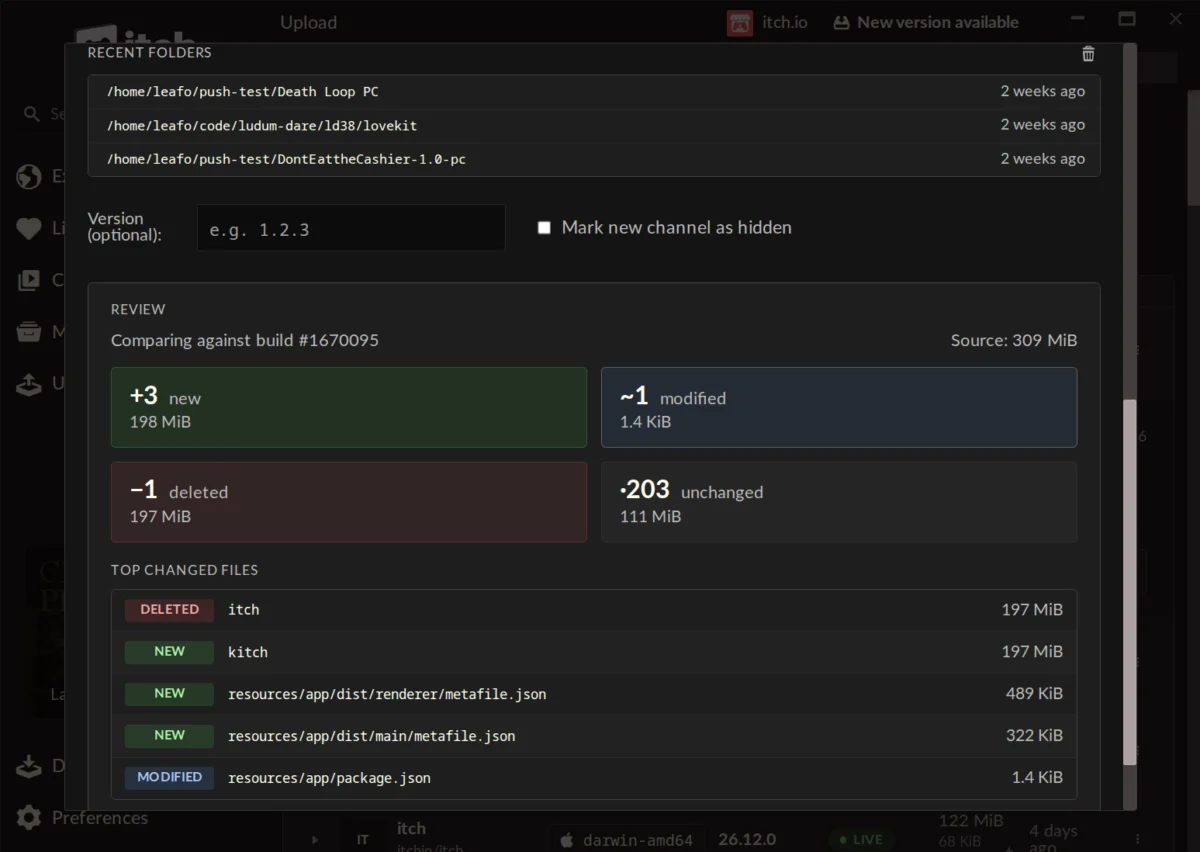
- File Input: The interface features a drag-and-drop area for easily adding the game’s build folder or a .zip file containing the build. This eliminates the need for manual path input, a common source of error in CLI environments. A "Recent Folders" list further streamlines the process by offering quick access to previously used directories.
The "Preview Changes" Feature: Enhancing Confidence
Before initiating an upload, the GUI offers a critical "Preview Changes" feature. This pre-upload analysis provides an invaluable layer of transparency and error prevention. It generates a detailed report outlining:
- File Status Breakdown: Categorizes files into "new," "modified," "deleted," and "unchanged."
- Size per Category: Displays the aggregate size for each status category, offering insight into the overall scope of the update.
- Largest Changed Files: Lists the individual files that have undergone the most significant modifications, allowing developers to quickly identify and verify major changes.
This preview capability empowers developers to catch potential mistakes (e.g., accidentally including debugging files, forgetting to exclude sensitive data, or identifying unexpectedly large changes) before they are pushed live. It fosters a greater sense of control and confidence in the build deployment process.
Seamless Integration and Maintenance
A significant advantage of the in-app Butler integration is its automatic maintenance. The version of Butler embedded within the itch.io app updates itself, freeing developers from the task of manually downloading and configuring new Butler binaries. Furthermore, the system seamlessly utilizes the credentials of the logged-in itch.io account, simplifying authentication. For developers managing multiple projects or profiles, the itch.io app’s existing support for multiple accounts means they can quickly switch between profiles and push builds using the correct credentials, further streamlining multi-project workflows.
Impact and Implications for the Indie Ecosystem
The integration of Butler into the itch.io app carries substantial implications for individual developers, the itch.io platform, and the broader independent game development landscape.
Democratizing Access to Advanced Tools: The most immediate impact is the democratization of efficient build management. By removing the technical hurdle of the command line, itch.io has made Butler’s powerful delta patching system accessible to a much wider array of creators. This includes hobbyists, students, and artists who may be new to development and less familiar with terminal environments, empowering them to deliver professional-grade updates to their players.
Enhanced Developer Workflow and Productivity: For all developers, the GUI offers a more intuitive and visually guided workflow. The centralized Builds page, drag-and-drop functionality, and explicit preview of changes significantly reduce cognitive load and potential for error. This translates directly into increased productivity, allowing developers to spend less time on deployment mechanics and more time on creation and iteration. The faster update cycles facilitated by efficient patching encourage more frequent updates, which can keep games fresh and players engaged.
Improved Player Experience: The benefits extend directly to players. More developers utilizing Butler’s delta patching means more games receiving smaller, faster updates. This reduces download times, conserves bandwidth, and minimizes the storage footprint of updated games, contributing to a smoother and more satisfying player experience. In an era where game sizes can be substantial, efficient patching is a critical factor in player retention and satisfaction.
Strengthening itch.io’s Position: This feature reinforces itch.io’s commitment to being a developer-first platform. By continuously improving its tools and making them more accessible, itch.io enhances its attractiveness to creators, potentially drawing more projects and talent to its ecosystem. This strategic move helps itch.io maintain its competitive edge against larger, more established digital storefronts that may offer similar patching capabilities but often with more rigid or complex developer toolsets.
Community Reactions and Future Outlook
Initial reactions from the developer community have been overwhelmingly positive, as evidenced by comments on the announcement. Developers praise the ease of use, organization, and speed of the new system. User "Warpzone" noted, "Honestly? This is a lot faster than manually updating the webpage. Great job, itch. I used butler some years ago, but I remember it being complicated and fiddly. Maybe even a bit fragile. The itch app has none of these problems." Another user, "Hopelessdecoy," expressed, "This is a very cool change, makes the app a lot more useful. Might move my software here." These sentiments highlight the immediate positive impact on developer workflows and platform utility.
A common question raised by developers, such as "Traxiss," pertains to the ability to convert existing projects not originally uploaded with Butler to the new system. Itch.io staff confirmed that this is currently not possible due to the additional metadata required for Butler pushes, which is computed during the initial upload. However, they acknowledged this as a potential future feature, indicating a continued responsiveness to community needs and a roadmap for further enhancements.
The integration of Butler into the itch.io app is more than just a convenience feature; it represents a significant step in making sophisticated development tools universally accessible. By streamlining the upload process, reducing friction, and enhancing transparency, itch.io continues to empower independent creators, fostering a more vibrant, efficient, and inclusive ecosystem for digital game and software distribution. The platform’s commitment to continuous improvement, driven by community feedback, suggests a promising future for its suite of developer tools and the creators who rely on them. The itch.io team’s concluding sentiment, "Looking forward to seeing what you push!" encapsulates the excitement and potential this new feature unlocks for creators worldwide.
About the Author