The digital storefront itch.io has rolled out a significant update to its desktop application, version 26.20.0, introducing a suite of features designed to enhance user convenience, broaden integration capabilities, and streamline game management. This latest iteration, addressing several long-standing community requests, notably includes the ability to add itch.io games directly to Steam, a versatile headless launch mode, and a much-anticipated function for linking existing game folders to the app. These additions underscore itch.io’s ongoing commitment to evolving its platform to meet the diverse needs of its user base and the broader independent game development community.
Bridging Ecosystems: Steam Shortcuts for itch.io Games
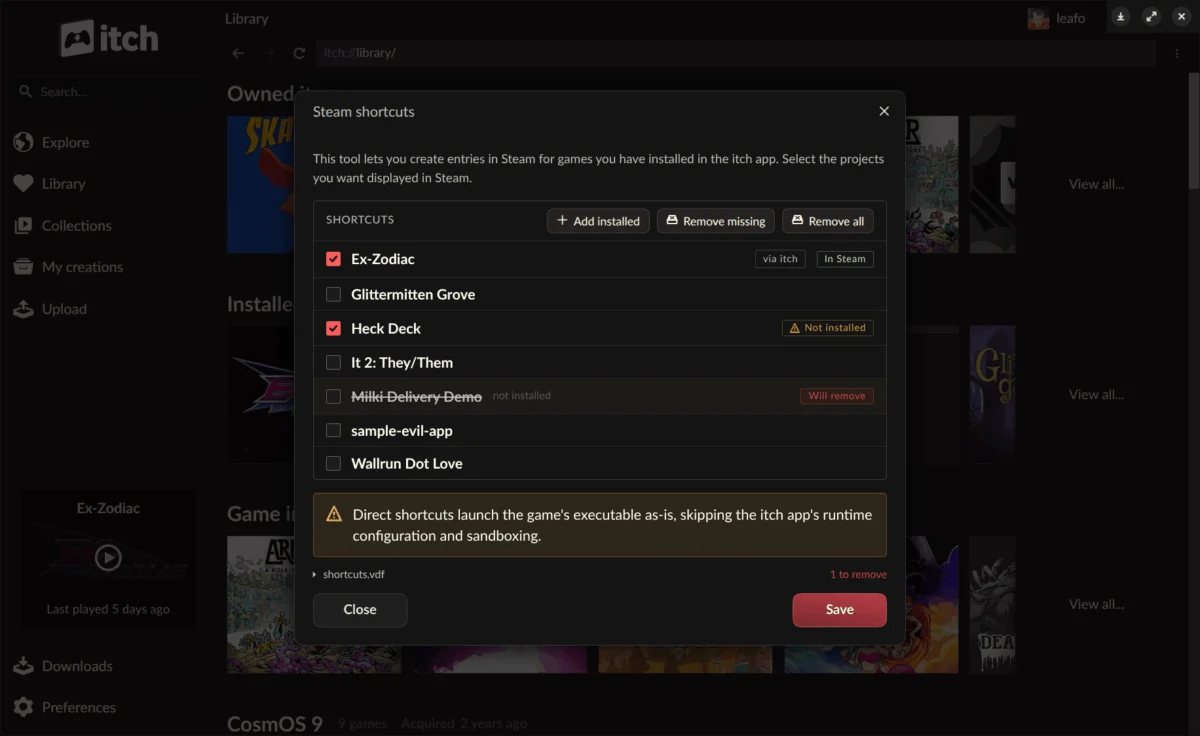
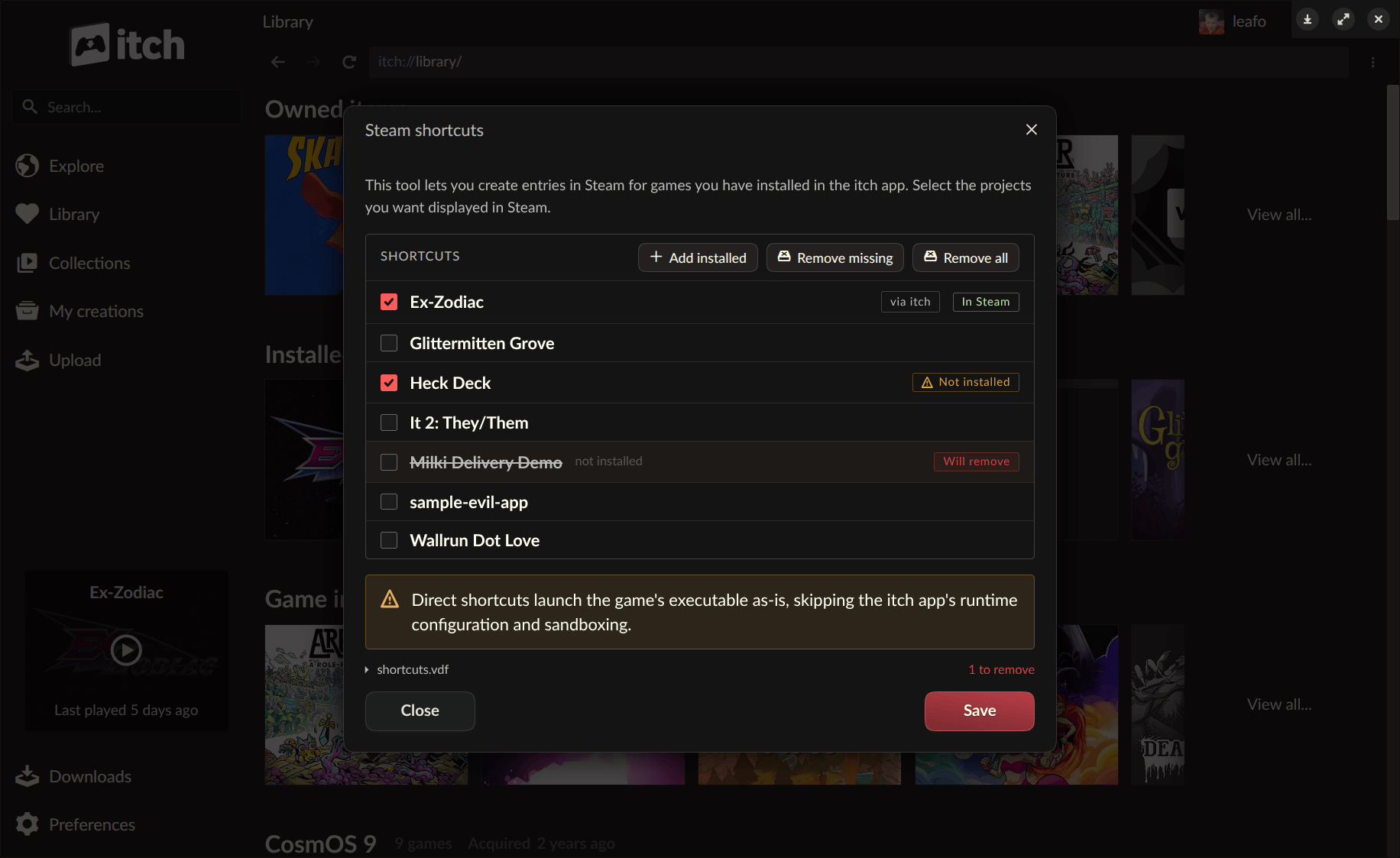
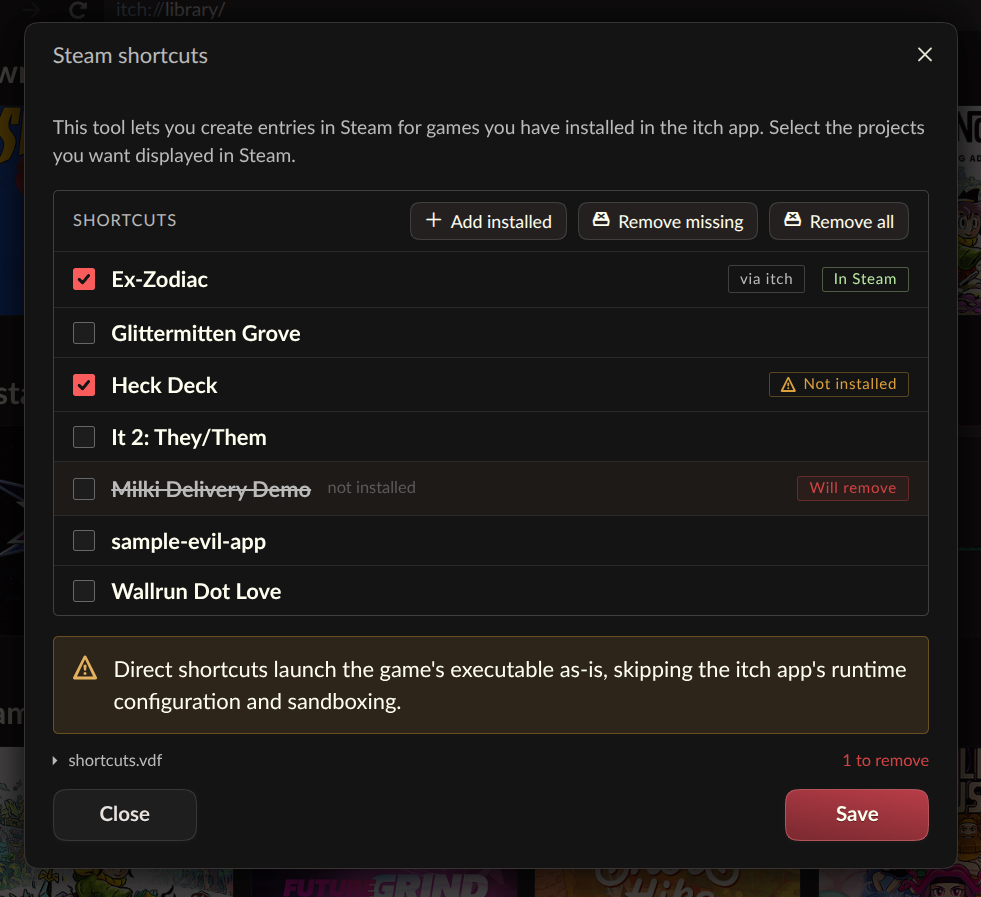
One of the most impactful features in v26.20.0 is the introduction of Steam shortcuts. This functionality allows users to integrate games installed via the itch.io app directly into their Steam library, a significant boon for players deeply entrenched in the Steam ecosystem. For owners of devices like the Steam Deck or those who primarily utilize Steam’s Big Picture mode, this means itch.io titles can now appear alongside their Steam-purchased games, enabling seamless launching without the need to switch between applications. This integration is not merely a cosmetic shortcut; it leverages a newly developed "headless runner mode" for itch.io games. This innovative approach ensures that games launched through Steam shortcuts still benefit from the full support of the itch.io app’s backend functionalities, such as sandboxing, prerequisite management, per-game launch settings, and play time tracking, all without the full itch.io application needing to be actively running in the foreground. The API key, crucial for certain game functionalities, is also passed consistently, maintaining a robust and integrated experience.
The implementation of Steam shortcuts is designed for user-friendliness. The dedicated Steam Shortcuts tool can be accessed either through the itch.io app’s preferences page or by right-clicking on any installed game within the itch.io library. Upon synchronization, all linked shortcuts are automatically organized into a dedicated "itch.io" collection within Steam, facilitating easy navigation and management. While the feature is currently described as "somewhat experimental," the development team has encouraged users to provide feedback and report any bugs encountered via GitHub issues, signaling a proactive approach to refinement and stability. Users are also given the flexibility to configure each shortcut with different launch modes, aiming for the highest compatibility across a diverse range of titles and system configurations. This feature directly addresses the growing demand for unified game library management, particularly as players accumulate titles across various digital storefronts.
Unlocking New Possibilities: The Headless Launch Mode
The development of Steam shortcuts necessitated a more fundamental change within the itch.io application: the ability to launch games without the full graphical user interface (GUI) of the app running. This led to the creation of the new "headless" launch mode, a powerful addition that extends far beyond Steam integration. This mode allows installed itch.io games to be initiated with a single command-line instruction: itch-setup --run-game <gameId> [--profile-id <profileId>].
While initially conceived to facilitate Steam integration, the headless launch mode is not exclusive to Valve’s platform. Its design makes it a versatile tool for any external launcher, custom shortcut system, or script. This open-ended approach empowers developers and advanced users to build their own custom integrations, potentially fostering a richer ecosystem of tools and utilities around itch.io games. To support this, itch.io has provided a comprehensive guide on interfacing with the itch app to build custom launchers, demonstrating a clear intent to encourage broader interoperability.
Under the hood, this headless launch leverages a new butler launch subcommand. Butler, itch.io’s command-line utility, is a cornerstone of the platform’s infrastructure, known for its robust capabilities in game uploading, downloading, and management. By running the launch machinery directly against the user’s existing app database, itch-setup efficiently locates the necessary installation and settings, then hands off control to butler. This ensures that all critical functionalities configured within the app – including sandboxing, prerequisite checks, individual game launch settings, play time tracking, and the passing of API keys – remain fully operational, maintaining the integrity and security of the gaming experience. However, it’s important to note that not all game types are supported by the headless mode; for instance, HTML5 games, which require a browser environment, will still necessitate the launch of the full itch.io app to run. This technical advancement represents a significant step towards making itch.io’s library more accessible and integrated across various computing environments.
Streamlined Library Management: Linking Existing Folders
Another highly requested feature arriving in v26.20.0 is the "Link existing folder" option. This new capability allows users to register a game folder that was downloaded from itch.io outside of the app – perhaps through a web browser or a manual transfer – directly with the itch.io application. Previously, if a user had a game downloaded separately, they would typically have to redownload it through the app to have it recognized in their library. This new feature eliminates that redundancy, saving significant time and bandwidth, especially for larger titles or users with limited internet access.
The process is straightforward: within a game’s install dialog, users will now find the "Link existing folder…" option alongside the standard download choices. Once a folder is linked, the game seamlessly appears in the user’s library as installed and can be launched just like any other game downloaded through the app. The development team has designed this as an "escape hatch," prioritizing simplicity and user agency. The app takes the user’s word that the contents of the linked folder constitute the correct game files, and no file verification is performed upon linking. This approach is particularly valuable for situations where a redownload is impractical, or when a project offers an external download link that the app cannot process autonomously. This feature significantly enhances the flexibility of the itch.io platform, catering to diverse user preferences and technical scenarios for game acquisition and management.
The Evolving Landscape of itch.io: Context and Vision
itch.io, since its inception, has carved out a unique and vital niche in the digital game distribution landscape. Known for its strong focus on independent developers, a creator-centric business model, and a commitment to flexibility, including supporting DRM-free options, it stands in contrast to larger, more corporate platforms. The itch.io desktop app serves as a central hub for users to discover, download, and manage their independent game libraries, embodying the platform’s philosophy of empowering both creators and players.
The introduction of v26.20.0 is a clear indicator of itch.io’s continued evolution, moving beyond its foundational offerings to provide sophisticated tools that enhance the user experience without compromising its core values. The features in this update, particularly the Steam integration and headless launch, demonstrate an understanding of modern gaming habits, where players often navigate multiple platforms and seek seamless transitions between them. This update can be seen as a strategic move to lower the barrier to entry for itch.io games for a wider audience, especially those who might otherwise find managing multiple launchers cumbersome.
Community Reception and Broader Implications
The initial reaction from the itch.io community has been overwhelmingly positive, echoing sentiments observed in comment sections. Users have expressed enthusiasm for the enhanced convenience, particularly for Steam Deck owners who can now centralize their gaming experience. The ability to link existing folders has been lauded as a practical solution for common frustrations, such as avoiding redundant downloads or integrating games acquired through external means. While some users have expressed desires for similar integrations with other platforms like GOG or for mobile support, the current update is widely recognized as a substantial step forward.
For independent developers, this update holds significant implications. By making their games more easily discoverable and launchable within popular environments like Steam, itch.io is effectively expanding the potential reach for indie titles. A smoother user experience on the player’s end can translate to increased engagement and playtime, ultimately benefiting the creators who rely on itch.io as their primary distribution channel. The headless launch mode, in particular, opens doors for developers or third-party tool creators to innovate with how itch.io games are accessed and played, potentially leading to new community-driven projects and integrations.
This update also reflects broader trends within the gaming industry towards interoperability and user-centric design. As the market becomes increasingly fragmented with numerous storefronts and platforms, solutions that allow users to consolidate and manage their diverse game libraries efficiently are becoming invaluable. itch.io, through v26.20.0, positions itself as a forward-thinking platform that prioritizes user convenience and developer empowerment, even if it means building bridges to competing ecosystems.
Availability and Future Outlook
Users can acquire the latest version of the itch.io app from the official website, https://itch.io/app. Existing installations are designed to update automatically, ensuring that all users can benefit from these new features without manual intervention. For those who prefer to initiate updates manually, the option is available within the app’s Preferences screen. A comprehensive list of changes, fixes, and security enhancements is detailed in the official release notes on GitHub, providing full transparency on the update’s scope.
Beyond the immediate features, itch.io continues to foster a collaborative environment, inviting community contributions. The platform actively encourages users to assist in translating the app through Weblate, reinforcing its global reach and commitment to accessibility for non-English speaking users. The continuous evolution of the itch.io app, driven by community feedback and a clear vision for an open and flexible platform, suggests that future updates will likely continue to bring innovative solutions to the challenges of digital game distribution and player experience. The release of v26.20.0 stands as a testament to itch.io’s dynamic approach, solidifying its position as a vital and adaptable player in the independent gaming ecosystem.
About the Author