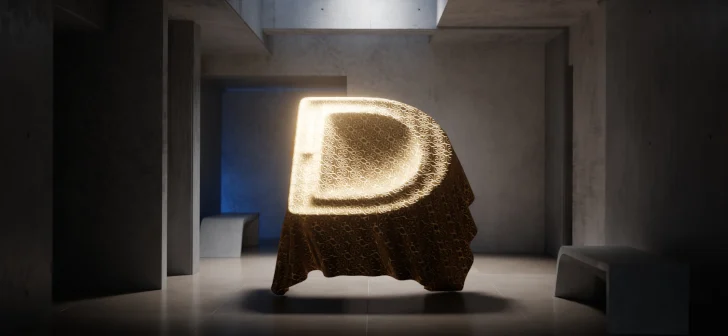
The recent release of Blender 5.2 has ushered in a significant advancement for motion designers and procedural artists with the introduction of powerful new Cloth Dynamics nodes integrated directly into Geometry Nodes. This innovative feature set empowers users to create sophisticated, controllable cloth animations with unprecedented ease, marking a pivotal moment in the evolution of Blender’s simulation capabilities. The "Dynamic Pinning" system, a core component of these new nodes, allows for granular control over how virtual fabric interacts with the scene, opening doors to complex and visually stunning motion graphics previously requiring specialized software or arduous manual animation.
The Dawn of Procedural Cloth Animation in Blender
For years, Blender has been a cornerstone for 3D content creation, known for its open-source accessibility and robust feature set. However, advanced cloth simulation, particularly for dynamic and controllable animations, often presented a steep learning curve or necessitated reliance on external plugins. Blender 5.2’s integrated Cloth Dynamics nodes represent a paradigm shift, bringing high-level simulation tools directly into the familiar and powerful Geometry Nodes environment. This integration means that artists can now procedurally generate and animate cloth, marrying the flexibility of node-based workflows with the realism of physics-driven simulations.
The introduction of these nodes is not merely an incremental update; it signifies Blender’s commitment to pushing the boundaries of procedural content generation. By embedding cloth simulation within Geometry Nodes, users can leverage the system’s inherent advantages: non-destructive workflows, real-time feedback, and the ability to create highly complex and unique setups through the interconnection of various nodes. This democratizes access to sophisticated animation techniques, enabling a wider range of creators to achieve professional-grade results.
Understanding Dynamic Pinning: The Key to Controllable Cloth
At the heart of this new system lies "Dynamic Pinning." This feature allows artists to define specific points or regions on a virtual cloth mesh that will behave in a predetermined manner, overriding or influencing the standard physics simulation. Instead of relying solely on external forces or initial conditions, Dynamic Pinning provides a direct method to anchor, guide, or even animate the cloth’s behavior.
This is achieved through a node-based interface, where users can select vertices, edges, or faces and assign them pinning properties. These properties can range from complete immobility (acting as anchors) to partial restraint, allowing for controlled stretching, folding, or draping. The "dynamic" aspect refers to the ability to change these pinning properties over time, either through keyframing within the node setup or by driving them with other procedural elements. This opens up a vast array of possibilities for creating intricate animations that would be incredibly challenging with traditional methods.
For instance, imagine animating a flag billowing in the wind. With Dynamic Pinning, an artist could fix the top edge of the flag to a virtual flagpole, while allowing the rest of the fabric to respond to simulated wind forces. Furthermore, they could procedurally animate the pinning strength along the edges, creating a ripple effect or a dramatic unfurling. This level of control is what sets Blender 5.2’s new features apart.
The Impact on Motion Design and Procedural Art
The implications of these advancements for motion designers are profound. Motion graphics often rely on dynamic elements, fluid transitions, and visually engaging textures. Cloth, with its inherent ability to drape, fold, and flow, is a natural fit for adding realism and visual interest to these projects.
Enhanced Realism: The ability to simulate realistic cloth behavior adds a layer of authenticity to digital scenes. Whether it’s the subtle sway of a banner, the intricate folds of a costume, or the dynamic movement of flags and banners, these new tools allow for a higher degree of visual fidelity.
Procedural Control and Iteration: For procedural artists, the integration of cloth simulation within Geometry Nodes is a game-changer. It means that entire cloth animation setups can be generated and modified procedurally. Artists can tweak parameters, experiment with different fabric properties, and achieve variations of an animation without having to manually re-animate each element. This dramatically speeds up the iteration process and allows for the creation of unique, algorithmically generated animations.
New Aesthetic Possibilities: The precise control offered by Dynamic Pinning can lead to entirely new aesthetic styles. Artists can create stylized, exaggerated cloth movements that defy real-world physics but are nonetheless visually compelling and controllable. This opens up avenues for abstract animations, character animations with unique fabric interactions, and dynamic logo reveals.
A Look at the Workflow: From Concept to Animation
The typical workflow for utilizing Blender 5.2’s Cloth Dynamics and Dynamic Pinning within Geometry Nodes might involve the following steps:
- Scene Setup: A 3D mesh representing the cloth object is created or imported into Blender.
- Geometry Nodes Integration: A Geometry Nodes modifier is applied to the cloth object.
- Cloth Dynamics Node: The new Cloth Dynamics node is added to the node tree, acting as the core simulation engine.
- Pinning Strategy: The Dynamic Pinning system is configured. This could involve:
- Attribute-Based Pinning: Using existing vertex attributes (like UV coordinates or custom attributes) to define pinning regions.
- Procedural Pinning: Generating pinning patterns using other Geometry Nodes (e.g., noise textures to create random pinning, or gradients to control pinning strength along a surface).
- Manual Pinning: While the node-based approach is emphasized, manual pinning through weight painting or vertex groups can also be integrated.
- Parameter Tuning: Simulation parameters such as stiffness, damping, mass, and collision settings are adjusted to achieve the desired cloth behavior.
- External Forces and Influences: Other nodes can be introduced to simulate forces like wind, gravity variations, or even the influence of other animated objects.
- Animation and Rendering: The node tree is evaluated over time, allowing the cloth to animate according to the simulation and pinning rules. The final result can then be rendered.
This node-based approach offers a significant advantage over traditional, object-based simulation systems. It allows for a much deeper level of integration with other procedural elements, such as scattering objects onto the cloth, generating intricate patterns, or even dynamically altering the cloth’s shape based on simulation outcomes.
Behind the Scenes: The Technical Underpinnings
While the user-facing features are impressive, the underlying technical implementation of these Cloth Dynamics nodes is equally noteworthy. Blender’s development team has focused on creating an efficient and robust simulation system that can handle complex scenarios.
Performance Optimization: Efficient solvers are crucial for real-time feedback and faster rendering. The development likely incorporates optimized algorithms for collision detection, constraint solving, and integration steps to ensure smooth performance, even with high-resolution meshes and complex interactions.
Integration with Existing Systems: The seamless integration with Geometry Nodes means that the cloth simulation can leverage the strengths of Blender’s existing data structures and processing pipelines. This includes efficient handling of mesh data, attribute propagation, and the ability to combine simulation results with other procedural operations.
Extensibility: The node-based architecture inherently makes the system extensible. As Blender continues to evolve, new nodes and functionalities can be added to enhance the cloth simulation capabilities further, such as more advanced material properties, tearing effects, or even interaction with fluid simulations.
Expert Reactions and Community Buzz
The announcement and subsequent release of Blender 5.2’s Cloth Dynamics nodes have generated considerable excitement within the 3D art and animation community. Many industry professionals have lauded the move as a significant step forward for Blender, particularly for those working in motion graphics and VFX.
"This is exactly what we’ve been waiting for," commented Sarah Chen, a freelance motion designer specializing in abstract animations. "Being able to control cloth dynamics procedurally within Geometry Nodes eliminates so many barriers. It’s not just about making things look realistic; it’s about having granular artistic control over how fabric moves and interacts, which is crucial for creating compelling motion graphics. The Dynamic Pinning feature, in particular, is a revelation for achieving precise, stylized animations."
Another prominent Blender educator, Mark Johnson, noted the pedagogical implications. "For students and aspiring artists, this new system makes advanced cloth animation far more accessible. Instead of getting bogged down in complex physics settings, they can learn through a visual, node-based approach. This fosters experimentation and a deeper understanding of the underlying principles of simulation and animation. We’re already seeing a surge of interest in tutorials covering these new features."
The open-source nature of Blender also means that the community will undoubtedly contribute to the evolution of these nodes, developing custom solutions and sharing innovative workflows. This collaborative environment ensures that the tools will continue to grow and adapt to the ever-changing demands of digital artistry.
The Future of Procedural Animation
Blender 5.2’s Cloth Dynamics and Dynamic Pinning are more than just new features; they represent a philosophical shift towards making complex simulation tools accessible and controllable through procedural workflows. This advancement positions Blender as an even more formidable contender in the realm of professional 3D content creation, especially for industries that rely on dynamic visual elements.
The ability to procedurally generate and manipulate cloth animations opens up a universe of possibilities for artists. From intricate character costumes that react organically to movement, to dynamic branding elements that unfurl with cinematic flair, the creative potential is immense. As artists continue to explore and master these new tools, we can expect to see a wave of innovative and visually captivating motion graphics emerge from the Blender community. The future of procedural animation is here, and it drapes beautifully.
About the Author