The digital storefront and community platform itch.io has announced a significant enhancement to its desktop application, rolling out a new graphical user interface (GUI) for its powerful command-line tool, Butler. This pivotal update, integrated directly into the latest version of the itch.io app (v26.12.0 and above), empowers developers to upload game builds with unprecedented ease and efficiency, eliminating the previous necessity for command-line proficiency. The new "Upload" section within the app marks a strategic move by itch.io to democratize its developer tools, making advanced build management accessible to a broader spectrum of creators, from seasoned professionals to burgeoning indie developers. This development is poised to streamline workflows, enhance version control, and ultimately foster a more robust and active developer community on the platform.
A New Era for Developers: Butler’s Graphical Interface Arrives
The core of this transformative update lies in the integration of Butler into a user-friendly GUI. Previously, Butler, a proprietary command-line interface (CLI) tool, required developers to navigate terminal commands to push game builds to their respective project channels on itch.io. While effective for those comfortable with command-line operations, this requirement presented a significant barrier for many creators who prioritize visual interfaces and streamlined workflows. The new "Upload" section within the itch.io app directly addresses this challenge, providing a visually intuitive environment where developers can manage their game builds without ever opening a terminal window.
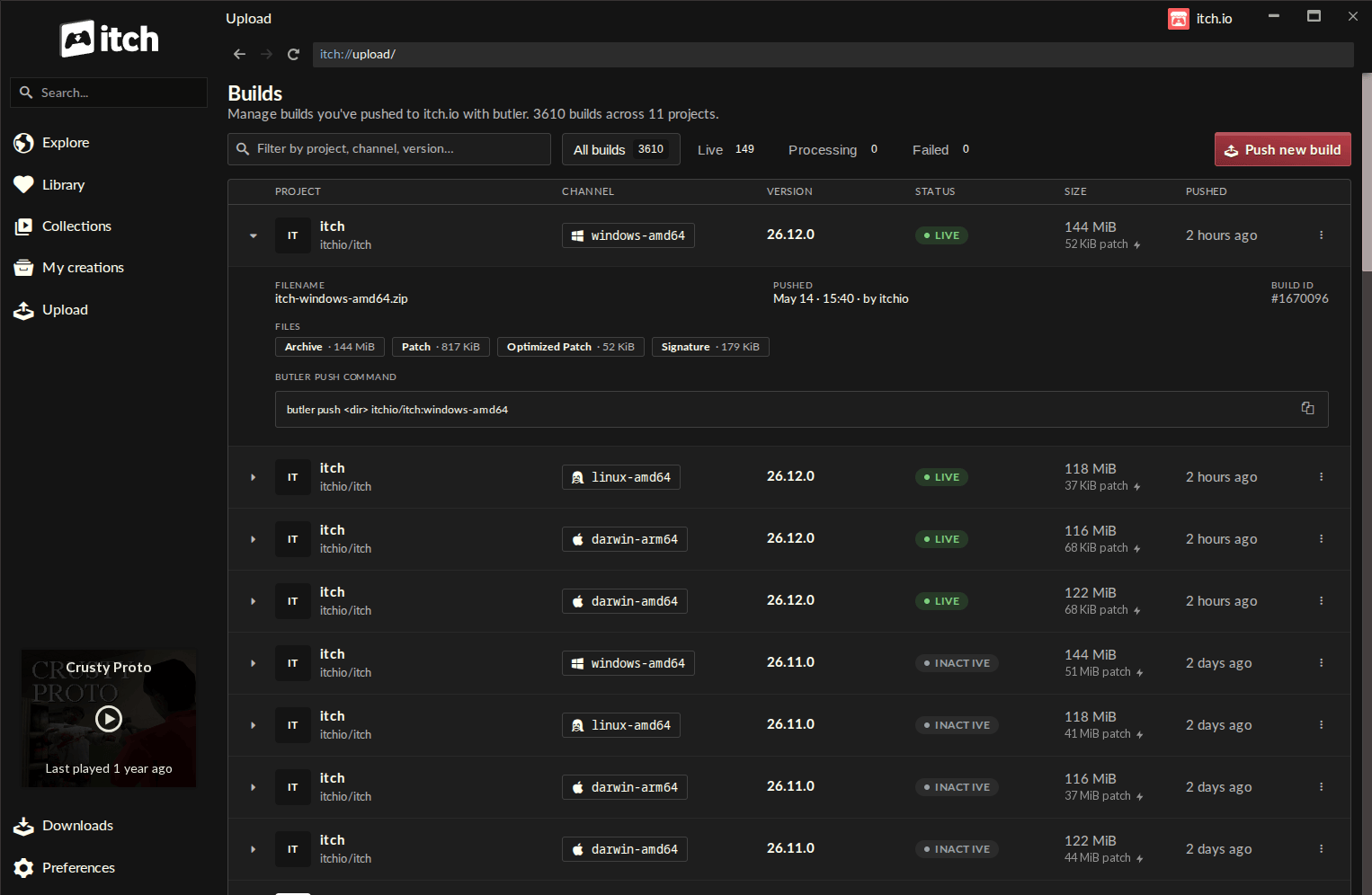
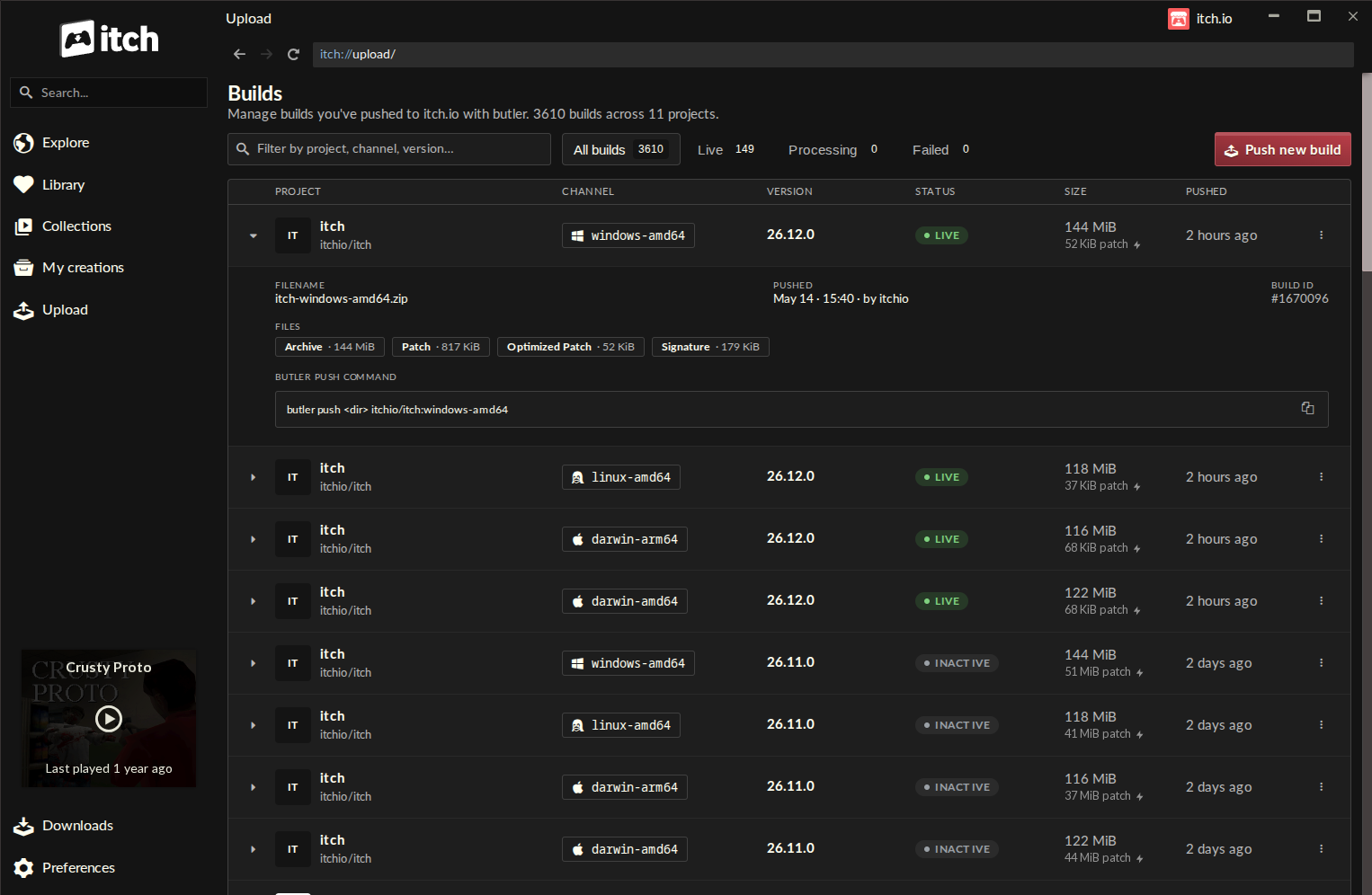
Upon updating the itch.io app, developers will discover a dedicated "Upload" entry in the sidebar, leading to the newly introduced "Builds" page. This centralized screen offers a comprehensive overview of all builds associated with projects the user’s account has permission to edit. Each entry on the "Builds" page provides critical information at a glance, including the project name, the specific channel to which the build was pushed (e.g., windows-beta, linux-arm64, macos-preview), its version number, current status, file size, and the precise timestamp of its upload. This consolidated view significantly enhances transparency and control over a developer’s entire portfolio of game builds, allowing for quick assessment and management.
Understanding Butler: The Backbone of Efficient Updates
To fully appreciate the significance of this GUI integration, it is crucial to understand the underlying technology of Butler itself. Butler is itch.io’s bespoke command-line interface designed specifically for uploading and managing game builds. Unlike traditional file uploads that transmit an entire game package with every update, Butler operates on a sophisticated patch-based system. This methodology represents a substantial leap forward in efficiency, bandwidth conservation, and user experience for both developers and players.
When a developer uses Butler for the first time on a new channel, the tool uploads the entire build. However, for every subsequent push to an existing channel, Butler intelligently compares the new build against the previously uploaded version. It then calculates and transmits only the "delta" – the exact differences or changes between the two versions. This means that instead of re-uploading gigabytes of data for a minor bug fix or content update, only a small patch containing the modified files is sent. This process drastically reduces upload times for developers and significantly conserves bandwidth.
The benefits extend directly to players using the itch.io app as well. When a game they own receives an update, the app leverages Butler’s patching technology to download only the necessary changes, rather than the entire game again. For frequently updated titles, this translates into quicker updates, less data consumption, and a much smoother gaming experience. Furthermore, after a patch is uploaded by the developer, itch.io’s backend servers perform additional re-compression and optimization, making these patches even smaller and more efficient for distribution. This commitment to optimization underscores itch.io’s dedication to providing a high-performance ecosystem for indie game distribution.
Addressing Developer Needs: The Evolution from Command Line to GUI
The transition of Butler from an exclusive CLI tool to an integrated GUI experience within the itch.io app reflects a broader industry trend towards accessible development tools. While command-line interfaces are powerful and offer granular control, their steep learning curve can be daunting for individuals not accustomed to terminal environments. The indie game development scene is increasingly diverse, attracting creators from various backgrounds, many of whom may not possess strong programming or systems administration skills.
Historically, command-line tools have been the bedrock of software development, offering direct interaction with operating systems and precise control over processes. Butler itself was engineered with this philosophy, providing robust functionality for version control, channel management, and efficient patching. However, as itch.io’s developer base expanded, the demand for a more intuitive, visually guided approach to these critical tasks grew. The original Butler, while technically superior for efficient uploads, inadvertently created a barrier for a segment of the developer community.
The new GUI integration effectively removes this barrier, democratizing access to Butler’s advanced capabilities. By abstracting the complexities of terminal commands behind clickable buttons, dropdown menus, and drag-and-drop functionality, itch.io has made its most powerful developer tool available to everyone. This move is not merely about convenience; it’s about inclusivity, empowering more creators to leverage professional-grade update mechanisms for their projects, regardless of their technical comfort level with command-line interfaces. This initiative aligns with itch.io’s foundational ethos of fostering an open and accessible platform for independent game development and publishing.
Streamlined Workflow and Enhanced Visibility
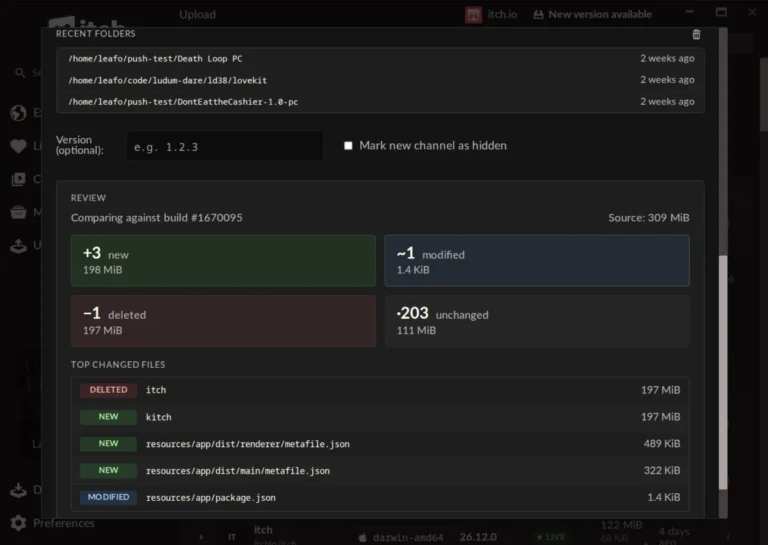
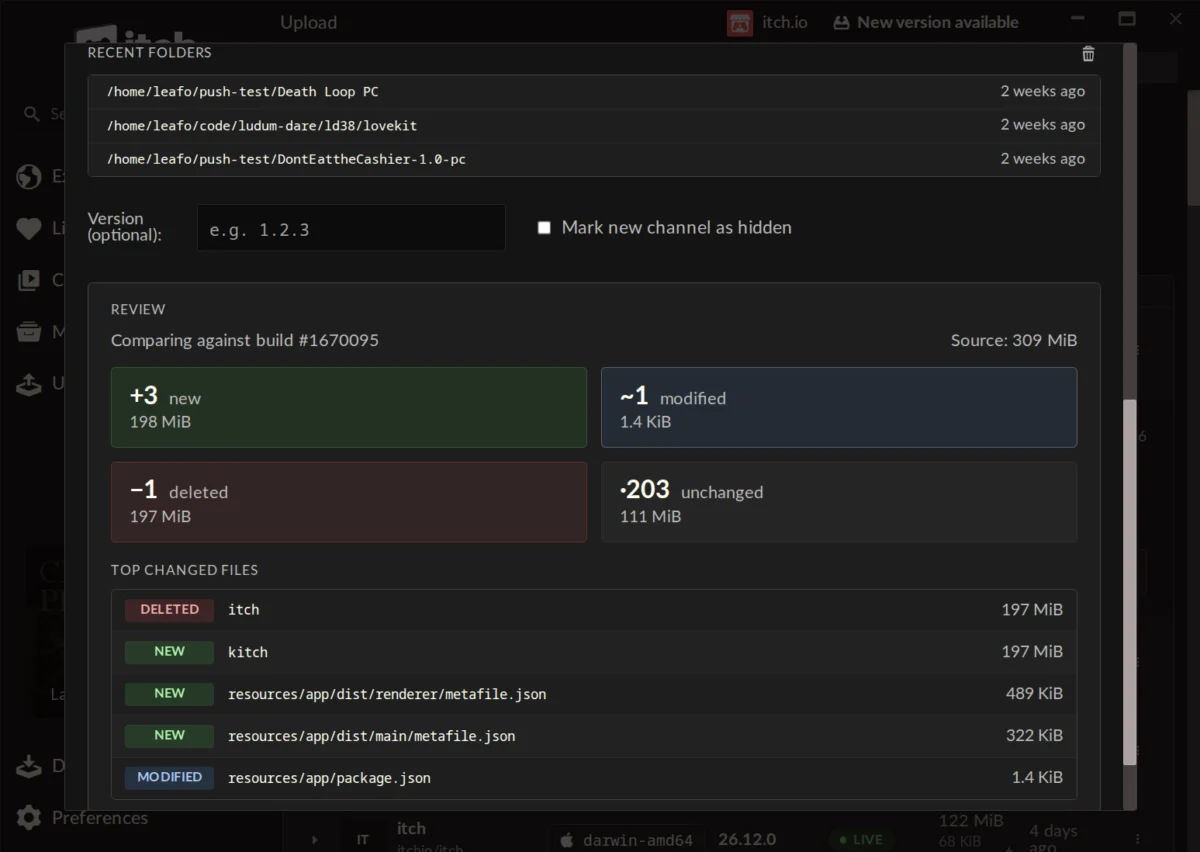
The "Push new build" button on the "Builds" screen opens a user-friendly dialog that guides developers through the upload process. The interface prompts users to select a project from their editable list, choose an existing channel, or easily create a new one by simply typing its desired name. Developers also have the option to assign a version number to their build, which is crucial for tracking progress and communicating updates to players. The actual build file can be uploaded by simply dropping a folder or a .zip archive into the designated area. A "recent folders" list further expedites the process by providing quick access to previously used upload locations.
One of the standout features of the new GUI is the ability to generate a preview of changes before initiating an upload. This pre-upload analysis provides invaluable insight into the impending patch. It clearly displays how many files are new, modified, deleted, or unchanged, alongside their respective sizes. Furthermore, it lists the largest changed files, allowing developers to quickly identify potential issues or confirm that the intended changes are indeed present. This "compare" step acts as a crucial safeguard, helping developers spot any accidental inclusions or omissions, thereby minimizing errors and ensuring the integrity of their updates. This level of transparency and control over the patching process was previously only available through careful command-line parameter usage and output analysis.
Another significant advantage of the integrated Butler is its automatic update mechanism. The version of Butler embedded within the itch.io app is self-updating, eliminating the need for developers to manually manage or verify its version. This ensures that developers are always using the most current and optimized version of the tool without any additional effort. Moreover, the integrated Butler leverages the credentials of the logged-in itch.io account, simplifying authentication. For developers managing multiple projects across different accounts, the app’s ability to quickly switch between profiles makes handling various publishing identities exceptionally straightforward, providing a seamless multi-account workflow that would be considerably more complex with standalone CLI tools.
Broader Implications for the itch.io Ecosystem
The introduction of Butler’s GUI integration carries significant implications for various stakeholders within the itch.io ecosystem and the broader indie game development landscape.
Impact on Developers: For developers, particularly those new to game publishing or less comfortable with technical interfaces, this update dramatically lowers the barrier to entry for utilizing professional-grade build management. It frees them from the complexities of command-line syntax, allowing them to focus more on game development itself. The streamlined workflow, combined with the visual feedback and error prevention features, promises increased productivity and reduced stress associated with game updates. Better version control and clearer update processes can lead to more consistent and reliable game releases, fostering greater trust with their player base.
Impact on Players: While indirect, players stand to benefit immensely from this enhancement. Developers who find the upload process easier are more likely to push frequent, smaller updates. This translates to players receiving bug fixes, performance improvements, and new content faster and more reliably. Crucially, the underlying patch-based system ensures that these updates are always bandwidth-efficient, resulting in faster download times and less data consumption, a significant advantage for players with limited internet access or data caps. This contributes to an overall improved user experience within the itch.io app.
Strategic Advantage for itch.io: For itch.io as a platform, this update solidifies its reputation as a developer-centric ecosystem. By investing in tools that genuinely simplify the publishing process, itch.io differentiates itself in a competitive digital marketplace. It can attract a wider pool of developers, including those who might have previously found the platform’s more technical aspects daunting. This move enhances its appeal as a viable alternative to larger, more complex platforms, reinforcing its niche as a vibrant hub for independent and experimental game creation. The improved efficiency and accessibility can lead to a higher volume of updated content, enriching the platform’s offerings for players.
Industry Trends: This development also reflects a broader trend in the software industry towards integrating powerful backend tools into user-friendly graphical interfaces. As technology becomes more sophisticated, the focus shifts to making that power accessible to a wider audience. itch.io’s move aligns with the democratization of creative tools, empowering individuals to publish and manage their work with professional polish, even without extensive technical expertise. It sets a precedent for how specialized tools can be integrated into broader platforms to enhance usability and expand reach.
Getting the Latest Update
The itch.io app is designed for automatic updates, meaning most users will receive this new functionality seamlessly without manual intervention. However, developers eager to access the new "Upload" tab immediately can manually check for updates via the Preferences screen within the app. To utilize the new Butler GUI, users must be running at least version v26.12.0 of the itch.io app. For individuals new to the platform, the itch.io app can be downloaded directly from the official website. Comprehensive documentation for Butler, detailing its full command-line capabilities for those who still prefer or require terminal interaction, remains available on the itch.io website.
Developer Community Reactions and Future Outlook
Initial reactions from the developer community have been overwhelmingly positive, as evidenced by comments on the announcement. Developers have praised the update for making the upload process "easy and organized," significantly "faster than manually updating the webpage," and providing "great visibility." Many highlighted the value of the "Compare step" in preventing errors, even for those new to the app’s workflow. Some developers, like ‘hopelessdecoy’, even expressed intentions to move their software to itch.io due to the enhanced utility of the app.
A pertinent question raised by a developer regarding the conversion of existing games, not originally uploaded with Butler, to the new patch-based system received an official response from ‘leafo’ (presumably an itch.io team member). While currently not possible due to Butler’s need for specific metadata computed during the upload process, the possibility of adding such a feature in the future was acknowledged, indicating an openness to further enhancements based on community feedback. This demonstrates itch.io’s responsive approach to its developer base, continuously evaluating and planning for future improvements.
Looking ahead, the successful integration of Butler’s GUI could pave the way for further developer tool integrations within the itch.io app. One might speculate on the future inclusion of more advanced analytics, community management features, or even lightweight game development tools directly accessible from the app interface. The current update solidifies itch.io’s commitment to creating a comprehensive, user-friendly, and powerful platform for independent game developers, empowering them to focus on creativity while streamlining the technical aspects of publishing and maintaining their creations. The platform eagerly anticipates the innovative projects and frequent updates that this enhanced accessibility will undoubtedly inspire from its vibrant community.
About the Author