The pursuit of unique and captivating visual styles in animation has led to innovative techniques, particularly in the wake of groundbreaking projects like Sony Pictures Animation’s "Spider-Man: Into the Spider-Verse." This film’s distinctive aesthetic, characterized by its hand-drawn line work meticulously integrated with 3D animation, set a new benchmark for what was possible in digital filmmaking. Now, independent animators and artists seeking to replicate this sophisticated visual language have a powerful and accessible toolkit at their disposal, thanks to advancements in Blender, a leading open-source 3D creation suite. Derel Flood, a prominent figure in the Blender community, has released a comprehensive video tutorial demonstrating how to achieve this sought-after effect using Blender’s Grease Pencil and Geometry Nodes.
This tutorial addresses a significant challenge for independent creators: bridging the gap between the fluid, expressive nature of traditional 2D animation and the dimensional depth of 3D rendering. Sony’s proprietary tools, developed specifically for the "Spider-Verse" films, allowed their artists to create line work that dynamically adhered to the movement and form of the animated characters. This allowed for a visual style that felt both organic and technically sophisticated. Flood’s tutorial aims to democratize this capability, offering a method for individual artists to imbue their 3D animations with a similar hand-drawn, inked quality without requiring access to exclusive studio software.
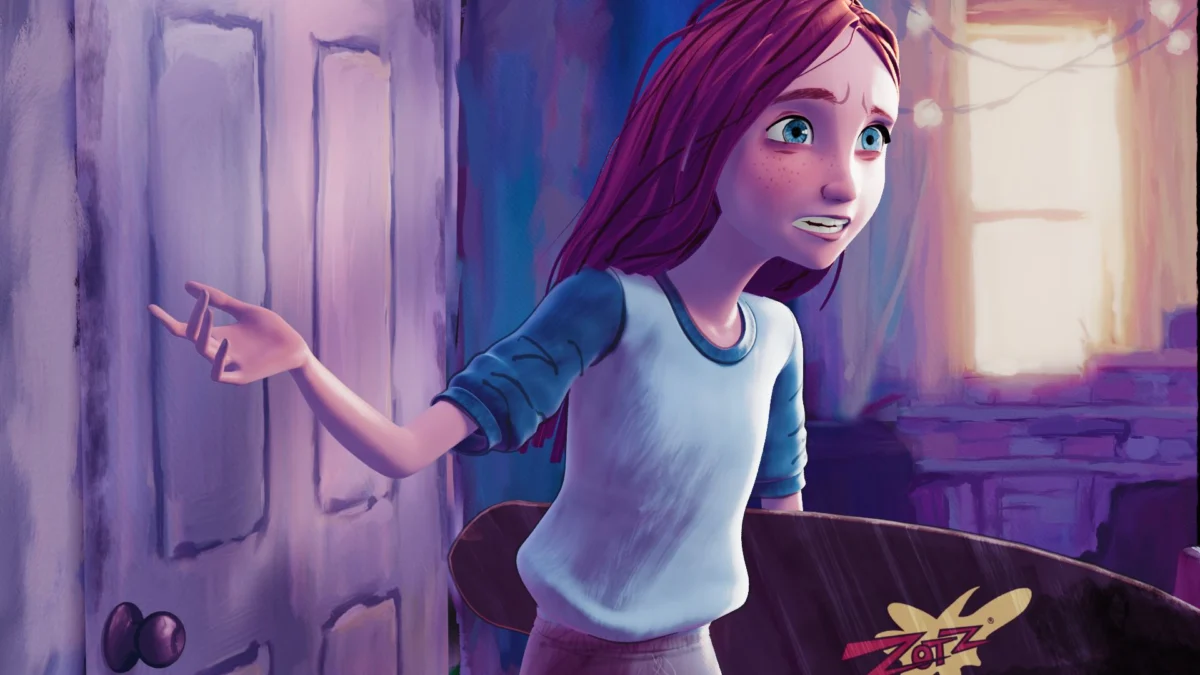
The demonstration centers on a short animated sequence, originally created by the talented Tiffany Huang. Flood has rendered this animation in a style inspired by Gwen Stacy’s Earth-65 world from "Spider-Verse," utilizing his custom "Brushed shading tools" to achieve a painterly look. The core of his technique involves leveraging Blender’s Grease Pencil, a robust 2D animation system within the 3D environment, and its powerful Geometry Nodes system for procedural asset generation and manipulation.
Replicating "Spider-Verse" Aesthetics with Open-Source Tools
The "Spider-Verse" films, released in 2018 and 2023 respectively, were lauded not only for their narrative but also for their groundbreaking visual artistry. "Spider-Man: Into the Spider-Verse" (2018) introduced a hybrid animation style that blended traditional comic book aesthetics with CGI. Key elements included halftone dots, vibrant color palettes, dynamic panel layouts, and, crucially, visible ink lines that followed the characters’ movements. This approach was a deliberate departure from the hyper-realistic CGI often seen in animated features, aiming for a more artistic and stylized output. The sequel, "Spider-Man: Across the Spider-Verse" (2023), pushed these boundaries even further, exploring diverse artistic styles from different dimensions, each with its unique rendering and line work.
Sony’s development of proprietary tools was essential to achieving this seamless integration of 2D elements into a 3D pipeline. These tools allowed animators to draw lines in real-time that could then be applied as textures or modifiers to the 3D models, ensuring they deformed and moved naturally with the characters. This was a complex technical undertaking, requiring deep integration between 2D drawing software and 3D rendering engines.
Derel Flood’s tutorial provides a blueprint for achieving a similar, albeit adapted, effect within Blender. The process typically involves several key stages:
- Character Animation in 3D: The foundational animation is created using standard 3D character rigging and animation techniques within Blender.
- Grease Pencil for Line Work: Artists can then use Grease Pencil to draw the desired ink lines directly onto or around the 3D animated character. This can be done by projecting the 2D strokes onto the 3D surface or by drawing them in relation to the character’s volume.
- Geometry Nodes for Adherence: This is where the real innovation lies. Geometry Nodes are used to procedurally generate and manipulate geometry. In this context, they can be employed to "stick" the Grease Pencil strokes to the deforming mesh of the 3D character. This involves techniques like using vertex groups, UV mapping, or even custom attribute transfer to ensure the lines follow the animation’s contours.
- Shading and Rendering: Finally, the rendered output is styled to match the desired aesthetic. Flood’s "Brushed shading tools" contribute to a painterly, non-photorealistic rendering style, further enhancing the hand-drawn feel.
A Deeper Dive into the Technique
Flood’s tutorial, titled "Sticking Hand Drawn Ink Lines to 3D Animation with Blender Grease Pencil and Geometry Nodes," offers a practical walkthrough. While the specific details of his implementation are best understood by watching the video, the underlying principles highlight the power of Blender’s nodal systems.

Grease Pencil: Introduced in Blender 2.8, Grease Pencil revolutionized 2D animation within a 3D context. It allows artists to draw in a scene, creating strokes that can be animated and rendered alongside 3D objects. Its integration with the 3D viewport enables artists to draw with perspective, depth, and volume, moving beyond the limitations of traditional 2D animation. For the "Spider-Verse" style, Grease Pencil is the primary tool for creating the characteristic outlines and stylistic line work that defines the characters.
Geometry Nodes: This powerful node-based system, which has seen significant development and expansion in recent Blender versions, allows for procedural generation and manipulation of geometry. It can be used for everything from creating complex environments and scattering objects to deforming meshes and adding intricate details. In Flood’s tutorial, Geometry Nodes are crucial for ensuring the Grease Pencil lines behave as if they are part of the 3D mesh. This might involve:
- Projection and Transfer: Using nodes to project the 2D strokes onto the 3D character’s surface and then transferring their position and orientation to newly generated geometry that represents the ink lines.
- Deformation Synchronization: Employing drivers or attribute mapping within Geometry Nodes to ensure that the ink line geometry deforms in perfect sync with the character’s animated mesh. This is the most critical aspect for achieving a believable "stuck" effect.
- Stylistic Control: Geometry Nodes can also be used to add variations to the line thickness, texture, and even subtle "wobble" effects, further enhancing the hand-drawn appearance.
Brushed Shading Tools: The aesthetic of "Spider-Verse" is not solely defined by its line work; the rendering and shading also play a vital role. Flood’s "Brushed shading tools" likely contribute to a non-photorealistic rendering (NPR) style that mimics traditional painting or drawing techniques. This could involve shaders that simulate brush strokes, watercolor effects, or other artistic mediums, complementing the Grease Pencil lines and creating a cohesive visual narrative.
The Impact on Independent Animation
The availability of such tutorials has a profound impact on the independent animation community. Previously, achieving a style akin to the "Spider-Verse" would have been prohibitively expensive and technically demanding for individual artists or small studios. They would have either lacked the budget for proprietary software or the expertise to build custom pipelines.
Blender, being free and open-source, lowers the barrier to entry significantly. The continuous development of features like Grease Pencil and Geometry Nodes means that increasingly sophisticated workflows are becoming accessible. This empowers artists to:
- Experiment with New Styles: Explore visually distinctive aesthetics that were once out of reach.
- Develop Unique Brand Identity: Create a signature look for their projects that sets them apart.
- Compete on a Visual Level: Produce high-quality animated content that can rival larger productions in terms of visual polish and artistic merit.
- Foster a Collaborative Ecosystem: Share knowledge and tools, as demonstrated by Flood’s tutorial, leading to rapid innovation within the community.
The success of "Spider-Verse" spurred a global interest in stylized animation. This tutorial is a direct response to that demand, providing a tangible path for artists to explore these aesthetics. The date of the publication, September 6, 2026, places this within a period where the impact of "Spider-Verse" is well-established, and the tools within Blender have matured to a point where such complex techniques are feasible.
Broader Implications and Future Trends
The democratization of advanced animation techniques has significant implications for the industry. It suggests a future where creative control is less dependent on financial resources and more on artistic vision and technical proficiency.
- Rise of Stylized Content: We can expect to see an increase in animated content that embraces unique, non-photorealistic styles across various platforms, from short films and independent features to animated series and even video games.
- Evolution of Animation Pipelines: The success of open-source tools in enabling complex workflows may influence larger studios to adopt more flexible and modular pipelines, potentially integrating more open-source components.
- Empowerment of Global Talent: Artists from anywhere in the world with access to a computer and the internet can now aspire to create visually stunning animated works, fostering a more diverse and inclusive global animation landscape.
Derel Flood’s tutorial is more than just a technical guide; it’s a testament to the power of community-driven development and the relentless pursuit of artistic expression. By breaking down complex, studio-grade techniques into manageable steps for Blender users, he is not only sharing knowledge but also nurturing the next generation of innovative animators. The ability to replicate the essence of the "Spider-Verse" visual style with readily available tools signifies a significant shift, making artistic boundaries more permeable and creative possibilities more expansive for everyone involved in the art of animation.
About the Author