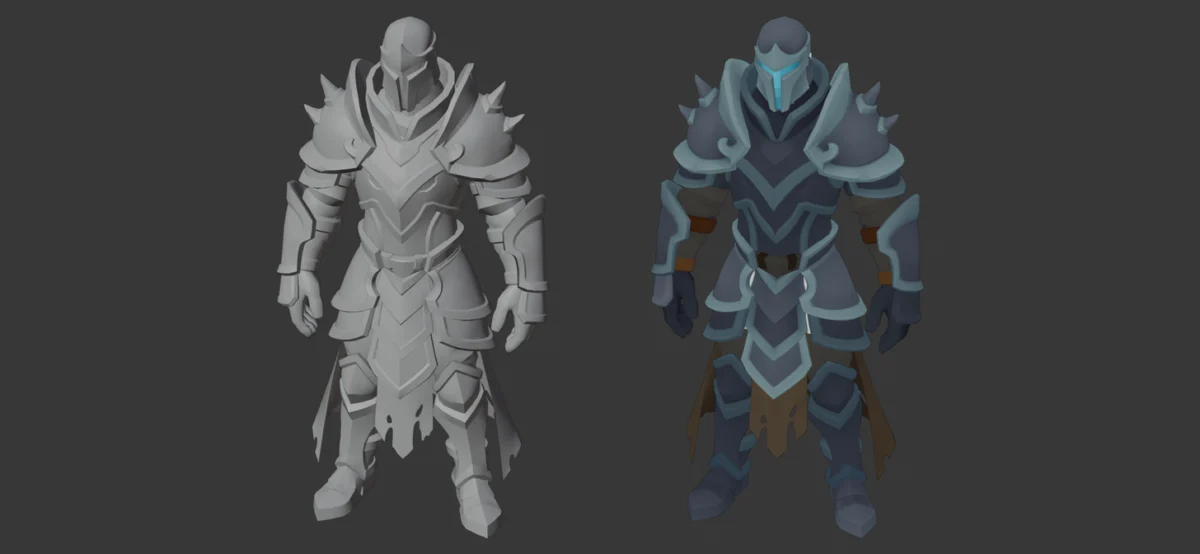
A significant update to the popular Blender add-on, Tintline, has been released, introducing version 2.2 with a suite of powerful new features designed to streamline and enhance the texturing workflow for low-poly models. Developed by Vojtech Daubner, Tintline has already established itself as an indispensable tool for artists seeking efficient, single-atlas texturing solutions. This latest iteration promises to further solidify its position by offering advanced auto-shading capabilities, customizable material palettes, and more intuitive control over texture application, all while maintaining the core principle of consolidating models onto a single texture and material.
Streamlined Texturing for the Modern 3D Artist
At its core, Tintline addresses a common challenge in 3D asset creation: the time-consuming process of UV unwrapping and texturing, particularly for projects that emphasize a stylized or performance-optimized low-poly aesthetic. Traditional methods often involve intricate UV layout and the management of numerous texture maps. Tintline bypasses much of this complexity by enabling users to directly paint colors onto their models. The fundamental operation involves selecting a color swatch and then clicking on the desired faces of the 3D model. This action instantly applies the chosen color, and critically, all the model’s geometry is consolidated onto a single texture atlas, utilizing just one material. This approach not only accelerates the texturing process but also significantly optimizes performance in real-time applications such as video games and interactive simulations.
The release of Tintline 2.2 marks a notable evolution in the add-on’s functionality, building upon its established strengths. The primary enhancement is the introduction of an "auto shade" feature. This innovative tool allows users to select their entire model, initiate the auto-shading process with a single click, and have each distinct part of the model automatically assigned its own unique tone, complete with shaded edges. This capability is a game-changer for artists who require a degree of visual depth and detail on their low-poly assets without the manual effort of intricate shading techniques or complex material setups. The auto-shading effectively simulates lighting and form, giving even the simplest geometric shapes a more rendered and professional appearance.
Enhanced Palette Management and User Control
Beyond auto-shading, Tintline 2.2 introduces a sophisticated system for building and managing custom material palettes. Users can now create their own palettes based on surface types, such as metal, leather, wood, or even emissive ("glow") materials. This allows for a more organized and thematic approach to texturing, enabling artists to quickly access and apply specific material properties. The swatches within these palettes can be named, providing a clear and intuitive labeling system, and the entire atlas can be saved to a file for easy reuse across multiple projects or for sharing with team members. This feature is particularly beneficial for larger productions where consistency in art style and material definition is paramount.
Further refining the user experience, Tintline 2.2 incorporates an improved "select piece" function. This tool now offers the ability to select an entire plate or rim based on just a single face. This granular control over selection simplifies the process of applying specific colors or textures to defined areas of a model, ensuring precision and efficiency. Additionally, the add-on’s ramp functionality has been enhanced to allow ramps to "follow a curve" drawn directly on the model. This allows for more dynamic and organic color transitions, enabling artists to create nuanced gradients and effects that conform precisely to the model’s geometry, rather than being limited by static, linear application.
Historical Context and Development Trajectory
The development of Tintline can be traced back to a growing demand within the Blender community for more efficient and accessible texturing solutions, especially for low-poly workflows. The rise of stylized art directions in game development and the increasing prevalence of real-time rendering pipelines have underscored the need for tools that can produce visually appealing results without compromising performance. Prior to Tintline, achieving a single-atlas, single-material workflow for complex low-poly models often required significant manual effort in UV unwrapping and texture baking.
Vojtech Daubner’s initial vision for Tintline was to democratize this process, making it approachable for artists of all skill levels. The add-on’s core design, focusing on direct color application and automatic atlas generation, resonated strongly with a community that values speed and simplicity. Version 2.2 represents a significant leap forward, addressing user feedback and incorporating advanced features that elevate the add-on from a simple coloring tool to a comprehensive texturing solution. The introduction of auto-shading, for instance, directly tackles the need for adding visual fidelity without increasing polygon counts or material complexity.
The progression of Tintline can be viewed as a response to evolving industry standards and user expectations. As 3D content creation becomes more collaborative and iterative, tools that facilitate efficient asset generation and consistent styling become increasingly valuable. The ability to save and share custom palettes, for example, directly supports team-based workflows, ensuring that all artists are working with the same set of approved colors and material definitions.
Technical Specifications and Accessibility
Tintline 2.2 is designed to be compatible with a range of Blender versions, specifically supporting Blender 4.2 LTS through to Blender 5.2. This broad compatibility ensures that a wide user base can leverage the add-on’s capabilities, regardless of their preferred Blender release. The pricing structure reflects different user needs, with a single-person license available for $12 and a team license priced at $36. This tiered approach makes the tool accessible to individual freelancers, small studios, and larger development teams alike.
The visual demonstration of Tintline 2.2 in action, as highlighted by the accompanying video titled "Tintline 2.2 for Blender: texturing a low poly knight in under a minute," underscores the add-on’s efficacy. Such demonstrations are crucial for potential users to grasp the speed and intuitive nature of the workflow. The video likely showcases the rapid application of colors, the seamless integration of auto-shading, and the overall reduction in time required compared to traditional texturing methods for similar assets.
Analysis of Implications and Broader Impact
The release of Tintline 2.2 has several significant implications for the 3D art and game development communities. Firstly, it further democratizes advanced texturing techniques. Artists who may have previously found complex shading and UV unwrapping to be a barrier can now achieve professional-looking results with greater ease. This can lead to a broader participation in 3D content creation and a potential increase in the volume and diversity of low-poly assets available.
Secondly, the efficiency gains offered by Tintline 2.2 are particularly impactful for independent game developers and small studios. By reducing the time spent on texturing, these smaller teams can allocate more resources to other critical aspects of development, such as gameplay design, programming, or overall asset creation. This can lead to more polished and ambitious projects emerging from smaller development houses.
Thirdly, the optimization benefits of using a single texture atlas and material are substantial for real-time applications. In game engines, fewer draw calls (requests from the CPU to the GPU to draw an object) translate directly to improved performance, leading to higher frame rates and a smoother user experience for players. Tintline’s ability to achieve this without sacrificing visual quality makes it a valuable tool for performance-conscious developers.
The advanced features like custom palettes and curve-following ramps also signal a maturation of the low-poly texturing landscape. These are not just basic coloring tools; they offer artistic control and creative flexibility that rivals more complex texturing pipelines. This suggests a future where stylized, low-poly art can achieve even greater levels of sophistication and visual appeal.
While specific statements from competing add-on developers or major game studios were not directly cited in the provided content, the general reception within the Blender community is often one of anticipation and enthusiasm for tools that address practical workflow challenges. One could infer that developers focused on asset creation pipelines would view Tintline 2.2 as a competitive advantage, enabling faster asset production and potentially influencing the visual direction of future projects.
In conclusion, Tintline 2.2 represents a significant advancement in low-poly texturing for Blender. Its new auto-shading, enhanced palette management, and refined selection tools offer artists unprecedented speed, control, and artistic expression. By continuing to innovate and address the practical needs of 3D creators, Tintline solidifies its role as a crucial tool for anyone looking to create efficient, visually appealing, and performant 3D assets. The $12-$36 price point further ensures its accessibility, making this powerful update a compelling proposition for a wide spectrum of users in the digital art and game development industries.
About the Author