
In the dynamic landscape of game development, balancing rapid iteration with peak performance is a perennial challenge. Developers utilizing Unreal Engine 5 (UE5) frequently leverage Blueprints, the engine’s visual scripting system, for its intuitive design and accelerated prototyping capabilities. However, as projects grow in complexity and scope, a critical juncture often arises where Blueprint code, despite its accessibility, begins to exhibit performance bottlenecks that cannot be resolved through further optimization within the visual scripting paradigm. This scenario necessitates a strategic shift towards C++, the foundational programming language of Unreal Engine, to achieve the requisite speed and efficiency. A complete refactoring of a project into C++ can be a daunting and time-consuming undertaking, potentially disrupting established Blueprint workflows. Fortunately, Unreal Engine 5 provides an elegant and powerful solution: the C++ Blueprint Function Library, offering a seamless bridge between the ease of Blueprints and the raw power of C++.
The C++ Blueprint Function Library is a specialized, built-in Unreal Engine class designed to allow C++ code to be directly exposed and callable within both other C++ modules and, crucially, within Blueprint scripts. This innovative integration mechanism empowers developers to selectively migrate performance-critical or computationally intensive Blueprint nodes into optimized C++ functions without necessitating a full project overhaul. The result is a hybrid development approach that harnesses the strengths of both systems: the agility and designer-friendliness of Blueprints for game logic and prototyping, combined with the unparalleled speed and expanded capabilities of C++ for core systems and demanding operations. Beyond performance enhancements, C++ also grants access to a myriad of advanced engine features, external libraries, and low-level system interactions that are often unavailable or cumbersome to implement through Blueprint nodes alone.
The Blueprint-C++ Synergy: A Historical Perspective
Unreal Engine has long offered a dual-path approach to game logic implementation. In earlier iterations, such as Unreal Engine 3, Kismet provided a visual scripting alternative to UnrealScript. With the advent of Unreal Engine 4 and continuing into Unreal Engine 5, Blueprints revolutionized game development by democratizing access to powerful engine functionalities for non-programmers and accelerating iteration cycles. Blueprints allow designers and technical artists to construct complex behaviors, UI elements, and gameplay mechanics visually, reducing the barrier to entry and fostering creative freedom.
However, the visual nature and interpreted execution model of Blueprints inherently introduce overhead compared to compiled C++ code. While Epic Games has continuously optimized the Blueprint runtime, there are fundamental differences. C++ code is compiled directly into machine code, allowing for direct hardware interaction and maximum execution speed. Blueprints, on the other hand, are essentially bytecode interpreted by the engine at runtime. For simple operations or event-driven logic, this difference is often negligible. But for intricate algorithms, repetitive calculations, or large data manipulations, the performance delta can become substantial, leading to noticeable frame rate drops, increased load times, or unresponsive gameplay. This performance ceiling became a key motivator for developers to seek more efficient integration methods. The C++ Blueprint Function Library emerged as a direct response to this need, providing a highly optimized pathway for C++ logic to coexist and interact fluently with Blueprint-driven systems.
Bridging the Performance Gap: The Essence of C++ Blueprint Function Libraries
At its core, a C++ Blueprint Function Library acts as a static collection of utility functions that can be invoked from anywhere within the Unreal Engine environment, including other C++ classes, Blueprint graphs, and even console commands. The "static" nature is crucial; it means these functions do not require an instance of an object to be called, making them universally accessible. This design principle significantly simplifies their integration into existing Blueprint graphs, where developers can simply search for and add the custom C++ nodes as if they were native Blueprint functions.
The primary advantage of moving critical logic into a C++ Blueprint Function Library is the immediate and often dramatic improvement in execution speed. Tasks such as complex mathematical calculations, intensive array processing, pathfinding algorithms, or custom physics simulations can run orders of magnitude faster when implemented in C++. This efficiency gain directly translates into smoother gameplay, reduced CPU overhead, and the ability to implement more sophisticated systems without compromising performance targets. Furthermore, C++ provides access to the full Unreal Engine API, operating system functionalities, and external third-party libraries, enabling developers to implement features that might be impossible or highly inefficient to create solely within Blueprints. For example, direct file system interactions, advanced networking protocols, or custom memory management routines are typically best handled in C++.
Strategic Implementation: Creating a C++ Blueprint Function Library
The process of creating and integrating a C++ Blueprint Function Library in UE5 is streamlined, yet requires a foundational understanding of C++ within the Unreal Engine framework.
1. Identifying Project Type and Setting Up the Development Environment:
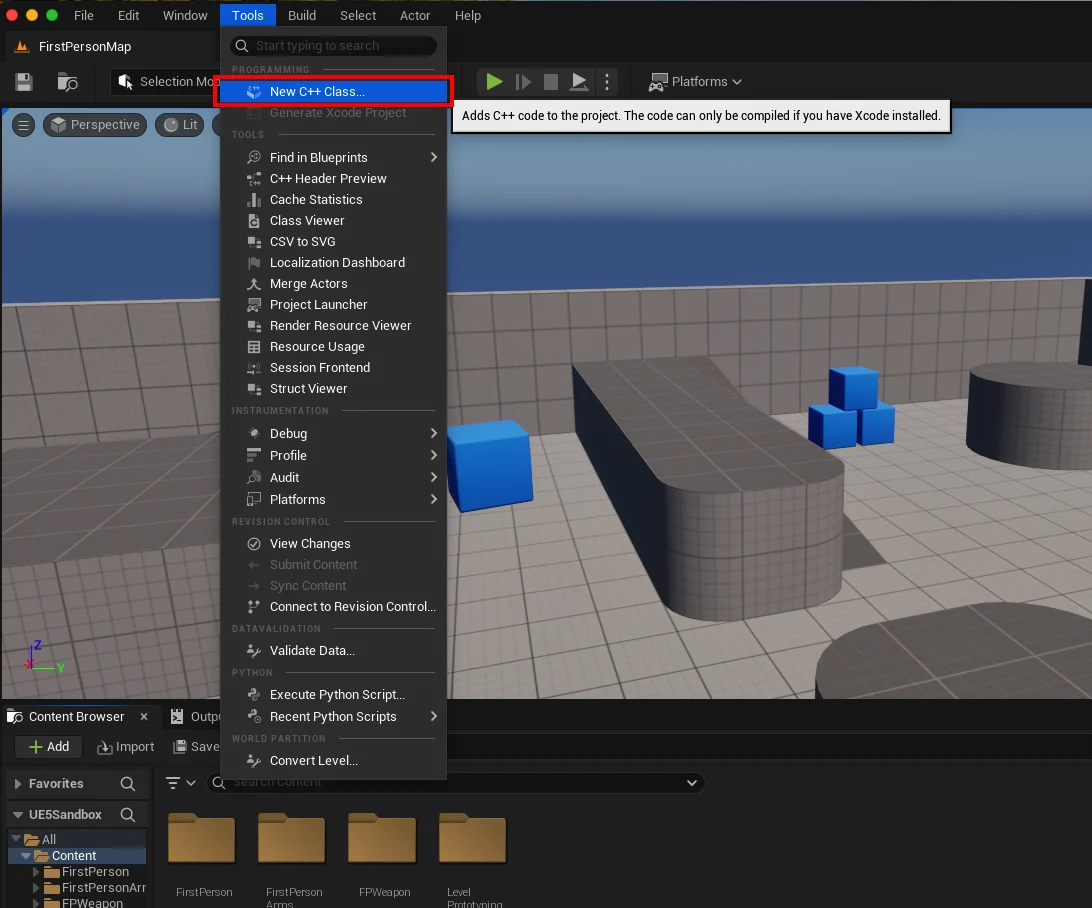
The first step is to ascertain if the Unreal Engine project is C++ enabled. This is easily checked within the Unreal Editor by navigating to the "Tools" dropdown menu and selecting "New C++ Class." If the project is Blueprint-only, the engine will prompt the user to add C++ files, which also entails installing a suitable Integrated Development Environment (IDE). Common choices include Microsoft Visual Studio for Windows, XCode for macOS, and JetBrains Rider for cross-platform development. These IDEs are essential for writing, compiling, and debugging C++ code, providing features like syntax highlighting, auto-completion, and integrated debugging tools. For instance, a developer on a macOS machine would typically install XCode to facilitate C++ compilation.
2. Defining the Library: Parent Class and Naming Conventions:
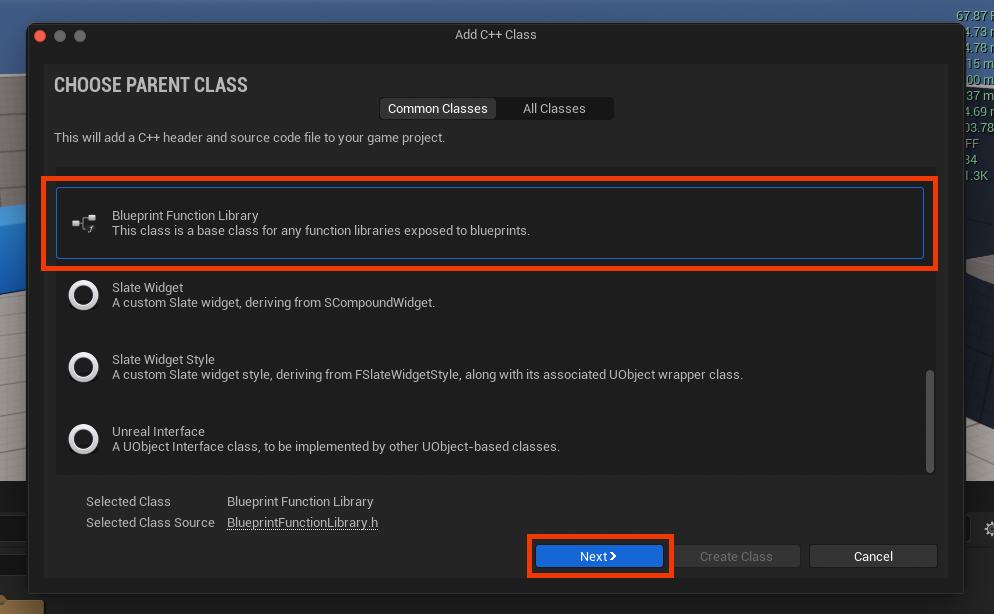
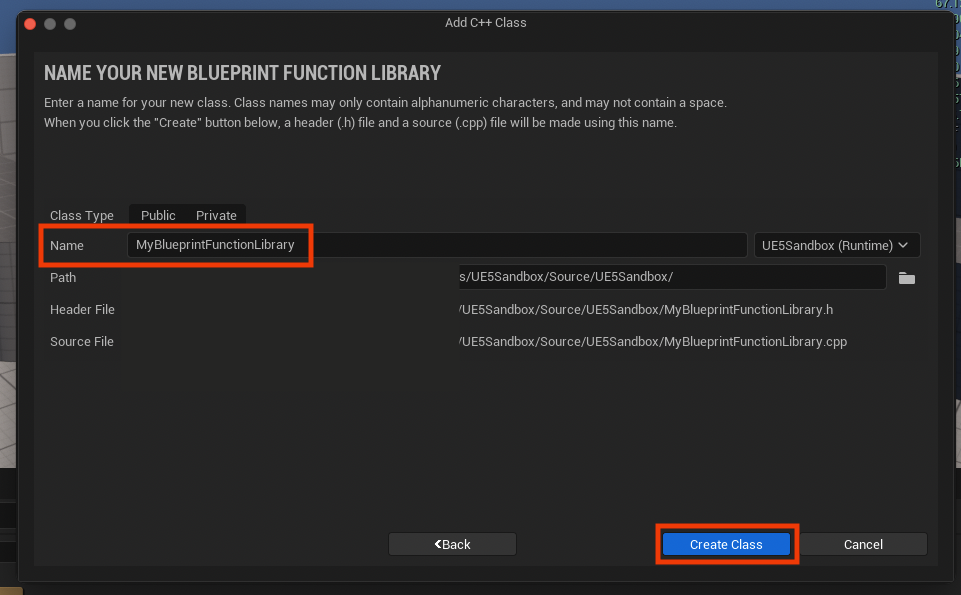
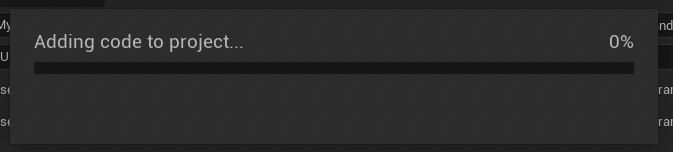
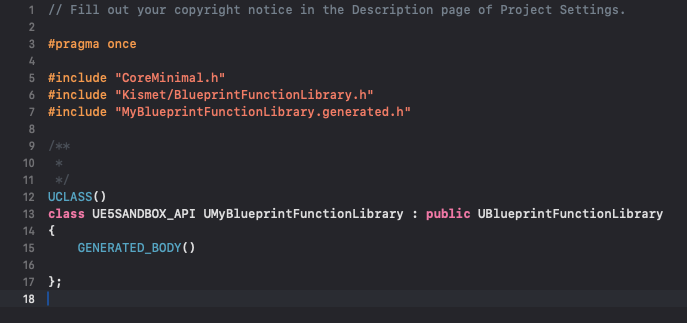
Upon selecting "New C++ Class," the engine presents a dialog box asking for a "Parent Class." To create a Blueprint Function Library, developers must scroll through the list and select "Blueprint Function Library." This ensures the new class inherits the necessary functionalities and macros to integrate seamlessly with both C++ and Blueprint systems. Naming conventions are important for maintainability and clarity. Following Unreal Engine’s recommended practices, a clear, descriptive name with PascalCase (e.g., MyBlueprintFunctionLibrary) is advisable. This consistency aids in project organization and team collaboration. After naming and confirming, the engine compiles the new C++ files, generating a .h (header) file for declarations and a .cpp (source) file for implementations. This compilation step is critical as it integrates the new C++ class into the project’s build system.
3. The Core of Integration: static Functions and UFUNCTION Macros:
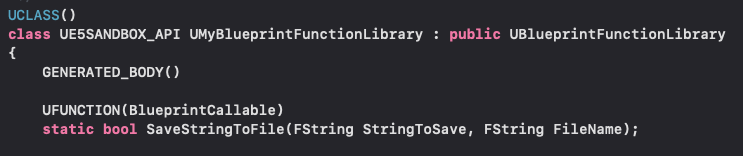
Within the newly generated .h and .cpp files, the developer can begin defining custom C++ functions. Two key elements are paramount for making these functions accessible and usable within Blueprints:

- The
staticKeyword: Declaring a function asstaticensures that it belongs to the class itself rather than an instance of the class. This means the function can be called directly using the class name (e.g.,UMyBlueprintFunctionLibrary::MyFunction()) without needing to create an object ofUMyBlueprintFunctionLibrary. This is fundamental for Blueprint Function Libraries, as it allows Blueprints to invoke these utilities universally without needing to manage object references. - The
UFUNCTIONMacro: This macro, provided by Unreal Engine’s reflection system, is placed above a function declaration in the header file. It signals to the engine that this C++ function should be exposed to the Unreal Editor, including the Blueprint visual scripting environment. TheUFUNCTIONmacro supports various specifiers that control how the function behaves in Blueprints, such asBlueprintCallable(making it callable from Blueprints),Category(organizing it in the Blueprint context menu), andBlueprintPure(indicating it has no side effects and can be executed multiple times without altering game state). For basic integration,BlueprintCallableis essential.
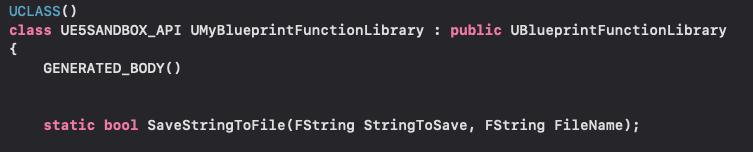
For example, to create a function that saves a string to a file, the declaration in the header file (.h) might look like this:
UCLASS()
class MYPROJECT_API UMyBlueprintFunctionLibrary : public UBlueprintFunctionLibrary

    GENERATED_BODY()

public:
    UFUNCTION(BlueprintCallable, Category = "File IO")
    static bool SaveStringToFile(FString InString, FString FileName);
;
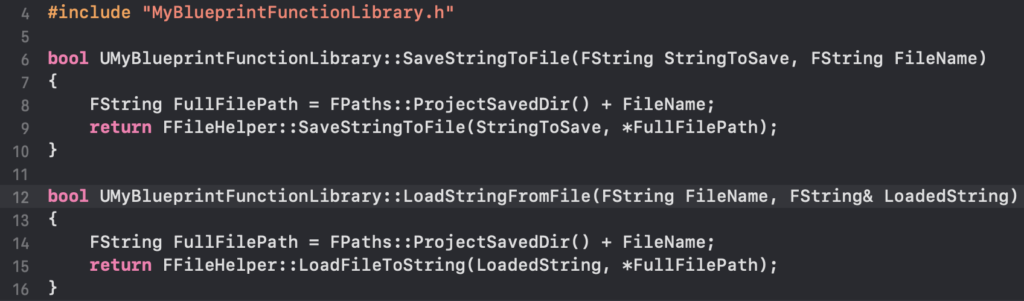
And its implementation in the source file (.cpp) would contain the actual C++ logic:
#include "MyBlueprintFunctionLibrary.h"
#include "Misc/FileHelper.h"
#include "HAL/PlatformFilemanager.h"

bool UMyBlueprintFunctionLibrary::SaveStringToFile(FString InString, FString FileName)

    // Get the project's Saved directory
    FString SaveDirectory = FPaths::ProjectSavedDir();
    FString AbsoluteFilePath = SaveDirectory + FileName;

    // Use FFileHelper to save the string to the specified file
    return FFileHelper::SaveStringToFile(InString, *AbsoluteFilePath);
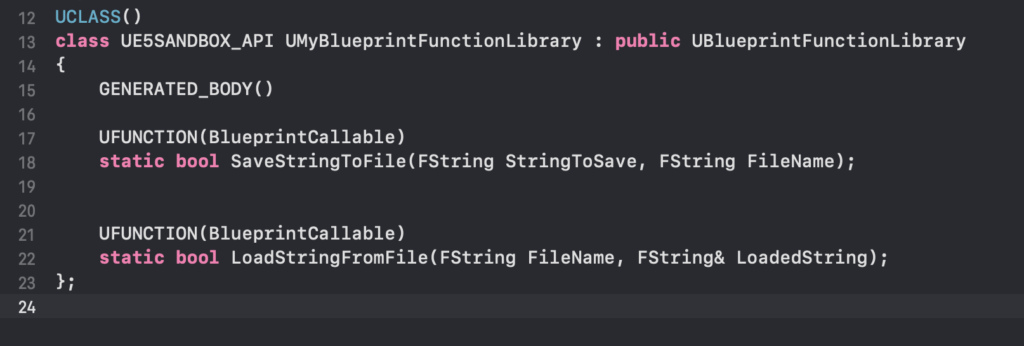
This simple example demonstrates how the FFileHelper utility class, part of Unreal Engine’s C++ standard libraries, is leveraged to perform direct file system operations, a task that would be significantly more complex or require specialized plugins in Blueprints. A corresponding function for loading a string from a file would follow a similar pattern, utilizing FFileHelper::LoadFileToString. Once the C++ code is written, the project must be recompiled to incorporate these new functions into the engine’s runtime and make them available in the editor.
Seamless Integration into Blueprint Workflows
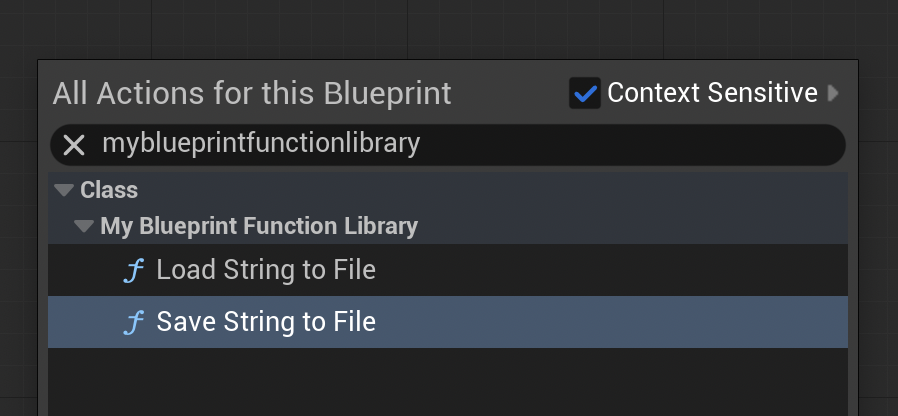
After successful compilation and an editor restart, the newly created C++ functions become instantly accessible within any Blueprint editor. By right-clicking in a Blueprint graph and typing the name of the function library or the function itself (e.g., "Save String to File"), the custom C++ nodes appear in the context menu, complete with their defined input and output pins. This seamless integration means that designers and Blueprint-focused developers can utilize highly optimized C++ functionalities without ever needing to delve into the C++ codebase, maintaining their preferred visual scripting workflow.
Demonstrating Real-World Impact
To illustrate the practical utility, consider the previously mentioned file I/O functions. A simple demonstration would involve:
- Saving Data: In a Level Blueprint, upon a
BeginPlayevent, a custom C++SaveStringToFilenode could be connected. A developer could input a string like "Save Test" and specify a filename such as "textfile-test.txt." Upon playing the game, this C++ function would execute, swiftly writing the string to the designated file within the project’s/Saveddirectory, confirming its operational capability and efficiency. - Loading Data: For loading, a file named "loadtest.txt" could be manually created in the
/Savedfolder, containing the text "Loading Test." In the Level Blueprint, aLoadStringFromFileC++ node could then be linked to aPrint Stringnode. When the game runs, the C++ function would quickly retrieve the "Loading Test" string from the file, and the Blueprint would then display it on screen, proving the successful bidirectional communication and data handling capabilities facilitated by the C++ Blueprint Function Library.
Implications for Game Development
The strategic adoption of C++ Blueprint Function Libraries carries significant implications for modern game development:
- Optimizing Critical Pathways: Development teams can identify performance bottlenecks within Blueprint graphs—often in loops, complex calculations, or data structures—and refactor only those specific sections into C++ functions. This targeted optimization provides substantial performance boosts without sacrificing the benefits of Blueprints for less demanding logic.
- Expanding Feature Sets: Access to the full C++ API and external libraries means developers are no longer constrained by the nodes natively exposed in Blueprints. Custom networking solutions, advanced AI decision-making algorithms, integration with hardware-specific APIs, or highly specialized data processing can all be implemented in C++ and made available to designers.
- Fostering Hybrid Development Teams: This approach empowers programmers to focus on performance-critical systems and low-level engine interactions, while designers and technical artists can iterate rapidly on gameplay mechanics and visual effects using Blueprints. This division of labor enhances team synergy, accelerates development cycles, and allows each team member to work within their area of expertise. It bridges the gap between different skill sets, promoting a more collaborative and efficient workflow.
- Improving Project Scalability: Projects can begin with rapid prototyping in Blueprints, and as they evolve and scale, performance-intensive components can be gradually transitioned to C++ Blueprint Function Libraries. This evolutionary approach avoids the need for costly and time-consuming complete rewrites, allowing projects to maintain momentum while continuously optimizing for performance and complexity.
Conclusion
The C++ Blueprint Function Library stands as a testament to Unreal Engine 5’s flexible and powerful architecture. It offers a vital mechanism for game developers to overcome the inherent performance limitations of visual scripting while retaining its numerous advantages. By providing a direct and efficient bridge between C++ and Blueprints, this functionality allows for the creation of high-performance, feature-rich games that are both rapidly prototyped and robustly optimized. Understanding and strategically utilizing C++ Blueprint Function Libraries is not merely an optional technique but a crucial skill for any developer aiming to push the boundaries of game development within Unreal Engine 5, striking an optimal balance between agility, functionality, and unparalleled performance.
About the Author








