The itch.io desktop application has recently undergone a substantial overhaul, rolling out two major updates, v26.15.0 and v26.17.0, followed by a critical hotfix, v26.18.0, addressing a prevalent MacOS crashing issue. These updates, developed in response to extensive user feedback and identified challenges from the platform’s issues tracker, introduce a suite of enhancements aimed at significantly improving the user experience, particularly concerning library management, game launch customization, and overall application stability. The core focus of these revisions centers on integrating large game bundles seamlessly into the user library, providing granular control over game execution parameters, enabling installation of platform-untagged downloads, and refining the in-app search functionality. This comprehensive upgrade underscores itch.io’s continuous commitment to fostering a robust and user-friendly ecosystem for independent game developers and players alike.
Addressing Critical Issues: The MacOS Hotfix
Immediately following the deployment of the initial updates, a critical issue emerged where some MacOS users experienced persistent application crashes. In a swift response, itch.io developers released hotfix v26.18.0. This rapid patch aimed to stabilize the application for affected users, preventing it from entering a continuous crash loop. Users experiencing these issues were advised to reinstall the application from the official setup program available on the itch.io website to ensure a clean and stable installation. This quick turnaround on a critical bug highlights the development team’s dedication to maintaining a reliable platform, especially given the diverse operating systems its user base employs. The incident, while disruptive for a subset of users, also served as a testament to the agility and responsiveness of the platform’s engineering efforts in mitigating widespread technical difficulties. Such immediate responses are crucial for maintaining user trust and ensuring the accessibility of the platform’s expanding features.
Transforming Library Management: Comprehensive Bundle Integration
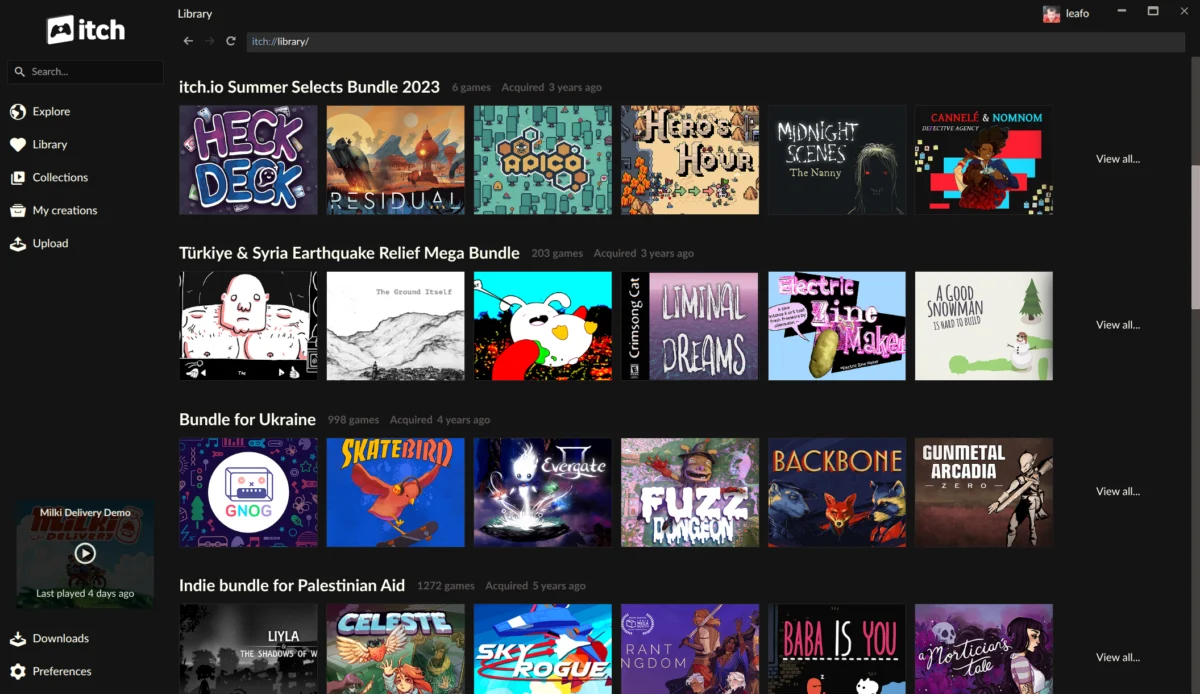
Perhaps the most impactful enhancement delivered in these updates is the profound improvement in how the itch.io app handles game bundles. Historically, itch.io has been a significant host for colossal game bundles, often organized for charitable causes or massive curated collections. Notable examples include the "Bundle for Racial Justice and Equality," which featured an astounding 1,741 items and was purchased over 800,000 times, and the "Bundle for Ukraine," comprising nearly 1,000 items and attracting over 400,000 buyers. The sheer scale of these initiatives presented a unique technical challenge for the platform’s backend infrastructure. Generating individual download keys for every item within such bundles for every purchaser would have resulted in an astronomical number of database entries—potentially exceeding a billion rows for the Racial Justice bundle alone.
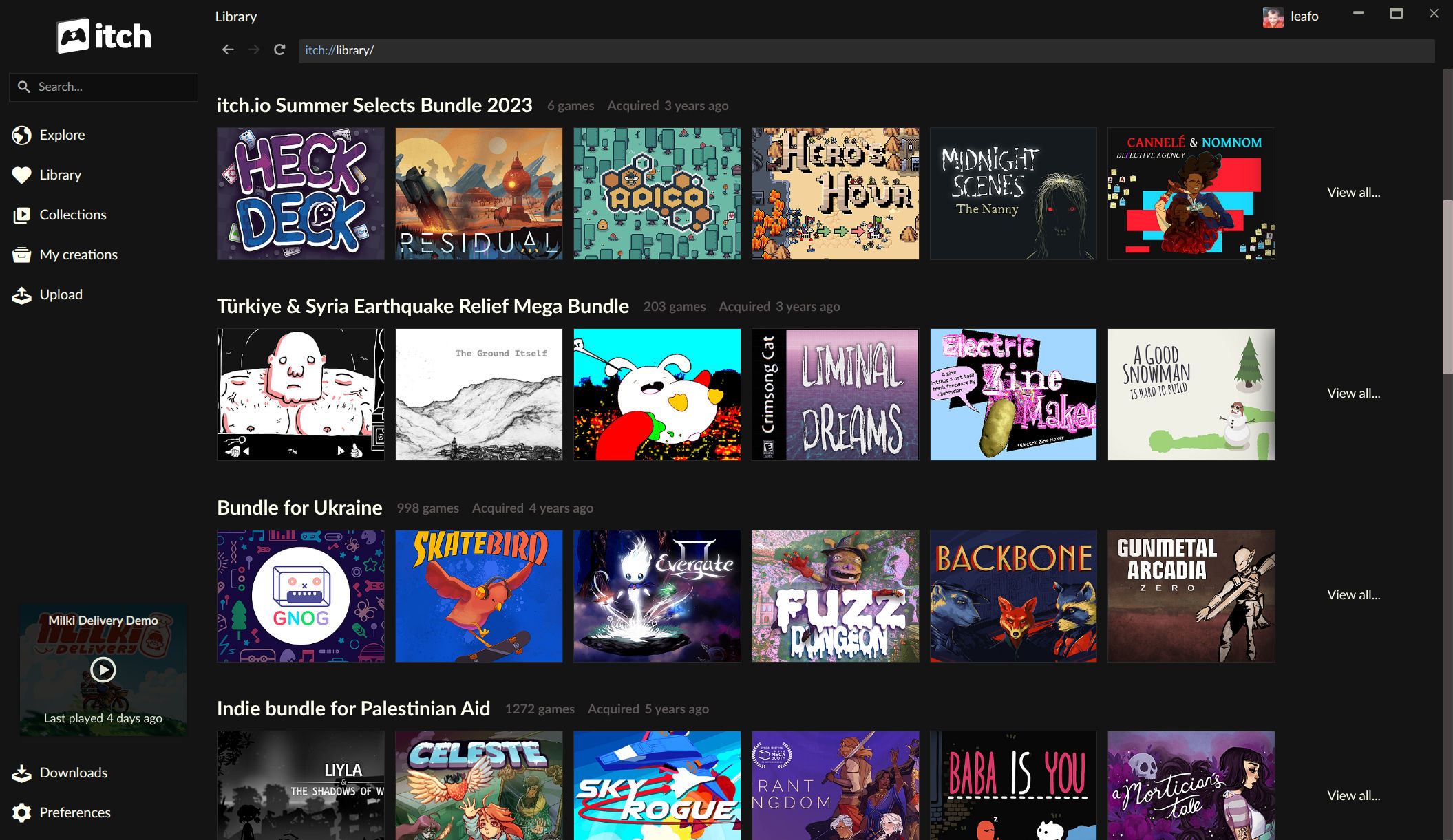
To circumvent this, itch.io initially implemented a system where ownership of these massive bundles was recorded as a single entity. Individual game download keys were only generated and assigned when a user explicitly "claimed" a specific game on the website. While effective for backend management, this approach created a significant hurdle for users interacting with their extensive libraries through the desktop application. Games acquired through these bundles would not appear in the app until manually claimed via the web interface, leading to a fragmented and often frustrating discovery experience for users who owned hundreds or even thousands of games through these collections. Many valuable indie titles remained hidden or difficult to access within these vast digital archives.
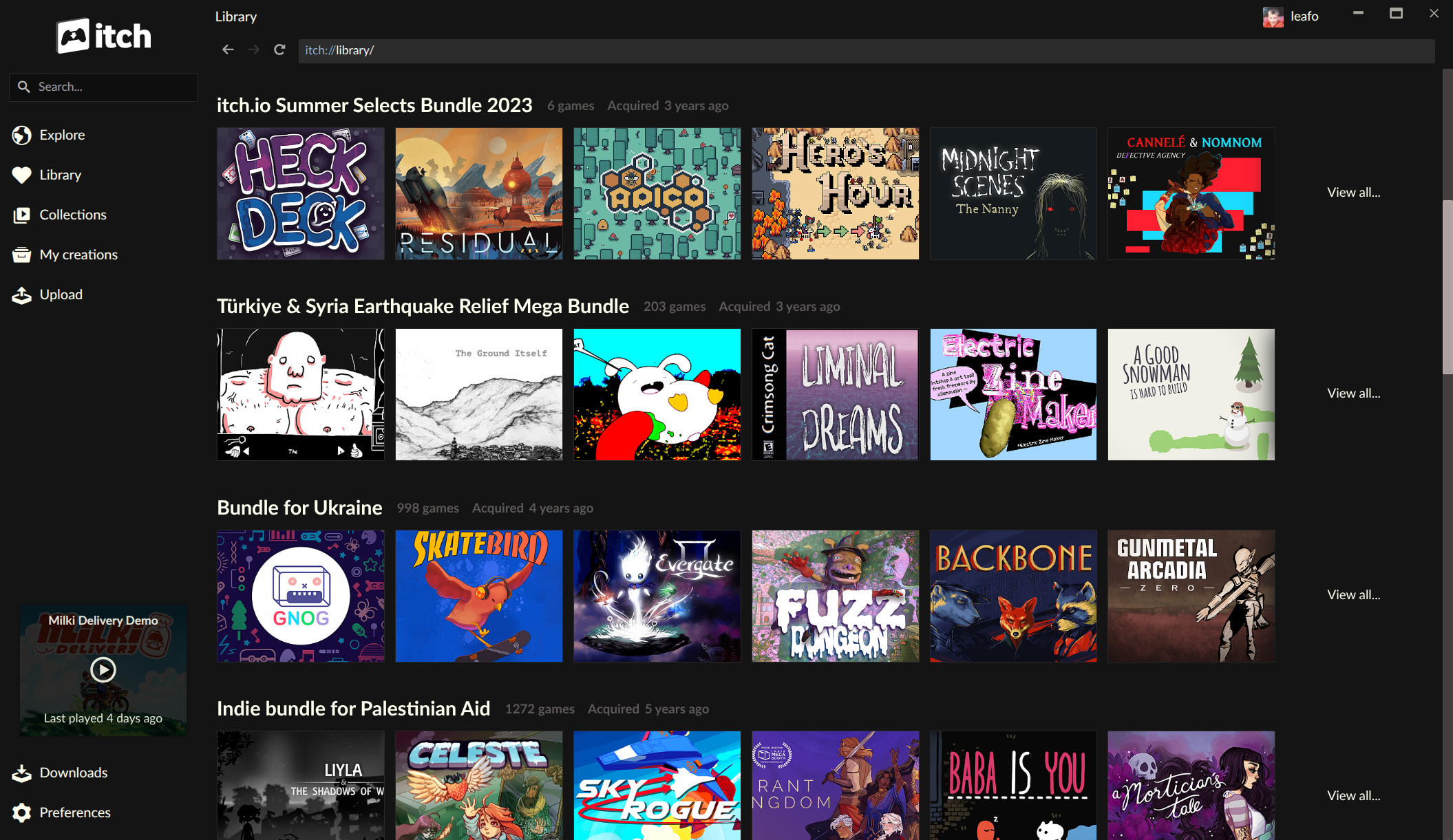
The latest updates fundamentally transform this dynamic. The itch.io app now possesses an inherent understanding of bundle ownership. This means that bundles acquired by users are now treated as first-class citizens within their digital library, each presented with its dedicated page. These bundle pages offer comprehensive listings of every game included, complete with robust filtering options. Users can now sort games by various criteria, perform title-based searches, and filter by platform compatibility, game classification, and installation status directly from within the bundle’s page. Crucially, games can now be installed directly from these bundle listings, eliminating the prior necessity of navigating to the website to claim individual titles. This streamlined approach significantly enhances game discoverability and accessibility, empowering users to fully explore and utilize the immense value contained within their purchased bundles. For users who invested in these large collections but struggled with navigating their contents, the new app functionality offers a compelling reason to re-engage and discover previously overlooked gems. Furthermore, this development aligns with itch.io’s broader strategic initiatives, as the platform recently revamped its bundle hosting tools, signaling a reinforced commitment to this unique aspect of its ecosystem. The integration of bundles directly into the app is a logical extension of these efforts, ensuring a cohesive and intuitive experience across all touchpoints.
Empowering Users: Advanced Per-Game Launch Settings
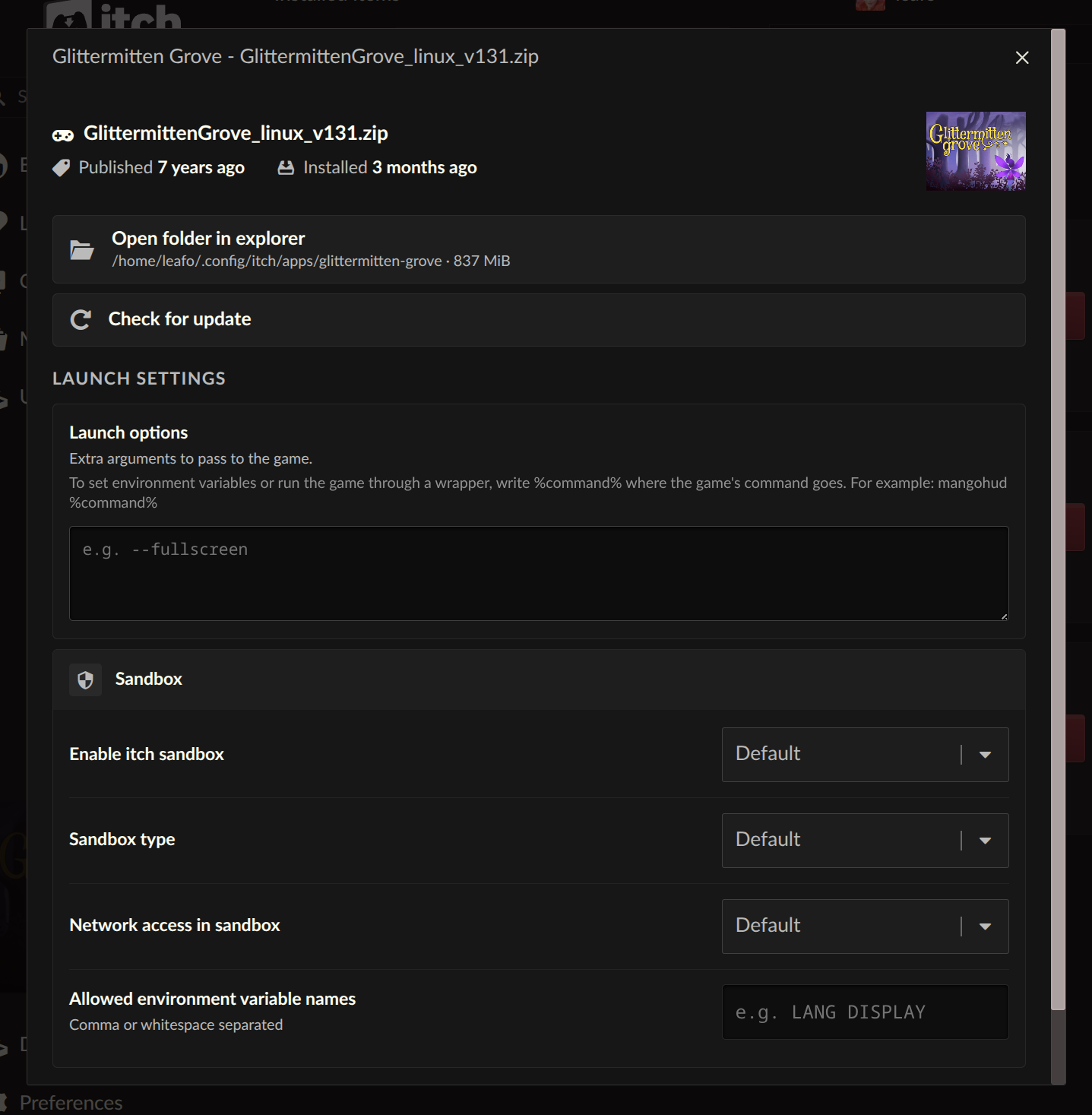
Beyond library organization, the updates introduce a new level of granular control over individual game execution. Each installed game within the itch.io app now features a dedicated "Launch settings" area, accessible through the game’s manage dialog. This new section caters to power users, developers, and those seeking to optimize their gaming experience by providing advanced configuration options.
Within the Launch settings, users can now configure critical parameters on a per-game basis, including sandbox restrictions, network access, and environment variables. Sandbox restrictions allow users to control the level of isolation for a game, potentially enhancing security or preventing unintended system interactions. Network access controls provide a means to manage whether a game can connect to the internet, a useful feature for offline play or for games where network functionality is not desired. Environment variables offer a powerful way to inject specific system-level configurations directly into a game’s runtime environment, which can be invaluable for debugging, compatibility adjustments, or for custom modding setups that require specific paths or flags.
A particularly anticipated feature is the new "Command pattern" option for launch arguments. This addresses a long-standing request from the community for more flexible game launch options. Previously, users might have been limited to passing simple arguments directly to a game executable. The Command pattern option now allows for more complex scenarios. Users can still provide plain arguments, but they can also utilize a "%command%" pattern. This pattern acts as a placeholder for the game’s executable command, enabling users to wrap the primary game launch within another command. For instance, this allows users to easily integrate compatibility layers like Wine or Proton on Linux systems, launch games through debugging tools, or use performance monitoring utilities without manually configuring complex scripts outside the application. This level of customization significantly enhances the utility of the itch.io app as a central launch point for diverse gaming setups, providing a more robust and adaptable environment for independent titles, many of which may require specific configurations to run optimally or to be experimented with.
Enhancing Compatibility and Flexibility: Platform-Agnostic Downloads
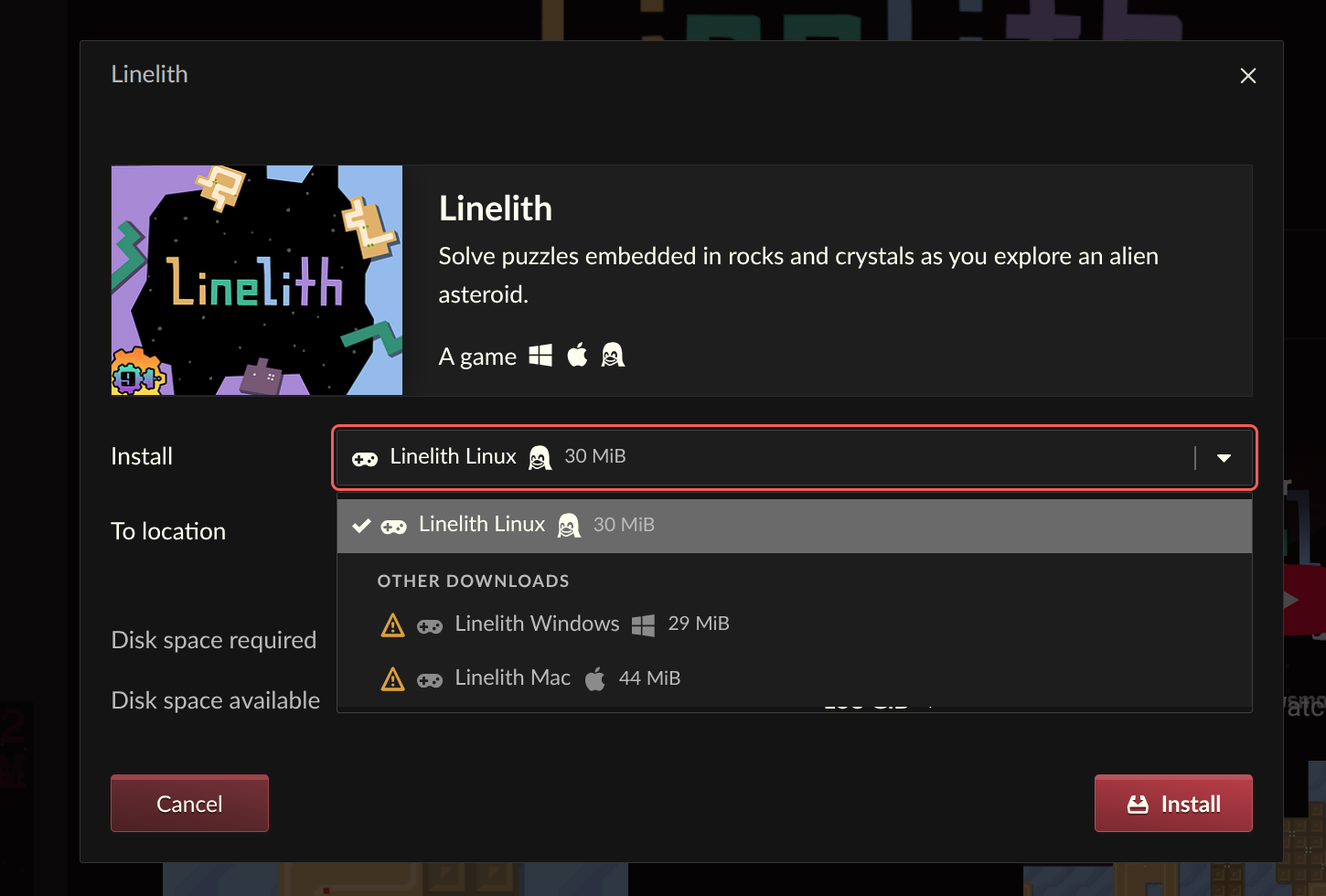
Another significant improvement is the newfound ability to install game downloads that are not explicitly tagged for the user’s current operating system. In the past, the itch.io app would typically only display and allow installation of builds specifically marked by the developer for the user’s detected platform (e.g., Windows builds for Windows users, Linux builds for Linux users). While this ensured a straightforward experience for most, it presented a limitation for users who wished to employ compatibility layers or access alternative builds.
The updated install dialog now includes an option to reveal and install downloads regardless of their platform tag. This is particularly beneficial for Linux users who often rely on compatibility layers such as Wine or Proton to run Windows-native games. With this feature, a Linux user can now directly access and install a Windows build of a game through the itch.io app, then configure it to launch via their preferred compatibility layer using the new launch settings. Similarly, developers or advanced users might wish to download a specific build for testing on a different virtual environment or for archival purposes, even if it’s not their primary OS. This flexibility significantly broadens the scope of games accessible through the app, empowering users to experiment with different configurations and expand their gaming libraries beyond strict platform limitations. It reflects an understanding of the diverse and often creative ways indie game players interact with their software, moving towards a more inclusive and adaptable digital distribution model.
Streamlining Navigation: The Revamped Sidebar Search
The updates also bring a noticeable change to the application’s sidebar search functionality. The previous iteration of the search utilized the platform’s API autocomplete feature, which, while offering suggestions, often presented items in an order that users found confusing or inefficient for quickly locating specific content. This design made it challenging to effectively discover new games or even pinpoint titles already within a user’s extensive library, particularly given the platform’s vast catalog of independent creations.
Recognizing this user experience bottleneck, the sidebar search has been replaced with a more focused approach. The development team articulated that autocomplete is best suited for scenarios where users already have a strong idea of what they are looking for and simply need to complete a known query. For broader discovery and more comprehensive searches, the full search experience available on the itch.io website remains the optimal tool. The revamped sidebar search, therefore, aims to be a more direct and less cluttered interface, likely prioritizing installed games or recently played titles for quick access, while guiding users towards the more powerful web-based search for broader exploration. This refinement is intended to create a clearer distinction between quick in-app navigation and comprehensive content discovery, thereby improving overall user flow and reducing cognitive load within the application.
Broader Context: itch.io’s Commitment to the Indie Ecosystem
These latest updates are not isolated incidents but rather reflective of itch.io’s ongoing commitment to evolving its platform to better serve the independent game community. Since its inception in 2013, itch.io has distinguished itself as a developer-friendly storefront, offering flexible revenue sharing models and a highly customizable publishing experience. Its role in facilitating massive charity bundles has also solidified its position as a socially conscious platform within the gaming landscape. The challenges posed by managing these extensive bundles, as detailed in the technical discussions surrounding the recent updates, underscore the unique demands placed on a platform that champions open access and diverse content.
The continuous cycle of updates, addressing both critical bugs and long-standing feature requests, demonstrates a proactive approach to platform development. By focusing on areas such as robust library management for bundles, advanced user controls for game launches, and enhanced cross-platform compatibility, itch.io is not merely maintaining its service but actively striving to deepen its utility for its diverse user base. These improvements facilitate better game discovery for players, provide more control for advanced users and developers, and ensure the app remains a stable and powerful gateway to a vast and ever-growing collection of independent games. The development team’s transparent communication, including detailed changelogs on GitHub, further fosters trust and engagement within its community, inviting users to track progress and contribute feedback.
User Engagement and Future Outlook
Users eager to experience these enhancements can download the latest version of the itch.io app from the official website at https://itch.io/app. For those who already have the application installed, the update process is designed to be seamless, with the app typically updating itself automatically. Detailed changelogs for both v26.15.0 and v26.17.0 are publicly available on GitHub, providing an in-depth look at all the changes, bug fixes, and new features implemented. The rapid deployment of the MacOS hotfix further illustrates the iterative and responsive nature of itch.io’s development philosophy. As the platform continues to grow and adapt to the needs of the indie game world, these updates solidify its position as a vital and increasingly sophisticated tool for both creators and consumers of independent interactive entertainment. The commitment to addressing user pain points and empowering greater control over the gaming experience bodes well for the future evolution of the itch.io ecosystem.
About the Author