Unreal Engine 5 (UE5) continues to empower developers with robust tools designed for efficiency and scalability, with Data Tables emerging as a cornerstone feature for structured data management. This intrinsic capability allows programmers and designers alike to centralize, organize, and access predefined lists of information, proving indispensable for the complex ecosystems of modern video games. At its core, a Data Table in UE5 serves as an asset that stores a collection of data, where each entry, or "row," conforms to a predefined structure, enabling rapid iteration and consistent data application across various game systems.
Understanding the Core Functionality
Data Tables are not merely simple lists; they represent a sophisticated approach to data serialization and retrieval within the engine. Each Data Table is fundamentally built upon a user-defined Struct (Structure), which dictates the types and arrangement of data that each row will contain. This architectural decision ensures data integrity and type safety, preventing common errors associated with loosely defined data. The ability to define a list of data and assign unique values based on a specific key – the "Row Name" – is paramount. This data is then stored as an asset directly within the project, making it effortlessly accessible and updateable from any part of the game’s codebase, whether in C++ or Blueprint visual scripting. Furthermore, the persistent nature of Data Tables within the editor means that designers can populate and modify game data during development, and these values will remain consistent and available at runtime, without requiring recompilation or complex database integrations.
Consider the immense data requirements of contemporary games: hundreds of unique items, dozens of enemy types, complex quest lines, and extensive localization data. Manually managing such vast datasets within individual Blueprint classes or hardcoding values becomes unwieldy, error-prone, and severely impedes development velocity. Data Tables address this by offering a single source of truth for game data, facilitating a streamlined workflow. For instance, item properties like damage values, rarity tiers, sell prices, or even visual asset paths can be uniformly managed. Similarly, enemy attributes such as health points, attack power, movement speed, and unique abilities can be configured and balanced in a centralized table, allowing for rapid adjustments without altering core game logic.
A Phased Approach to Data Table Implementation
The creation and utilization of Data Tables in UE5 follow a logical, structured progression, emphasizing modularity and clear definition. This process typically involves three foundational steps: defining categorical types with Enumerations (Enums), structuring the data schema with Structs, and finally, assembling the Data Table itself.
Phase 1: Defining Categorical Types with Enumerations (Enums)
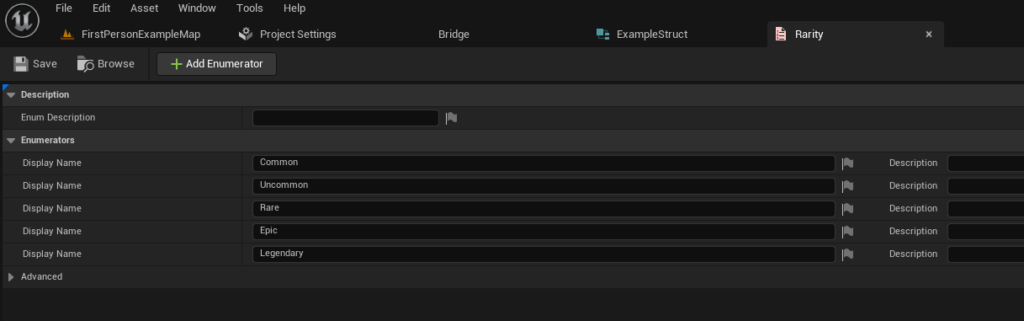
Before constructing the overarching data structure, it is often beneficial to establish clear categorical values using Enums. An Enum, short for Enumeration, is a distinct type that consists of a set of named integer constants. In game development, Enums are invaluable for representing discrete states or qualities in a type-safe and human-readable manner. For example, in an RPG setting, item rarity is a perfect candidate for an Enum, with values such as "Common," "Uncommon," "Rare," "Epic," and "Legendary."
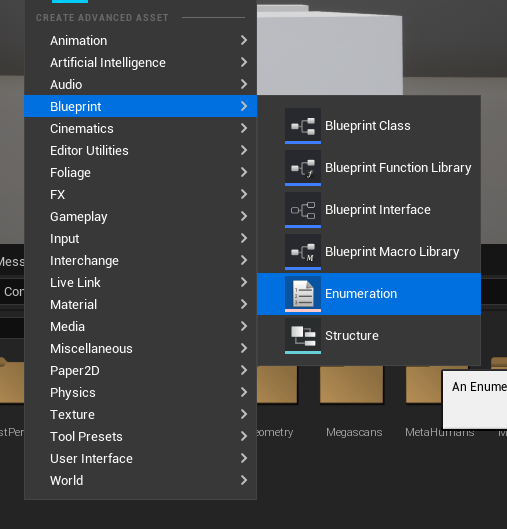
To create an Enum, developers typically navigate the Content Browser, right-click, and select "Enumeration" under the Blueprint category. The subsequent step involves defining the required values. For an item rarity system, this might include NewEnumerator0 (Common), NewEnumerator1 (Uncommon), NewEnumerator2 (Rare), etc., with descriptive names replacing the default ones for clarity and maintainability. This establishes a controlled vocabulary for specific data fields, enhancing readability and reducing potential errors compared to using raw integer values.
Phase 2: Structuring Data with Custom Structures (Structs)
With categorical types defined, the next critical step is to create the Struct that will serve as the blueprint for each row in the Data Table. A Struct in UE5 is a custom data type that groups together a collection of variables (or "members") of different types under a single name. It acts as a template, defining the precise schema for the information that each Data Table row will encapsulate.
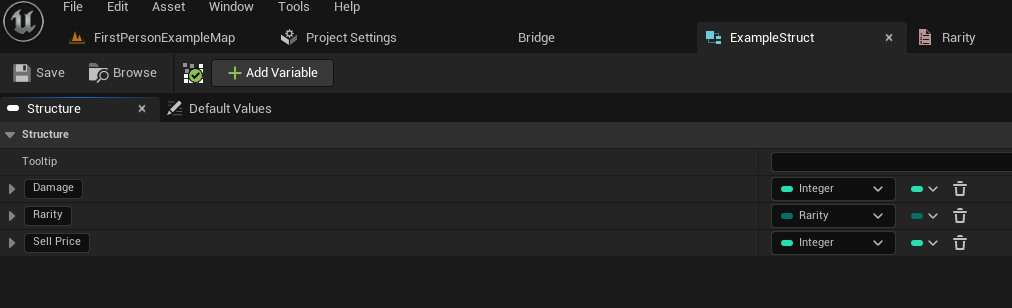
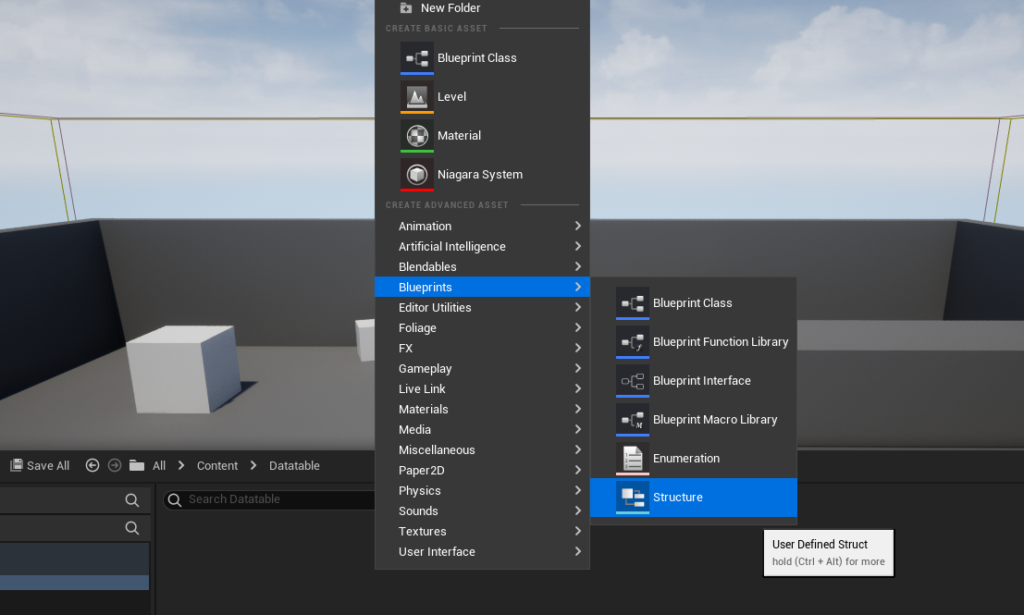
Creating a Struct is also initiated from the Content Browser, by right-clicking and selecting "Structure" within the Blueprints category. Once created, developers can add variables to this Struct, defining their types and default values. For an item data example, the Struct might include:
Damage(Integer or Float): Representing the item’s offensive capability.Rarity(Enum): Utilizing the previously created item rarity Enum to categorize the item’s quality.SellPrice(Integer): Indicating the monetary value when selling the item.ItemName(Text): For the item’s display name.Description(Text): A brief explanation of the item.IconPath(Soft Object Reference): A reference to the item’s visual icon.
This structured approach ensures that every entry in the Data Table will consistently possess these defined attributes, promoting data uniformity and simplifying data access later on.
Phase 3: Assembling and Populating the Data Table
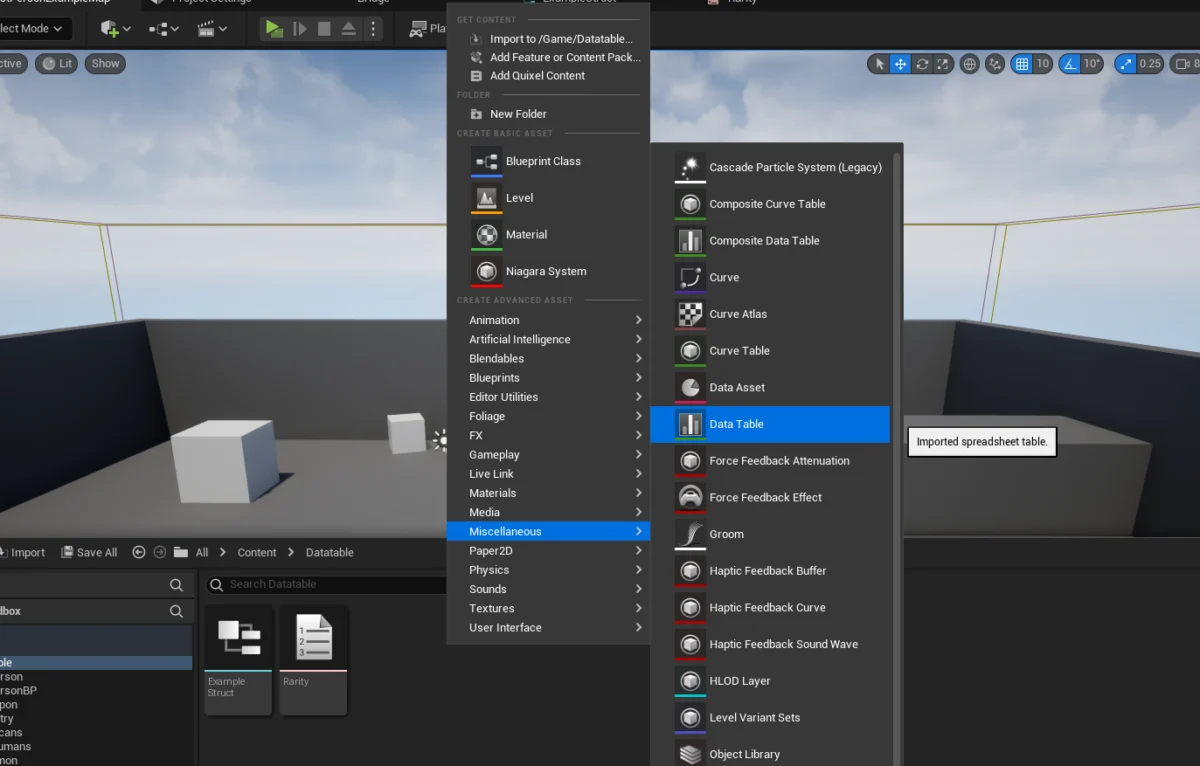
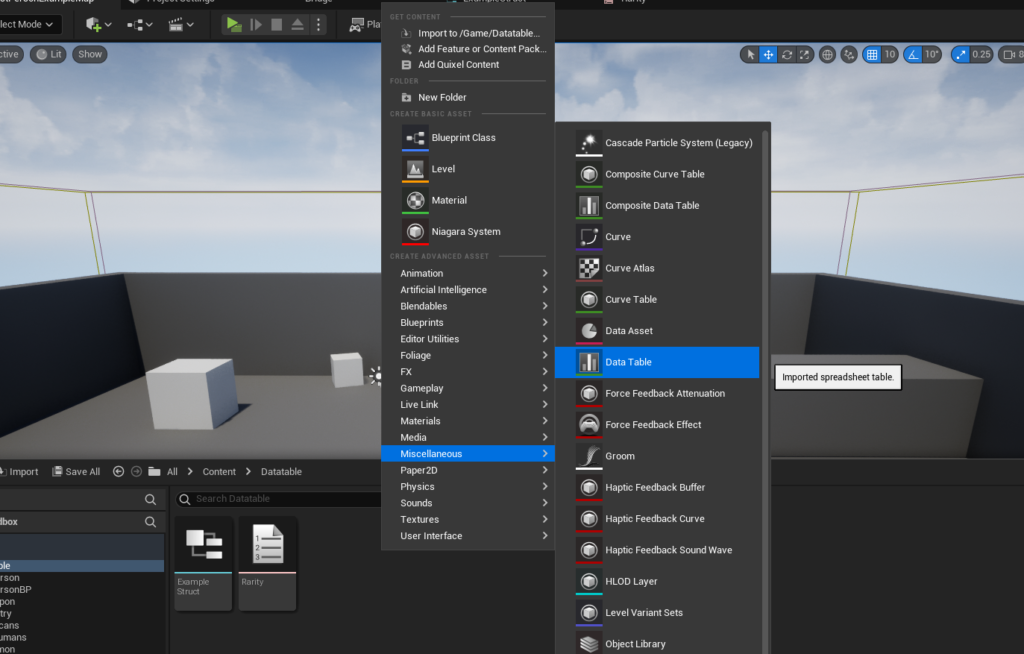
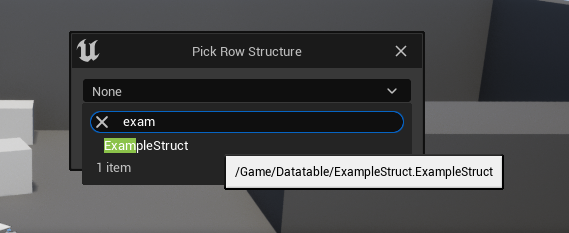
The final step in establishing a data-driven system is the creation of the Data Table itself. This asset binds the chosen Struct to a collection of rows, each representing a unique instance of that Struct’s data. From the Content Browser, developers right-click and select "Data Table" from the Miscellaneous category. Crucially, upon creation, the engine prompts the developer to select the Row Structure – this is where the custom Struct created in Phase 2 is linked. This linkage is fundamental, as it dictates the columns and data types available within the Data Table.
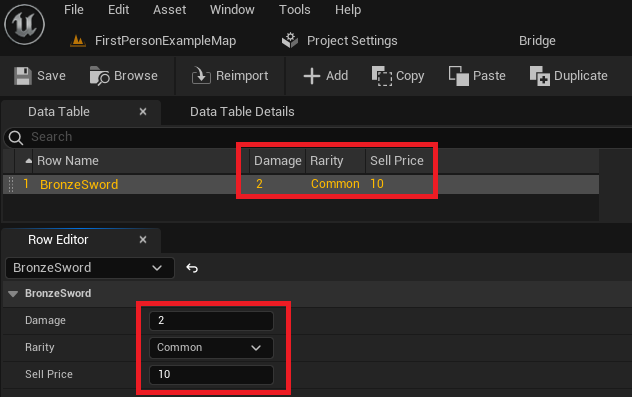
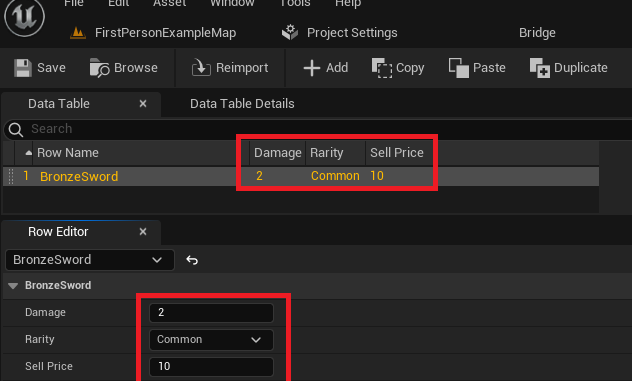
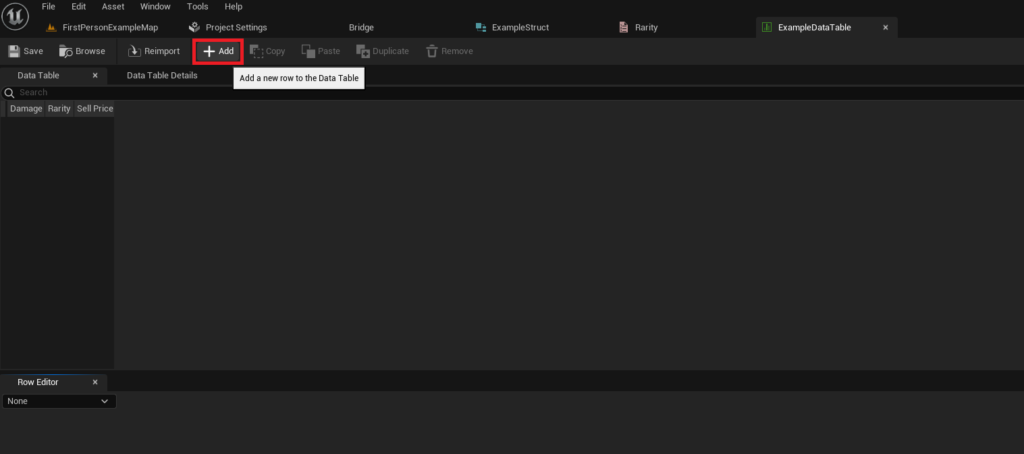
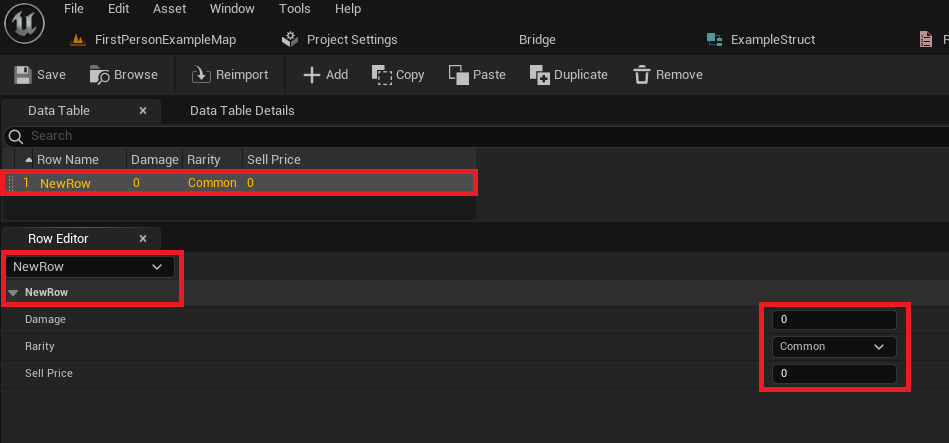
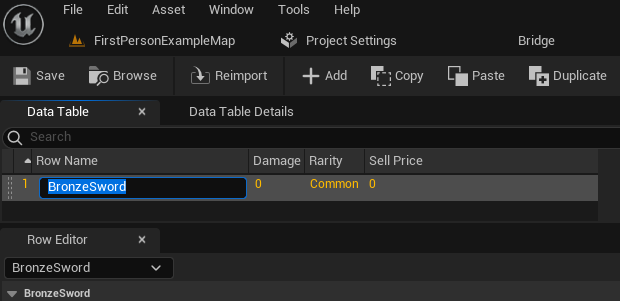
Once created and configured, the Data Table asset can be opened in the editor. Here, developers are presented with an intuitive interface to add new rows. Each new row automatically inherits the default values defined in the associated Struct. The "Row Editor" panel allows for easy modification of these values, and the main Data Table view updates dynamically. A significant feature is the ability to assign a unique "Row Name" to each entry, which acts as a primary key for efficient data retrieval. For instance, a row might be named "BronzeSword," and its associated data fields (Damage, Rarity, Sell Price) can be populated accordingly. This process is iterative, allowing for the creation of an extensive catalog of game assets or parameters. It is imperative for developers to frequently save their Data Table asset to prevent data loss.
Accessing and Utilizing Data Tables at Runtime
The true power of Data Tables manifests when their stored information is accessed and utilized by the game’s logic during runtime. UE5 provides straightforward Blueprint nodes and C++ functions to query Data Tables, allowing game systems to dynamically fetch necessary data based on context.
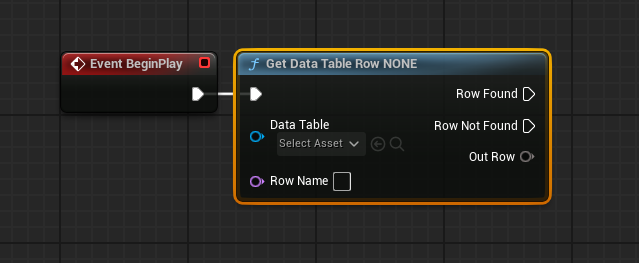
Direct Row Access: The most common method of data retrieval is through the Get Data Table Row node (in Blueprints) or its C++ equivalent. This node requires two primary inputs: a reference to the specific Data Table asset and the "Row Name" (key) of the desired entry. If a matching row is found, the node outputs a "Row Found" execution pin and an "Out Row" pin containing the requested data. The "Out Row" is a direct instance of the Struct linked to the Data Table. Developers can then "Split Struct Pin" on the Out Row to expose all the individual variables (e.g., Damage, Rarity, Sell Price) for immediate use in game logic. This method is ideal for fetching data for a specific item when it’s picked up, an enemy when it spawns, or a quest when it’s activated.
Iterative Processing: For scenarios requiring examination or processing of multiple or all entries within a Data Table, UE5 offers tools for iteration. The Get Data Table Row Names node can be used to retrieve an array containing all the unique Row Names present in a given Data Table. This array can then be connected to a For Each Loop node. Within each iteration of the loop, the Array Element (which is a Row Name) can be fed into a Get Data Table Row node. This allows the game logic to sequentially access the data for every single row in the Data Table, enabling operations such as populating an entire inventory screen, dynamically balancing game parameters, or performing bulk data validation. This pattern is particularly useful for systems that need to react to or display all available options, such as crafting recipes or character customization choices.
Broader Impact and Strategic Implications for Game Development
The implementation of Data Tables within Unreal Engine 5 carries significant strategic implications for the modern game development pipeline, extending beyond mere data storage.
- Enhanced Efficiency and Faster Iteration: By centralizing data, Data Tables drastically reduce the time spent searching for and modifying values across disparate assets. Designers can adjust parameters like weapon damage or enemy health in a single table, seeing immediate effects without developer intervention or lengthy recompilations. This accelerates the iteration loop, a critical factor in agile development.
- Improved Collaboration: Data Tables serve as a shared data source, enabling seamless collaboration between different disciplines. Game designers can focus on balancing and content creation, artists on asset integration, and programmers on core logic, all referencing the same data. This minimizes miscommunication and conflicting data entries, fostering a more cohesive development environment.
- Simplified Maintainability and Scalability: As games grow in complexity, managing thousands of data points becomes a daunting task. Data Tables provide a structured, easily navigable interface for this. Updates and bug fixes related to data can be applied to the table directly, rather than sifting through numerous Blueprint graphs or C++ files. This organized approach also makes scaling the project easier, as new content can be added by simply extending the Data Table.
- Accessibility for Non-Programmers: A key advantage of Data Tables is their accessibility. Content creators, level designers, and QA testers can directly interact with game data through the UE5 editor without needing advanced C++ programming knowledge. This democratizes content creation, allowing a broader team to contribute to the game’s core values and attributes.
- Support for Data-Driven Design: Data Tables are fundamental to data-driven design principles. Instead of hardcoding behaviors, developers can define them through data. This makes game systems more flexible and extensible. Want to add a new weapon type? Just add a row to the item Data Table. Need to adjust the difficulty of an enemy? Change its stats in the enemy Data Table. This approach fosters robust, adaptable game mechanics.
- Localization Management: Data Tables are excellent for managing localization efforts. Text strings for different languages can be stored in a Data Table, indexed by a unique ID. When the game loads, it can query the Data Table for the appropriate language-specific text.
Conclusion
Unreal Engine 5’s Data Tables represent more than just a convenient feature; they embody a fundamental paradigm shift towards more organized, efficient, and collaborative game development. By providing a powerful yet accessible mechanism for defining, populating, and accessing structured data, they empower development teams to manage the inherent complexity of modern game projects. From defining intricate item properties and enemy behaviors to managing localization strings and balancing parameters, Data Tables streamline workflows, accelerate iteration, and foster a robust data-driven design methodology. As games continue to evolve in scope and ambition, the strategic utilization of tools like UE5 Data Tables will remain critical for achieving high-quality, maintainable, and scalable interactive experiences. The ability to establish a single source of truth for project data, accessible to all team members regardless of their technical expertise, firmly positions Data Tables as an indispensable asset in the Unreal Engine developer’s toolkit.
About the Author