The landscape of modern video game development has been significantly enhanced with the robust, built-in SaveGame system introduced in Unreal Engine 5 (UE5). This integral feature addresses the fundamental requirement for persistent game data, allowing developers to effortlessly save and load player progress, world states, and various in-game metrics to and from local files. The system’s design emphasizes ease of use, leveraging a blueprint-centric approach that democratizes complex data management for a wide spectrum of developers, from independent creators to large-scale AAA studios.
The Indispensable Role of Data Persistence in Modern Gaming
In today’s gaming ecosystem, the ability to save and load game progress is not merely a convenience but a core expectation that profoundly impacts player retention and overall satisfaction. Industry data consistently shows that games lacking intuitive and reliable save mechanisms suffer from significantly higher player churn rates. A 2023 survey by Statista indicated that over 60% of players cite poor save functionality as a major deterrent to continuing a game, underscoring the critical nature of this feature. Without a seamless save/load experience, players are less likely to invest time in expansive open-world titles, narrative-driven adventures, or competitive multiplayer games that track progression. Historically, developers faced the arduous task of implementing bespoke save systems, a process fraught with potential for bugs, data corruption, and significant development overhead. This often involved intricate file I/O operations, serialization, and deserialization routines, demanding specialized programming expertise and exhaustive testing.
Architectural Overview: How Unreal Engine’s SaveGame System Functions
At its core, the UE5 SaveGame system operates through a dedicated SaveGame class, pre-configured to handle the serialization and deserialization of various data types. Developers extend this base class to create custom blueprints, embedding the specific variables they intend to save. These variables, encompassing almost every common type from simple integers and booleans to complex vectors and custom structures, are then written to a binary file stored securely on the user’s machine. Upon loading, the system reads this file, reconstructing the game state by populating the variables within the custom SaveGame object.
The system ensures cross-platform compatibility by managing file locations automatically based on the operating system:
- Windows: Data is typically stored in the Local Appdata folder.
- MacOS: Files reside in Library/Application Support.
- Linux: Data is saved in the
/home/username/.local/sharedirectory.
This abstraction layer eliminates the need for developers to manage platform-specific file paths, further simplifying the implementation process. The robustness of this system is a testament to Epic Games’ commitment to providing comprehensive tools that reduce boilerplate code and allow developers to focus on creative aspects.
Prerequisites and Target Audience for Implementation
While designed for ease of use, Epic Games assumes a foundational understanding of Unreal Engine’s development environment for developers intending to utilize the SaveGame system. Prospective implementers are expected to be familiar with:
- Unreal Engine Basics: Navigating the editor, managing projects, and understanding core engine concepts.
- Blueprint Fundamentals: Proficiency in visual scripting, including the creation and manipulation of blueprint actors.
- Variable Management: Adding and configuring variables within blueprint actors.
- Custom Game Instances: Understanding the role of the Game Instance as a persistent object throughout a game session, ideal for housing global save/load logic.
- Custom Events: Utilizing custom events for modular and organized blueprint logic.
- Input Actions: Configuring and responding to player input for triggering save and load operations.
These prerequisites highlight Epic’s strategy to empower a broad developer base, ensuring that even those with less C++ programming experience can leverage powerful engine features through its intuitive Blueprint system. The availability of extensive documentation and community resources further supports this learning curve.

A Step-by-Step Approach to Data Persistence

The implementation of a custom SaveGame system in UE5 follows a logical, modular process, primarily utilizing the engine’s Blueprint visual scripting language.
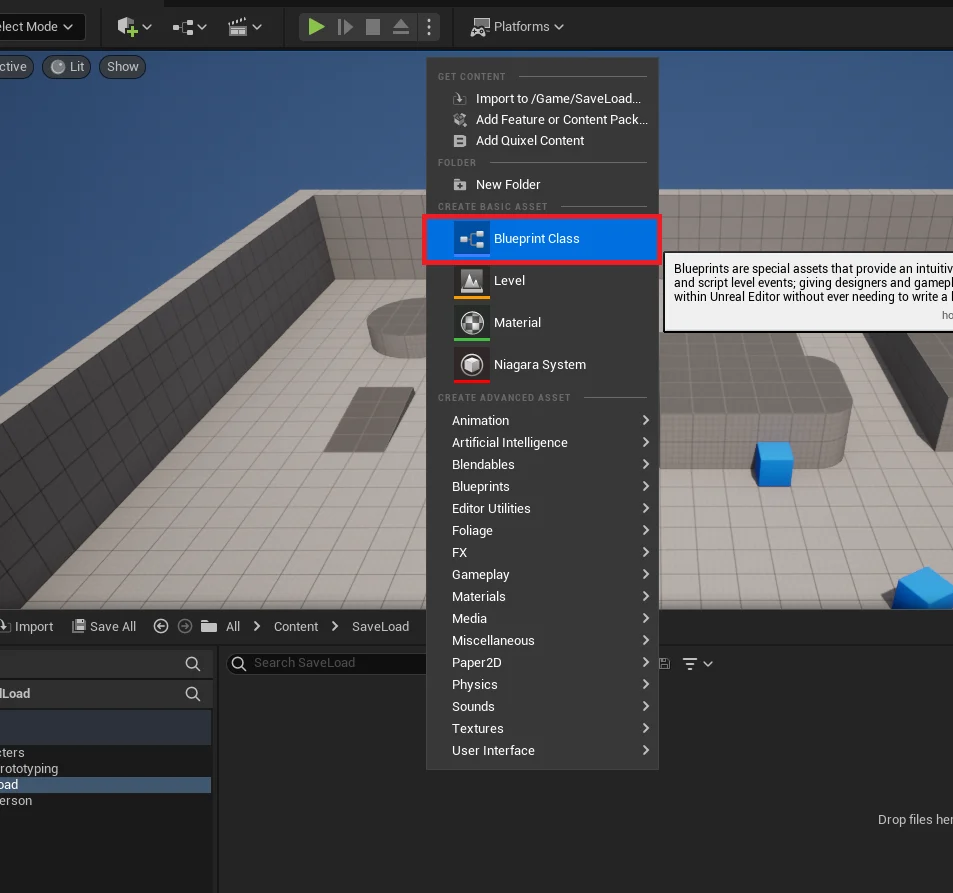
1. Creating the Custom Save Class:
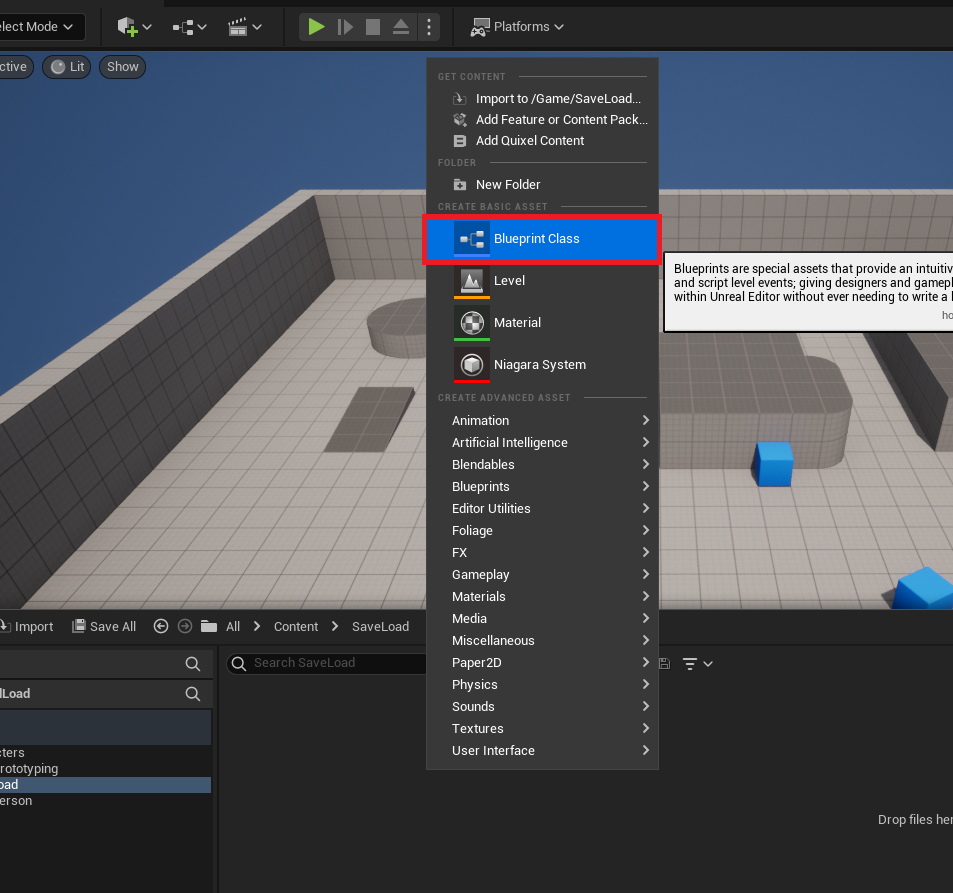
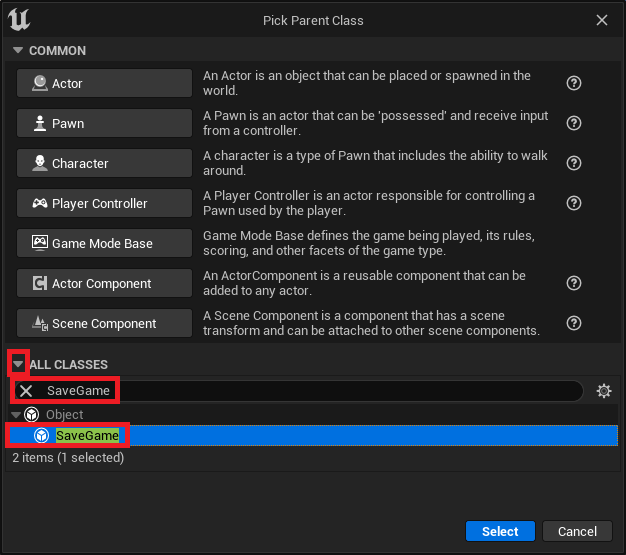
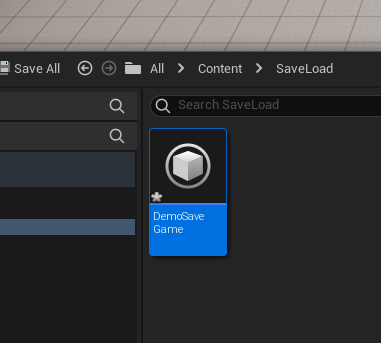
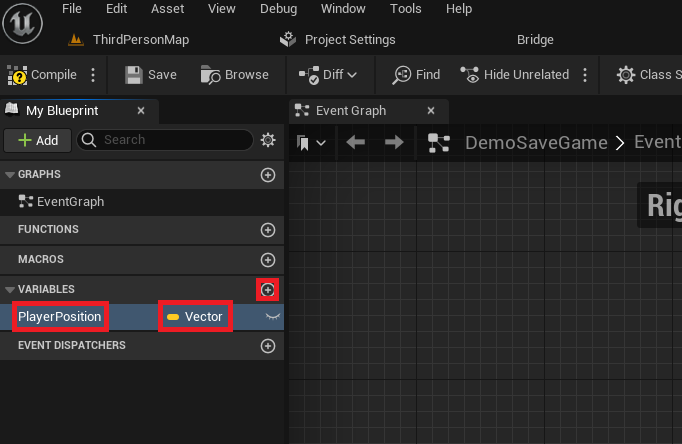
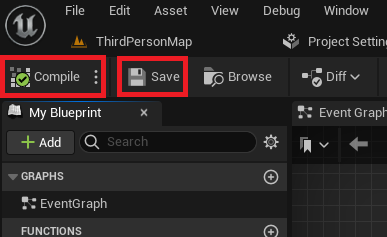
The initial step involves creating a new Blueprint class derived from the SaveGame base class. This custom class, for instance, named "DemoSaveGame," serves as the central repository for all data intended for persistence. Within this class, developers define variables—such as a Vector variable named "PlayerPosition" to store a character’s coordinates—that will hold the game state. Once defined, these variables are compiled and saved, making them ready for interaction. This modular approach ensures that save data is neatly organized and easily extensible as a game evolves.
2. Integrating Save and Load Functionality into the Game Instance:
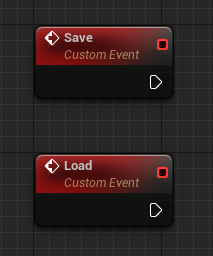
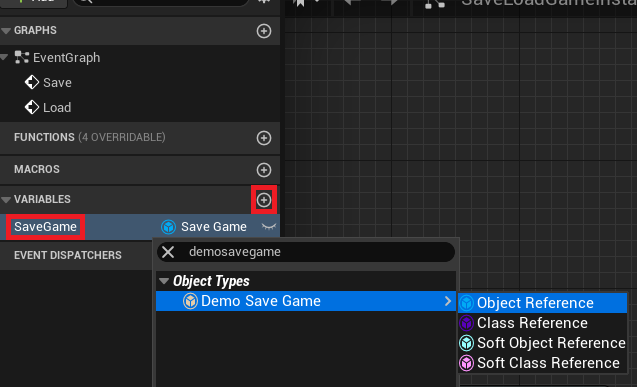
The Game Instance is the ideal location for save/load logic due to its persistence across level changes and its single-instance nature throughout the game’s lifecycle. Within the custom Game Instance blueprint, two custom events, "Save" and "Load," are established. A new variable, typed to the custom SaveGame class (e.g., "DemoSaveGame"), is also added to the Game Instance to maintain a reference to the active save object.
3. Implementing the Load Logic:
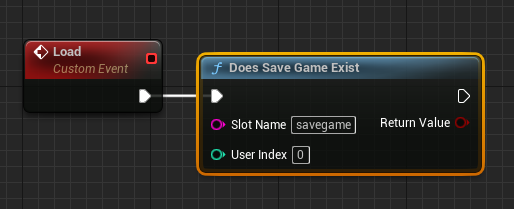
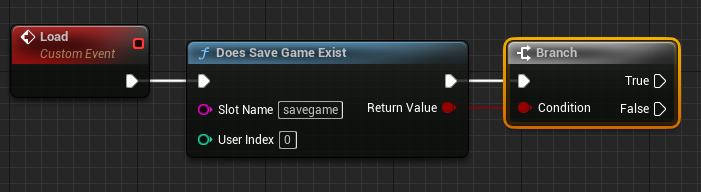
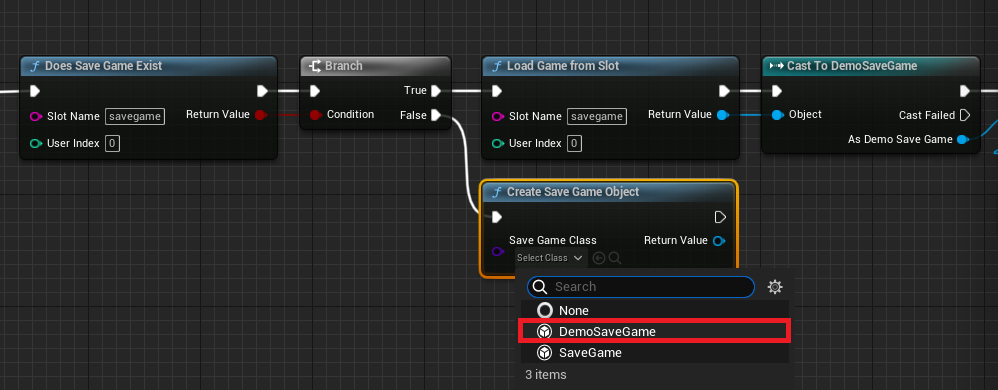
The "Load" event’s blueprint logic begins with a Does Save Game Exist node, which checks for the presence of a save file associated with a specified "Slot Name" (e.g., "savegame"). This "Slot Name" acts as a unique identifier for different save files, enabling multiple save slots if desired.
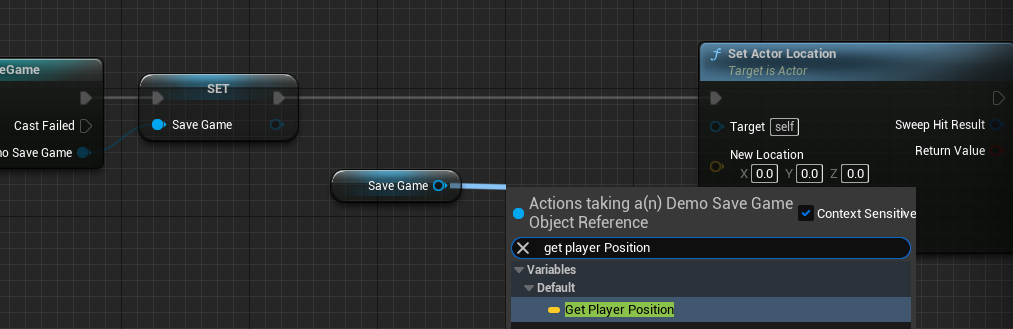
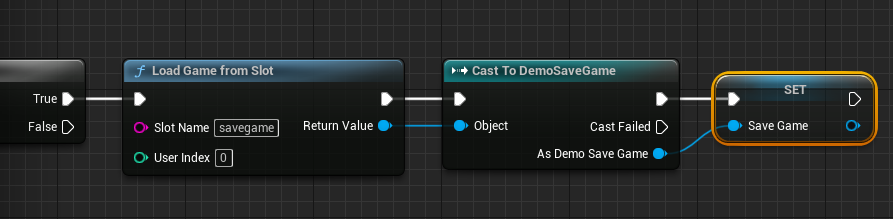
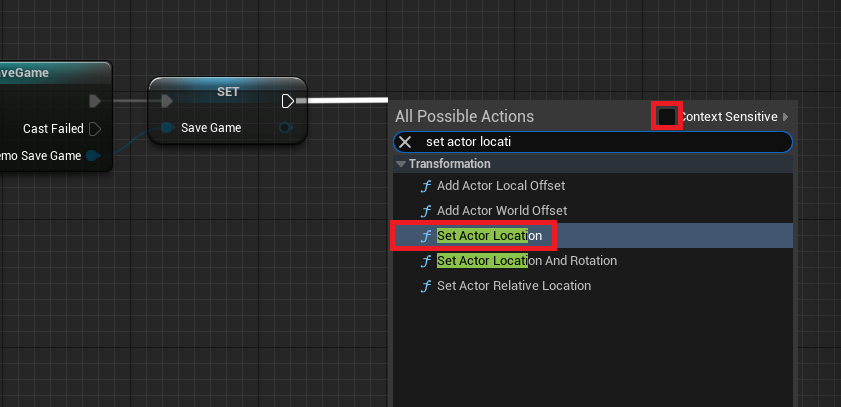
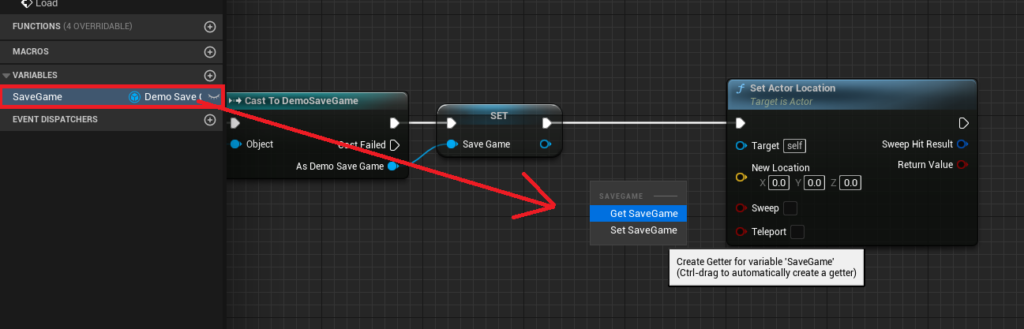
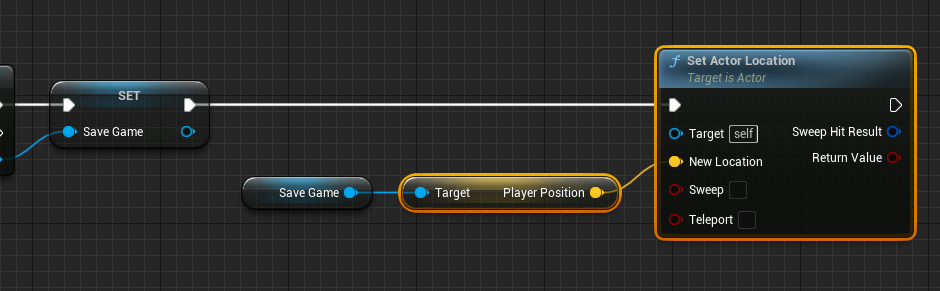
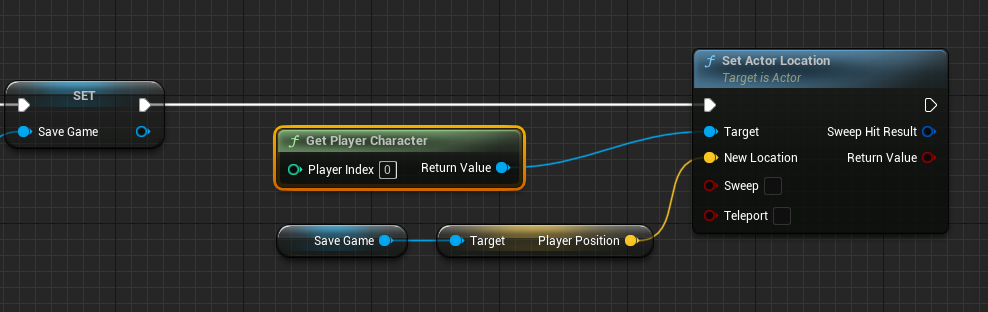
- If the Save File Exists (True Branch): The system proceeds to a
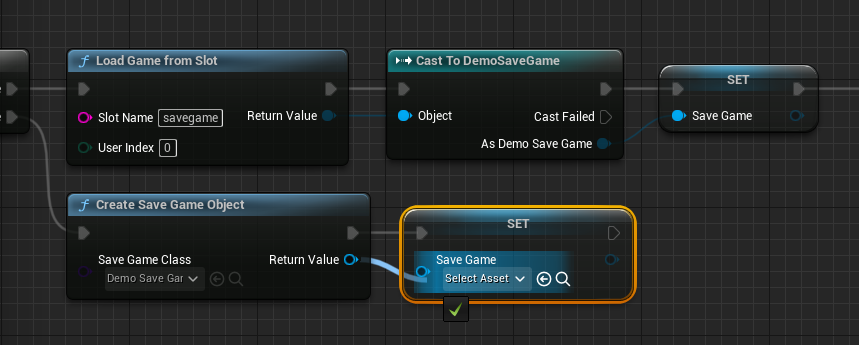
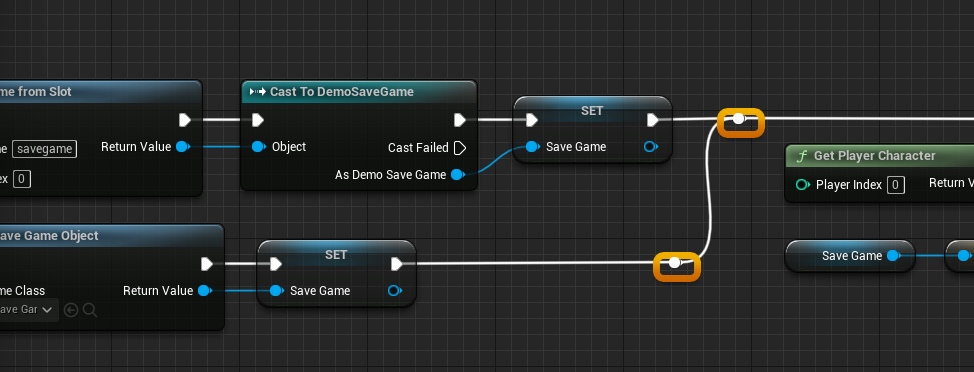
Load Game From Slotnode, retrieving the data from the designated slot. The returnedSaveGameobject is thenCast Tothe customSaveGameclass (e.g., "Cast to DemoSaveGame") to access its specific variables. TheGame Instance‘s reference to theSaveGameobject is updated, and the loaded data is applied. For instance, the "PlayerPosition" variable is retrieved from the loadedSaveGameobject, and aSet Actor Locationnode, targeting theGet Player Character, teleports the player to the saved coordinates. - If the Save File Does Not Exist (False Branch): A new
Create Save Game Objectnode is executed, instantiating a freshSaveGameobject of the custom class. This new object is then assigned to theGame Instance‘sSaveGamevariable, initializing the save system for a new game session. This ensures that the game can always proceed, whether a save file is present or not.
4. Implementing the Save Logic:
The "Save" event begins by validating the SaveGame object reference within the Game Instance using an Is Valid node.
- If the Save File is Valid (True Branch): The current game state is captured. A
Get Player Characternode retrieves the player’s current location viaGet Actor Location, and thisVectorvalue is then used toSet Player Positionwithin the referencedSaveGameobject. This updates the data held in memory. - If the Save File is Not Valid (False Branch): Similar to the load process, a new
Create Save Game Objectis generated, and theGame Instance‘sSaveGamevariable is set to this new instance. Following this initialization, the player’s current position is then saved to this newly createdSaveGameobject.
Finally, irrespective of whether theSaveGameobject was initially valid or newly created, theSave Game to Slot(orAsync Save Game to Slotfor larger data sets to prevent hitches) node is called. This writes the updatedSaveGameobject from memory to the designated file slot on disk, ensuring data persistence. The choice between synchronous and asynchronous saving depends on the volume of data and the desired performance characteristics, with asynchronous operations being preferred for minimizing frame rate drops during I/O intensive tasks.
Triggering Save and Load Operations
To make the system interactive, input events are typically configured within the Player Character blueprint. For demonstration purposes, a Key Press Event (e.g., number 1 key for Save, number 2 key for Load) is set up. Upon activation, these events retrieve a reference to the custom Game Instance and Cast To it, allowing the execution of the "Save" and "Load" custom events defined earlier. This direct integration into player input ensures that the save/load functionality is accessible and responsive during gameplay.
Broader Implications and Industry Impact
The UE5 SaveGame system represents a significant quality-of-life improvement for developers and a tangible enhancement for players.
- Developer Efficiency: By providing a standardized, robust, and easy-to-use system, Epic Games significantly reduces the development time and debugging efforts traditionally associated with implementing data persistence. This allows development teams to allocate resources to other critical areas, such as gameplay mechanics, art, and optimization. Indie developers, in particular, benefit immensely from this abstraction, enabling them to create more polished and feature-rich games without needing deep expertise in low-level file management.
- Enhanced Player Experience: Reliable save systems contribute directly to player satisfaction. Features like auto-save, multiple save slots, and seamless loading improve accessibility and reduce frustration, encouraging longer play sessions and deeper engagement with game worlds. The system’s ability to save almost any variable type opens possibilities for intricate save states, including dynamic environmental changes, NPC relationships, quest progress, and inventory systems, leading to more immersive and personalized experiences.
- Standardization and Interoperability: A built-in system fosters a degree of standardization across UE5 projects, potentially simplifying future integrations or collaborations within the engine’s ecosystem. While not explicitly designed for cross-game compatibility, the underlying structure provides a consistent framework for data handling.
- Future-Proofing: As games become increasingly complex and data-intensive, a well-engineered save system is paramount. The UE5 SaveGame system is designed to scale, offering both synchronous and asynchronous saving options to accommodate varying data sizes and performance requirements, thus supporting the evolving demands of game development.
The integration of such a sophisticated yet accessible data persistence solution in Unreal Engine 5 reinforces Epic Games’ position as a leader in providing comprehensive tools that empower developers to push the boundaries of interactive entertainment. The system’s thoughtful design, from its foundational class structure to its blueprint integration and platform-agnostic file management, underscores a clear vision for streamlining the complex art of game creation.
About the Author