The landscape of modern video games is increasingly defined by the sophistication of its artificial intelligence (AI), with AI-controlled characters serving critical roles from populating vibrant open worlds to presenting formidable gameplay challenges. The ability of these digital entities to navigate complex environments realistically is paramount to player immersion and engagement. Unreal Engine 5 (UE5), Epic Games’ flagship development platform, offers a robust and accessible framework for implementing such navigation, primarily through its NavMesh system. This guide delves into the fundamental process of setting up a NavMesh and configuring basic AI character movement within UE5, highlighting its efficiency and impact on contemporary game development.
The Cornerstone of AI: Understanding the Navigation Mesh (NavMesh)

At its core, a Navigation Mesh, or NavMesh, is a specialized polygonal mesh that defines the walkable surfaces for AI agents within a game level. Unlike simple collision detection, a NavMesh provides AI characters with a sophisticated understanding of their environment, enabling them to find paths, avoid obstacles, and traverse complex terrains in a believable manner. It serves as a pre-calculated, optimized representation of the navigable space, which AI pathfinding algorithms, such as the ubiquitous A* search algorithm, can then query to plot efficient routes.
The necessity of a NavMesh stems from the inherent complexity of 3D game worlds. Directly calculating paths through raw geometry would be computationally prohibitive, especially in expansive environments with numerous dynamic elements. A NavMesh abstracts this complexity, presenting a simplified, yet accurate, map for AI. This abstraction dramatically reduces the processing power required for pathfinding, allowing developers to deploy a multitude of AI characters without sacrificing performance. Furthermore, it inherently understands concepts like slopes, steps, and traversable gaps, providing a more intelligent foundation for AI movement than simple waypoint systems.
Unreal Engine’s Evolution in AI Navigation
Unreal Engine has long been at the forefront of game development technology, and its AI capabilities have evolved significantly over successive iterations. In earlier versions, developers often relied on more manual waypoint systems or custom pathfinding solutions. Unreal Engine 3 (UE3) introduced more formalized navigation systems, but it was with Unreal Engine 4 (UE4) that the NavMesh system matured into a highly integrated and user-friendly feature. UE4’s NavMesh generation was largely automatic and configurable, becoming a staple for developers seeking efficient AI pathfinding.
Unreal Engine 5 builds upon this legacy, refining the NavMesh system with enhanced performance, improved tools, and tighter integration with its visual scripting language, Blueprints. The focus in UE5 is on streamlining the workflow, making advanced AI behaviors more accessible to a broader range of developers, from seasoned professionals to indie creators. The engine’s emphasis on data-driven design and optimization ensures that even large-scale environments with numerous AI agents can maintain high frame rates and responsive behavior.
Implementing the NavMesh Bounds Volume in UE5
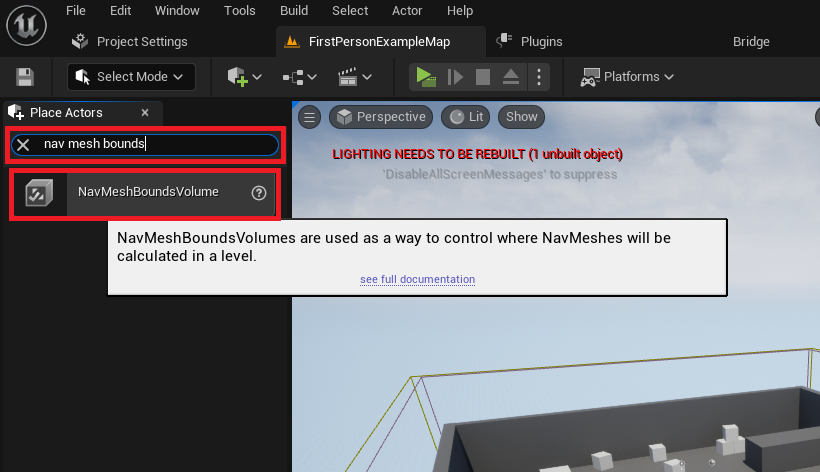
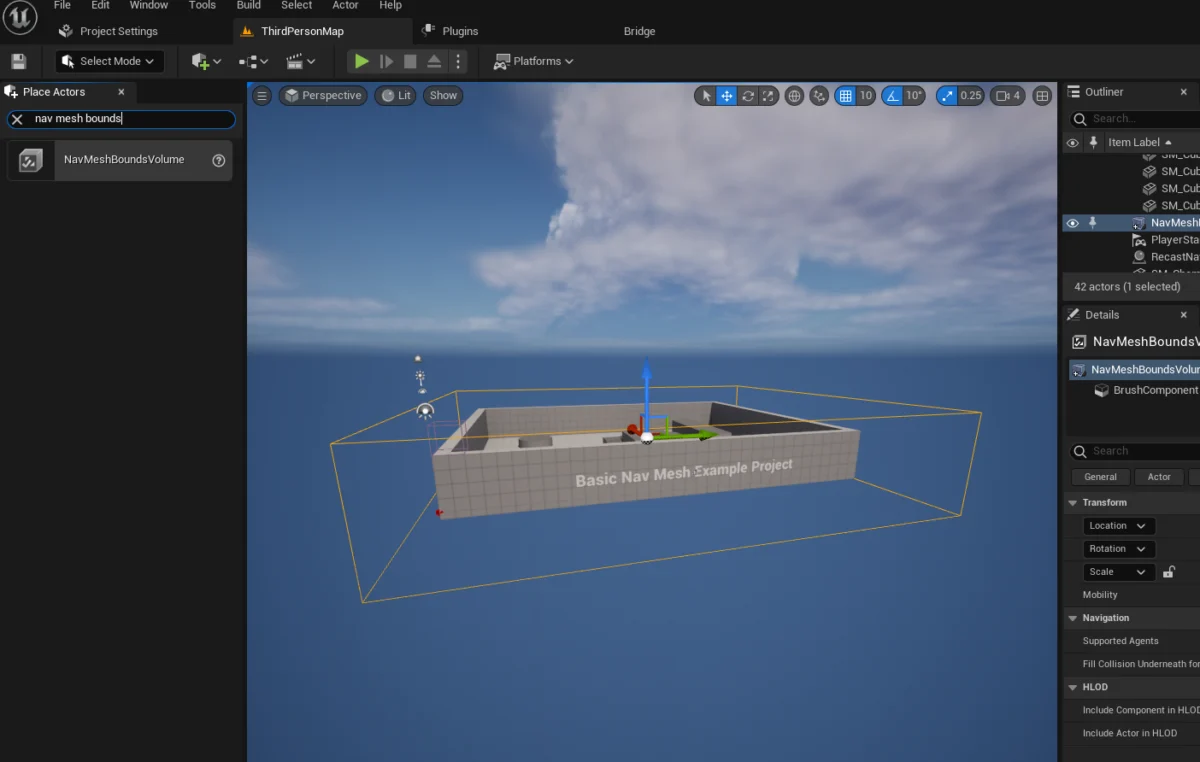
The initial and most critical step in configuring AI navigation within Unreal Engine 5 involves defining the navigable space. This is achieved through the use of the NavMeshBoundsVolume actor. This volumetric primitive dictates the area within which the engine will generate the NavMesh, essentially carving out the traversable pathways for AI.
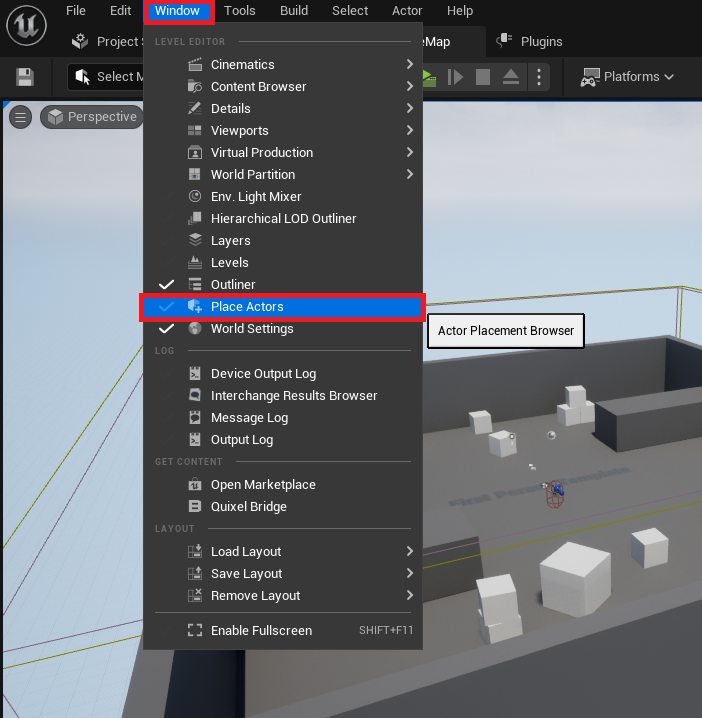
To begin this process, a developer typically accesses the "Place Actors" window, a fundamental interface within the UE5 editor that serves as a repository for various foundational objects and volumes. This window can be opened by navigating to "Window" in the editor’s main menu, then selecting "Place Actors." This action reveals a panel where a wide array of basic geometric primitives, lights, cameras, and, crucially, volumes can be spawned into the active level.
From the "Place Actors" panel, specifically under the "Volumes" category, the NavMeshBoundsVolume actor is selected and dragged directly into the game level. Upon placement, this volume appears as a wireframe box, initially with a default size. Its purpose is to encapsulate all geometry that AI characters are intended to traverse.
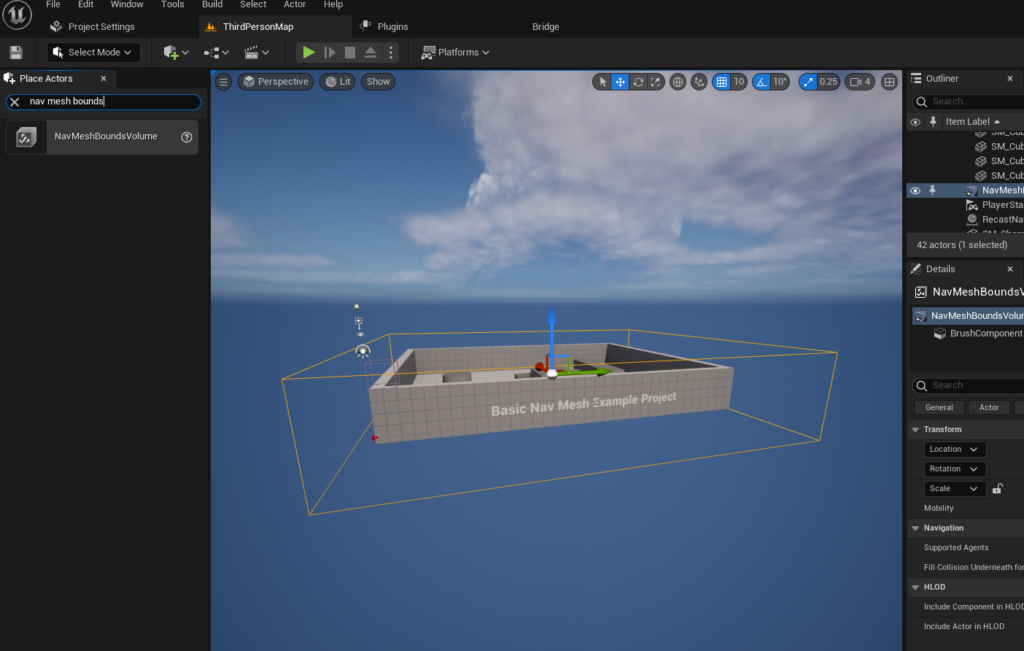
The subsequent step involves meticulously scaling and positioning the NavMeshBoundsVolume to encompass the desired navigable area. This is a crucial phase, as the size and placement directly influence where AI can move. Developers must ensure the volume adequately covers all floors, ramps, and other walkable surfaces, while also considering areas where AI should be restricted, such as ledges, water bodies, or confined spaces. The flexibility of UE5 allows this volume to be as expansive or as confined as the game’s design necessitates. For instance, in an open-world environment, the volume might span vast territories, whereas in a tightly designed interior level, it might be confined to specific rooms and corridors.
It is important to note the implications of the volume’s size on performance. Larger NavMeshes naturally take longer to generate, particularly during initial setup or when significant changes are made to the level geometry. Unreal Engine offers advanced solutions, such as dynamic NavMesh generation, which allows the NavMesh to adapt in real-time to changes in the environment, minimizing performance hits in scenarios involving destructible environments or moving platforms. This dynamic capability represents a significant leap from older, static navigation systems, providing unparalleled flexibility for complex interactive game worlds.
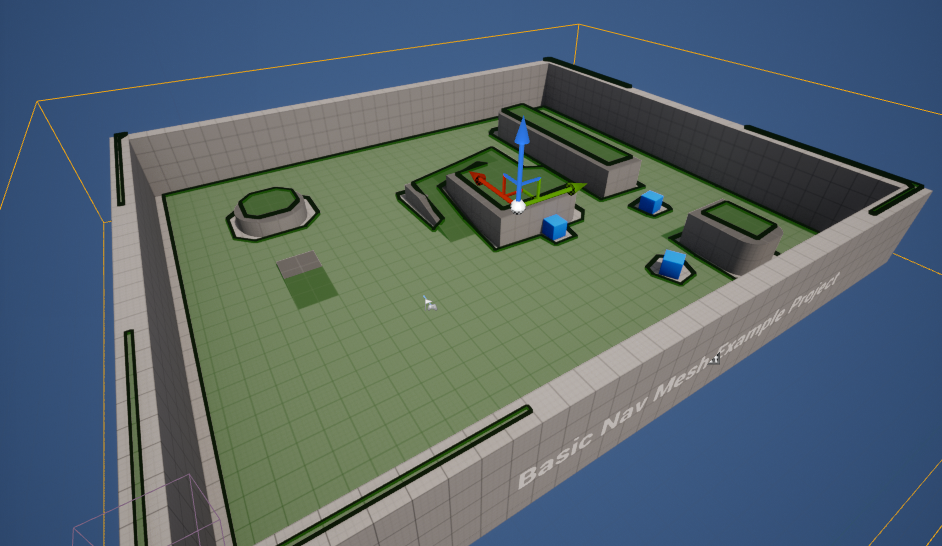
Once the NavMeshBoundsVolume is correctly scaled and positioned, developers can immediately visualize the generated NavMesh to confirm its accuracy. By pressing the "P" key on the keyboard, the editor overlays a green mesh onto all surfaces deemed traversable by AI. This debug visualization is an indispensable tool, allowing developers to quickly identify areas where the NavMesh might be incomplete, incorrectly generated, or extend into unintended regions. Gaps in the green mesh indicate areas where AI cannot navigate, prompting adjustments to the volume or the underlying geometry. Conversely, green areas extending over non-walkable surfaces suggest an incorrectly configured volume or navigation parameters, which can be fine-tuned in the Project Settings or the NavMesh’s specific properties.
Bringing Characters to Life: Implementing Basic AI Movement
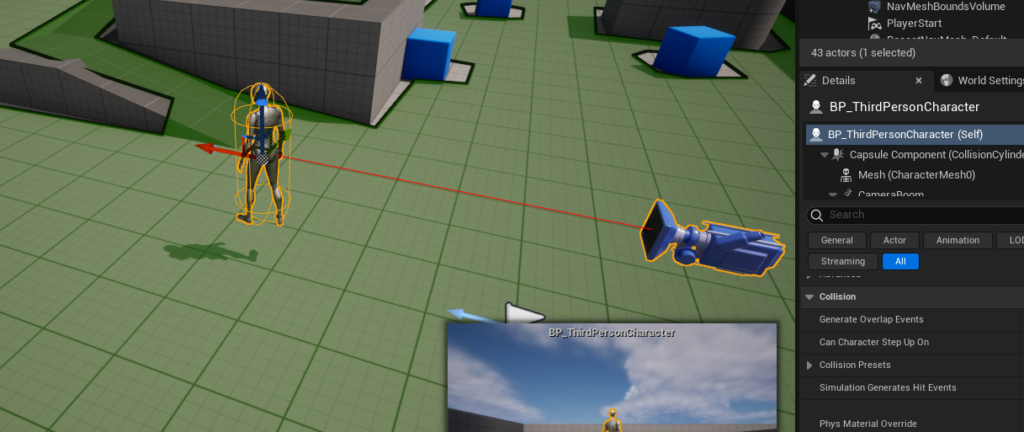
With a functional NavMesh in place, the next phase involves instructing AI characters on how to utilize it for movement. Unreal Engine 5’s Blueprint system provides an intuitive visual scripting environment for this, eliminating the need for complex C++ coding for many common AI behaviors. For demonstration purposes, leveraging the engine’s built-in Third Person Template is highly advantageous, as it provides a pre-animated character blueprint, ready for AI integration. This template-based approach accelerates development and learning, allowing developers to focus on AI logic rather than character setup.
The process begins by dragging an instance of the Third Person Character blueprint into the level. This character, often located in the "Third Person / Blueprints" folder within the Content Drawer for projects initiated with the Third Person Template, will serve as the AI agent.
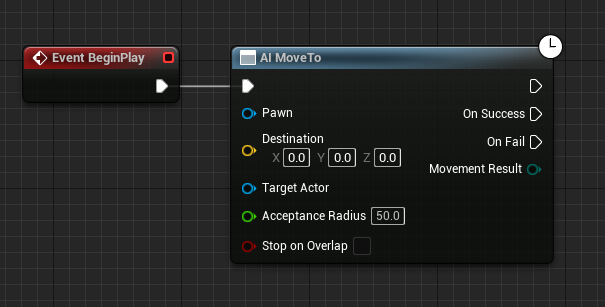
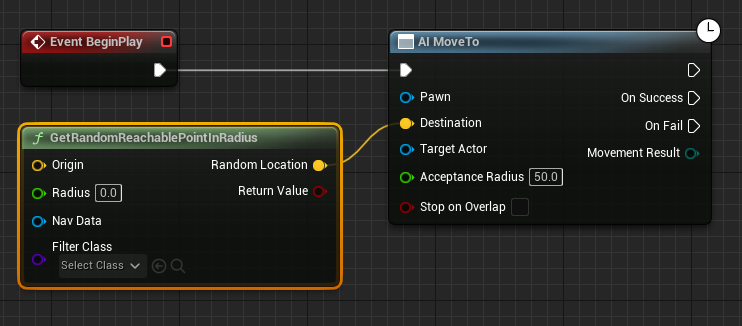
The core of the AI movement logic resides within the character’s Blueprint editor. Here, developers can define a sequence of actions that the AI character will execute. The initiating event for any AI behavior is typically the "Event Begin Play" node. This node triggers its connected logic when the game level starts. Connected to "Event Begin Play" is the "AI MoveTo" node, a powerful command specifically designed for AI navigation. This node tells an AI agent to move to a specified destination, leveraging the underlying NavMesh for pathfinding.
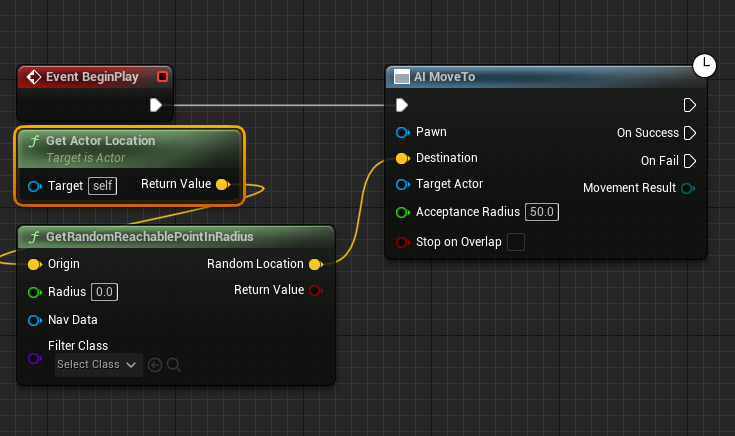
To provide a dynamic and non-linear movement pattern, the "AI MoveTo" node is supplied with a target destination generated by the "GetRandomReachablePointInRadius" node. This node is a cornerstone for creating patrol routes or ambient wandering behaviors. It calculates a random point within a specified radius from a given origin that is also reachable via the NavMesh. The yellow vector output pin of "GetRandomReachablePointInRadius" is connected directly to the yellow "Destination" pin of the "AI MoveTo" node.
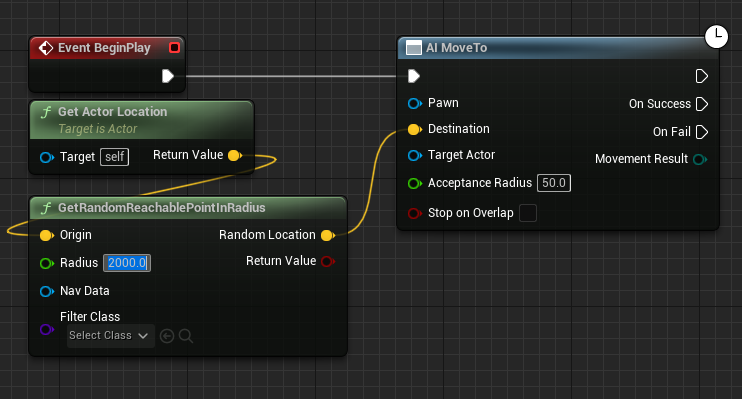
The "Origin" for this random point generation is typically the AI character’s current location, ensuring that the character wanders within a defined proximity of itself or a designated point. This is achieved by connecting a "Get Actor Location" node to the "Origin" yellow vector pin of "GetRandomReachablePointInRadius." This ensures that the random movement is consistently calculated relative to the AI’s current position, preventing it from straying too far from its intended patrol area or starting point.
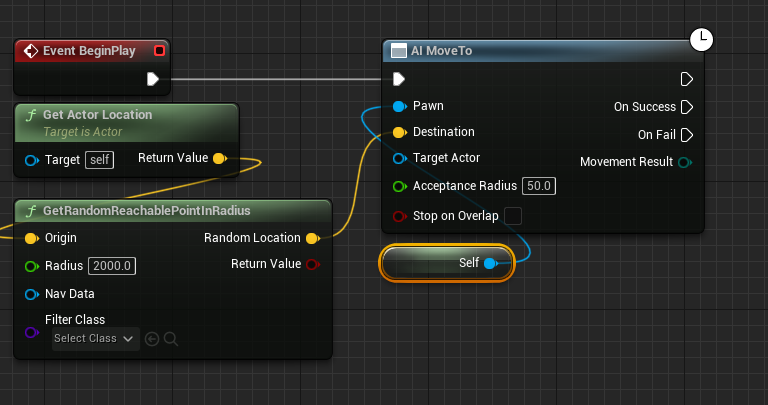
The "Radius" input pin of "GetRandomReachablePointInRadius" dictates the maximum distance from the origin that a random destination can be generated. For instance, setting this value to "2000" (Unreal units, typically centimeters) means the AI will attempt to find a reachable point within a 20-meter sphere around its current location. This value is crucial for controlling the AI’s roaming patterns, allowing developers to define tight patrol areas or expansive exploration zones.
Finally, the "Pawn" input pin of the "AI MoveTo" node must be supplied with a reference to the AI character itself. This is accomplished by creating a "Reference to Self" node and connecting its output to the blue "Pawn" pin. This ensures that the "AI MoveTo" command is executed by the correct AI agent in the level.
To ensure continuous AI movement rather than a single destination trip, a loop mechanism is implemented. After the "AI MoveTo" node successfully completes its movement, signified by its "On Success" execution pin, a "Delay" node is introduced. This node pauses the execution for a specified duration, allowing the AI to momentarily "rest" at its destination before seeking a new one. The output of the "Delay" node is then reconnected back to the input of the "AI MoveTo" node, creating an infinite loop. This setup means that once the AI reaches its current random destination, it waits for a short period (e.g., 2 seconds), then triggers the "AI MoveTo" node again to find a new random reachable point within its radius and moves towards it. This simple yet effective loop generates persistent, believable wandering behavior for AI characters.
Upon completing these steps and clicking "Play" in the editor, the AI character will immediately begin navigating the level, using the generated NavMesh to plot paths to successive random locations within its defined radius.
Industry Implications and Developer Workflow
The streamlined NavMesh and AI movement tools in Unreal Engine 5 have profound implications for game development. Firstly, they significantly enhance developer efficiency. The largely automatic generation of NavMeshes, coupled with intuitive Blueprint nodes, drastically reduces the time and effort required to implement sophisticated AI navigation. This allows developers to focus more on unique AI behaviors, intricate level design, and overall game mechanics rather than getting bogged down in complex pathfinding algorithms.
Secondly, these tools empower game designers to create more expansive and intricate game worlds. With reliable and performant AI navigation, designers are no longer constrained by the limitations of simpler pathfinding methods. They can craft sprawling open worlds, multi-layered architectural spaces, and dynamically changing environments, confident that their AI characters will traverse them intelligently. This directly translates to richer player experiences, as NPCs can inhabit worlds more believably, enemies can maneuver tactically, and companions can follow reliably.
Industry analysts often point to Epic Games’ continuous investment in user-friendly AI tools as a key factor in Unreal Engine’s widespread adoption. Features like the NavMesh and AI MoveTo nodes lower the barrier to entry for aspiring game developers, making it possible for individuals and small teams to create games with complex AI systems that would have previously required large, specialized engineering teams. Seasoned studios also benefit, as these tools enable faster iteration cycles and allow their programmers to dedicate resources to more cutting-edge AI research and development. Developers frequently laud Unreal Engine’s robust AI framework for its flexibility and performance, allowing for intricate AI behaviors without excessive performance overhead.
Challenges and Future Outlook
While UE5’s NavMesh system is powerful, developers still face challenges, particularly in optimizing NavMeshes for extremely large, dense, or highly dynamic environments. Ensuring that the NavMesh accurately reflects all possible traversable areas while remaining performant requires careful consideration of its generation parameters, such as cell size, agent radius, and climb settings. For highly dynamic environments, where level geometry changes frequently (e.g., destructible environments, moving platforms, or procedural generation), static NavMeshes are insufficient. This is where advanced techniques like dynamic NavMesh generation or specialized navigation solutions for runtime geometry become critical, requiring further optimization and potentially custom implementations.
Furthermore, basic AI movement, while fundamental, is merely the starting point for complex AI behaviors. The NavMesh provides the "where to go," but advanced AI requires the "why" and "how." This necessitates integrating the NavMesh with higher-level AI systems such as Behavior Trees, State Machines, Utility AI, and AI Perception systems. These systems allow AI characters to make decisions, react to environmental stimuli, engage in combat, or follow complex routines, all while relying on the NavMesh for their physical movement through the world.
The future of AI in gaming, propelled by advancements in engines like Unreal Engine 5, promises even greater realism and intelligence. As computational power continues to increase and AI research progresses, we can anticipate more adaptive, learning, and emergent AI behaviors. Engines will likely offer even more sophisticated tools for dynamic navigation, AI-driven content generation, and seamless integration of machine learning models for nuanced character interactions. These advancements will continue to blur the lines between virtual and reality, offering players increasingly immersive and dynamic experiences.
In conclusion, Unreal Engine 5’s NavMesh and basic AI character movement setup represent a cornerstone of modern game development. By providing developers with intuitive, powerful, and performant tools, Epic Games continues to democratize the creation of complex interactive experiences. The ability to easily define navigable spaces and orchestrate intelligent character movement is not just a technical feature; it is a fundamental enabler for the rich, dynamic, and believable game worlds that players have come to expect and cherish.
About the Author