The latest iteration of Epic Games’ powerful Unreal Engine 5 (UE5) is equipping game developers with robust, yet remarkably accessible, tools for implementing sophisticated artificial intelligence (AI) navigation, a critical component for creating believable and dynamic virtual worlds. This development is particularly significant as modern video games increasingly rely on AI-controlled characters to enrich environments, drive narrative, and provide engaging gameplay challenges. The engine’s integrated navigation mesh (NavMesh) system, coupled with intuitive visual scripting through Blueprints, democratizes the creation of complex AI behaviors, moving beyond simple pre-scripted paths to enable truly autonomous character movement.
The Foundational Role of AI in Contemporary Gaming
AI-driven characters are no longer mere window dressing in video games; they are integral to the core experience, contributing to atmospheric immersion, adversary intelligence, and dynamic world interactions. From non-player characters (NPCs) populating bustling cityscapes to formidable enemies employing tactical maneuvers, the quality of AI directly impacts player engagement and satisfaction. Historically, developing competent AI navigation has been a significant technical hurdle, often requiring extensive programming expertise and meticulous pathfinding algorithms. Failures in AI pathfinding, such as characters getting stuck on environmental geometry or exhibiting illogical movement, can severely break immersion and frustrate players. Unreal Engine 5 addresses these challenges head-on by providing a comprehensive and user-friendly framework for AI to traverse complex environments intelligently.
Unreal Engine 5’s Streamlined NavMesh Implementation
At the heart of UE5’s AI navigation capabilities lies the NavMesh system. A navigation mesh is essentially a dynamically generated, traversable surface that AI agents can "see" and move across within a game level. Unlike raw collision meshes, which are too complex for efficient pathfinding, a NavMesh simplifies the geometry into a navigable graph, allowing AI to calculate optimal routes around obstacles, up inclines, and through doorways.
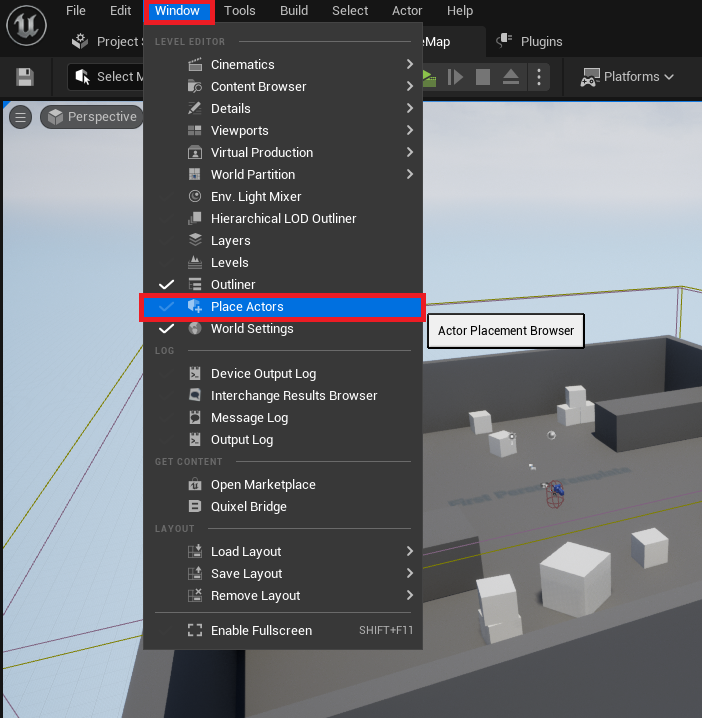
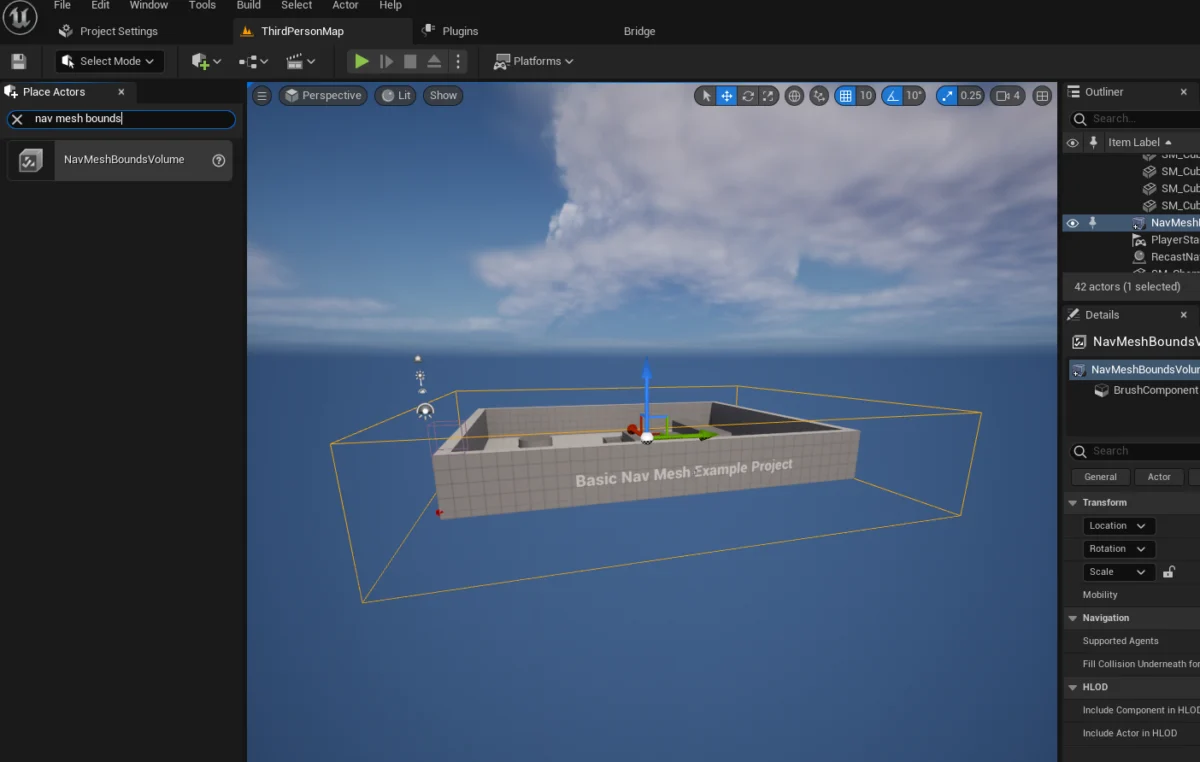
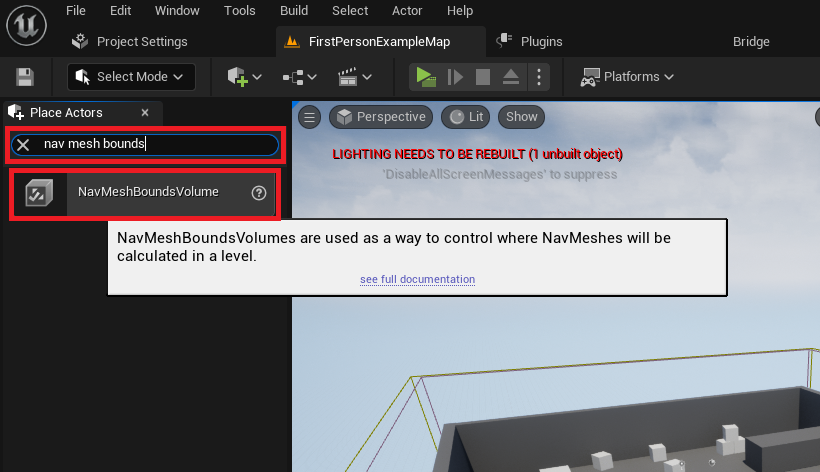
The process of setting up a NavMesh in Unreal Engine 5 is designed for efficiency and clarity. Developers initiate this by accessing the "Place Actors" window, a central hub within the UE5 editor for spawning fundamental objects and volumes. This window, typically accessed via the "Window" menu, provides quick access to essential building blocks for any level. Within the "Modes" panel, under the "Volumes" category, the crucial component—the NavMeshBoundsVolume actor—is introduced into the level. This volume serves as the bounding box within which the NavMesh will be generated.
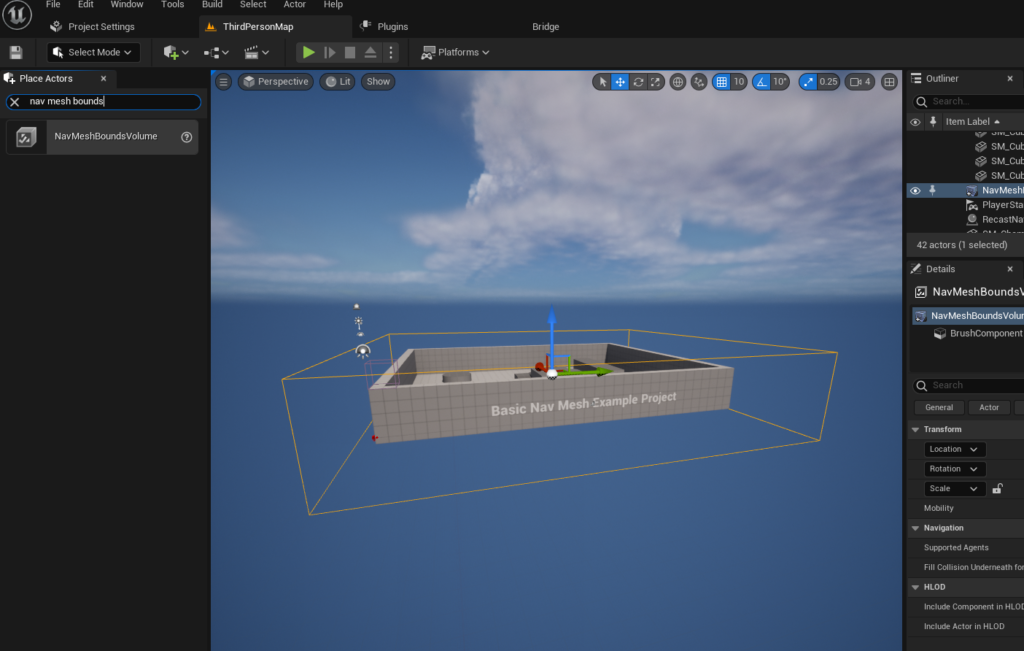
Once placed, the NavMeshBoundsVolume must be carefully scaled and positioned to encompass the specific areas where AI characters are expected to navigate. This step is vital, as the size and placement of this volume directly dictate the extent of the AI’s operational space. A smaller, tightly constrained volume will generate a NavMesh quickly but limit AI movement, while a larger volume allows for expansive roaming but may require more computational resources during generation. For performance-critical applications or dynamic environments, developers can opt for dynamic NavMesh generation, a feature that adjusts the mesh in real-time as the environment changes, further enhancing the adaptability of AI. The engine’s flexibility in this regard provides developers with granular control over performance versus AI operational scope.
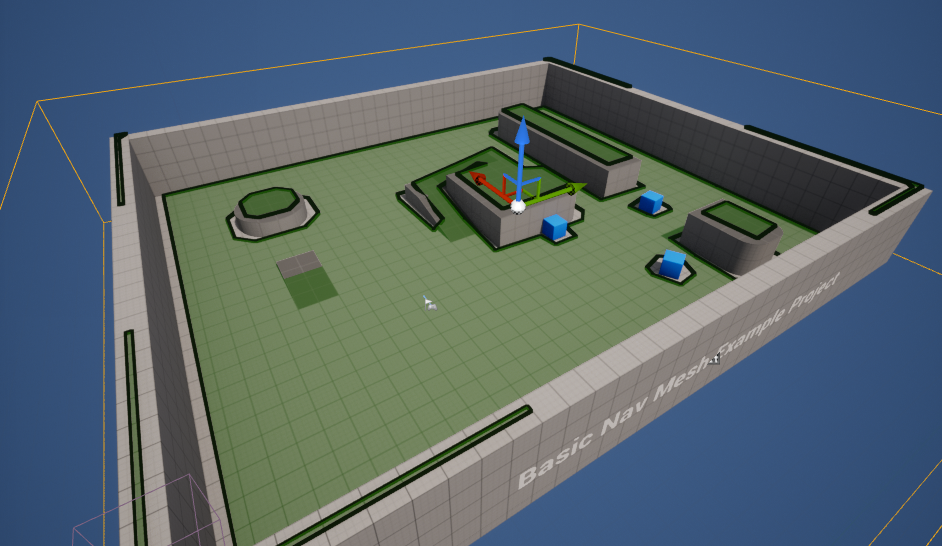
To validate the correct setup of the NavMesh, Unreal Engine 5 offers an immediate visual debug mode. By simply pressing the ‘P’ key, developers can visualize the generated NavMesh directly within the editor viewport. This overlay, typically rendered in green, highlights the areas traversable by AI, allowing for instant identification and rectification of any generation issues, such as inaccessible regions or unintended gaps. This real-time feedback loop significantly accelerates the development process, ensuring that the foundational navigation layer for AI is robust before proceeding to character-specific behaviors.
Crafting Autonomous AI Character Movement with Blueprints
Beyond the foundational NavMesh, Unreal Engine 5 empowers developers to define intricate AI behaviors using its visual scripting language, Blueprints. This node-based system abstracts complex code into understandable visual graphs, making AI logic accessible even to those without extensive C++ programming backgrounds. For demonstrating basic AI movement, the engine’s Third Person Template serves as an excellent starting point, providing a pre-animated character blueprint ready for integration into the navigation system.
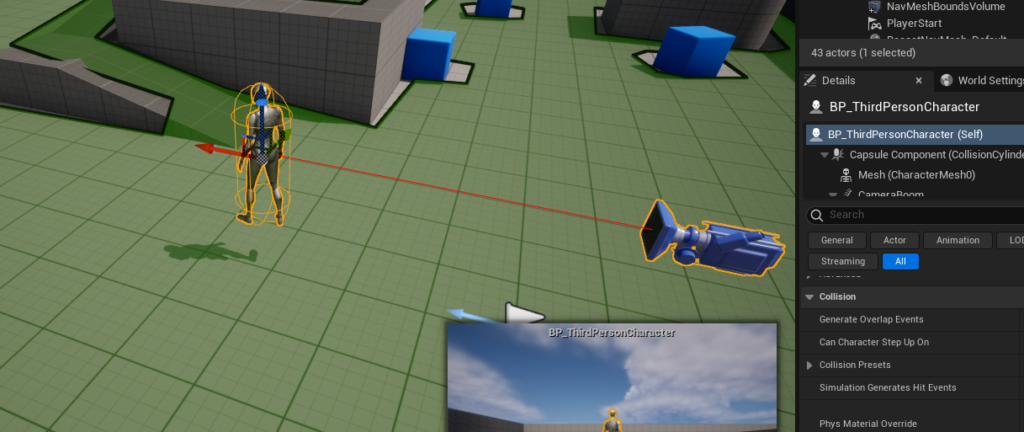
The first step in animating an AI character involves dragging the character’s blueprint into the level. Assuming a project was created using the Third Person Template, this blueprint is typically located within the "Third Person / Blueprints" folder in the Content Drawer. Once the character is present in the level, its blueprint editor becomes the canvas for defining its autonomous actions.
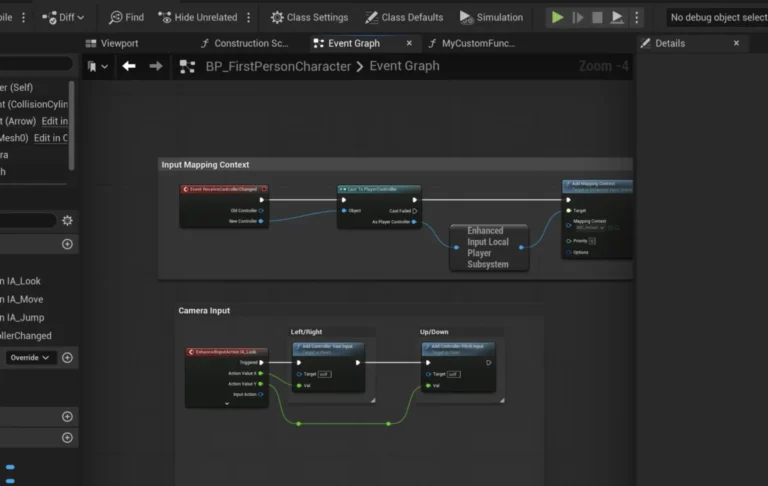
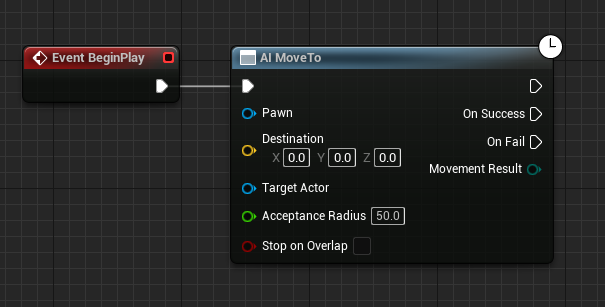
Within the character’s blueprint graph, the sequence of operations begins with the Begin Play event. This event serves as the trigger, executing its connected nodes as soon as the game starts. Connected to this, the AI MoveTo node is the primary command for instructing an AI pawn to move to a specified destination. This node is a high-level function that leverages the underlying NavMesh to calculate an optimal path.
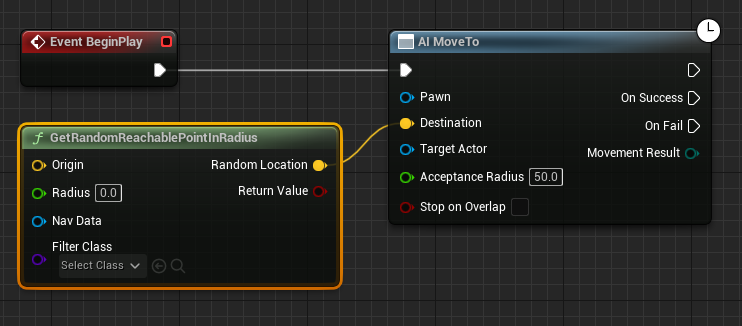
To facilitate dynamic and non-linear movement, the GetRandomReachablePointInRadius node is introduced. This node intelligently queries the NavMesh to find a valid, traversable point within a specified radius from a given origin. The output (a yellow vector pin representing the coordinates of the random point) is then fed directly into the "Destination" pin of the AI MoveTo node. This ensures that the AI character always targets a location that is physically reachable within the defined navigation space.
The "Origin" for this random point calculation is dynamically determined by the Get Actor Location node, which retrieves the current position of the AI character itself. This ensures that the random movement is centered around the character’s present location, allowing it to roam naturally within its vicinity. The "Radius" pin on the GetRandomReachablePointInRadius node, typically set to a value like "2000" (Unreal units, often centimeters), defines the maximum distance the AI will consider for its next random destination. This parameter provides developers with fine-tuned control over the AI’s wandering behavior, from confined patrols to expansive explorations.
To ensure the AI MoveTo node operates on the correct character, a "Reference to Self" node is connected to the blue "Pawn" pin. This explicit reference directs the movement command to the blueprint instance itself, preventing ambiguity in multi-character scenarios.
Finally, to establish continuous, autonomous movement, a Delay node is connected to the "On Success" output pin of the AI MoveTo node. The Delay node introduces a pause after the AI successfully reaches its current destination. Following this delay, the execution flow loops back to the AI MoveTo node, prompting the AI to find a new random destination and repeat the process. This simple yet effective loop creates the illusion of thoughtful, continuous wandering, bringing life to static environments. Should the AI MoveTo fail for any reason (e.g., no reachable point found), alternative logic can be branched from the "On Fail" pin, allowing for robust error handling and more complex AI decision-making.
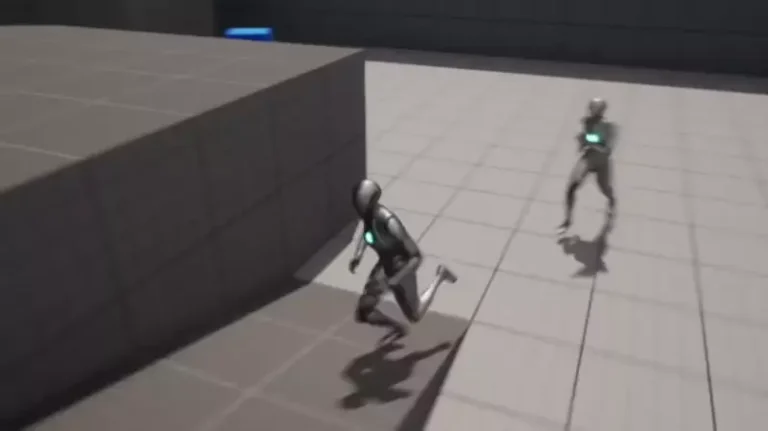
Upon executing the game (by clicking "Play" in the editor), the character seamlessly begins navigating the level, moving towards successive random locations within the bounds of the meticulously generated NavMesh. This observable behavior validates the entire setup, from the underlying navigation mesh to the character’s blueprint logic.
Broader Implications for Game Development and Player Experience
The integration and user-friendliness of Unreal Engine 5’s NavMesh and AI movement systems carry significant implications across the game development industry.
Accessibility and Democratization: For independent developers and smaller studios, these tools significantly lower the barrier to entry for creating games with sophisticated AI. Rather than dedicating valuable resources to developing proprietary pathfinding solutions, teams can leverage UE5’s robust framework, allowing them to focus on unique gameplay mechanics, narrative, and artistic expression. This accessibility fosters innovation and diversity within the gaming landscape.
Efficiency for AAA Studios: Even large AAA studios benefit immensely from a highly optimized and integrated AI navigation system. By abstracting away the complexities of low-level pathfinding, senior developers can allocate their expertise to designing more complex AI behaviors, such as advanced combat tactics, dynamic social interactions, and emergent gameplay systems that build upon a reliable navigation foundation. This efficiency translates to faster development cycles and more polished final products.
Enhanced Player Immersion and Engagement: From a player perspective, well-implemented AI navigation results in more believable and immersive game worlds. Characters move logically, respond dynamically to changes in the environment, and rarely exhibit the "stuck" or "teleporting" behaviors that detract from realism. This leads to more challenging adversaries, more convincing companions, and an overall higher quality gameplay experience. The ability for AI to intelligently roam and interact with the environment contributes directly to the sense of a living, breathing world.
Future-Proofing Game Design: As virtual environments become increasingly complex and dynamic, the need for adaptive AI navigation will only grow. Unreal Engine 5’s foundation provides a solid platform for future advancements, including potential integrations with machine learning for more adaptive and learning AI, or advanced crowd simulation techniques that can manage hundreds or thousands of intelligent agents simultaneously. Epic Games’ continuous investment in its engine tools suggests a future where AI in games will continue to evolve rapidly, with UE5 at the forefront of enabling these innovations.
The demonstration of basic AI movement within Unreal Engine 5 underscores Epic Games’ commitment to empowering creators with powerful yet approachable tools. By simplifying the once-daunting task of AI navigation, the engine not only streamlines development but also elevates the potential for intricate, dynamic, and immersive player experiences across the entire spectrum of game development. This blend of technical prowess and user-centric design solidifies Unreal Engine 5’s position as a pivotal technology shaping the future of interactive entertainment.
About the Author