Unreal Engine 5 (UE5) continues to set benchmarks in game development technology, and among its most impactful features for efficient content management are Data Tables. These powerful assets provide a centralized, pre-made list of information, enabling programmers and designers to access and modify game data with unprecedented ease and flexibility. At their core, Data Tables in UE5 require a developer to choose a specific data structure, or "struct," upon which the table will be based, defining the types of information each entry will hold. This foundational requirement ensures data consistency and robust organization, critical for the complex ecosystems of modern video games.
The Evolution of Data-Driven Design in Gaming
The landscape of game development has dramatically shifted over the past two decades. Early game titles often hard-coded much of their game logic and data directly into the program, making updates, balancing, and content additions cumbersome and prone to errors. As games grew in scope and complexity, the need for more agile and scalable data management became paramount. This led to the adoption of data-driven design principles, where game logic is separated from game data, allowing designers to tweak parameters, introduce new items, or balance mechanics without requiring direct code changes or developer intervention.
Unreal Engine, a pioneer in game development tools, has consistently evolved its data management capabilities to meet these demands. Data Tables in UE5 represent a mature iteration of this philosophy, offering an intuitive yet powerful system that integrates seamlessly into the engine’s visual scripting (Blueprint) and C++ environments. This integration allows development teams to manage vast quantities of game assets—from weapon statistics and character attributes to quest parameters and enemy behaviors—within a structured, editable format directly within the Unreal Editor. The ability to retrieve and update this data from anywhere in the codebase, coupled with its persistence within the editor, signifies a major leap in developmental efficiency and collaborative workflow.
Understanding the Core Components: Enums and Structs
Before a Data Table can be effectively utilized, two fundamental components must be established: Enumerations (Enums) and Structures (Structs). These elements are crucial for defining the schema and permissible values within the Data Table, ensuring data integrity and ease of use.
-
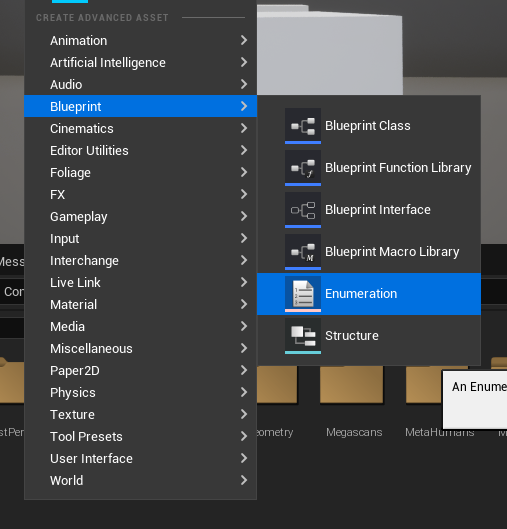
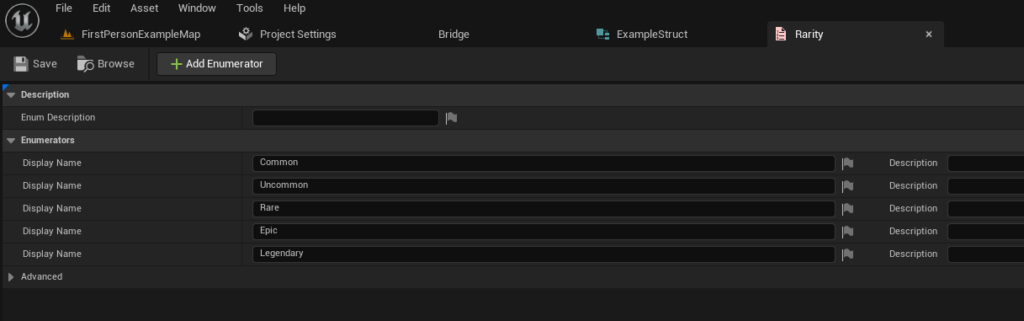
Enumerations (Enums): Enums are user-defined data types that consist of a set of named integer constants. In game development, they are invaluable for representing categorical data, such as item rarity (e.g., Common, Uncommon, Rare, Epic, Legendary), status effects, or character classes. The creation of an Enum typically involves right-clicking within the Content Browser, navigating to the Blueprint category, and selecting "Enumeration." Developers then define the specific values required for their project. For instance, an item rarity Enum might include entries like "E_Common," "E_Uncommon," and "E_Rare," providing clear, human-readable labels that correspond to underlying numerical values. This approach significantly reduces the potential for errors compared to using raw integer values and enhances code readability.
-
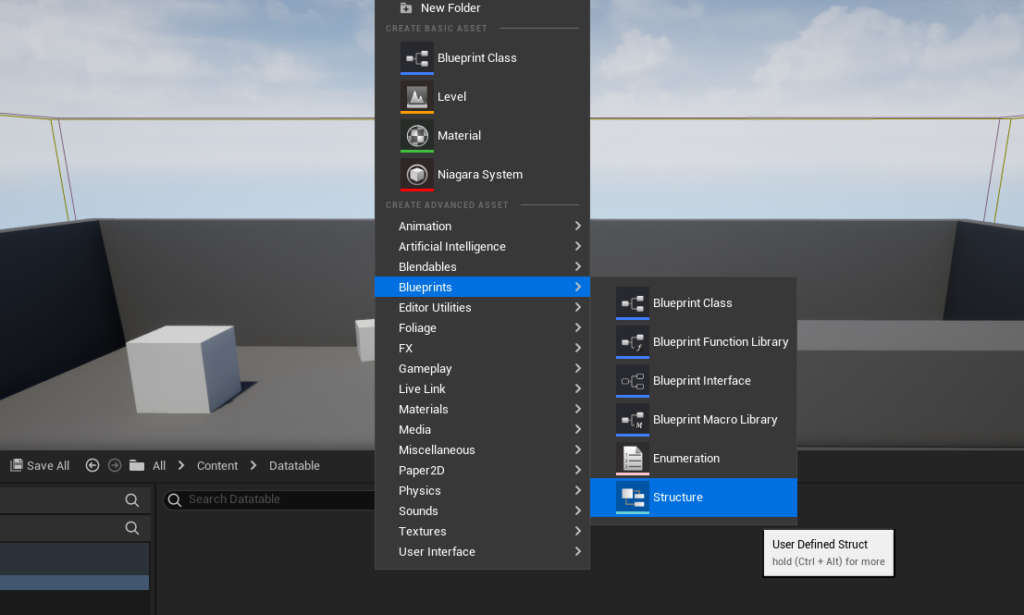
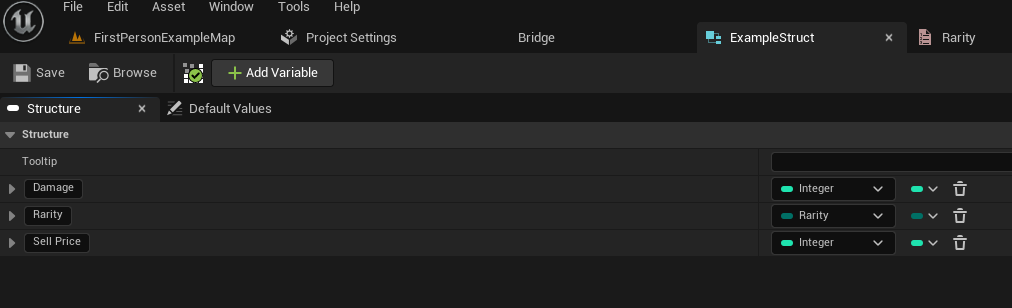
Structures (Structs): A Struct in Unreal Engine is a composite data type that allows developers to group multiple variables of different data types into a single unit. It acts as a blueprint for the rows within a Data Table, dictating the specific fields and their types that each data entry will possess. To create a Struct, one would typically right-click in the Content Browser, select "Structure" under the Blueprints category. For a hypothetical item system, a Struct named "FItemData" might include fields such as:
Name(Text/String): The display name of the item.Damage(Integer/Float): The item’s damage output.Rarity(Enum type, referencing the previously created Item Rarity Enum): The quality tier of the item.SellPrice(Integer): The monetary value upon selling the item.Description(Text): A brief explanation of the item.Icon(Texture 2D): A visual representation of the item.
By defining these fields within a Struct, every row subsequently added to a Data Table based on this Struct will automatically inherit these attributes, ensuring a consistent and organized data schema. This structured approach is fundamental to creating maintainable and scalable game systems.
Chronology of Data Table Creation and Population
The process of implementing Data Tables in an Unreal Engine 5 project follows a logical, sequential workflow, designed to be intuitive for developers:
-
Establishing Data Definitions (Enums and Structs): As previously detailed, the initial step involves defining the necessary Enums and Structs. This establishes the foundational data types and structures that will populate the Data Table. This phase is critical for laying the groundwork for how data will be organized and interpreted within the game.
-
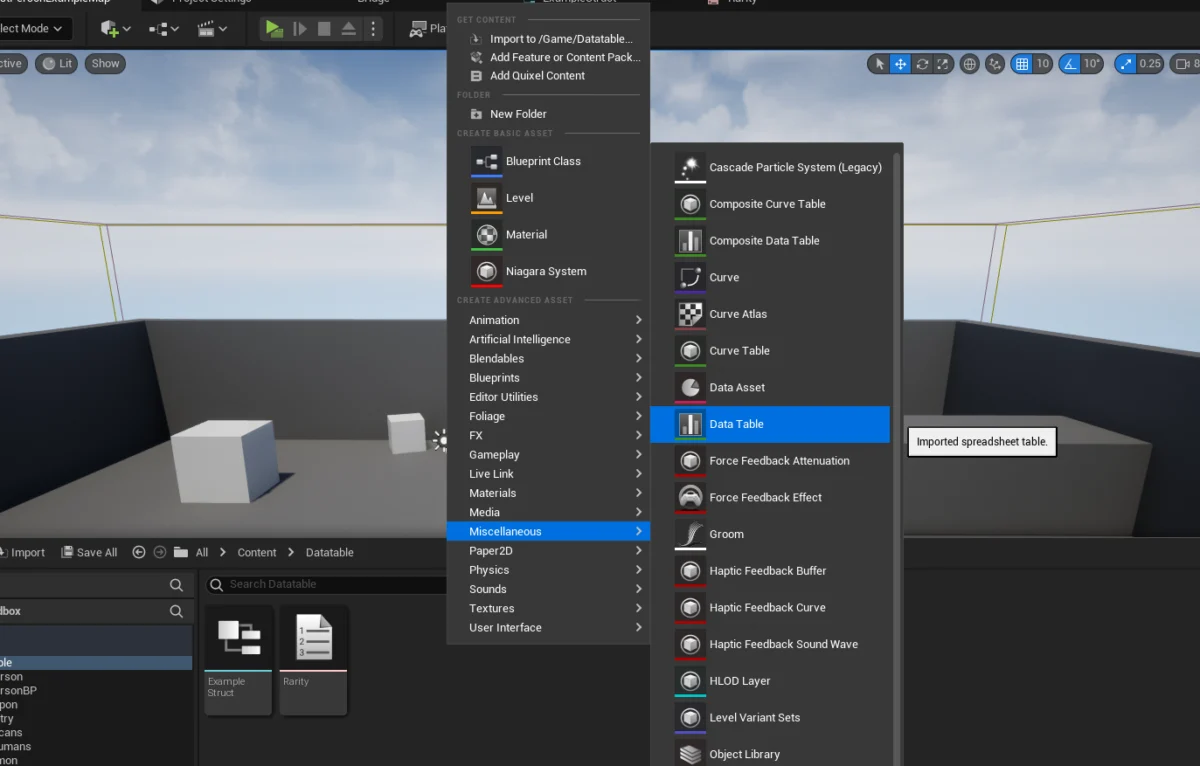
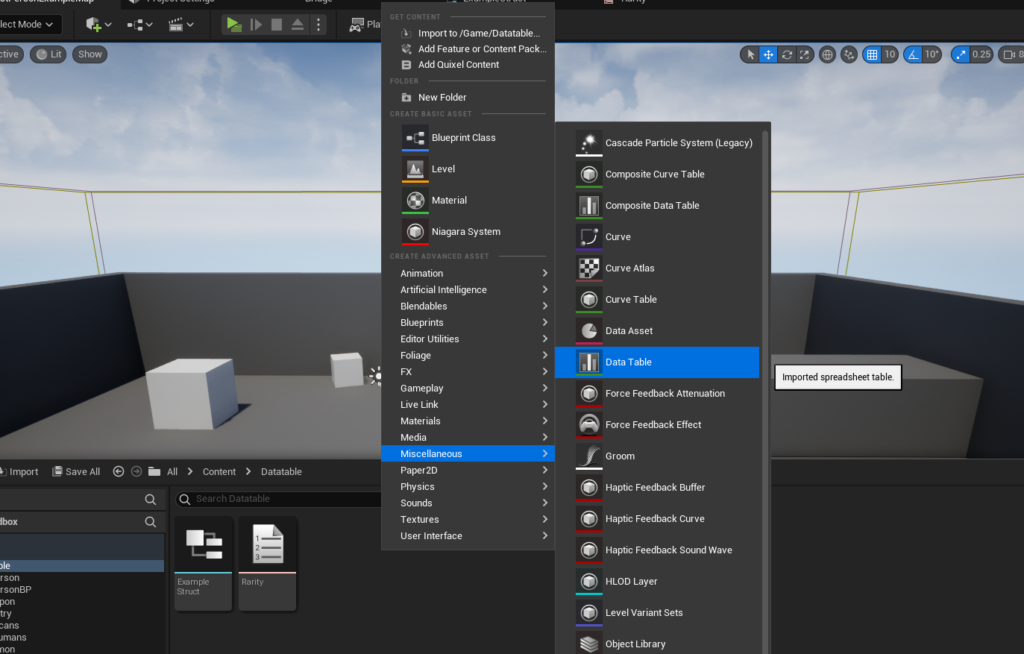
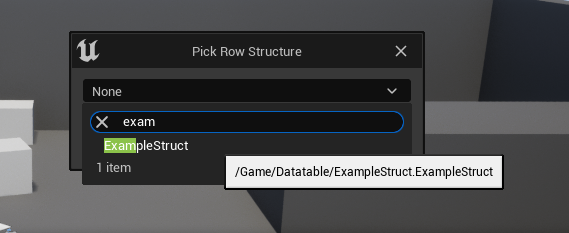
Creating the Data Table Asset: Once the Struct is defined, the Data Table asset itself can be created. This is done by right-clicking in the Content Browser, navigating to the "Miscellaneous" category, and selecting "Data Table." Upon creation, a crucial prompt appears, asking the developer to select the "Row Structure." This is where the previously created Struct (e.g., "FItemData") is linked, formally establishing the blueprint for each row in the Data Table. This link is immutable once set, underscoring the importance of careful Struct design.
-
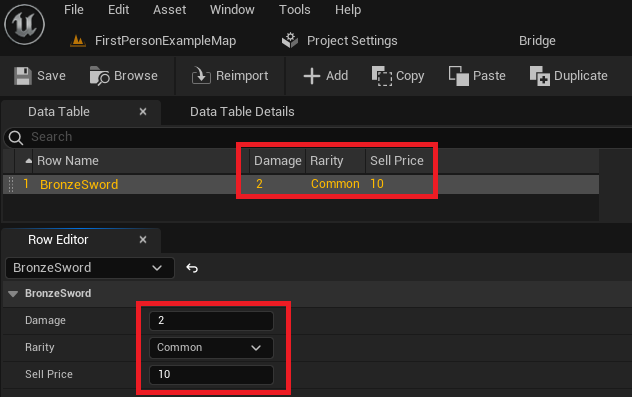
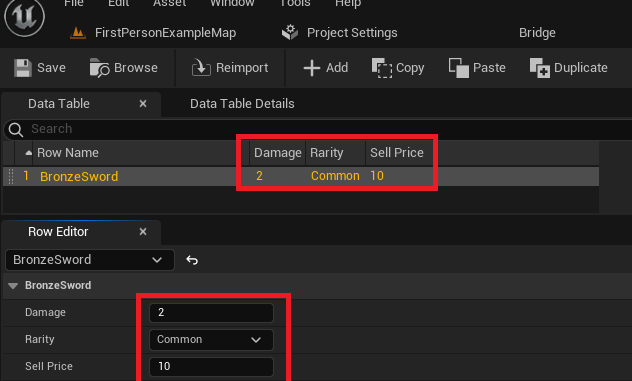
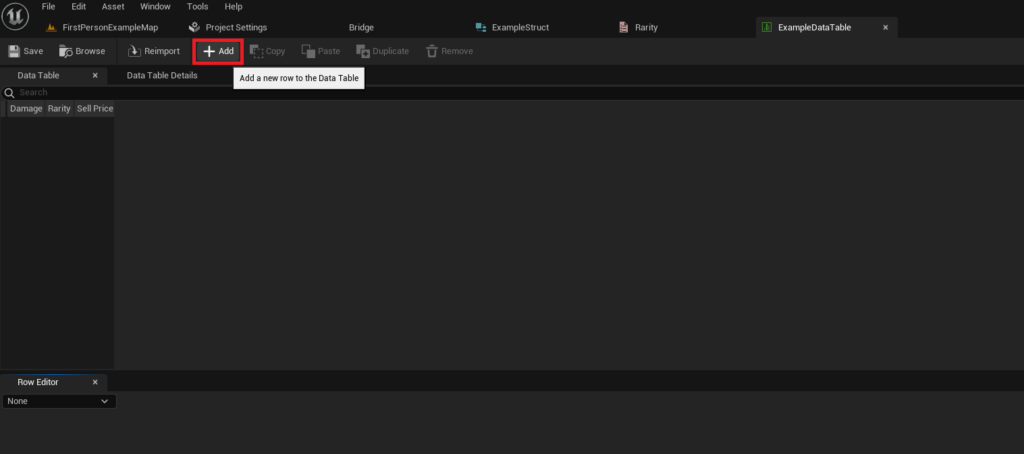
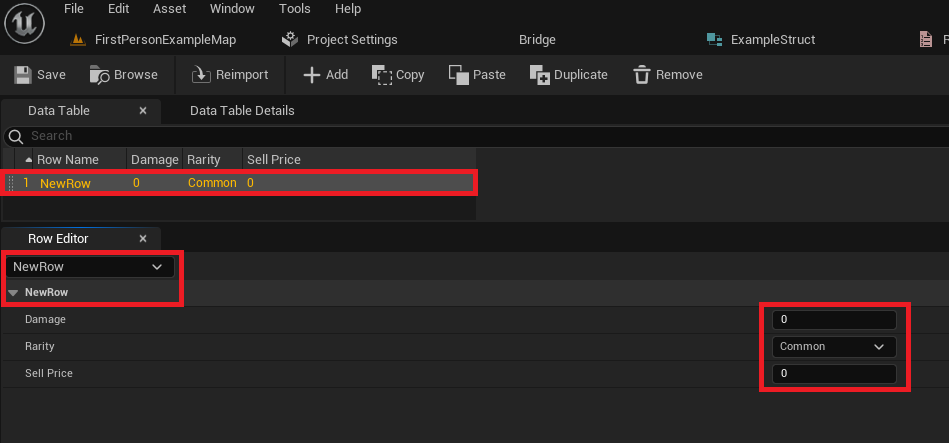
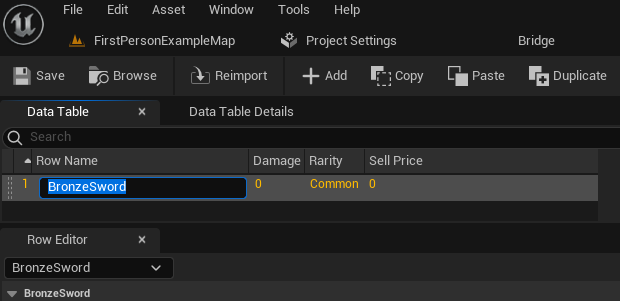
Populating the Data Table with Values: With the Data Table created and its Struct defined, designers and developers can begin populating it with actual game data. Opening the Data Table asset reveals a spreadsheet-like interface. By clicking the "Add" button, a new row is generated, pre-filled with default values as defined in the associated Struct. Each row is identified by a unique "Row Name," which serves as a primary key for data retrieval. For instance, a designer might add a row named "BronzeSword," then proceed to input its specific attributes: Damage (e.g., 15), Rarity (E_Common), Sell Price (e.g., 50), and so forth. The editor’s "Row Editor" panel provides a convenient interface for modifying these values, with changes instantly reflected in the main table view. This direct, visual data entry significantly accelerates content creation and iteration cycles. It’s imperative to frequently save the Data Table asset to preserve all modifications.
Accessing and Utilizing Data Tables at Runtime
The true power of Data Tables is realized when their stored information is dynamically accessed and utilized within the game’s logic at runtime. Unreal Engine 5 provides robust mechanisms for this, primarily through Blueprint nodes and C++ API calls.
-
Retrieving Specific Rows: The most common method of accessing Data Table information is through the "Get Data Table Row" node in Blueprints (or its C++ equivalent). This node requires two primary inputs: a reference to the Data Table asset itself and the "Row Name" (the unique identifier for the desired row). Upon execution, the node attempts to find the specified row. If successful, it triggers a "Row Found" execution pin and outputs the entire row’s data as a Struct. If the row is not found, a "Row Not Found" pin is triggered, and the output Struct will be invalid. To easily access individual fields within the retrieved Struct, developers can right-click the "Out Row" pin and select "Split Struct Pin," which exposes all the individual variables (e.g., Damage, Rarity, Sell Price) for direct use in game logic. This mechanism allows for precise data retrieval, such as fetching the attributes of a specific "BronzeSword" when it’s equipped by a player.
-
Iterating Through All Rows: In scenarios where game logic needs to process every entry in a Data Table—for example, generating a list of all available items in a shop, calculating average damage across all weapons, or performing bulk data validation—Unreal Engine offers tools for iteration. The "Get Data Table Row Names" node returns an array containing all the unique "Row Names" present in a given Data Table. This array can then be fed into a "For Each Loop" node. Inside the loop, for each "Array Element" (which is a Row Name), a "Get Data Table Row" node can be used to retrieve the full data for that specific row. This allows developers to systematically process every piece of data stored within the table, enabling dynamic game systems that adapt to the available content.
Broader Impact and Implications for Game Development
The comprehensive implementation of Data Tables in Unreal Engine 5 carries significant implications across various facets of game development:
- Enhanced Design Iteration and Balancing: Data Tables empower game designers to directly modify core game parameters without relying on programmers. A designer can adjust weapon damage, enemy health, or quest rewards in the editor and immediately test the changes, drastically accelerating the iteration loop. This autonomy fosters creativity and enables faster fine-tuning of gameplay mechanics.
- Improved Collaboration: By centralizing game data in easily accessible Data Tables, cross-disciplinary teams can work more efficiently. Programmers define the systems, artists provide visual assets, and designers populate the data tables, all contributing to a single source of truth for game content. This minimizes miscommunication and streamlines asset integration.
- Scalability and Content Management: As games grow larger, managing thousands of items, abilities, or enemy types becomes a logistical challenge. Data Tables provide a scalable solution, allowing new content to be added simply by creating new rows, without requiring changes to underlying code. This is invaluable for games with extensive content updates, expansions, or user-generated content features.
- Performance Optimization: While seemingly a minor detail, structured data access from Data Tables can be more performant than parsing less optimized formats at runtime, especially for frequently accessed information. The engine is designed to efficiently load and query these assets, contributing to smoother gameplay.
- Localization and Moddability: Data Tables are inherently amenable to localization efforts, as textual content can be isolated and translated in separate table instances. Similarly, for games that support modding, Data Tables offer a clear and accessible format for modders to introduce new content or modify existing game parameters, extending the lifespan and community engagement of a title.
- Reduced Error Potential: By enforcing a consistent data structure (via Structs) and providing a visual interface for data entry, Data Tables significantly reduce the likelihood of human error compared to manual data entry in code or disparate text files. Validation tools can also be built around these structures to further ensure data integrity.
Industry analysts consistently point to data-driven methodologies as crucial for modern game production, citing improved efficiency and reduced time-to-market. Developers leveraging Unreal Engine 5 widely report significant gains in productivity and design flexibility through the robust implementation of Data Tables. Epic Games’ continued emphasis on user-friendly tools like Data Tables underscores their commitment to empowering both technical and non-technical creators, making sophisticated game development accessible to a broader audience.
Conclusion
Unreal Engine 5’s Data Tables stand as a testament to the ongoing evolution of game development tools, offering a sophisticated yet accessible solution for managing the ever-increasing complexity of game data. By mastering the creation, configuration, population, and implementation of these powerful assets, developers can unlock a new level of efficiency, collaboration, and scalability in their projects. From accelerating design iterations to streamlining content updates and fostering better team dynamics, Data Tables serve as a cornerstone for modern, data-driven game development within the Unreal Engine ecosystem, ensuring that projects can maintain a single, consistent source of truth for their critical game information. The ability to manage vast quantities of data without requiring extensive C++ knowledge democratizes game design, allowing creative visions to be realized with greater agility and precision.
About the Author