
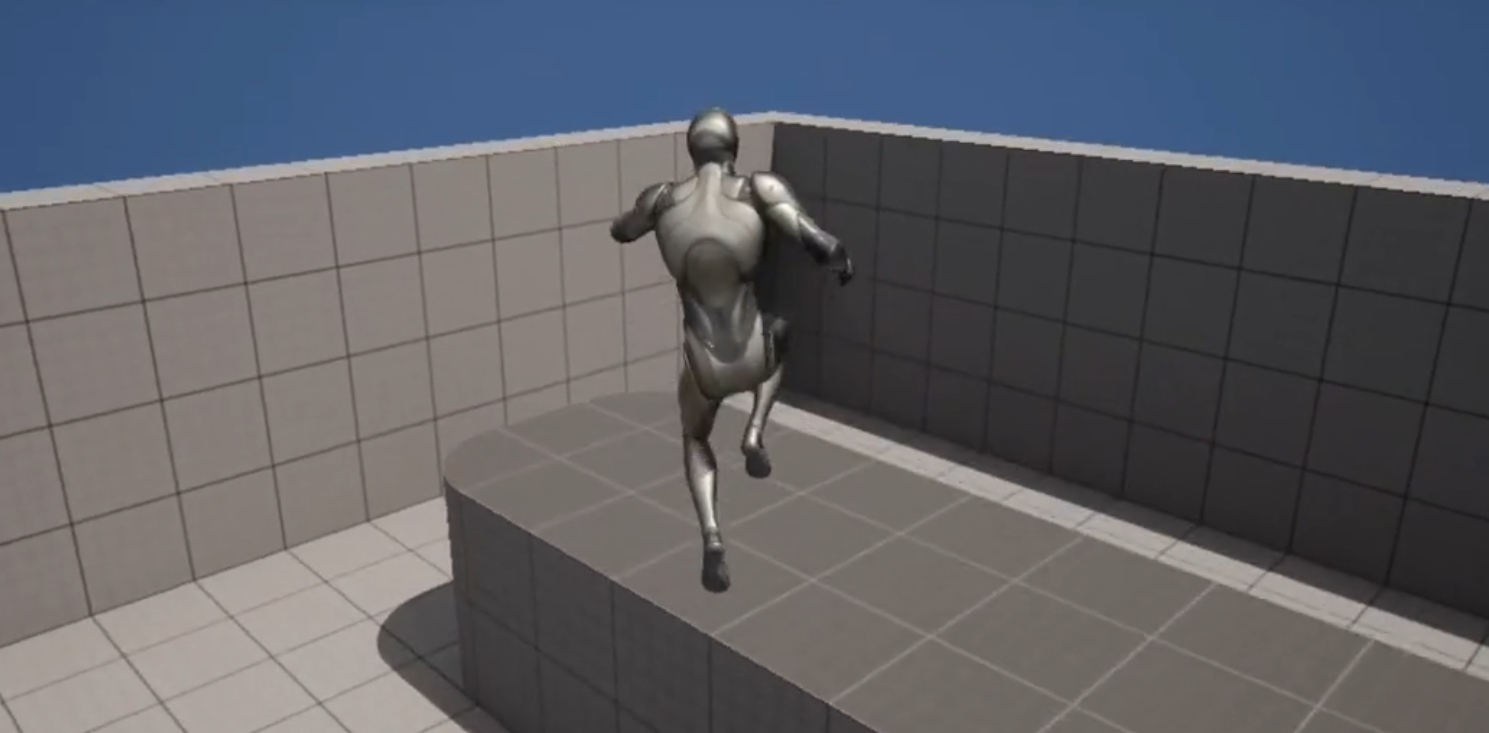
The ubiquitous double jump, a foundational mechanic in countless classic and contemporary video games, has become remarkably straightforward to implement within Unreal Engine 5, offering game developers a powerful tool to enrich platforming experiences and enhance player agency. This ease of integration, coupled with options for advanced animation refinement, underscores Unreal Engine 5’s commitment to providing accessible yet robust tools for creating dynamic and engaging interactive content.
The Enduring Appeal of the Double Jump in Gaming
The double jump is far from a niche mechanic; it is a staple that transcends genres and generations. From the meticulous platforming of Castlevania: Symphony of the Night to the fast-paced precision of Crash Bandicoot, the whimsical exploration of the Kirby series, and the expansive worlds of Banjo-Kazooie, the ability to execute a second aerial leap has consistently served as a critical element for navigation, puzzle-solving, and combat. Its appeal lies in the immediate sense of expanded control and freedom it grants the player, transforming what would be an insurmountable gap into a navigable challenge and opening up new avenues for level design and secret discovery. This mechanic, which first gained widespread prominence in the 1980s and 90s, continues to be a hallmark of sophisticated character movement systems, proving its timeless relevance in an ever-evolving industry. Its psychological impact on players is significant, providing a feeling of mastery and agility that enriches the overall gameplay loop, making successful traversal more rewarding.
Unreal Engine 5’s Streamlined Approach to Core Mechanics
In a testament to its design philosophy of empowering developers, Unreal Engine 5 (UE5) has significantly simplified the process of adding a double jump. Historically, implementing such a mechanic in game engines could involve custom code, complex state machine logic, or intricate blueprint scripting to manage jump counts and reset conditions. UE5, however, leverages its sophisticated Character Movement Component to abstract much of this complexity. This approach allows even novice developers to integrate advanced character behaviors with minimal effort, thereby reducing development time and allowing teams to allocate resources to other creative aspects of their projects.
The core of this simplification lies in a single, easily accessible parameter within the Character Blueprint. This design choice by Epic Games reflects a broader industry trend towards more intuitive and artist-friendly development environments, where technical barriers are lowered without sacrificing depth or flexibility. For independent developers and smaller studios, this accessibility is particularly impactful, enabling them to build feature-rich games that might otherwise require more extensive programming expertise or a larger development budget. The ability to quickly prototype and iterate on core mechanics like the double jump fosters greater experimentation and innovation, contributing to a more diverse and vibrant gaming landscape.
Technical Implementation: A Step-by-Step Overview
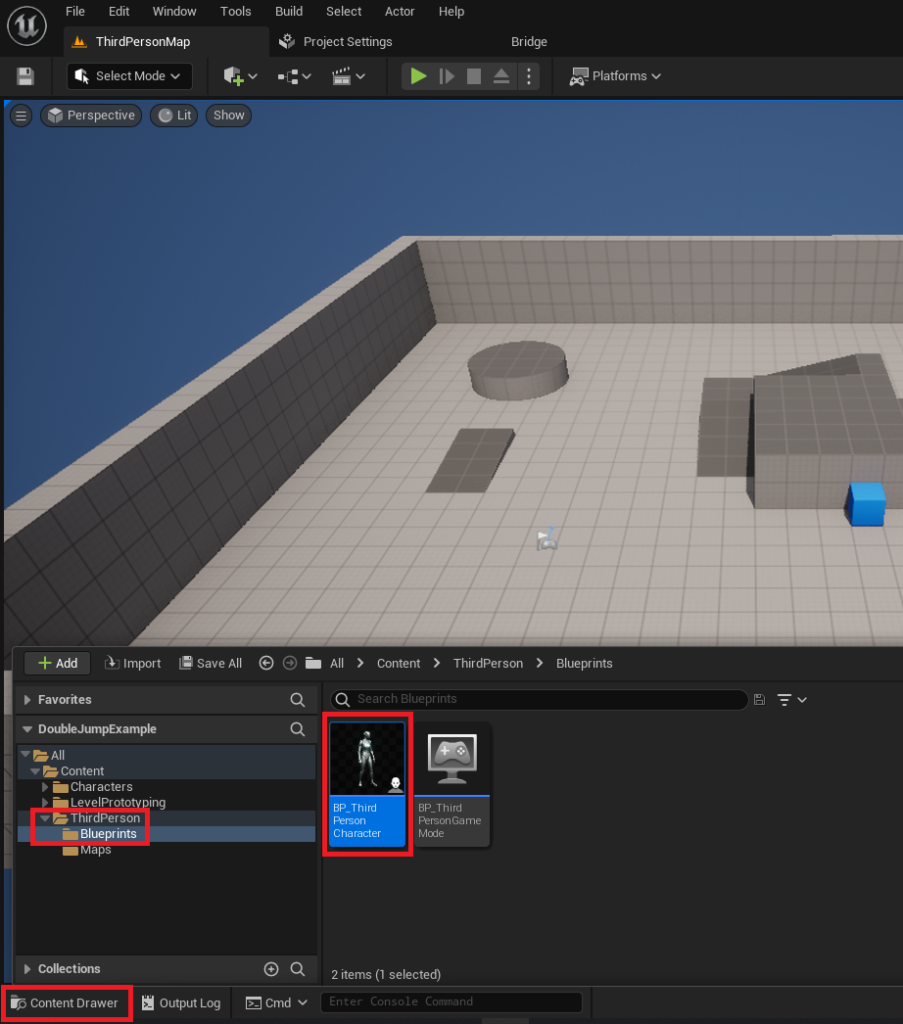
For developers looking to integrate this functionality, the process within Unreal Engine 5 is remarkably straightforward, particularly when starting with the engine’s pre-configured templates. Utilizing the Third Person template, a common starting point for many projects, the implementation begins by navigating to the core character asset.
-
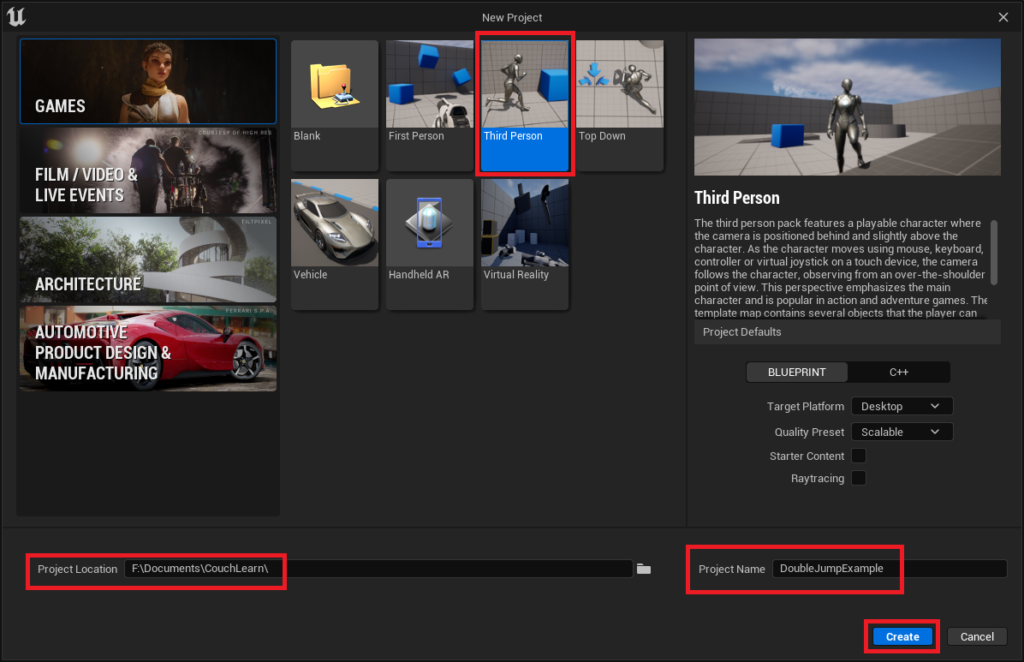
Project Setup: The initial step involves creating a new project in Unreal Engine 5, selecting the Third Person template. This template provides a pre-built character model and basic movement controls, serving as an ideal foundation for rapid prototyping and learning. Once the project is named and saved, the Unreal Engine editor opens, presenting a default scene with the playable character.
-
Accessing the Character Blueprint: Within the editor’s Content Drawer, developers locate the
BP_ThirdPersonCharacterasset, typically found in theContent/ThirdPerson/Blueprintsfolder. This blueprint is the central hub for defining the character’s behavior, attributes, and interactions. Opening this asset reveals the blueprint editor, a visual scripting environment where logic can be constructed without writing traditional code. -
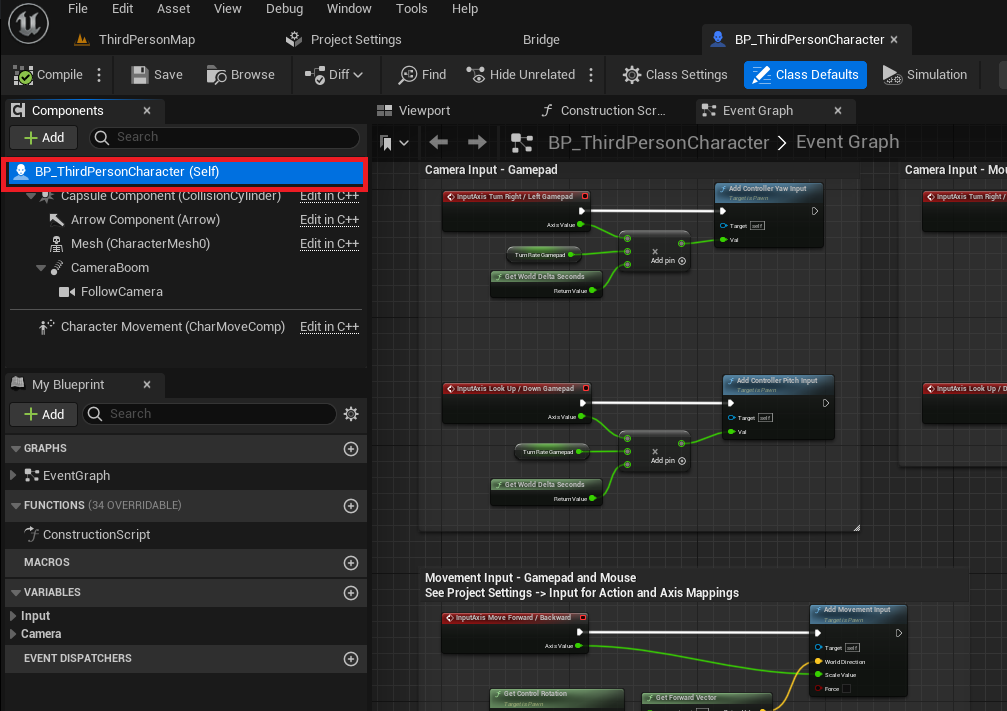
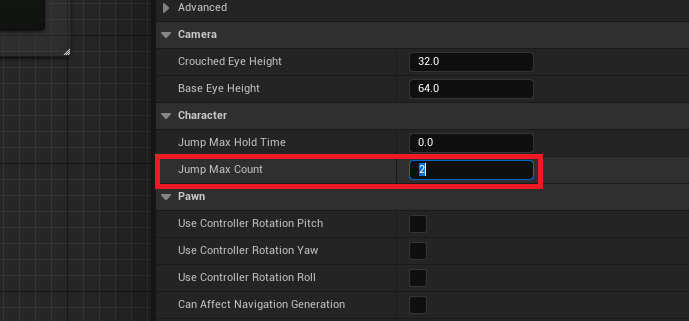
Modifying the Jump Max Count: The pivotal step occurs within the
BP_ThirdPersonCharacterblueprint. By selecting the character blueprint itself (labeledBP_ThirdPersonCharacter (Self)), developers gain access to its ‘Details’ panel on the right side of the editor. Under the ‘Character’ category, a parameter namedJump Max Countis present. By default, this value is set to ‘1’, allowing for a single jump. To enable the double jump, this value is simply changed to ‘2’. This single numerical alteration instantly grants the character the ability to perform a second jump mid-air. The flexibility of this parameter allows for more than just a double jump; developers can set it to ‘3’ for a triple jump or even higher, enabling unique character abilities or specific platforming challenges tailored to their game’s design.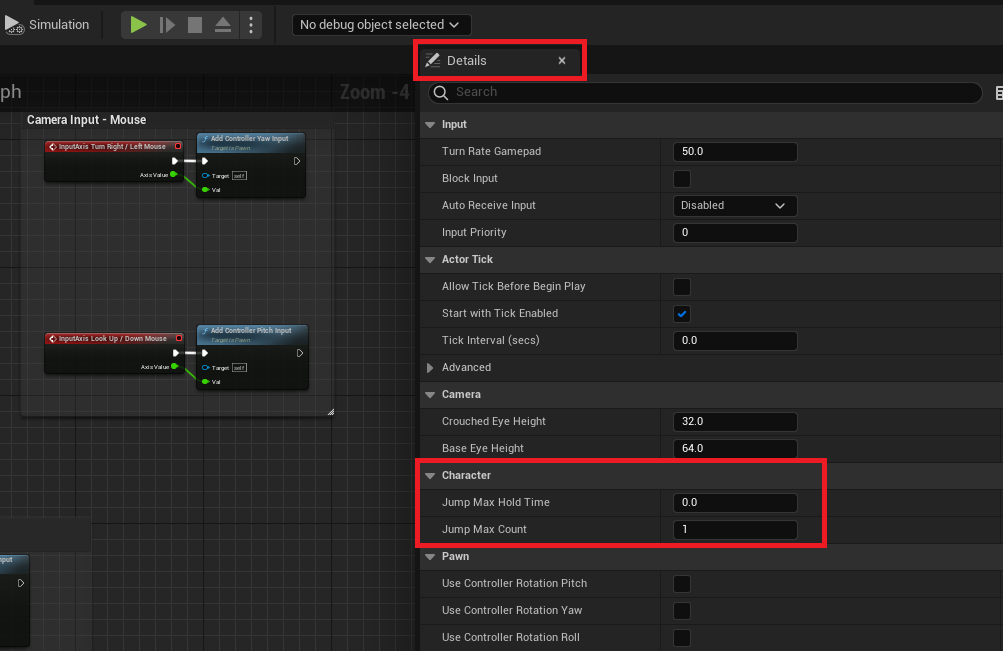
-
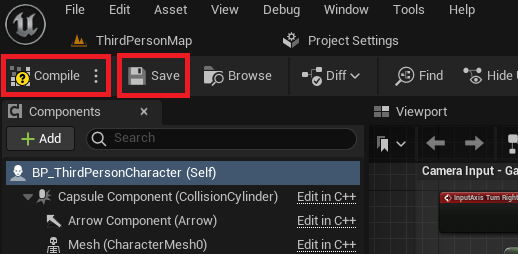
Compilation and Saving: After modifying the
Jump Max Count, it is crucial to click the ‘Compile’ and ‘Save’ buttons located in the top-left corner of the blueprint editor. Compilation processes the visual script into executable code, and saving ensures that the changes are permanently applied to the project. Without these steps, the modifications would not take effect in the game environment.
This direct manipulation of a pre-existing parameter exemplifies UE5’s commitment to user-friendliness, abstracting away the complex underlying calculations and state management that would typically be required for such a mechanic. The simplicity of this process allows developers to quickly test and iterate on jump heights, gravity settings, and other movement parameters, fine-tuning the feel of their character’s aerial control.
Beyond Basic Functionality: Enhancing Player Feedback with Animations
While the default implementation instantly grants double jump functionality, a critical aspect of creating a polished player experience lies in providing clear visual feedback. A character merely performing the same jump animation twice can feel uninspired and fail to communicate the successful execution of the second jump. This is where intermediate animation improvements become invaluable, transforming a functional mechanic into a visually satisfying one.
The process of refining the double jump animation involves delving into the character’s animation blueprint, which dictates how various skeletal animations are played based on character states and actions.
-
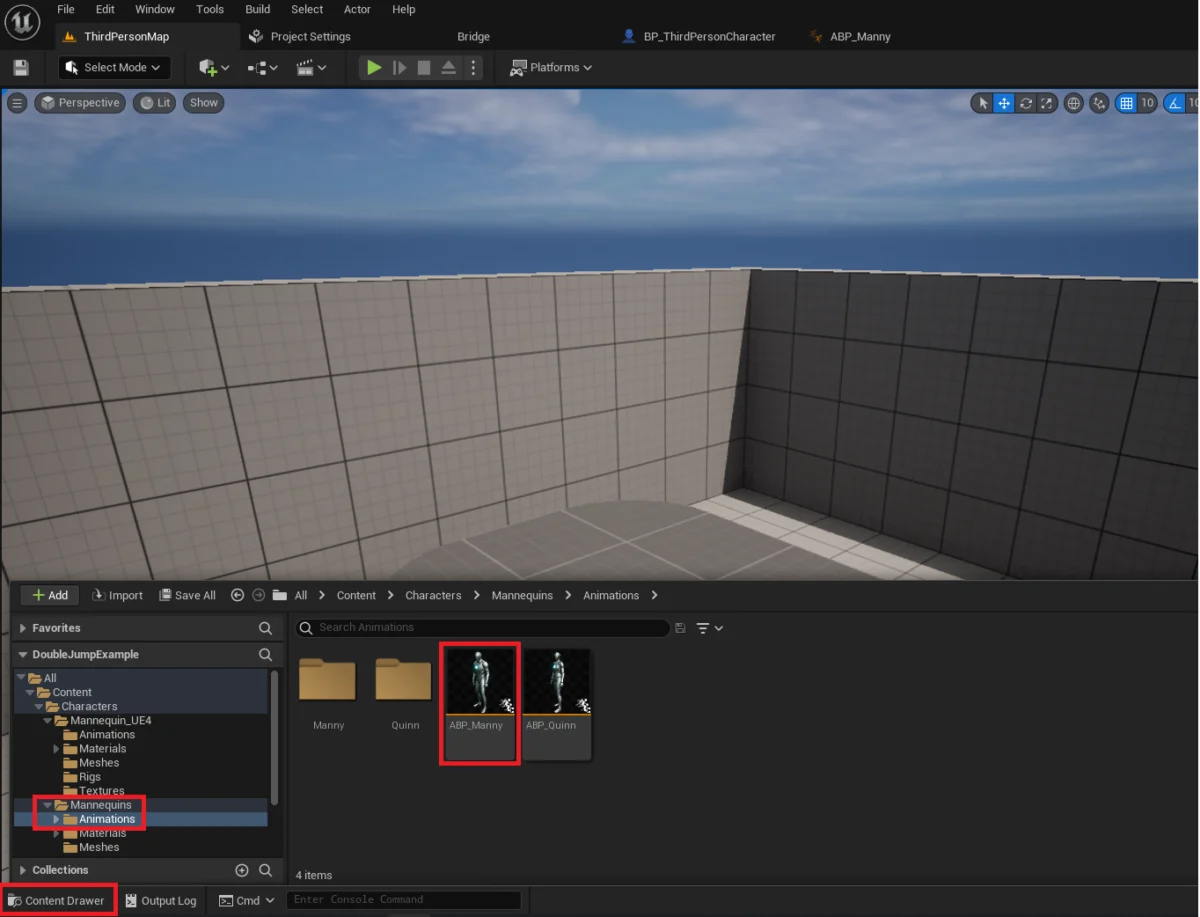
Accessing the Animation Blueprint: Developers locate the
ABP_Mannyanimation blueprint, typically found in theContent/Characters/Mannequins/Animationsfolder, or the equivalent animation blueprint for their custom character. This asset contains the animation logic for the default Unreal Engine mannequin.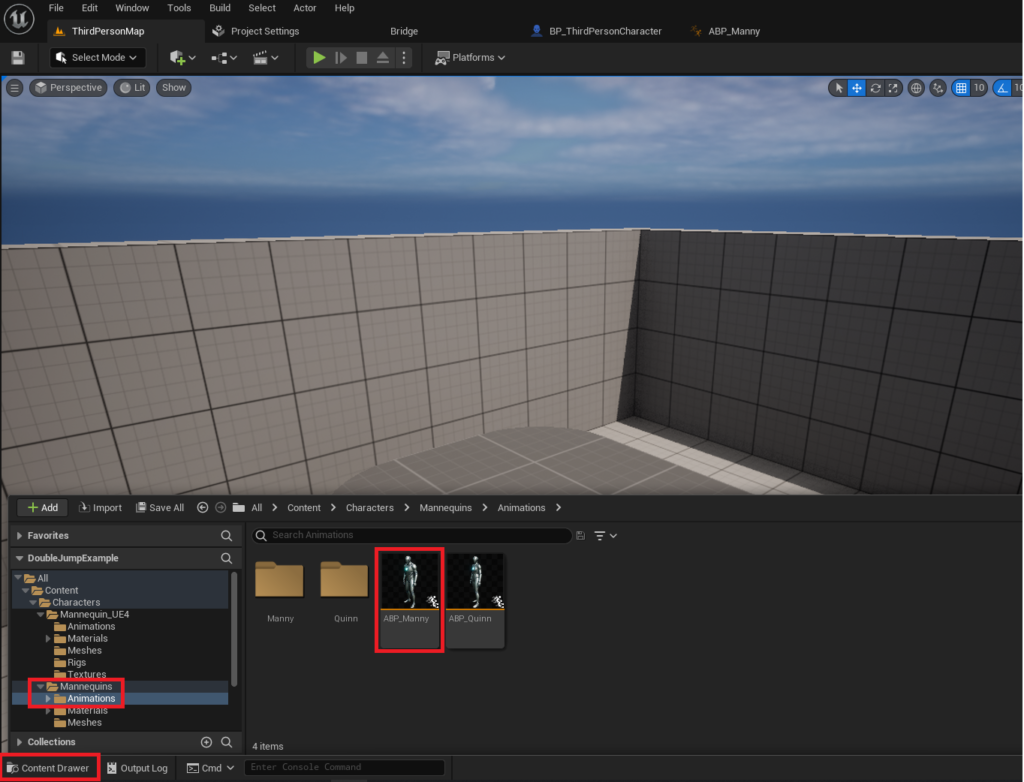
-
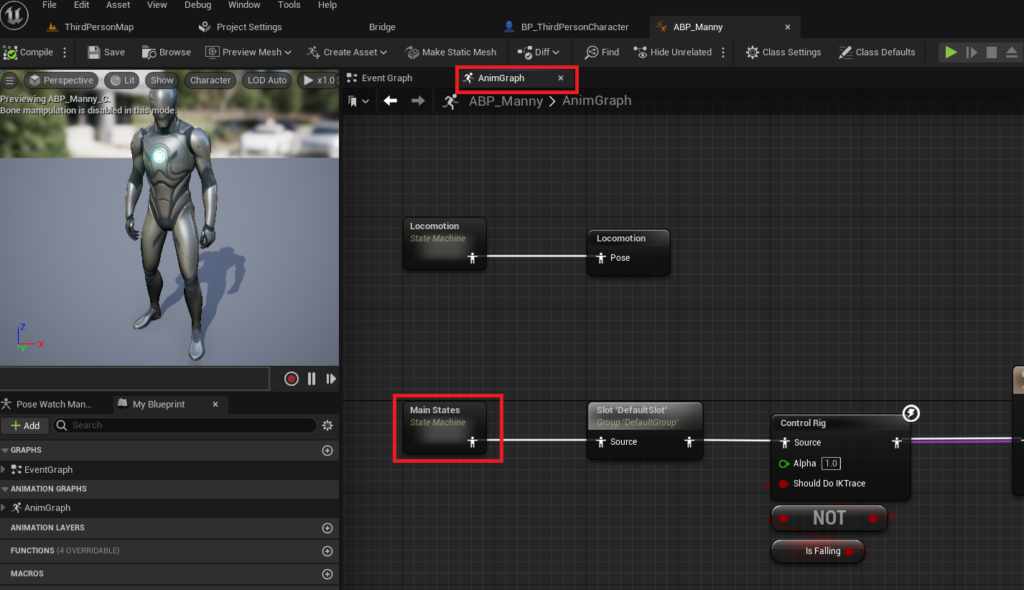
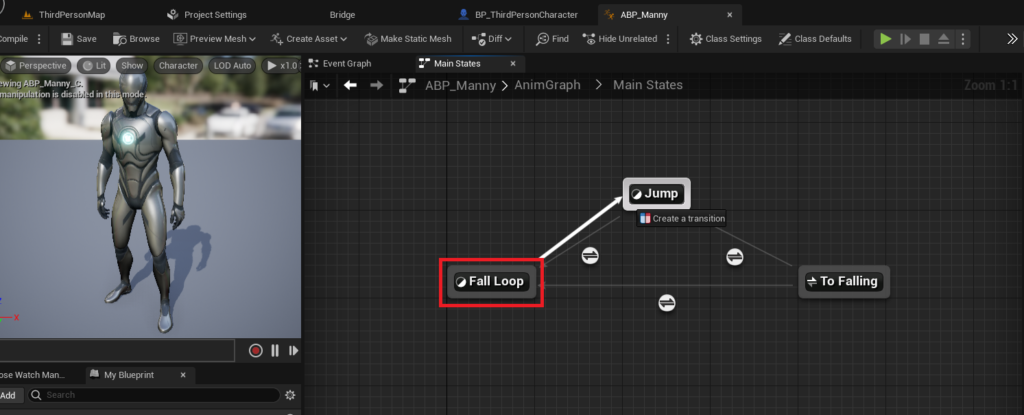
Navigating the AnimGraph and State Machine: Inside the animation blueprint editor, developers double-click on the
AnimGraphand then theMain Statesstate machine. State machines are fundamental to animation systems, allowing designers to define different animation states (e.g., idle, walk, jump, fall) and the rules for transitioning between them. -
Creating a New Animation Transition: A key enhancement for the double jump involves creating a new transition path. Specifically, a transition is established from the
Fall Loopstate to theJumpstate. This new arrow signifies a potential flow from falling animations back into a jumping animation, which is precisely what is needed for a visually distinct second jump.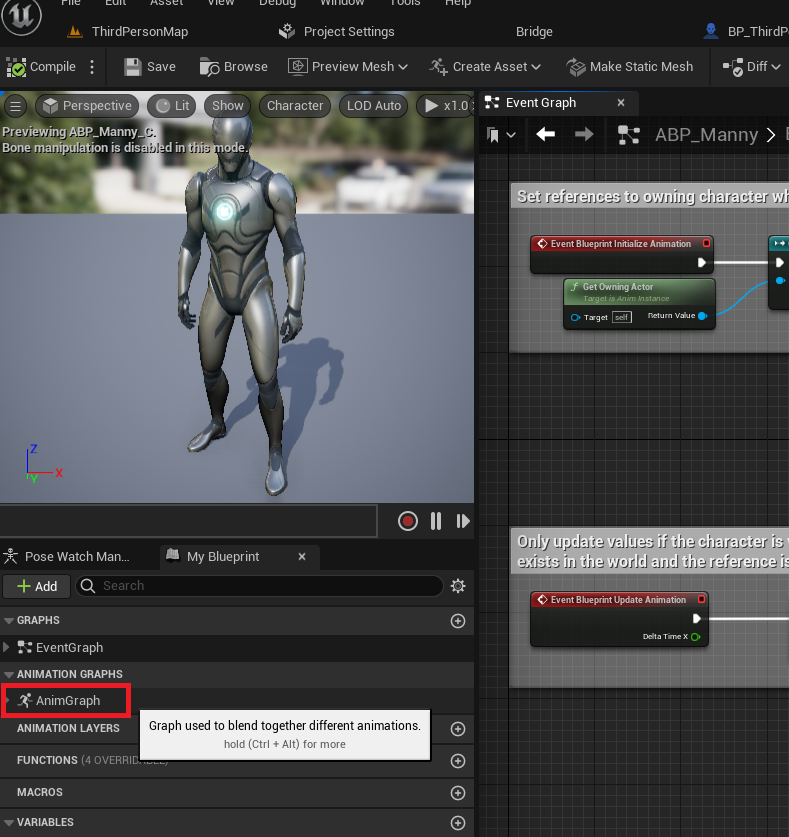
-
Defining Transition Logic: The final step involves opening the newly created transition and adding specific blueprint nodes to define when this transition should occur. The critical nodes typically involve checking if the character is currently falling (
Is Fallingnode) and crucially, whether theJump Max Count(orCurrent Jump Count) is greater than 1 (meaning a second jump is available and executed). This logic ensures that if the character is in a falling state and initiates a second jump, the animation system correctly transitions back to the initial jump animation, providing the desired visual reset and feedback. This blueprint setup effectively tells the engine: "If I’m falling and I press jump again, play the jump animation from the beginning."
This level of animation control, though slightly more complex than the initial Jump Max Count adjustment, is vital for immersion. When a character visibly "re-coils" or executes a distinct secondary jump animation, players receive immediate confirmation of their action, making the mechanic feel responsive and impactful. The difference between a simple, functional double jump and a beautifully animated one can significantly elevate the perceived quality and polish of a game, contributing to a more engaging and satisfying player experience.
Implications for Modern Game Development
The simplification of core mechanics like the double jump in Unreal Engine 5 carries significant implications for the broader game development landscape.
- Empowering Indie Developers: For independent studios and individual creators, the reduced technical overhead means more time can be dedicated to creative design, storytelling, and unique gameplay elements, rather than wrestling with foundational system implementation. This fosters innovation and lowers the barrier to entry for aspiring game makers.
- Accelerated Prototyping and Iteration: The ease of implementation allows developers to rapidly prototype and test various movement mechanics, jump heights, and character abilities. This iterative process is crucial for discovering what "feels right" and for fine-tuning gameplay, leading to more polished and enjoyable products.
- Enhanced Player Experience: By making it easier to implement and animate features like the double jump, UE5 enables developers to deliver games with superior visual and tactile feedback. A well-executed animation for a double jump isn’t just cosmetic; it’s a vital part of the player’s understanding and enjoyment of the game’s physics and character capabilities.
- Unreal Engine’s Ecosystem Strength: This accessibility is a key factor in Unreal Engine 5’s growing dominance. Alongside its cutting-edge rendering technologies like Lumen and Nanite, its commitment to developer-friendly tools for core gameplay mechanics creates a comprehensive and attractive ecosystem for studios of all sizes. Industry analysts frequently point to such ease-of-use features as critical differentiators in the highly competitive game engine market.
- Broader Design Freedom: When basic mechanics are easily handled, designers are freed to explore more complex variations or combine the double jump with other abilities (e.g., wall jumps, air dashes, specialized attacks), leading to richer and more intricate character control schemes.
Conclusion
The seemingly minor detail of simplifying the double jump mechanic within Unreal Engine 5 is, in fact, indicative of a larger trend towards empowering game developers with sophisticated yet accessible tools. By abstracting complex technical challenges into manageable parameters and providing clear pathways for animation refinement, Epic Games ensures that iconic mechanics remain foundational yet easily integrated. This not only streamlines the development process for studios but ultimately contributes to a higher standard of player experience, where fluid movement and responsive controls are the norm. As Unreal Engine 5 continues to evolve, its focus on both cutting-edge technology and developer usability will undoubtedly shape the future of interactive entertainment, allowing creators to bring their most ambitious visions to life with unprecedented efficiency and polish. The double jump, a testament to enduring game design, now stands as a prime example of this powerful convergence.
About the Author








