
Saving and loading game data is not merely a feature but a foundational pillar of modern interactive entertainment, directly influencing player engagement and game longevity. Recognizing this critical need, Unreal Engine 5 (UE5) has refined its built-in SaveGame system, offering developers a robust yet remarkably accessible solution for managing game state persistence. This integrated framework allows for the straightforward serialization and deserialization of crucial game data to and from local storage, significantly simplifying a historically complex aspect of game development. With only a handful of functions, developers can now ensure players’ progress, achievements, and unique in-game states are reliably preserved, fostering deeper immersion and a more satisfying gameplay experience.
The Evolution and Imperative of Game Data Persistence
The evolution of game data persistence has mirrored the advancement of gaming itself. Early arcade games, designed for short, session-based play, rarely offered saving mechanisms. As home consoles emerged, rudimentary systems like password entries for level progression became common, albeit cumbersome. The advent of physical memory cards revolutionized console gaming in the late 1990s, allowing players to store large chunks of game data, including entire playthroughs, on portable media. This was a significant leap, enabling longer, more complex games. The digital era further accelerated this, with PC games leveraging local file systems and, more recently, cloud saving becoming standard across platforms, offering convenience and backup.
Each iteration aimed to address the growing complexity of game worlds, narrative depth, and player customization. Modern titles, particularly open-world epics, role-playing games (RPGs), and long-form simulations, rely heavily on seamless data persistence to track intricate player choices, vast inventories, character statistics, and dynamic world states. A failure in this system, leading to lost progress, can be catastrophic for player retention and a game’s reputation, potentially resulting in negative reviews and disengaged communities. Data from industry surveys consistently highlight save functionality as a top priority for players, underscoring its impact on overall game satisfaction. Unreal Engine, a leading force in game development technology, has continually evolved its tools to meet these demands, culminating in the sophisticated and user-friendly SaveGame system in UE5.
Understanding the Core Mechanism: Unreal Engine’s SaveGame Class
At the heart of UE5’s data persistence solution lies the SaveGame class. This dedicated blueprintable class acts as a specialized data container, pre-configured to handle the intricate processes of serialization (converting data into a format for storage) and deserialization (reconstructing data from storage). Unlike transient variables that reset with each game session or level load, any variable declared within a custom SaveGame blueprint is automatically flagged for persistence. This means developers do not need to manually manage byte streams or complex file formats.
When a save operation is triggered, the engine efficiently captures the current values of these designated variables and writes them into a structured file on the user’s machine. Conversely, during a load operation, the engine reads this file, reconstructs the SaveGame object, and populates its variables with the stored data, which can then be used to restore the game state. This abstraction shields developers from the complexities of low-level file I/O and data formatting, allowing them to focus on game logic and design.
The engine intelligently handles the storage locations across various operating systems, ensuring broad compatibility without requiring platform-specific code from the developer:
- Windows: Files are typically found in the Local Appdata folder.
- MacOS: Users will find them in
Library/Application Support. - Linux: Distributions place them in
/home/username/.local/share.
Crucially, the system supports nearly every variable type commonly used in Unreal Engine, from simple booleans, integers, floats, and strings to complex vectors, rotators, transforms, arrays, and custom structs. This extensive compatibility offers immense flexibility for storing diverse game data, from player health and inventory to world states and quest progress.
Establishing the Persistence Blueprint: Creating the Custom Save Class
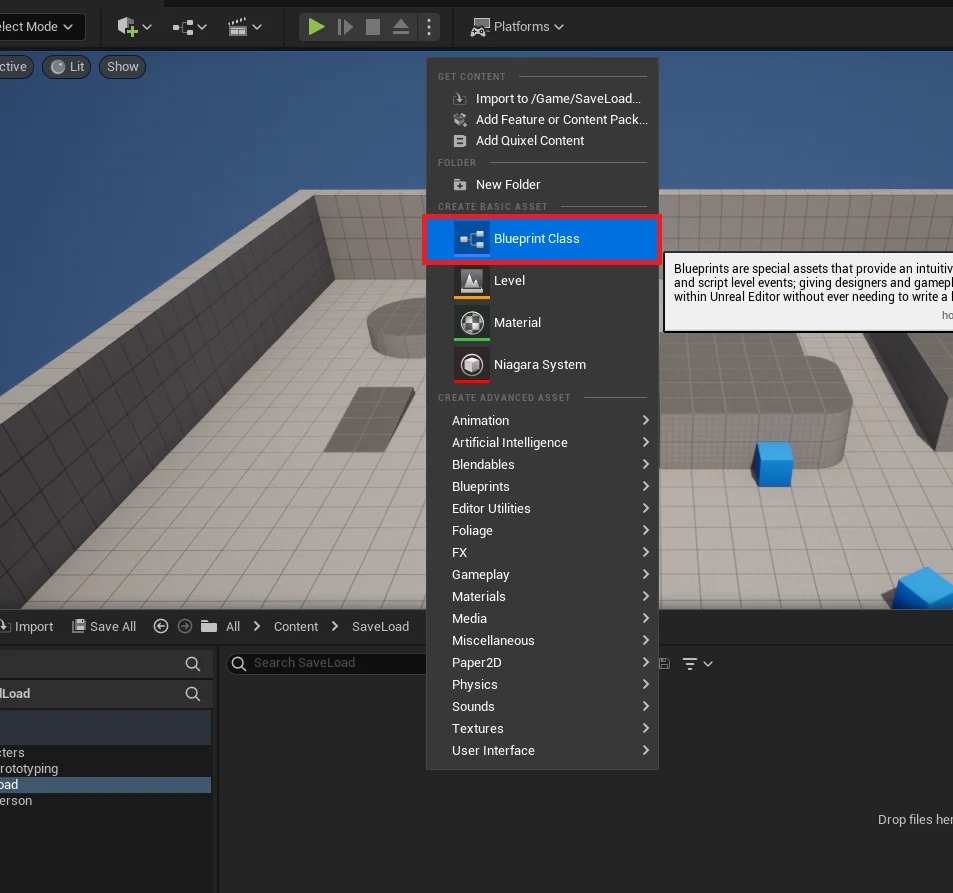
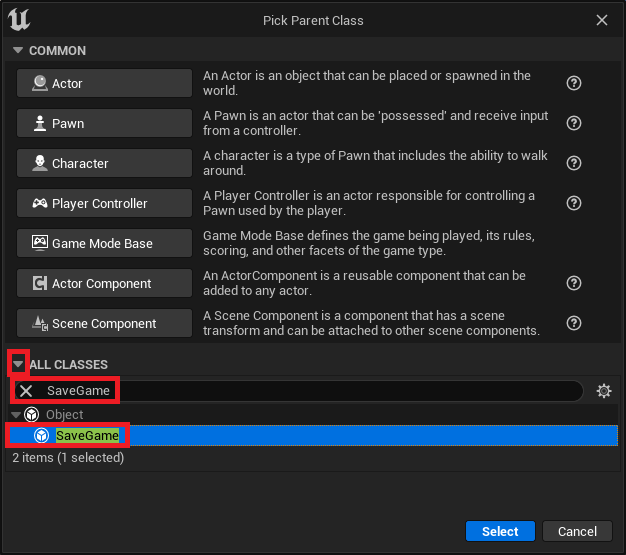
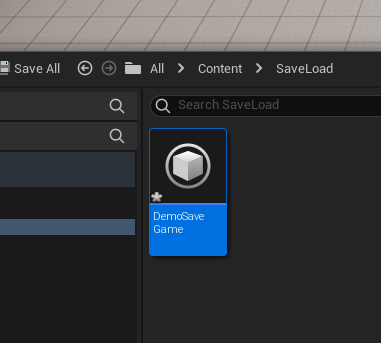
The initial and foundational step for any developer leveraging this system involves establishing a custom SaveGame class. This is achieved within the Unreal Engine editor by creating a new blueprint class and selecting SaveGame as its parent. Naming this blueprint descriptively, such as "DemoSaveGame," "PlayerProfileSave," or "WorldStateSave," is crucial for clarity and future reference, especially in larger projects with multiple save files.
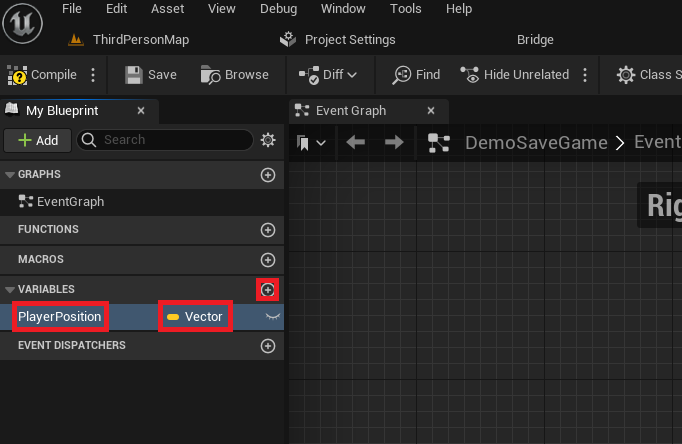
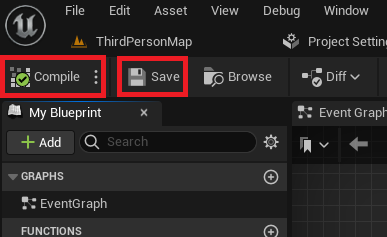
Once created, this custom blueprint becomes the central repository for all data intended for persistence. Developers then add variables to this class, meticulously defining each piece of information they wish to save. For instance, in a typical scenario, a Vector variable named "PlayerPosition" might be added to store the player character’s last known location. Other common additions include integer variables for scores, boolean flags for quest completion, TArrays for inventory items, or even custom UStructs to encapsulate more complex data structures like player statistics or equipment configurations. The process is intuitive: variables are declared and configured directly within the blueprint editor, much like any other blueprint actor, and a simple "Compile" and "Save" ensures these structural changes are applied, preparing the data container for runtime operations. This modular approach allows for easy expansion and modification of saved data as a game evolves.
Implementing Save and Load Functionality via the Game Instance
To effectively manage the lifecycle of save and load operations, Unreal Engine best practices dictate integrating this functionality within a custom Game Instance class. The Game Instance is a unique object that persists for the entire duration of a player’s session, even across level changes, making it an ideal central hub for managing global game state and, by extension, save data. This ensures that save data references and logic remain intact regardless of what map the player is currently in.

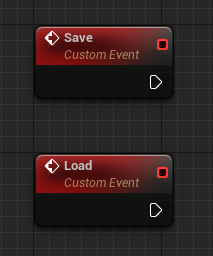
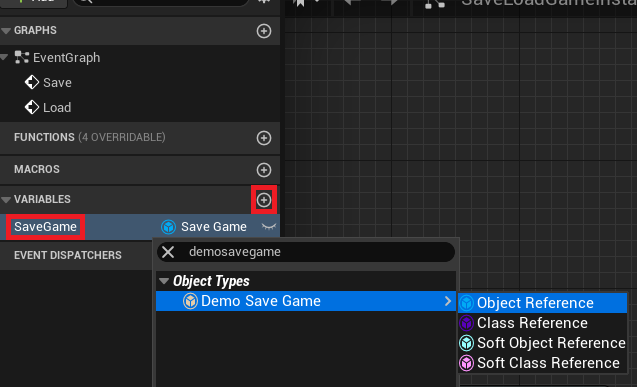
Within this custom Game Instance, developers define two primary custom events: "Save" and "Load." These events encapsulate the entire logic for handling data persistence. Additionally, a variable of the custom SaveGame class type (e.g., "DemoSaveGame") is created within the Game Instance to hold a runtime reference to the active save object. This ensures that the loaded or newly created save data is readily accessible throughout the game, acting as a single source of truth for persistent information.

The Load Process: Retrieving Stored Game States
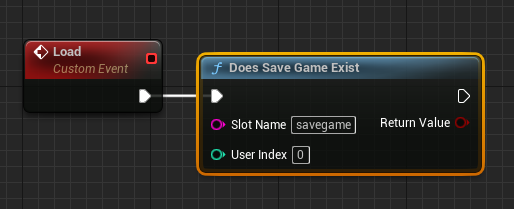
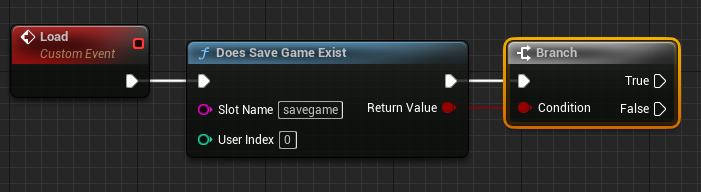
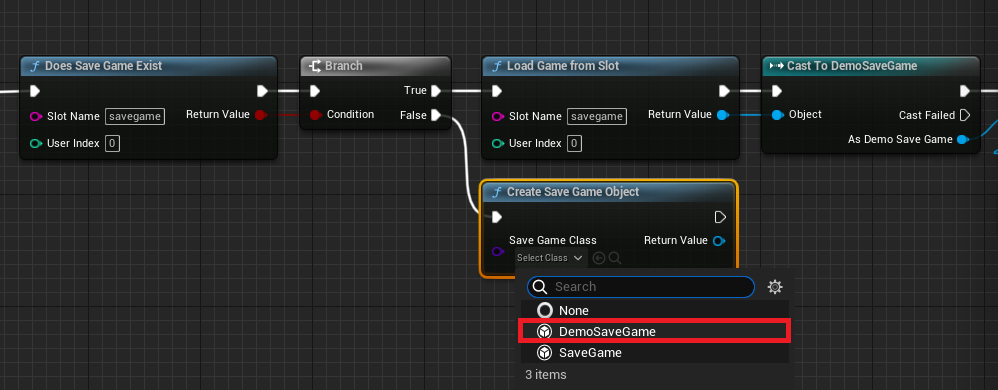
The "Load" event orchestrates the retrieval of previously saved game data. The process begins with a crucial check: the "Does Save Game Exist" node. This node queries the file system using a unique "Slot Name" (e.g., "savegame"). The "Slot Name" acts as a unique identifier for a specific save file, allowing for multiple save slots (e.g., "savegame_slot1", "savegame_slot2") if desired, providing players with more control over their progress. The output of this node, a boolean value, feeds into a "Branch" node, determining the subsequent flow of logic.
If a Save File Exists (True Branch)
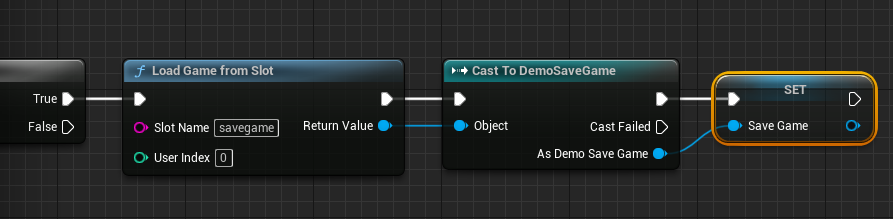
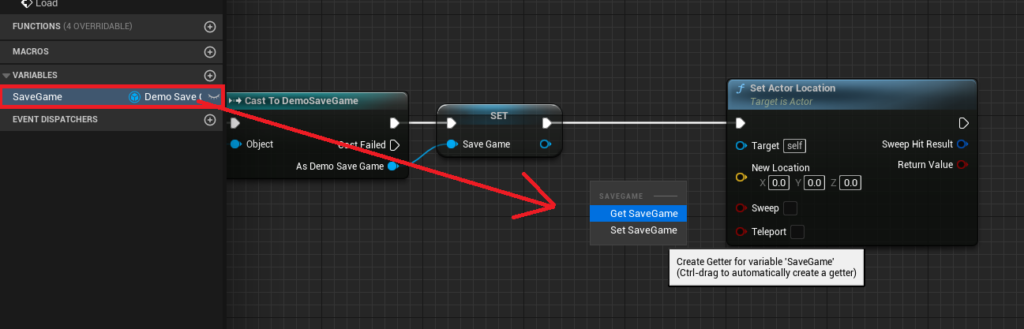
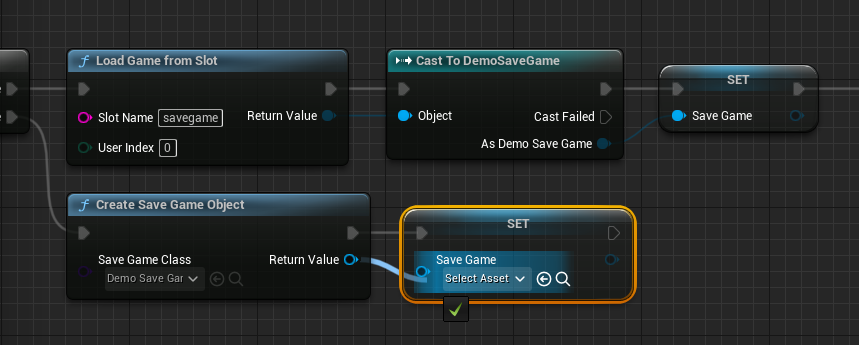
If the "Does Save Game Exist" node returns true, the engine proceeds to load the data. A "Load Game From Slot" node, using the same "Slot Name," reads the raw data from the disk. The output of this node is a generic SaveGame object, which must then be "Cast To" the specific custom SaveGame class created earlier (e.g., "Cast to DemoSaveGame"). This casting operation verifies the data type and allows access to the custom variables defined within it. The successfully cast object is then assigned to the Game Instance‘s "SaveGame" variable, making its data accessible throughout the game session.
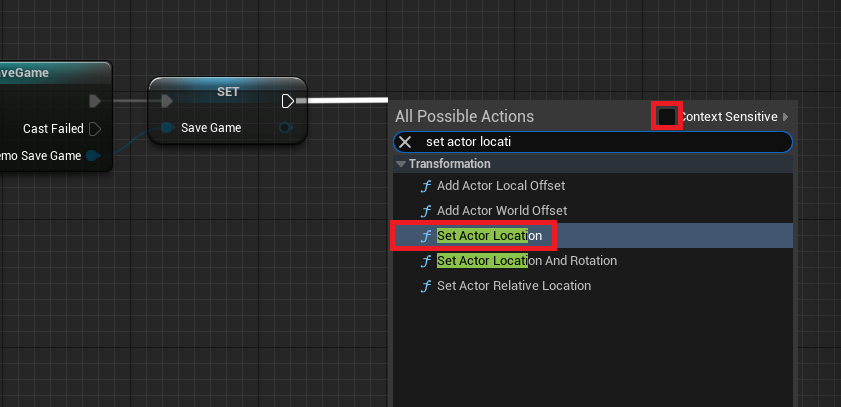
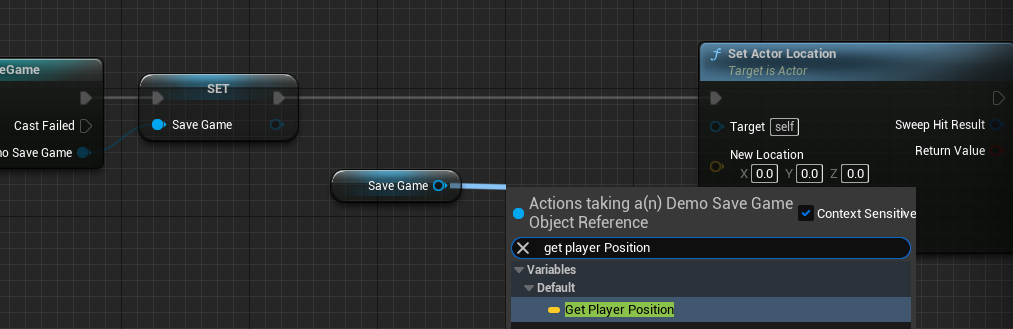
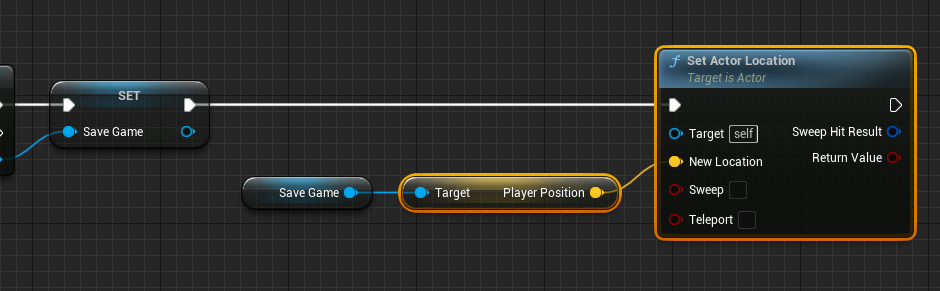
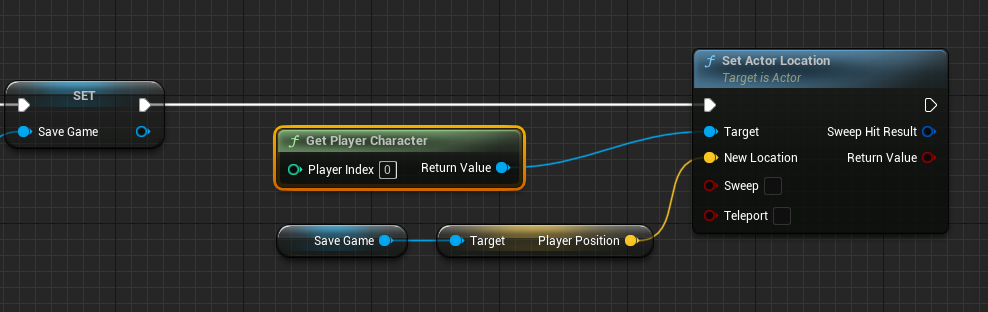
From this point, the loaded variables can be used to restore the game state. For instance, the "PlayerPosition" variable can be retrieved from the SaveGame object and used with a "Set Actor Location" node, targeting the "Get Player Character" node, to instantly teleport the player to their last saved coordinates. This seamless restoration of position is a fundamental aspect of continuity in gameplay.
If No Save File Exists (False Branch)
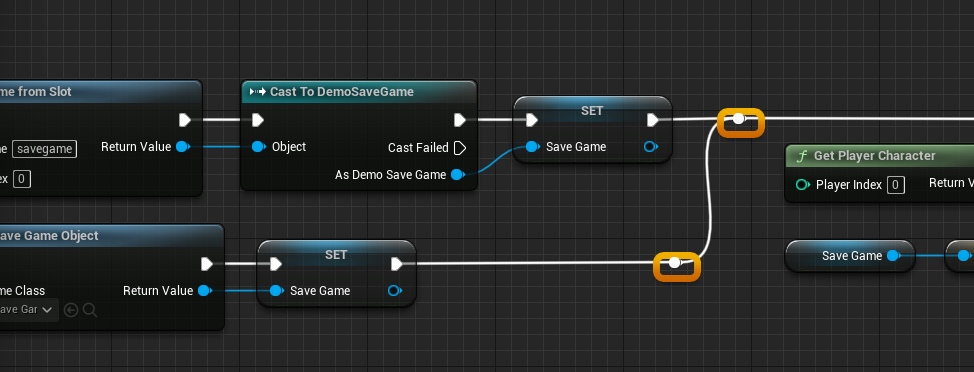
When no save file is found for the specified "Slot Name," the system intelligently creates a new, empty SaveGame object. This is done via the "Create Save Game Object" node, specifying the custom SaveGame class. This newly initialized object contains default values for all its variables. This new object is then assigned to the Game Instance‘s "SaveGame" variable, ensuring a valid object is always present for subsequent operations, even if no prior save existed. This prevents null reference errors and provides a clean slate for a new game playthrough. Careful arrangement of blueprint nodes, including judicious use of reroute nodes, ensures a clean and readable workflow for both scenarios, which is vital for debugging and collaboration.
The Save Process: Persisting Current Game States
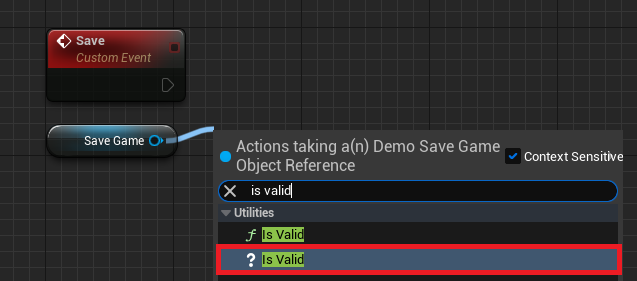
Conversely, the "Save" event handles the capture and storage of the game’s current state. The first step in this process involves validating the Game Instance‘s "SaveGame" variable using an "Is Valid" node. This crucial check prevents attempting to save data to a non-existent or corrupted object, which could lead to crashes or data loss.
If the SaveGame Object is Valid
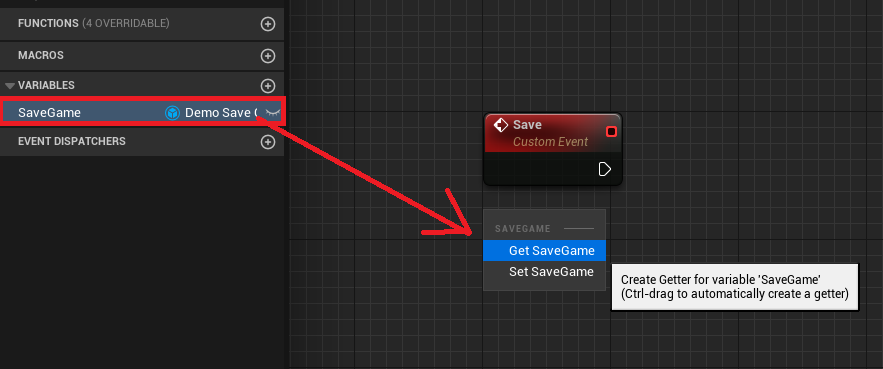
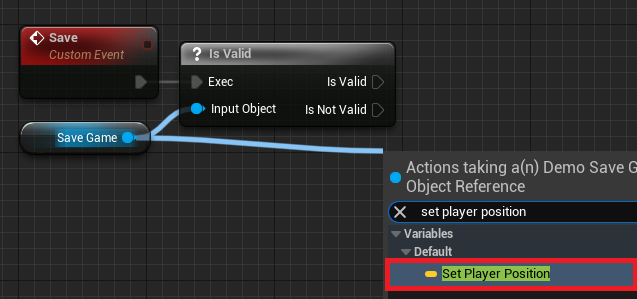
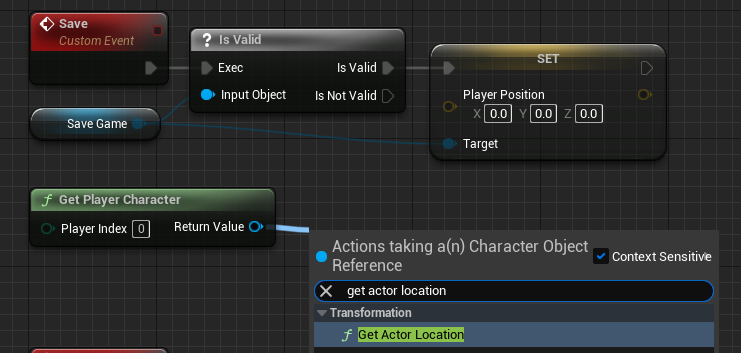
If the "Is Valid" node confirms that the SaveGame object reference is active, the system proceeds to populate it with the current game data. For the "PlayerPosition" example, a "Get Player Character" node is used to retrieve a reference to the active player, followed by a "Get Actor Location" node to ascertain their real-time coordinates in the game world. This Vector value is then assigned to the "PlayerPosition" variable within the SaveGame object using a "Set Player Position" node. This updates the data container with the player’s most recent position. This logic would be extended to update all other variables within the SaveGame object that correspond to dynamic game states (e.g., current health, inventory changes, quest progress).
Once all relevant variables within the SaveGame object are updated, the "Save Game to Slot" or "Async Save Game to Slot" node is invoked. This crucial node writes the entire SaveGame object to disk using the designated "Slot Name." The choice between synchronous ("Save Game to Slot") and asynchronous ("Async Save Game to Slot") saving is a vital performance consideration. For games saving minimal data, the synchronous option is straightforward and simpler to implement. However, for titles with extensive data sets (common in open-world or complex RPGs), Async Save Game to Slot is highly recommended as it performs the file I/O in a separate thread, preventing potential hitches or frame rate drops that could disrupt gameplay and negatively impact the player experience. This is particularly important for games targeting 60 frames per second or higher.
If the SaveGame Object is Not Valid
Should the SaveGame object reference be invalid (e.g., if the player starts a new game without loading, and no save file was previously created or the reference was somehow lost), the system must first instantiate a new SaveGame object before any data can be saved. This mirrors the "False" branch of the load process: a "Create Save Game Object" node is used, specifying the custom SaveGame class, and the result is assigned to the Game Instance‘s "SaveGame" variable. Once a valid object is established, the flow reconnects to the main save logic, allowing the player’s current position (or other data) to be set and then saved to the newly created file. This robust error handling ensures that a save operation can always proceed, creating a new file if one doesn’t exist.
Triggering Persistence: Integrating Save/Load into Gameplay
With the core save and load logic implemented within the Game Instance, the final step is to expose and trigger these functions from within the game world. A common approach involves integrating key press events, UI elements (like a "Save Game" button in a pause menu), or specific gameplay triggers (e.g., reaching a checkpoint, exiting a zone, or simply quitting the game).
For demonstration purposes, developers often configure simple key bindings within their Player Character blueprint (e.g., ThirdPersonCharacterBP). When a designated key (like ‘1’ for save, ‘2’ for load) is pressed, the event first retrieves a reference to the custom Game Instance using a "Get Game Instance" node, followed by a "Cast To" node targeting the specific custom Game Instance class. From this successfully cast reference, the "Save" or "Load" custom events can then be invoked. This setup allows players to manually save their progress at critical junctures or load their last saved state, directly experiencing the persistence functionality.
Beyond simple key presses, these events can be integrated with more sophisticated game systems, such as:
- Checkpoint Triggers: Automatically saving player progress upon reaching designated safe zones.
- Exit Prompts: Asking players to save before quitting the game.
- Auto-Save Intervals: Periodically saving progress in the background to prevent significant data loss.
- In-Game UI: Buttons within menus for manual saving and loading.
By integrating these triggers thoughtfully, developers can provide a robust and user-friendly persistence layer that enhances the overall playability and convenience of their games.
Analysis and Broader Implications for Game Development
Unreal Engine 5’s refined SaveGame system represents more than just a technical utility; it’s a strategic advantage for developers across the spectrum, from solo indie creators to large AAA studios. By providing a high-level, blueprint-friendly abstraction for data persistence, Epic Games significantly lowers the barrier to entry for managing complex game states. This directly translates to several profound benefits:
- Enhanced Developer Efficiency: Less time spent on boilerplate file management, low-level serialization code, and platform-specific implementations means more time dedicated to innovative gameplay mechanics, rich narratives, and compelling content creation. This is particularly beneficial for indie studios with limited resources and tight development cycles, democratizing access to professional-grade persistence solutions.
- Improved Player Experience: Reliable saving and loading are fundamental to player satisfaction and retention. A system that "just works" builds trust and encourages longer play sessions, reducing frustration caused by lost progress or corrupted save files. Data shows that games with robust save systems generally have higher player completion rates and positive community feedback.
- Greater Design Freedom: Game designers can envision and implement more ambitious features, such as branching narratives with persistent player choices, intricate inventory and crafting systems, dynamic world changes based on player actions, and even emergent gameplay loops, knowing that the engine can handle the underlying data persistence with relative ease. This empowers more complex and engaging game worlds.
- Scalability and Performance: The distinction between synchronous and asynchronous saving (
Save Game to Slotvs.Async Save Game to Slot) allows developers to scale their persistence solutions from simple games with minimal saved data to large, data-intensive projects without compromising performance. This ensures that even the most expansive virtual worlds can save progress without introducing noticeable hitches or stalls. - Cross-Platform Consistency: While the physical file locations vary across operating systems, the abstract
SaveGamesystem provides a consistent API (Application Programming Interface) for developers across different platforms. This simplifies multi-platform development, reducing the need for platform-specific save logic and accelerating porting efforts.
The continuous evolution of such core engine functionalities underscores Unreal Engine’s commitment to empowering creators and pushing the boundaries of interactive entertainment. Industry experts often laud integrated systems like UE5’s SaveGame as critical for streamlining modern development workflows. Developers accustomed to intricate manual serialization processes or reliance on third-party plugins will find this streamlined approach invaluable. The UE5 SaveGame system is a testament to this, solidifying its role as an indispensable tool in the modern game development ecosystem and paving the way for more immersive, persistent, and player-centric experiences.
About the Author








