In the dynamic landscape of game development with Unreal Engine 5 (UE5), developers frequently leverage Blueprints, Epic Games’ robust visual scripting system, for rapid prototyping, interactive logic, and accessible design workflows. However, as projects mature and complexity escalates, a common challenge emerges: Blueprint code can occasionally encounter performance bottlenecks, becoming a limiting factor when intricate calculations, extensive data manipulation, or high-frequency operations are required. While writing core game logic entirely in C++ offers superior performance, it often necessitates a significant refactoring of existing Blueprint-centric projects, introducing substantial development overhead and potentially disrupting established workflows. Furthermore, certain advanced C++ features or low-level engine functionalities might not have direct Blueprint node equivalents, hindering developers from fully exploiting Unreal Engine’s capabilities through visual scripting alone.
This inherent tension between Blueprint’s ease of use and C++’s raw power underscores the critical need for an effective bridging solution. Enter the C++ Blueprint Function Library, a powerful built-in Unreal Engine class designed to seamlessly integrate high-performance C++ code directly into Blueprint graphs. This integration offers the best of both worlds: the speed and efficiency of compiled C++ code combined with the accessibility and visual clarity of Blueprints. By strategically employing C++ Blueprint Function Libraries, developers can offload performance-critical segments of their game logic to C++, achieving substantial optimizations without undertaking a complete project overhaul. This guide delves into the essence of C++ Blueprint Function Libraries, outlining their definition, creation process within UE5, and practical application, ensuring developers can harness the full potential of a hybrid development approach.
The Performance Imperative in Modern Game Development
The choice between visual scripting and compiled code is a foundational decision in game development, particularly within an engine like Unreal Engine 5 that offers both paradigms. Blueprints, with their intuitive drag-and-drop interface and visual flow, excel in empowering designers and scripters to quickly build game mechanics, iterate on ideas, and manage complex event sequences without writing a single line of traditional code. This agility significantly reduces development time in early stages and fosters a collaborative environment where diverse team members can contribute effectively.
However, the advantages of visual scripting come with inherent performance characteristics. Blueprints are interpreted at runtime, meaning the engine processes and executes them dynamically. This interpretation layer introduces a certain overhead compared to compiled C++ code, which is translated directly into machine-executable instructions during the build process. For operations involving extensive loops, complex mathematical algorithms, frequent memory access, or intensive physics calculations, the cumulative overhead of Blueprint interpretation can lead to noticeable frame rate drops, stuttering, or increased load times. Experienced developers often observe that while a simple Blueprint node might be performant, a chain of hundreds of such nodes executing repeatedly can become a significant CPU drain.
Conversely, C++ offers unparalleled performance due to its compiled nature and direct memory access. It allows developers to write highly optimized code that interacts intimately with the hardware and the underlying engine architecture. This makes C++ the go-to choice for core engine modifications, complex AI systems, custom rendering pipelines, advanced networking, and any logic demanding maximum computational efficiency. The challenge, however, lies in its steeper learning curve, longer compilation times, and the potential for disrupting visual scripting workflows if C++ code isn’t carefully integrated.
The C++ Blueprint Function Library directly addresses this dichotomy. It provides a targeted solution to bridge the gap, allowing developers to identify specific performance bottlenecks within their Blueprint graphs and reimplement those critical sections in C++. This strategic offloading preserves the agility of Blueprint development for the majority of game logic while injecting C++’s raw speed precisely where it’s needed most, leading to a more balanced and optimized overall project.
Defining the C++ Blueprint Function Library in Unreal Engine 5
At its core, a C++ Blueprint Function Library is a specialized Unreal Engine class designed to host static C++ functions that can be directly invoked from any Blueprint graph. Unlike regular C++ classes that might require an instantiated object to call their methods, functions within a Blueprint Function Library are marked as static, meaning they belong to the class itself rather than an instance. This crucial characteristic allows them to be accessed globally and effortlessly within the Blueprint editor’s context menu without needing to reference a specific object.
Architecturally, these libraries act as a crucial interoperability layer. They are UObject derived classes, leveraging Unreal Engine’s reflection system (UCLASS, UFUNCTION, UPROPERTY macros) to expose C++ elements to the editor. By decorating C++ functions with the UFUNCTION(BlueprintCallable) macro, developers explicitly instruct the Unreal Engine reflection system to make these functions visible and callable from Blueprints. The engine then automatically generates the necessary wrappers and plumbing to enable seamless communication between the Blueprint Virtual Machine (VM) and the compiled C++ code.
The primary benefit of this design is that it empowers developers to consolidate complex or performance-sensitive logic into robust, compiled C++ modules. For instance, if a game requires a custom sorting algorithm that processes thousands of data entries every frame, implementing it in C++ within a function library would offer a dramatic performance improvement over a purely Blueprint-based solution. Similarly, accessing operating system-specific APIs, interacting with third-party SDKs, or performing advanced memory management, which are often challenging or impossible directly within Blueprints, become straightforward when encapsulated within a C++ Blueprint Function Library. This gives developers unparalleled control and flexibility, expanding the capabilities of their Blueprint-driven projects without sacrificing visual development efficiency.
Prerequisites for Seamless C++ Integration
Before embarking on the creation of a C++ Blueprint Function Library, developers must ensure they meet certain foundational requirements. The process assumes a basic level of familiarity with C++ programming, particularly within the context of Unreal Engine 5. This includes understanding fundamental C++ syntax, object-oriented programming principles, and how Unreal Engine’s specific macros (e.g., UCLASS, UFUNCTION, UPROPERTY) are used to integrate C++ code with the engine’s reflection system. While a deep expertise in C++ isn’t always necessary for simple functions, a conceptual grasp of memory management and performance considerations will prove invaluable for writing optimized code.
Crucially, developers must have an Integrated Development Environment (IDE) installed that is compatible with Unreal Engine 5. These powerful software applications are essential for writing, debugging, and compiling C++ code. The primary IDEs supported by Unreal Engine include:
- Microsoft Visual Studio (for Windows): A comprehensive IDE widely used for C++ development on the Windows platform. It comes with powerful debugging tools and excellent integration with Unreal Engine.
- Xcode (for macOS): Apple’s native IDE for macOS development, essential for compiling C++ projects on Apple hardware.
- JetBrains Rider (cross-platform): A popular, subscription-based IDE known for its intelligent code analysis, refactoring capabilities, and robust support for C++ and Unreal Engine across Windows, macOS, and Linux.
These IDEs work in conjunction with C++ compilers (like MSVC for Visual Studio, Clang/LLVM for Xcode) to translate the human-readable C++ source code into executable machine code that Unreal Engine can utilize. If an IDE or its associated compiler toolchain is not detected when attempting to create a new C++ class, Unreal Engine will intelligently prompt the user to install the necessary components, guiding them through the setup process. Ensuring these prerequisites are in place is the first critical step toward unlocking the full potential of C++ within your UE5 projects.
Establishing a C++ Blueprint Function Library in Unreal Engine 5
The creation of a C++ Blueprint Function Library is an intuitive process initiated directly from the Unreal Engine 5 editor. This method streamlines the setup, automatically generating the necessary boilerplate code and project files.
-
Initiating the New C++ Class Creation:
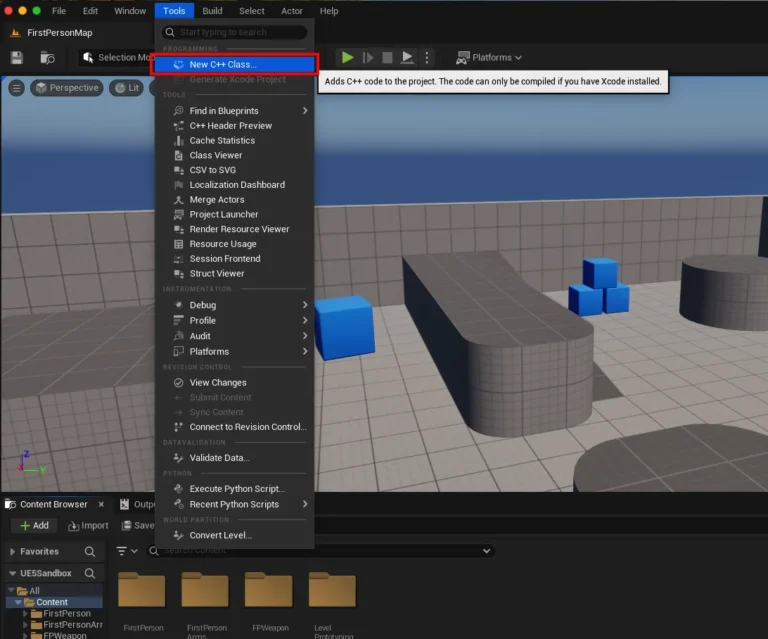
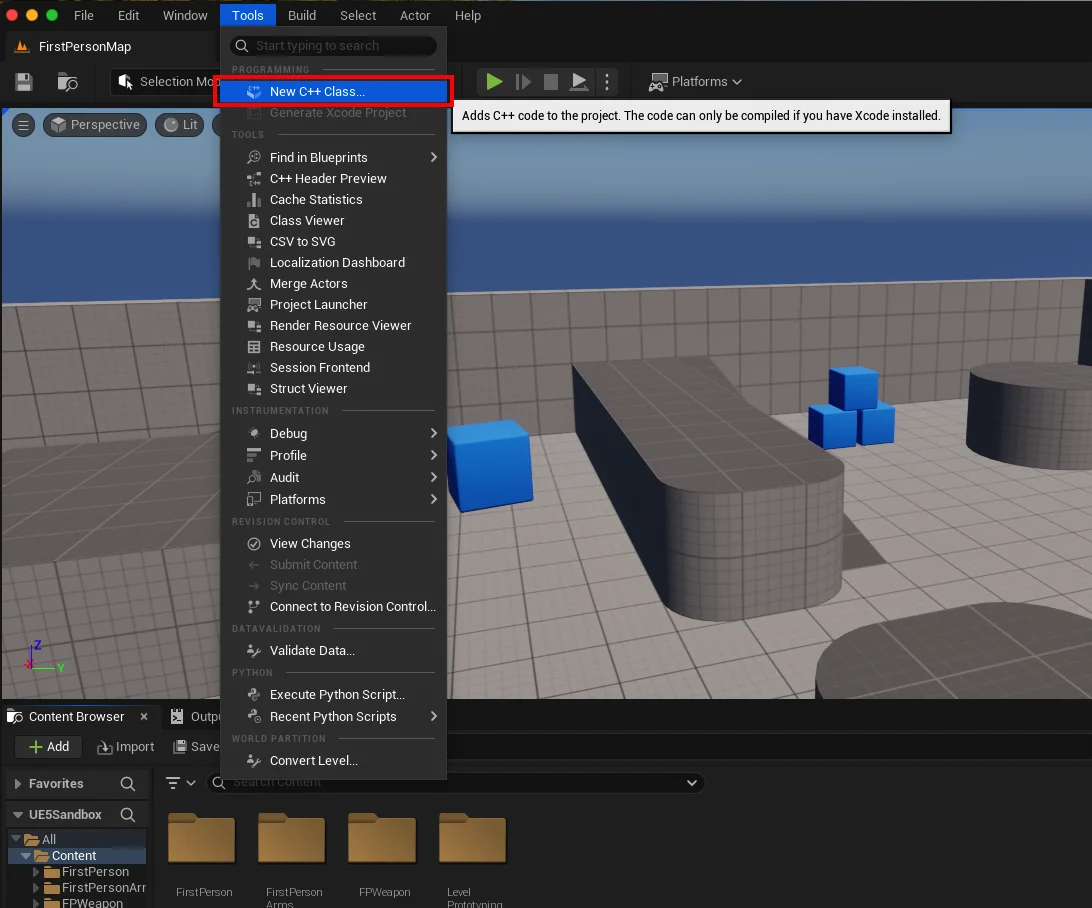
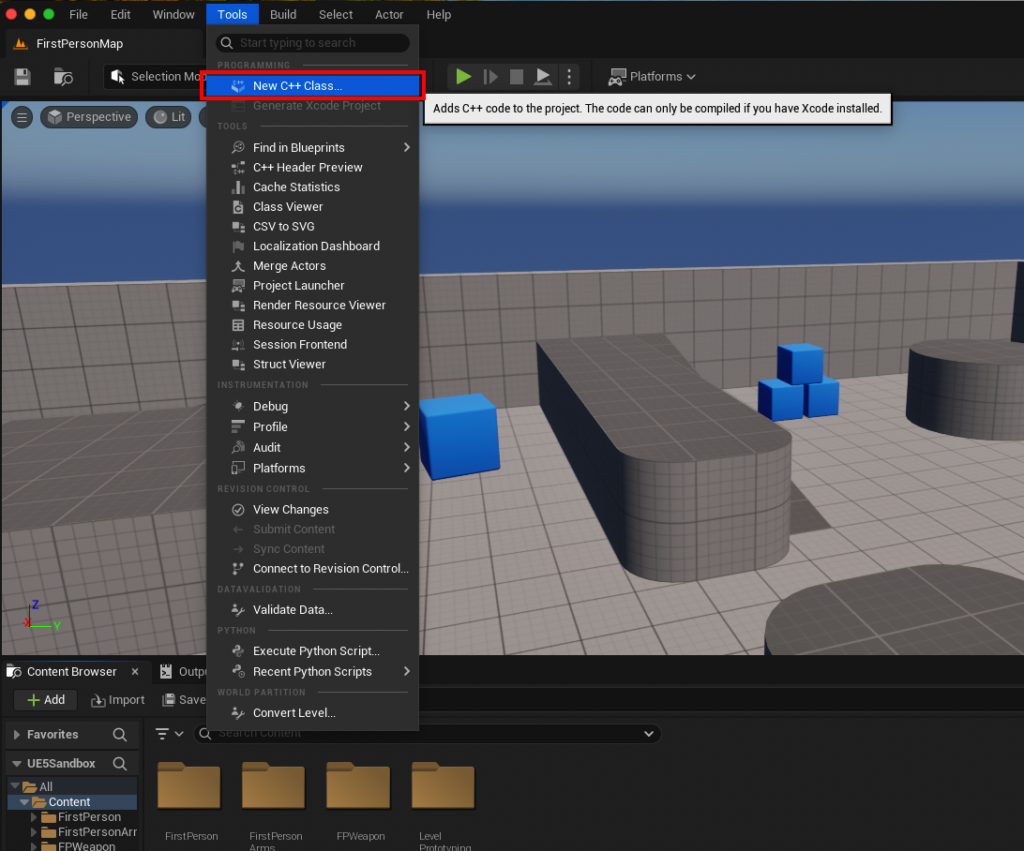
The journey begins by navigating to the "Tools" dropdown menu at the top of the Unreal Engine editor. From there, selecting "New C++ Class…" will open a dialog box that guides the user through the class creation process. This initial step also serves as a quick verification of the project’s C++ enablement. If the project is currently Blueprint-only and lacks a C++ development environment setup, the engine will typically detect this and offer to install the required IDE components (e.g., Visual Studio or Xcode) before proceeding. -
Selecting the Parent Class:
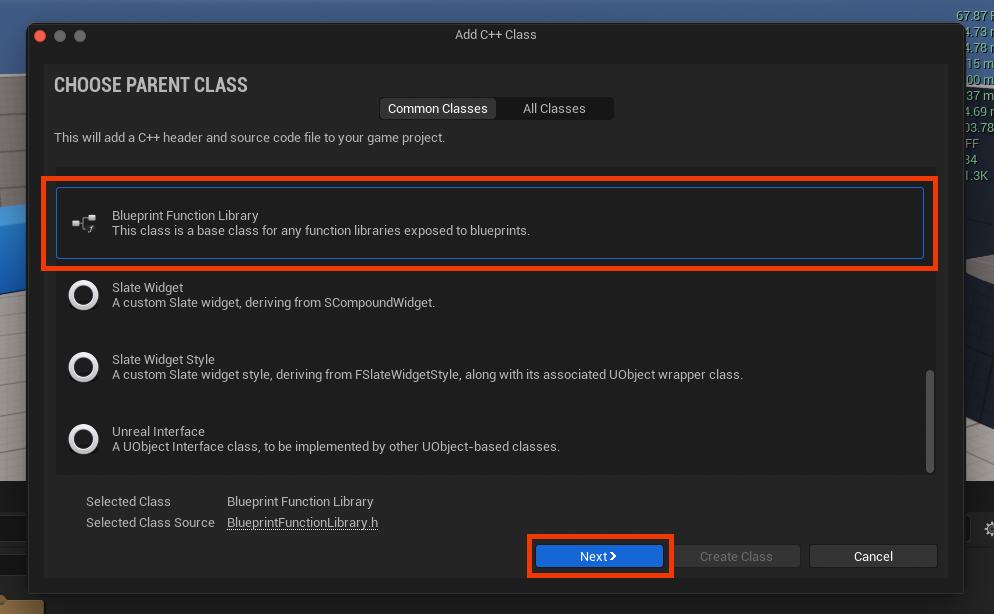
Upon successful initialization, a dialog box titled "Choose Parent Class" will appear. This is a crucial step as it defines the fundamental behavior and inheritance of the new C++ class. To create a Blueprint Function Library, developers must scroll through the list of available parent classes and select "Blueprint Function Library." This specific parent class is optimized for static functions that are callable from Blueprints, providing the correct base for the desired functionality. After selecting, the "Next" button should be pressed to proceed.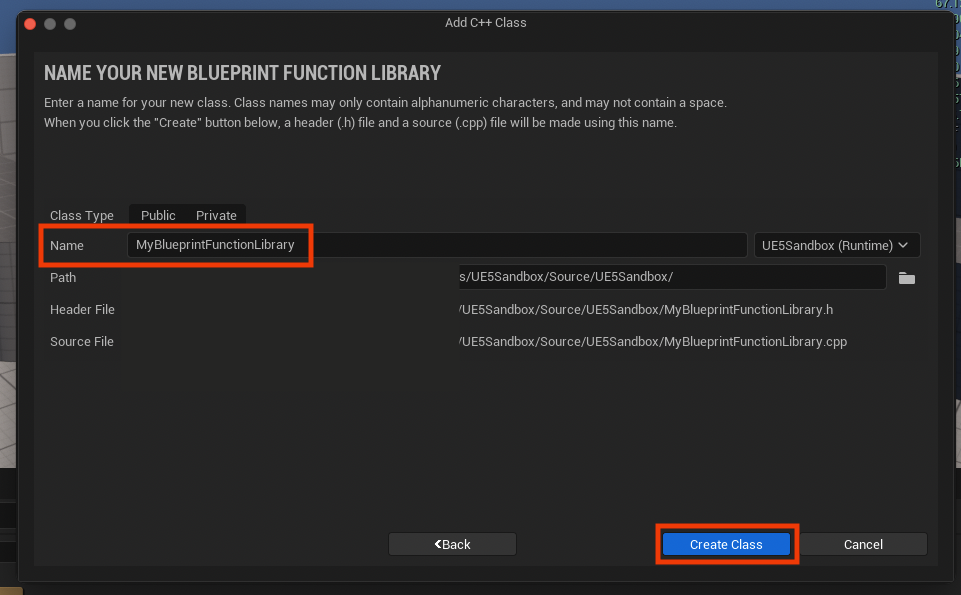
-
Naming the Function Library:
The subsequent dialog prompts for a name for the new Blueprint Function Library class. While a default name like "MyBlueprintFunctionLibrary" is often provided, it is highly recommended to choose a descriptive and clear name that adheres to Unreal Engine’s naming conventions. This typically involves using PascalCase (e.g.,GameUtilityLibrary,SaveLoadFunctions,MathHelpers) to improve readability and maintain consistency across the project. A well-chosen name will also make the library easier to locate and utilize within the Blueprint editor later. -
Project Compilation and IDE Integration:
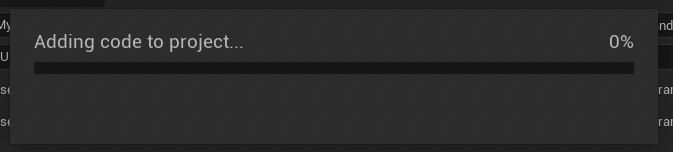
After providing a name and clicking the "Create Class" button, Unreal Engine initiates a compilation process. During this phase, the engine generates the necessary C++ source files (.hfor header declarations and.cppfor function implementations) within the project’sSourcedirectory. It then compiles these new files, integrating them into the game’s module. This compilation can take a few moments, depending on the project’s size and system specifications. Developers must wait for this process to complete successfully. Once finished, the newly created.hand.cppfiles will be accessible within the chosen IDE (e.g., Visual Studio, Xcode, or Rider), ready for code implementation. The IDE’s Solution Explorer or Project Navigator will display these files, typically under the project’s source folder.
Developing Functionality: Implementing C++ Code
With the C++ Blueprint Function Library class established, the next phase involves populating it with the desired C++ functionality. This process primarily involves modifying the generated header (.h) and source (.cpp) files within the chosen IDE.
-
Inside the Header File (
.h): Declaring Functions
The header file,MyBlueprintFunctionLibrary.h(or whatever name was chosen), serves as the public interface for the class. It defines the structure and declarations of the functions that will be exposed to Blueprints.
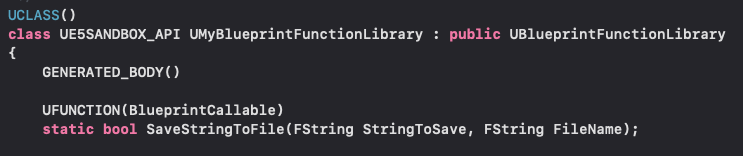
The engine-generated header file will typically look like this initially:#pragma once #include "CoreMinimal.h" #include "Kismet/BlueprintFunctionLibrary.h" #include "MyBlueprintFunctionLibrary.generated.h" /** * */ UCLASS() class YOURPROJECTNAME_API UMyBlueprintFunctionLibrary : public UBlueprintFunctionLibrary GENERATED_BODY() ;To add new functions, developers must define them within the
UMyBlueprintFunctionLibraryclass, incorporating two critical elements: thestatickeyword and theUFUNCTIONmacro.- The
staticKeyword: This is paramount for Blueprint Function Libraries. Astaticfunction belongs to the class itself, not to any specific instance of the class. This means it can be called directly without needing to create an object ofUMyBlueprintFunctionLibrary, which is precisely what Blueprints require for global utility functions. - The
UFUNCTIONMacro: This macro is how Unreal Engine’s reflection system discovers and exposes C++ functions to the editor and Blueprint runtime. The most common specifier used here isBlueprintCallable, which makes the function available as a node in any Blueprint graph. Additionally, theCategoryspecifier (Category="FileIO") is highly recommended to organize the function within the Blueprint editor’s context menu, making it easier for developers to find.
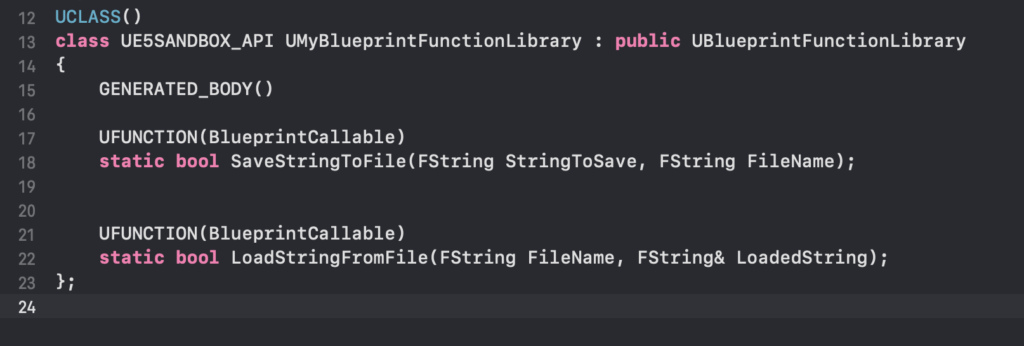
For instance, to create functions for saving and loading strings to/from files, the header file would be updated as follows:
#pragma once

#include "CoreMinimal.h"
#include "Kismet/BlueprintFunctionLibrary.h"
#include "MyBlueprintFunctionLibrary.generated.h"

/**
 *
 */
UCLASS()
class YOURPROJECTNAME_API UMyBlueprintFunctionLibrary : public UBlueprintFunctionLibrary

    GENERATED_BODY()

public:
    UFUNCTION(BlueprintCallable, Category = "FileIO")
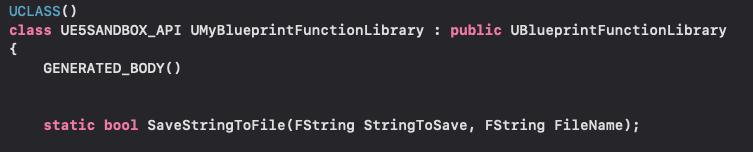
    static bool SaveStringToFile(FString SaveDirectory, FString FileName, FString SaveText, bool bAllowOverwriting);

    UFUNCTION(BlueprintCallable, Category = "FileIO")
    static FString LoadStringFromFile(FString SaveDirectory, FString FileName, bool& bOutSuccess);
;
Note the use of
FStringfor text manipulation, which is Unreal Engine’s native string type and interoperates seamlessly with Blueprint’sStringtype. Thebool& bOutSuccessparameter inLoadStringFromFileis an output parameter, a common pattern for returning status information from C++ functions to Blueprints.
- The
-
Inside the Source File (
.cpp): Implementing Function Logic
The source file,MyBlueprintFunctionLibrary.cpp, is where the actual C++ logic for the declared functions is implemented. This is where the power of C++ comes into play, allowing for efficient algorithms, access to robust engine APIs, and complex system interactions.For the file I/O example, Unreal Engine provides the
FFileHelperclass, which offers convenient static methods for common file operations. To useFFileHelper, its header must be included at the top of the.cppfile:#include "MyBlueprintFunctionLibrary.h" #include "Misc/FileHelper.h" // Required for FFileHelper #include "HAL/PlatformFilemanager.h" // Required for IPlatformFile #include "Misc/Paths.h" // Required for FPaths // ... (rest of the file)The implementation for
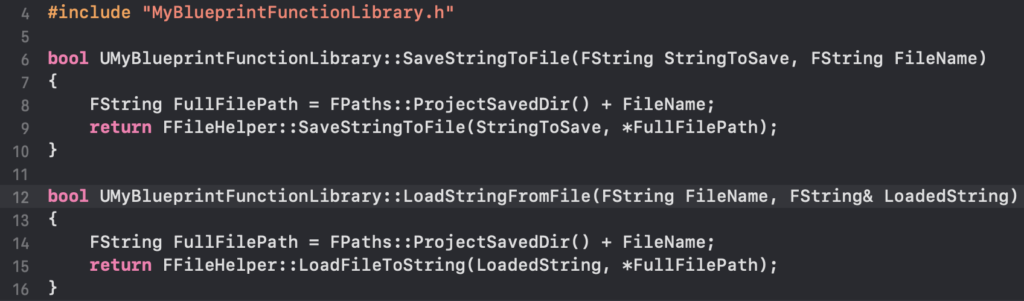
SaveStringToFileandLoadStringFromFilewould then look like this:bool UMyBlueprintFunctionLibrary::SaveStringToFile(FString SaveDirectory, FString FileName, FString SaveText, bool bAllowOverwriting) // Set the full path FString AbsoluteFilePath = FPaths::Combine(SaveDirectory, FileName); // Check if file exists and overwriting is allowed if (!bAllowOverwriting && FPlatformFileManager::Get().GetPlatformFile().FileExists(*AbsoluteFilePath)) UE_LOG(LogTemp, Warning, TEXT("File already exists and overwriting is not allowed: %s"), *AbsoluteFilePath); return false; // FFileHelper::SaveStringToFile will create the directory if it doesn't exist bool bSuccess = FFileHelper::SaveStringToFile(SaveText, *AbsoluteFilePath); if (!bSuccess) UE_LOG(LogTemp, Error, TEXT("Failed to save string to file: %s"), *AbsoluteFilePath); return bSuccess; FString UMyBlueprintFunctionLibrary::LoadStringFromFile(FString SaveDirectory, FString FileName, bool& bOutSuccess) FString ResultString = TEXT(""); FString AbsoluteFilePath = FPaths::Combine(SaveDirectory, FileName); bOutSuccess = FFileHelper::LoadFileToString(ResultString, *AbsoluteFilePath); if (!bOutSuccess) UE_LOG(LogTemp, Error, TEXT("Failed to load string from file: %s"), *AbsoluteFilePath); return ResultString;This code demonstrates leveraging
FPaths::Combinefor robust path handling andFPlatformFileManagerfor checking file existence. TheFFileHelperclass then handles the actual reading and writing. Error logging usingUE_LOGis included for better debugging.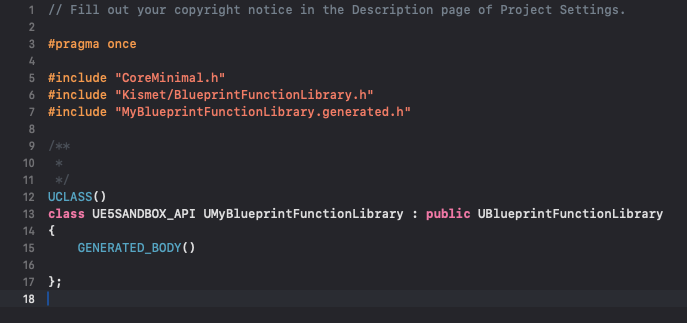
-
Final Compilation:
After all C++ code modifications are complete, the project must be recompiled. This can typically be done from within the IDE (e.g., "Build Solution" in Visual Studio) or by closing and reopening the Unreal Engine editor, which will prompt a recompile. Only after a successful compilation will the newly added C++ functions become visible and usable within the Blueprint editor. This compile-relaunch cycle is a fundamental aspect of hybrid C++/Blueprint development in UE5.
Integrating C++ Functions into Blueprint Workflows
Once the C++ Blueprint Function Library has been successfully created and compiled, its functions are immediately accessible within any Blueprint graph in Unreal Engine 5. This seamless integration is one of the most compelling features of this hybrid approach, allowing designers and scripters to leverage high-performance C++ logic without ever leaving the visual scripting environment.
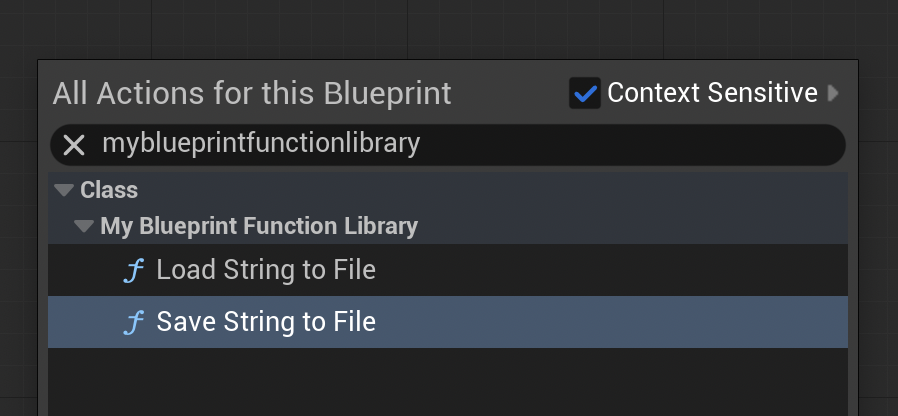
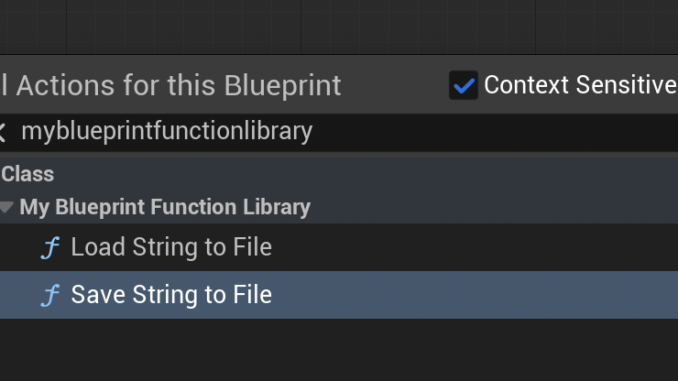
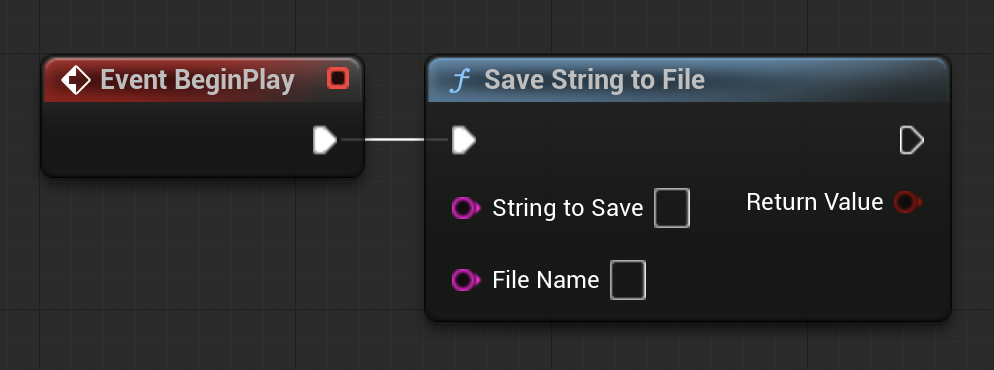
To access these newly exposed functions, developers simply open any Blueprint (e.g., a Level Blueprint, a Character Blueprint, or a Widget Blueprint). Within the Blueprint graph, right-clicking in an empty space will bring up the context-sensitive action menu. By typing the name of the function library (e.g., "MyBlueprintFunctionLibrary") or the specific function name (e.g., "Save String To File"), the corresponding C++ function node will appear. Thanks to the Category specifier used in the UFUNCTION macro, these nodes will also be organized under their designated category, improving discoverability.
The C++ function nodes behave identically to native Blueprint nodes. They feature input pins for parameters (like SaveDirectory, FileName, SaveText) and output pins for return values (like the bool success indicator or the FString result). Developers can connect these pins using standard Blueprint wires, integrating the C++ functionality into their existing visual logic flow. This allows for a smooth transition, where complex or computationally intensive tasks are handled by C++ behind the scenes, while the overall game logic, event sequencing, and user interface elements remain manageable and visible in Blueprints.
This seamless interoperability allows for powerful workflows:
- Performance Bottleneck Resolution: Developers can profile their Blueprint graphs, identify slow sections, and rewrite those specific parts in C++ within a function library, immediately seeing performance improvements.
- Access to Advanced Features: Utilize C++ libraries or low-level engine APIs that lack direct Blueprint equivalents, opening up new possibilities for game mechanics or system integrations.
- Code Reusability: Centralize common utility functions (like the file I/O example) in C++ libraries, making them easily reusable across multiple Blueprints and projects without duplication.
- Clearer Division of Labor: Programmers can focus on optimizing core systems in C++, while designers can leverage these robust tools within Blueprints to build engaging gameplay.
Case Study: Implementing Persistent Data with C++
To illustrate the practical utility of a C++ Blueprint Function Library, consider the file I/O example developed earlier. Persistent data storage is a common requirement in games, and while Blueprint can handle basic save/load operations, more robust or custom solutions often benefit from C++.
1. Saving Data:
To demonstrate the SaveStringToFile function, a simple setup in the Level Blueprint can be used. On a BeginPlay event (when the game starts), the Save String To File node from our MyBlueprintFunctionLibrary can be invoked.
- Input:
SaveDirectory: This can be set usingFPaths::ProjectSavedDir()in C++ (or a hardcoded path in Blueprint for simplicity in demonstration, e.g.,FPaths::ProjectSavedDir() + TEXT("MyCustomSaves/")for a subdirectory). For this example, let’s assumeFPaths::ProjectSavedDir()for direct saving to the project’s Saved folder.FileName: "testfile-data.txt"SaveText: "Hello from C++ via Blueprint!"Allow Overwriting: True (to simplify testing)
- Output: The boolean return value can be connected to a
Print Stringnode to confirm success or failure.
Upon playing the project in the editor, the BeginPlay event will trigger the C++ function. Navigating to the project’s Saved folder (YourProjectName/Saved/), a new file named testfile-data.txt will be found, containing the string "Hello from C++ via Blueprint!". This confirms the successful execution of the C++ logic initiated from Blueprint.
2. Loading Data:
To test the LoadStringFromFile function, first, a new text file named loadtest-data.txt can be manually created within the project’s Saved folder. Inside this file, a string like "This data was loaded!" is written and saved.
Next, in the same Level Blueprint, a Load String From File node is added.
- Input:
SaveDirectory: Again,FPaths::ProjectSavedDir().FileName: "loadtest-data.txt"
- Output: The
Return Value(the loaded string) is connected to aPrint Stringnode. TheOut Successboolean can also be printed for verification.
When the game is played, the BeginPlay event will now execute the LoadStringFromFile C++ function. The string "This data was loaded!" will be retrieved from the loadtest-data.txt file and displayed on the screen via the Print String node. This visually confirms that the C++ function successfully read data from the file system and returned it to the Blueprint environment.
This demonstration highlights how easily robust file system operations, typically a domain for C++, can be encapsulated and exposed to Blueprints, providing powerful persistent data capabilities without requiring designers to delve into C++ code.
Broader Implications and Best Practices
The strategic integration of C++ Blueprint Function Libraries carries significant implications for project scalability, performance, and team dynamics within Unreal Engine 5 development.
Performance Gains: The most direct benefit is the tangible performance improvement. By moving computationally intensive tasks (e.g., complex pathfinding algorithms, physics calculations, large array manipulations, data compression) from Blueprint to C++, developers can see significant reductions in CPU overhead. While exact numbers vary widely based on the specific task, C++ can often execute operations orders of magnitude faster than their Blueprint equivalents, particularly in tight loops. This directly translates to higher frame rates, smoother gameplay, and a more responsive user experience, especially crucial for demanding genres or VR applications.
Development Efficiency and Workflow: This hybrid approach streamlines development by allowing teams to leverage the strengths of both paradigms. Programmers can focus on crafting highly optimized, robust, and extensible C++ systems, encapsulating them within function libraries. Designers and gameplay scripters can then utilize these powerful tools within Blueprints, focusing on iterative gameplay design, level scripting, and UI/UX implementation without needing deep C++ knowledge. This clear division of labor can accelerate development cycles and reduce bottlenecks associated with complex C++ compilation for every small change.
Code Organization and Maintainability: Centralizing complex logic in well-structured C++ libraries improves code organization. Instead of sprawling Blueprint graphs attempting to manage intricate algorithms, the core logic resides in compiled C++ files, which are often easier to debug, refactor, and version control. This leads to more maintainable codebases, especially in large-scale projects with multiple contributors.
Scalability: As a game project grows in scope and complexity, the performance overhead of exclusively Blueprint-driven systems can become prohibitive. C++ Blueprint Function Libraries provide a vital escape hatch, enabling projects to scale by systematically optimizing performance-critical sections without abandoning the benefits of visual scripting for the majority of the game. This approach ensures that performance does not become an insurmountable barrier to adding new features or expanding game content.
When to Use C++ vs. Blueprint: A Guiding Principle:
- Use Blueprints for:
- High-level game logic and event sequencing.
- User Interface (UI) and user experience (UX) elements.
- Rapid prototyping and iterative design.
- Level-specific scripting and environmental interactions.
- Gameplay elements that are not performance-critical or do not require low-level engine access.
- Use C++ Blueprint Function Libraries for:
- Performance-critical algorithms and complex mathematical computations.
- Heavy data processing, parsing, or manipulation.
- Interactions with external libraries, APIs, or operating system features.
- Low-level engine modifications or extending engine functionality not exposed to Blueprint.
- Core systems that require maximum stability and optimization.
Adhering to these
About the Author