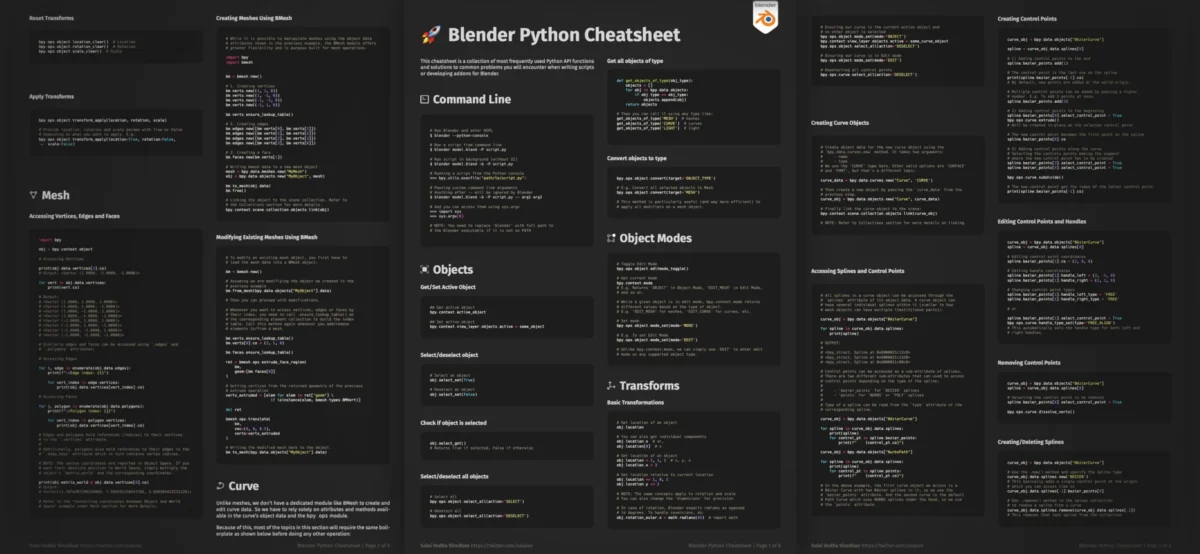
The release of an updated Blender Python Cheatsheet by Salai Vedha Viradhan marks a significant development for artists and developers seeking to enhance their workflow efficiency within the popular 3D creation suite. This comprehensive resource, now available in a revised edition, aims to demystify the integration of Python scripting with the Blender API, providing readily accessible solutions for a wide array of common use cases. The cheatsheet, offered free of charge, is designed to empower users to automate repetitive tasks, manipulate complex node graphs programmatically, and streamline asset batch processing, thereby unlocking new levels of productivity.
The initial announcement of the cheatsheet highlighted its practical utility, emphasizing that even a foundational understanding of Python, coupled with the Blender API, can lead to substantial workflow improvements. This sentiment is echoed by the creator, Salai Vedha Viradhan, who stated in a recent communication that the updated version significantly expands its scope. The latest iteration introduces three new dedicated sections focusing on Mesh, Curve, and Math operations, in addition to existing content that addresses frequent scripting challenges. This expansion brings the total size of the cheatsheet to approximately six pages, a testament to its dense and practical information.
For existing users who have previously acquired the cheatsheet, the updated version is automatically accessible through their Gumroad library, ensuring a seamless transition to the enhanced content. This proactive approach to updates demonstrates a commitment to providing ongoing value to the Blender community.
Background and Evolution of Scripting in Blender
Blender, a free and open-source 3D computer graphics software toolset, has long been recognized for its extensibility. Since its inception, the platform has evolved to incorporate powerful scripting capabilities, primarily through the Python programming language. The integration of Python began in earnest with Blender 2.4x, and over the years, the Blender API (Application Programming Interface) has matured considerably, offering deep access to nearly every aspect of the software’s functionality.
This scripting prowess allows users to go beyond manual operations, enabling the creation of custom tools, add-ons, and automated workflows that can dramatically reduce the time and effort required for complex projects. The ability to programmatically interact with Blender’s scene, objects, materials, modifiers, and rendering engines has become an indispensable asset for both individual artists and larger studios. However, navigating the extensive API and identifying the correct Python commands for specific tasks can present a steep learning curve. This is precisely where resources like Salai Vedha Viradhan’s cheatsheet play a crucial role.
The development of the cheatsheet itself can be seen as a response to this challenge. By consolidating frequently used functions and providing ready-made solutions, it acts as a bridge between the user’s intent and the Blender API’s capabilities. The ongoing updates, such as the inclusion of Mesh, Curve, and Math operations, reflect a continuous effort to cover the most pressing needs of the scripting community.
Key Content Areas and Their Significance
The Blender Python Cheatsheet, in its updated form, offers a curated selection of essential Python commands and code snippets designed for practical application. The newly added sections on Mesh, Curve, and Math operations are particularly noteworthy.
Mesh Operations:
Manipulating 3D geometry is a cornerstone of 3D art. The Mesh section likely provides scripts for common tasks such as:
- Vertex, Edge, and Face manipulation: Programmatically adding, deleting, or modifying the components of a mesh. This could include tasks like extruding faces, creating new vertices, or connecting edges.
- Mesh data access and modification: Scripts to retrieve and alter vertex coordinates, normals, UV maps, and other crucial mesh data.
- Mesh generation and modification: Code for creating primitive shapes programmatically or for applying modifiers through scripting.
- Selection and iteration: Efficiently selecting and processing multiple mesh elements based on various criteria.
The ability to automate these operations is invaluable for tasks like procedural generation of complex objects, batch modification of multiple assets, or implementing custom modeling tools. For instance, a studio might use such scripts to automatically generate a series of variations of a product model or to ensure consistent UV mapping across a library of assets.

Curve Operations:
Curves in Blender are fundamental for creating smooth, organic shapes, animation paths, and complex profiles. The dedicated Curve section is expected to offer scripts for:
- Curve creation and manipulation: Generating Bezier, NURBS, and poly curves, as well as controlling their control points and handles.
- Curve properties: Modifying curve resolution, bevel depth, taper objects, and other relevant settings.
- Curve to Mesh conversion: Scripts to efficiently convert curves into usable mesh objects, a common step in many modeling pipelines.
- Path animation: Utilizing curves as animation paths for objects, a powerful technique for creating dynamic motion.
Automating curve operations can significantly speed up the creation of intricate designs, such as character hair, intricate patterns, or complex architectural elements.
Math Operations:
Numerical computations are at the heart of many 3D operations, from transformations and calculations to procedural generation and simulations. The Math section is likely to include scripts for:
- Vector and Matrix operations: Performing standard mathematical calculations on vectors and matrices, essential for transformations, rotations, and scaling.
- Geometric calculations: Scripts for calculating distances, angles, intersections, and other geometric properties.
- Randomization and noise generation: Implementing procedural algorithms for creating natural-looking variations and textures.
- Data processing: Scripts for reading, writing, and manipulating numerical data relevant to 3D scenes.
These tools are crucial for artists who rely on precise calculations for modeling, texturing, and animation, as well as for developers building complex procedural systems.
Existing Use Cases:
The cheatsheet also continues to provide solutions for previously identified common needs, which often include:
- Batch Processing: Automating tasks that need to be applied to a large number of assets, such as rendering multiple frames, applying material changes to many objects, or exporting models in various formats. This is a major time-saver for project management.
- Workflow Automation: Scripting repetitive sequences of actions that are performed regularly, such as setting up a specific render layer configuration, applying a set of modifiers to selected objects, or organizing scene elements.
- Node Graph Manipulation: Programmatically building, modifying, or analyzing shader node trees and compositor node trees. This is particularly useful for creating complex procedural materials or for developing custom shading workflows.
Accessibility and Community Impact
The decision to offer the Blender Python Cheatsheet free of charge democratizes access to powerful scripting knowledge. This is particularly significant within the open-source community, where such resources foster collaboration and empower a wider range of users, from hobbyists to professionals.
The availability of a curated cheatsheet reduces the barrier to entry for individuals who might otherwise be intimidated by the prospect of learning Python and the Blender API from scratch. By providing direct, usable code snippets for common problems, it allows users to quickly implement functional solutions and build confidence, encouraging them to explore more advanced scripting techniques.
The continuous updates and expansions of the cheatsheet suggest a responsive development process, likely informed by community feedback and evolving user needs. This iterative approach ensures that the resource remains relevant and valuable over time.
Broader Implications for the 3D Industry
The proliferation of accessible and high-quality scripting resources like this cheatsheet has several implications for the broader 3D industry:
- Increased Productivity: As more artists and developers become proficient in scripting, overall project turnaround times can decrease. Automation of repetitive tasks frees up valuable creative time for more complex artistic endeavors.
- Democratization of Advanced Techniques: Complex workflows that were once the exclusive domain of highly specialized technical artists can now be implemented by a wider user base, fostering innovation and creativity.
- Customization and Specialization: The ability to tailor Blender to specific project needs through custom scripts and add-ons allows for greater specialization and the development of unique artistic pipelines.
- Open-Source Ecosystem Growth: Such community-driven resources strengthen the open-source Blender ecosystem, making it a more competitive and attractive alternative to commercial software for a wider range of users.
The Blender Python Cheatsheet, in its current iteration, stands as a testament to the power of community-driven development and the ongoing efforts to make sophisticated 3D workflows more accessible. As Blender continues to evolve, the importance of such practical guides will only grow, empowering a new generation of creators to push the boundaries of digital art and design. The success of this initiative underscores the value of sharing knowledge and providing tools that directly address the practical challenges faced by users in their daily work.
About the Author