
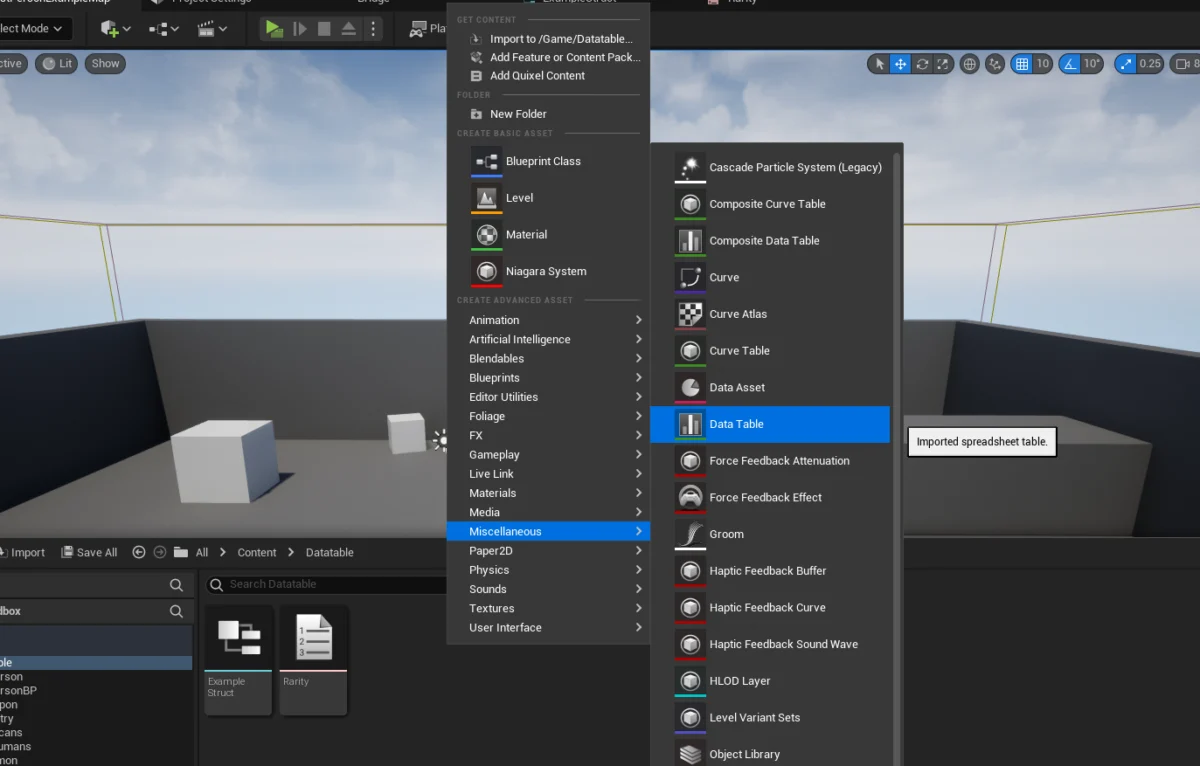
The integration of robust data management solutions is paramount for modern game development, and Unreal Engine 5 offers a powerful and flexible feature in its Data Tables. These structured assets provide developers and designers with an intuitive mechanism to organize, store, and access predefined lists of information, fundamentally streamlining content creation and game balancing processes. Data Tables serve as a centralized repository for game-related values, allowing for rapid iteration and consistent data application across complex projects. At their core, Data Tables in Unreal Engine 5 necessitate a foundational structure, specifically a Blueprint Structure (Struct), upon which the tabular data is based. This underlying Struct dictates the types and names of the columns, ensuring data integrity and ease of access.
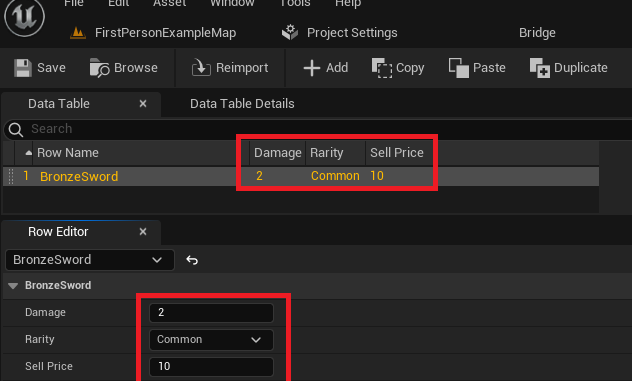
This guide delves into the creation, configuration, population, and implementation of Data Tables within an Unreal Engine 5 environment, demonstrating their utility for various game mechanics. By centralizing data for elements such as items, enemies, character statistics, or even localization strings, developers can significantly reduce hardcoding, enhance project scalability, and facilitate collaborative workflows. The process involves defining custom enumerations (Enums) and structures (Structs) to precisely model the required data, followed by the creation and population of the Data Table asset itself. Finally, the article outlines methods for retrieving and utilizing this stored data within game logic, both for individual entries and through iterative processes across the entire table.
Understanding the Core Concept: What is a Data Table?
In Unreal Engine 5, a Data Table functions as a highly organized, spreadsheet-like asset that stores a collection of structured data. Each row in a Data Table represents a distinct record, uniquely identified by a "Row Name," while the columns are defined by the properties within an associated Blueprint Structure. This design allows for the definition of a specific schema for a list of data, enabling developers to store various values corresponding to this predefined list. The data, once stored as an asset within the Unreal Engine project, becomes readily retrievable and updateable from any part of the game’s codebase, whether through Blueprints or C++. A significant advantage is the persistence of this data directly within the editor environment, empowering designers to populate and modify game data during development, which then seamlessly integrates into the runtime experience.
Consider a practical scenario such as managing attributes for in-game items or enemy characters. Instead of embedding damage values, health points, or rarity levels directly into individual Blueprints or C++ classes, these properties can be meticulously defined and stored within a Data Table. This approach ensures that design changes, such as adjusting the damage output of a "Bronze Sword" or modifying the health of a "Goblin," can be implemented swiftly within the Data Table asset itself, without requiring recompilation or extensive modifications to game logic. This separation of data from code promotes modularity, reduces the potential for errors, and significantly accelerates the iterative design process, which is crucial for game balancing and content updates. Industry professionals frequently advocate for this data-driven approach, highlighting its role in maintaining a "single source of truth" for game statistics and configurations.
Prerequisites for Data Table Implementation
Before embarking on the creation and utilization of Data Tables in Unreal Engine 5, a fundamental understanding of several core Unreal Engine concepts is beneficial. While this guide primarily focuses on Blueprint-based implementation, the underlying principles are transferable to C++ development. Key prerequisites include:
- Familiarity with Unreal Engine 5 Editor: Basic navigation of the Content Browser, understanding asset creation, and knowledge of the Blueprint editor interface are essential. Proficiency in locating and manipulating assets is foundational.
- Understanding of Blueprint Structures (Structs): Data Tables are inherently tied to Structs, which define the data types and names of the columns. A firm grasp of how to create and define variables within Structs, understanding their role as custom data types, is fundamental. This includes awareness of common variable types such as integers, floats, booleans, and string.
- Basic Blueprint Scripting: The ability to connect nodes, understand execution flow, work with variables, and manage arrays in Blueprints is necessary for interacting with Data Tables at runtime. Concepts like event graphs, functions, and macro libraries will aid in more complex integrations.
- Concept of Enumerations (Enums): Enums provide a way to define a set of named integer constants, offering type-safe and readable options for categorical data, such as item rarity, character states, or item types. Their utility in enforcing specific choices and improving code clarity is a significant advantage.
- Data Management Principles: While not strictly an Unreal Engine prerequisite, a conceptual understanding of structured data, key-value pair systems, and the benefits of centralized data storage will enhance comprehension and application of Data Tables. This includes an appreciation for how data separation from logic can improve project maintainability and scalability.
These foundational elements empower developers to effectively design, implement, and leverage Data Tables for robust and scalable game projects, facilitating a more organized and efficient development pipeline.
The Chronology of Data Table Creation
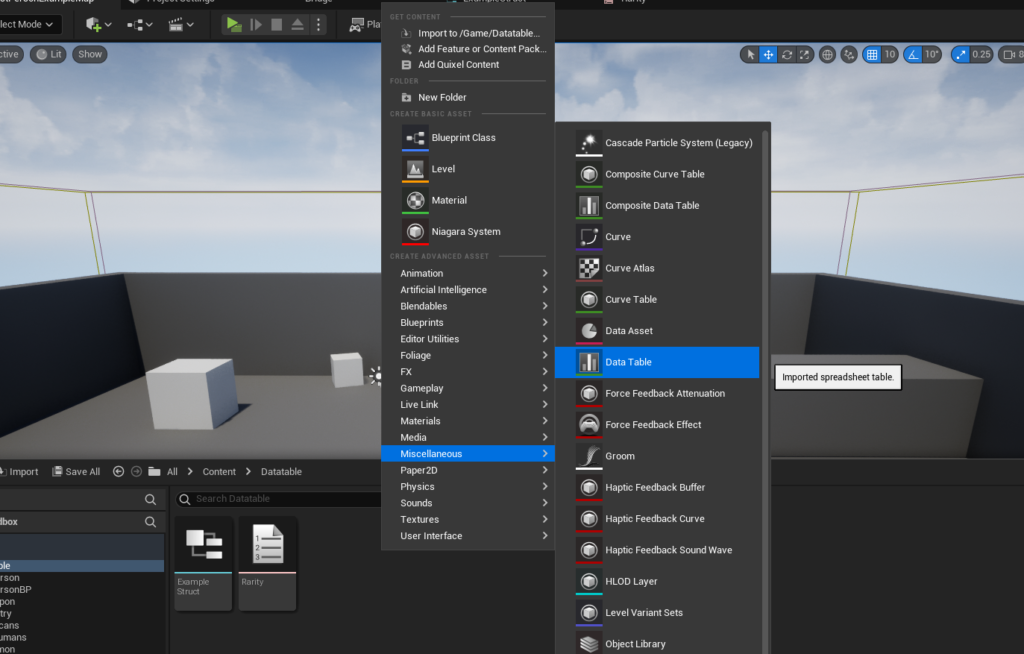
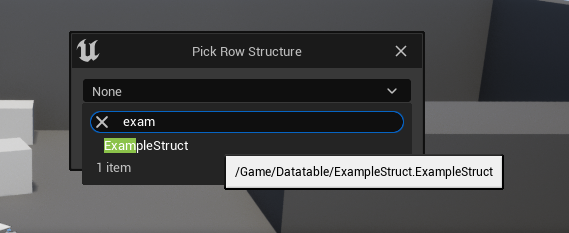
The process of establishing a functional Data Table in Unreal Engine 5 follows a logical sequence, starting with the definition of data types and culminating in the creation and population of the table itself. This structured approach ensures that the data is well-organized and readily consumable by game logic, reflecting a standard industry practice for content configuration.
Step 1: Defining Categorical Data with an Enumeration (Enum)
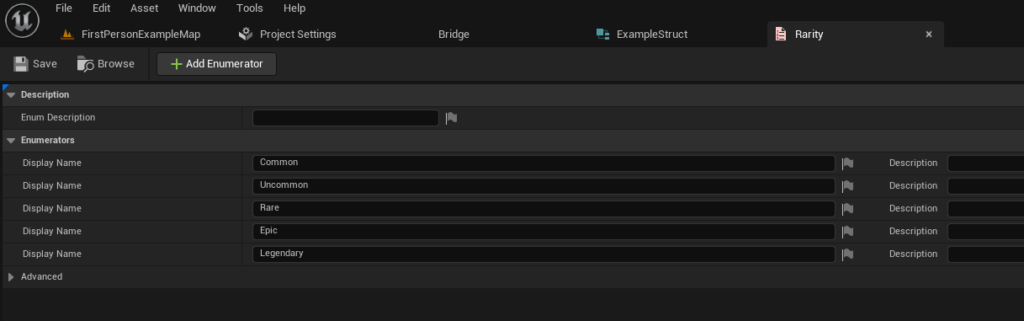
The initial step in structuring our game data for a Data Table often involves defining any categorical values using an Enumeration (Enum). Enums are invaluable for representing a fixed set of distinct values in a type-safe and readable manner, far superior to using raw integers or strings. For instance, in the context of an RPG item system, item quality or rarity is a prime candidate for an Enum. This allows developers to explicitly define tiers like "Common," "Uncommon," "Rare," "Epic," and "Legendary," ensuring consistency across all game items.
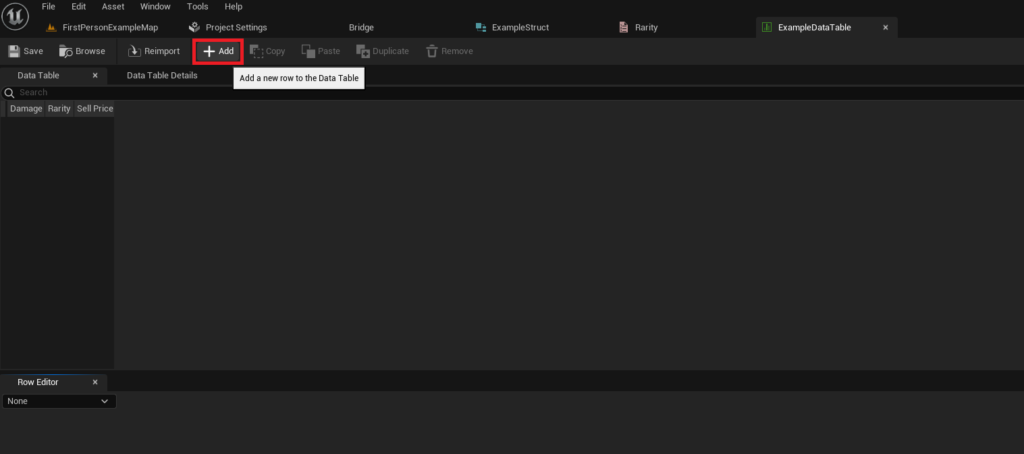
To create an Enum, a developer would:
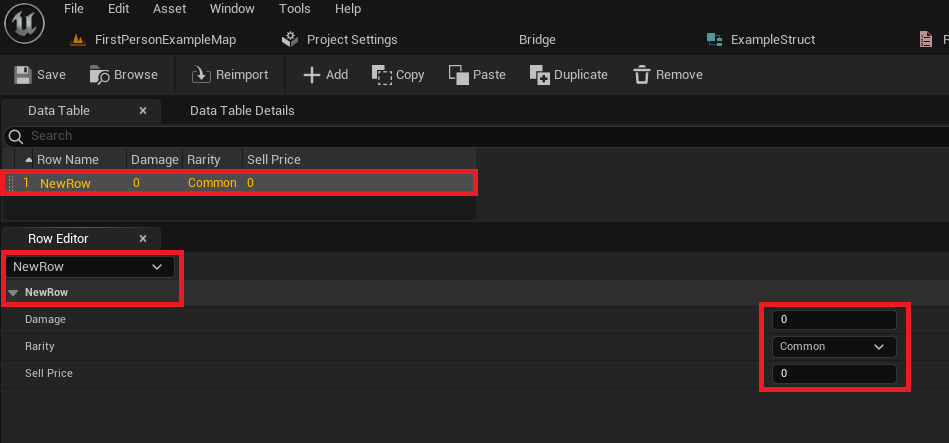
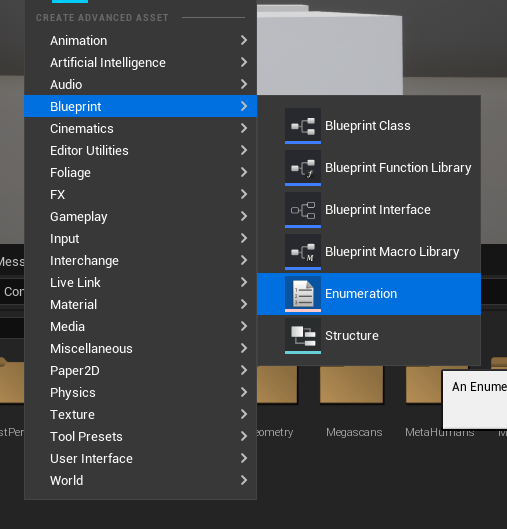
- Right-click anywhere within the Content Browser to open the context menu.
- Navigate to the "Blueprints" category.
- Select "Enumeration" from the submenu.
- Assign a descriptive and conventional name, such as
E_ItemRarity(where ‘E_’ denotes an Enum). - Open the newly created Enum asset. Within its editor, add and rename the desired values. For an item rarity system, these might include:
Common(representing standard items)Uncommon(items with slightly better attributes)Rare(distinctive items)Epic(powerful or unique items)Legendary(extremely rare and potent items)
The strategic use of an Enum for properties like rarity ensures consistency across all items, significantly reduces the potential for typographical errors that could arise from using string literals, and inherently improves code readability by replacing arbitrary numbers with meaningful, self-documenting labels. This small initial step lays a crucial groundwork for a well-structured and maintainable data system within the game project.
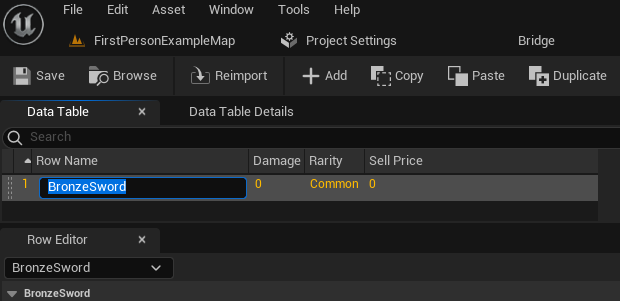
Step 2: Constructing the Data Schema with a Blueprint Structure (Struct)
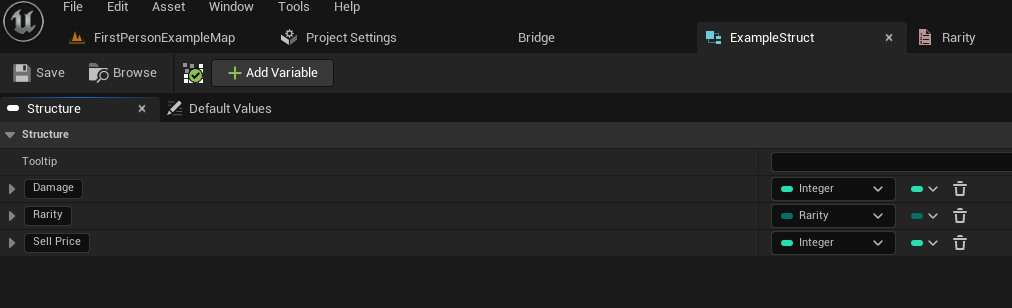
With our categorical data explicitly defined by an Enum, the next critical step is to create a Blueprint Structure (Struct). This Struct acts as the definitive schema for our Data Table, meticulously outlining the specific types and names of all the data fields that each individual row in the table will contain. Every row subsequently added to the Data Table will rigidly conform to this Struct’s definition, thereby ensuring uniformity, predictability, and strong type-safety in the stored data.
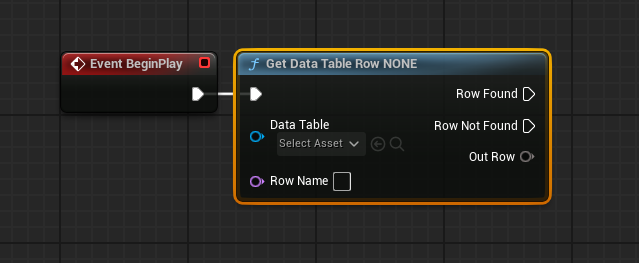
For an item system, a Struct might logically encapsulate fundamental properties such as the item’s damage output, its assigned rarity tier, and its monetary sell price. These defined properties within the Struct directly correspond to the columns that will be present in the eventual Data Table, establishing a clear mapping between the data structure and its tabular representation.
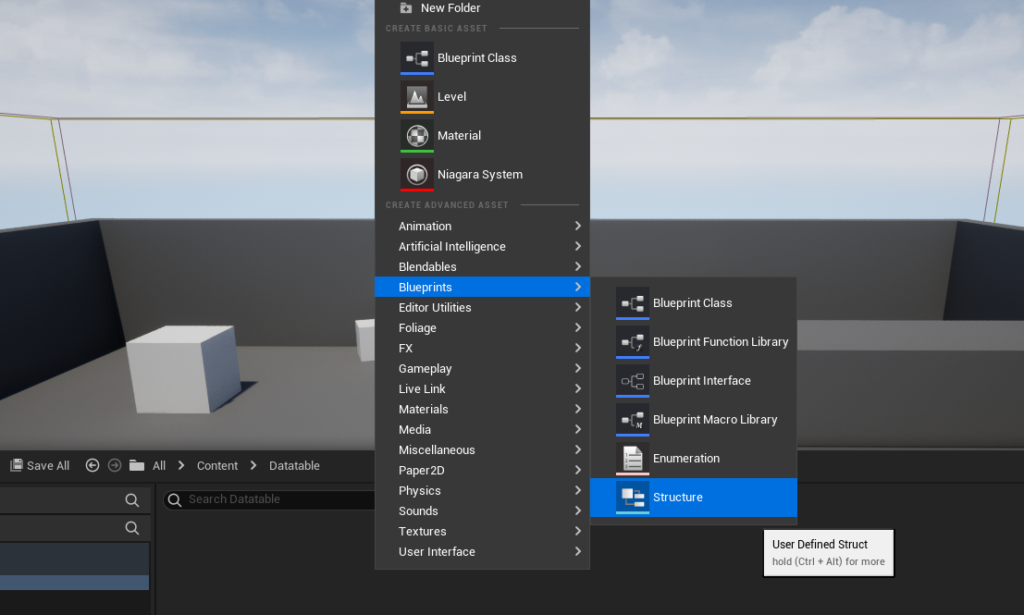
To create a Struct, the process involves:
- Right-clicking anywhere in the Content Browser to invoke the context menu.
- Navigating to the "Blueprints" category.
- Selecting "Structure" from the available options.
- Providing a clear and descriptive name for the Struct, adhering to conventional naming standards such as
F_ItemData(where ‘F_’ is a common prefix for
About the Author








