
The integration of fundamental gameplay mechanics, such as the double jump, into modern game development pipelines has been significantly simplified by Unreal Engine 5 (UE5). This widely utilized feature, a staple across diverse gaming genres from retro classics to contemporary titles, is now exceptionally accessible to developers, fostering an environment where complex interactions can be implemented with remarkable ease. Beyond merely enabling the core functionality, UE5 also offers robust tools for refining the associated visual feedback, allowing for sophisticated animation improvements that elevate the player experience. This development underscores Epic Games’ ongoing commitment to democratizing game creation, making advanced interactive elements readily available to a broad spectrum of developers, from independent creators to large studios.
The Enduring Appeal and Design Utility of the Double Jump
The double jump mechanic stands as a cornerstone in the lexicon of video game movement, a testament to its enduring appeal and profound impact on player agency. Its ubiquity spans decades, appearing in seminal titles that have defined genres and shaped player expectations. Games like Castlevania: Symphony of the Night showcased its role in intricate level design and secret discovery, offering players a newfound verticality. Crash Bandicoot utilized it as a core component of its precise platforming challenges, demanding timing and spatial awareness. The Kirby series often integrates it as part of its floaty, accessible movement, while Banjo-Kazooie leveraged it for expansive exploration and puzzle-solving. These examples highlight the double jump’s versatility, serving not just as a means to overcome obstacles but also as a tool for enhancing exploration, combat maneuvers, and overall player control.
Historically, implementing such a mechanic required considerable boilerplate code and intricate scripting, often demanding a deep understanding of physics engines and animation states. The ability to execute a second jump mid-air fundamentally alters how players perceive and interact with game environments, providing a crucial sense of agility and mastery. From a design perspective, it opens up possibilities for more complex level layouts, hidden pathways, and dynamic encounters, enriching the gameplay loop. The psychological impact on players is equally significant; the capacity for a mid-air course correction or an unexpected ascent provides a feeling of empowerment and freedom, contributing significantly to a game’s "feel" and replayability.
Unreal Engine 5: A Paradigm Shift in Development Accessibility
Unreal Engine 5 continues Epic Games’ strategic trajectory of democratizing game development, extending powerful tools to a wider audience. The engine’s architecture is designed to abstract away much of the underlying complexity, allowing developers to focus on creative execution rather than low-level programming. This philosophy is particularly evident in its character blueprint system, a visual scripting interface that allows for the construction of complex gameplay logic without writing a single line of C++ code. For features like the double jump, this translates into a dramatically reduced development overhead.
Prior to such streamlined engine capabilities, integrating a double jump might have involved custom code to track jump counts, manual application of upward forces, and bespoke state machine logic to manage animations. This often meant dedicating significant development resources, which could be a prohibitive factor for smaller, independent studios. UE5’s approach, conversely, provides a highly optimized and pre-configured framework within its default character classes, significantly lowering the barrier to entry for implementing advanced movement mechanics. This not only accelerates the prototyping phase but also enables more rapid iteration and refinement of gameplay features, fostering greater innovation across the industry.
Effortless Core Implementation: The Jump Max Count Parameter
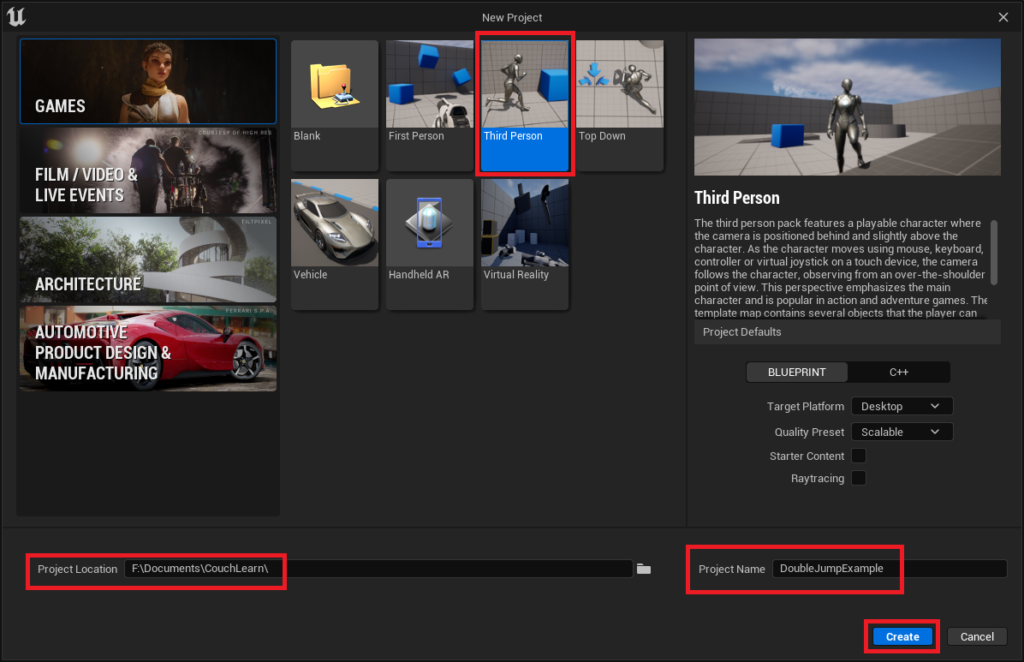
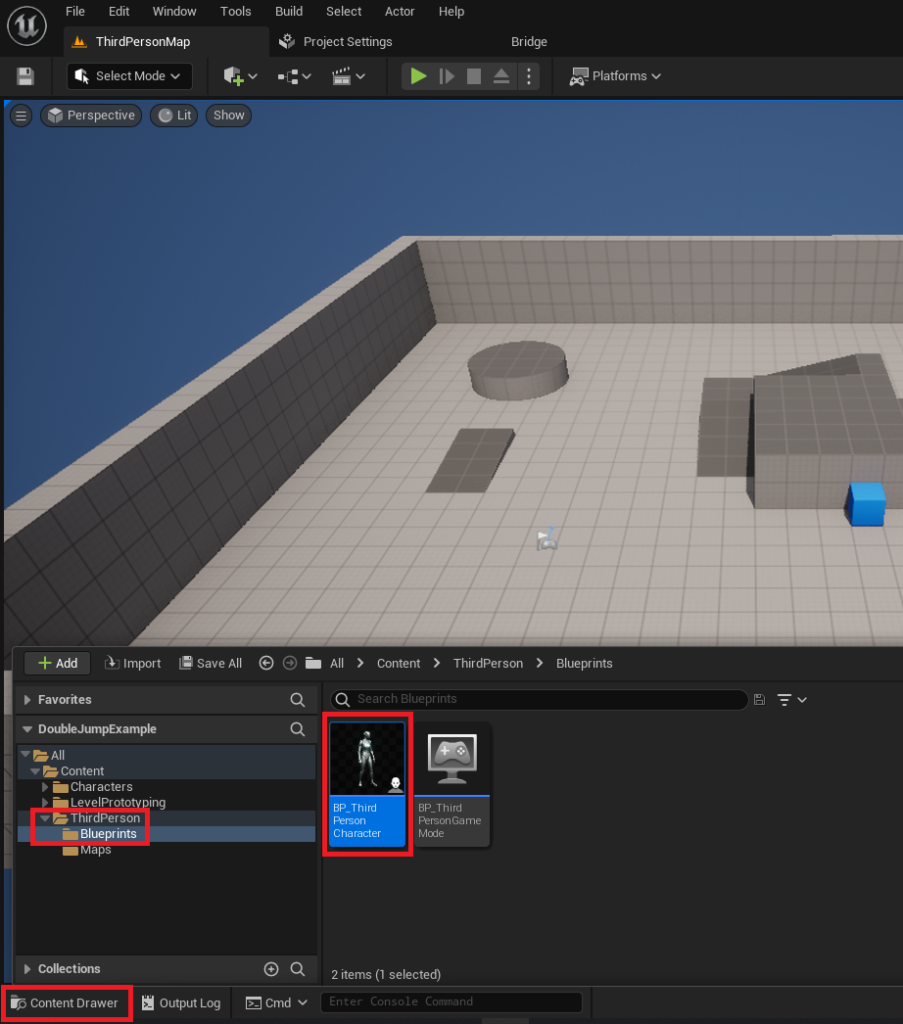
The primary mechanism for enabling the double jump functionality within Unreal Engine 5 is remarkably straightforward, residing within the core properties of the character blueprint. For new developers, the process typically begins by utilizing the standard Unreal Engine 5 Third Person template, a robust starting point that includes a pre-configured character. This template is accessible through the New Project window, where developers select "Third Person," define a project location, and assign a project name before creation.
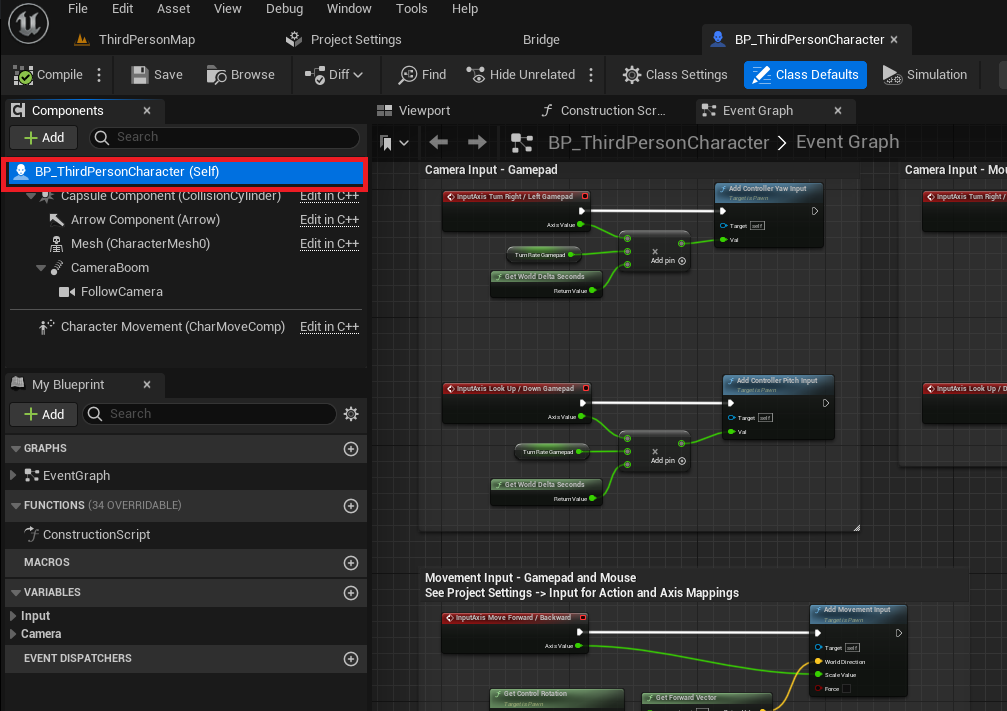
Once the Unreal Engine editor is active and the project loaded, the critical asset for modification is the BP_ThirdPersonCharacter object, usually found within the Content/ThirdPerson/Blueprints folder. This blueprint represents the playable character and encapsulates its behaviors and properties. To initiate the double jump capability, developers must first open this character blueprint. Within the blueprint editor, selecting the primary blueprint class, typically labeled BP_ThirdPersonCharacter (Self), reveals its detailed properties in the Details tab located on the right side of the interface.
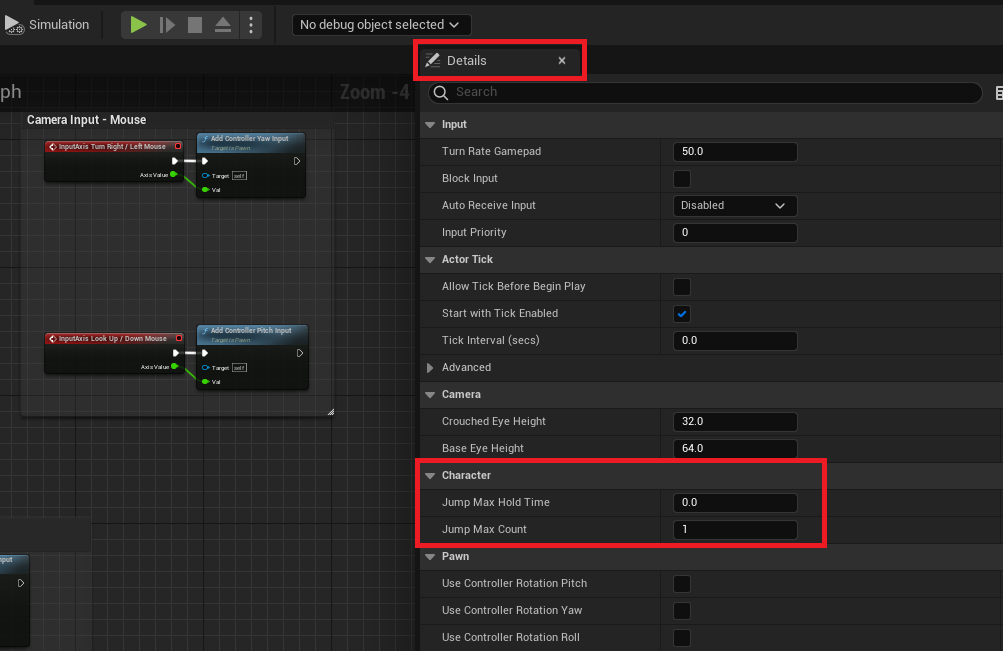
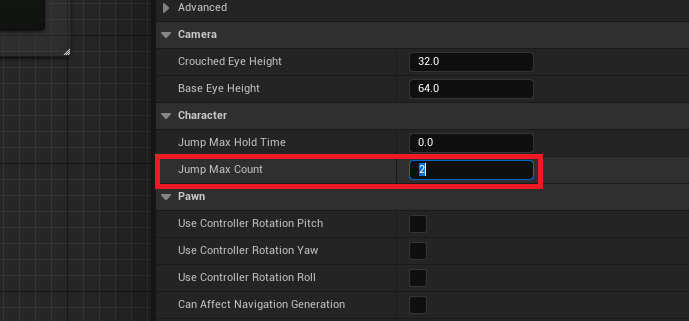
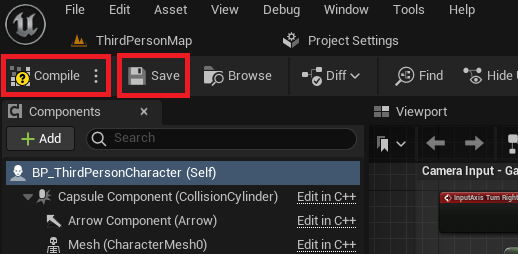
Navigating through the Details tab, developers will locate a section dedicated to "Character" parameters. Within this section lies the crucial Jump Max Count property. By default, this value is set to 1, allowing for a single jump. The transformation to a double-jump-capable character is achieved by simply modifying this parameter. Changing the Jump Max Count value from 1 to 2 immediately confers the ability for the character to perform a second jump mid-air. Should a project require more than two jumps, this value can be adjusted accordingly to 3, 4, or any desired number, offering flexible design possibilities. Following this modification, it is imperative to compile and save the blueprint using the respective buttons in the top-left of the blueprint editor, ensuring the changes are applied and persistent. This process exemplifies UE5’s commitment to visual scripting and accessible parameter tuning, making what was once a complex coding task a simple configuration change.
Beyond Functionality: Elevating Player Experience Through Animation
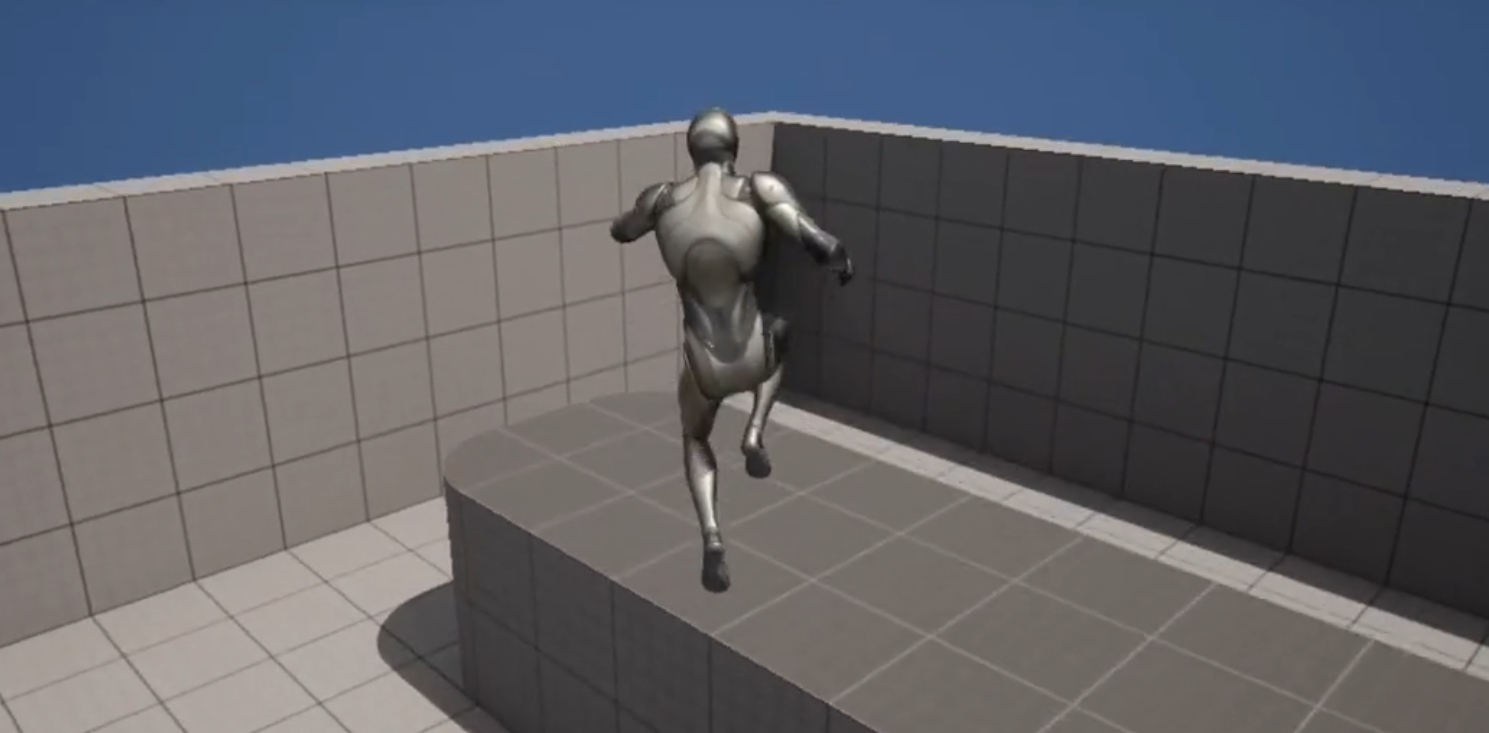
While the functional implementation of the double jump is made incredibly simple in Unreal Engine 5, true game polish often extends beyond mere mechanics. The visual feedback provided by character animations is paramount to player immersion and understanding. A character performing a double jump without a distinct second-jump animation can feel unpolished, failing to convey the energetic action to the player. As observed in initial demonstrations, a character might execute a double jump successfully, but if the animation only plays once, the visual communication of the second jump is lost, potentially leading to a disconnect in player perception and satisfaction. Addressing this aspect elevates the feature from merely functional to genuinely engaging, contributing significantly to the overall "feel" of the game.
This is where Unreal Engine 5’s animation tools, though slightly more intricate, provide the necessary control for developers to refine the player experience. These animation improvements fall into what might be considered an intermediate difficulty level, requiring a deeper dive into the engine’s animation blueprint system. The goal is to ensure that when the second jump input is received while the character is already airborne (typically in a falling state), the animation system correctly transitions back to a "jump start" or "second jump" animation, providing clear visual reinforcement for the player’s action.
Navigating the Animation Blueprint: ABP_Manny and the AnimGraph
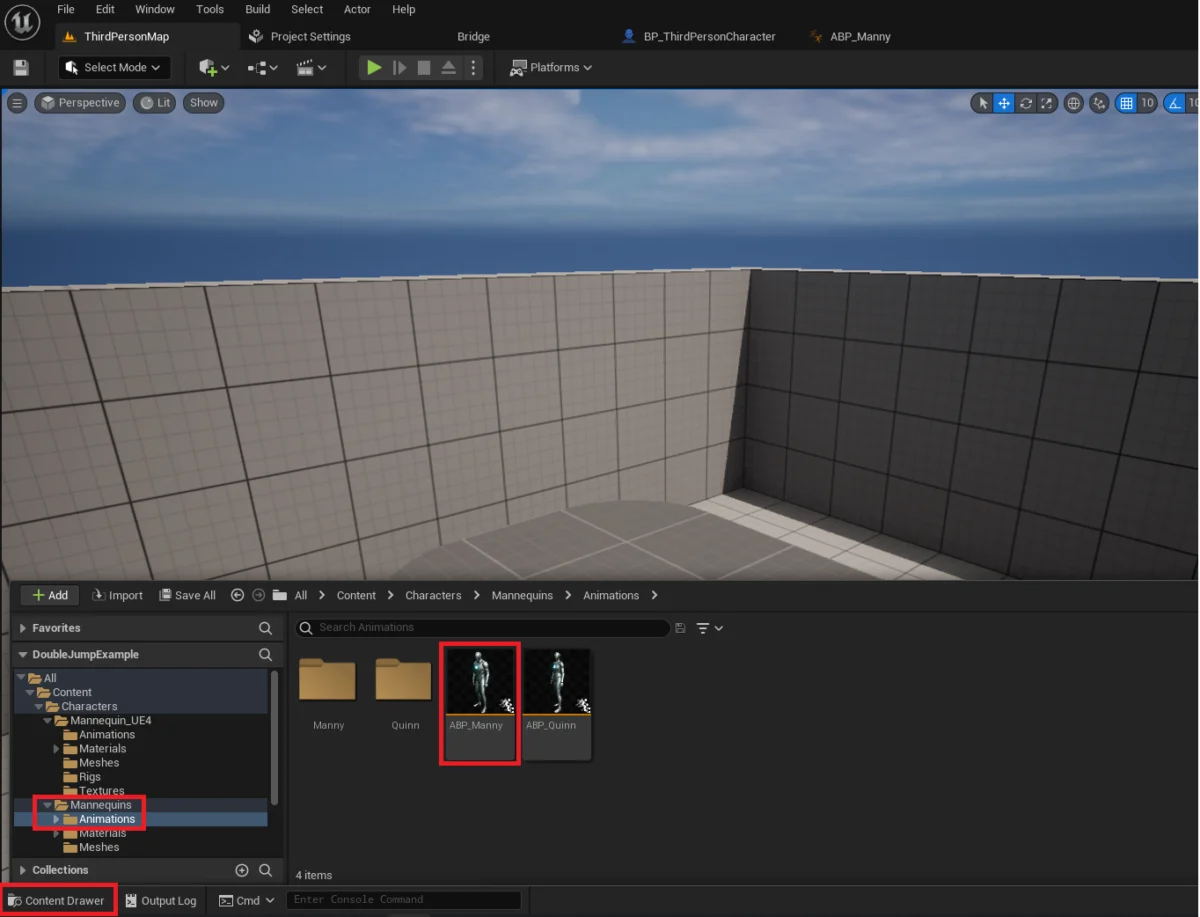
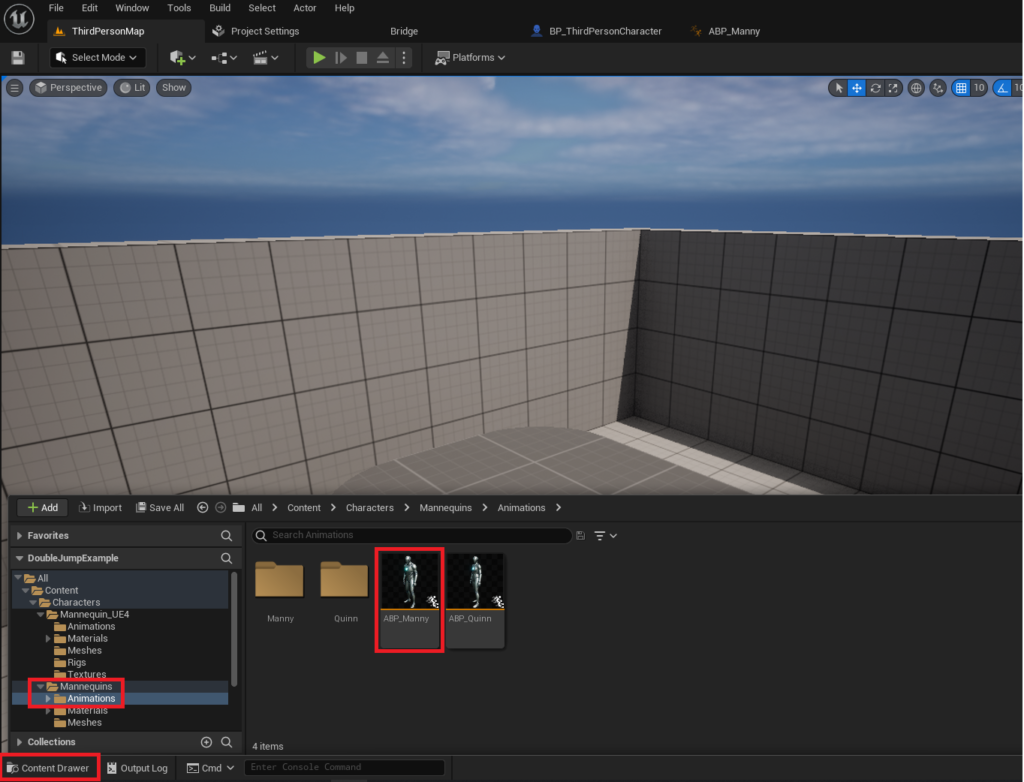
The journey into animation refinement begins by accessing the animation blueprint responsible for the character’s movements. In projects derived from the Unreal Engine 5 Third Person template, this blueprint is typically named ABP_Manny and can be located within the Content/Characters/Mannequins/Animations folder. Opening this asset brings up the Animation Blueprint editor, a powerful environment for defining how character skeletal meshes respond to various gameplay states and inputs.
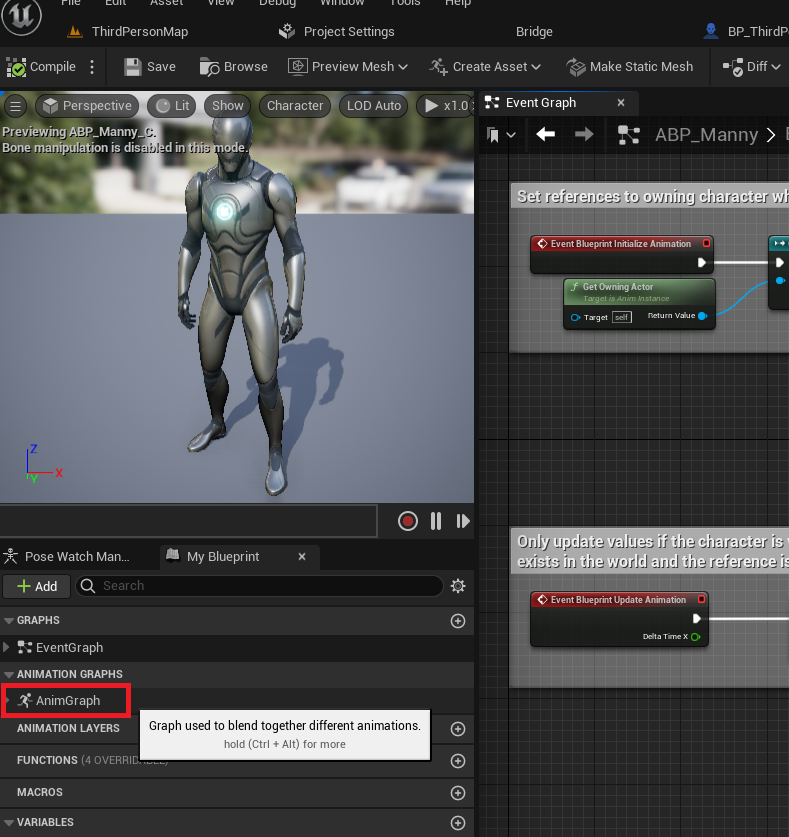
Within the Animation Blueprint editor, developers must locate and double-click the AnimGraph text, usually found on the left side of the editor window. The AnimGraph is the core workspace where animation logic is constructed, employing a network of nodes to blend, sequence, and transition between different animations. It is within this graph that the character’s movement states, such as idling, running, jumping, and falling, are orchestrated.
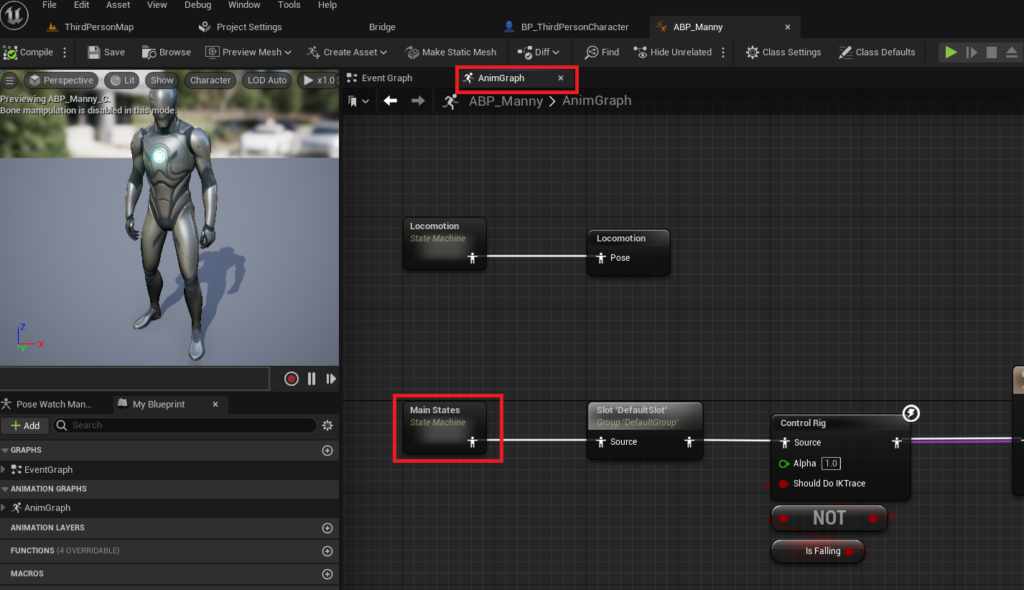
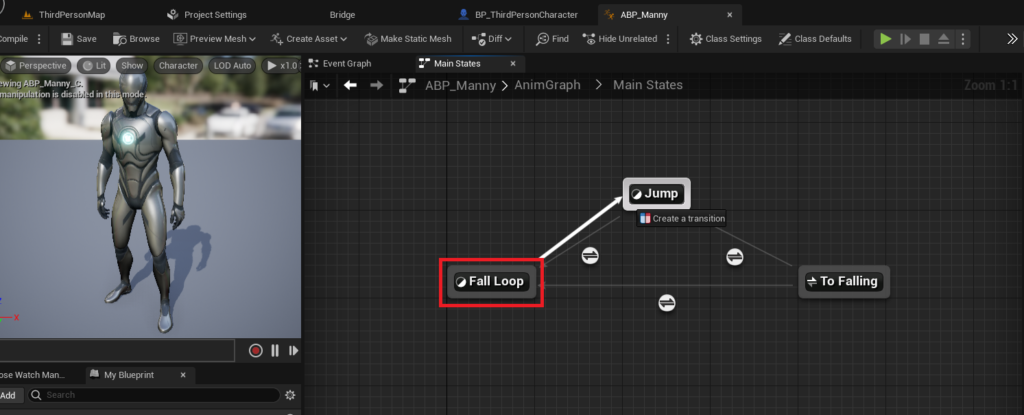
The next critical step involves navigating to the Main States state machine within the AnimGraph. State machines are fundamental to animation systems, providing a structured way to manage complex animation sequences by defining distinct states (e.g., "Idle," "Jump," "Fall Loop") and the rules governing transitions between them. The Main States state machine in the default template holds all the primary animation transitions for the character, offering a centralized location for modifying how the character animates during various actions. Understanding the flow within this state machine is key to inserting the logic required for a visually compelling double jump.
Crafting Seamless Transitions: Fall Loop to Jump State
To ensure that the double jump visually registers with the player, a critical animation transition must be established within the Main States state machine. The problem arises when a character is in the "Fall Loop" state (i.e., descending after an initial jump or simply falling) and the player triggers a second jump. Without specific instructions, the animation system might continue playing the falling animation, leading to a jarring visual experience. The solution involves creating a transition that allows the character to smoothly move from the Fall Loop state back into the Jump state, effectively re-triggering the jump animation.
This is achieved by dragging a connection from the Fall Loop state to the Jump state within the Main States state machine. Upon successful connection, an arrow will appear between the two states, accompanied by text indicating "Create a transition." This visual cue signifies that a pathway has been established, allowing the animation system to potentially move from a falling animation directly into a jumping animation under specific conditions.
Once this transition is created, the next step is to define the conditions under which this transition should occur. This is done by clicking on the newly formed transition icon, which opens the transition editor. The transition editor is where blueprint nodes are utilized to specify the logical rules for state changes. For the double jump, the primary condition is whether a jump has been initiated while the character is currently airborne and descending.
Blueprint Nodes for Dynamic Animation Reset
The final and most crucial step in enhancing the double jump animation involves adding specific blueprint nodes within the transition editor. These nodes constitute the logical gate that permits the animation state to return to the jumping animation when a double jump is executed. The typical setup involves a sequence of nodes that check the character’s current movement state and jump status.
A common implementation involves querying the character’s IsFalling status and comparing the JumpCurrentCount against JumpMaxCount. The logic generally dictates that if the character IsFalling AND the JumpCurrentCount is greater than 1 (meaning a second jump has been initiated), then the transition should be allowed. This sophisticated yet accessible blueprint logic allows the animation system to dynamically respond to player input. When the player triggers the second jump, and the conditions are met, the character’s animation state is reset, causing the "Jump" animation to play again, providing clear and immediate visual feedback. This ensures that the player perceives a distinct and responsive action for each jump input, transforming a simple functional mechanic into a polished and engaging interaction.
After implementing these blueprint nodes, compiling and saving the animation blueprint are essential steps to ensure the changes are applied across the project. The result is a dramatically improved double jump experience. The character no longer simply "pops" higher during the second jump; instead, a distinct, re-triggered jump animation provides vital visual cues, enhancing player immersion and making the character’s actions feel more robust and intentional. This attention to animation detail underscores how UE5 empowers developers to move beyond basic functionality towards creating truly captivating and responsive gameplay.
Impact on Game Design and Development Cycles
The accessibility of features like the double jump and its associated animation refinements in Unreal Engine 5 carries significant implications for game design and development cycles across the industry. For independent developers and smaller studios, these streamlined processes are transformative. They enable these teams to implement complex, polished gameplay mechanics quickly, diverting valuable time and resources from intricate coding to more creative endeavors such as unique level design, innovative gameplay systems, and compelling storytelling. This reduction in technical overhead directly translates into a lower barrier to entry for creating high-quality games, fostering a more diverse and vibrant indie game scene.
Furthermore, the ease of implementation accelerates the prototyping phase. Game designers can rapidly test different jump heights, multiple jump counts, and various animation timings, iterating on mechanics with unprecedented speed. This agile development approach allows for quicker validation of design choices and a more responsive refinement process, ultimately leading to a more polished and enjoyable final product. The enhanced visual feedback provided by proper animation also contributes to player satisfaction, as responsive controls and clear visual cues are fundamental to a positive gaming experience. As player expectations for sophisticated movement mechanics continue to rise, engines that facilitate their implementation efficiently become indispensable tools for meeting market demands.
The Broader Vision of Unreal Engine
The simplified double jump implementation is emblematic of Epic Games’ broader vision for Unreal Engine: to provide a comprehensive, powerful, yet user-friendly suite of tools that pushes the boundaries of game creation. By blending visual scripting through Blueprints with the underlying power of C++, UE5 caters to a wide range of developer skill sets. This hybrid approach ensures that while complex systems are accessible to those without extensive coding backgrounds, the engine retains the flexibility and performance required for AAA titles.
This philosophy extends beyond basic movement mechanics to encompass advanced rendering capabilities like Lumen and Nanite, robust physics simulations, and sophisticated AI frameworks. The continuous evolution of Unreal Engine is geared towards reducing friction in the development process, allowing creators to materialize their visions with greater efficiency and fidelity. The accessibility of features like a well-animated double jump is not merely a convenience; it is a strategic element in fostering innovation and enabling a new generation of games that are both technically impressive and deeply engaging.
Conclusion
Unreal Engine 5 has demonstrably simplified the integration of the double jump mechanic, a fundamental and widely appreciated feature in video games. Through accessible parameter adjustments within the character blueprint, developers can effortlessly enable this core functionality. More significantly, UE5 provides the necessary tools within its animation blueprint system to refine the visual feedback, allowing for seamless transitions and dynamic animation resets that elevate the player experience. This dual approach – ease of core implementation coupled with powerful animation controls – empowers developers to create polished, responsive, and visually engaging platforming mechanics. This advancement underscores Unreal Engine 5’s role as a pivotal platform in modern game development, continuously pushing the boundaries of what creators can achieve by democratizing access to sophisticated tools and fostering an environment ripe for innovation.
About the Author








