
The landscape of modern game development, particularly within powerful engines like Unreal Engine 5 (UE5), is characterized by a constant interplay between rapid prototyping and optimal performance. While UE5’s visual scripting system, Blueprint, offers unparalleled accessibility and swift iteration for designers and programmers alike, its inherent interpretive nature can, in certain scenarios, lead to performance bottlenecks. To address this critical challenge and unlock the full potential of high-fidelity game experiences, developers are increasingly turning to C++ Blueprint Function Libraries as a strategic bridge, seamlessly integrating the raw power and efficiency of C++ directly into Blueprint workflows. This integration not only resolves performance limitations but also exposes a wealth of C++ features and external library functionalities previously inaccessible within the visual scripting environment.
The Dual Pillars of Unreal Engine: Blueprint vs. C++
Unreal Engine 5 stands on two foundational programming paradigms: Blueprint visual scripting and C++ code. Blueprint, celebrated for its intuitive node-based interface, empowers developers to build complex game logic, UI, and interactions without writing a single line of traditional code. Its strengths lie in accelerating development cycles, fostering collaboration between technical and non-technical team members, and providing immediate visual feedback. For many tasks, Blueprint is the ideal solution, offering a perfect balance of ease of use and capability.
However, as game projects scale in complexity and demand higher performance, the limitations of Blueprint can become apparent. Operations involving intensive calculations, large data processing, complex physics simulations, or sophisticated AI routines, when implemented purely in Blueprint, can introduce noticeable slowdowns. This is primarily due to Blueprint’s underlying execution model, which involves an interpretive layer and virtual machine overhead, making it inherently less efficient than compiled native C++ code. Rewriting entire sections of a project in C++ to mitigate these issues, while offering superior performance, often necessitates a complete architectural overhaul, disrupting existing Blueprint logic and demanding a significant investment of development time and resources. Furthermore, certain advanced engine features or external libraries are primarily exposed through C++ APIs, rendering them unavailable to Blueprint-only projects.
C++ Blueprint Function Libraries: Bridging the Performance Gap
The C++ Blueprint Function Library emerges as a crucial architectural component designed specifically to reconcile these two development philosophies. It is a specialized Unreal Engine class that allows developers to write highly optimized C++ code for specific functionalities and then expose these functions as callable nodes directly within the Blueprint editor. This mechanism provides a robust solution for enhancing game performance without abandoning the agility and visual clarity of Blueprint. By selectively offloading performance-critical tasks to C++, developers can achieve significant speed improvements while maintaining the majority of their game logic in Blueprint, striking an optimal balance between performance and development efficiency.
The core advantage lies in its ability to leverage C++’s direct compilation into machine code, bypassing the interpretive overhead of Blueprint for the designated functions. This means tasks that previously taxed the system can now execute at native speeds, freeing up computational resources for other aspects of the game. Moreover, C++ Blueprint Function Libraries enable access to advanced C++ features, custom data structures, and third-party libraries that might not have equivalent Blueprint nodes, effectively expanding the functional toolkit available to Blueprint users.
Prerequisites for Implementation: Setting the Stage for C++ Integration
Before embarking on the creation of a C++ Blueprint Function Library, developers must ensure their Unreal Engine 5 environment is properly configured for C++ development. This primarily involves having a suitable Integrated Development Environment (IDE) installed. For Windows users, Microsoft Visual Studio (specifically versions like 2019 or 2022) is the standard choice, offering comprehensive C++ development tools, debugging capabilities, and seamless integration with Unreal Engine. macOS developers, conversely, rely on Xcode, Apple’s proprietary IDE, which provides similar functionalities for compiling C++ code on that platform.
These IDEs are essential as they contain the necessary compilers, linkers, and debugging tools required to transform human-readable C++ code into executable machine instructions that Unreal Engine can incorporate into a project. Without a properly installed and configured IDE, Unreal Engine will prompt the user to install one when attempting to create C++ classes, underscoring their fundamental role in the C++ development pipeline within the engine. A basic understanding of C++ programming concepts and Unreal Engine’s C++ framework, including its object model and macro system, is also expected for effective utilization of this feature.
Creating a C++ Blueprint Function Library: A Step-by-Step Chronology
The process of establishing a C++ Blueprint Function Library within an Unreal Engine 5 project is methodical and follows a clear sequence of steps, ensuring proper integration and accessibility.
-
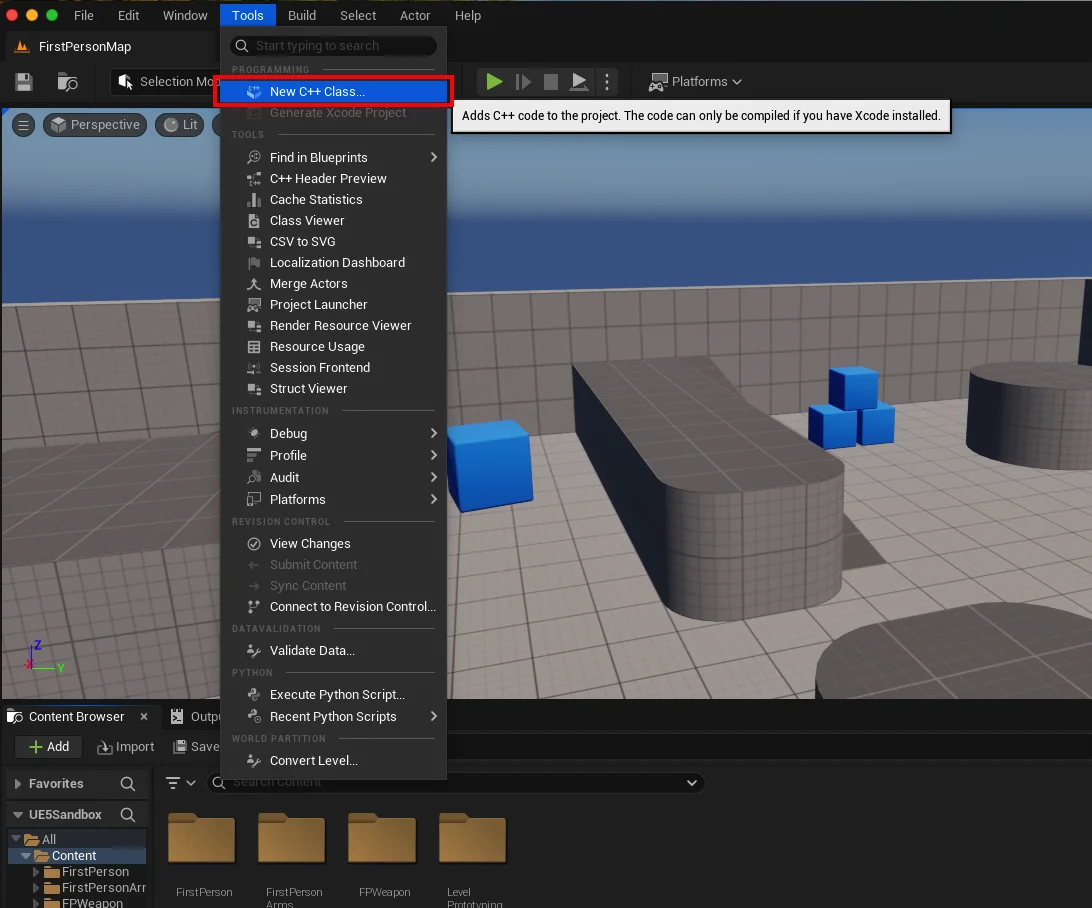
Project Assessment: The initial step involves determining whether the existing Unreal Engine project is C++ enabled. This is crucial because a Blueprint-only project lacks the necessary C++ build configurations and project structure. To verify, navigate to the
Toolsdropdown menu at the top of the Unreal Editor screen and selectNew C++ Class. If the project is not C++ enabled, the engine will guide the user through the process of adding C++ support, typically by prompting for an IDE installation if one isn’t detected. This ensures the project has the foundational infrastructure to compile and link C++ code.
-
Parent Class Selection: Upon initiating the
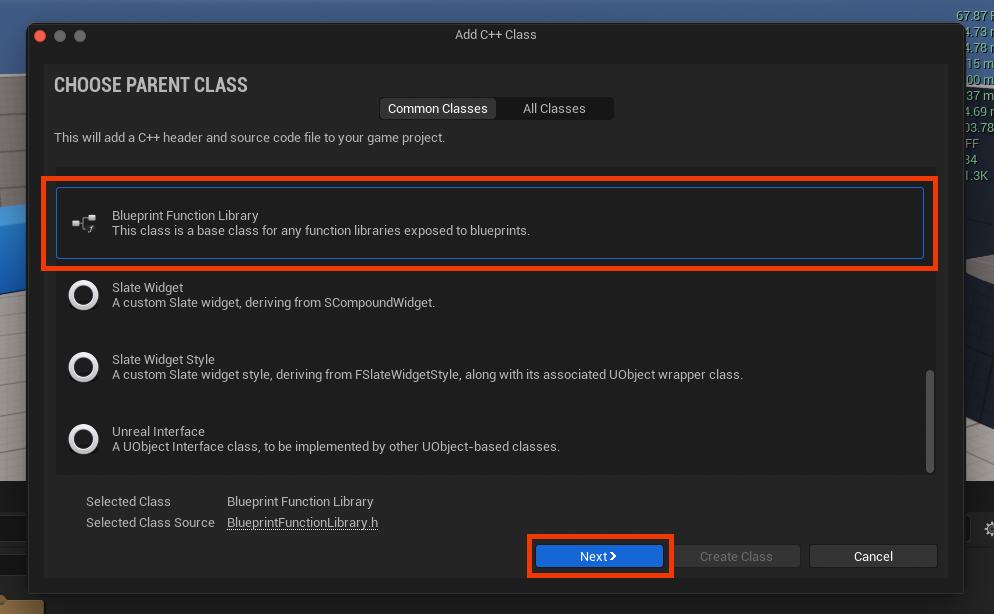
New C++ Classprocess, a dialog box will appear, presenting a list of availableParent Classes. This selection dictates the base functionality and inheritance of the new C++ class. For creating a Blueprint Function Library, developers must scroll down and selectBlueprint Function Libraryfrom the list. This specific parent class ensures that the generated C++ code will be correctly structured to expose static functions to the Blueprint system. After selecting, click theNextbutton to proceed. -
Naming Convention: The next critical step is to assign a descriptive name to the new Blueprint Function Library class. While the system might offer a default, it is highly recommended to choose a clear, concise name that adheres to Unreal Engine’s naming conventions, typically using PascalCase (e.g.,
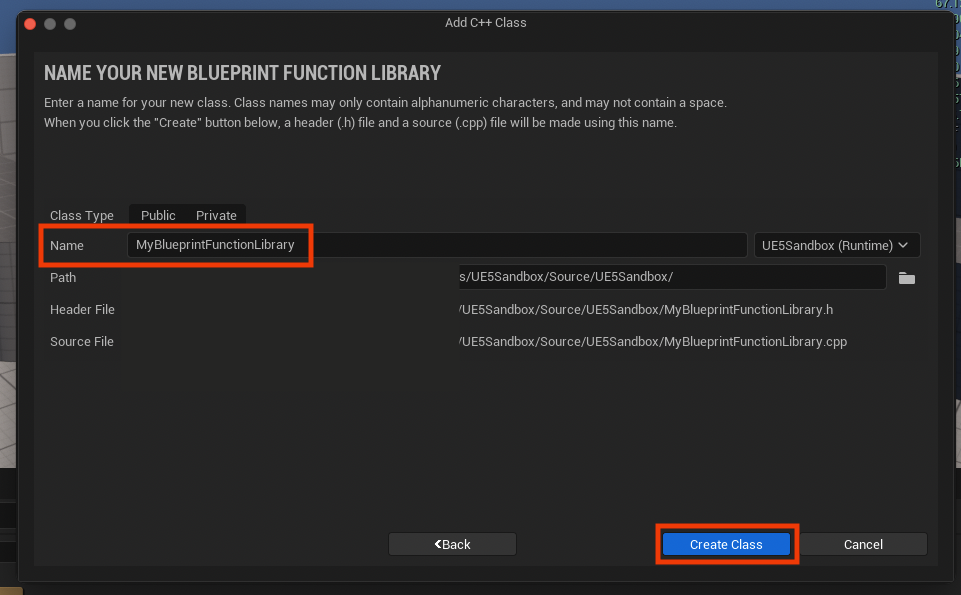
MyUtilityFunctionLibrary,GameSaveSystemLibrary). A well-chosen name enhances code readability and maintainability, especially in larger projects. Once named, clickingCreate Classinitiates the compilation process.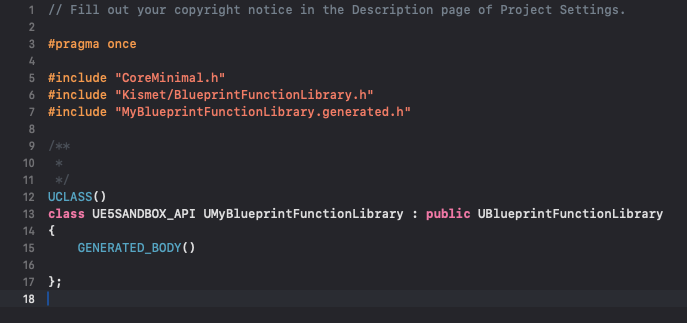
-
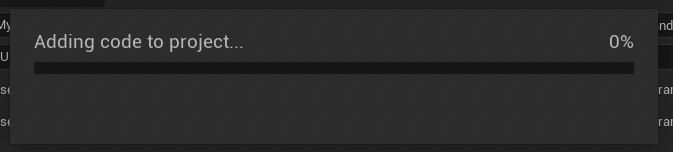
Compilation and IDE Integration: Following the naming, Unreal Engine will compile the newly generated C++ files. This process can take a few moments, during which the engine creates the
.h(header) and.cpp(source) files for the new class within the project’sSourcedirectory. Developers must wait for this compilation to complete before proceeding. Once finished, the project will be ready for the IDE to be opened, revealing the newly generated files (e.g.,MyBlueprintFunctionLibrary.handMyBlueprintFunctionLibrary.cpp). These files form the canvas upon which custom C++ functionality will be written.
Developing Functionality: Inside the Code IDE
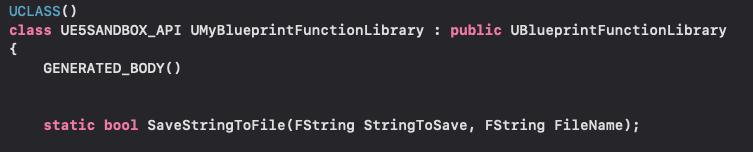
With the foundational files in place, the focus shifts to the chosen IDE (e.g., Visual Studio, Xcode) to implement the desired C++ functions. The generated header file (.h) will contain the basic class definition, including necessary Unreal Engine includes and inheritance from UBlueprintFunctionLibrary.
-
Function Declaration: Within the header file, developers declare the functions intended for exposure to Blueprint. A crucial keyword here is
static. Declaring a function asstaticensures that it can be called directly on the class itself, without needing an instance of the class (i.e., an object reference). This is fundamental for Blueprint Function Libraries, as it allows Blueprint nodes to invoke these functions directly, similar to how static utility functions operate in other programming contexts. For instance, to implement a simple string read/write system, a function likestatic bool SaveStringToFile(const FString& InString, const FString& FileName)might be declared.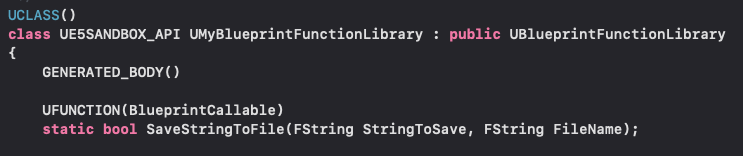
-
UFUNCTION Macro: To make these C++ functions accessible and visible within the Blueprint editor, each function declaration must be prefixed with the
UFUNCTIONmacro. This macro is part of Unreal Engine’s reflection system, which automatically generates metadata about the C++ code, allowing the editor to understand and interact with it. TheUFUNCTIONmacro can also take specifiers (e.g.,BlueprintCallable,Category="Utility") to control how the function appears and behaves in Blueprint, such as its accessibility and categorization within the Blueprint context menu. -
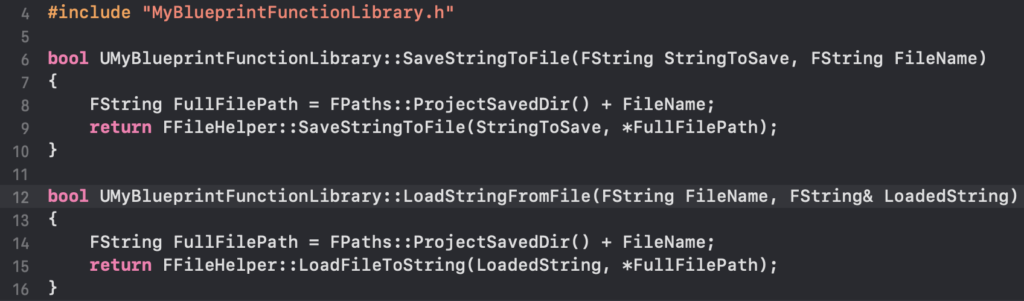
Function Definition: The actual implementation of the C++ logic resides in the source file (
.cpp). Here, the declared functions are defined, containing the C++ code that performs the desired operations. For the string read/write example, this might involve using Unreal Engine’sFFileHelperclass, which provides convenient static methods for file operations. For instance,FFileHelper::SaveStringToFileandFFileHelper::LoadFileToStringoffer robust and efficient ways to handle file I/O within the engine environment. This is where the performance benefits of C++ are directly realized, as these file operations execute at native speeds.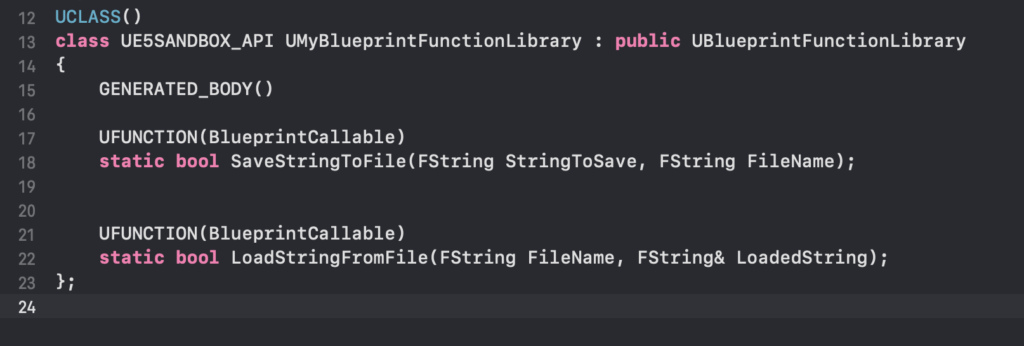
Compilation and Editor Relaunch: After implementing all desired C++ functions and ensuring correct syntax, the project must be compiled again. This compilation integrates the new C++ code into the Unreal Engine executable. Following a successful compilation, it is often necessary to relaunch the Unreal Editor for the changes to be fully recognized and for the new Blueprint nodes to appear in the editor’s function palette.
Seamless Integration: Utilizing C++ Functions in Blueprints
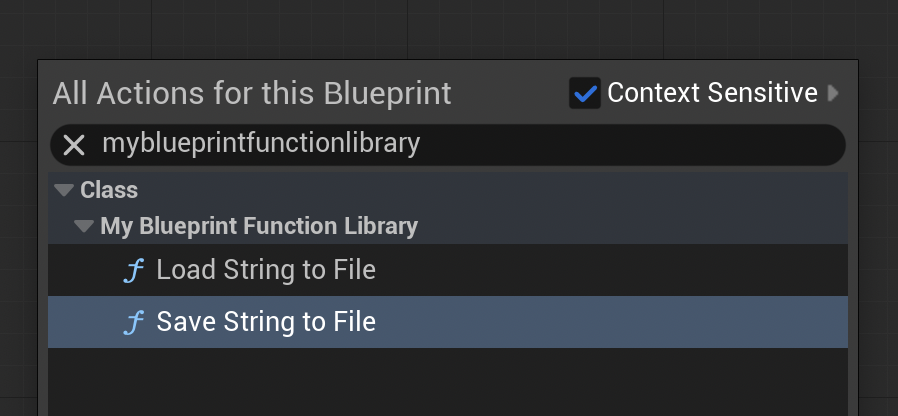
Once the C++ Blueprint Function Library has been created and compiled, its functions become immediately available for use within any Blueprint graph. In the Blueprint editor, simply right-clicking and typing the name of the C++ Blueprint Function Library (or the specific function name) will bring up the newly exposed C++ nodes. For the string read/write example, developers would see nodes like "Save String To File" and "Load String From File," which can then be connected to other Blueprint logic like any native Blueprint node.
Demonstration and Practical Application: File I/O Example
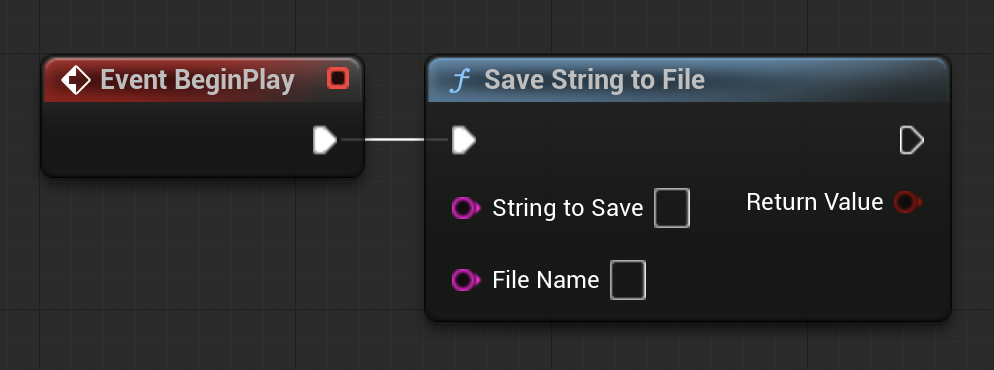
To illustrate the practical utility of a C++ Blueprint Function Library, consider the simple file read/write system developed in the example. This system provides a clear demonstration of how C++ can extend Blueprint functionality:
-
Saving Data: A
Save String To FileBlueprint node, derived from a C++ function, can be connected to an event (e.g.,BeginPlay,OnSaveGame). Developers can provide aFStringvariable containing the data to be saved and aFStringrepresenting the desired file path (e.g.,textfile-test.txt). Upon execution, the C++ backend efficiently writes the string to the specified file within the project’s/Saveddirectory. This capability is crucial for implementing game save systems, logging game data, or managing custom configuration files, tasks that demand reliability and performance.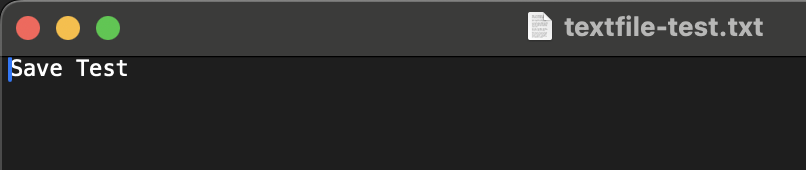
-
Loading Data: Conversely, a
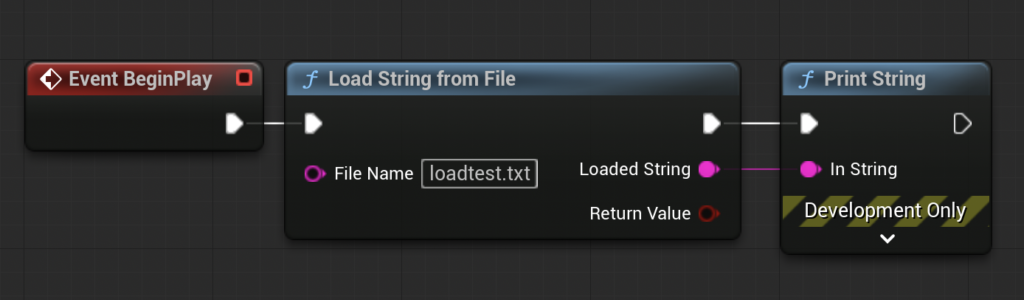
Load String From FileBlueprint node can retrieve data. By specifying the file path, the C++ function reads the file’s contents into anFStringvariable, which can then be used within Blueprint. Connecting this output to aPrint Stringnode, for instance, allows developers to immediately verify the loaded content, demonstrating the successful round-trip of data from C++ to Blueprint. This seamless interaction empowers designers to build complex data persistence features without delving into C++ code themselves.
The demonstration vividly showcases how the C++ Blueprint Function Library acts as an abstraction layer, providing high-performance, low-level functionalities in a user-friendly Blueprint interface.

Broader Impact and Implications for Game Development
The strategic implementation of C++ Blueprint Function Libraries carries significant implications for modern game development within Unreal Engine 5:
- Performance Optimization: This is the most direct benefit. By migrating computationally intensive Blueprint logic to C++, developers can achieve substantial frame rate improvements, reduce hitching, and ensure a smoother player experience, especially in graphically demanding or simulation-heavy games.
- Expanded Functionality: It unlocks access to the vast C++ ecosystem, including advanced algorithms, complex data structures, multi-threading capabilities, and integration with third-party libraries (e.g., external physics engines, AI middleware, networking protocols) that are not natively exposed to Blueprint.
- Enhanced Collaboration: This approach fosters better collaboration between programmers and designers. Programmers can encapsulate complex, optimized C++ logic into robust, designer-friendly Blueprint nodes, while designers can leverage this power without needing C++ knowledge, focusing on game logic and creative implementation.
- Project Scalability and Maintainability: By compartmentalizing performance-critical code in C++ libraries, projects become more scalable. It also improves maintainability, as C++ code can be more rigorously tested, documented, and version-controlled, leading to a more stable and predictable codebase.
- Future-Proofing: As game engines evolve and hardware capabilities increase, the demand for performance will only grow. A hybrid C++/Blueprint approach ensures that projects can adapt to these demands by selectively optimizing bottlenecks with C++ while retaining the agility of Blueprint.
In essence, C++ Blueprint Function Libraries represent a sophisticated architectural solution within Unreal Engine 5, enabling developers to harness the best attributes of both visual scripting and native code. This hybrid methodology is not merely a technical workaround but a strategic imperative for creating cutting-edge, high-performance interactive experiences that push the boundaries of what is possible in modern game development. As the industry continues its pursuit of ever-more immersive and complex virtual worlds, the judicious integration of C++ power into Blueprint workflows will remain a cornerstone of successful Unreal Engine projects.
About the Author








