
Epic Games has further solidified Unreal Engine 5’s position as a premier development platform with the detailed unveiling of its integrated SaveGame system, a critical feature designed to simplify the complex challenge of data persistence in modern interactive experiences. This robust, built-in framework provides developers with an intuitive and efficient method for saving and loading crucial game data, from player progress and inventory to intricate world states, directly to and from a user’s local storage. The system, accessible via Unreal Engine’s visual scripting language, Blueprints, is poised to significantly reduce development overhead while enhancing the reliability and user experience of games built on the engine.
The imperative for robust data persistence in contemporary gaming cannot be overstated. As game worlds grow in scale and complexity, and player expectations for seamless progression and uninterrupted gameplay heighten, a dependable save/load system transitions from a mere feature to a foundational requirement. Players invest significant time and effort into their virtual journeys, and the ability to reliably resume play from any point, or to transfer progress across sessions, is paramount to maintaining engagement and satisfaction. Industry trends, particularly in open-world, role-playing, and simulation genres, underscore this demand, with titles often featuring hundreds of hours of content that necessitate sophisticated state management. Without an efficient mechanism for data persistence, the player experience would be severely fragmented, leading to frustration and abandonment. Epic Games’ integrated SaveGame system addresses this directly, offering a standardized and easily implementable solution that aims to future-proof game development against these evolving demands.
At its core, the Unreal Engine SaveGame system operates around a specialized SaveGame class. This abstract class serves as a blueprint for developers to define precisely what data needs to be preserved. Unlike Actors, which exist within the active game world, SaveGame objects are designed to be transient in memory during gameplay but capable of serializing their contained variables into a binary file format. This file is then stored securely on the user’s machine, providing a persistent record of the game state that can be reloaded at any subsequent time. The system supports nearly all standard variable types, offering extensive flexibility for developers to capture diverse aspects of their game’s logic and content. Crucially, the engine manages the underlying file I/O operations, abstracting away the complexities of file paths and serialization, thereby allowing developers to focus on game logic rather than low-level system interactions.
The saved data files are strategically located in platform-specific directories to ensure proper access and management. On Windows, these files reside within the user’s Local Appdata folder, adhering to standard application data storage conventions. macOS users will find them within the Library/Application Support directory, a common location for application-specific data. For Linux environments, the files are typically stored in the /home/username/.local/share directory, aligning with the freedesktop.org XDG Base Directory Specification for user-specific data. This standardized approach across major operating systems ensures consistency and predictability for both developers and players.
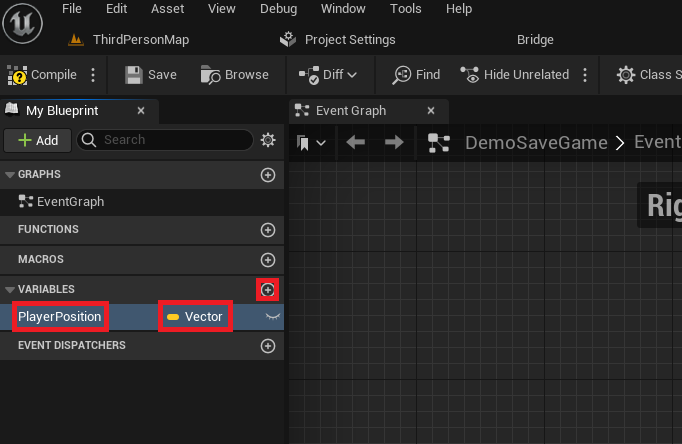
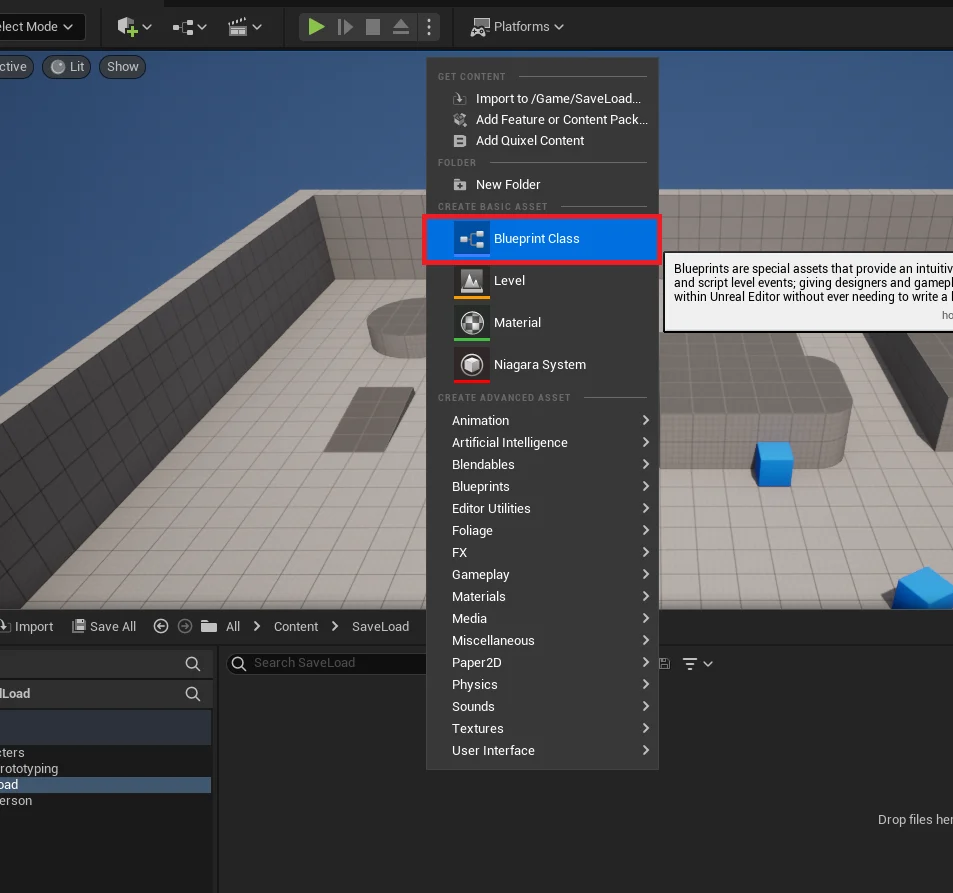
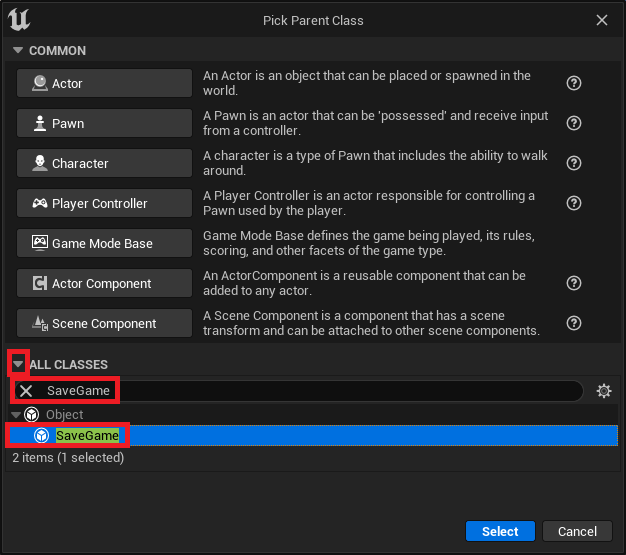
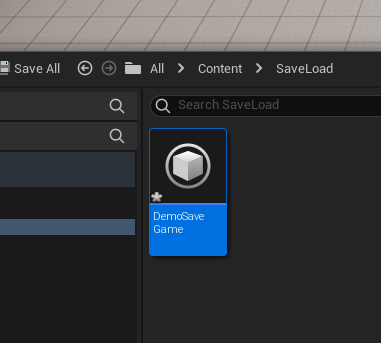
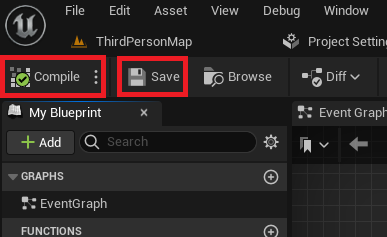
Implementing this foundational data persistence capability within an Unreal Engine 5 project begins with establishing a dedicated SaveGame blueprint class. This initial step involves navigating the Content Drawer, initiating the creation of a new Blueprint Class, and then specifically selecting SaveGame from the comprehensive list of parent classes. This custom class, once named (e.g., "DemoSaveGame"), becomes the central repository for all data intended for persistence. For instance, in a common use case, a developer might introduce a Vector variable named "PlayerPosition" within this new SaveGame class. This variable would subsequently store the exact spatial coordinates of the player character, enabling them to resume play precisely where they left off. The intuitive nature of Blueprint allows for the easy addition and configuration of any number of variables, catering to the diverse data requirements of various game types. Upon defining these variables, a crucial step involves compiling and saving the blueprint to ensure all modifications are integrated into the project’s asset database, preparing the class for runtime use.
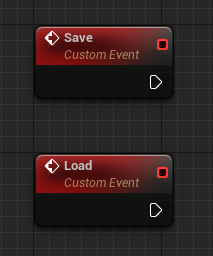
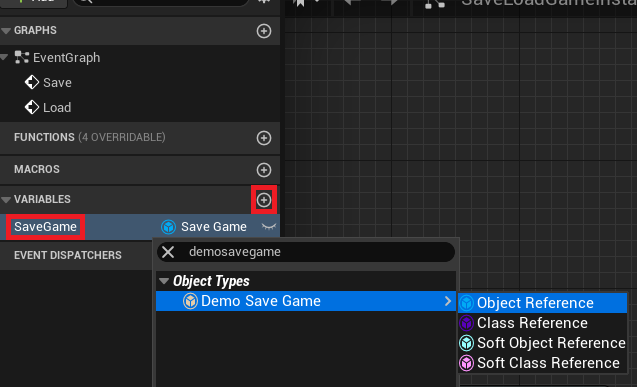
The orchestration of save and load operations is typically centralized within the Game Instance, a singleton object that persists throughout the entire lifecycle of a game session, even across level changes. This makes it an ideal candidate for managing global state and save/load logic. Within the custom Game Instance Blueprint, developers establish two custom events, conventionally named "Save" and "Load," which serve as the primary entry points for triggering persistence operations. Furthermore, a new variable, also of the custom SaveGame class type (e.g., "DemoSaveGame"), is added to the Game Instance. This variable will hold a runtime reference to the active SaveGame object, facilitating seamless access and modification of the persistent data. This architectural decision emphasizes modularity and maintainability, ensuring that save/load logic is encapsulated and accessible globally without tight coupling to specific game actors.
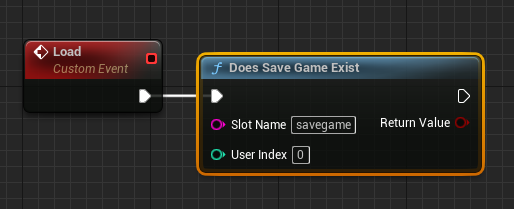
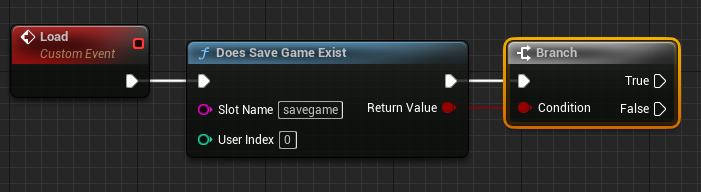
The loading protocol, responsible for retrieving stored game states, is meticulously structured to ensure data integrity and a smooth player experience. Upon the invocation of the "Load" event, the system first executes a "Does Save Game Exist" node. This critical check determines whether a save file corresponding to a specified "Slot Name" (a unique identifier for a particular save slot, such as "savegame") is present on the user’s machine. The output of this node then feeds into a Branch node, initiating conditional logic.
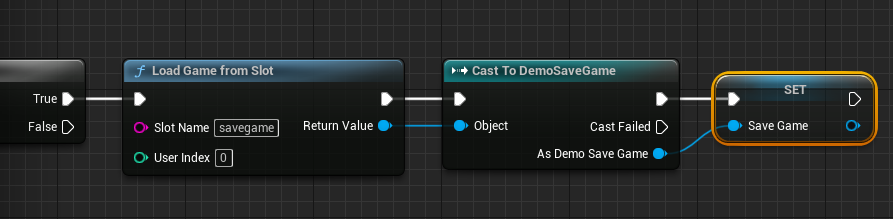
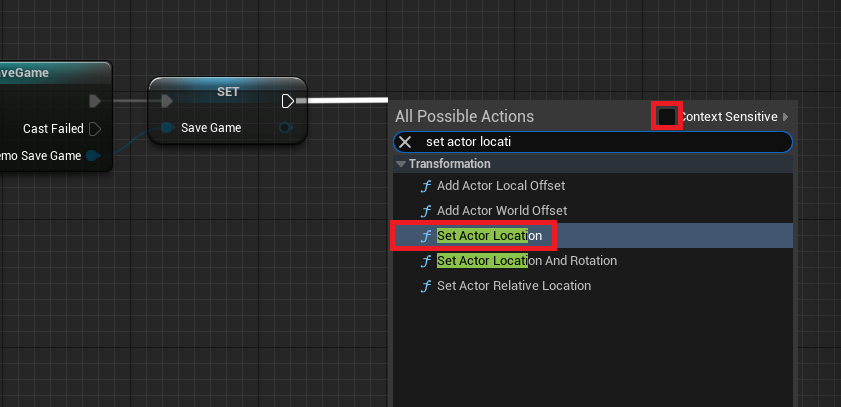
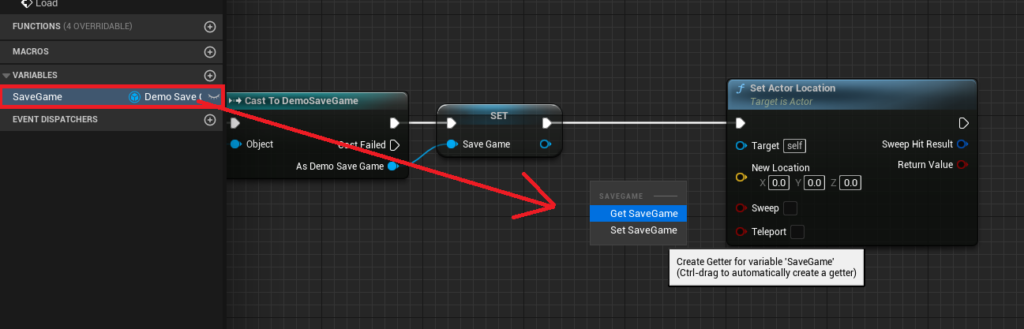
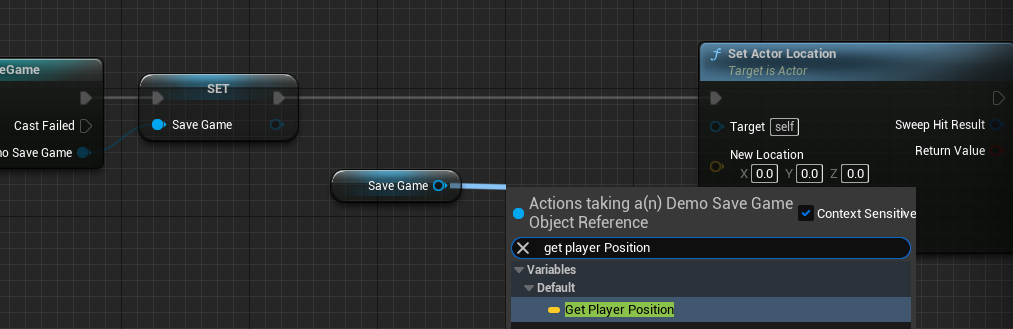
If the save file is detected ("True" branch), the system proceeds to load the data using a "Load Game From Slot" node, referencing the same "Slot Name." The raw loaded object is then "Cast To" the developer’s specific SaveGame class (e.g., "Cast to DemoSaveGame") to ensure type safety and allow access to its custom variables. The successfully cast SaveGame object is then assigned to the Game Instance’s dedicated SaveGame variable, making its data readily available. Following this, the loaded data is applied to the game world. For instance, the "PlayerPosition" vector retrieved from the SaveGame object is fed into a "Set Actor Location" node, targeting the "Get Player Character" reference, effectively relocating the player to their last saved coordinates. This sequence ensures that the game state is accurately restored, providing players with a continuous experience.
Conversely, if no save file is found ("False" branch), indicating a first-time play session or a deleted save, the system initiates a "Create Save Game Object" node. This generates a new instance of the custom SaveGame class in memory. This newly created object is then assigned to the Game Instance’s SaveGame variable, establishing a fresh, default save state. This proactive creation ensures that the game always has a valid SaveGame object to interact with, preventing potential null reference errors and providing a robust foundation for subsequent save operations. The "Set Save Game" node ensures this newly created object is properly referenced for future interactions. This comprehensive loading protocol gracefully handles both existing and non-existent save files, contributing significantly to the stability and user-friendliness of the game.
The saving protocol, designed to persist the current game state, mirrors the loading process in its meticulous structure. Upon the activation of the "Save" event, the system first retrieves the Game Instance’s SaveGame variable and passes it through an "Is Valid" node. This crucial check verifies that a valid SaveGame object reference exists in memory, preventing attempts to save data to a non-existent or corrupted object.

If the SaveGame object is valid ("Is Valid" pin), the system proceeds to capture the current game state. For example, to save the player’s position, a "Get Player Character" node is used to obtain a reference to the active player. From this, a "Get Actor Location" node extracts the player’s current spatial coordinates. This Vector value is then used to update the "PlayerPosition" variable within the SaveGame object via a "Set Player Position" node. This sequence ensures that the most up-to-date player location is recorded in the in-memory SaveGame object.

In scenarios where the SaveGame object is not valid ("Is Not Valid" pin), which could occur if the game was started without loading or if a save file was manually deleted during gameplay, the system proactively creates a new SaveGame object. This is achieved using a "Create Save Game Object" node, specifying the custom SaveGame class. The newly created object is then assigned to the Game Instance’s SaveGame variable, ensuring a valid target for the save operation. Following this, the system proceeds to capture and set the player’s current position, just as it would if the object had initially been valid. This ensures that even if a save object is missing, the game can still successfully create one and record the current state.
The final step in the saving process involves committing the in-memory SaveGame object to persistent storage. Developers have a choice between two primary nodes: "Save Game to Slot" and "Async Save Game to Slot." The synchronous "Save Game to Slot" node writes data to disk immediately. While simpler to implement, it can introduce momentary hitches or freezes in gameplay if the amount of data being saved is substantial, as the game thread is blocked during the write operation. For games saving only a small amount of data, this might be negligible. Conversely, for titles with extensive game states (e.g., large open worlds, complex inventories, detailed character data), the "Async Save Game to Slot" node is highly recommended. This asynchronous operation performs the file write on a separate thread, preventing gameplay interruptions and maintaining a smooth frame rate. Regardless of the chosen method, it is imperative to consistently use the same "Slot Name" (e.g., "savegame") that was used during the loading process to ensure data integrity and proper file association. This comprehensive saving protocol ensures that game progress is reliably recorded, catering to both performance and consistency requirements.
With the Save and Load system meticulously configured within the Game Instance, the final step involves integrating trigger mechanisms to allow players to interact with this functionality. This is typically achieved by binding the "Save" and "Load" events to specific player input actions. For instance, within a player character’s Blueprint class (e.g., "ThirdPersonCharacterBP"), developers can set up a "Key Press Event" (e.g., for the ‘1’ key for saving and ‘2’ key for loading).
Upon detecting a key press, the system first retrieves a reference to the active "Game Instance" and then performs a "Cast To" the custom Game Instance class. This ensures that the correct instance of the Game Instance, containing the custom save/load logic, is being targeted. From the successfully cast "As Game Instance" output pin, developers can then call the previously defined "Save" or "Load" custom events. For example, pressing the ‘1’ key would trigger the "Save" event, capturing and writing the player’s current location to the save file. Similarly, pressing the ‘2’ key would invoke the "Load" event, retrieving the saved position and teleporting the player character accordingly. This direct integration of input actions with the Game Instance’s persistence events provides players with intuitive control over their game’s state, enabling them to save progress before exiting or load a previous session with ease. This user-friendly interface is crucial for delivering a polished and accessible gameplay experience.
The integration of Unreal Engine 5’s streamlined SaveGame system represents a significant step forward for game developers, offering a powerful, yet accessible, solution to a historically complex challenge. By abstracting the intricacies of file I/O and serialization into a user-friendly Blueprint-based workflow, Epic Games has effectively lowered the technical barrier for implementing robust data persistence. This empowerment extends to indie developers, who can now integrate sophisticated save systems without extensive low-level coding, as well as to larger studios, who can leverage the system’s flexibility and performance options (e.g., asynchronous saving) for their most demanding titles. The implications for player experience are equally profound, ensuring reliable progression, seamless resumption of gameplay, and the preservation of hard-earned achievements across countless hours of engagement. As game worlds continue to expand in scope and detail, the foundation laid by this integrated SaveGame system will undoubtedly contribute to the creation of more stable, engaging, and memorable interactive experiences for players worldwide.
About the Author








