
The integration of intelligent, autonomous characters is a cornerstone of modern video game design, enhancing atmosphere, driving narrative, and providing engaging gameplay challenges. Unreal Engine 5 (UE5), a leading development platform, offers robust tools for developers to implement sophisticated Artificial Intelligence (AI) behaviors, with fundamental pathfinding systems like NavMesh being critical to this endeavor. This guide delves into the essential steps for configuring a NavMesh and establishing basic AI character navigation within UE5, a process vital for crafting dynamic and believable virtual environments. While seemingly straightforward, precise setup is paramount to avoid common pitfalls that can hinder AI functionality.
The Evolution of In-Game Intelligence
The journey of AI in video games spans decades, evolving from rudimentary finite-state machines controlling simple enemy patterns to complex decision-making processes governing non-player characters (NPCs) in vast open worlds. Early game AI often relied on predefined paths or simple line-of-sight checks, limiting the complexity and realism of character movement. As hardware capabilities advanced, so did the ambition of game developers to create more dynamic and believable interactions. The concept of pathfinding emerged as a critical discipline, seeking efficient ways for AI agents to navigate complex environments without getting stuck or exhibiting unnatural movements.
Pathfinding algorithms like A* (A-star) became foundational, allowing agents to find the shortest path between two points while considering obstacles. However, applying these algorithms directly to raw 3D geometry was computationally expensive and often inefficient. This challenge led to the development of navigation meshes (NavMeshes) – a simplified, abstract representation of the navigable areas within a game level. Instead of searching through millions of polygons, AI agents could traverse a much smaller network of interconnected polygons or nodes, drastically improving performance and enabling more complex behaviors. This technological leap has allowed games to feature hundreds of AI characters simultaneously, each making independent pathfinding decisions, contributing to the bustling streets of an urban RPG or the chaotic battlefields of a strategy game.
Unreal Engine 5’s Approach to AI Navigation
Unreal Engine has consistently been at the forefront of providing powerful yet accessible tools for game developers, and its AI framework in UE5 continues this tradition. The engine’s AI system is built on a foundation that combines visual scripting (Blueprints) with C++ capabilities, offering flexibility for both technical artists and seasoned programmers. At the heart of its pathfinding solution lies the NavMeshBoundsVolume, a key actor that defines the space where AI characters can move.
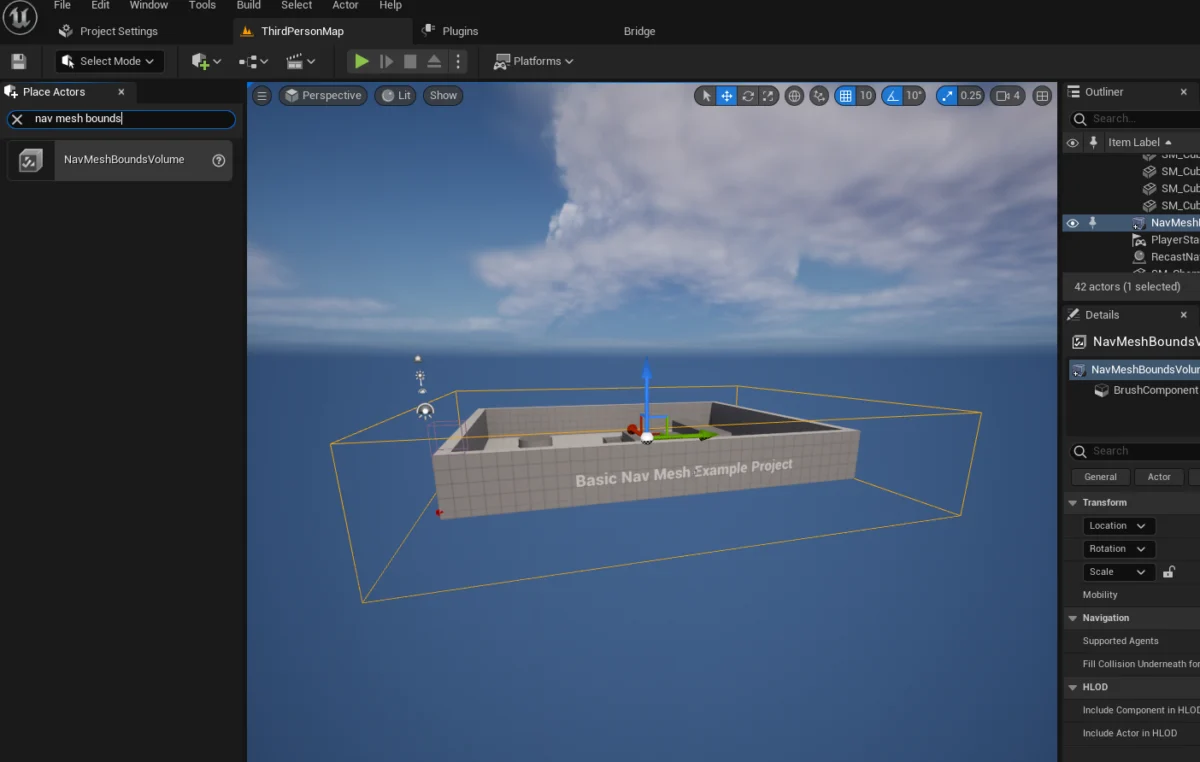
A NavMesh in UE5 is not merely a collection of waypoints but a dynamically generated polygonal mesh that represents all walkable surfaces within a specified volume. When a NavMeshBoundsVolume is placed and scaled in a level, UE5 automatically analyzes the underlying geometry to construct this navigable mesh. This process considers various parameters, such as the maximum slope an agent can climb, the step height it can overcome, and its radius, ensuring the generated mesh accurately reflects the physical capabilities of the AI characters. For instance, an AI character representing a human will have different navigation parameters than one representing a large monster, and the NavMesh adapts accordingly.
The advantages of this system are numerous. Firstly, it provides robust and collision-free pathfinding, as the mesh inherently avoids static obstacles. Secondly, it supports dynamic obstacle avoidance, allowing AI to react to moving objects or other characters. Thirdly, it is highly optimized, significantly reducing the computational overhead compared to real-time path calculations on complex geometry. Epic Games, the developer of Unreal Engine, has continuously refined these tools, emphasizing performance and ease of use, making advanced AI navigation accessible even to solo developers or small teams. This commitment is evident in the engine’s ability to handle both static and dynamic NavMeshes, allowing developers to choose between pre-computed paths for stable environments and on-the-fly generation for levels with destructible elements or constantly changing layouts. The latter, dynamic NavMesh generation, is particularly valuable in open-world games where level geometry might change based on player actions or environmental events, requiring the navigation data to update in real-time without causing performance hitches.
Demystifying NavMesh Implementation
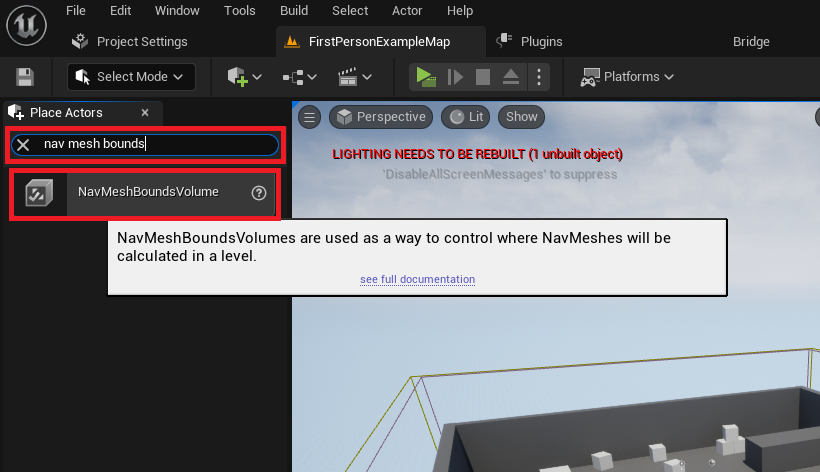
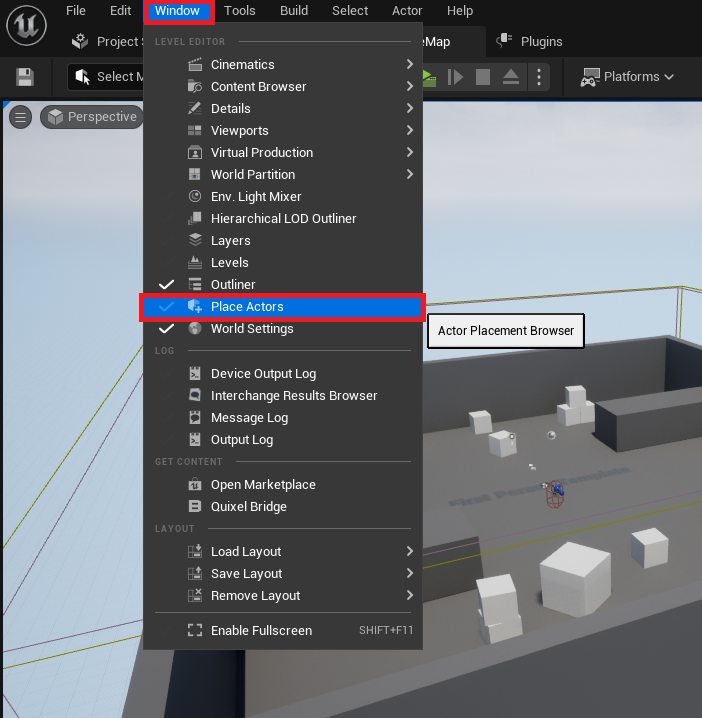
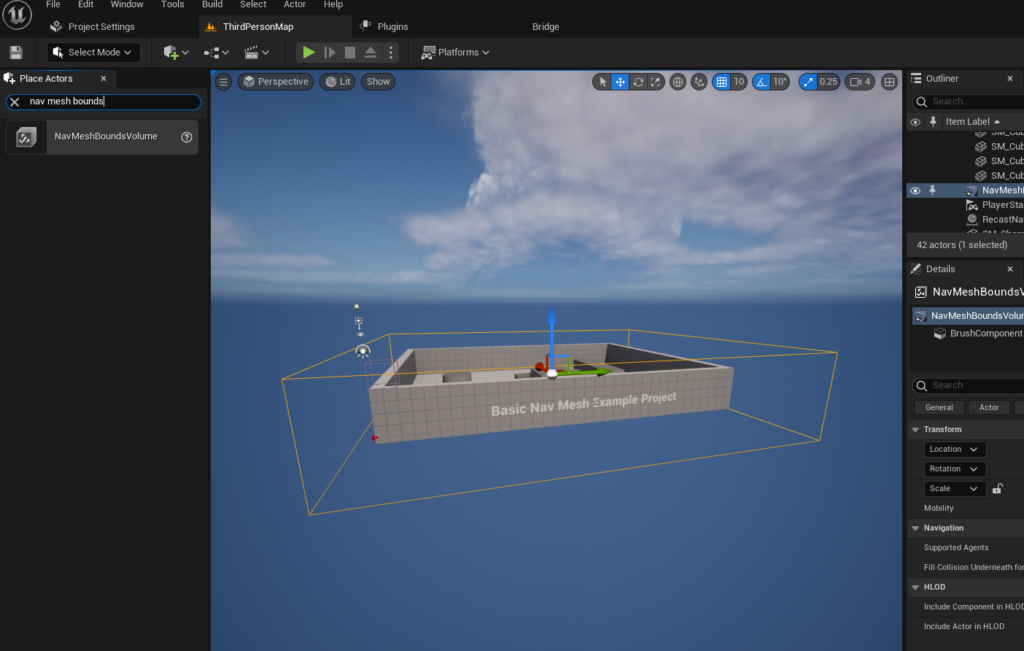
Implementing a NavMesh in Unreal Engine 5 begins with a few critical steps, focusing on defining the navigable space. The initial action involves accessing the "Place Actors" window, typically found under the "Window" menu in the editor. This panel serves as the primary interface for spawning various assets, including basic geometric primitives and specialized volumes, into the level. Once opened, developers can locate the "NavMeshBoundsVolume" within the "Volumes" category of the Modes panel.
Upon dragging and dropping the NavMeshBoundsVolume into the level, it appears as a wireframe box. The crucial next step involves meticulously scaling and positioning this volume to encompass all areas where AI characters are intended to navigate. This requires careful consideration of the level’s layout, ensuring that the volume covers all floors, ramps, and other walkable surfaces while avoiding areas where AI should not venture, such as walls or ceilings. The size of this volume directly impacts the generation time and memory footprint of the NavMesh; larger, more complex volumes will naturally take longer to process. Developers can adjust the volume’s dimensions and location using the standard transformation tools within the UE5 editor, much like any other actor.
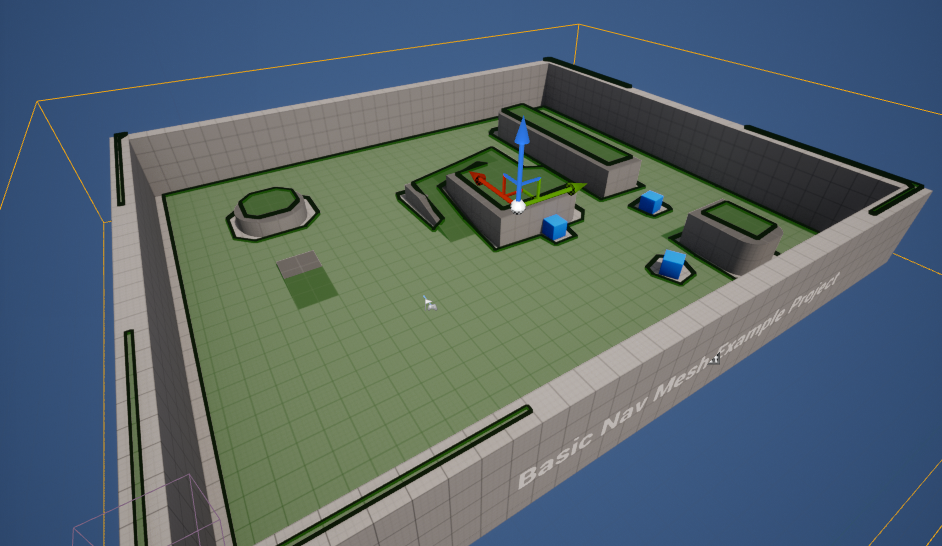
After placing and sizing the NavMeshBoundsVolume, developers can visualize the generated NavMesh by pressing the ‘P’ key on their keyboard. This debug feature overlays a green mesh onto the walkable surfaces within the volume, providing immediate visual confirmation that the NavMesh has been successfully generated and correctly represents the navigable areas. Any gaps, unreachable platforms, or incorrectly marked obstacles become immediately apparent, allowing for prompt adjustments to the volume or underlying geometry. This iterative process of adjusting and visualizing is essential for ensuring robust AI navigation, as an improperly generated NavMesh can lead to AI characters getting stuck, taking illogical paths, or failing to reach their intended destinations.
Crafting Intelligent Characters: The Blueprint for Movement
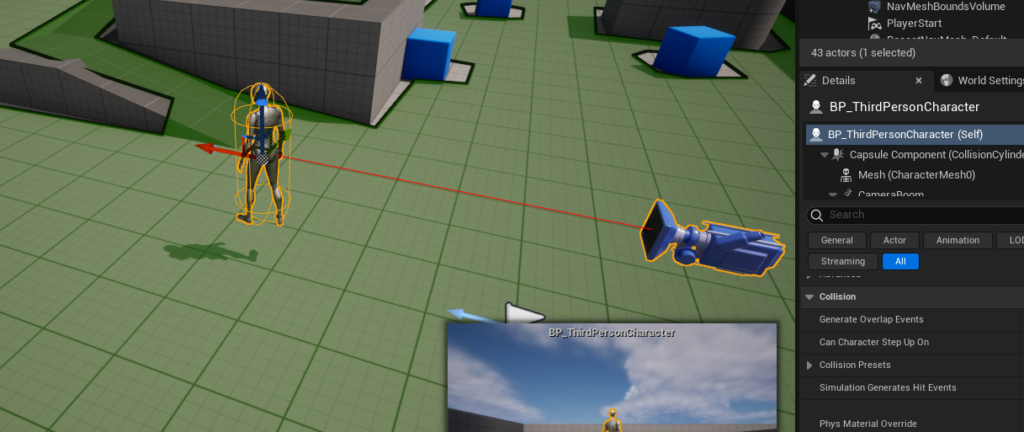
Once the NavMesh is established, the next phase involves enabling AI characters to utilize this navigation data. For demonstration purposes, many developers begin with the Third Person Template provided by Unreal Engine 5, which includes a pre-animated character blueprint. This allows for immediate testing of AI navigation without the need for custom character rigging or animation setup.
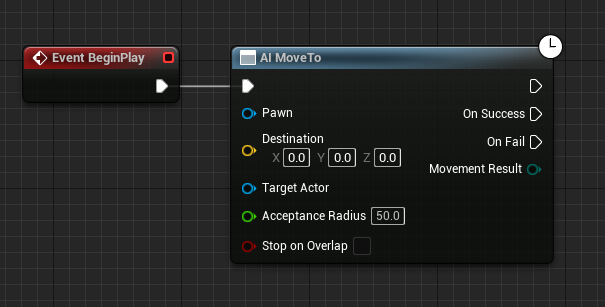
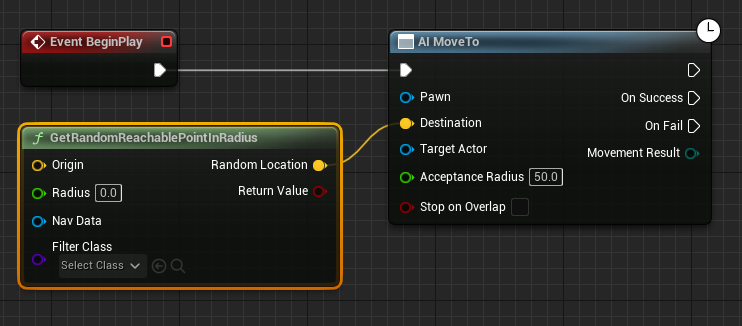
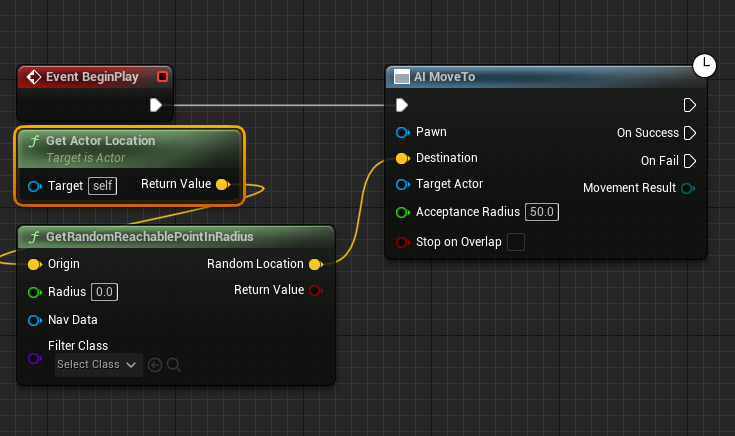
The process of imbuing a character with AI navigation capabilities typically involves modifying its Blueprint. First, an instance of the chosen character blueprint, such as the BP_ThirdPersonCharacter, is dragged into the level from the Content Drawer (found in the "Third Person / Blueprints" folder if using the template). Within the character’s Blueprint editor, the core logic for movement is established using nodes. A fundamental sequence begins with the "Event BeginPlay" node, which triggers when the game starts. Connected to this is the "AI MoveTo" node, a high-level function designed to command an AI Pawn to move to a specific destination.
To provide a dynamic destination, the "GetRandomReachablePointInRadius" node is utilized. This node queries the NavMesh to find a valid, walkable point within a specified radius from an origin point. The output (a yellow vector pin representing the destination coordinates) is then connected to the "Destination" pin of the "AI MoveTo" node. The "Origin" for this random point generation is typically the AI character’s current location, obtained using a "Get Actor Location" node and connected to the "Origin" pin. This setup ensures that the AI character seeks destinations within a defined proximity of its current position, simulating a "roaming" behavior.
A crucial parameter for the "GetRandomReachablePointInRadius" node is the "Radius" value, which dictates how far the AI character will search for a random destination. Setting this to a value like "2000" units (Unreal Engine units, typically centimeters) allows the character to roam within a significant area around its starting point. Finally, the "Pawn" input of the "AI MoveTo" node must be populated with a reference to the AI character itself, achieved by connecting a "Self Reference" node. This informs the AI MoveTo node which character it needs to control.

For continuous movement, especially for ambient AI, a "Delay" node is connected to the "On Success" output pin of the "AI MoveTo" node. This creates a pause after the character successfully reaches its destination. After the delay, the execution flow is looped back to the "AI MoveTo" node, prompting the character to seek a new random destination. This creates a continuous loop of movement, making the AI character appear to wander aimlessly within the defined NavMesh boundaries. The duration of the delay can be adjusted to control the pacing of the AI’s movement, from continuous strolling to longer pauses between movements. Upon pressing "Play" in the editor, the AI character will immediately begin navigating the level, demonstrating the functional integration of the NavMesh and blueprint logic.
Performance and Scalability Considerations
While the initial setup of NavMesh and basic AI movement in UE5 is user-friendly, developers must consider performance and scalability, particularly for games featuring numerous AI agents or expansive environments. The generation of a NavMesh, especially for large and intricate levels, can be computationally intensive. Static NavMeshes, pre-calculated during development, offer optimal runtime performance but require recalculation if the level geometry changes. Dynamic NavMeshes, while offering flexibility, introduce a slight runtime overhead for updating the navigation data. Epic Games provides tools to optimize NavMesh generation, such as adjusting cell size, agent radius, and other parameters, which can significantly impact both performance and the fidelity of the navigable mesh. Smaller cell sizes yield more precise navigation but increase generation time and memory usage.
For games with many AI characters, further optimizations are often necessary. Techniques include using AI Perception systems to limit processing for agents outside the player’s view, implementing Behavior Trees or Utility AI for more complex and efficient decision-making, and leveraging AI pooling to manage the lifecycle of AI actors. The "AI MoveTo" node itself is highly optimized, but its efficiency can be impacted by the complexity of the path and the number of simultaneous requests. Developers might also consider implementing hierarchical AI, where high-level strategic decisions are made for groups of AI, and individual agents then execute local pathfinding. Monitoring performance metrics during development is crucial to identify and address bottlenecks early on.
The Broader Impact on Game Development
The accessibility and power of Unreal Engine 5’s AI navigation tools have profound implications for the game development landscape. For independent developers and small studios, these tools democratize the creation of sophisticated AI, allowing them to build immersive worlds with believable NPC interactions without requiring deep expertise in complex pathfinding algorithms or AI programming. This lowers the barrier to entry, fostering innovation and enabling a wider range of creative visions to come to fruition.
For larger AAA studios, UE5’s robust AI framework provides a highly efficient foundation upon which to build incredibly complex and nuanced AI systems. It streamlines the initial setup, freeing up AI programmers to focus on higher-level behaviors, decision-making, and emergent gameplay mechanics rather than reinventing core navigation. This efficiency can translate into reduced development times and costs, allowing studios to allocate resources to other areas of game development, such as narrative, art, or advanced physics. The flexibility of Unreal Engine’s Blueprint system further empowers designers and technical artists to prototype and iterate on AI behaviors rapidly, fostering a more collaborative development environment.
Industry Perspectives and Future Trends
Industry experts consistently highlight the importance of intuitive tools in modern game engines. Speaking generally on engine design philosophy, an Epic Games spokesperson might emphasize the goal of empowering creators at all skill levels. "Our aim with Unreal Engine 5 is to provide a comprehensive suite of tools that are both powerful and approachable," a hypothetical statement could read. "Making core systems like AI navigation easy to implement allows developers to spend more time innovating on gameplay and narrative, which ultimately leads to richer player experiences."
The future of AI in games, and specifically navigation, is likely to see even greater integration with machine learning (ML) and more sophisticated procedural generation techniques. While current NavMeshes are highly effective, ML could potentially enable AI to learn navigation patterns in dynamic, unstructured environments, adapting to player behavior or emergent situations in ways that pre-defined meshes cannot. Furthermore, as virtual worlds become increasingly vast and detailed, techniques for generating navigation data on-the-fly, perhaps streamed from cloud services or optimized with advanced data structures, will become paramount. The foundational NavMesh system in Unreal Engine 5 serves as a robust platform for these future advancements, providing a stable and efficient base upon which increasingly intelligent and adaptable AI can be built.
Conclusion
The ability to create intelligent, navigating AI characters is no longer an exclusive domain of large development teams but an accessible feature for all creators using Unreal Engine 5. By understanding and correctly implementing the NavMeshBoundsVolume and basic Blueprint logic for AI movement, developers lay a crucial foundation for populating their virtual worlds with believable and dynamic non-player characters. From enhancing environmental realism to providing challenging adversaries, AI navigation is integral to the modern gaming experience. As game development continues to push boundaries, the robust and user-friendly tools provided by Unreal Engine 5 will undoubtedly remain instrumental in shaping the immersive and interactive digital landscapes of tomorrow, paving the way for increasingly sophisticated and engaging AI-driven gameplay.
About the Author








