

Modern video game development increasingly relies on sophisticated artificial intelligence (AI) to create compelling and dynamic player experiences. Among the foundational AI behaviors, the ability for non-player characters (NPCs) or enemies to effectively chase or follow a player character stands out as a ubiquitous and critical feature. This functionality, essential for everything from relentless antagonists to helpful companions, is remarkably accessible within powerful game engines like Unreal Engine 5 (UE5), often requiring only a minimal set of visual scripting nodes known as Blueprints. The ease of implementing such core AI logic through UE5’s intuitive visual scripting system underscores the engine’s commitment to democratizing game development, allowing creators to rapidly prototype and integrate complex behaviors without extensive coding knowledge.
The evolution of AI in video games has been a journey from simplistic, pre-scripted movements to highly adaptive and emergent behaviors. Early game AI often relied on basic state machines and limited pathfinding, leading to predictable and often exploitable enemy patterns. However, with advancements in computing power and sophisticated engine tools, AI has become a cornerstone of immersive gameplay, capable of reacting dynamically to player actions and environmental changes. Unreal Engine, particularly with its latest iteration, UE5, has been at the forefront of this revolution, providing robust tools that empower developers to craft intelligent NPCs that enhance narrative, challenge, and overall player engagement. The integration of AI following mechanics is a prime example of how foundational AI behaviors can be built with efficiency and flexibility, laying the groundwork for more intricate character interactions.

At the heart of any sophisticated AI movement system in a 3D environment is the navigation mesh, or NavMesh. As a prerequisite for the player-following AI, a properly configured NavMesh is indispensable. This invisible, traversable surface, automatically generated by the engine, defines the areas where AI characters can move. Without a NavMesh, AI agents would be unable to calculate paths, avoid obstacles, or understand the navigable space within a level. The "Setting up a NavMesh in Unreal Engine 5" guide, a foundational step for many AI implementations, establishes this crucial environment data, allowing AI characters to perceive and interact with the game world’s geometry. The NavMesh acts as a roadmap for AI, providing the necessary spatial awareness for pathfinding algorithms to operate effectively.
The process of transitioning an AI character from random patrolling to actively pursuing the player in UE5 involves a precise yet straightforward manipulation of Blueprint nodes. Initially, an AI character might be configured to move randomly within its environment, perhaps to simulate idle behavior or a basic patrol route. This typically involves nodes like Get Actor Location and GetRandomReachablePointInRadius, which instruct the AI to find arbitrary destinations within a given range. However, to shift this behavior towards player pursuit, the core logic must be redefined. The initial configuration, while useful for establishing basic movement, does not account for a dynamic target like the player.
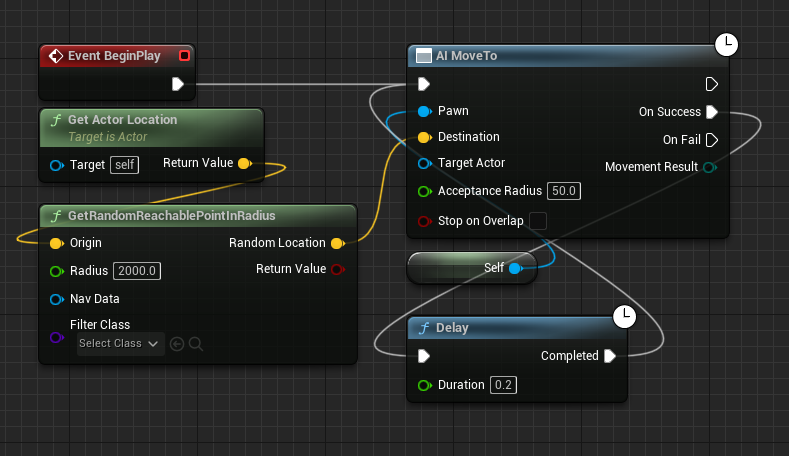
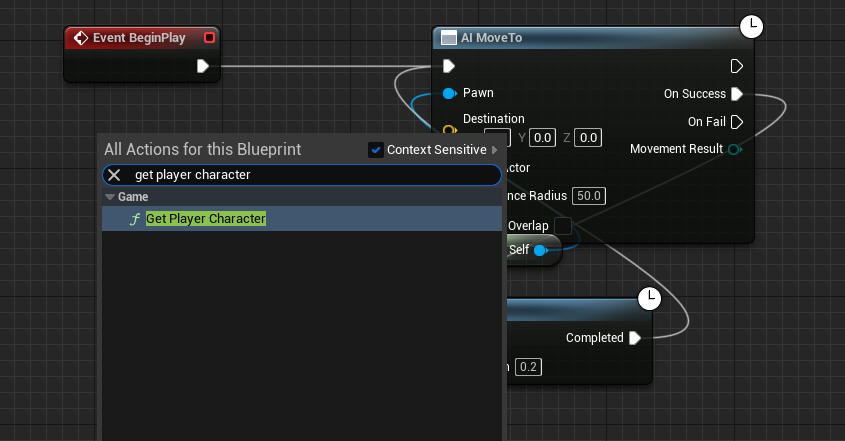
The pivotal step in enabling player-following AI is to redirect the AI’s target acquisition. This begins by systematically removing the nodes responsible for generating random movement targets, specifically the Get Actor Location and GetRandomReachablePointInRadius nodes from the AI’s Blueprint graph. These nodes, designed for non-player-centric movement, become redundant and counterproductive when the objective is to track a specific entity. Once these arbitrary target definitions are cleared, the system is ready to receive input from the player character itself. This deletion streamlines the AI’s decision-making process, eliminating any conflicting instructions that might send the AI to a random location instead of its intended target.
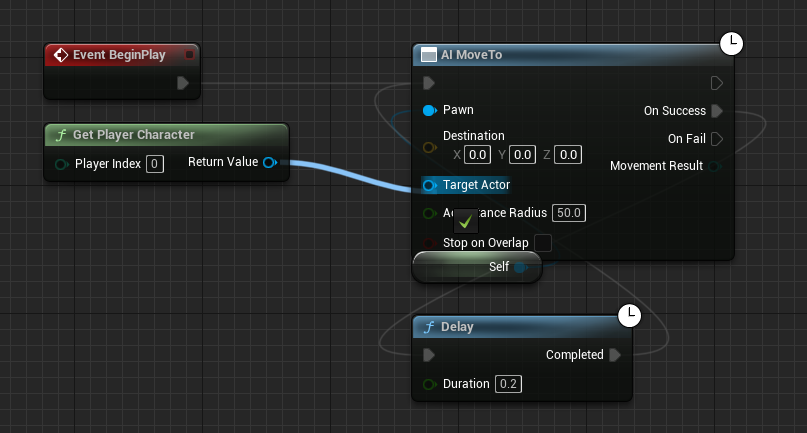
Following the removal of the random target nodes, the next critical addition is the Get Player Character node. This Blueprint node serves a singular, vital purpose: to identify and retrieve a reference to the active player character within the game environment. In multi-player scenarios, more advanced nodes like Get Player Pawn or specific character references might be used, but for a single-player context, Get Player Character efficiently provides the necessary target. Once the player character reference is obtained, its location becomes the definitive destination for the AI. This is achieved by connecting the blue "Return Value" pin of the Get Player Character node directly to the blue "Target Actor" pin on the AI MoveTo node. This connection effectively tells the AI MoveTo node, "Your target is now the player character." The AI MoveTo node is a high-level AI command that handles the complexities of pathfinding, obstacle avoidance, and movement execution, all based on the input target.
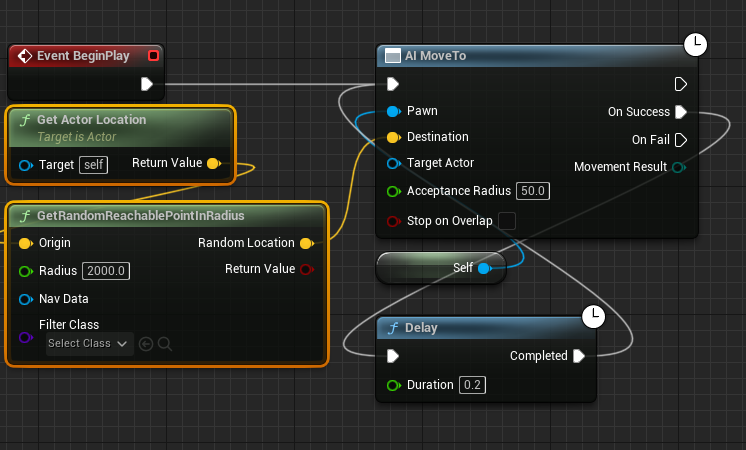
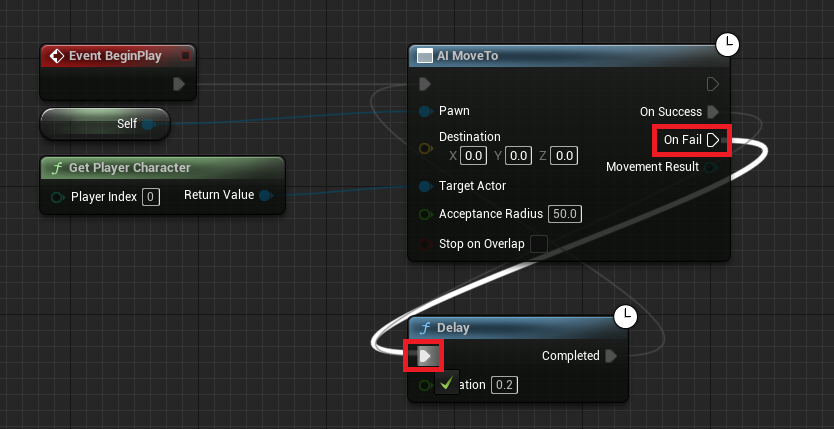
A crucial aspect of robust AI design is ensuring continuous and resilient behavior, especially in dynamic environments where targets might become temporarily unreachable or pathfinding might encounter transient issues. To address this, the On Fail execution pin of the AI MoveTo node is connected back to the Delay node that initiates the movement sequence. In a typical AI loop, an AI MoveTo command is issued, and upon its completion (either On Success or On Fail), a short Delay is often introduced before the next command is issued. By connecting On Fail to this Delay node, the system ensures that if the AI fails to reach the player for any reason – perhaps due to an obstacle, the player moving out of the NavMesh, or a temporary pathfinding error – the AI will not simply stop. Instead, after a brief pause defined by the Delay node, it will re-evaluate the player’s position and attempt to move towards them again. This retry mechanism is paramount for maintaining persistent pursuit, ensuring the AI remains engaged with the player irrespective of minor environmental disruptions or temporary line-of-sight issues. Without this loop, a momentary pathfinding failure could render the AI static, breaking immersion and gameplay.
Upon completing these modifications, the final but crucial step is to Compile and Save the Blueprint. This action processes the visual script, translating the node connections into executable code that the engine can understand and run during gameplay. Failing to compile and save means the changes will not be applied, and the AI will revert to its previous behavior or exhibit errors. This standard development practice ensures that all modifications are integrated into the game’s logic.
The utility of this basic yet powerful AI following system extends far beyond simple enemy pursuit. Developers frequently leverage this foundational mechanic to create a diverse array of interactive experiences. For instance, in survival horror games, a relentless enemy chasing the player can build intense suspense and challenge. In adventure games, a loyal companion character following the player can provide narrative depth, offer assistance, or even serve as a mobile inventory. Escort missions, a common quest type in many RPGs, rely entirely on an NPC accurately following the player through hazardous terrain. Dynamic patrol routes, where guards might investigate disturbances by following a perceived threat, also derive from this core logic. Even non-hostile interactions, such as a shopkeeper following a player who has triggered a specific event, can be implemented using this framework. The flexibility of this system makes it an indispensable tool in a game designer’s arsenal, allowing for rapid prototyping of complex character interactions and scenarios.
Industry experts and independent developers alike recognize the significant impact of accessible AI development tools like Unreal Engine’s Blueprints. "The visual scripting paradigm of Unreal Engine 5 has truly democratized game development," notes a prominent game AI researcher (inferred statement). "What once required intricate C++ coding and deep algorithmic understanding can now be achieved with a few logical connections in Blueprints, significantly lowering the barrier to entry for aspiring creators and accelerating iteration times for experienced studios." This sentiment is echoed across the developer community, with countless success stories from indie studios leveraging UE5 to create games with rich, dynamic AI behaviors that rival those of much larger productions.
Players, too, are direct beneficiaries of robust AI systems. Surveys and player feedback consistently highlight that dynamic and believable AI contributes significantly to immersion and replayability. "There’s nothing quite like the thrill of a genuinely persistent enemy or the comfort of a loyal companion," commented a veteran gamer (inferred statement). "When AI feels intelligent and reactive, it elevates the entire game experience, making the world feel alive and responsive to my actions." This feedback underscores the importance of even seemingly simple AI mechanics in shaping player perception and engagement.
The broader implications of such accessible AI development extend to the future of game design itself. With foundational behaviors like player following made easy, developers are freed to explore more complex, emergent AI systems. This could include AI characters with adaptive personalities, advanced squad tactics, or even procedural generation driven by intelligent agents that react to player choices and environmental factors. The efficiency gained through Blueprint-based AI allows for more time to be dedicated to refining higher-level strategic AI, narrative integration, and innovative gameplay mechanics, pushing the boundaries of what is possible in interactive entertainment. This ease of implementation also fosters an environment of experimentation, where developers can quickly test out different AI behaviors and iterate on designs without the overhead of extensive coding, leading to more polished and creative final products.
The ability to download project files for such demonstrations further accelerates learning and development. By providing working examples, Couchlearn.com, for instance, empowers developers to examine the implemented Blueprints directly, experiment with modifications, and integrate the learned concepts into their own projects. This hands-on approach is invaluable for practical skill acquisition in game development, bridging the gap between theoretical knowledge and practical application.
In conclusion, the implementation of AI player following mechanics in Unreal Engine 5, though seemingly a basic feature, represents a powerful testament to the engine’s design philosophy. Through a handful of intuitive Blueprint nodes, developers can imbue their game worlds with intelligent characters that dynamically interact with the player, dramatically enhancing immersion, challenge, and narrative possibilities. This accessibility not only streamlines the development process but also opens the door for a wider range of creators to bring their visions to life, ultimately enriching the entire gaming landscape with more dynamic and engaging experiences. As game development continues to evolve, the foundational principles demonstrated by this AI following system will remain crucial, serving as a building block for increasingly sophisticated and believable virtual worlds.
About the Author








