
The integration of intelligent non-player characters (NPCs) is paramount to crafting immersive and dynamic interactive experiences in contemporary video games. These AI-controlled entities serve multifaceted roles, from populating vibrant game worlds and enriching environmental atmosphere to delivering formidable challenges and crucial gameplay mechanics for players. Unreal Engine 5 (UE5), a leading development platform, provides a robust suite of tools to facilitate the creation of such sophisticated AI behaviors, with its navigation mesh (NavMesh) system forming the bedrock of intelligent character movement. This foundational technology, while seemingly straightforward, requires precise configuration to unlock its full potential, ensuring seamless and believable AI locomotion across diverse game environments.

Historically, the journey of artificial intelligence in video games has been one of continuous evolution, driven by advancements in computing power and algorithmic innovation. Early game AI often relied on simplistic, predefined patrol paths or rigid grid-based systems, where characters would follow invisible lines or navigate discrete cells. While functional for their time, these methods frequently resulted in robotic, predictable movements that broke player immersion and offered limited tactical depth. The advent of advanced pathfinding algorithms, such as A* (A-star), marked a significant leap forward, enabling AI to calculate optimal routes between two points while avoiding obstacles. However, applying these algorithms directly to complex 3D environments with varying terrain, dynamic objects, and intricate level geometry presented considerable computational challenges. The raw processing power required to repeatedly scan a complex 3D world for pathfinding at runtime proved prohibitive for many systems.
This challenge led to the development and widespread adoption of navigation meshes. A NavMesh fundamentally transforms a complex 3D game world into a simplified, navigable 2D surface that AI characters can understand and traverse. Instead of processing every polygon or voxel in the environment, the engine pre-calculates a mesh representing all walkable areas. This abstraction dramatically reduces the computational load during gameplay, allowing for more numerous and more intelligent AI characters without sacrificing performance. When an AI needs to move from point A to point B, it queries the NavMesh for a path, which is significantly faster than performing a full 3D search. This strategic pre-computation and simplification are critical enablers for modern game AI, from simple crowd simulations to complex tactical enemy movements.
Unreal Engine 5 stands at the forefront of this technological curve, offering developers powerful and intuitive tools to implement advanced AI navigation. The engine’s NavMesh system is designed for both efficiency and flexibility, allowing creators to define vast navigable areas and fine-tune AI behavior with considerable precision. The process begins with establishing the physical boundaries within which AI can operate, a critical step for generating the underlying navigation data.
Establishing the Navigable Landscape within Unreal Engine 5
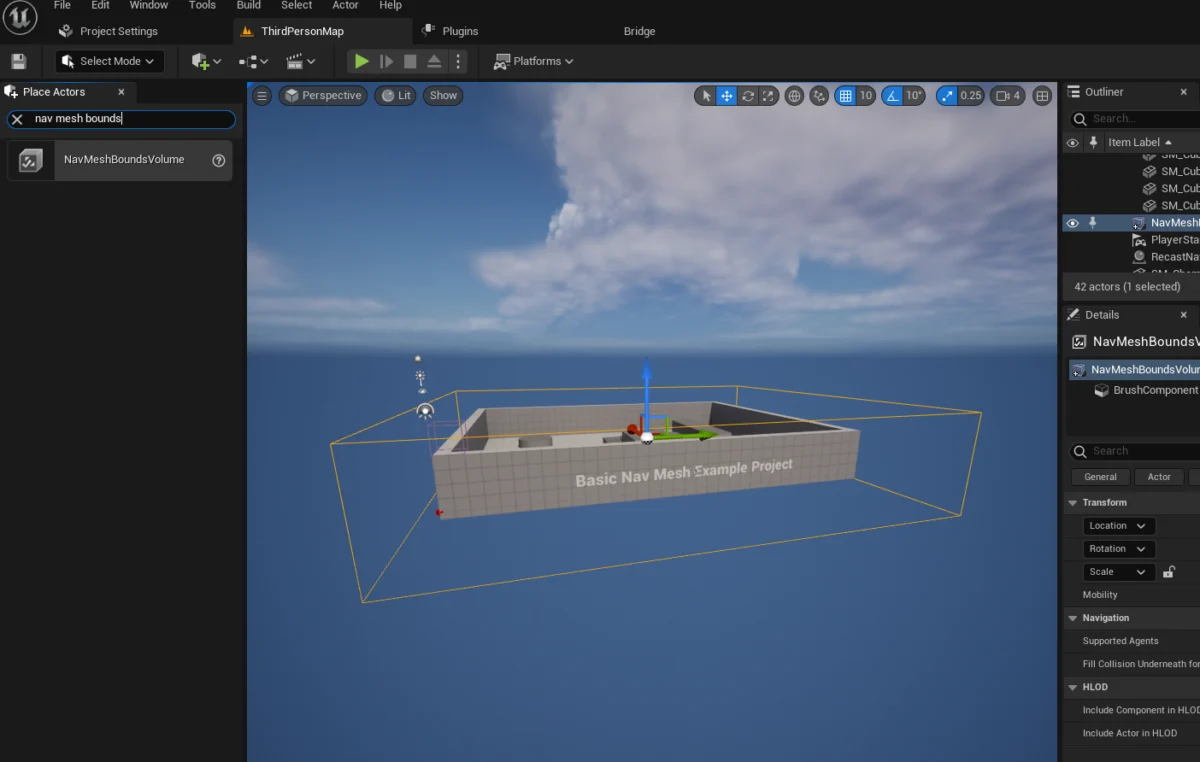
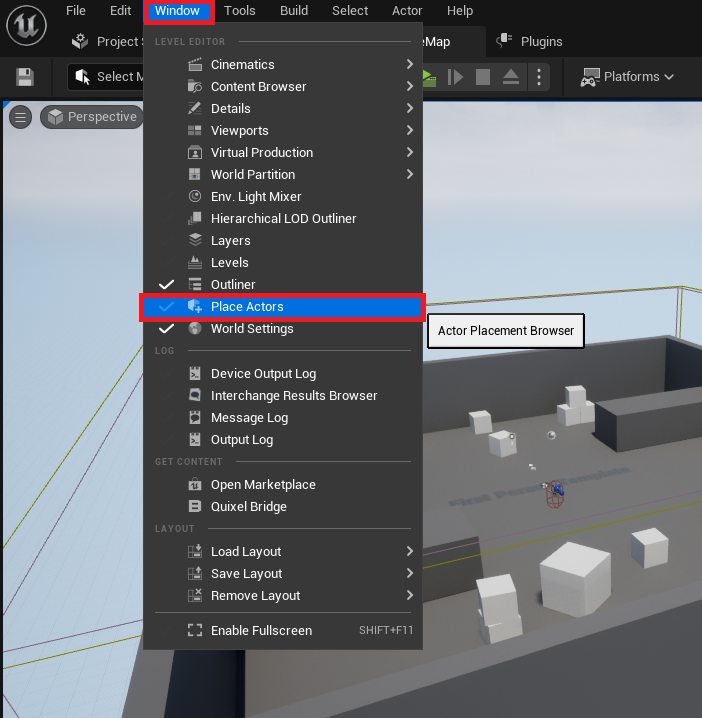
The initial phase of integrating AI navigation in any Unreal Engine 5 project involves defining the traversable space. This is achieved through the strategic placement and configuration of a NavMeshBoundsVolume. Accessing the necessary tools within the UE5 editor is an intuitive process, designed to streamline developer workflow. Developers first navigate to the Window menu, then select Place Actors. This action reveals the Place Actors panel, a centralized hub for spawning a wide array of fundamental objects, volumes, and assets directly into the active level. This panel consolidates various tools, making it a primary interface for environment construction.
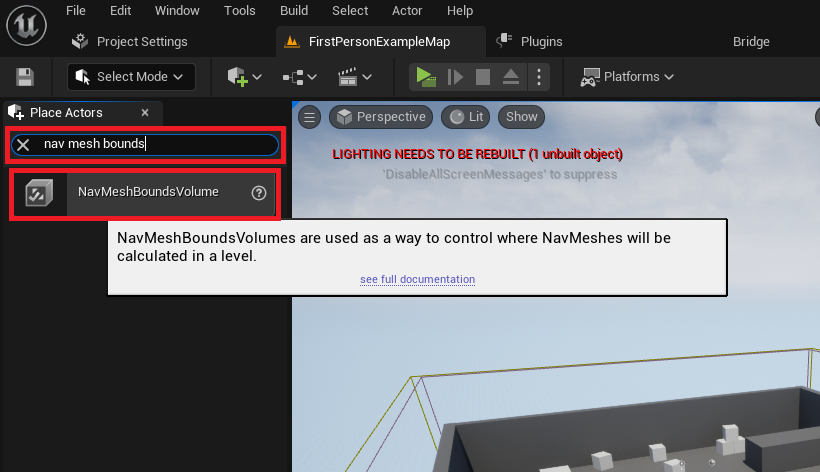
Within the Place Actors window, under the Volumes category, the NavMeshBoundsVolume is readily available. Upon selection, this specialized actor is instantiated within the game world. Its fundamental purpose is to delineate the three-dimensional area that the engine will analyze to generate the NavMesh. Critically, the size and position of this volume directly dictate where AI characters will be able to pathfind. Developers must meticulously scale and position the NavMeshBoundsVolume to encompass all desired walkable surfaces within their level. This includes floors, ramps, platforms, and any other geometry that AI characters are expected to traverse. The scaling tools within UE5’s editor, which allow for precise manipulation of actor dimensions, are essential here.
The precise sizing of the NavMeshBoundsVolume is a crucial consideration. An undersized volume will result in AI characters being unable to pathfind in certain areas, leading to broken behaviors and frustration. Conversely, an excessively large volume, particularly one covering non-walkable areas or vast empty spaces, can lead to increased generation times and unnecessary computational overhead. For expansive levels or those with dynamic elements, Unreal Engine also supports more advanced configurations, such as dynamic NavMesh generation, which can recompute navigable areas at runtime, adapting to changing environments. While static NavMesh generation, as covered in this guide, is suitable for many scenarios, understanding the trade-offs between generation time, memory footprint, and adaptability is essential for optimizing performance in large-scale projects, especially those targeting diverse hardware specifications.
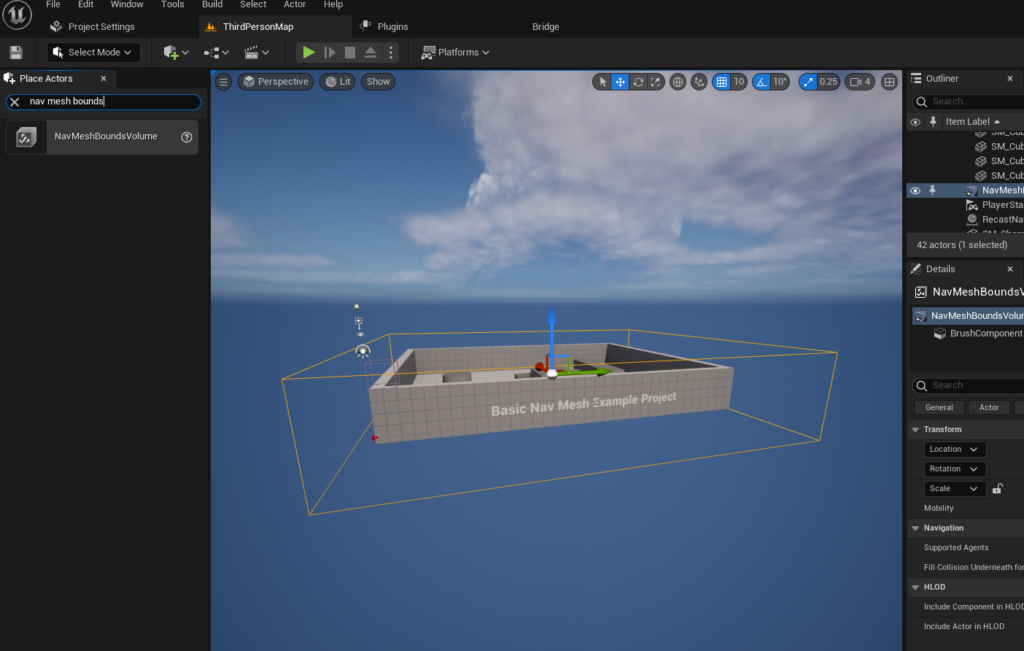
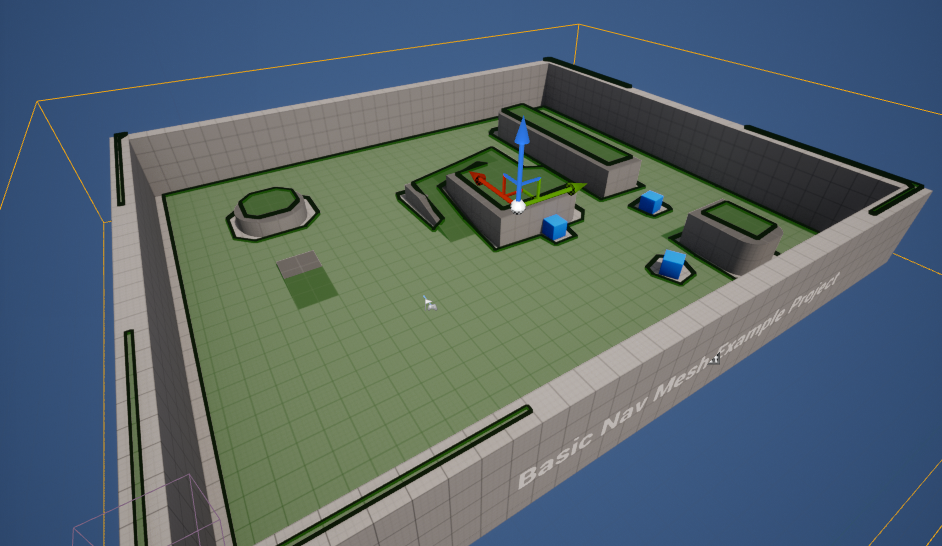
Once the NavMeshBoundsVolume is correctly positioned and scaled, the engine automatically generates the NavMesh. This process converts the complex geometric data of the level into a simplified, interconnected network of polygons that represent walkable surfaces. To verify the successful generation and accuracy of this mesh, Unreal Engine provides a convenient visualization tool. By simply pressing the P key on the keyboard (the default shortcut for toggling navigation mesh visualization), developers can observe a distinct green overlay on all surfaces deemed traversable by AI. This visual feedback is indispensable for debugging, allowing creators to immediately identify areas where the NavMesh might be incomplete, incorrectly generated, or unexpectedly excluded, thereby enabling swift corrections. Common pitfalls for new developers include failing to ensure the volume covers all intended AI movement areas, having too small a CellSize in the project settings (which affects NavMesh granularity and can lead to performance issues or overly complex meshes), or overlooking obstacles that should be marked as non-navigable.
Implementing Basic AI Character Movement
With the foundational NavMesh established, the next phase involves programming the AI character to leverage this navigation data. For demonstration purposes, many developers opt for Unreal Engine’s readily available templates, such as the Third Person Template. This template includes a pre-animated character blueprint, offering a convenient starting point for testing AI navigation without the need for custom character rigging or animation setup. This accelerates the prototyping phase, allowing developers to focus on AI logic rather than asset creation.
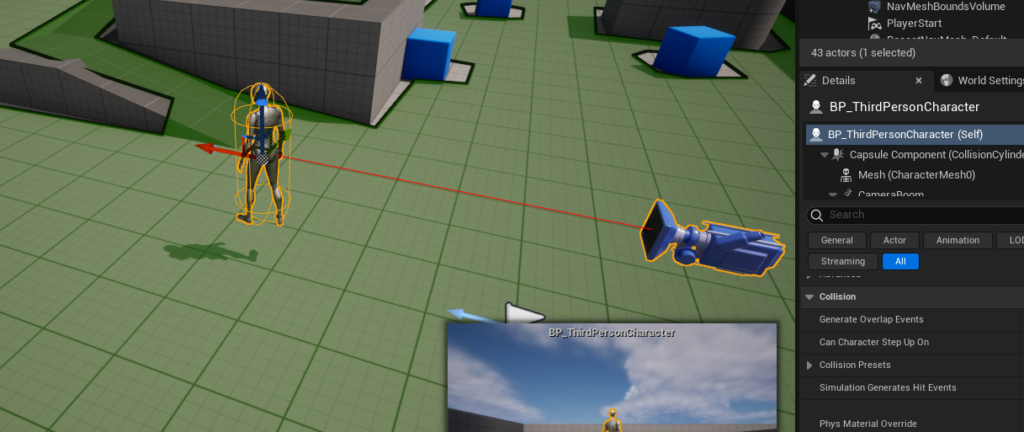
The process of bringing an AI character to life begins by instantiating the character blueprint within the level. If using the Third Person Template, the relevant blueprint, typically named BP_ThirdPersonCharacter or similar, can be found within the Content Drawer under the Third Person / Blueprints folder. Developers simply drag and drop this blueprint into the level viewport. Once placed, this character instance becomes an actor within the game world, ready to receive AI commands. It’s crucial that these AI characters are Pawns or Characters (which inherit from Pawn) as they are the entities capable of being controlled by an AIController.
The core logic for directing the AI character’s movement is typically implemented within its Blueprint editor. Unreal Engine’s Blueprint visual scripting system is a cornerstone of its accessibility, allowing developers to create complex gameplay systems, including AI behaviors, without writing a single line of code. This visual approach democratizes game development, enabling designers and artists to contribute directly to interactive logic, fostering a more collaborative development environment.
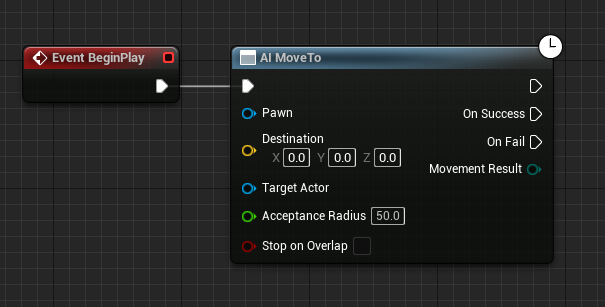
Inside the character’s Blueprint, the execution of AI commands is initiated through events. The Event Begin Play node serves as the primary entry point for any logic that should execute when the game starts or when the character is spawned into the world. Connected to this event, the AI MoveTo node is the central command for initiating pathfinding and movement. This powerful node instructs the AI Pawn (the character itself) to navigate towards a specified Destination. The AI MoveTo node inherently understands and utilizes the NavMesh, making it an efficient and robust solution for autonomous movement.
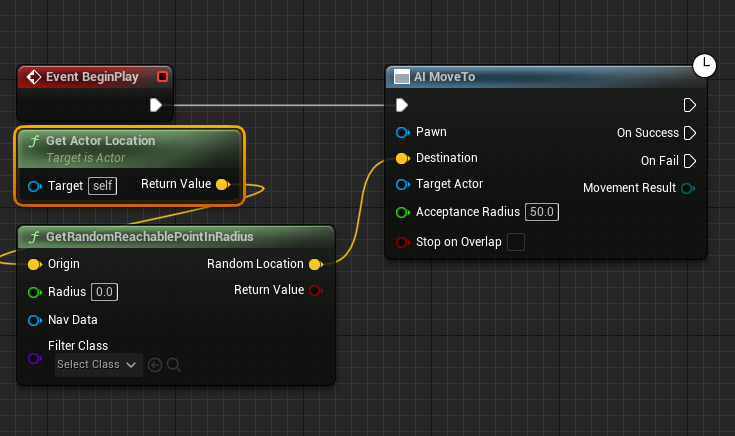
To introduce dynamic and less predictable movement, the GetRandomReachablePointInRadius node is employed. This node intelligently queries the NavMesh to find a valid, walkable location within a specified radial distance from an Origin point. The output, a yellow vector pin representing the calculated destination, is then directly fed into the Destination pin of the AI MoveTo node. This ensures that the AI character always attempts to move to a location that is both within a defined roaming area and accessible via the generated NavMesh. This prevents AI from attempting to walk through walls or off cliffs, enhancing realism and preventing gameplay exploits.
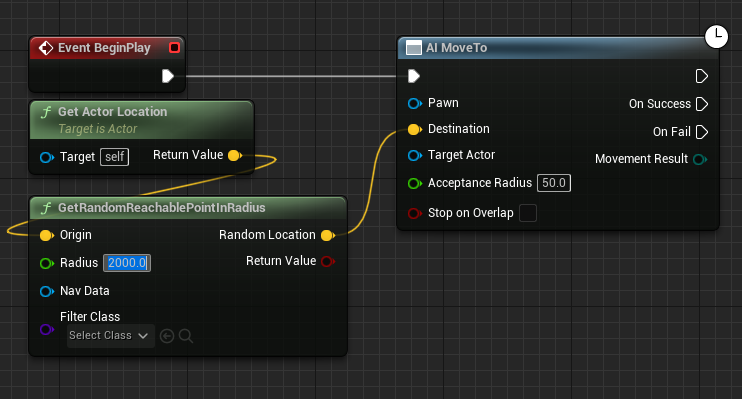
The Origin parameter for GetRandomReachablePointInRadius is crucial for defining the center of the AI’s roaming area. By connecting a Get Actor Location node to this Origin pin, the AI character effectively uses its current position as the center point for determining a new random destination. This allows for localized, organic movement patterns, preventing the AI from straying too far from its initial spawn point or a designated area. Furthermore, the Radius parameter, set to a value such as 2000 units in the provided example, defines the maximum distance from the Origin within which the random destination will be sought. Adjusting this value allows developers to control the scope of the AI’s wandering behavior, from tight patrols to expansive explorations, depending on the game’s requirements.
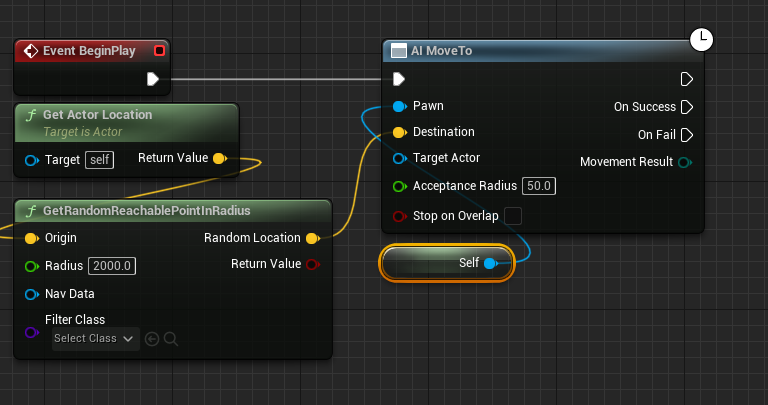
To ensure the AI MoveTo node correctly identifies which character it needs to control, a Reference to Self node is connected to its blue Pawn pin. This self-reference explicitly tells the AI MoveTo node that the current blueprint instance is the target for the navigation command. Without this connection, the engine would not know which AI character to move, leading to errors or non-functional behavior. It’s also important to verify that the AI character has an AIController assigned in its Pawn settings, as the AI MoveTo node relies on this controller to execute its commands.
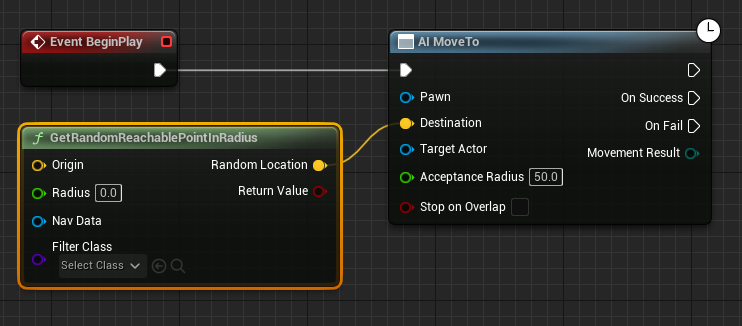
Finally, to create a continuous, looping AI movement pattern, a Delay node is introduced. When the AI MoveTo node successfully reaches its Destination, its On Success execution pin triggers. By connecting this to a Delay node, the system pauses for a specified duration (e.g., 2 seconds, which can be adjusted). After this delay, the execution flow loops back to the AI MoveTo node, initiating the search for a new random destination and subsequent movement. This creates a perpetual wandering behavior, giving the impression of an autonomous character exploring its environment. The Delay node is vital for preventing the AI from instantly choosing a new target upon arrival, which can look unnatural and lead to excessive pathfinding calculations. It allows for a brief pause, making the movement more realistic and less frantic and conserving computational resources.
The Broader Impact and Implications of Robust AI Navigation
The meticulous setup of NavMeshes and AI movement, as demonstrated, has profound implications across the entire spectrum of game development and player experience. From a game design perspective, accessible and powerful AI navigation tools in UE5 empower creators to design more intricate levels, where environmental storytelling can be complemented by intelligent NPC interactions. Developers can craft challenging enemy encounters that leverage complex terrain, design dynamic populations for bustling virtual cities, or create compelling companion AI that navigates alongside the player seamlessly. This capability directly influences level design choices, allowing for multi-layered environments that are both visually appealing and functionally navigable for AI.
For players, the benefits are immediately apparent. Games featuring sophisticated AI that can realistically navigate complex environments offer a heightened sense of immersion and believability. AI characters that can intelligently pathfind, avoid obstacles, and respond dynamically to changes in the environment contribute significantly to the overall quality and replayability of a title. Gone are the days of NPCs getting stuck on geometry or exhibiting jarring, unnatural movement patterns. Modern AI, facilitated by robust NavMesh systems, can provide emergent gameplay moments, where characters react in unexpected yet logical ways, enriching the player’s journey. Industry reports consistently indicate that advanced AI is a key differentiator in player experience, with titles featuring sophisticated NPC behavior often garnering higher critical acclaim and player retention rates. The global video game market, valued at over $200 billion annually according to various market research firms, continuously seeks innovation, and AI stands as a critical pillar for future growth and player engagement, driving demand for more complex and responsive virtual worlds.
From a developer workflow standpoint, Unreal Engine 5’s Blueprint system, combined with its optimized NavMesh generation, offers significant efficiency gains. Visual scripting reduces the barrier to entry for complex AI behaviors, allowing a wider range of team members, including designers and quality assurance professionals, to understand, modify, and debug AI logic. This collaborative approach shortens iteration times and fosters a more agile development environment. Epic Games representatives have consistently highlighted the accessibility of UE5’s AI tools, emphasizing their commitment to empowering developers of all skill levels to create compelling interactive experiences. Game developers frequently commend Unreal Engine’s intuitive Blueprint system for democratizing complex AI implementation, allowing them to focus more on creative design rather than low-level coding. This efficiency is particularly valuable in the competitive landscape of modern game development, where time-to-market and innovation are crucial.
Future Trends and Challenges in AI Navigation
While current NavMesh technology is highly effective, the field of AI navigation continues to evolve. Future trends point towards even more dynamic and adaptive systems. This includes:
- Procedural Generation: The ability to generate NavMeshes for procedurally created or destructible environments in real-time, allowing for infinite variations and emergent gameplay, especially vital for roguelikes or open-world titles with environmental destruction.
- Machine Learning Integration: AI that learns optimal pathfinding strategies and adapts its movement patterns based on player behavior or environmental changes, potentially leading to truly unpredictable and intelligent adversaries. This could involve neural networks predicting player movement or learning optimal tactical positions.
- Swarm Intelligence: More efficient handling of hundreds or thousands of AI agents simultaneously, crucial for large-scale battles or crowd simulations, often requiring advanced optimization techniques and multi-threading to maintain performance without overwhelming the CPU.
- Contextual Navigation: AI that doesn’t just find a path, but understands the meaning of different paths – preferring cover, stealth routes, or high ground based on tactical context, rather than simply the shortest distance. This adds a layer of strategic intelligence beyond mere movement.
However, challenges remain. Optimizing NavMesh generation and AI behavior for massive open worlds, ensuring performant AI on a wide range of hardware (from high-end PCs to mobile devices), and debugging increasingly complex AI systems are ongoing hurdles. Balancing the computational cost of sophisticated AI with the desired level of realism and immersion requires careful consideration and continuous optimization. Furthermore, preventing AI from appearing "too perfect" or exploitatively intelligent, thereby maintaining a fair and enjoyable challenge for players, is an art form in itself, requiring designers to fine-tune difficulty and unpredictability. The quest for believable, yet not frustrating, AI continues to drive innovation in the sector.
Conclusion
The setup of a functional NavMesh and basic AI character movement in Unreal Engine 5 represents a fundamental yet powerful step in game development. By following the outlined steps – from defining the navigable space with a NavMeshBoundsVolume and verifying its generation, to programming dynamic movement with Blueprint nodes like AI MoveTo and GetRandomReachablePointInRadius – developers can lay the groundwork for
About the Author








